
Our readers keep the lights on and my morning glass full of iced black tea. As an Amazon Associate, I earn from qualifying purchases.
Specs are compiled from manufacturer listings and verified buyer reviews and can change over time — please confirm the key details on the product page before buying.
A basketball game moves fast. The fast break, the steal, the last-second shot — blink and it is gone. The frustration of holding a phone up for two hours, only to find the video is shaky or pointed at the wrong end of the court, is what drives parents and coaches toward a dedicated basketball tracking camera. These devices use AI to follow the ball and the players automatically, turning your smartphone or a standalone camera into a hands-free sports director. This guide breaks down four real options so you can pick the one that actually fits your season and your budget.
I’m Min — the founder and writer behind Gadgets Feed. This guide is built by comparing the manufacturers’ published specifications and the patterns across verified customer reviews, so you get each pick’s real strengths and trade-offs instead of marketing spin.
You want to watch the game live, not fiddle with a phone on a tripod. A basketball tracking camera follows the action automatically, so you can cheer, coach, or share highlights without touching a thing.
Our Picks at a Glance
How To Choose The Best Basketball Tracking Camera
Every basketball tracking camera follows the same basic idea — it locks onto the action so you do not have to babysit it. But the details vary hugely between a budget-friendly setup that uses your phone and a premium all-in-one unit. Here are the specs that actually decide whether you end up with great footage or a frustrating afternoon.
Auto-Tracking Accuracy
The whole point of a tracking camera is that it follows the game for you. The technology ranges from “digital cropping” (the 180° lens captures everything and the software zooms in) to a physical motorized gimbal that pans the camera. Digital cropping never misses a mechanical move, but it can sometimes lose the ball in a fast break. Motorized gimbals give you a clearer native image but can be jerky if the AI lags.
Video Quality: 4K vs 1080p
Higher resolution gives you more flexibility. 4K footage lets you zoom in on a player during review without the image turning into a blurry mess. 1080p is still perfectly watchable for live streaming and quick sharing, but you lose the ability to crop in post-production. If your goal is recruiting tapes or detailed game analysis, 4K is the better bet.
Live Streaming and Sharing
Most of these cameras let you stream the game live through their app. The difference is in how easy it is. Some send a single link that grandparents can open without creating an account. Others require you to log into YouTube or Facebook. Think about who you are sharing with — the easier the link, the more likely family actually watches.
Battery Life and Weather Resistance
A single basketball game runs about an hour and a half, and tournaments can mean two or three games in a row. A camera that lasts 3-4 hours covers a full day without charging. If you play outdoors, look for weatherproofing. Several models are water-resistant so a light rain does not end the recording session.
Quick Comparison
| Model | Best For | Resolution | Tracking Method | Battery Life | Amazon |
|---|---|---|---|---|---|
| BallerCam BC01★ Best Overall | Value & ease of use (uses your iPhone) | iPhone-dependent (up to 4K) | Digital crop (180° lens) | 10,000 mAh external pack | Amazon |
| XbotGo Chameleon | Mid-range versatility | 4K 60FPS | Motorized gimbal (120° lens) | 8 hours | Amazon |
| XbotGo Falcon | Standalone power | 4K with dual-lens | AI dual-lens + motorized gimbal | Long (USB-C powered) | Amazon |
| Veo Cam 3 | Professional team use | 1080p | AI follow-cam (subscription required) | 6.5 hours | Amazon |
In‑Depth Reviews
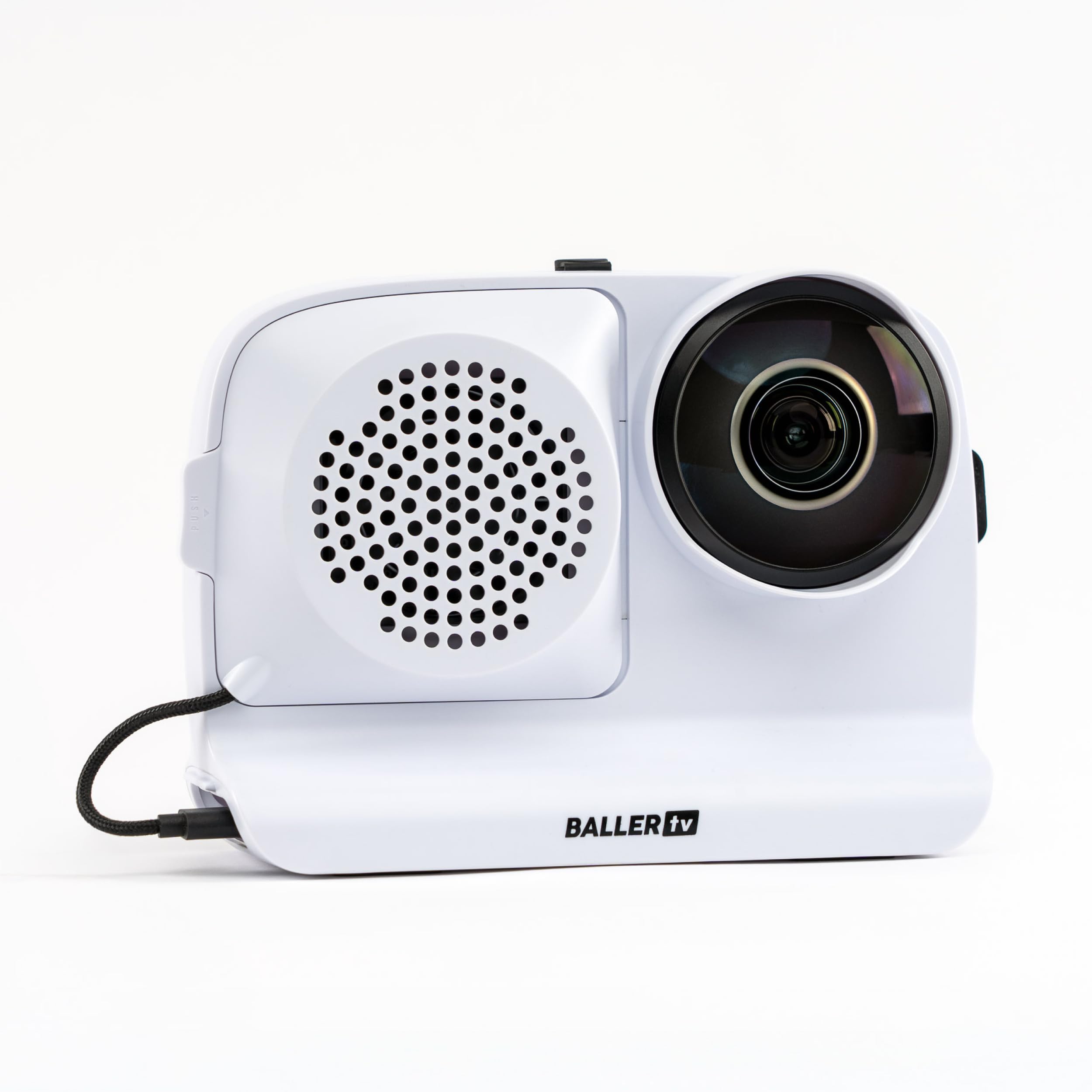
1. BallerCam BC-Series (BC01)
Our pick — over 4★ from 60+ verified ratings; the strongest balance of quality and price.
The setup that turns your own iPhone into a pro-level sideline camera crew.
Rather than trying to duplicate your phone’s camera inside a separate device, the BallerCam works with your iPhone (it is compatible with the iPhone 16 Pro and earlier models) and uses a smart dock that holds the phone on a standard tripod. When you start recording, the AI inside the companion app — trained on more than 2 million games, according to the maker — automatically keeps the ball and the key players centered by cropping into the 180° ultra-wide view that the lens captures. That 180° field means the camera sees the entire court at once, so it never needs to mechanically pan. The result is a tracking system with no moving parts to fail.
Buyers consistently describe it as the best balance of cost, features, and quality when compared against the much pricier Veo and Trace systems. They also praise how simple it is to share a live stream — you press go in the app and send a watch link, with no logins required for the people watching. A 10,000 milliamp-hours battery pack keeps the phone charged for a couple of games, and the whole rig is lighter than a standalone camera unit like the Veo. The trade-off is that it requires you to dedicate your phone to recording for the whole game, and the tracking is sometimes described as 95% accurate — not perfect, but good enough that few owners mind. An honest note: the tracking feature is the most-discussed aspect, with some finding it very reliable and others noting it can drift on chaotic plays.
This is the hands-down choice if you already own a recent iPhone and want the easiest, most affordable path to hands-free recording with live streaming and instant highlight clipping. If you do not want to use your personal phone for recording, you would need a spare device, which nudges you toward an all-in-one unit instead.
The Smartest Compromise
- Leverages your iPhone’s powerful camera sensor — no extra camera hardware to buy
- True 180° field of view captures the whole court and never misses action from panning lag
- No ongoing subscription fee is needed (20 hours of cloud storage included)
- Live streaming is extremely simple — a single link, no account needed for viewers
The Real-World Trade-Offs
- Uses your primary phone during games — you need a second phone if you want to use your own device
- Tracking is strong but not flawless for very fast, scrambled plays
- Requires at least 20GB free space on the iPhone for a standard recording session
Grab this if: you have an iPhone and want a subscription-free system that combines live streaming, easy highlight clipping, and whole-court vision in one lightweight package.
Look elsewhere if: you do not want to tie up your phone, or you need flawless player-by-player tracking.
2. XbotGo Chameleon
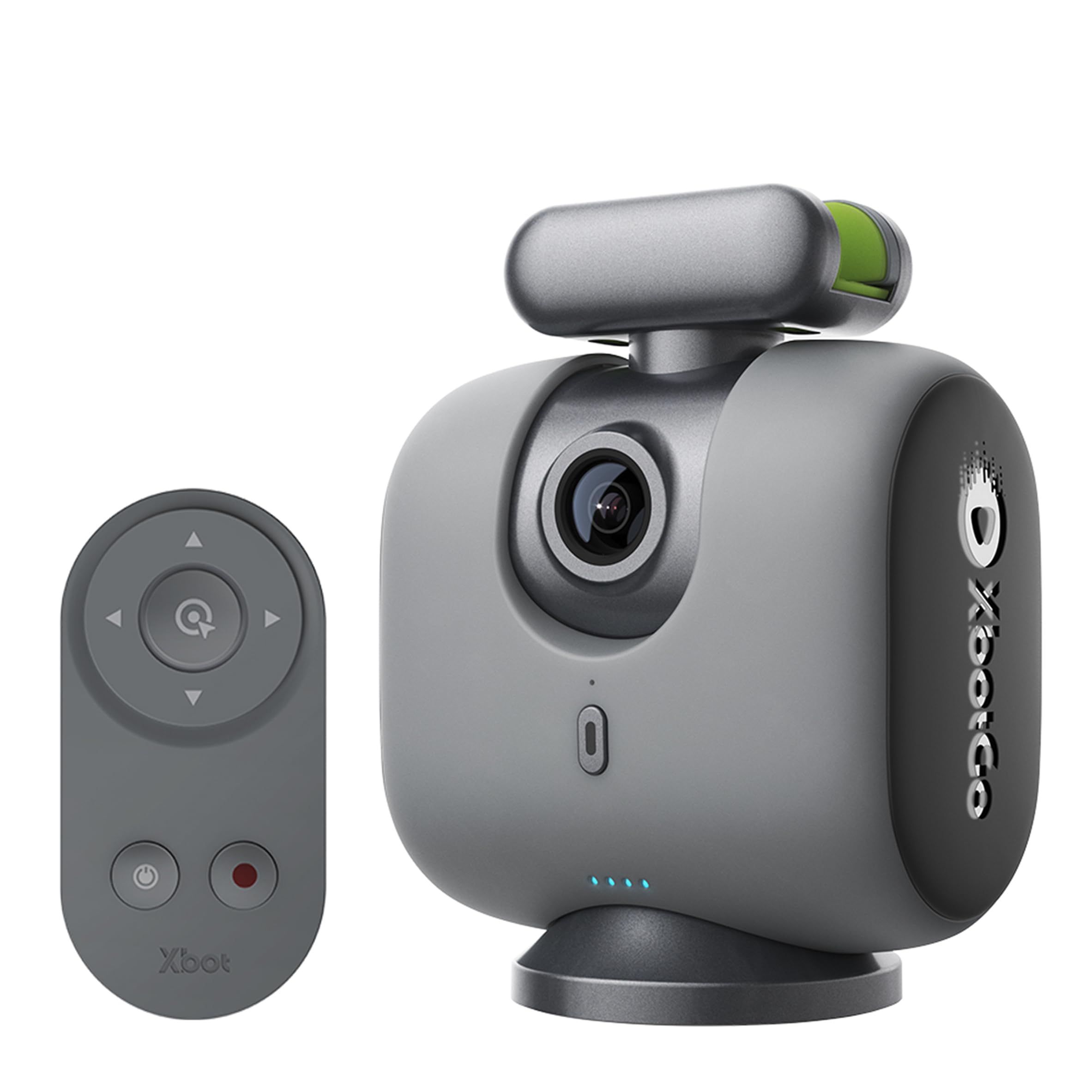
The mechanical gimbal option that delivers crisp 4K 60FPS video from your phone.
The XbotGo Chameleon takes a different approach. Instead of a digital crop, it physically pans and tilts your phone via a Bluetooth gimbal to follow the action. The 120° lens on your phone’s camera means you get a clean, uncropped 4K image at 60 frames per second. This is a major benefit if you want high-quality slow-motion replays — owners describe that 4K 60FPS footage as clean and smooth even in low-light gyms. The AI inside uses the xbotVision 2.0 algorithm and can be set to track specific sports like basketball or soccer, choosing whether to follow the ball or the player movement depending on your selection.
The strong 8-hour battery life easily covers a full day tournament. You also get a Bluetooth remote and Apple Watch support for controlling the angle without walking over to the camera. The live streaming function is flexible — you can stream directly to YouTube or Facebook, and you can add a scoreboard overlay using a second phone. However, with a 3.9/5 average across nearly a thousand ratings, the tracking is the most-discussed feature for a reason. While many call it “fantastic,” others find the panning can be jerky on fast transitions, and the setup does have a learning curve. The instruction manual is not the most helpful, and some features like online video editing are not available.
If you want full 4K 60FPS video quality and a physical gimbal that pans your phone, the Chameleon is the best mid-range option. Just be ready to spend time learning the app settings before game day. It is less suited for someone who wants a low-maintenance experience from minute one.
What Owners Love
- Real 4K 60FPS video from your phone’s native camera is noticeably sharp and smooth
- 8 hours of battery life covers a full day of tournament recording without a recharge
- Bluetooth remote and Apple Watch control add surprising convenience from the sideline
- Scoreboard overlay via a second phone is a nice touch for live games
The Catch
- The motorized gimbal can feel jerky during very fast sports transitions like a hockey rush
- Steep learning curve — the manual explains features poorly and video tutorials are not scrollable
- Live streaming can be finicky; using a hotspot may block Wi-Fi streaming
Best for: the parent or coach who prioritizes smooth 4K 60FPS footage and wants a mechanical gimbal that actively moves the phone.
Think twice if: you want a quick, zero-hassle setup for streaming without any tinkering.
3. XbotGo Falcon
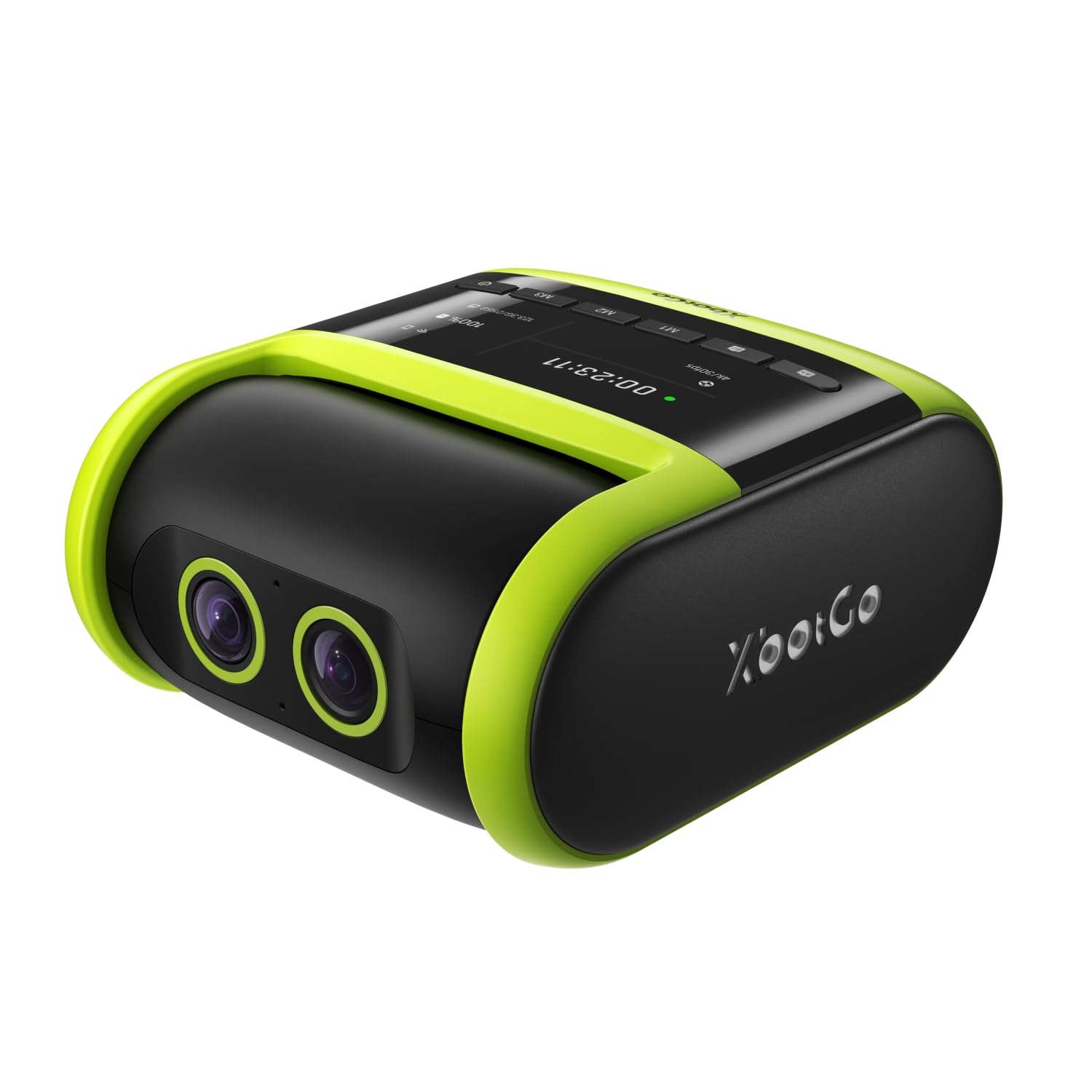
The standalone powerhouse that ditches your phone for a dual-lens tracking system.
The XbotGo Falcon is the closest package on this list to a professional game camera that you do not need a separate phone for. It combines a 4K recording lens with a secondary AI-assisted tracking lens in one body. The dual-lens system, backed by a 6 TOPS AI processor and an 8-core CPU, is designed to keep the play centered while recording in crisp 4K resolution directly to a microSD card. No subscription is required for the camera itself, which is a huge plus over the Veo. It records to microSD (up to 1024 GB, not included) or to the cloud via its Wi-Fi connection.
The camera is built for outdoor realities. It carries an IPX5 rating, meaning it resists water jets, so a light drizzle will not ruin a game recording session. The video quality is the top praise, with many saying the 4K footage looks sharp and the dual lens gives better tracking depth than a single-camera phone setup. The biggest point of mixed feedback is the AI tracking itself — while many say it works well for soccer and basketball, others find it “needs improvement,” especially when tracking individual players rather than the ball. The digital zoom also only stretches to 1.6x, so you cannot push in tight on a single player for a portrait-style shot.
Choose the Falcon if you want a dedicated device that does not eat up your phone’s battery and storage, and you value the weatherproof body for outdoor courts. It is less ideal if you need ultra-tight close-ups of individual players or if you are on a tight budget — the price is considerably higher than the phone-based BallerCam option.
Why It Stands Out
- Dual-lens system (4K + AI tracking) gives a unified all-in-one device — no phone required
- IPX5 weather resistance means outdoor games and light rain won’t force you indoors
- No monthly subscription — records to large-capacity microSD cards (up to 1TB)
- USB-C charging enables external battery packs for unlimited game time
Room for Improvement
- 1.6x digital zoom is weak — you cannot crop in tightly on individual players
- AI tracking is good but inconsistent; some owners find it better suited to ball-tracking than player-tracking
- Heavier than phone-based setups — requires a sturdy, tall tripod (not included) for best results
- Live streaming glitchy for some; occasional reports of the camera overheating and shutting down
Reach for this if: you want a standalone, weatherproof camera with a two-lens tracking engine that works without your phone and has no subscription fees.
skip it if: you need powerful zoom for individual close-ups or you want a simple, simple to use tracking system that never drops the action.
4. Veo Cam 3
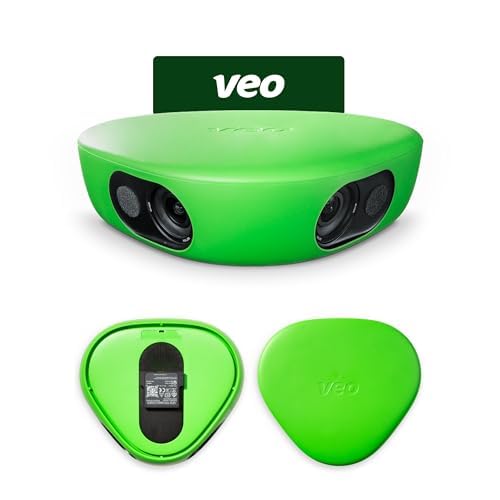
The premium ecosystem built for teams that need cloud storage and detailed film breakdown.
The Veo Cam 3 represents the professional end of the spectrum. It shoots in 1080p HD and weighs in as a dedicated, weatherproof sports camera built to handle extreme climates from -10°C to 45°C (14°F to 113°F). It has a 6.5-hour internal battery and relies on Wi-Fi to automatically sync footage to the Veo cloud platform. This is where Veo differentiates itself — it is not just a camera, but a full ecosystem. The AI-powered follow-cam tracking ensures you capture the play, and the cloud service lets coaches create tagged clips and playlists for film study. It even catches rain and snow without a problem.
The catch is significant and you should know it upfront: the Veo Cam 3 requires a subscription to function. You cannot just buy the camera and record locally. The subscription tiers start at a notable annual fee, and there are limitations — some owners note that a credit cannot be used on the more affordable family plan, effectively locking you into the pricier team plan. A few buyers also report frustration with the camera arriving without the necessary mounting piece, and customer support can be slow. Despite these hurdles, the owners who get it working consistently call it the “best investment ever” for team film review and training. It records to an SD card internally but the entire workflow is built around the cloud upload.
Buy the Veo Cam 3 only if you are a coach, a team manager, or a program that is fully committed to the Veo subscription model and needs the end-to-end platform (recording, cloud sync, editing tools) in one product. Do not buy it if you just want to record games and share them casually — the subscription cost and setup process will frustrate you when a simpler phone-based system would work better.
The Team Advantage
- Built for every weather condition — rain, snow, and extreme heat are handled by its rugged design
- The cloud platform gives coaches proper film-review tools (tagging, playlists, slow-motion)
- 6.5-hour battery and 1080p recording at the professional level create reliable, long training sessions
- Auto-sync via Wi-Fi means no manual file transfers — footage uploads after the game
The Hard Reality
- Mandatory ongoing subscription is a serious ongoing cost (cannot function without it)
- Customer support is reported to be slow, including missing accessories like the camera mount
- The credit fine print means you cannot use it on the family plan, pushing you to the more expensive team plan
- 1080p resolution is lower than 4K competitors like the Falcon or Chameleon
Best for: organized teams and clubs already invested in or willing to pay for the full Veo platform for detailed cloud-based film review.
Not for: the casual parent or individual coach — the subscription requirement and 1080p-only video do not compete well against the no-subscription 4K options in this guide.
Understanding the Specs
Digital Crop vs Motorized Gimbal
A digital crop uses an ultra-wide lens (like the BallerCam’s 180°) and then zooms into the action digitally — the camera never moves, so there is no mechanical noise or delay, but the image is cropped. A motorized gimbal (like the XbotGo Chameleon) physically pans your phone or camera to track the play, giving you a full-resolution, uncropped image but adding the possibility of slightly jerky movements if the AI is slow. The XbotGo Falcon uses a hybrid approach — a dual-lens system that pairs a 4K recording lens with a secondary AI tracking lens to improve accuracy without relying solely on a mechanical pan.
Why Frame Rate Matters
60 FPS (frames per second) means the camera captures 60 individual frames every second. For sports, this is important. It gives you smooth footage during fast movement, and crucially, it allows you to slow the video down in editing without it turning into a choppy, frame-by-frame slideshow. The XbotGo Chameleon’s 4K 60FPS is the best combo in the mid-range for this purpose. The Veo Cam 3 records at 1080p (not 4K), which is fine for immediate viewing but offers less flexibility for cropping or detailed slow-motion review.
FAQ
Can I use a basketball tracking camera with an Android phone or only an iPhone?
Do I need a subscription to use a basketball tracking camera?
Will the camera track the ball or the player?
How long does the battery last for a full tournament?
Can I live stream a basketball game to YouTube or Facebook?
Will a basketball tracking camera work outdoors or only in a gym?
What is the difference between 4K video and 1080p video for basketball?
How much storage space do I need to record a full game?
Can I edit and clip highlights automatically?
Is a tripod included with the camera?
Final Thoughts: The Verdict
For most parents and coaches, the basketball tracking camera winner is the BallerCam BC01 because it delivers the best mix of an enormous 180° field of view, low-maintenance live streaming, and zero subscription fees, all by leveraging your existing iPhone. If you want the highest-quality standalone 4K 60FPS footage with a mechanical gimbal and a long 8-hour battery, the XbotGo Chameleon is the most versatile option. And for a weatherproof all-in-one system that cuts the cord from your phone entirely, the XbotGo Falcon is the top choice, especially if you coach outdoor teams. Each serves a slightly different sideline, but the BallerCam gives the smartest balance for the widest range of buyers.
How We Picked
We do not accept paid placement. Every pick is matched to a real buyer and a real use-case; we do not hands-on test units.
Sources & Methodology
Specifications: manufacturer listings and product documentation. Review insights: verified customer reviews, as of July 2026. Pricing: not shown on this page (it changes often); check the current price via the retailer link.
As an Amazon Associate, Gadgets Feed earns from qualifying purchases. This does not affect which products we feature.