
Our readers keep the lights on and my morning glass full of iced black tea. As an Amazon Associate, I earn from qualifying purchases.
Specs are compiled from manufacturer listings and verified buyer reviews and can change over time — please confirm the key details on the product page before buying.
Picking a fan for your radiator means choosing between pushing enough air through those tight fins and keeping your PC quiet enough to live with. The wrong 140mm fan leaves your liquid cooler struggling under load or your desk area buzzing with an annoying whine — and the spec sheet doesn’t always tell you which is which. This guide cuts through the marketing noise to find the best 140mm radiator fans by looking at the real-world trade-offs that matter: static pressure, noise levels, and how they behave when you actually need them to work.
I’m Min — the founder and writer behind Gadgets Feed. This guide is built by comparing the manufacturers’ published specifications and the patterns across verified customer reviews, so you get each pick’s real strengths and trade-offs instead of marketing spin.
The right 140mm fan keeps your radiator cool without turning your desk into a wind tunnel. After digging through dozens of specs and thousands of owner experiences, these are the best 140mm radiator fans for every build and budget.
Our Picks at a Glance


How To Choose The Best 140mm Radiator Fans
Radiator fans must push air through dense metal fins, not open space. They have to push air through a dense mesh of metal fins, which creates resistance — that is why you need a fan built for static pressure. Ignore this and you end up with a loud, hot system.
Static Pressure vs. Airflow (CFM)
Static pressure is the force that pushes air through tight spaces like radiator fins or thick heatsinks. High static pressure lets a fan cool your radiator effectively even at lower speeds. Airflow (measured in CFM — cubic feet per minute) tells you how much total air the fan moves, but on a radiator, static pressure is the spec that really matters.
Noise Level (dBA)
Noise is measured in decibels (dBA), and a difference of just 3 dBA is a noticeable change. Many powerful fans get loud at their top speed, so you want a wide PWM speed range (revolutions per minute controlled by your motherboard) that lets the fan run quietly at idle and ramp up only when your CPU gets hot. A fan that spins up to 1800 or 2000 RPM is powerful, but you will want to keep it under 1200 RPM or so for quiet operation most of the time.
Size and Clearance (Slim vs. Standard)
Standard 140mm fans are 25mm thick. Slim fans measure around 15-16mm thick. If you are building in a small form factor (SFF) case or need a push/pull setup (a fan on each side of the radiator) where space is tight, a slim fan is your only option. The trade-off is that slim fans usually move less air and produce less static pressure than their full-size counterparts.
Quick Comparison
| Model | Best For | Max RPM | Noise Level | Airflow (CFM) | Amazon |
|---|---|---|---|---|---|
| Noctua NF-A14x25 G2★ Best Overall | Overall Quiet Performance | 1500 rpm | 24.8 db | — | Amazon |
| ARCTIC P14 SlimSlim Fit | SFF / Tight Spaces | 1800 rpm | 0.3 sones | 52 cfm | Amazon |
| be quiet! Pure Wings 3Best Value | Value & Airflow | 1800 rpm | 30.5 db | 72.2 cfm | Amazon |
| Scythe Kaze Flex 140mm | High Static Pressure | 1800 rpm | 26.45 db | 100.8 cfm | Amazon |
| Thermalright TL-C14C-S X3 | Budget ARGB Trio | 1500 rpm | 26.4 db | 75.8 cfm | Amazon |
| NZXT F140P | Clean Aesthetic & Pressure | 1700 rpm | 30 db | — | Amazon |
| Silverstone Air Slimmer 140 | Slim High Performance | 1700 rpm | 33 db | 82 cfm | Amazon |
| be quiet! Silent Wings 4 | Premium Build & Speed | 1900 rpm | 29.3 db | 78.4 cfm | Amazon |
| Noctua NF-A14 iPPC-2000 | Industrial / Extreme Cooling | 2000 rpm | 31.5 db | — | Amazon |
In‑Depth Reviews
1. Noctua NF-A14x25 G2 PWM
Our pick — over 4.5★ from 500+ verified ratings; the strongest balance of quality and price.
The quietest high-performance fan you can strap to a radiator.
This is the fan the crowd with over 500 reviews and a stellar 4.8-star rating gets behind. Its noise level sits at just 24.8 db — noticeably quieter than the be quiet! Pure Wings 3 which runs at 30.5 db. What that means for you is a system that stays nearly silent at idle (under 800 RPM) and still manages to be remarkably unobtrusive under load. The build uses Sterrox LCP (a liquid-crystal polymer) with an ultra-tight tip clearance between the blade and frame, which is the engineering that makes such quiet operation possible while still moving huge amounts of air. One owner reported their CPU temperature dropped by about 1°C when swapping to this from the previous G1 version at a 117W load, which is a solid gain from just swapping a fan. The included Low-Noise Adaptor (LNA), extension cable, and Y-splitter mean you have everything for a clean install right in the box. The catch: that polarizing brown color is not for everyone, and the premium price tag reflects the class-leading engineering.
What the owners love
- Nearly silent operation at low speeds — barely audible at idle.
- Excellent build quality and premium materials.
- Comes with a full accessory kit (Y-splitter, LNA, gasket, anti-vibration mounts).
The honest trade-offs
- Brown color scheme is not to everyone’s taste.
- Premium price — among the most expensive 140mm fans on the market.
- Gasket lip is slightly smaller than the earlier model, reducing the seal a bit.
Reach for this if: quiet operation is your top priority and you are willing to pay for the best engineering in the business.
Think twice if: you need a budget-friendly option or the brown color clashes with your build’s aesthetic.
2. ARCTIC P14 Slim PWM PST
The slim fan that fits where standard 25mm fans cannot go.
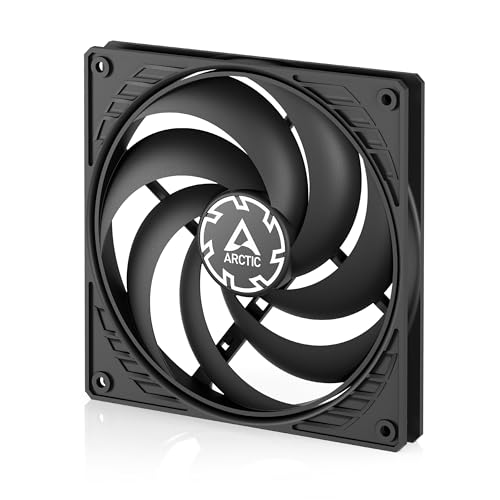
At just 16mm thick, this is the fan you reach for in a small form factor (SFF) case or a push/pull radiator setup where clearance is measured in millimeters. It weighs only 109 g — versus the 220 g of the be quiet! Pure Wings 3 — which makes it easy to mount in tight spots without extra strain. The PWM PST (Pulse Width Modulation with Passive Smart Technology) lets you daisy-chain multiple fans on a single header, so cable management is cleaner. It spins from 150 up to 1800 RPM and delivers 52 cfm of airflow. One owner who added it to a push/pull radiator config noted it is not super strong but said “I’m fully satisfied with these.” The main durability concern across owners is that the blades can rub against the case if not spaced properly, so some users add rubber washers as a fix. At this price point, it is the go-to for space-constrained builds.
Why people pick it
- Ultra-slim 16mm design fits in the tightest spaces.
- Very quiet operation and effective PWM control.
- Extremely good value for a specialized slim fan.
The things to know
- Blades can contact the case if mounted too closely — consider spacers.
- Cheaper plastic frame construction feels less premium than rivals.
- Lower airflow than standard 25mm fans (52 cfm).
Best for: tight SFF builds and slim push/pull radiator configs where every millimeter counts.
skip it if: you want a premium feel or need high static pressure for a very dense radiator.
3. be quiet! Pure Wings 3 140mm High-Speed
Pushes the most air at its price without breaking a sweat.
The frame is tune specifically for radiators, with a closed-loop motor that helps regulate speed smoothly. At 30.5 db it is not the quietest on the list, but owners consistently describe it as “quiet-ish” for a 140mm fan, and the ability to run three intake fans at just 40% power keeps things nearly silent in practice. It weighs 220 g, which is hefty and suggests solid construction, and the rifle bearing is rated for 80,000 hours of life. The main caveat: at full 1800 RPM it is audible, so a good PWM curve is essential to keep it in its quiet balance. It runs a bit louder than the Noctua NF-A14x25 G2 (30.5 db vs 24.8 db), but at a fraction of the cost it is tough to top for value.
The strengths
- Excellent airflow at 72.2 cfm for radiator cooling.
- Affordable price for the performance you get.
- tune frame design for radiator use.
The limitations
- Audible at full speed — requires a smart PWM curve.
- Heavier than many competitors (220 g).
- Not the quietest option on the list.
Best for: budget-conscious builders who need high CFM for a radiator without spending a premium.
Look elsewhere if: absolute silence at all speeds is your non-negotiable requirement.
4. Scythe Kaze Flex 140mm PWM

A near-Noctua experience at a mid-range price point.
With a maximum airflow of 100.8 cfm and a static pressure of 2.81 mmH2O, this is among the most powerful 140mm fans you can buy for a radiator. The sealed precision Fluid Dynamic Bearing (FDB) uses a special oil film that can withstand up to 250°C, drastically reducing friction and wear for a rated lifespan of 120,000 hours. Owners compare its build quality directly to Noctua, and the included anti-vibration rubber pads covering each corner help keep operation quiet. It is nearly silent up to about 1200 RPM, but it does get loud at its full 1800 RPM — louder than the Noctua NF-A14x25 G2 at equivalent speeds. The braided cables and extension are a nice touch that shows attention to detail. If you are running a high-power CPU and need to move serious heat, this fan has the static pressure to do it effectively.
What stands out
- Extremely high static pressure (2.81 mmH2O) ideal for dense radiators.
- Outstanding build quality with braided cables.
- Very quiet operation below 1200 RPM.
What to consider
- Audible and loud when pushed above 1200 RPM to its 1800 RPM max.
- Noisy at full speed compared to top-tier quiet fans.
You want this if: static pressure is your priority and you run a custom PWM curve to keep speeds moderate.
Not the one if: you need a fan that stays whisper-quiet even when running at high RPM under load.
5. Thermalright TL-C14C-S X3 3-Pack
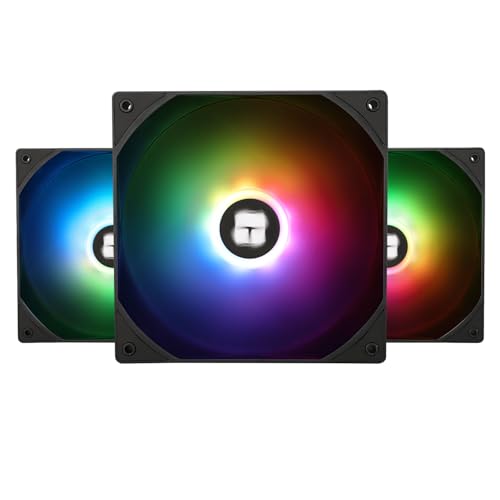
Three ARGB fans with solid specs for less than the price of one premium rival.
This three-pack delivers 75.8 cfm of airflow per fan at a maximum of 1500 RPM and a noise rating of just 26.4 db. That noise level is impressively low — quieter than the be quiet! Silent Wings 4 (29.3 db) when running at similar speeds. The fan cable runs up to 55cm long, which is generous for routing in larger cases. The only real caveat is that the maximum speed is 1500 RPM — lower than some competitors — but for a radiator in a standard build, that is plenty of airflow without the noise penalty of higher RPMs.
Why it’s a great deal
- Three fans with ARGB lighting for an incredible value.
- Very quiet operation at 26.4 db — competitive with premium fans.
- Smooth, even RGB light distribution.
The trade-offs
- Max speed of 1500 RPM is lower than some high-end options (1800-2000 RPM).
- Plastic construction feels less premium than high-end Noctua or be quiet! models.
Ideal for: builders who want ARGB lighting and good performance without spending a small fortune on fans.
Pass on this if: you need absolute top-end static pressure for an ultra-dense custom loop radiator.
6. NZXT F140P Static Pressure Fan
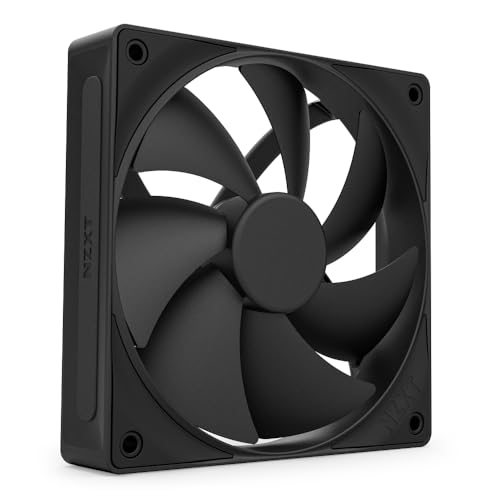
The clean, no-nonsense radiator fan for builders who hate RGB clutter.
NZXT designed this fan with seven thick blades and a minimal gap between the blade edges and the frame to boost the spinning area for higher airflow and reduced turbulence. The result is a chamfered frame that directs air in a highly concentrated flow pattern, perfect for pushing through radiator fins. It is rated at 30 db of noise at its max 1700 RPM and features a fluid dynamic bearing (FDB) with a 60,000-hour lifespan. One owner who swapped these onto an NZXT 280mm AIO reported an immediate improvement in cooling performance with less noise. The non-RGB black design keeps things clean and understated. It is not the quietest at full speed (the Noctua NF-A14x25 G2 beats it at 24.8 db), but it is a solid, well-built fan at a fair price.
What works
- Engineered specifically for high static pressure on radiators.
- Clean, minimal aesthetic without RGB.
- Fluid dynamic bearing for quiet, stable operation.
The downsides
- Can get a bit loud at max RPM compared to premium quiet fans.
- Fewer accessory items included than Noctua competitors.
Grab this if: you are building a clean, all-black or all-white system and want a reliable static pressure fan for your AIO.
Consider something else if: near-silent operation at all speeds is your absolute priority.
7. Silverstone Air Slimmer 140 (SST-AS140B)

A slim fan that moves as much air as many full-size options.
At just 15.5mm thick — even slimmer than the ARCTIC P14 at 16mm — this fan delivers 82 cfm of airflow, which beats the be quiet! Pure Wings 3’s 72.2 cfm despite being nearly 10mm thinner. The “Shark Force” blade design is engineered to produce high air pressure specifically for radiators and heatsinks, and the all-copper Fluid Dynamic Bearing (FDB) promises superior performance over a long lifespan. The modular cable design simplifies management in tight SFF builds. One owner replaced the fans on an Arctic Freezer III 280 AIO with these and said they work great with “awesome airflow” and are NOT loud. The noise at maximum 1700 RPM (33 db) is higher than many competitors, but at moderate speeds around 1200 RPM it stays manageable. This is the best slim option for performance, but you pay a premium for that specialization.
Its standout features
- Incredible 82 cfm airflow from a 15.5mm slim design.
- High static pressure “Shark Force” blades for radiator use.
- All-copper fluid dynamic bearing for durability.
The catches
- Noisier than many competitors at full speed (33 db).
- Premium price for a slim fan.
- No white color option available for white builds.
Perfect for: SFF builders who need serious performance from a slim fan on a radiator.
Reconsider if: you do not have space constraints and can fit a standard 25mm fan with better noise characteristics.
8. be quiet! Silent Wings 4 140mm PWM High Speed

1900 RPM of serious cooling power with premium German engineering.
This is the fastest standard fan on this list, reaching 1900 RPM compared to the Noctua NF-A14x25 G2’s 1500 RPM. It delivers 78.4 cfm of airflow and uses a 6-pole fan motor with 3 phases for very low power consumption and reduced vibration. The fluid-dynamic bearing (FDB) is rated for up to 300,000 hours of operation. It is heavy at 310 g, which gives it a very solid, premium feel. It comes with two mounting options: anti-vibration mounts for case use and hard plastic mounts for radiators. At 29.3 db it is rated quieter than the Pure Wings 3 (30.5 db) while pushing more air. The honest feedback is that noise is a mixed subject — many find it super quiet, while others note it becomes audible at around 30% speed. At full 1900 RPM, it is loud, so you will want to use a custom fan curve to keep it in its quiet zone.
Why it stands out
- Very high maximum speed (1900 RPM) for extreme cooling when needed.
- Superb build quality with a premium feel (310 g).
- 300,000-hour bearing lifespan.
What to be aware of
- Audible at full speed — requires a fan curve to stay quiet.
- Heavier than most competitors, which may matter in some mounts.
- Premium price for the high-speed variant.
Ideal for: enthusiasts who want the headroom of 1900 RPM but can manage it with a sensible fan curve.
Avoid if: you plan to run fans at max speed all the time and need near-silent operation.
9. Noctua NF-A14 iPPC-2000 IP67 PWM

A certified tornado for the most demanding radiator setups.
This is the Noctua industrialPPC line — “Industrial Performance Cooling” — built for heavy-duty applications. It spins up to 2000 RPM and is IP67 certified, meaning it is completely dust-tight and can survive immersion in water. The construction uses fibre-glass reinforced polyamide for extreme durability. It runs from 500 to 2000 RPM via 4-pin PWM and is rated at 31.5 db. The motor is dead-quiet with a sine wave controller, meaning no annoying tick or whine as it speeds up — a common complaint with other high-speed fans. Buyers report it is quiet up to around 1100 RPM; at 2000 RPM it is a jet engine, but that is the price of moving that much air. One owner described it as “a tornado” and reported keeping an overclocked i7-7700K at 30°C idle and 65°C under load. This is overkill for most builds, but if you have a very dense radiator or need industrial reliability, nothing else on this list matches it.
The heavy-hitting facts
- 2000 RPM maximum for extreme cooling performance.
- IP67 certified — dust-tight and waterproof for reliability.
- Silky smooth motor with no tick or whine.
Reality check
- Very loud at maximum speed — best run below 65% RPM.
- Overkill for standard desktop use.
- Premium price for industrial-grade specifications.
Grab this if: you need extreme cooling, IP67 protection, or plan to run a very dense custom loop radiator.
pass on it if: you are building a standard gaming or productivity PC — it is too loud and powerful for everyday use.
Understanding the Specs
Static Pressure (mmH2O)
Think of static pressure as the fan’s ability to push air through a tight space — like a radiator’s dense metal fins. It is measured in millimeters of water (mmH2O). A higher number means the fan can force air through more resistance. For a radiator, this is more important than raw CFM because the fins create strong resistance. The Scythe Kaze Flex hits 2.81 mmH2O, which is excellent for a 140mm fan.
Noise Level (dBA)
Decibels (dBA) measure sound pressure. A 3 dBA increase is a noticeable jump in loudness. The Noctua NF-A14x25 G2 at 24.8 db is a quiet fan; the Silverstone at 33 db is noticeably louder. Most fans are quietest at low RPM (idle) and get loud at max RPM. A good PWM curve on your motherboard keeps the fan at low speeds when your CPU is cool and ramps it up only under load, which is the key to a quiet system.
FAQ
Can I use a regular case fan on a radiator?
What is the difference between PWM and DC fan control?
How does a slim fan compare to a standard 25mm fan on a radiator?
What does MTTF mean and why does it matter?
Will a 140mm fan fit on my 280mm or 420mm radiator?
What is a push/pull configuration on a radiator?
How do I control the speed of my 140mm radiator fans?
Are Noctua fans worth the extra cost?
What is the best RPM range for a radiator fan?
Is a higher CFM always better for a radiator?
Final Thoughts: The Verdict
For most buyers, the best 140mm radiator fans winner is the Noctua NF-A14x25 G2 PWM because it delivers class-leading quiet operation at 24.8 db with the engineering (Sterrox LCP, Flow Acceleration Channels) to back it up, and it is the crowd favorite with 4.8 stars across over 500 owners. If you want the highest static pressure for a dense radiator without spending Noctua money, grab the Scythe Kaze Flex 140mm. And for an ultra-slim build or a push/pull configuration, the ARCTIC P14 Slim PWM PST is the one to reach for.
How We Picked
We do not accept paid placement. Every pick is matched to a real buyer and a real use-case; we do not hands-on test units.
Sources & Methodology
Specifications: manufacturer listings and product documentation. Review insights: verified customer reviews, as of July 2026. Pricing: not shown on this page (it changes often); check the current price via the retailer link.
As an Amazon Associate, Gadgets Feed earns from qualifying purchases. This does not affect which products we feature.