
Our readers keep the lights on and my morning glass full of iced black tea. As an Amazon Associate, I earn from qualifying purchases.
Specs are compiled from manufacturer listings and verified buyer reviews and can change over time — please confirm the key details on the product page before buying.
If you spend hours clicking, dragging, and scrolling, a 6-button mouse is a small upgrade that makes a huge difference to your daily comfort and speed. The extra two buttons put common actions (forward, back, copy, paste, a macro) right under your thumb or finger, so you never dig through menus again. The real trick is finding one that matches your hand size, grip style, and if you need wireless freedom or a zero-lag wired connection.
I’m Min — the founder and writer behind Gadgets Feed. This guide is built by comparing the manufacturers’ published specifications and the patterns across verified customer reviews, so you get each pick’s real strengths and trade-offs instead of marketing spin.
if you want marathon battery life, a vertical shape to ease wrist strain, a featherweight honeycomb shell, or precision tracking for competitive gaming, you’ll find the right match among these carefully chosen 6 button mouse recommendations.
Our Picks at a Glance


How To Choose The Best 6 Button Mouse
Picking the right 6-button mouse means matching its shape, connection type, and core specs to how you actually use it. Here are the decision points that matter most.
Connection: Wired vs Wireless
Wired mice offer absolute zero-lag performance and never run out of power. Wireless options, whether using a 2.4 GHz dongle or Bluetooth, free up desk space but introduce battery management and potential interference. A 2.4 GHz wireless connection with a 1 ms report rate (how often the mouse sends its position — here, once every 1 millisecond), like Logitech’s Lightspeed, is indistinguishable from wired for most gamers. Bluetooth (BT 5.2, the latest Bluetooth version) is convenient for switching between a PC, tablet, and phone, but often caps at 125 Hz (one update every 8 milliseconds), making it feel sluggish for fast-paced titles.
Sensor and DPI Range
The sensor is the mouse’s eye. A standard 8,000 DPI optical sensor is plenty for most uses. DPI stands for dots per inch — a higher number makes the cursor zip across the screen faster. High-end models reach 24,000 or even 26,000 DPI for ultra-high-resolution monitors and twitch-sensitive players. Adjustable DPI cycles through preset speeds with a button tap, so you can switch from pixel-precise editing (low DPI) to fast inventory reactions (high DPI) in a click.
Shape, Weight, and Your Hand Size
A well-shaped mouse prevents wrist and hand pain during extended use. Vertical mice rotate your forearm into a handshake position, reducing wrist strain for office use. For gaming, a weight under 100 grams (like 59g or 90g) reduces fatigue during fast flicks. Ambidextrous shapes suit left- or right-handed users, while right-handed sculpted mice support your palm and ring finger. A mouse built for medium-to-large hands feels awkward for small-handed users.
Battery Life and Recharging
Single AA battery mice can run for 250 hours or even 9 months, which means you change the battery once or twice a year. Rechargeable models with built-in lithium cells (often 1,000 mAh, the milliampere-hour capacity) last 48 to 180 hours per charge and fill up in about an hour via USB-C. Some mice include a wireless charging pad so you can drop the mouse on the pad and keep it topped up without plugging in cables. If you hate managing batteries, look for rechargeable with a long runtime.
Quick Comparison
| Model | Best For | Connection | Sensor DPI | Weight | Amazon |
|---|---|---|---|---|---|
| Logitech G305★ Best Overall | Marathon Wireless Gaming | 2.4 GHz Wireless | 12,000 | 3.4 oz (99g) | Amazon |
| Logitech G203Best Value | Budget Wired RGB | USB-A Wired | 8,000 | 5.53 oz | Amazon |
| Logitech MX Ergo SPremium Pick | Premium Ergonomic Trackball | Bluetooth / Logi Bolt USB | N/A | N/A | Amazon |
| Amazon Basics Vertical | Budget Ergonomic Relief | 2.4 GHz Wireless | 1,000 / 1,200 / 1,600 / 2,400 | 4.16 oz | Amazon |
| ASUS TUF M3 Gen II | Ultralight Durability | USB-A Wired | 8,000 | 59g | Amazon |
| TMKB Falcon M1 | High-DPI Tri-Mode Versatility | 2.4G / BT 5.2 / USB-C | 24,000 | 90g | Amazon |
| DIERYA M1 | White Aesthetic + Long Battery | 2.4G / BT 5.2 / USB-C | 24,000 | 90g | Amazon |
| Perixx PERIMICE-713RX | Charging-Pad Convenience | 2.4 GHz Wireless | 1,000 / 1,600 | 0.35 lb | Amazon |
| ELECOM EX-G | Thumb-Operated Trackball | 2.4 GHz Wireless | 500 / 1,500 | N/A | Amazon |
In‑Depth Reviews
1. Logitech G305 Lightspeed Wireless Gaming Mouse
Our pick — over 4.5★ from 39,000+ verified ratings; the strongest balance of quality and price.
The wireless gaming mouse that runs for 250 hours on a single AA battery.
The G305 has become a crowd favorite for a simple reason: it delivers competition-level wireless performance without a rechargeable battery to manage. The next-generation HERO optical sensor (up to 12,000 DPI, meaning the cursor moves 12,000 dots per inch of hand movement, with 400 IPS precision, so rapid flicks stay accurate) tracks every flick with zero smoothing. The 1 ms report rate (one update every 1 millisecond) from Logitech’s Lightspeed technology feels identical to a wired connection, so you never notice the lag. At just 3.4 ounces (99g with the AA battery inside), it stays nimble for fast-paced aiming without feeling hollow or cheap.
Six programmable buttons cover all the essentials, and the onboard memory saves your settings so you can plug into any PC without reinstalling software. The ambidextrous compact shape also makes it a strong travel companion — the nano receiver stores inside the battery compartment, so you never lose it. Over 2,000 buyers praise how solid it feels. The flip side is that reliability receives mixed feedback, and a few buyers report the left button failing after about a year. Compared to the heavier Logitech G203, the G305 is wireless and far more portable, making it the better pick if you need one mouse for multiple desks.
The Marathon Performer
- Up to 250 hours of gameplay on a single AA battery
- 1 ms Lightspeed wireless feels indistinguishable from wired
- HERO sensor delivers 12,000 DPI with 400 IPS precision
Know Before You Buy
- Compact shape may not fill large hands
- No RGB lighting if you want desk flair
- Some owners note the left-click can fail after about a year
Perfect for: Gamers and power users who want one mouse that runs for months on a single AA battery without ever plugging in a cable.
Size check: It is compact; if you have large hands or prefer palm grip, you may want a larger sculpted mouse.
2. Logitech G203 Wired Gaming Mouse
The wired RGB mouse that punches well above its weight for under.
The G203 steps up from a standard office mouse with an 8,000 DPI optical sensor that has zero filtering or smoothing, giving you pixel-precise control. Mechanical primary buttons are tensioned with durable metal springs for crisp, reliable clicks. The LIGHTSYNC RGB lighting lets you sync colors with other gear, react to in-game action, or simply flash to the beat of your music — all customizable through Logitech G HUB.
With six programmable buttons and five on-the-fly DPI settings, it adapts to both work and play. The matte-finished shell is comfortable for claw and fingertip grips, and the 6.89-foot braided cable gives you plenty of reach without drag. At 5.53 ounces, it is slightly heavier than ultralight competitors like the ASUS TUF M3 Gen II, but the feel is substantial without being tiring. The consensus from hundreds of owners is that the quality and ergonomics are excellent for the price. The main trade-off is that the scroll wheel can develop issues after 1.5 years of use, and the clicks are noticeably loud.
Why It Wins
- 8,000 DPI optical sensor with zero smoothing
- Vibrant LIGHTSYNC RGB that syncs with other Logitech gear
- Metal-spring tensioned primary buttons feel crisp
What To Know
- Scroll wheel durability is mixed; some owners see wear after 1.5 years
- Right-handed only — not for lefties
- Clicks are loud and crunchy, not quiet
Reach for this if: You want a no-compromise wired gaming mouse with flashy RGB and zero battery worries.
Think twice if: You work in a shared quiet space — the mechanical clicks are loud enough to bother others.
3. Logitech MX Ergo S Advanced Wireless Trackball Mouse
The MX Ergo S is designed for anyone whose wrist or shoulder complains after a long day of clicking. Its sculpted shape tilts at a 20-degree angle, which improves your forearm posture and, according to the maker, reduces muscle strain by 27%. The thumb-operated trackball lets you move your cursor by rolling the ball with your thumb, keeping your arm stationary and comfortable. Six programmable buttons plus a precision mode button let you switch between speed and high-precision tracking instantly.
Build quality is a clear strong point, with 94 owners praising the solid feel. The rechargeable battery lasts up to 120 days on a full charge, and a one-minute quick charge gives you 24 hours of use — enough to get through a day if you forgot to plug it in. The clicks are 80% quieter than the previous generation, which matters in shared offices. The real catch is size: this trackball is built for medium-to-large hands. Owners with smaller hands report that the thumb ball can be hard to coordinate, leading to inaccuracy.
The Ergonomic Powerhouse
- 20-degree tilt cuts muscle strain by 27% for all-day comfort.
- Up to 120 days battery life with fast USB-C charging
- 80% quieter clicks than the previous generation
The Honest Limitations
- Thumb-operated trackball has a learning curve (1-2 weeks)
- Designed for medium-to-large hands; small hands may struggle
- No dongle storage compartment on the mouse itself
Who it beats: Anyone dealing with wrist or shoulder pain from a standard mouse will find real relief here.
Who it doesn’t: Gamers need quick flicks and long-distance cursor movement, which a trackball is not designed for.
4. ASUS TUF Gaming M3 Gen II Wired Mouse

A 59-gram wired mouse with IP56 dust and water resistance for serious durability.
The TUF Gaming M3 Gen II sheds weight aggressively at just 59 grams, making it one of the lightest 6-button mice on this list. That feathery build means your wrist stays fresh during long sessions. The 8,000 DPI optical sensor delivers pixel-precise tracking, with a dedicated DPI button to cycle through four sensitivity levels on the fly. PTFE feet (a low-friction plastic) glide smoothly across any surface.
what separates it is the IP56 rating (a protective coating that resists dust and water splashes) — which is rare in a gaming mouse. ASUS also adds an Antibacterial Guard that, according to the brand, inhibits bacterial growth on the surface and buttons. Quality is praised most by owners, with 26 buyers calling it out. The main mixed points are weight (some find 59g too light) and function reliability — a few owners mention units that do not work from the start. Against the heavier Logitech G203, the TUF M3 Gen II is the better choice for competitive players who want minimal inertia.
Speed demon: At 59 grams with an 8,000 DPI sensor, this is the pick for competitive players who want minimal inertia.
Durability caveat: The IP56 coating is a real advantage for longevity, but an occasional unit arrives with no function — a run-time check on arrival is wise.
Grab this for: Competitive gaming where every gram counts and you want a sturdy wired mouse that resists dust.
Skip it for: Office precision work — some find the ultralight weight too unstable for steady cursor control.
5. TMKB Falcon M1 Wireless Gaming Mouse
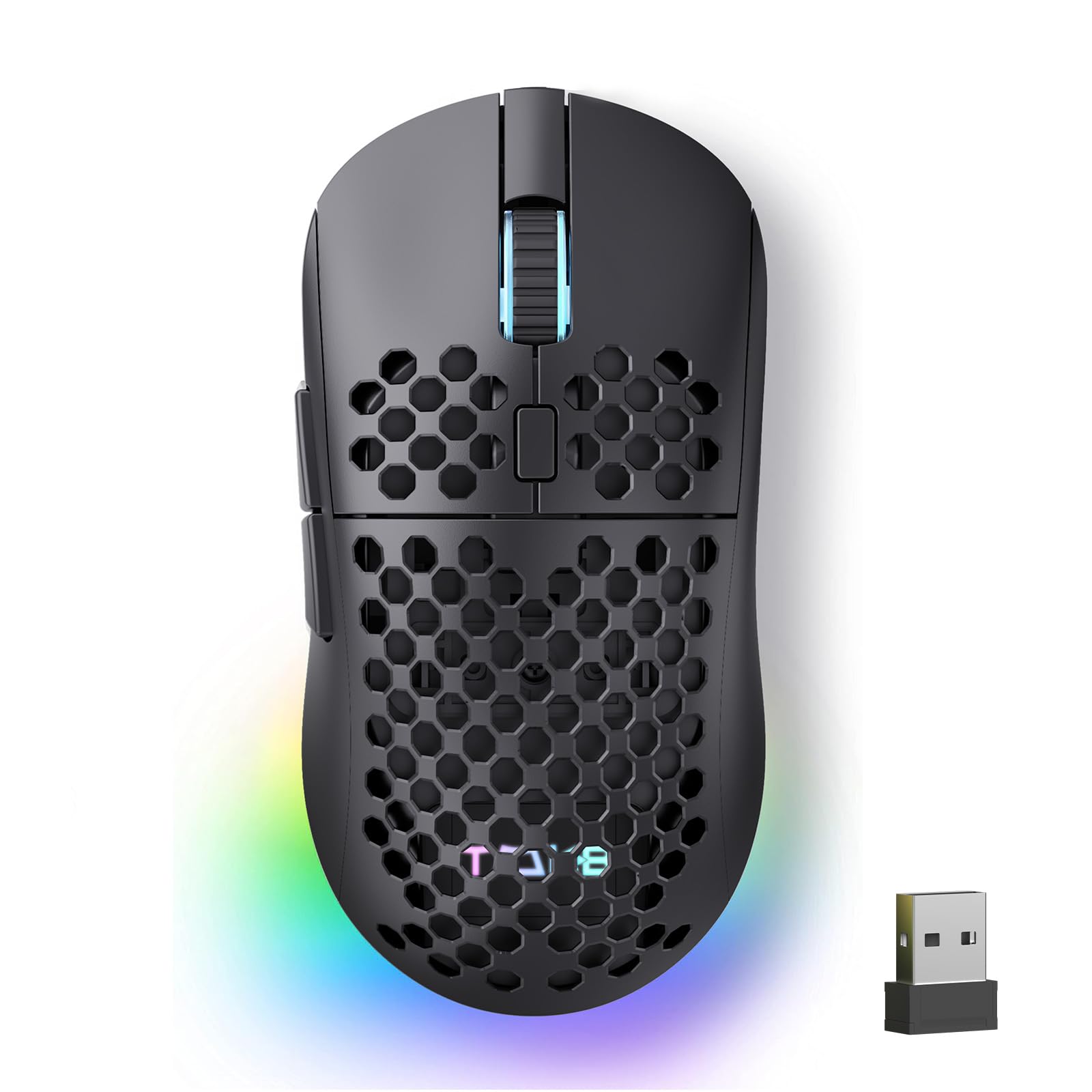
A tri-mode wireless mouse with 24,000 DPI and a 180-hour rechargeable battery.
The Falcon M1 connects three ways — ultra-fast 2.4 GHz (1000 Hz polling), Bluetooth 5.2 (dual-device pairing), and USB-C wired — so you can switch from a desktop to a laptop to a tablet without re-pairing. The 24,000 DPI optical sensor (with 300 IPS speed, or inches per second, and 35G acceleration) handles high-res monitors easily. Six color-coded DPI presets let you adjust sensitivity on the fly, and the RGB strip on the side gives instant feedback.
A 1,000 mAh rechargeable battery powers it for 180 hours in ECO mode or 48 hours with full RGB lighting — and it fully recharges via USB-C in one hour. The honeycomb shell keeps the weight at 90 grams for a good balance between lightweight and substantial. Quality is the top praised aspect by owners. The main mixed feedback is around reliability, with some owners experiencing random disconnections over Bluetooth. It packs a higher DPI and longer battery life than the Logitech G305, but the G305 is more reliable for pure gaming.
Connectivity champion: 2.4 GHz, Bluetooth 5.2, and USB-C wired modes in one device for maximum flexibility.
Watch for: A few customers note intermittent Bluetooth dropouts, so the 2.4 GHz dongle mode is the most stable choice.
Best for: Users who need one mouse that works across a desktop, laptop, and tablet without multiple pairings.
Not ideal for: Those who rely heavily on Bluetooth reliability for time-sensitive gaming — stick to the 2.4 GHz dongle.
6. DIERYA M1 Wireless Gaming Mouse
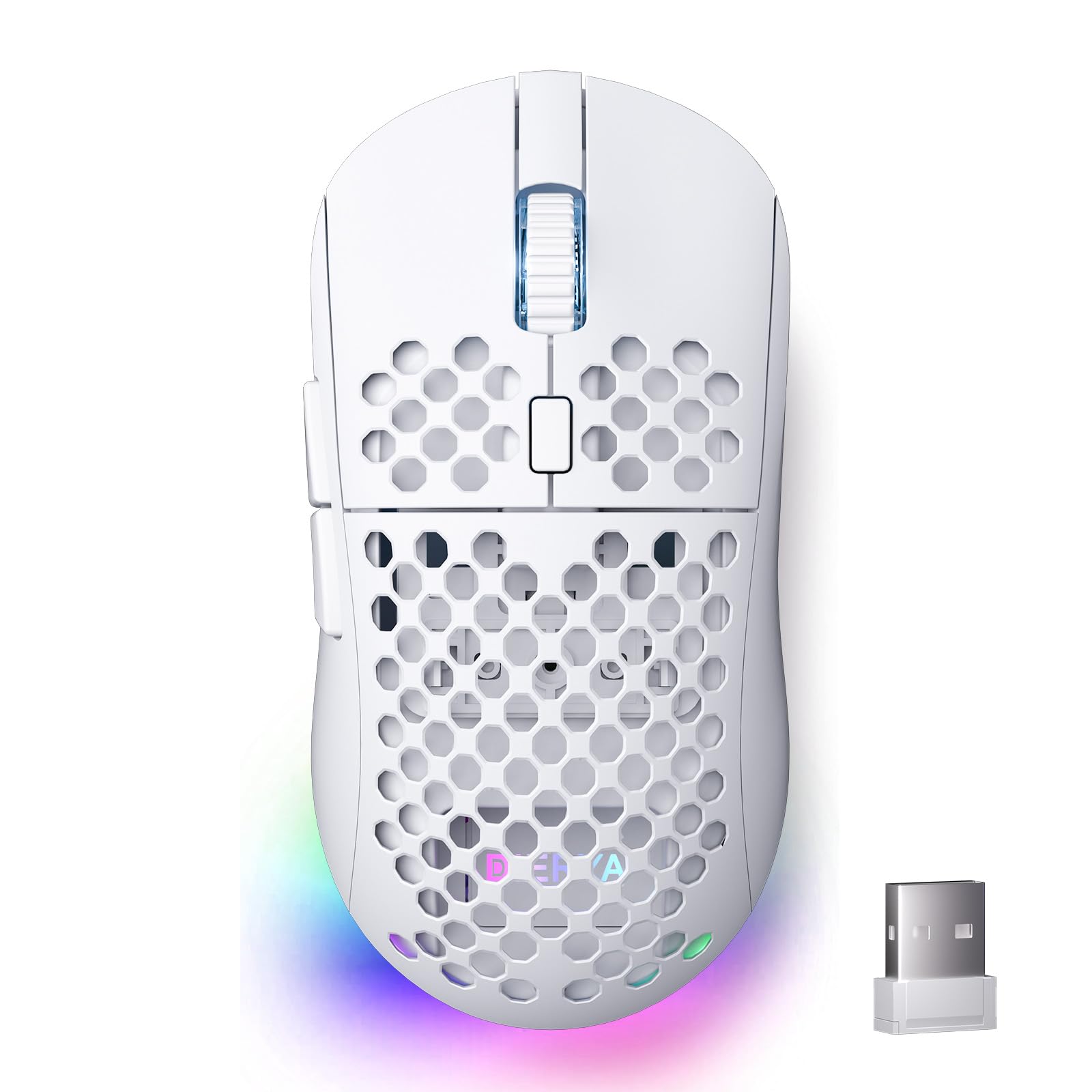
A white honeycomb mouse with 16.8 million colors and a 180-hour rechargeable battery.
The DIERYA M1 is the one to pick if you want a clean white aesthetic on your desk without sacrificing modern features. The 24,000 DPI optical sensor offers six preset levels (400/800/1600/3200/4800/6400) with color-coded feedback on the scroll wheel and RGB strip. Tri-mode connectivity (2.4 GHz at 1000 Hz, or 1 ms report rate, Bluetooth 5.2 at 125 Hz, or one update every 8 milliseconds, or USB-C wired) lets you toggle between a gaming PC, a work laptop, and a tablet with a dedicated button.
The honeycomb shell keeps weight at 90 grams and improves ventilation, so your palm stays less sweaty during long sessions. Huano micro switches (the mechanical switches under the buttons) are rated for 20 million clicks. Quality is the top aspect praised by owners. The main mixed point is responsiveness — a few owners note the buttons can feel slightly squeaky. Compared to the TMKB Falcon M1, the DIERYA M1 shares similar specs but stands out for its white aesthetic and color-coded DPI feedback.
: The white honeycomb shell with 13 RGB lighting effects looks great on any desk.
Minor quibble: A small number of reviewers point out squeaky buttons, though the company offered full refunds for the issue.
Choose this if: You want a stylish white mouse with a long battery life, tri-mode connectivity, and vibrant RGB.
Pass on it if: You need perfectly silent clicks — some units can develop a slight squeak.
7. Amazon Basics 6-Button Vertical Wireless Mouse
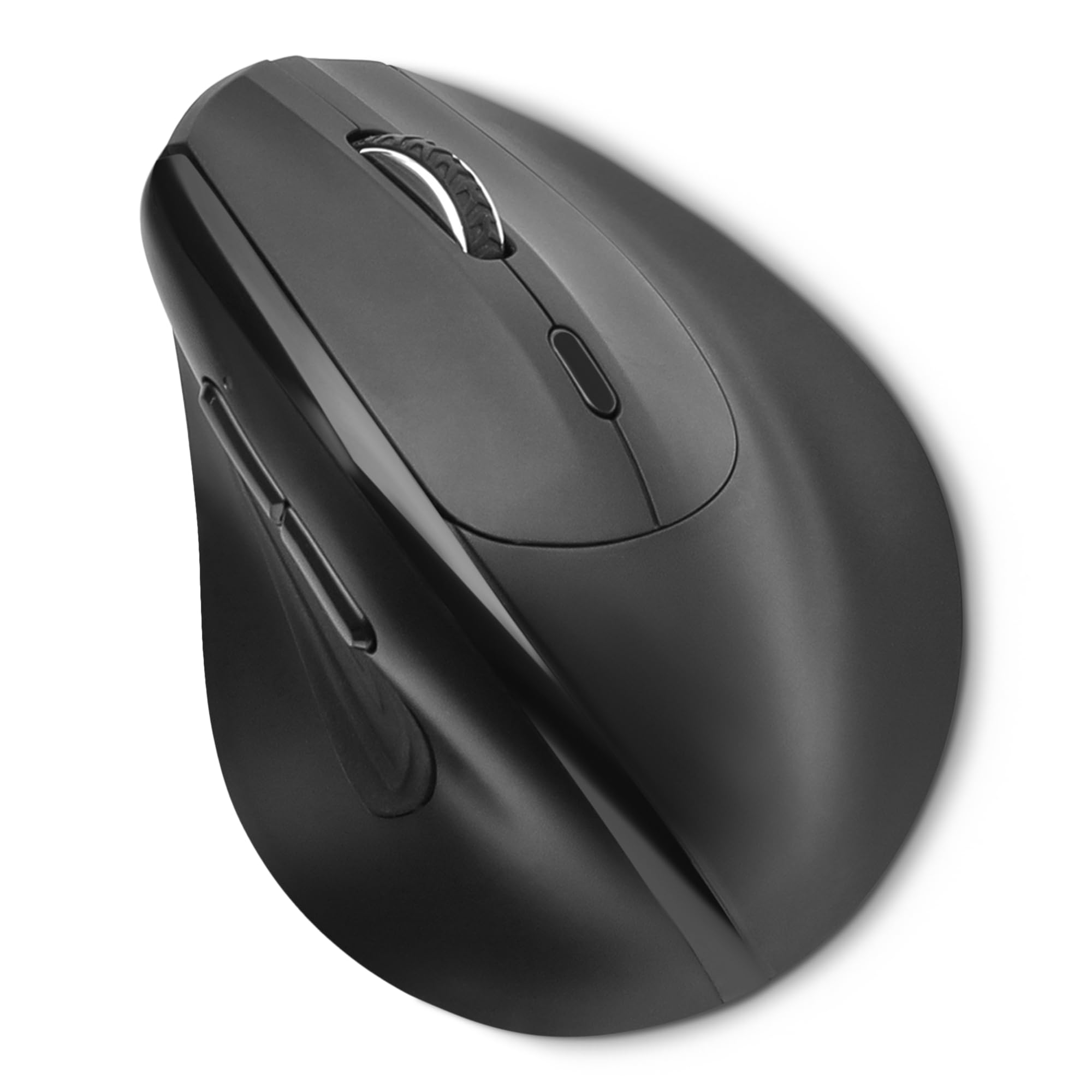
The Amazon Basics vertical mouse rotates your hand into a natural handshake position, helping to reduce wrist strain for anyone who spends all day at a computer. It uses a 2.4 GHz wireless connection that works up to 33 feet away, with plug-and-play simplicity — just insert the USB-A receiver and start clicking. The adjustable DPI (dots per inch) cycles through 1,000 / 1,200 / 1,600 / 2,400 levels, letting you dial in the right cursor speed.
It takes 2 AAA batteries (included) that last approximately 4 months, and the vertical shape is tune for medium to large hands (palm length over 6.7 inches and palm width over 3.2 inches). At 4.16 ounces, it is noticeably lighter than a standard vertical mouse. Buyers consistently note that it reduces wrist discomfort for a fair price. For pure ergonomic relief on a budget, this beats the Perixx PERIMICE-713RX because it costs less and has a simpler, more reliable setup.
Budget relief: The vertical shape provides real ergonomic relief at a low price.
Sizing note: It is built for medium-to-large hands; smaller hands may find the vertical shape awkward.
Who it fits: Office workers or casual users looking to try a vertical mouse without spending +.
Who it doesn’t: Gamers should look for a higher-DPI sensor and polling rate (mouse update speed) — this is strictly a productivity tool.
8. Perixx PERIMICE-713RX Wireless Vertical Mouse

A vertical mouse that charges wirelessly and includes its own charging pad.
The PERIMICE-713RX solves two problems at once: wrist strain from a standard mouse and the annoyance of hunting for a charging cable. The vertical design keeps your wrist in a neutral, upright position. It supports both USB-C wired charging and wireless charging, and a charging pad is included in the box — which also works for phones (supports 7.5W for iPhone and 10W for Samsung). The quiet-click main buttons help maintain focus in an office.
Connectivity is a stable 2.4 GHz wireless with a range of up to 30 feet. Adjustable DPI cycles between 1,000 and 1,600. Build quality is praised, but reliability is the top concern — a number of shoppers say the mouse stops working after a few months. The learning curve is real: most users adapt within 1-2 weeks. Unlike the straightforward Amazon Basics vertical, this Perixx model offers the perk of a free charging pad but carries a higher early-failure risk.
Clever convenience: Wireless charging pad included means one less cable on your desk.
Reliability alert: A noticeable number of buyers report failures within months — treat this as a budget ergonomic gamble.
Consider this for: First-time vertical users who want the convenience of a bundled charging pad.
Be aware: The longest-term reliability is mixed, and an occasional unit fails early.
9. ELECOM EX-G Trackball Mouse

The thumb-operated trackball with 2.5 mm ruby bearings for ultra-smooth motion.
The EX-G uses a thumb-operated trackball that rolls on three 2.5 mm large artificial ruby ball bearings (tiny spheres that reduce friction). This design minimizes friction and prevents dust from clogging the mechanism, so you clean it less often — the ball pops out easily from the bottom for quick maintenance. DPI can be switched between 500 (low) and 1,500 (high) for cursor speed control. Six buttons plus scroll-wheel tilting for horizontal scrolling make navigation fluid.
Quality is the most-praised aspect, and a dedicated user base has kept the product alive for years. The design reduces hand movement since you only move your thumb, not your whole arm. The main trade-off is trackball movement quality — a significant number of owners mention choppy cursor movement and occasional sluggishness. The receiver can also lose range over time, dropping from 30 feet down to a few feet. For a durable trackball on a budget, it beats the Logitech MX Ergo S in price but lacks its premium build and ergonomic tilt.
: Ruby ball bearings make the trackball feel smooth, and the design has a strong loyal following.
But note: Cursor response can feel choppy, and the receiver range degrades over years of use.
Try this for: A durable, low-maintenance trackball experience at a reasonable price.
Skip it for: Precision tasks like photo editing where pixel-perfect cursor control matters.
Understanding the Specs
DPI and Sensor
DPI (dots per inch) tells you how fast the cursor moves for a given hand movement. A higher DPI setting means the cursor zips across the screen faster. For a standard 1080p monitor, 800-1600 DPI is comfortable for most people. For a 1440p or 4K monitor, you might prefer 1600-3200 DPI. Competitive gamers often run 800-1600 DPI with a low in-game sensitivity for pixel-level aim. The sensor type — optical or laser — affects tracking surface compatibility. Optical sensors work on most surfaces and have no acceleration issues, making them preferred for gaming.
Polling Rate and Report Rate
Polling rate, measured in Hz (hertz), is how often the mouse reports its position to the computer. A 125 Hz mouse sends an update every 8 milliseconds, while a 1000 Hz mouse sends one every 1 millisecond. That 7 ms difference can matter in fast-paced shooters where split-second reactions count. Most gaming mice now offer 1000 Hz polling in wired or 2.4 GHz wireless mode. Bluetooth typically caps at 125 Hz, which is fine for browsing but feels sluggish for gaming.
FAQ
Are 6-button mice only for gaming?
What is the difference between a 6-button and a 5-button mouse?
Is a 6-button wireless mouse good for gaming?
How long do gaming mouse switches last?
What does 24,000 DPI mean for my monitor?
Does a heavier mouse make you aim better?
Can I use a 6-button mouse with a Mac?
How does a vertical mouse reduce wrist pain?
Final Thoughts: The Verdict
For most