
Our readers keep the lights on and my morning glass full of iced black tea. As an Amazon Associate, I earn from qualifying purchases.
Specs are compiled from manufacturer listings and verified buyer reviews and can change over time — please confirm the key details on the product page before buying.
Your desk is where your daily grind happens — and building a setup that actually supports you beats buying random gadgets that just sit there. The trick is choosing pieces that earn their spot: a monitor stand for your neck, a power strip for cable tangle, and an organizer for your pens. This guide walks you through the choices that turn a messy desktop into a functional command center.
I’m Min — the founder and writer behind Gadgets Feed. This guide is built by comparing the manufacturers’ published specifications and the patterns across verified customer reviews, so you get each pick’s real strengths and trade-offs instead of marketing spin.
Whether you are starting from scratch or hunting for that one missing piece, skip the noise and shop the office desk accessories that actually pull their weight — no fluff, just the gear that solves the real problems.
Our Picks at a Glance

How To Choose The Best Office Desk Accessories
Grabbing the prettiest set on the first page is tempting, but a desk accessory that doesn’t fit your space or workflow becomes clutter. Start with what you actually do at your desk — lots of writing, dual monitors, daily charging of a laptop and phone — and let that steer your choices. A monitor riser for your neck, a power station for your cables, a mat for your mouse, and an organizer for your pens cover most bases.
Material and Build
The main debate is metal versus coated finishes. Powder-coated steel or alloy holds up to years of daily use without wobbling, while painted concrete offers a clean look but can chip if knocked around. Genuine leather or thick faux-leather on a desk pad protects your surface and feels smooth under a mouse, but if you are rough on your gear, a metal mesh organizer is practically indestructible.
Ports and Power
If you run a laptop plus monitors, a basic power strip won’t cut it. Look at how many USB-C ports you get and the total wattage — 70W or 100W single-port charging means your laptop charges at full speed. Retractable cables and a desk clamp save you from the usual tangle. Check the cord length too: a 5-foot cord works for most desks, but if your outlet is far, you might need an extension.
Size and Layout
A 32-inch desk mat fits a full keyboard and mouse, but a shallow desk calls for a smaller 10-inch organizer. Measure your desk surface and gear first. A monitor stand should be wide enough for both monitors and deep enough to clear your keyboard underneath — 16 inches deep is a good target. For caddies and holders, pick something that does not crowd your typing area.
Quick Comparison
| Model | Best For | Key Material | Item Weight | Ports / Compartments | Amazon |
|---|---|---|---|---|---|
| Aesthetic Concrete Desk Organizer Set★ Best Overall | Minimalist single-piece decoration | Concrete | 0.59 kg | 3 holders | Amazon |
| Anker Nano Power Strip Desk ClampBest for Standing Desks | Cable-free standing desk | Plastic / Metal clamp | 1.5 lbs | 10 (6 AC, 2 USB-C, 2 USB-A) | Amazon |
| Anker Nano Charging Station 7-in-1Top Performer | Multi-device fast charging | Plastic | 1.4 lbs | 7 (3 AC, 3 USB-C, 1 USB-A) | Amazon |
| OPNICE Dual Monitor Stand Riser | Ergonomic dual-monitor setup | Alloy Steel | 3.39 kg | 2 hanging pen holders + drawer | Amazon |
| 6-Piece Leather Desk Set | Coordinated premium look | Faux Leather / MDF | 6 lbs | 6 pieces | Amazon |
| Elizo Real Leather Desk Mat | Smooth mouse surface + desk protection | Full Grain Leather | 0.81 kg | Pad + tray + coaster | Amazon |
| 17-in-1 Black Desk Organizer Set | Complete all-in-one college desk kit | Powder-coated metal / acrylic | 1.98 kg | 17 pieces (3 organizers + 14 tools) | Amazon |
| Black Desk Organizer and Accessories | Compact mesh organizer for small desks | Powder-coated metal | 1.22 kg | 7 compartments | Amazon |
| Purple 12pcs Desk Accessories Set | Colorful starter kit with stapler | Metal / Plastic | 1.22 kg | 12 pieces (mesh organizer + tools) | Amazon |
In‑Depth Reviews
1. Aesthetic Desk Organizer Set of 3
Our pick — over 4.5★ from 500+ verified ratings; the strongest balance of quality and price.
The concrete trio that turns desk clutter into clean decoration.
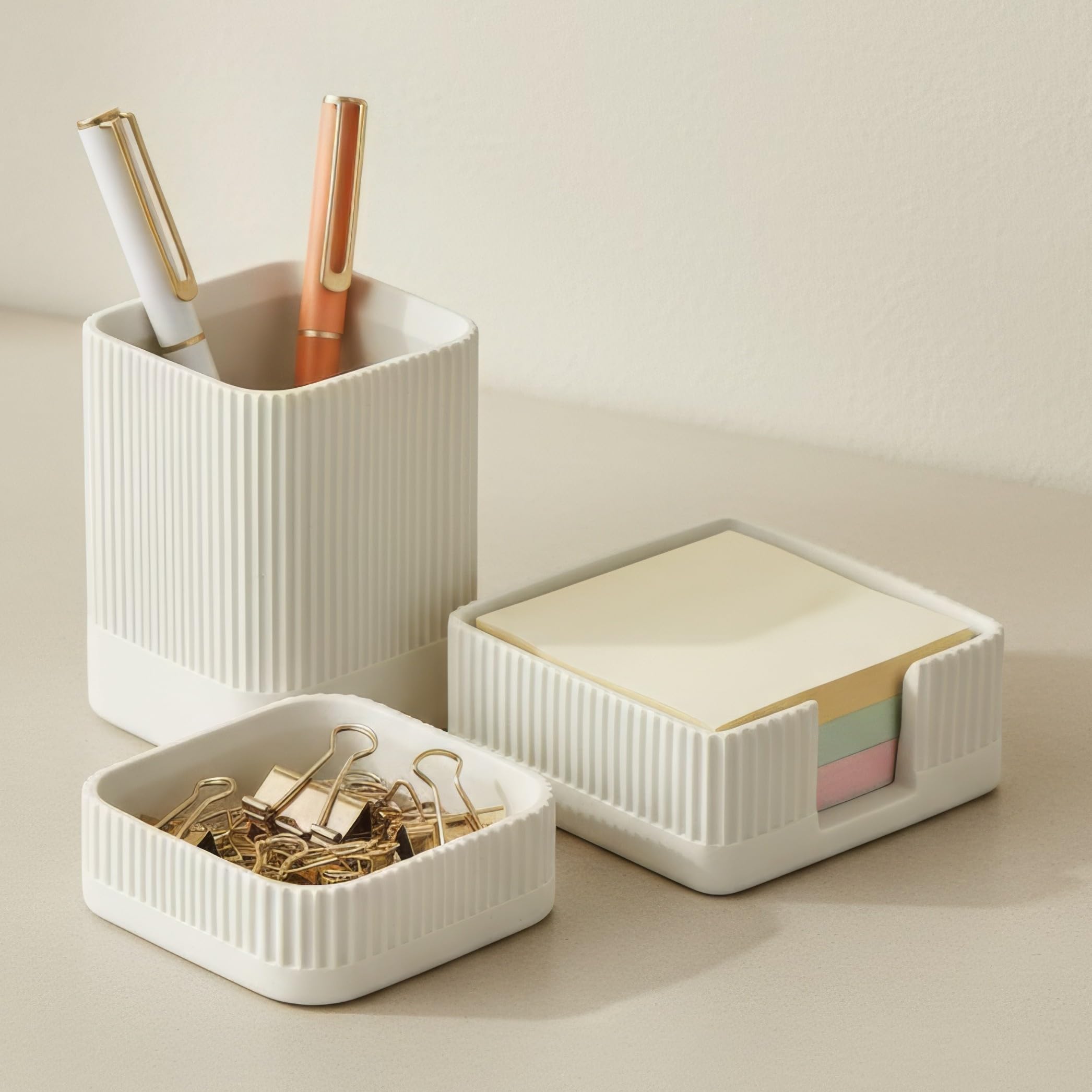
This set from KIBAGA uses real concrete — a pen holder at 2.75 x 2.75 x 3.75 inches, a notes holder, and a small metal clip holder. Owners call it “esthetically pleasing” and note that the weight gives it a solid, grown-up feel that plastic just cannot match. The concrete also keeps it from sliding around when you grab a pen. At 0.59 kg, it is the lightest organizer in this roundup, yet it feels much heavier in hand.
What wins people over is the appearance — it is the top praise by a wide margin. The color runs slightly whiter than the photos suggest, which most buyers actually prefer. The only real debate is the sticky note holder: several find it a bit small for a standard pad. Think of it as a tidy catch-all for a few loose notes rather than your main notebook holder.
Why it stands out
- Real concrete construction — no wobble or slide on the desk
- Minimalist look that blends into any workspace decor
- Three separate holders keep pens, clips, and notes in their own spots
The honest caveat
- Sticky note holder is on the smaller side — not ideal for large pads
- Concrete can chip if dropped on a hard floor
Best for the minimalist: This is your pick if you want a quiet, good-looking organizer that does not scream for attention and actually stays put.
Think twice if: You need to store a full stack of sticky notes or you tend to knock things over — concrete is sturdy but brittle.
2. Anker Nano Power Strip, Desk Clamp
The power strip that bolts to your desk and vanishes from sight.
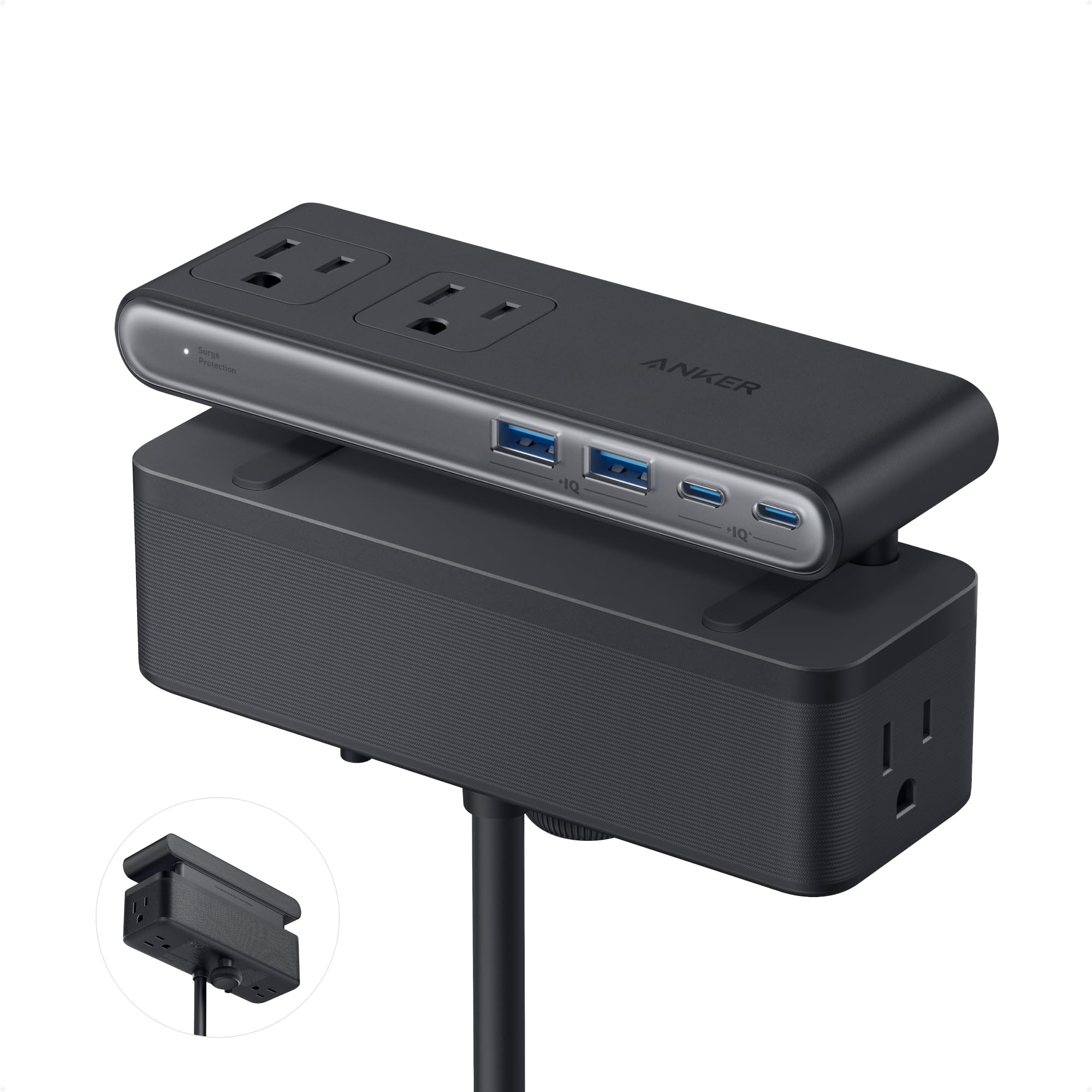
This Anker unit attaches to your desk edge with an adjustable clamp (fits edges between 0.6 and 1.8 inches thick) so it never sits on your work surface. The layout is smart: 6 AC outlets, 2 USB-C, and 2 USB-A ports split into top and bottom zones, giving you a clean way to plug in everything without a rat’s nest of cables. The USB-C port delivers up to 70W using GaN technology — enough to charge a MacBook Pro 13 M3 at full speed. Owners consistently call out the “outstanding build quality” and the fact that it stays rock-solid during one-handed plugging.
The 5-foot power cord is about the width of a standard queen-size bed, so it reaches most outlet placements under a standing desk. The only catch is compatibility: it will not clamp onto curved edges or anything sloped more than 45 degrees. Measure your desk edge before you buy.
Standout features
- Adjustable clamp fits most standard desk edges — no surface space lost
- 70W USB-C GaN charging handles a full laptop
- Clever pop-up outlets and flush top keep the desk clean
One limitation
- Not compatible with curved or heavily sloped desk edges
- Premium price compared to basic power strips
For the cable hater: If keeping your desk surface completely clear is the goal, this clamp-on power strip is the single best upgrade you can make.
skip it if: You have an unusual desk profile (curved or super-thin edge) — it simply will not clip on.
3. Anker Nano Charging Station, 7-in-1
The charging block that pulls double duty — clean desk + fast laptop power.
This 7-in-1 station packs 3 USB-C ports (each delivering up to 100W when used alone), 1 USB-A, and 3 AC outlets. The real trick is the two built-in retractable USB-C cables that extend up to 2.3 feet. Pull them out to charge, then tug gently and they retract in one smooth second. Owners say it “reduces cable clutter” dramatically and that the 100W output is legit — it charges a 16-inch MacBook Pro M3 Pro to 50% in 35 minutes.
At 1.4 pounds (615g), it is about the weight of a 13-inch iPad Air, so it stays planted on your desk but is not ideal for travel. The main trade-off is that the retractable cables are short by design (fine for desktop use within 3 feet of an outlet), and when you plug in multiple devices, the shared power delivery does drop each port’s output. It is a home-base charger, not a travel companion.
Why it wins
- 100W USB-C charges a full-size laptop faster than most bricks
- Retractable cables are neat — no loose cords on your desk
- Real-time LCD power display is genuinely useful
Fair warning
- Retractable cables are short (2.3 ft) — not great if the outlet is far
- Shared power output means slower charging with many devices plugged in
Grab this for: A clean, cable-managed desk where you charge a laptop and phone every day — the retractable cables alone are worth it.
Look elsewhere if: You need a long cord to reach a distant outlet, or you want something portable for your bag.
4. OPNICE Dual Monitor Stand Riser
The riser that lifts your monitors — and your neck — without taking over your desk.
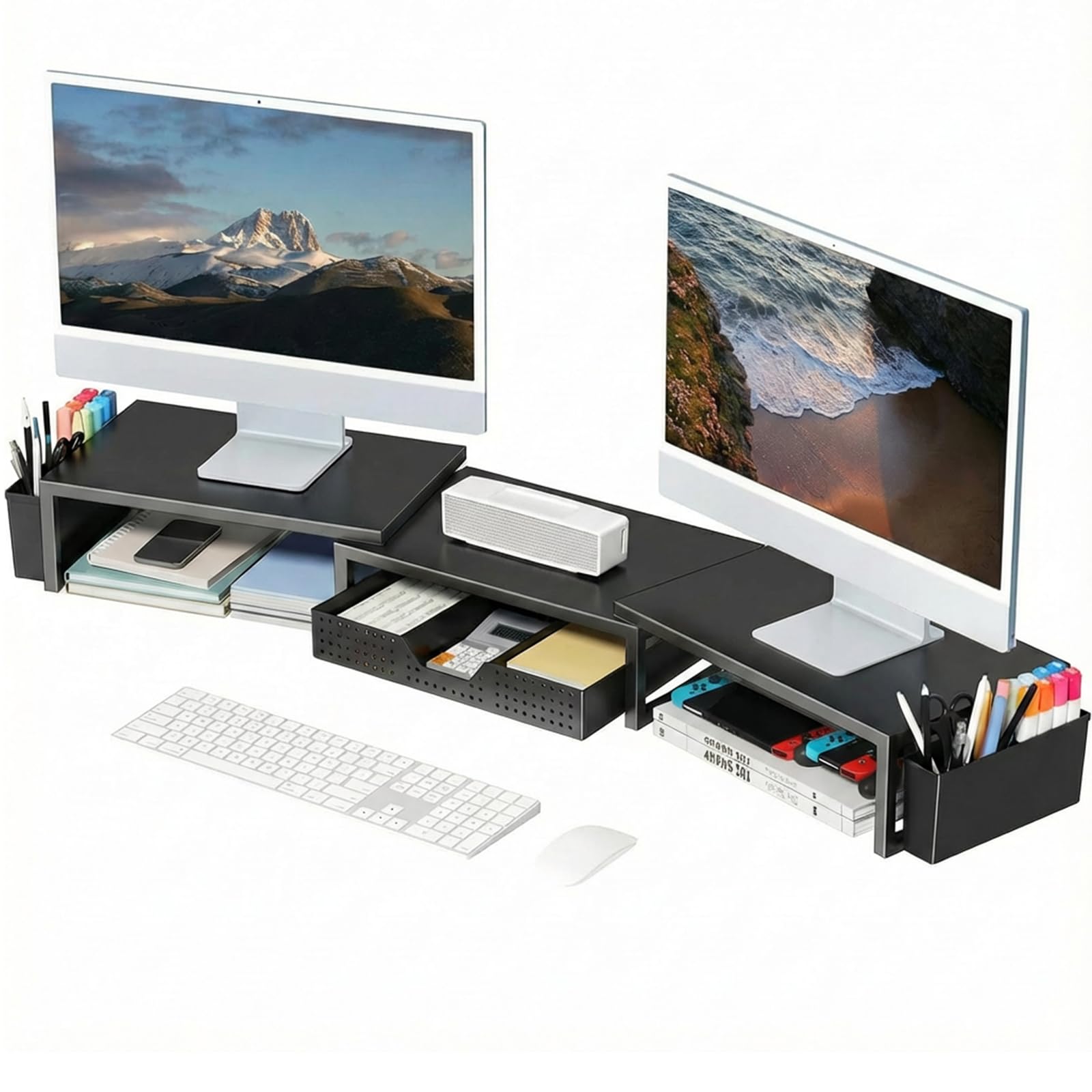
OPNICE’s dual monitor stand is built from alloy steel and raises your screens by 3.78 inches, getting them to proper eye level so you stop slouching. At 16.06 inches deep and 10 inches wide, it holds two monitors comfortably and still leaves room underneath to slide a keyboard or mouse pad when you are not typing. It adds a drawer and two hanging pen holders, turning empty space under the screens into usable storage. Buyers describe the assembly as minimal — basically unbox and place — and praise the “nice weight and quality.”
It weighs 3.39 kg, which is noticeably heavier than the concrete organizer set above (0.59 kg) but that mass is exactly what makes it feel stable under two heavy monitors. The main grumble from owners is that it does not rotate; you get a fixed shelf. It also uses an adhesive strip instead of prongs for the drawer, so treat the latch gently.
What it does well
- Raises monitors to eye level — real posture help for long workdays
- Drawer and pen holders turn wasted under-monitor space into storage
- Sturdy alloy steel frame handles two 32-inch monitors
Worth noting
- Fixed shelf — does not rotate or adjust angle
- Adhesive strip for the drawer needs gentle handling
Best for dual-monitor users: If you spend eight hours looking at two screens, this stand saves your neck and frees up desk real estate underneath.
Not for you if: You need a rotating or tilting monitor arm — this is a fixed shelf.
5. 6-Piece Leather Desk Set

The full desk makeover that looks like executive leather for a fraction of the cost.
RHCSZ delivers six coordinated pieces — a writing pad, magazine folder, file paper tray, letter sorter, pen cup, and sticky note holder — all wrapped in brown faux leather with hand-stitching over MDF interiors. The set weighs 6 pounds, so each piece feels substantial on the desk. The deep file tray fits regular folders, and the waterproof leather surface wipes clean in seconds. Owners say it “looks way more expensive than the price.”
This is the set for someone who wants a unified look without hunting for matching pieces separately. Every component is ready to place straight from the start — no assembly. The trade-off is the faux leather coating: it looks great but will show wear around the edges faster than real leather or metal mesh would. It is also a large footprint at 13.58 x 11.42 x 5.12 inches, so measure your desk first.
Reasons to buy
- Coordinated 6-piece set means your whole desk matches instantly
- Waterproof faux leather surface — easy wipe-clean maintenance
- File tray and magazine holder are deep enough for real folders
One caution
- Faux leather may show edge wear over heavy daily use
- Significant footprint — not ideal for a small or crowded desk
For the style-conscious: If you want your desk to look pulled-together and professional without shopping for five separate items, this set delivers.
Think twice if: Your desk is cramped or you prefer metal/mesh durability over a leather-like finish.
6. Elizo Real Leather Desk Mat Set
The oversized leather mat that turns your whole desk into a premium writing surface.
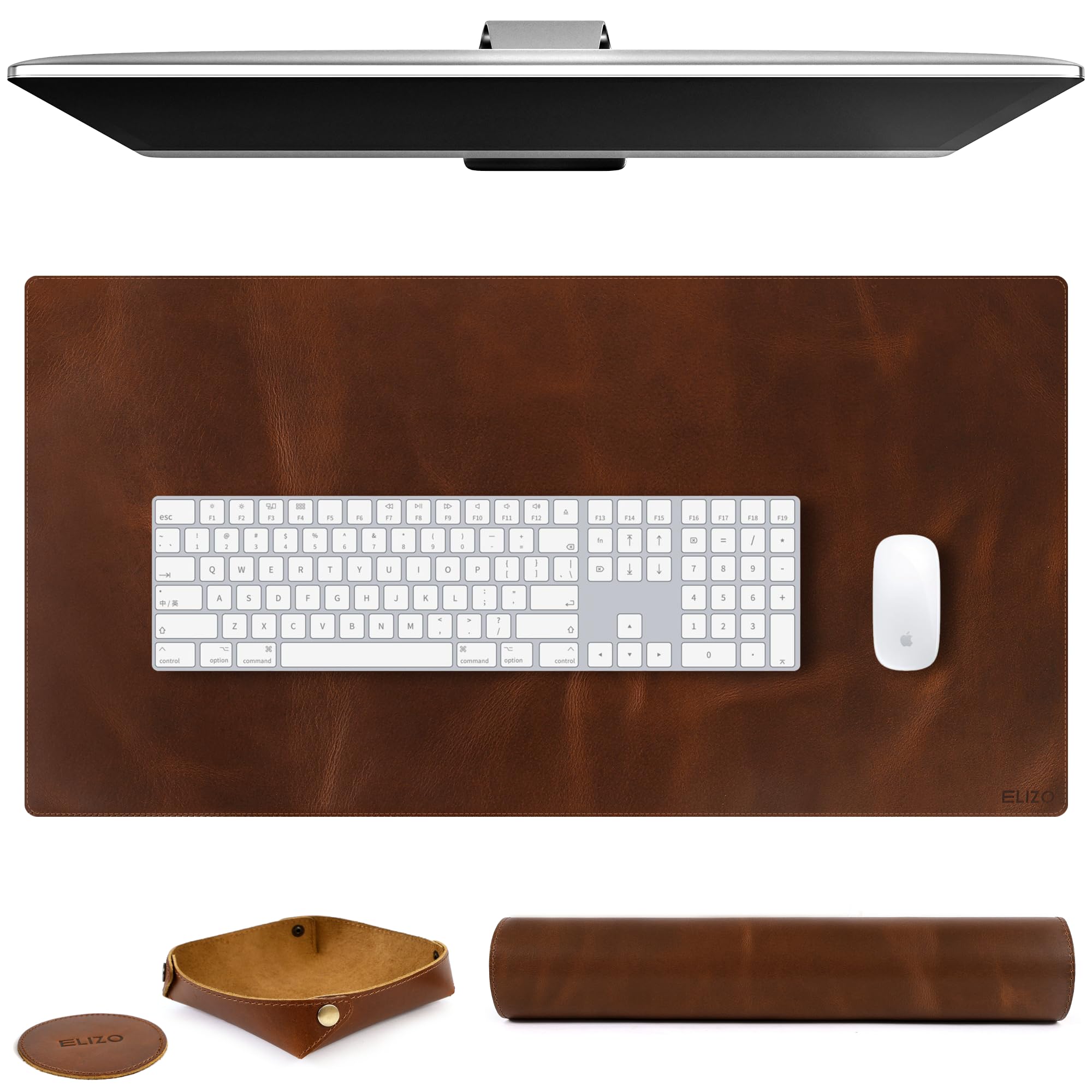
At 32 by 16 inches, this full-grain leather pad replaces both your mouse pad and keyboard pad with a single smooth surface. The 2mm thickness means it lies completely flat from day one (no curling edges), and the leather grain gives it a soft, natural-feeling texture that owners say tracks a mouse beautifully. The set also includes a matching leather tray and coaster — a classy bonus for keys and your morning coffee.
What people rave about is that it is real full-grain leather, not the usual PU-coated plastic. The distressed antique finish hides minor wear, though a minority of owners do note that genuine leather can scratch if you are not careful — that is the nature of the material, not a defect. A light glue smell from the start fades within a week. It is the single piece that instantly improve the feel of your whole desk.
The highlights
- Genuine full-grain leather — ages naturally, not fake PU
- 2mm thickness lays dead flat — no annoying curled corners
- Large 32×16 inch size covers a full keyboard and mouse
Honest heads-up
- Real leather can show scratches if you drag sharp objects across it
- Initial glue smell may linger for up to a week
Perfect for: Anyone who wants a tactile, premium surface under their keyboard and mouse — real leather changes the feel of your whole workspace.
Not ideal for: Heavy-handed users who frequently cut or scrape things on their desk pad.
7. 17-in-1 Black Desk Organizer Set

The everything-in-one-box kit for anyone starting fresh — pens, punch, scissors, stapler, and more.
Froidesente packs 17 pieces into this set: 3 organizers plus 14 tools including 4 ballpoint pens, a hole punch, a stapler with 24/6 staples, a staple remover, scissors, a 6.7-inch ruler, a box of clips, a tape dispenser with tape, and a sticky notes holder. The organizers use powder-coated metal with rounded edges that won’t scratch your hands, and the bottom has non-slip spacers to protect your desk. At 1.98 kg, it is the heaviest organizer-only set here, which tracks with the metal construction. Owners say it “holds more than expected” and that the pens write well.
The stapler has two binding modes you can switch between — a small detail that adds real utility. The hole punch uses soft silicone for a comfortable grip. The recurring note from owners is that the stapler needs a firm press to drive through multiple papers, and an occasional unit arrives with a broken tape dispenser. For the price, though, the value is tough to beat.
What you get
- 17 pieces cover nearly every basic desk need in one box
- Powder-coated metal build with non-slip bottom pads
- Stapler offers two binding modes
Watch for
- Stapler takes a firm press for thick stacks
- Tape dispenser has been reported as fragile in some units
Go-to for college or a new home office: One order gives you a full desk setup without buying fifteen separate items — unbeatable for the convenience.
Not for you if: You already own good-quality tools and just need an organizer.
8. Black Desk Organizer and Accessories Set

The mesh caddy that corrals a surprising amount of gear into a small footprint.
auroray’s black mesh organizer uses powder-coated metal with smooth edges and a classic finish that blends into any desk. The 7 compartments — 6 individual slots plus one sliding drawer — give you dedicated homes for staplers, scissors, paper clips, and pens without taking over your surface. At 5.51 x 8.66 x 5.12 inches, the mesh organizer uses more desk space than the concrete set’s individual holders, but it holds much more. Buyers report it “fits great in the space” and requires no assembly.
The kit includes a stapler, 1000 staples, a tape dispenser, scissors, ruler, pen holder, and clips. Owners mention that the metal build feels nice and the compact size is perfect for a printer-side station. The honest catch is the staple remover, which owners describe as “weak and struggles with multiple papers.” Treat it as a backup tool rather than your daily driver.
Reasons it works
- 7-compartment mesh organizer fits a lot without eating your whole desk
- Powder-coated metal is durable and easy to wipe clean
- No assembly — unbox and place
The one letdown
- Staple remover is not up to heavy-duty stapling — expect to replace it
Best for tight spaces: If your desk real estate is precious and you need a single caddy that holds the essentials, this mesh organizer does the job.
Look elsewhere if: You staple dozens of documents daily and need a pro-grade stapler and remover included.
9. Purple 12pcs Desk Accessories Set

The colorful starter kit that turns a boring cubicle into a workspace with personality.
Scindaly’s purple set includes 12 pieces: a mesh desk organizer with 7 compartments (6 sections plus a sliding drawer), a tape dispenser, a stapler, 1000 staples, a staple remover, a pencil holder, scissors, a ruler, 200 sticky tabs, tape, a ballpoint pen, and a 4-grid clip set. The powder-coated metal and plastic build is sturdy enough for daily use, and the color is the star — owners say it “adds a pop of pink” and draws compliments from coworkers. At 1.22 kg, it weighs the same as the black mesh set above but gives you more included accessories.
The organizer itself is the anchor piece, with enough space to store pens, clips, and small supplies in the six compartments plus the drawer. The quality is the most-praised aspect, followed closely by the appearance. The main concern from owners is that an occasional set arrives missing an item — check the box contents as soon as it arrives. The staple remover is fine for light use but not built for deep staple pulling.
Why people love it
- Vibrant purple finish brightens up a dull office instantly
- 12 pieces cover most desk needs in one purchase
- 7-compartment mesh organizer is functional and roomy
Be aware
- Missing items are reported by some buyers — inspect on arrival
- Staple remover is adequate for light use only
Grab this for: Adding a fun, coordinated color to your workspace while getting everything you need to start working — the purple is genuinely cheerful.
pass on it if: You prefer a neutral, professional-black look or you need heavy-duty office tools.
Understanding the Specs
Material and Build Quality
The material of your desk accessories determines how long they last and how they feel every day. Powder-coated metal resists scratches and is easy to wipe clean — great if you are hard on your gear. Concrete gives a premium, weighty feel but can chip if knocked over. Full-grain leather on a desk mat feels soft and ages naturally, while faux leather looks great initially but may show edge wear quicker. Look for “powder coated” or “sturdy metal” in the specs if durability is your priority.
Charging Wattage and Ports
For a charging station, the number of USB-C ports and the max wattage per port is what decides if your laptop charges at full speed. A port delivering 100W can charge a 16-inch MacBook Pro quickly, while a 70W port still works but tops out slower on larger laptops. Retractable cables reduce desk clutter, but note the cord length — 2.3 feet is fine for desktop use near an outlet, while a 5-foot cord gives you more placement flexibility. Shared power output means plugging in multiple devices drops each port’s speed, so if you often charge three devices at once, look for a station with higher total wattage.
FAQ
Will a concrete desk organizer chip or break if I drop it?
How do desk clamp power strips attach to my desk?
Can a monitor stand really help with neck pain?
Is real leather on a desk mat better than faux leather?
How many USB-C ports do I need on a desk charging station?
Can I use a desk mat with a gaming mouse?
What is the difference between a power strip and a charging station?
Will a 6-piece leather desk set fit on a small desk?
How do I clean a powder-coated metal desk organizer?
What does “GaN technology” mean for a charger?
Final Thoughts: The Verdict
Across the board, the office desk accessories winner is the Aesthetic Desk Organizer Set because it brings real concrete build quality to a clean, minimalist design that works on any desk, and the near-perfect owner satisfaction backs it up. If you want to solve cable chaos once and for all, grab the Anker Nano Power Strip — the desk clamp design is a revelation for standing desks. And for a complete desk makeover that looks like a premium executive set, the 6-Piece Leather Desk Set is the one to reach for. Pick the piece that solves your biggest desk pain — everything else follows.
How We Picked
We do not accept paid placement. Every pick is matched to a real buyer and a real use-case; we do not hands-on test units.
Sources & Methodology
Specifications: manufacturer listings and product documentation. Review insights: verified customer reviews, as of July 2026. Pricing: not shown on this page (it changes often); check the current price via the retailer link.
As an Amazon Associate, Gadgets Feed earns from qualifying purchases. This does not affect which products we feature.