
Our readers keep the lights on and my morning glass full of iced black tea. As an Amazon Associate, I earn from qualifying purchases.
Specs are compiled from manufacturer listings and verified buyer reviews and can change over time — please confirm the key details on the product page before buying.
Dropping five grand or more on a gaming PC means you expect everything to disappear except the game — no frame drops, no noise, no stuttering when you alt-tab (switch between programs instantly). But at this price tier, the difference between a smart buy and a headache often depends on what owners actually report living with, not the printed specs. This guide taps straight into that real-world verdict for four very different luxury desktops.
I’m Min — the founder and writer behind Gadgets Feed. This guide is built by comparing the manufacturers’ published specifications and the patterns across verified customer reviews, so you get each pick’s real strengths and trade-offs instead of marketing spin.
If you are ready to commit serious cash to a rig that will dominate 4K gaming for years, these are the crowd‑vetted top contenders for the best $10000 gaming pc.
Our Picks at a Glance

How To Choose The Best $10000 Gaming PC
At this price point, almost every rig delivers extreme power. The real decisions come down to cooling headroom, memory speed, upgrade paths, and the quality of the included peripherals — all areas where a few wrong choices can turn a dream machine into a loud, bottlenecked frustration (a part that holds back overall performance).
Graphics Card Generation Matters More Than Brand
The GPU (Graphics Processing Unit, the main chip that renders images) does the heavy lifting for 4K and ray tracing (a lighting effect that simulates real light behavior). An RTX 5090 with 32GB of GDDR7 (a type of very fast video memory) will outlast a 5080 for future titles, but the gap is smaller than the price difference suggests. Focus on the specific card tier, not the AIB (Add-In-Board partner, like ASUS or MSI) partner name.
Watch Out for Slow RAM in a Premium Chassis
Many high‑end pre‑builds ship with 5200 MHz or 5600 MHz DDR5, which can leave performance on the table compared to 6000 MHz. DDR5 6000 is the current balance for Ryzen X3D chips (processors with extra game-friendly cache memory); check the spec before you buy.
Cooling and Noise Are the Real Quality Markers
Liquid cooling with a 360mm radiator (a three-fan heat exchanger) is standard at this tier, but not all implementations are quiet. Reviews that mention fan noise under load or pump whine should steer you toward systems with independently praised thermal solutions.
Quick Comparison
| Model | Best For | GPU | CPU | RAM | Amazon |
|---|---|---|---|---|---|
| Alienware Aurora (RTX 5080)★ Best Overall | Out‑of‑box 4K gaming + quiet operation | RTX 5080 16GB | Core Ultra 9 285 | 32GB DDR5 5200 | Amazon |
| GIGABYTE AORUS (RTX 5090) | Top‑tier future‑proof 4K/8K | RTX 5090 32GB | Ryzen 7 9800X3D | 64GB DDR5 | Amazon |
| Skytech Azure 3 (RTX 5080) | Max value for 4K Ultra settings | RTX 5080 16GB | Ryzen 7 9800X3D | 32GB DDR5 6000 | Amazon |
| Thermaltake View 9580S (RTX 5080) | Customizable RGB showpiece | RTX 5080 16GB | Ryzen 9 9950X3D | 32GB DDR5 6000 | Amazon |
In‑Depth Reviews
1. Alienware Aurora ACT1250 (RTX 5080)
Our pick — over 4★ from 100+ verified ratings; the strongest balance of quality and price.
The crowd‑favorite that runs butter‑smooth and stays whisper‑cool.
The 240mm liquid cooler (a two-fan radiator) keeps the Intel Core Ultra 9 285 — which boosts to a 5.6 GHz maximum — under wrap during long sessions. Buyers report the system running at 66°C under full load at only 65% fan speed. One owner says they achieved a world record 3D Mark (a popular benchmarking tool) score with an overclock (running components faster than stock), pushing the i9‑285k to 6.2GHz and the RTX 5080 to a 3.2GHz core clock with +3000 memory, all while staying stable.
The RTX 5080 with 16GB of GDDR7 handles modern titles at maxed‑out 4K settings. Buyers consistently praise its quiet operation — 19 people single it out in their reviews — and the easy setup process. The Alienware Command Center gives you full control over the customizable AlienFX lighting zones, from stadium lights to keyboard sync.
There is a catch worth knowing: the 32GB of DDR5 runs at 5200 MHz. Compared to the 6000 MHz kit that the Skytech Azure 3 uses, this is a noticeable step down for Ryzen chips, though Intel’s architecture is less sensitive to it. The bundled wired keyboard and mouse are basic — plan to replace them if you already own quality peripherals. A few owners mentioned the RAM slot aesthetics and the lack of an included mechanical keyboard.
Owner‑approved power: Performance is the most‑praised feature by a wide margin — 39 owners lead with it — followed by the near‑silent fan curve. If you want a system that lets you game and livestream for hours without noise, this is the one.
Grab it if: you want a proven, quiet 4K machine with manufacturer onsite support and a chassis that looks the part.
Look elsewhere if: you need 6000 MHz RAM from the start or want a fully mechanical keyboard included.
2. GIGABYTE AORUS Supreme 5 (RTX 5090)
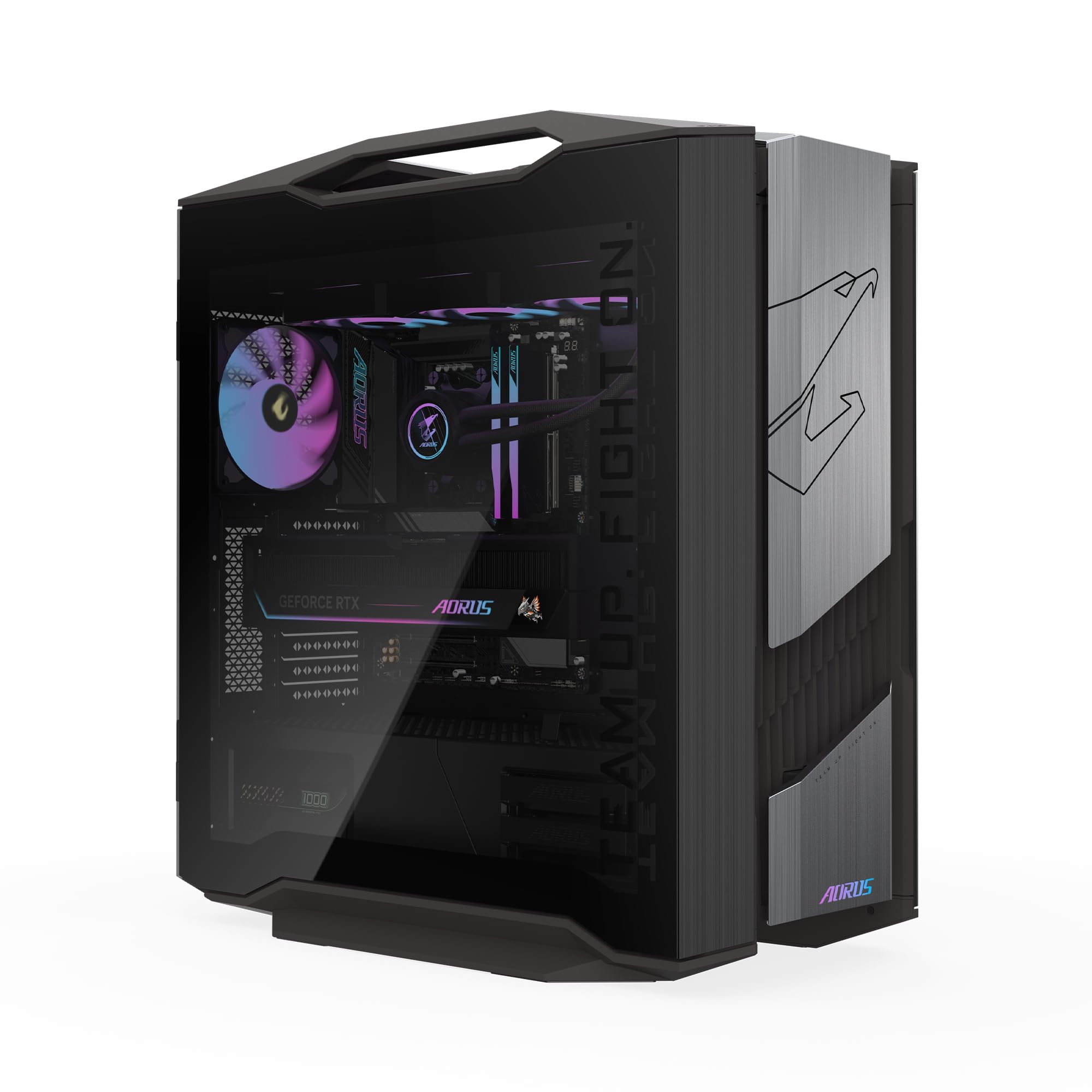
The heavy‑hitter with double the VRAM and no compromises.
The GPU is the story here: a full AORUS GeForce RTX 5090 MASTER with a massive 32GB of GDDR7 — compared to the 5080’s 16GB of VRAM (video memory, which stores textures and graphics data). That extra headroom means this machine handles 8K textures, heavy modding, and AI workloads. Graphics card RAM of 32GB puts it in a league above everything else here, including the Alienware and Skytech. The Ryzen 7 9800X3D processor, which can hit a maximum of 5.2 GHz turbo, pairs with an AORUS X870 motherboard and a 360mm AIO liquid cooler (a three-fan radiator).
Build quality gets universal praise. Owners say the cables are arranged well, the side panels are easy to remove for cleaning, and the tempered glass case looks sharp. The WINDFORCE cooling system with Hawk Fans keeps the RTX 5090 quiet even under heavy load — one owner put it simply: “the GPU is quiet and barely has to go all out.” The system arrived ready to run from the start for most buyers, though a quick BIOS check to set the correct memory speed is a helpful first step.
Speaking of that BIOS note (Basic Input/Output System, the motherboard’s low-level settings menu): a few owners mention the RAM speed is set to a lower default from the factory, so you will want to enable the full 64GB DDR5 speed manually. It is a five‑minute fix, but it is worth knowing going in. Beyond that, the upgrade paths are generous — plenty of room for additional storage and a well‑laid‑out interior.
What owners rave about
- 32GB RTX 5090 easily runs everything at max settings
- Easy‑access tempered glass panels for cleaning
- Quiet even during extended sessions
The one setup gotcha
- Memory speed needs enabling in the BIOS — not plug‑and‑play for that spec
For the gamer who wants no ceiling: if you demand the highest VRAM count (32GB) and a system that feels premium inside and out, this is the one.
skip it if: the price gap over an RTX 5080 build is more than you are comfortable with for the performance difference.
3. Skytech Gaming PC Azure 3 (RTX 5080)

The AMD 3D V‑Cache build that hits the value balance.
Where this rig wins is the whole package for the money. You get the RTX 5080 with 16GB GDDR7, the AMD Ryzen 7 9800X3D (5.2 GHz turbo), and critically — 32GB of DDR5 6000 RAM. That 6000 MHz speed is the current ideal for Ryzen X3D chips, and Skytech includes it without any BIOS hassle, unlike the GIGABYTE AORUS. The 360mm AIO liquid cooler with ARGB fans (Addressable RGB, meaning each light can be a different color) is included, so thermal throttling (the CPU slowing down to avoid overheating) is off the table. This pre‑build is assembled in the USA and comes with a free gaming keyboard and mouse.
Owners are universally satisfied. One buyer who uses the system for both gaming and video editing said the only upgrade they needed was adding a second 2 TB drive. The 2 TB NVMe M.2 SSD (a very fast storage drive that connects directly to the motherboard) is already up to 30x faster than a traditional HDD (Hard Disk Drive). Reviews describe it as “awesome” and “a beast of a machine” with no complaints about noise or performance. The system runs all current AAA titles at Ultra settings, 4K resolution, and a smooth 60+ FPS.
The trade‑off is a matter of brand recognition and support. Skytech is a smaller integrator compared to Dell or GIGABYTE, so warranty claims rely on their 1‑year parts and labor policy. Users who want a brand‑name warranty with onsite service may prefer the Alienware. But for pure spec‑for‑spec value, this is the strongest play here — faster RAM than the Alienware at 6000 MHz versus 5200 MHz.
Why it stands out
- Ryzen 7 9800X3D + 6000 MHz DDR5 — optimal match for gaming
- 360mm AIO with ARGB delivers top‑tier thermals
- Included keyboard and mouse, no bloatware
The catch
- No onsite service — 1‑year warranty is standard, not premium
Grab it if: maximum gaming performance per dollar is your priority and you are comfortable with a smaller integrator for support.
Consider the Alienware if: you prefer a big‑brand warranty and onsite service over the faster RAM.
4. Thermaltake LCGS View 9580S‑380XL (RTX 5080)
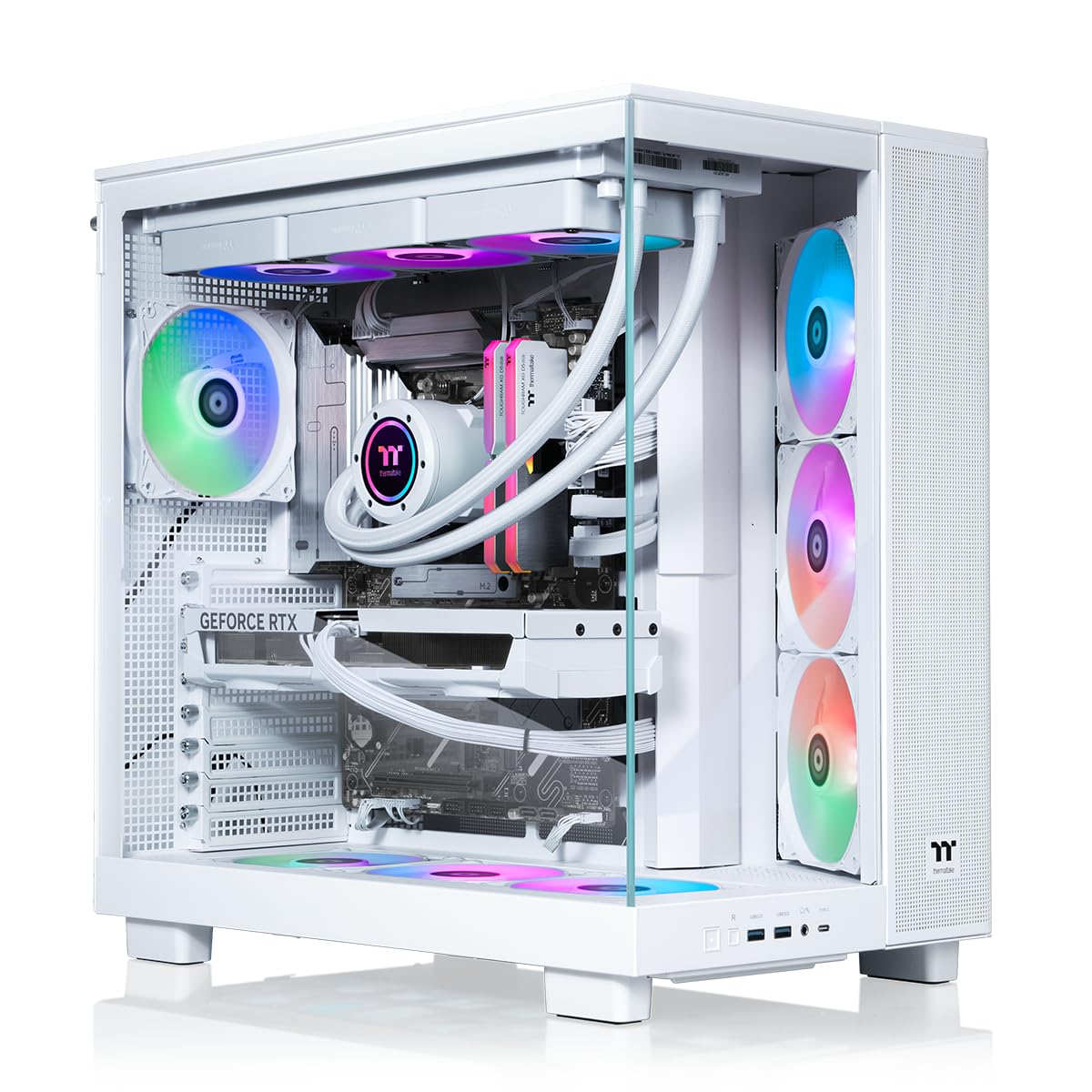
The showpiece with a Ryzen 9 9950X3D and 10 ARGB fans.
This is the only build here with the top‑tier AMD Ryzen 9 9950X3D CPU, paired with an X870 chipset motherboard and a 360mm closed‑loop liquid cooler. In a buyer’s own words: “Works from the start, very fast FPS, quiet operation even at full power.” The panoramic front and side tempered glass panels showcase the customizability of the RGB lighting. SignalRGB is the recommended tool for full lighting control, per one owner. The RTX 5080 here (a Zotac OC Solid Core in many units) delivers the same 16GB of GDDR7 performance as the other 5080 builds.
Functionality and gaming performance are the two aspects owners mention most — both with five positive mentions each. The system boots immediately, runs demanding games and streaming without issue, and one owner confirmed it handles music production perfectly. The 32GB of DDR5 runs at 6000 MT/s (Megatransfers per second, equivalent to MHz), keeping the CPU fed without bottlenecking.
Shipping damage is the main variable here. While many units arrive flawless, a few owners mention fan header pins coming loose during transit and, in rare cases, a non‑functioning system. The lack of USB ports on the top or front is also a recurring gripe if you keep the tower on the floor. Customer service response times have been a sore point for the small number who needed returns.
Light show, heavy frames: If you want a stunning display piece that delivers at 1440p and 4K, the Thermaltake is the looker of the list. Just factor in a potential BIOS adjustment (core parking) and careful handling of shipping.
Best for: the builder who wants the top AMD CPU (9950X3D) in an eye‑catching white and glass chassis with 10 RGB fans.
Think twice if: you need rock‑solid front‑panel USB placement or cannot risk any shipping‑related handling issues.
Understanding the Specs
VRAM — Video Memory on the GPU
VRAM holds the textures and assets the graphics card is currently processing. An RTX 5080 comes with 16GB of GDDR7, which handles every 4K game on the market. The RTX 5090 provides 32GB, a buffer for future titles, VR mods, and creative workloads. More VRAM rarely hurts, but you will only feel the difference in extreme use cases like 8K gaming or heavy modding.
DDR5 RAM Speed (MT/s or MHz)
RAM speed is how fast the system memory talks to the CPU. For AMD Ryzen X3D processors, 6000 MHz is the balance — anything slower, like 5200 MHz, leaves frames on the table. For Intel chips, the gap is smaller. Always check whether the pre‑build ships at 6000 MT/s or if you need to enable it in the BIOS.
FAQ
Is an RTX 5090 worth the jump over an RTX 5080?
Will I notice the difference between DDR5 5200 and DDR5 6000?
What is a 360mm AIO cooler and do I need it?
Should I build my own $10000 gaming PC instead?
What is AMD 3D V‑Cache and why does it matter?
What size monitor works best with these PCs?
Do these pre‑builds come with bloatware?
What kind of warranty should I expect at this price?
Will a 1000W power supply be enough for an RTX 5090?
Final Thoughts: The Verdict
Across the board, the $10000 gaming pc winner is the Alienware Aurora ACT1250 because it balances proven performance, whisper‑quiet cooling, and the confidence of Dell’s onsite service — backed by the most positive owner feedback. If pure GPU firepower is the priority, the GIGABYTE AORUS Supreme 5 with its RTX 5090 and 32GB of VRAM is the no‑compromise choice. And for the best spec‑for‑value, the Skytech Azure 3 gives you the ideal Ryzen and RAM pairing without the premium markup.
How We Picked
We do not accept paid placement. Every pick is matched to a real buyer and a real use-case; we do not hands-on test units.
Sources & Methodology
Specifications: manufacturer listings and product documentation. Review insights: verified customer reviews, as of July 2026. Pricing: not shown on this page (it changes often); check the current price via the retailer link.
As an Amazon Associate, Gadgets Feed earns from qualifying purchases. This does not affect which products we feature.