
Our readers keep the lights on and my morning glass full of iced black tea. As an Amazon Associate, I earn from qualifying purchases.
Specs are compiled from manufacturer listings and verified buyer reviews and can change over time — please confirm the key details on the product page before buying.
For statistics students, the calculator in your bag can make or break your workflow. You need a calculator that handles standard deviation, linear regression, and probability distributions without hidden menus. A wrong pick forces you to double-check every result and wastes exam time on data entry.
I’m Min — the founder and writer behind Gadgets Feed. This guide is built by comparing the manufacturers’ published specifications and the patterns across verified customer reviews, so you get each pick’s real strengths and trade-offs instead of marketing spin.
The right tool should feel like a shortcut, not a puzzle — that is exactly what this list of the best calculator for statistics options delivers, cutting through the clutter to find your match.
Our Picks at a Glance

How To Choose The Best Calculator For Statistics
A statistics calculator must go beyond basic arithmetic. Feeding it data sets, running regressions, and plotting distributions — the right features save serious lab time.
Statistical Functions Are Non-Negotiable
Check that the calculator has built-in modes for mean, median, standard deviation, and at least linear regression (paired-variable statistics). Some models go further with hypothesis testing, confidence intervals, and probability distributions. If your course is AP Statistics or college-level intro stats, those extra modes are a lifesaver.
Graphing vs Non-Graphing: When It Matters
A graphing calculator lets you see the regression line, scatter plot, or distribution curve right on the screen. That visualization helps you catch data entry errors at a glance. If your exam allows it — and many like the AP, SAT, and ACT do — a graphing model is a clear upgrade. Non-graphing scientific calculators are faster to learn and cheaper, but you lose the visual feedback.
Power Source and Exam Rules
Look for dual solar/battery power if you want confidence during long exam sessions. Most standardized tests (AP, SAT, PSAT, ACT) permit calculators with specific features; some ban Computer Algebra Systems (CAS). Before buying, check your test board’s approved list — a disallowed calculator on exam day is a headache you do not need.
Quick Comparison
| Model | Best For | Functions | Display | Power Source | Amazon |
|---|---|---|---|---|---|
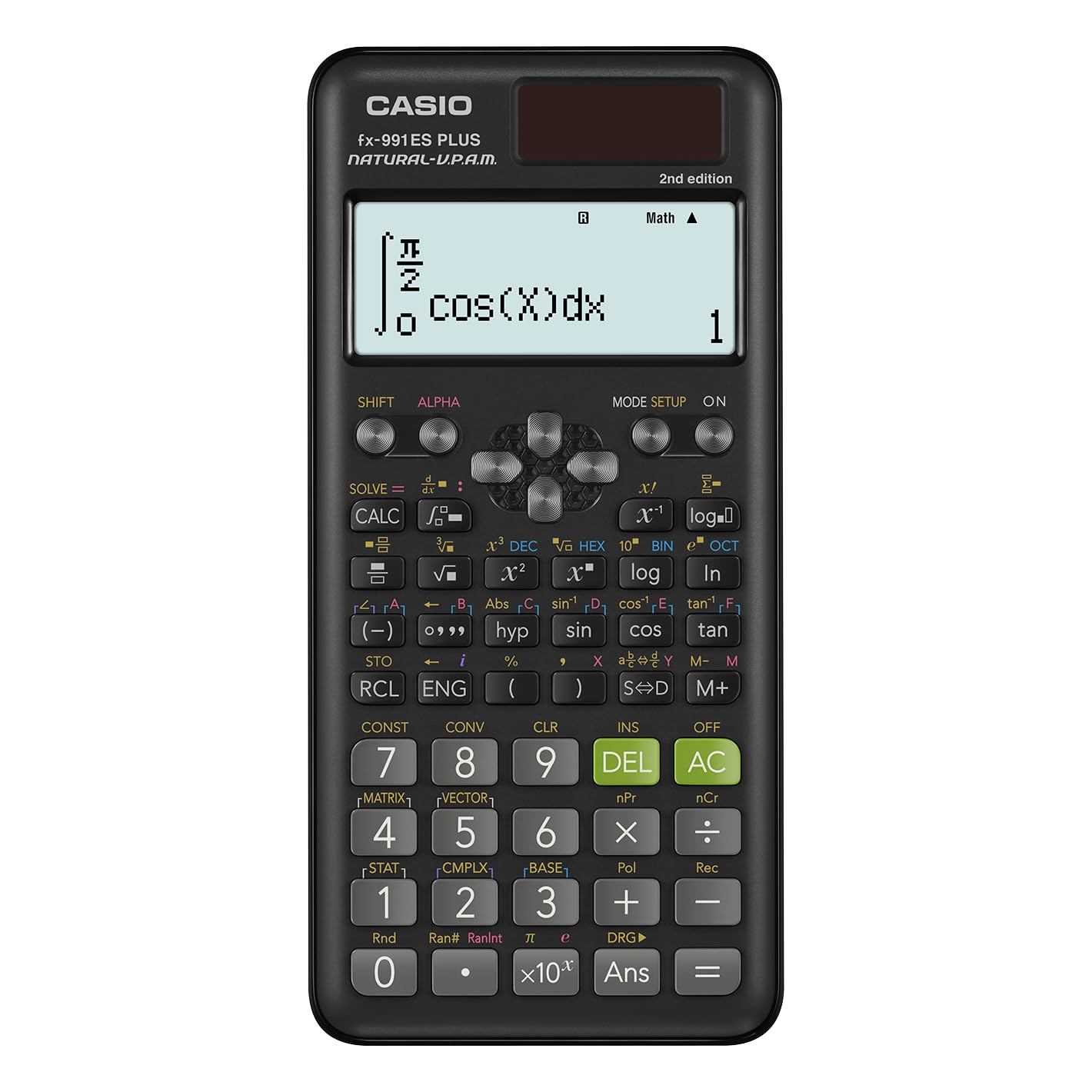
| Casio fx-991ES Plus 2★ Best Overall | Best Overall | 417 | Natural Textbook | Solar + Battery | Amazon |
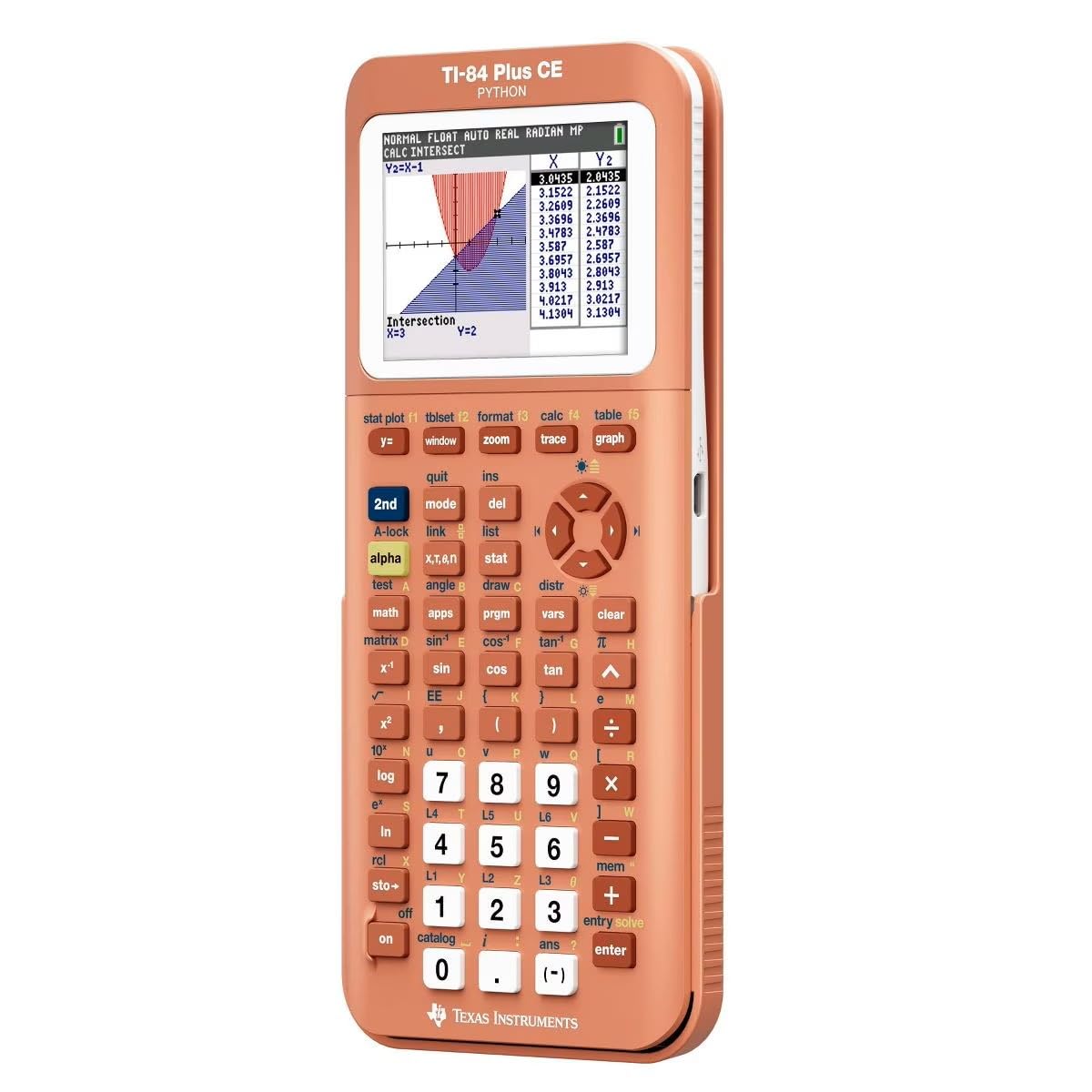
| Texas Instruments TI-84 Plus CE PythonPremium Classic | Premium Classic | Built-in Apps | High-Res Color | Rechargeable | Amazon |
| TI-Nspire CX II CASCollege Power User | College Power User | CAS System | 320 x 240 Color | Rechargeable | Amazon |
| Casio fx-CG100 ClassWiz | 3D Graphing | Advanced | 65K Color, 3.7″ | 4x AAA | Amazon |
| TI-84 Evo | Classroom Standard | Icon-based | 50% More Space | USB-C | Amazon |
| Nadex Scientific with Graph | Budget Graphing | 360+ | Large Screen | Solar + Battery | Amazon |
| ROATEE 36X Pro | School Starter | 360 | 3″ Screen | Battery | Amazon |
| IPepul Scientific Graphing | Budget Entry | 10 Modes | 128 x 64 | 4x AAA | Amazon |
In‑Depth Reviews
1. Casio fx-991ES Plus 2 Scientific Calculator
Our pick — over 4.5★ from 3,000+ verified ratings; the strongest balance of quality and price.
The lightest in the lineup at 95 g, yet it packs 417 functions.
You get a Natural Textbook Display (it shows equations and statistical expressions exactly as they appear in your textbook) — no mental translation needed. The dual solar/battery power means it keeps running even if the room lighting dims, a real comfort during a three-hour exam.
But the sheer number of functions (417) is the headline. That covers everything from basic trigonometry and statistics through to advanced calculus, regression, and correlation coefficients. One owner noted it handles everything from bench calculations in circuit design to complex stats without breaking a sweat. The crowd favorite among thousands of buyers earns a sky-high satisfaction rating. The only recurring nitpick is that the smooth plastic slides on glossy desks — a few owners added rubber feet, a minor hack for an otherwise perfect tool.
Exam-Ready Workhorse: The 24 levels of brackets and intuitive color-coded keypad make data entry fast and accurate, which matters when you are under time pressure. At this price point, the ratio of functions to cost is simply class-leading.
Reach for this if: you want a single calculator that covers high school through early college math, stats, and engineering — all in a compact, solar-powered body.
Look elsewhere if: you need full-color graphing or a Computer Algebra System for upper-level college math.
2. Texas Instruments TI-84 Plus CE Python Graphing Calculator, Coral
The coral color makes it impossible to lose in a dark backpack.
The TI-84 Plus CE is the gold standard for high school and college math for a reason. It delivers a high-resolution, full-color backlit display with 140 DPI and 16-bit color, which makes scatter plots and regression lines pop. The rechargeable battery lasts a long time — buyers report charging it only every few weeks even with heavy use.
What wins people over is the sheer reliability. The color screen is clear, the button layout is intuitive, and it handles everything from algebra through statistics and calculus. One chemistry major specifically loves the built-in periodic table with element data. The 3.2-inch screen is smaller than some newer models, but the software is so mature that you rarely feel limited. The recurring gripe is the price — it is a premium tool — but the build quality and resale value justify it for the long haul.
Durable and Dependable: One owner confirmed they already dropped it twice and it emerged without a scratch. The value-for-money rating is mixed, but the functionality score is rock-solid positive.
Best for: students in AP Statistics through college calculus who need a trusted, exam-approved graphing calculator with excellent battery life.
Think twice if: your budget is tight — the Casio fx-991ES Plus 2 covers most stats needs for a fraction of the cost.
3. Texas Instruments TI-Nspire CX II CAS Graphing Calculator
A Computer Algebra System that rewrites the rules of what a calculator can do.
The TI-Nspire CX II CAS includes a full Computer Algebra System (CAS), which means it performs symbolic calculations (factor, expand, and solve equations algebraically, not just numerically). For statistics, the built-in Data & Statistics app lets you summarize and analyze data using different graphical methods and charts directly.
It also has 8 built-in apps: Calculator, Graphs, Lists & Spreadsheets, Data & Statistics, Geometry, Notes, Vernier DataQuest, and Programming. You get the 320 x 240 pixel color screen with 6 different graph styles. The slim design weighs 9.12 ounces, making it surprisingly portable for such a powerful tool. The downside? The sheer number of functions means you might need to ask AI or YouTube how to use the more complex ones — the learning curve is real. Owners also note the boot time is slow, especially if you have many documents installed.
Symbolic Power: Unlike the TI-84 series, the CAS engine gives you exact answers (like √2 instead of 1.414), which is critical for theoretical stats proofs and college-level math.
Reach for this if: you are in college-level math, finance, or STEM and need symbolic algebra plus Python programming on a single device.
Look elsewhere if: your exam board bans CAS (like some ACT or military exams) — check first.
4. Casio fx-CG100 ClassWiz Color Graphing Calculator
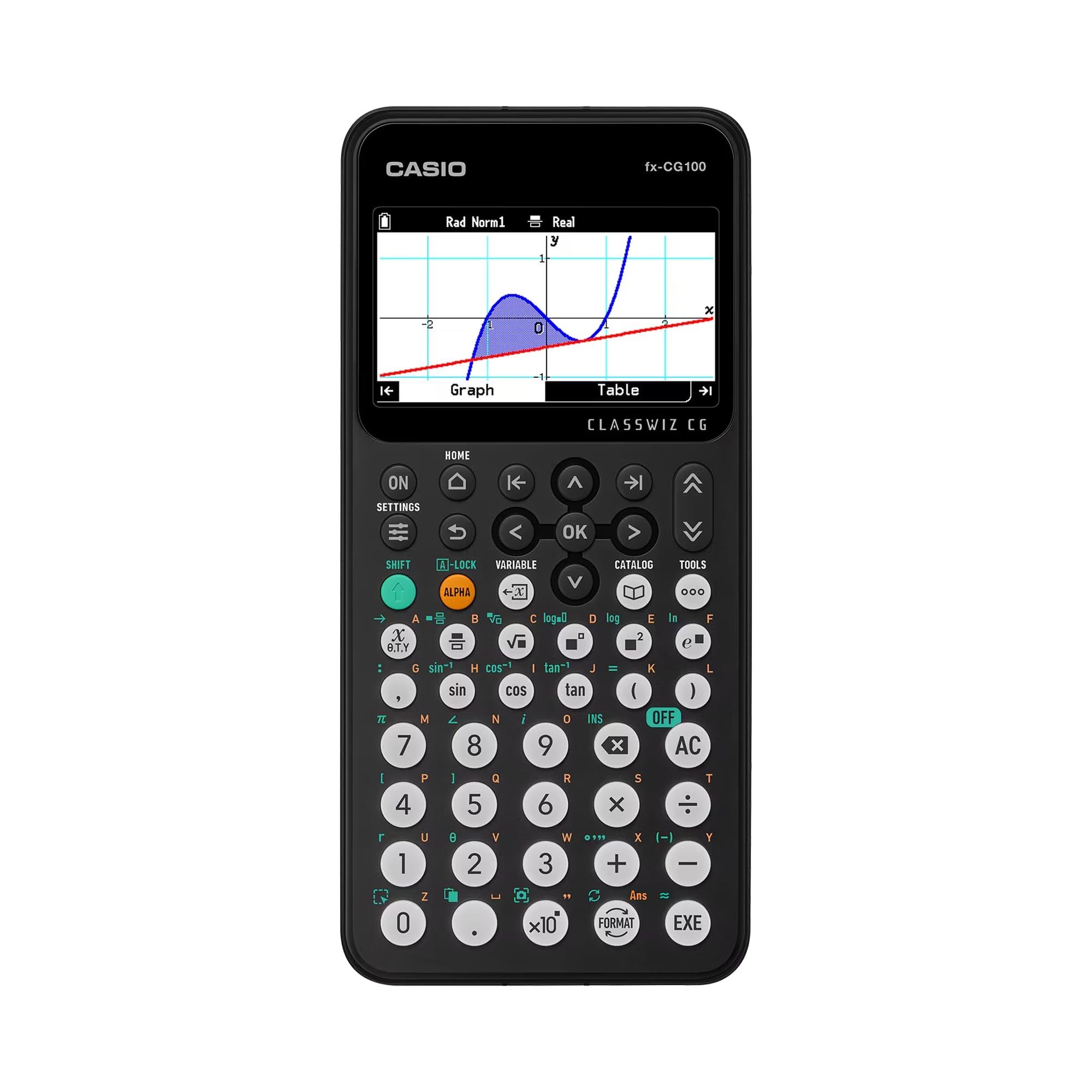
The large 3.7-inch color display is the biggest in this roundup.
The fx-CG100 supports 3D graphing of up to three functions simultaneously (think spheres, cylinders, and planes) — a standout for multivariable calculus and advanced statistics visualizations. The high-resolution backlit LCD offers over 65,000 colors, making graphs clear and readable even in bright lecture halls.
It features Natural Textbook Display, so expressions appear exactly as in your math book. The MicroPython integration means you can learn programming directly on the calculator, which is becoming standard in modern STEM curricula. The tab-based menu and glyph-based key labeling make navigation intuitive. It is exam-approved for AP, SAT, PSAT, and ACT, with a built-in Exam Mode for test security. The trade-off? At 8 ounces and powered by 4 AAA batteries (included), it is a hair heavier than some rivals, and the AAA requirement is a bit old-school compared to USB-C rechargeable models.
Visualization Leader:The enhanced contrast and flush-gloss panel improve visibility during data analysis and graph transformations, making it easier to spot trends.
Best for: students who need to present statistical data graphically and want a large, colorful screen for 3D plots.
Think twice if: you prefer a rechargeable battery and a slimmer profile — the TI-84 Evo is lighter.
5. TI-84 Evo Graphing Calculator, White
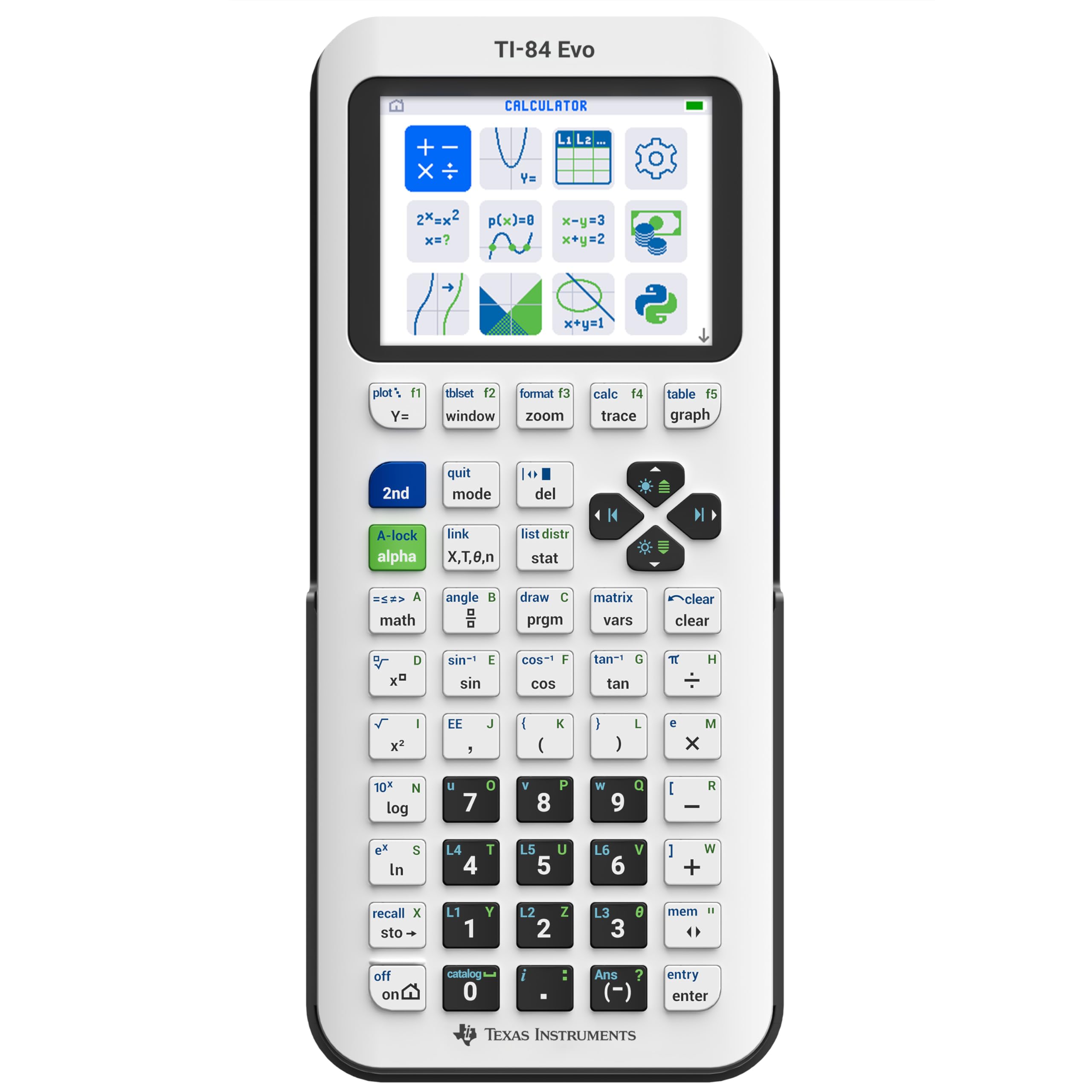
3x faster performance than the TI-84 Plus CE, and USB-C charging.
The newest addition to the TI-84 series moves to an icon-based home screen where popular math tools — including statistics and graphing — are front and center. The processor is 3x faster, meaning smoother graphing and quicker calculations when you are running multiple regressions.
The biggest visual upgrade is 50% more graphing space, making it easier to see patterns and relationships in your statistical data. The simplified keypad design with larger buttons and reduced clutter helps you work faster. At 7.2 ounces and USB-C rechargeable, it is the most modern classroom graphing calculator here. The downside? The price is premium, and some owners note the button layout has changed (the APPS shortcut moved), which can disrupt muscle memory if you are upgrading from a previous TI-84. The value-for-money rating is mixed among owners, but the functionality score is strongly positive.
Modern Feel: The matte finish resists fingerprints, and the included 4-year online subscription for tutorials and a duplicate online calculator adds serious value for self-study.
Reach for this if: you want the latest TI-84 with faster performance, USB-C charging, and a larger graph view for statistics.
Look elsewhere if: you are on a budget — the Casio fx-991ES Plus 2 covers stats for a fraction of the price.
6. Nadex Scientific Calculator with Graph Functions

A budget-friendly bridge between a scientific and graphing calculator.
The Nadex packs over 360 functions, including linear regression, standard deviation, permutations, and variable solving. The large screen enables simultaneous display of equations and graphic visuals, which helps you see your regression line while you adjust the data.
It comes with 3 operating modes: Calculation Mode, Angular Measurement Mode, and Display Mode. The solar power with a secondary replacement battery already in the chamber is a thoughtful touch for exam day reliability. However, note that this is not a full graphing calculator — the graph functions are intended for formula visualizations, not the deep plotting you get from a TI-84. The quality and ease of use receive mixed feedback among owners, with some finding the instructions confusing. Still, for honors and AP math classes, it is a very capable companion that costs a fraction of the premium models.
Works Great for AP Classes: One verified owner said it “works great and is very useful for honors or AP math classes” and praised the included booklet that explains all the different functions.
Best for: high school students who need graph visualization for statistics but cannot justify the cost of a TI-84.
Think twice if: you need full-color graphing or a Computer Algebra System — the graph functionality is more of a visualization tool than a plotting powerhouse.
7. ROATEE Graphing Scientific Calculators 36X Pro
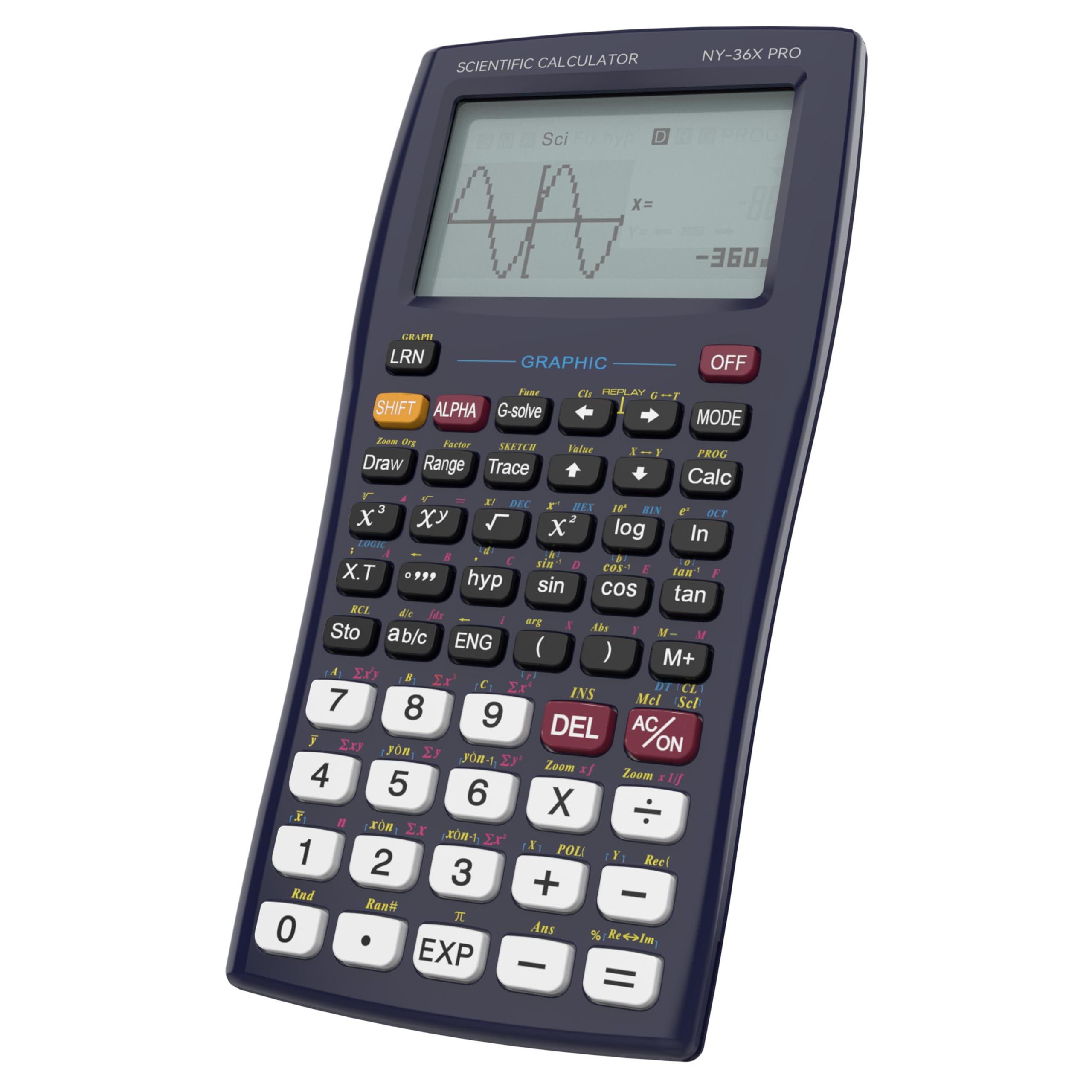
Lightweight at 129 g, but tough enough for a 14-year-old’s backpack.
The ROATEE includes 5 calculation modes: COMP, COMPLEX, SD (standard deviation), REG (regression), and BASE-N, making it directly suited for statistics work. The 3-inch screen is large enough for classroom demonstration, and the sliding cover design protects the screen from dust and falls.
The built-in reusable notepad with magnetic stylus is a standout feature for quick notes and sketches during problem solving. One owner confirmed the “buttons and screen still work after 2 months of rough use by a 14-year-old.” The reliability rating is mixed — some units have had issues — but the functionality score is overwhelmingly positive, with 152 owners praising it. The memo pad’s display is dim, and the key placement takes some getting used to, but at this price, the value proposition is strong for middle and high school students.
Functionality Leader: At 360 functions, this is comprehensive enough for Pre-Algebra through AP Statistics and Calculus, and it is compatible with PSAT, SAT, and ACT exams.
Reach for this if: you need an affordable graphing calculator for high school stats and the writing pad sounds useful for notes.
Look elsewhere if: you need a crisp, bright display for intense graph analysis — the display brightness is a known mixed point.
8. IPepul Scientific Calculator with Graphing Functions

10 built-in modes including a dedicated Statistics mode and G-Solve.
The IPepul is a versatile entry-level graphing calculator with 10 modes: Calculate, Complex, Statistics, Base-N, Equation, Table, Matrix, Vector, Graphic, and G-Solve. The dedicated Statistics mode handles regression and data analysis directly, which is rare at this price tier.
The 128 x 64 high-resolution screen shows formulas, tables, and graphs clearly, and the well-spaced keys reduce accidental presses. One owner noted it “does most everyday engineering math” and has solvers that are good enough for many applications. However, the graphing capability is not as deep as a TI or Casio — it is “good enough” rather than excellent. The instructions can be confusing, so expect a small learning curve if you are used to more established brands. It is powered by 4 AAA batteries (included) and has an auto power-off after 6 minutes to save energy.
Good Enough for College: One buyer using it for a nephew’s high school math confirmed it could even be used in university-level calculus and trigonometry settings.
Best for: budget-conscious students who need a graphing calculator with a dedicated stats mode for high school and early college work.
Think twice if: you need sturdy graphing or a well-documented user manual — the instructions have a reputation for being confusing.
Understanding the Specs
Statistical Functions (Regression & SD)
These are the core of any stats calculator. A regression mode (often labeled REG or STAT) lets you input paired data (x,y) and get the line of best fit, correlation coefficient, and predicted values. Standard deviation (SD) mode calculates mean, variance, and spread of a single data set. Without these, a calculator is just an expensive arithmetic machine for stats work. Higher-end models also handle hypothesis testing, confidence intervals, and probability distributions (binomial, normal, t-distribution), which are critical for college-level stats.
Display Type & Resolution
A Natural Textbook Display shows fractions, exponents, and statistical symbols exactly as they appear in your textbook, reducing input errors. Graphing calculators with color screens (like the TI-84 Plus CE or Casio fx-CG100) let you distinguish multiple data sets, regression lines, and distribution curves at a glance. Higher resolution (measured in pixels or DPI) means sharper graphs, which helps when you are analyzing tight scatter plots or complex function intersections.
Power Source & Exam Approval
Dual power (solar + battery) is a lifesaver during long exams — if the room lighting changes, the calculator does not die. Rechargeable calculators (like the TI-84 Evo with USB-C) are convenient but require planning ahead to charge. Always check your exam board’s approved calculator list: most non-CAS graphing calculators are allowed for AP, SAT, PSAT, and ACT, but some tests restrict Computer Algebra System (CAS) models like the TI-Nspire CX II CAS.
Function Count vs Usefulness
A higher number of functions (417 vs 360) sounds impressive, but what matters is whether those functions cover your specific curriculum. Many scientific calculators have modes you will never touch. For statistics, prioritize models with dedicated STAT, REG, and probability distribution modes over raw function count. A calculator with 360 functions that includes regression and hypothesis testing is far more useful than a 417-function model that buries those features in a generic menu.
FAQ
Can I use a graphing calculator on the AP Statistics exam?
What is the difference between a scientific and a graphing calculator for statistics?
How many functions do I need for college-level statistics?
What does a Computer Algebra System (CAS) do for statistics?
Is a solar-powered calculator reliable for long exam sessions?
How long does a rechargeable calculator battery last?
What is Natural Textbook Display and why does it matter for stats?
Will a TI-84 work for finance and business statistics courses?
What does the standard deviation (SD) mode actually do?
Can I transfer data from my calculator to a computer?
Final Thoughts: The Verdict
For most buyers, the best calculator for statistics is the Casio fx-991ES Plus 2 because it packs 417 functions, a Natural Textbook Display, and dual solar/battery power into a 95 g frame at a very accessible price — the crowd favorite with nearly a thousand positive ratings. If you need full-color graphing and the familiar TI ecosystem for AP exams, grab the Texas Instruments TI-84 Plus CE Python. For college-level work requiring symbolic math and a CAS engine, the TI-Nspire CX II CAS is the one to reach for. Each pick serves a different stage of your math journey — match the tool to your syllabus, not the hype.
How We Picked
We do not accept paid placement. Every pick is matched to a real buyer and a real use-case; we do not hands-on test units.
Sources & Methodology
Specifications: manufacturer listings and product documentation. Review insights: verified customer reviews, as of July 2026. Pricing: not shown on this page (it changes often); check the current price via the retailer link.
As an Amazon Associate, Gadgets Feed earns from qualifying purchases. This does not affect which products we feature.