
Our readers keep the lights on and my morning glass full of iced black tea. As an Amazon Associate, I earn from qualifying purchases.
Specs are compiled from manufacturer listings and verified buyer reviews and can change over time — please confirm the key details on the product page before buying.
Every single day, you reach across your keyboard to hit the same three shortcuts — Ctrl+C, Ctrl+V, Ctrl+X. That tiny stretch adds up. A 4-key keyboard puts your most-used commands under one hand, so you stop hunting and start flowing. This guide picks the best options by matching real-world specs to what owners actually say about them.
I’m Min — the founder and writer behind Gadgets Feed. This guide is built by comparing the manufacturers’ published specifications and the patterns across verified customer reviews, so you get each pick’s real strengths and trade-offs instead of marketing spin.
You need to decide one thing before picking a 4 key keyboard: do you want a pad that works right from the start for office shortcuts, or one you can fully program for gaming macros and custom commands?
Our Picks at a Glance


How To Choose The Best 4 Key Keyboard
A 4-key keyboard might look simple, but there are real differences under the keycaps. The main split is between a pad that works straight from the start for basic copy-paste tasks and a fully programmable one that you can set up for gaming combos, media controls, or complex macros.
Plug-and-Play vs Programming
Some 4-key pads arrive with a fixed layout — typically Select All, Copy, Cut, Paste. You plug them in and they work with no setup at all. Others let you remap every key through a software app or website, so you can assign a single key to open a program, type a password, or trigger a game combo.
Mechanical Switch Type
Most 4-key keyboards use mechanical switches. A linear (often red) switch is quiet and smooth, making it great for office typing where you do not want a loud click. A tactile switch gives a small bump you can feel. Some pads support hot-swappable switches, so you can change the feel later without soldering — a handy upgrade path.
Wired or Wireless
A wired USB-C pad is always ready and never needs charging. A wireless Bluetooth model lets you use it on the go with a tablet or laptop, but you have to remember to charge its internal battery. Pick what matters more: a clutter-free desk or a low-maintenance connection.
Quick Comparison
| Model | Best For | Connectivity | Switch Type | Key Function | Amazon |
|---|---|---|---|---|---|
| BTXETUEL Mini 4-Key★ Best Overall | Cut/Copy/Paste office shortcuts | USB-C | Mechanical | Ctrl+A, Ctrl+X, Ctrl+C, Ctrl+V | Amazon |
| SayoDevice Mini 4-KeyAlso Great | Plug-and-play arrow keys + gaming macros | USB-C | Mechanical (linear, hot-swappable) | Up/Down/Left/Right (default) | Amazon |
| BRIMFORD OSU Keypad | Cut/Copy/Paste for Mac and PC | USB-C | Mechanical (low-resistance, hot-swappable) | Cut/Copy/Paste/Select-All | Amazon |
| QINIZX USB Mini 4-Key | Budget-friendly customization | Type C to USB | Mechanical (red switch, hot-swappable) | Keyboard/Mouse/Multimedia modes | Amazon |
| PCsensor 4 Key Mini | Wireless use with tablet / iPad | Bluetooth + USB-C | Mechanical | Fully programmable | Amazon |
| Vaydeer 4 Key Keypad | Multi-layer macros and floating window | USB-C | Mechanical | Fully programmable with layers | Amazon |
In‑Depth Reviews
1. BTXETUEL Mini 4-Key Select-All Cut Copy Paste Macro Pad
Our pick — over 4★ from 150+ verified ratings; the strongest balance of quality and price.
The dedicated Ctrl-A-X-C-V pad that saves your wrist from one million keyboard reaches.
This one comes ready to rock for the most common office shortcuts: Select All, Cut, Copy, Paste. You plug the USB-C cable in and it works — no software, no drivers, no configuration. The appeal is immediate: the thing everyone raves about is compatibility — it works across Windows, Mac, and Linux without question.
Buyers also praise the build quality, calling it among the best for its price tier. You can customize it later through the SayoDevice website (the same platform as the SayoDevice pad) to set different functions, multimedia controls, or effect modes. The RGB lighting cycles through gradients by default, but the backlight sits on the back of the case rather than shining through the keycaps, so a few owners cover it with a sticky note or just turn it off via software.
At 1.8 ounces it is light enough to toss in a laptop bag. One owner recovering from pinky surgery found it a lifesaver — Ctrl+C/X/V had become painful, and the pad solved that immediately. The main trade-off is that the lighting is more of a desk glow than key illumination, and if you want backlit legends you will need to look elsewhere.
clipboard command center: Plug it in and your three most-used shortcuts live under one hand in under five seconds.
no customization software: The RGB is bright on the back edge rather than through the keycaps — fine as ambient light, less useful if you need to read key labels in the dark.
copy-paste pro: you want a dedicated copy-paste pad that works the second you plug it in.
complex macros: you need backlit key legends or you prefer a smaller footprint on your desk (the SayoDevice measures 2.5 inches long).
2. SayoDevice Mini 4-Key WASD Keypad
The tiny arrow-key pad that pleases everyone from StepMania dancers to laptop repairers.
This is the crowd favorite — owners consistently call it reliable and perfectly responsive. from the start it works as Up, Left, Down, Right, so you get instant arrow navigation for spreadsheets or document scrolling with zero setup. The real magic is the web-based programming: you remap keys at sayodevice.com, and the settings save directly on the device itself. Switch between computers and your custom layout travels with you.
The mechanical switches are linear (likely red), and owners describe them as “really, really, really soft and responsive.” The build is solid with rubber grips on the bottom. It also supports hot-swappable switches, so you can change the feel later without a soldering iron. At 2.5 inches long and 1.7 inches wide, it is notably more compact than the BTXETUEL Mini 4-Key, which measures 3.5 inches long.
Owners use it for Helldivers 2 stratagem inputs, for StepMania at high difficulty levels, and even as a workaround for a broken laptop arrow key. The only small gap is that the RGB is single-color rather than full addressable per-key lighting. A few owners had to update firmware to fix RGB behavior, but the web tool makes that simple.
compact WASD specialist: Plug it in, use the arrow keys instantly, then customize whenever you want through a browser — no sketchy driver downloads.
limited to four keys: The default arrow layout is perfect for navigation, but if you need dedicated Cut/Copy/Paste from the start, you will need to remap the keys first.
gaming shortcut: you want a ready-to-use arrow pad that you can turn into anything later with web-based programming, backed by a 4.8 rating across a solid base of owners.
office tasks: you only want dedicated Copy/Cut/Paste keys with no setup at all — the next pick handles that from the start.
3. BRIMFORD OSU Keypad (4-Key)

The quiet copy-paste pad that disappears on your desk and just works.
This pad ships ready for Cut, Copy, Paste, and Select All with no software needed. The switches are low-resistance and silent — no loud click noise, which makes it an ideal desk companion for shared offices or late-night work. Owners find it works on both Mac and PC, with one noting it is their go-to for report writing.
The build includes rubber feet and a standard USB-C cable at 4.9 feet (1.5 meters). It supports hot-swappable switches, so you can change the feel later without soldering. If the default lighting is too distracting, the software lets you turn the LEDs off entirely. The main catch is that the customizability gets mixed reactions — owners disagree on how much you can really tweak beyond the basics. A few note that the preset functions are not adjustable, and the RGB may not be fully addressable.
But for a dedicated copy-paste pad, the core experience is solid. One buyer summed it up: “I’m a little spoiled with it lol.” If you need a reliable workhorse that stays out of the way, this delivers.
silent OSU performer: Low-resistance switches mean you can rapid-fire paste without annoying anyone nearby.
fixed key mapping: Mac users need a one-time setup on a PC to customize keys — plan for that if you are Mac-only.
rhythm gamers: you want a silent copy-paste pad with hot-swappable flexibility and a solid build.
programmable needs: you plan to heavily customize keys or need per-key RGB lighting.
4. QINIZX USB Mini 4-Key Mechanical Gaming Keyboard

The budget-friendly pad that gives you four full modes and custom keycaps.
For the price, this one packs a surprising amount of flexibility. Each key can be set to keyboard, mouse, multimedia, or multi-key mode independently. It uses Cherry-compatible keycap stems and hot-swappable red switches, so you can customize the look and feel. The default out-of-box layout is arrow keys, which makes it useful immediately for navigation.
Setup requires downloading a configuration.exe file, and owners note that antivirus software often flags it (the maker says it is a false positive). The reliability gets mixed notes here — the subject owners discuss most is reliability, and the key quality also splits opinion. A few owners had keys fall out after a drop, and one noted the software link in the product photo was incorrect and needed seller support. Once running, it works on Windows, Mac, Linux, and even Chromebook.
The form factor is compact at 2.52 x 1.81 x 1.18 inches with a durable 1.5m cable. If you are comfortable with a little initial setup and don’t mind the software quirks, it is a strong entry point for exploring what a programmable 4-key pad can do.
budget mechanical mod: Four independent modes per key and Cherry-compatible caps for a very low entry fee.
stiff switches: The software setup is not smooth — expect antivirus warnings and possibly having to hunt down the correct download link.
DIY enthusiasts: you are on a tight budget and want to experiment with fully programmable macros across multiple modes.
out-of-box use: you want a single, fuss-free plug-and-play experience without downloading software.
5. PCsensor 4 Key Mini Keypad (USB & Bluetooth)
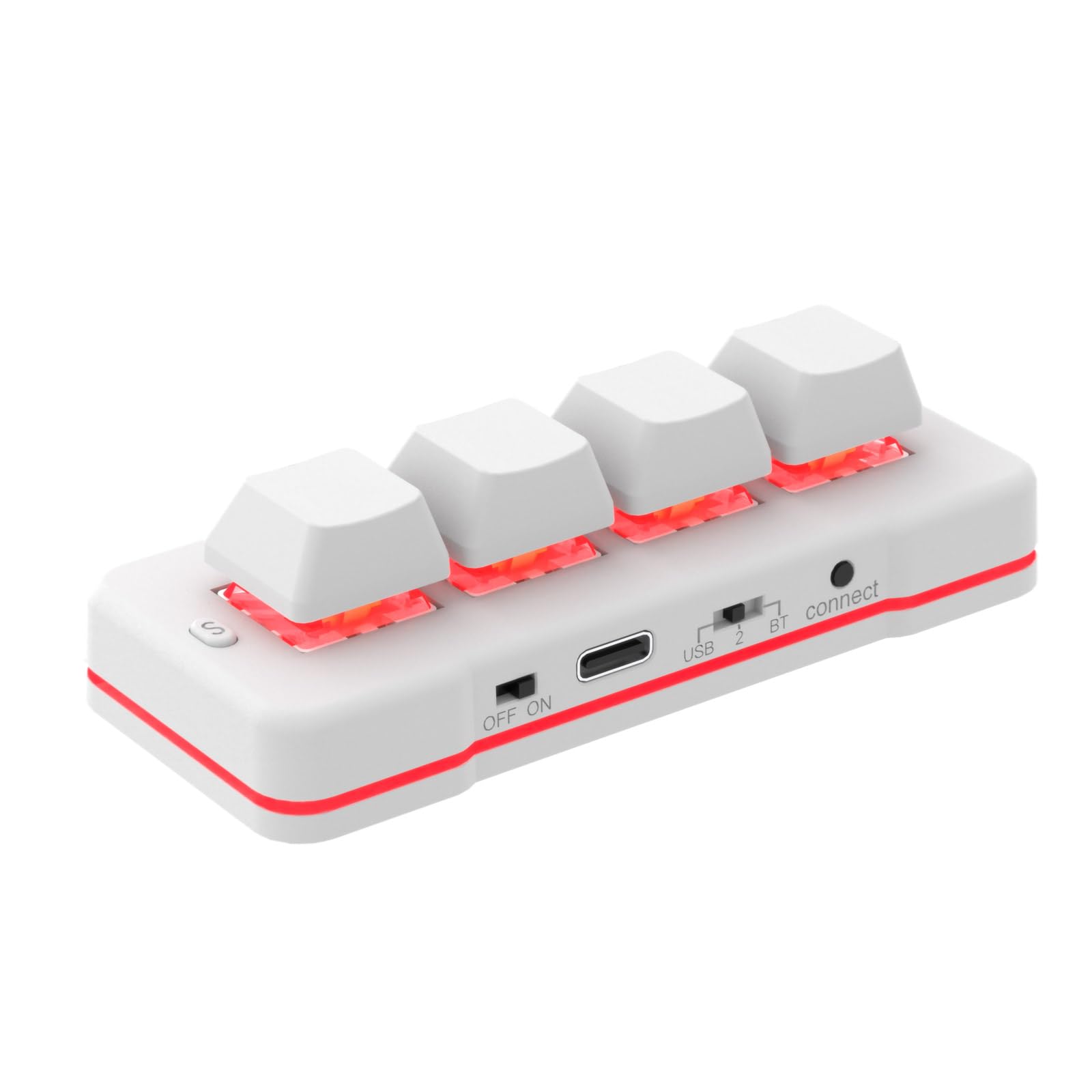
The wireless 4-key pad that jumps between your desktop, tablet, and even sheet music.
This is the only pick on the list with built-in Bluetooth — you can go wired via USB-C or cut the cable entirely. A two-hour full charge is claimed to hold up for “3 mouths use” (three months), though buyers report more modest battery life around the 8-hour mark with active use. The LED flashes a low-battery warning every three seconds when you are running low.
It uses HID protocol, meaning once you configure it on Windows or Mac, you can delete the software and use it on iOS, Android, Linux, or anything else. Owners find it works flawlessly with an iPad Pro for hotkeys. The range of uses is broad: video games, office shortcuts, sheet music page turning, even factory machine control. The maker offers lifetime technical support and 24/7 service.
The downsides are real. One owner found the keys too sensitive. An occasional unit arrives defective, but the seller replaces it. If you need wireless flexibility for a tablet workflow, the trade-offs are worth considering.
dual-mode wireless: Bluetooth means you can keep this next to your iPad or phone without a cable tethering you to a desk.
plastic build: Battery life under active use is noticeably shorter than the advertised standby time, and the keys are loud and unlabeled.
tablet productivity: you need a wireless 4-key pad for tablet hotkeys, sheet music turning, or reducing cable clutter.
heavy typing: you want quiet switches, long battery life, or labeled keys — a wired pad is a safer bet.
6. Vaydeer 4 Fully Programmable Keys Keypad

The programmable powerhouse with multi-layer macros and a live floating window so you never forget a key.
This is the most feature-dense pad on the list. It supports multiple layers — you can switch between them by scrolling in the floating window or automatically based on the application you are using. The 4 keys support NKRO (N-Key Rollover), meaning you can press multiple keys simultaneously for accurate game combos. You can assign a single key to open a folder, launch a website, or execute a macro sequence.
The Vaydeer supports OTA firmware updates, setting export/import, and sharing configurations with friends. Owners use it for day trading, pausing music during calls, and CSGO macros. The build quality is good, and the compact 3.7 x 1.5 x 1 inch size fits anywhere. However, the software is widely described as “non intuitive” — you have to flash the keyboard after every setting change. The floating window, while useful, is also persistent and some owners find it annoying.
Mac compatibility is limited — the pad was not recognized when one owner plugged it into a Mac after programming on a PC, and the software needs to run constantly in the background on some computers. If you are a Windows power user who wants deep customization, this open up potential that simpler pads cannot match.
fully programmable keys: Multiple layers, NKRO, OTA updates, and the floating window give you control no other 4-key pad on this list offers.
steep learning curve: The software has a learning curve and Mac support is unreliable — this is a Windows-tuned tool.
macro masters: you are on Windows and want to build complex macro layers with application-aware switching and NKRO support.
simple shortcuts: you want a simple plug-and-play pad or need reliable Mac compatibility.
Understanding the Specs
Hot-Swappable Switches
This means you can pull out the current mechanical switch and click a different one in without any soldering. It lets you change the feel — from a quiet linear switch for work to a clicky tactile switch for gaming — without buying a whole new keypad.
NKRO (N-Key Rollover)
N-Key Rollover means every single key press registers no matter how many keys you hold down at once. For a 4-key pad, this matters most in games where you need to press a combo like Shift+W+Space simultaneously and have each command register immediately.
Macro Layers
A layer is a separate set of key assignments. Think of it like having multiple virtual keypads in one physical device. You can have one layer for copy-paste office work, another for gaming combos, and a third for media controls — and switch between them with a scroll or automatically.
Plug and Play vs Programmable
A plug-and-play pad works the moment you connect it — typically with preset Cut/Copy/Paste or arrow keys. A programmable pad requires setup software but lets you assign any function to any key, from launching apps to typing whole sentences.
FAQ
Will a 4-key keyboard work with my Mac?
Can I use a 4-key keypad for gaming?
What is the difference between a mechanical and a membrane switch?
Do I need to install software to use a 4-key keyboard?
How do I change what a key does on a programmable pad?
Can I use a 4-key pad alongside my regular keyboard?
What does hot-swappable mean on a 4-key keyboard?
How long does a wireless 4-key keyboard last on a charge?
Is a 4-key keyboard useful for anything beyond copy-paste?
Will a 4-key keypad work with my iPad or Android tablet?
Final Thoughts: The Verdict
For most buyers, the best 4 key keyboard is the SayoDevice Mini 4-Key because it works as a flawless arrow pad from the start and open up full web-based customization when you are ready. If you want dedicated Copy/Cut/Paste keys with zero setup, grab the BTXETUEL Mini 4-Key. And for deep multi-layer macros with NKRO and a floating window on Windows, the Vaydeer 4 Key Keypad is the most versatile tool in this list.
How We Picked
We do not accept paid placement. Every pick is matched to a real buyer and a real use-case; we do not hands-on test units.
Sources & Methodology
Specifications: manufacturer listings and product documentation. Review insights: verified customer reviews, as of July 2026. Pricing: not shown on this page (it changes often); check the current price via the retailer link.
As an Amazon Associate, Gadgets Feed earns from qualifying purchases. This does not affect which products we feature.