
Pushing your system to its full potential starts with memory that can keep up with modern CPUs. Upgrading to a 32GB DDR5 5600MHz kit unlocks noticeably faster load times and fluid multitasking, whether you are compiling code, editing high-resolution video, or running the latest game titles.
I’m Min — the co-founder and writer behind Gadgets Feed. I spend my time analyzing component roadmaps, comparing benchmark results, and scrutinizing the real-world performance data that separates a good memory kit from a great one. (And Homer 🐱 supervised the entire comparison from his warm spot on the motherboard box).
In this guide I break down the top kits available, covering timings, heat spreader designs, platform compatibility, and the subtle differences that make each module distinctly suited to a specific build. Let’s find the best 32gb ddr5 5600mhz ram for your workload and budget.
How To Choose The Best 32GB DDR5 5600MHz RAM
Not all DDR5 kits are built the same, even when they share the same frequency. The differences in latency, voltage regulation, and heat management determine whether a kit will run stable at its rated speed or leave performance on the table.
CAS Latency and Timings
While 5600MHz is the data rate, the CAS latency (CL) dictates how many clock cycles the memory takes to respond. A CL36 kit will be noticeably more responsive in latency‑sensitive tasks like gaming than a CL46 kit running at the same frequency. Look for a lower CL number when performance matters most.
DIMM vs SO-DIMM Form Factor
Desktop motherboards require standard DIMM modules (288‑pin), while laptops and mini‑PCs use compact SO-DIMM modules (262‑pin). Confusing the two is the most common mistake. Always verify your platform’s physical slot before purchasing.
XMP and EXPO Profiles
Most DDR5 kits boot at a conservative JEDEC speed (often 4800MHz) and require an overclock profile to reach 5600MHz. Intel systems use XMP 3.0, while AMD platforms use EXPO or DOCP. Enabling the profile in BIOS is simple, but not all motherboards handle it equally well. A kit with solid profile validation saves you troubleshooting time.
Quick Comparison
On smaller screens, swipe sideways to see the full table.
| Model | Category | Best For | Key Spec | Amazon |
|---|---|---|---|---|
| CORSAIR Vengeance | Desktop DIMM | iCUE software control | CL40, 1.25V, Intel XMP 3.0 | Amazon |
| Kingston FURY Beast RGB | Desktop DIMM | RGB synchronization | CL40, Infrared Sync, dual kit | Amazon |
| Patriot Viper Venom | Desktop DIMM | Low-latency gaming | CL36, 1.25V, Hynix chips | Amazon |
| PNY XLR8 Gaming | Desktop DIMM | Low‑profile builds | CL46, 1.1V, matte heat spreader | Amazon |
| Crucial | Desktop UDIMM | Intel/AMD platform compatibility | CL46, Micron ICs, 2Rx8 | Amazon |
| A-Tech | Desktop UDIMM | Diagnostic/toolkit use | CL46, 1.1V, dual kit | Amazon |
| G.SKILL Ripjaws | Laptop SO-DIMM | Laptop gaming upgrade | CL40, 1.1V, dual kit (2x16GB) | Amazon |
| Acer SD200 | Laptop SO-DIMM | Reliable single‑stick upgrade | CL46, PMIC, On‑die ECC | Amazon |
| TEAMGROUP Elite | Laptop SO-DIMM | Stable out‑of‑box operation | CL46, 1.1V, 262‑pin | Amazon |
In‑Depth Reviews
1. CORSAIR Vengeance 32GB DDR5 5600MHz

The CORSAIR Vengeance 32GB kit is built for builders who want granular control over their memory. Its low‑clearance heat spreader fits comfortably under large air coolers, and the onboard voltage regulation allows the iCUE software to adjust power delivery with precision. Many users report that the XMP 3.0 profile enables the full 5600MHz speed on the first boot after initial memory training completes.
At CL40-40-40-77 and 1.25V, this kit sits in a balanced sweet spot — faster than budget CL46 modules without requiring the aggressive voltage of lower‑latency kits. The aluminium heat spreader keeps temperatures in check during extended rendering sessions, and the module design avoids interference with CPU cooler fans even on compact ITX boards.
Several verified buyers running ASUS B760i and Z790 builds confirm plug‑and‑play stability after enabling XMP. The only note is that memory training on first insert can take a couple of minutes. For a desktop user who values software tuning and consistent performance across Intel platforms, this kit is hard to beat.
Why it’s great
- Onboard voltage regulation via iCUE for fine‑tuned overclocking
- Low‑profile design fits under large CPU air coolers
- XMP 3.0 profile delivers rated speed reliably
Good to know
- Memory training on first boot can take 2‑3 minutes
- Requires iCUE software for full voltage control
2. Kingston FURY Beast RGB 32GB 5600MHz

The Kingston FURY Beast RGB brings a distinctive heat spreader design with integrated LED lighting controlled by Kingston’s Infrared Sync Technology. This ensures the lighting effects stay synchronised across both sticks without requiring additional cables or hubs. The CL40 latency is a solid middle ground for gamers who want the visual flair without compromising timings.
Compatibility extends across both Intel XMP 3.0 and AMD EXPO platforms, making this a flexible choice for system builders. The 90‑gram modules include a thicker heat spreader that handles sustained loads well, and users on Z690 and Z790 boards confirm that enabling the XMP profile delivers the advertised 5600MT/s speed after a brief BIOS adjustment.
One buyer noted that activating XMP caused a boot failure on a Z790 board and required a full system AI overclock to stabilise — an edge case, but worth knowing for those who prefer a pure XMP approach. For a showpiece build that demands coordinated lighting and reliable DDR5 performance, the FURY Beast RGB is a standout.
Why it’s great
- Infrared Sync Technology keeps RGB perfectly coordinated
- Dual compatibility with Intel XMP 3.0 and AMD EXPO
- Thick heat spreader for sustained thermal performance
Good to know
- Some Z790 boards require extra steps to stabilise XMP
- Heavier than non‑RGB kits at 90g per module
3. Patriot Viper Venom 32GB 5600MHz CL36

The Patriot Viper Venom stands out for its CL36 timings — the tightest of any 5600MHz kit in this roundup. Running at 1.25V, this 2x16GB kit uses Hynix ICs, which are known for overclocking headroom beyond the stock XMP profile. On an MSI B650 Mortar, one verified user confirmed the XMP 3.0 profile worked immediately, unlocking the full 5600MHz speed without manual tuning.
The matte black heat spreader is subtle, making it a good fit for minimalist builds that don’t need RGB. The lifetime warranty from Patriot adds confidence for long‑term use. Despite the competitive pricing, the build quality holds up well against pricier options, and the low 30‑gram weight per module is among the lightest in the desktop category.
A few buyer reports mention incompatibility with specific motherboards, with one unit causing blue‑screen errors after installation. This is not uncommon with early‑generation DDR5 kits, and the return process through Amazon resolved the issue. If you are building a new system and want the snappiest timings at this frequency, the Viper Venom delivers excellent value.
Why it’s great
- CL36 is the tightest latency available at 5600MHz
- Hynix ICs offer strong overclocking potential
- Lightweight modules with a clean, low‑profile design
Good to know
- Intermittent compatibility issues reported on some boards
- No RGB lighting for those who want flair
4. PNY XLR8 Gaming 32GB 5600MHz

PNY’s XLR8 Gaming kit is built around a slim matte black heat spreader that keeps module height minimal. This is a meaningful advantage for builds using large dual‑tower air coolers where tall RAM sticks often block the front fan. Running at CL46 and 1.1V, it follows JEDEC standard voltage, which reduces heat output and keeps power draw low.
The dual‑kit package includes two matched 16GB sticks that support both Intel XMP and AMD EXPO, giving flexibility across platforms. The 288‑pin DIMM design fits standard desktop motherboards, and several buyers note that the modules ran stably at 5600MHz out of the box after setting the appropriate profile in BIOS. The limited lifetime warranty is a solid safety net.
A small number of users experienced premature failure within a month, reporting that one stick stopped working or caused dual‑channel instability. While these incidents appear isolated, they do suggest some batch variation. For a budget‑conscious builder who prioritises cooler clearance and basic DDR5 speed without extra frills, the PNY XLR8 is a sensible choice.
Why it’s great
- Low‑profile design avoids cooler clearance issues
- Dual compatibility with Intel XMP and AMD EXPO
- Low 1.1V operation keeps thermals in check
Good to know
- Isolated reports of early module failure
- CL46 latency is on the higher end for gaming
5. Crucial 32GB DDR5 5600MHz
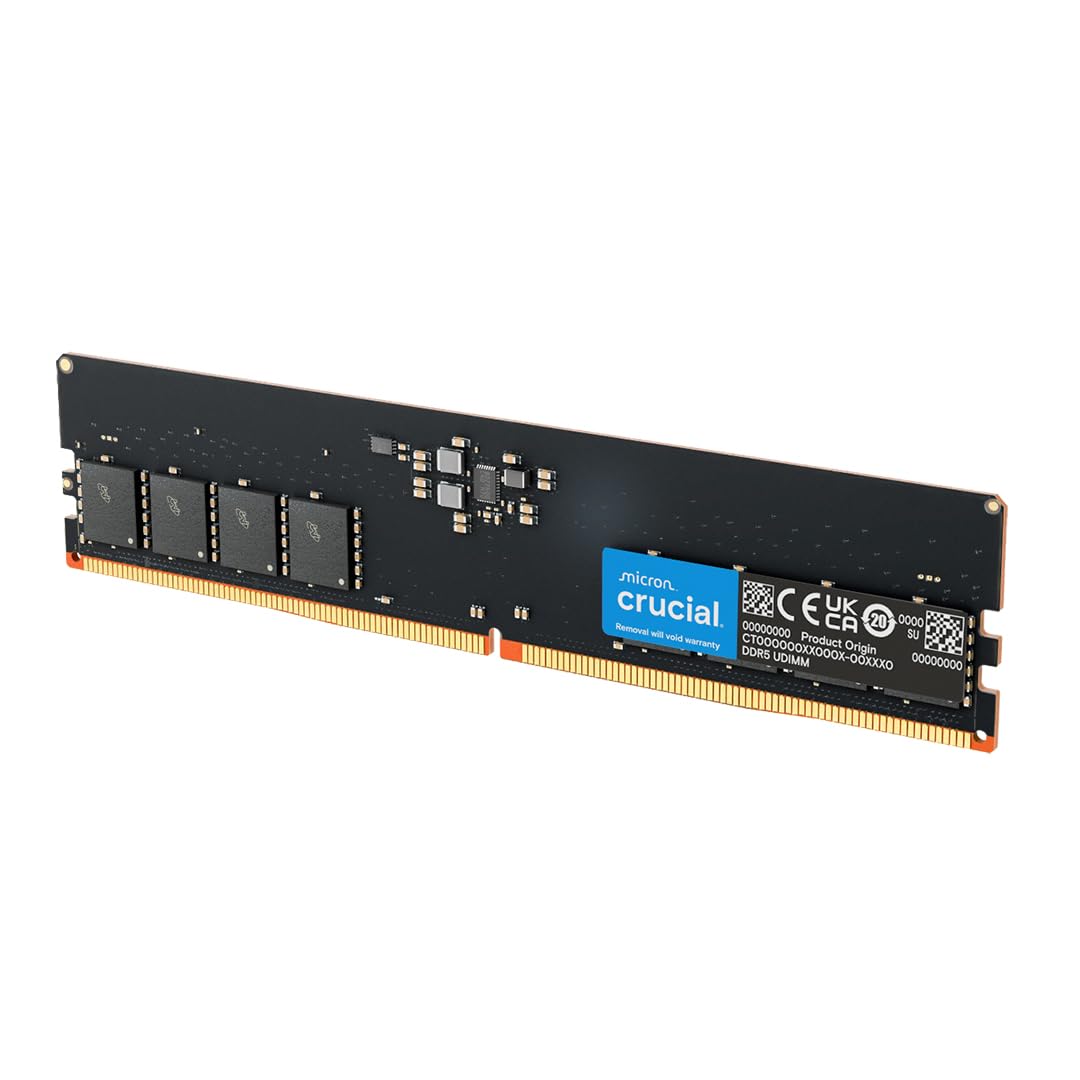
Crucial’s 32GB single‑stick UDIMM is a workhorse built by Micron, one of the three major DRAM manufacturers. It operates at 1.1V and supports downclocking from 5600MHz to 5200MHz or 4800MHz, which makes it broadly compatible with systems that don’t fully stabilise at the highest speed. The 2Rx8 configuration provides better performance than 1Rx16 in bandwidth‑sensitive tasks.
Verified buyers report seamless installation in Dell XPS 8960 and other prebuilt desktops, often using two sticks to reach 64GB. The memory training phase on first boot can take 5–6 minutes — a normal DDR5 behaviour that surprises many first‑time upgraders. Once trained, the module runs reliably at the selected speed without further intervention.
One shipping issue involved a module arriving bent due to insufficient packaging, highlighting that buying from a retailer with a good return policy is wise. For users upgrading a prebuilt workstation or building a mainstream desktop who value compatibility verification and Micron’s track record, the Crucial stick is a solid foundation.
Why it’s great
- Manufactured by Micron with 42 years of memory expertise
- 2Rx8 configuration offers strong bandwidth
- Downclocking flexibility for broader system support
Good to know
- First‑boot memory training can take up to 6 minutes
- Single stick only — need two for dual‑channel
6. A-Tech 32GB DDR5 5600MHz

The A-Tech 32GB kit offers a no‑frills path to DDR5 capacity at entry‑level pricing. It operates at CL46 and 1.1V standard voltage, matching the JEDEC baseline. The dual‑stick package is non‑ECC unbuffered and comes with on‑die ECC for data integrity. This setup works well for diagnostic workstations or secondary machines where absolute lowest latency is not the priority.
Buyers report successful installation in Dell Precision 3680 and EBT2250 workstations, with the modules passing MemTest86 after a full 10‑hour test cycle. The limited lifetime warranty and responsive customer support are highlights — one user had a stick fail after five months and received a replacement within days. The clear focus here is on reliability and affordability.
The 1.5‑ounce modules are lightweight and lack a heat spreader, which is fine for standard desktop airflow but less ideal for overclocking or heavily ventilated chassis. If your goal is to get a known‑good DDR5 kit for testing, light workloads, or a home office PC without paying for RGB or low‑latency tuning, A-Tech delivers.
Why it’s great
- Lifetime warranty with responsive customer support
- Passes extended MemTest86 stability testing
- Great price for a matched dual‑kit
Good to know
- No heat spreader limits overclocking potential
- CL46 latency is not ideal for competitive gaming
7. G.SKILL Ripjaws DDR5 SO-DIMM 32GB 5600MHz

The G.SKILL Ripjaws SO-DIMM kit is purpose‑built for laptops and mini‑PCs, offering 32GB in a 2x16GB configuration at CL40. Running at 1.1V, it includes Intel XMP 3.0 support for overclocking on compatible laptops, though many systems will run it at the JEDEC default of 4800MHz without enabling the profile. This is a common behaviour for laptop memory.
Verified users have successfully installed it in Alienware M18 R2, Acer Predator Helios 16, and Lenovo P16v workstations. One buyer noted that the 5600MHz speed requires a BIOS reset after installation and recommends enabling XMP 1 for the full frequency. The 45‑gram modules are built to standard 262‑pin specification and fit any modern laptop with DDR5 SO-DIMM slots.
The kit downclocks automatically to 4800MHz in some laptops, which is a motherboard limitation rather than a module issue. Despite this, users report a 15% benchmark improvement over single‑channel configurations due to the dual‑channel layout. For laptop users who need a reliable, high‑capacity upgrade with tighter timings than most SO-DIMM options, the Ripjaws kit is the top pick.
Why it’s great
- CL40 is tight for a laptop SO-DIMM kit
- Dual‑channel delivers measurable benchmark gains
- Proven compatibility with gaming laptops and workstations
Good to know
- Some laptops downclock to 4800MHz automatically
- XMP profile may require BIOS reset to activate
8. Acer SD200 32GB DDR5 5600MHz

The Acer SD200 is a single‑stick 32GB SO-DIMM module designed for laptops and mini‑PCs. It runs at 5600MHz with CL46 latency and features an integrated PMIC that brings voltage down to 1.1V. The on‑die ECC automatically corrects single‑bit data errors, adding a layer of stability that is especially valuable in work or long‑run server environments.
Buyers have used it to upgrade Acer Nitro 16S and Aspire laptops, as well as Beelink EQR6 mini‑PCs. The module was detected instantly in most cases and passed MemTest86 stability tests without errors. For systems that only have a single SO-DIMM slot, this 32GB capacity is a straightforward path to a significant memory boost without needing a dual‑stick kit.
The main trade‑off is the CL46 latency, which is higher than laptop kits that run at CL40. In day‑to‑day productivity tasks the difference is negligible, but for latency‑sensitive gaming on a laptop, a dual‑stick CL40 kit like the G.SKILL Ripjaws would be preferable. For a single‑slot workstation or a reliable laptop upgrade, the Acer SD200 is a strong and well‑priced option.
Why it’s great
- On‑die ECC for enhanced data stability
- Integrated PMIC reduces power consumption
- Plug‑and‑play with most DDR5 laptops and mini‑PCs
Good to know
- Single stick only — cannot dual‑channel alone
- CL46 is slower than premium laptop kits
9. TEAMGROUP Elite 32GB DDR5 5600MHz

The TEAMGROUP Elite SO-DIMM kit offers a clean, no‑RGB upgrade path for laptops. It ships as a 2x16GB pair at CL46 and 1.1V, with on‑die ECC support included. The 262‑pin modules are built to JEDEC standards, and many buyers confirm that they run at the full 5600MHz frequency out of the box without needing to enable any profile — rare for DDR5 laptop memory.
Verified users have installed it in MSI Alpha 17, Acer Nitro 5, and Dell 7020 laptops, reporting smooth operation in Windows 11 and stable performance under VMware workloads. One buyer upgraded from 8GB to 32GB and noticed immediate elimination of lag in demanding titles like Marvel Rivals. The lifetime warranty provides long‑term peace of mind.
At CL46, the Elite kit is not designed for extreme overclocking or minimum latency — it prioritises stability and capacity. The modules are built with standard green PCBs and lack heat spreaders, which is typical for budget laptop RAM. For users who need a reliable, dual‑channel 32GB upgrade for everyday computing, creative work, or virtualisation, the TEAMGROUP Elite is a sensible choice.
Why it’s great
- Runs at full 5600MHz out of the box on many laptops
- Dual‑channel 2x16GB configuration for immediate gains
- Lifetime warranty adds long‑term security
Good to know
- CL46 latency not ideal for competitive gaming
- No heat spreader or fancy PCB design
FAQ
Will a 32GB DDR5 5600MHz kit work with an Intel 13th Gen CPU?
Is there a noticeable difference between CL40 and CL46 at 5600MHz for gaming?
Can I mix two single sticks from different brands to make a 32GB kit?
Why does my DDR5 kit show 4800MHz instead of 5600MHz after installation?
Final Thoughts: The Verdict
For most users, the 32gb ddr5 5600mhz ram winner is the CORSAIR Vengeance 32GB because it combines solid CL40 timings, low‑clearance design, and iCUE software for advanced voltage control on Intel platforms. If you want tighter CL36 latency and Hynix ICs for overclocking, grab the Patriot Viper Venom. And for a laptop upgrade with reliable dual‑channel performance, nothing beats the G.SKILL Ripjaws SO-DIMM kit.