
Pulling clean, studio-grade audio from a microphone or instrument into your computer is the single most important step in any recording chain. The right audio interface 2 channel unit delivers pristine preamps, low-noise conversion, and the latency-free monitoring that separates a professional take from a frustrating one.
I’m Min — the co-founder and writer behind Gadgets Feed. I’ve spent years analyzing signal-to-noise ratios, preamp gain structures, and converter specs across the consumer audio interface market to separate genuine performance from marketing claims..
Whether you’re a vocalist tracking a demo, a podcaster capturing an interview, or a guitarist laying down riffs, the right two-channel interface defines your entire recording quality. This guide breaks down nine of the market’s most compelling best audio interface 2 channel options across every budget and use case.
How To Choose The Best Audio Interface 2 Channel
Every two-channel audio interface does the same basic job — convert analog audio to digital and back — but the components inside determine how much of your source signal survives the trip. Focus on these four criteria to find the interface that matches your gear and your goals.
Preamps and Gain Range
Mic preamps amplify the weak signal from your microphone up to line level. The usable gain range, measured in dB, is the number that matters. A dynamic microphone like the Shure SM7B requires 60dB or more of clean gain to sound its best. Interfaces with 56dB or less may leave your signal quiet and noisy, forcing you to add a cloudlifter. Look for a spec like 69dB (Scarlett 4th Gen) or 80dB (Elgato XLR Dock MK.2) if you plan to use low-output dynamic mics.
Converter Quality and Sample Rate
The analog-to-digital converters define the noise floor and dynamic range of your recordings. A 24-bit/192kHz converter captures more headroom and finer detail than a 24-bit/96kHz one, though the audible difference is subtle for most users. Dynamic range, measured in dB, tells you the distance between the quietest and loudest signal the interface can capture before distortion. Modern interfaces like the Focusrite Scarlett 2i2 4th Gen advertise 120dB of dynamic range, matching what professional studio converters deliver.
Direct Monitoring and Latency
When recording vocals or instruments, latency — the delay between speaking into the mic and hearing it in your headphones — can throw off your timing. Direct monitoring routes the analog input signal straight to your headphones before it reaches your computer, giving you zero-latency playback. Every interface in this guide offers some form of direct monitoring, but the implementation varies. Dedicated hardware knobs for blend control are more convenient than software-based solutions.
Connectivity and Build
A basic 2-channel interface needs one combo XLR/TRS input per channel, balanced outputs for studio monitors, a headphone jack, and USB-C connectivity. Beyond that, consider extras: MIDI I/O for synths, loopback for streaming computer audio, and a metal chassis for road use. Bus-powered interfaces draw power from the USB port, keeping your desk clean, while some higher-gain units require an external power supply to drive phantom power without noise.
Quick Comparison
On smaller screens, swipe sideways to see the full table.
| Model | Category | Best For | Key Spec | Amazon |
|---|---|---|---|---|
| Focusrite Scarlett 2i2 4th Gen | Plug-and-Play | All-around recording | 120dB dynamic range | Amazon |
| Solid State Logic SSL 2 MKII | Pro Sound | Vocal clarity & warmth | Legacy 4K analog enhancement | Amazon |
| Focusrite Scarlett Solo 3rd Gen | Entry Level | Single-mic podcasting | 24-bit / 192kHz converters | Amazon |
| Universal Audio Volt 2 | Vintage Tone | Musicians & producers | UA 610 tube preamp emulation | Amazon |
| Audient EVO 4 | Smart Gain | Quick setup auto-leveling | Smartgain automatic leveling | Amazon |
| Elgato XLR Dock MK.2 | Streamer Focus | Stream Deck+ integration | 80dB gain + onboard DSP effects | Amazon |
| MAONO AME2C Pro | All-in-One Bundle | Podcasters & live streamers | 10-channel mixer / sound pads | Amazon |
| Scarlett 2i2 4th Gen w/ XLR Cables | Great Value | Studio recording out of the box | 69dB gain on mic pres | Amazon |
| Behringer XENYX 802S | Budget Mixer | Analog mixing & streaming | 8-channel mixer with USB out | Amazon |
In‑Depth Reviews
1. Focusrite Scarlett 2i2 4th Gen USB Audio Interface
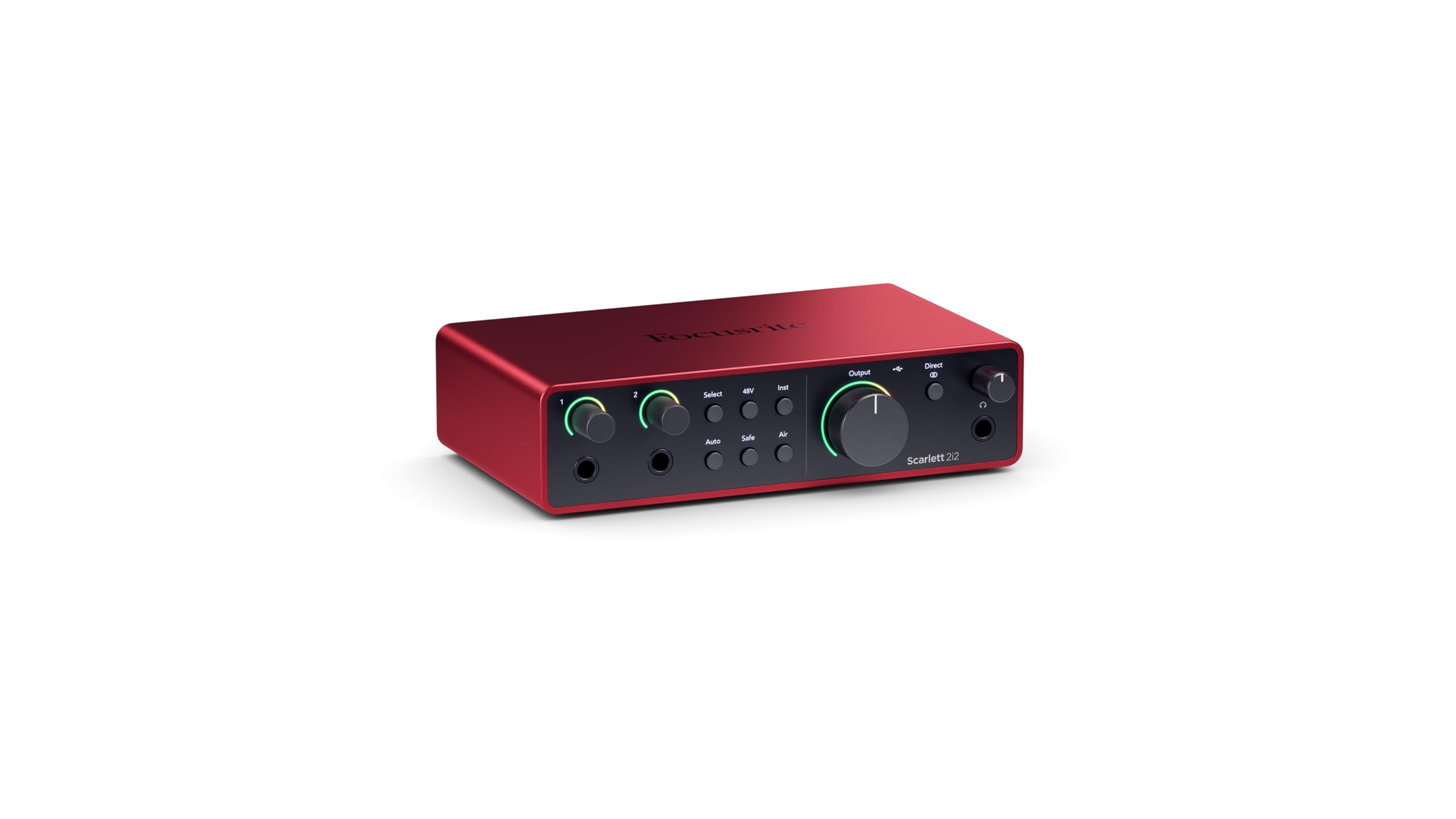
The Scarlett 2i2 has been the default recommendation for bedroom producers and professional engineers alike for years, and the 4th Gen justifies every bit of that reputation. Focusrite upgraded the mic preamps to deliver 69dB of gain — enough to drive an SM7B without an external booster — while the converters now offer a massive 120dB dynamic range, matching the performance of the company’s flagship RedNet studio interfaces. The Dynamic Gain Halos on the front panel make it impossible to clip your inputs by accident; the ring lights shift from green to yellow to red as your signal approaches zero.
Two new features, Auto Gain and Clip Safe, remove the guesswork from setting levels. Hit the Auto Gain button, play or speak for ten seconds, and the interface sets the optimal input gain automatically. Clip Safe acts as a safety net during dynamic performances, reducing gain in real-time if you hit the ceiling. Air mode adds high-end presence and harmonic drive to vocals and acoustic instruments, giving recordings a polished sheen without external plugins. The included software bundle — Pro Tools Intro+, Ableton Live Lite, Cubase LE, and the Hitmaker Expansion suite — gives beginners everything they need to start recording immediately.
Build quality is excellent with a full metal chassis that feels road-ready, and the USB-C bus power means no wall wart cluttering your desk. The only trade-off is the lack of MIDI I/O, which may matter if you control hardware synths directly from your interface. For anyone who wants a single interface that handles vocals, guitar, podcasting, and streaming with zero fuss, the 4th Gen Scarlett 2i2 is the benchmark.
Why it’s great
- 120dB dynamic range rivals pro studio converters
- 69dB of clean gain drives low-output dynamic mics
- Auto Gain and Clip Safe eliminate leveling guesswork
Good to know
- No MIDI I/O for synth connectivity
- Packaging lacks shock protection for shipping
2. Solid State Logic SSL 2 MKII 2×2 USB Audio Interface

SSL brings the sonic DNA of its legendary 4000 series consoles to the desktop with the SSL 2 MKII, a 2×2 interface that prioritizes analog character without compromising modern digital specs. The marquee feature is the Legacy 4K analog enhancement circuit — a button that engages a high-frequency EQ shelf and subtle harmonic distortion derived from the SSL 4000 console’s listen mic compressor. Engaging it on a vocal track adds air and presence that sounds musical rather than brittle, saving you from reaching for an EQ plugin later.
The mic preamps are exceptionally quiet with a low noise floor, and the high-pass filter on each channel (engageable via a front-panel button) cuts rumble and low-end thumps before they hit your converters — a lifesaver for voice-over artists working in untreated rooms. The headphone amplifier is powerful and clean, easily driving high-impedance cans like the Beyerdynamic DT 990 Pro to satisfying levels. MIDI I/O on 5-pin DIN jacks is a welcome inclusion for electronic musicians, and the stereo loopback function simplifies streaming and podcast setups by routing computer audio back through the interface.
The metal chassis and weighted knobs give the SSL 2 MKII a premium tactile feel that rivals interfaces costing significantly more. The 32-bit / 192kHz AD/DA converters ensure headroom for days, though note this is not a true 32-bit float recording interface — it still clips at 0dBFS if you overshoot. Voice artists and podcasters will appreciate how the 4K circuit and HPF work together to deliver broadcast-ready sound with minimal post-processing. It is larger and heavier than the Scarlett 2i2, but that solid build inspires confidence on the road.
Why it’s great
- Legacy 4K analog enhancement adds console-grade presence
- High-pass filters clean up rumble before recording
- MIDI I/O for hardware synth integration
Good to know
- Not a true 32-bit float recorder (still clips at 0dBFS)
- Heavier and bulkier than comparable 2-channel interfaces
3. Universal Audio Volt 2 USB Audio Interface

Universal Audio built its reputation on high-end rack-mount interfaces and UAD DSP plugins, but the Volt 2 brings that analog heritage to a compact bus-powered format at a very accessible price. The headline feature is Vintage mode, a circuit inspired by UA’s classic 610 tube preamp used on recordings by Ray Charles and Van Halen. Engaging it adds a subtle, musical warmth and harmonic saturation to your signal — it smooths out digital harshness on vocals and makes DI guitars sound fuller without additional processing.
The Volt 2 records at up to 24-bit / 192kHz with crystal-clear AKM converters, and the instrument input handles guitar and bass with plenty of headroom. UA includes a free LUNA Digital Audio Workstation license, giving you access to LUNA’s analog-style summing and tape emulation — a genuine differentiator in this price bracket. A bundle of UAD plugins and instruments is also included, though activation requires a somewhat lengthy setup process. Build quality is excellent with a metal chassis and a retro design that looks great on any desk.
Direct monitoring is handled via a front-panel blend knob, allowing you to mix your analog input with the computer playback in real time. The Volt 2 is USB-powered and does not require an external adapter, making it genuinely portable for laptop-based recording. The main limitation is the lack of loopback functionality — if you want to stream your DAW output back into a live stream, you will need to route audio through software. For musicians focused on tracking vocals and instruments with instant analog character, the Volt 2 is a superb value proposition.
Why it’s great
- Vintage mode adds tube-style warmth and saturation
- Includes LUNA DAW and UAD plugin bundle
- Metal chassis, fully bus-powered for mobile recording
Good to know
- No hardware loopback for streaming
- Plugin activation process is time-consuming
4. Focusrite Scarlett Solo 3rd Gen

The Scarlett Solo 3rd Gen remains one of the most popular entry-level audio interfaces on the market, and for good reason. It strips the interface down to the essentials: one XLR/TRS combo input with a switchable Air mode, one dedicated Hi-Z instrument input, and balanced outputs for studio monitors. Air mode engages an analog EQ shelf that adds clarity and presence to vocals, making an immediate audible improvement over flat preamps when recording spoken word or singing. The Gain Halo metering system — a ring of LEDs around the gain knob — gives you a clear visual indication of your signal level at a glance.
Recording quality is excellent for the category, with 24-bit / 192kHz converters that capture plenty of detail for demos, podcasts, and streaming. The low-noise balanced outputs deliver clean audio to your monitors, and the dedicated headphone output with its own volume knob provides independent monitoring. Focusrite bundles the interface with Pro Tools Intro+, Ableton Live Lite, Cubase LE, and the Hitmaker Expansion plugin suite, providing a generous software starter pack that covers DAW choice and effect processing.
The metal chassis is compact and durable — reviewers report the unit surviving years of travel and cold storage without issues. Bus-powered via USB-C, the Solo 3rd Gen works seamlessly with Mac and Windows. The limitation is obvious: with a single mic preamp and one instrument input, you can only record one source at a time. If you need to capture a stereo pair of microphones or a guitar and vocal simultaneously, you will need to step up to a 2-channel unit like the Scarlett 2i2. For the solo podcaster or singer-songwriter working one track at a time, however, this remains a phenomenal starting point.
Why it’s great
- Switchable Air mode adds clarity to vocals instantly
- Generous software bundle covers all recording needs
- Compact metal chassis proven to survive years of use
Good to know
- Single mic input limits simultaneous recording to one source
- No loopback function for streaming computer audio
5. Audient EVO 4 USB Audio Interface

Audient built the EVO 4 around a genuinely useful innovation: Smartgain. Press the button, play your instrument or speak into the mic for a few seconds, and the interface automatically sets the optimal input level for all active channels. This eliminates the fumbling and guesswork of adjusting gain knobs during setup, making the EVO 4 particularly appealing for solo content creators and streamers who need to get levels right fast. The multifunctional rotary encoder with its LED ring handles volume, mute, and monitoring control through intuitive touchpoints.
Under the hood, the EVO 4 uses AKM converters — the same chip family found in interfaces costing substantially more — delivering a clean, flat frequency response with very low noise. The two combo inputs share a single gain stage (they are linked), which is a minor compromise for stereo recording setups but a non-issue for podcasting or single-source music tracking. The JFET instrument input adds natural harmonic coloration to DI guitar and bass, giving a more amp-like feel than a standard solid-state input. Included software includes Cubase LE and Cubasis LE for mobile recording, plus the EVO control panel for routing and monitoring.
Build quality is solid though the chassis uses high-impact plastic rather than the stamped metal of the Scarlett line — it feels sturdy but not quite as premium. The direct monitoring loop avoids audible latency, and the loopback function is accessible directly from the hardware without diving into software. The EVO 4 works as a plug-and-play device on both Windows and macOS, though Windows users should disable USB power saving to prevent sleep-related disconnects. For users who prioritize speed of setup over channel count, the Smartgain feature alone makes the EVO 4 a uniquely compelling buy.
Why it’s great
- Smartgain sets optimal input levels automatically
- AKM converters deliver flat, low-noise sound
- JFET instrument input adds analog warmth
Good to know
- Plastic chassis not as durable as metal alternatives
- Two inputs share a single linked gain control
6. Elgato XLR Dock MK.2 for Stream Deck+
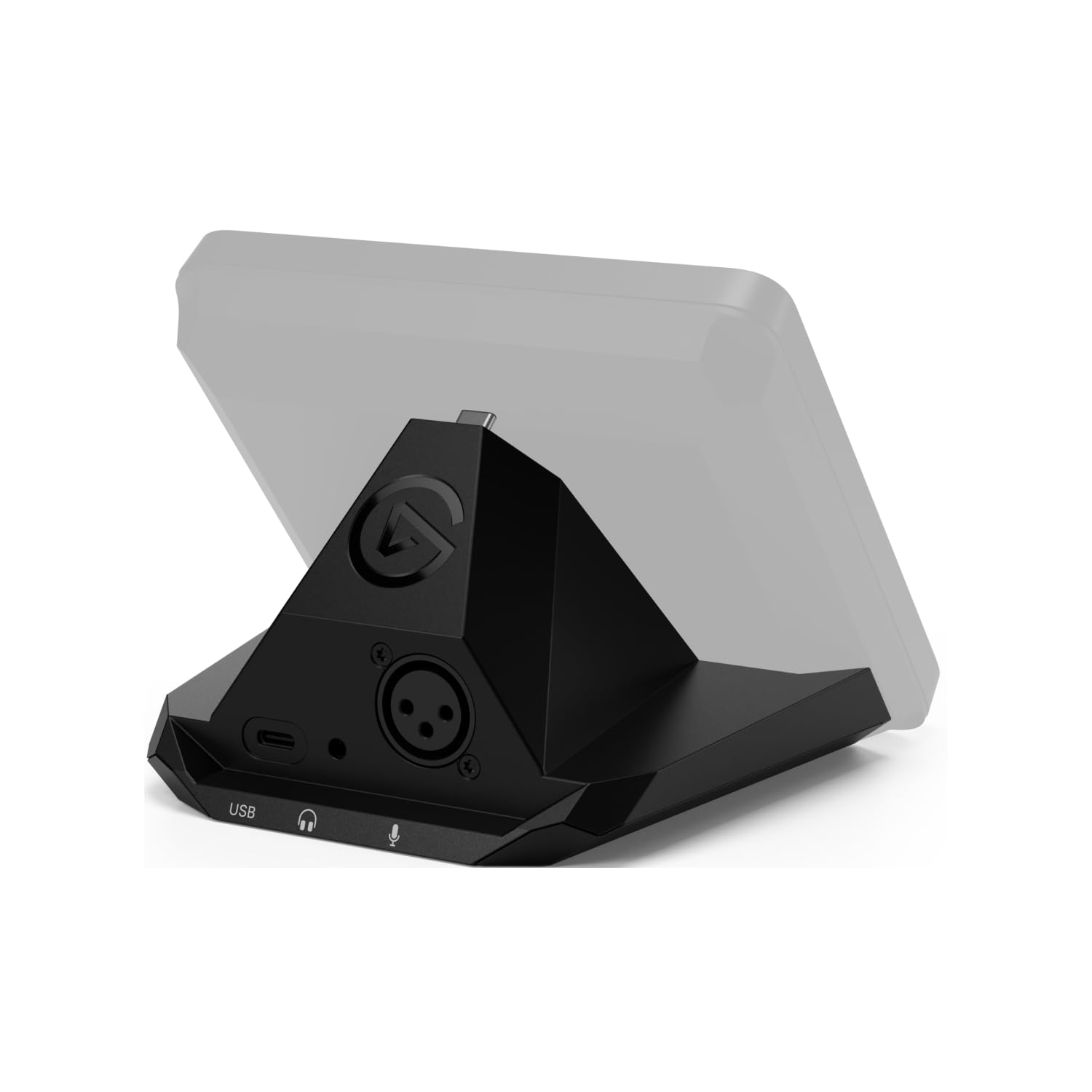
The XLR Dock MK.2 is not a standalone audio interface — it is a dock attachment for the Elgato Stream Deck+ that adds professional XLR connectivity and DSP processing to your streaming workflow. The standout spec is the 80dB of clean preamp gain, which is enough to drive an SM7B or RE20 without requiring a Cloudlifter or inline booster. The Clipguard 2.0 technology provides real-time overload protection, automatically reducing gain if your signal spikes, ensuring your stream never clips regardless of how loud you get.
Onboard DSP effects run through the Wave Link software, giving you access to a voice enhancer, compressor, EQ, and low-cut filter directly on the hardware — no CPU strain, zero added latency. The XLR Dock MK.2 integrates physically into your Stream Deck+ using a single USB-C cable, keeping your desk clean and your cabling minimal. Direct monitoring is available with zero latency, so you never hear yourself delayed in your headphones. The form factor is ingenious: it fits behind the Stream Deck+, adding practically no footprint to your setup.
The major caveat is software dependency. The XLR Dock MK.2 requires Wave Link 3.0, which only supports Windows 11 and macOS 14.2 and higher. Users on Windows 10 are locked out, a decision that has frustrated some buyers. If you do not own a Stream Deck+, the XLR Dock MK.2 is incompatible — you need the host device for it to function. For streamers already invested in the Elgato ecosystem, however, this is the cleanest, most powerful XLR solution available, combining pro-grade preamps with the tactile control of physical faders and buttons.
Why it’s great
- 80dB of gain drives demanding dynamic mics without boosters
- Onboard DSP effects reduce CPU load during streaming
- Zero-footprint design integrates physically with Stream Deck+
Good to know
- Requires Stream Deck+ — not compatible as standalone interface
- Needs Windows 11 or macOS 14.2+; unsupported on Windows 10
7. MAONO Podcast Equipment Bundle AME2C Pro

The MAONO AME2C Pro is less a traditional 2-channel audio interface and more of a complete podcast production console. It houses 10 channels of mixing (3 mic/line inputs, 2 USB, 2 live-output, 1 Bluetooth, 1 AUX, and 1 instrument input) and packs everything — including an XLR dynamic microphone, boom arm, XLR cable, and all necessary adapters — into a single box. The on-board preamp delivers up to 60dB of gain with 48V phantom power, and a dedicated DENOISE function aims to clean up background noise before it hits your stream.
The 11 customizable sound pads (3 of which support up to 60 seconds of recording with one-key looping) give podcasters and live streamers the ability to trigger intro music, sound effects, and sponsorships without reaching for a keyboard. Six reverb modes, a 12-step auto-tune effect, and three-band EQ per channel offer granular audio sculpting that most standalone audio interfaces cannot touch. The unit connects to a computer via USB-C, and two Live Output jacks let you route audio to a smartphone or camera for streaming on the go.
Build quality is decent for the price, though the plastic mixer body does not inspire the same confidence as a metal chassis. Several long-term reviewers note that sound pad triggers can become finicky after months of use, and the recorded sample loop function has inconsistent behavior that requires a sound check before each episode. The inclusion of a decent XLR dynamic microphone and boom arm makes this an exceptional value for someone building a podcast or streaming setup from scratch, but experienced users may find the control surface less precise than dedicated knobs and faders.
Why it’s great
- Complete podcast bundle includes microphone, arm, and cables
- 11 sound pads with looping for live streaming effects
- 6 reverb modes and auto-tune for vocal processing
Good to know
- Sound pad triggers reported to become unreliable over time
- Plastic chassis less durable than metal interfaces
8. Scarlett 2i2 4th Gen with 2 XLR Cables

This bundle takes the excellent Scarlett 2i2 4th Gen — already our top performer — and adds two XLR microphone cables, making it the most convenient route to a complete recording setup. The interface itself is identical to the standalone 2i2 4th Gen we reviewed as product number one: the same 120dB dynamic range, 69dB of gain, Auto Gain, Clip Safe, and Air mode. The 4th-Generation mic pres are a meaningful upgrade over the 3rd Gen, with noticeably lower noise and more headroom for dynamic microphones. The Hi-Z instrument inputs handle guitar and bass with the feel of a real amp input.
The loopback function is a significant feature for streamers and podcasters — it creates virtual inputs within your computer, allowing you to route system audio (game sounds, browser audio, music) alongside your microphone signal for simultaneous capture or broadcasting. The custom-designed headphone amp delivers loud, clear monitoring with independent level control, and the Dynamic Gain Halos provide instant visual feedback on your levels. The Easy Start tool simplifies setup for beginners, walking you through driver installation, firmware updates, and software activation.
The included XLR cables are functional but basic — adequate for desktop use, though you may want longer or higher-shielded cables for a more permanent installation. The two-channel design is the sweet spot for solo musicians and podcasters who need to capture a stereo pair or a mic and instrument simultaneously. If you know you will need two XLR cables anyway, buying this bundle saves you the extra shopping trip and ensures compatibility out of the box.
Why it’s great
- Identical pro-grade 2i2 4th Gen interface with cables included
- 69dB gain drives a wide range of microphones cleanly
- Loopback function ideal for streaming and podcast workflows
Good to know
- Included XLR cables are basic desktop length
- Shipping times can be inconsistent based on recent feedback
9. Behringer XENYX 802S Premium Analog Mixer with USB

The Behringer XENYX 802S sits in a different product category than the other interfaces in this guide — it is a 8-channel analog mixer with a stereo USB audio interface built in, not a dedicated 2-channel interface. But for users who need to mix multiple live sources (multiple microphones, a computer, a phone, a game console) into a single stereo stream for podcasting or live streaming, this hybrid approach makes a lot of sense. The ultra-low noise analog mixer topology delivers clean sound with no noticeable hum or white noise, and the XENYX mic preamps (based on the classic Behringer design) provide enough gain for most dynamic microphones with only half the knob travel needed.
The USB connection sends the main mix stereo output directly to your computer, appearing as a standard audio device in OBS, Zoom, or your DAW. Direct monitoring is inherent to the analog mixer design — you hear exactly what goes into the mix, with no digital latency. Separate main and monitor control sections allow you to send different mixes to your USB output and your headphone/speaker outputs, a feature missing from many pure audio interfaces. The 3-band EQ per channel is a real mixing tool, not a gimmick, letting you shape tones before they reach the computer.
The trade-offs are significant for purists. This is not a high-resolution interface — it operates at CD-quality 16-bit / 48kHz, which is fine for streaming and podcasts but limiting for music production requiring 24-bit depth and higher sample rates. The form factor is large (a full-width mixer) and requires an AC power adapter — not portable, not bus-powered. For streamers and podcasters who need to juggle multiple simultaneous sources without a computer router, the XENYX 802S is an incredibly capable and affordable tool. For musicians needing pristine 24-bit recording, a dedicated audio interface is the better path.
Why it’s great
- Eight analog channels for mixing multiple live sources
- Separate main/monitor routing for USB and headphones
- 3-band EQ per channel allows tone shaping on the fly
Good to know
- Limited to 16-bit / 48kHz recording resolution
- Large form factor and AC power reduce portability
FAQ
Do I need a 24-bit / 192kHz interface for home recording?
What does phantom power (48V) do and when should I use it?
What is direct monitoring and why is it important for recording?
How do I know if my interface has enough gain for my microphone?
Does loopback matter for my setup?
Final Thoughts: The Verdict
For most users, the best audio interface 2 channel winner is the Focusrite Scarlett 2i2 4th Gen because it combines 120dB dynamic range, 69dB of clean gain, and intelligent Auto Gain / Clip Safe features that make professional recording approachable for beginners while satisfying experienced engineers. If you want the analog character of a vintage console in your recordings, grab the Solid State Logic SSL 2 MKII — the Legacy 4K circuit and high-pass filters deliver broadcast-ready warmth out of the box. And for a budget-friendly complete podcast solution, nothing beats the MAONO AME2C Pro bundle, which includes everything you need to start recording immediately.