
Our readers keep the lights on and my morning glass full of iced black tea. As an Amazon Associate, I earn from qualifying purchases.
Specs are compiled from manufacturer listings and verified buyer reviews and can change over time — please confirm the key details on the product page before buying.
You have got a stack of rookies, Hall of Famers, and maybe a few duplicates you forgot you owned. Getting them off your desk and into a neat digital archive is the goal, but choosing the right machine to do it can feel like a deep dive into resolutions and software you do not want to decode. This guide cuts through that noise to help you find the perfect baseball card scanner for your collection, your computer setup, and your patience level.
I’m Min — the founder and writer behind Gadgets Feed. This guide is built by comparing the manufacturers’ published specifications and the patterns across verified customer reviews, so you get each pick’s real strengths and trade-offs instead of marketing spin.
The ideal scanner for your baseball cards balances speed for bulk digitizing against the optical quality that keeps foil and glossy stock looking sharp. Your perfect baseball card scanner is one that matches how you actually want to work, and the six picks below cover every approach.
Our Picks at a Glance
How To Choose The Best Baseball Card Scanner
Before you buy a scanner, ask yourself three things: how many cards you need to scan, how valuable they are, and what you will do with the digital files. A quick bulk job for commons needs a different machine than a careful archival scan of your one prized rookie card. The right choice protects your cardboard from jams and scuffs while producing files that faithfully reproduce the card’s colors and corners.
Speed vs. Resolution: The Core Trade-Off
Every scanner forces you to pick a side. A document-style feeder can chew through a stack of standard-size cards in seconds, but it usually caps out around 300 to 600 dpi (dots per inch, a measure of how much detail the scan captures). That is plenty for a digital binder or a basic checklist. But if you want to zoom in on the print dot pattern to check authenticity, or if you plan to sell cards and need buyers to see every corner, you will want a flatbed that pushes past 1200 dpi. The trade-off is time: a high-resolution flatbed scan takes minutes per card, not seconds.
Handling: Feeders vs. Flatbeds
Your cards have a physical thickness that office paper does not. A single-sheet feeder moves each card through a slot, which is brilliant for speed but can be unforgiving with thick, glossy, or warped stock. A flatbed scanner is the gentlest option — you place the card face-down on the glass, close the lid, and scan, but you have to do that one card at a time by hand. If your collection is full of vintage cards with soft corners, the extra care of a flatbed is worth the slow pace.
Software Matters More Than You Think
The bundled software is just as important as the hardware. The bundled software handles auto-detecting the card edges, cropping out the white border, and saving the file in the format you want. If that software is clunky or requires a separate paid license to export your scans, the whole experience sours quickly. Look for a package that lets you set up a workflow and then just feed cards through without fiddling with settings on every single one. A scanner with great specs but clunky software will stall your workflow and waste your time.
Quick Comparison
| Model | Best For | Max Resolution | Card Handling | Color Depth | Amazon |
|---|---|---|---|---|---|
| Epson FastFoto FF-680W★ Best Overall | Bulk digitizing with duplex speed | 600 dpi (JPEG) / 1200 dpi | Auto sheet feeder | 24 bpp | Amazon |
| AMBIR PS670ST-AS | Quick, single-card desktop scans | 600 dpi | Single vertical slot | 24 bits | Amazon |
| Epson Perfection V800 | Archival quality and oversized media | 6400 dpi | Flatbed glass | 48 bpp | Amazon |
In‑Depth Reviews
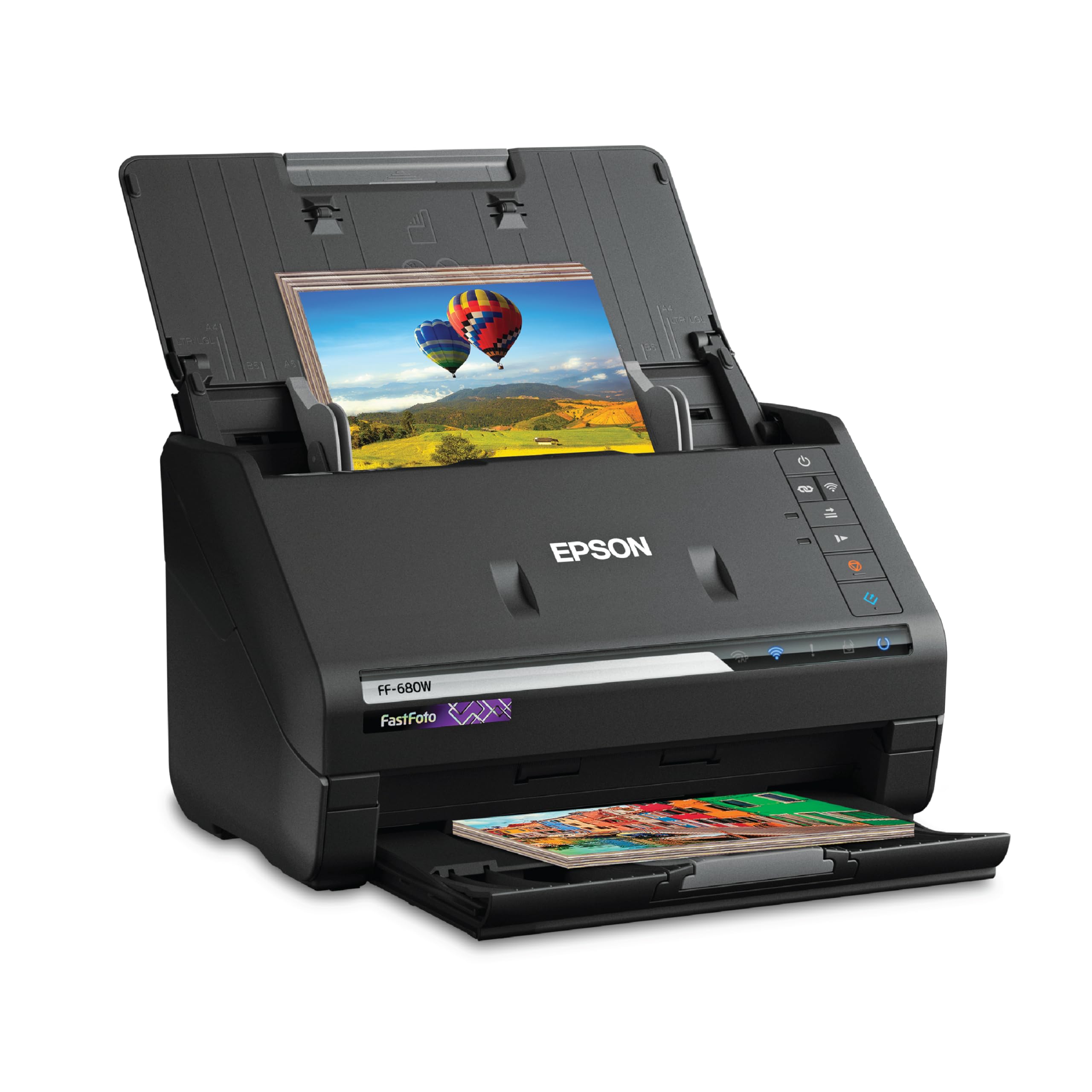
1. Epson FastFoto FF-680W
Our pick — 4.5★ from 3,000+ verified ratings; the strongest balance of quality and price.
The bulk digitizer that turns a shoebox of loose cards into organized digital files in an afternoon.
The headline here is sheer velocity. This machine scans up to 36 photos at a time at a rate of one per second, so a stack of common cards that would take all weekend on a flatbed gets processed in a single sitting. It pulls both sides in one pass too, which means any notes or autographs written on the back of a card get captured without a second run, and at 11.7″D x 11.7″W x 6.9″H it fits comfortably on a desk next to your monitor.
Owner experiences back up the speed promise — one report of 14,000 scanned photos stands out, with the only hiccup being slow loading after roughly 1,000 images pile into one file, fixed simply by starting a fresh file. The built-in auto-enhancement handles faded cardboard beautifully, and the duplex document mode even converts scans into searchable text with included OCR software. It also scans documents up to 240 inches long, which is a bonus well beyond the card world.
The honest trade-off is resolution: its 600 dpi JPEG mode suits sharing but not archival blow-ups. Its 24 bpp color depth (bits per pixel, or how many shades of color each dot can hold) is lower than a dedicated photo flatbed, and the 600 dpi JPEG mode is great for sharing but not the ultimate for archival blow-ups. Buyers report the feeder needs a gentle touch with thick or unusually-shaped cards, and it does not support 35mm slides. For building a clean, searchable digital collection of standard cards fast, it is the crowd favorite — 4.5 stars across 3,300+ owners.
Speed Demon
- Batch-feed up to 36 cards at a time
- Duplex scanning grabs both sides in one pass
- Auto-corrects color and rotation for clean files
- Wireless and USB connectivity for easy placement
Realistic Limits
- Requires a vinyl sleeve for very thick or small cards
- Back-scan feature can capture watermarks accidentally
- No support for 35mm slides or negatives
Reach for this if: your priority is churning through hundreds of standard-size cards efficiently to organize a growing digital collection.
Look elsewhere if: you need maximum archival detail from vintage stock, since the resolution ceiling is lower.
2. AMBIR PS670ST-AS
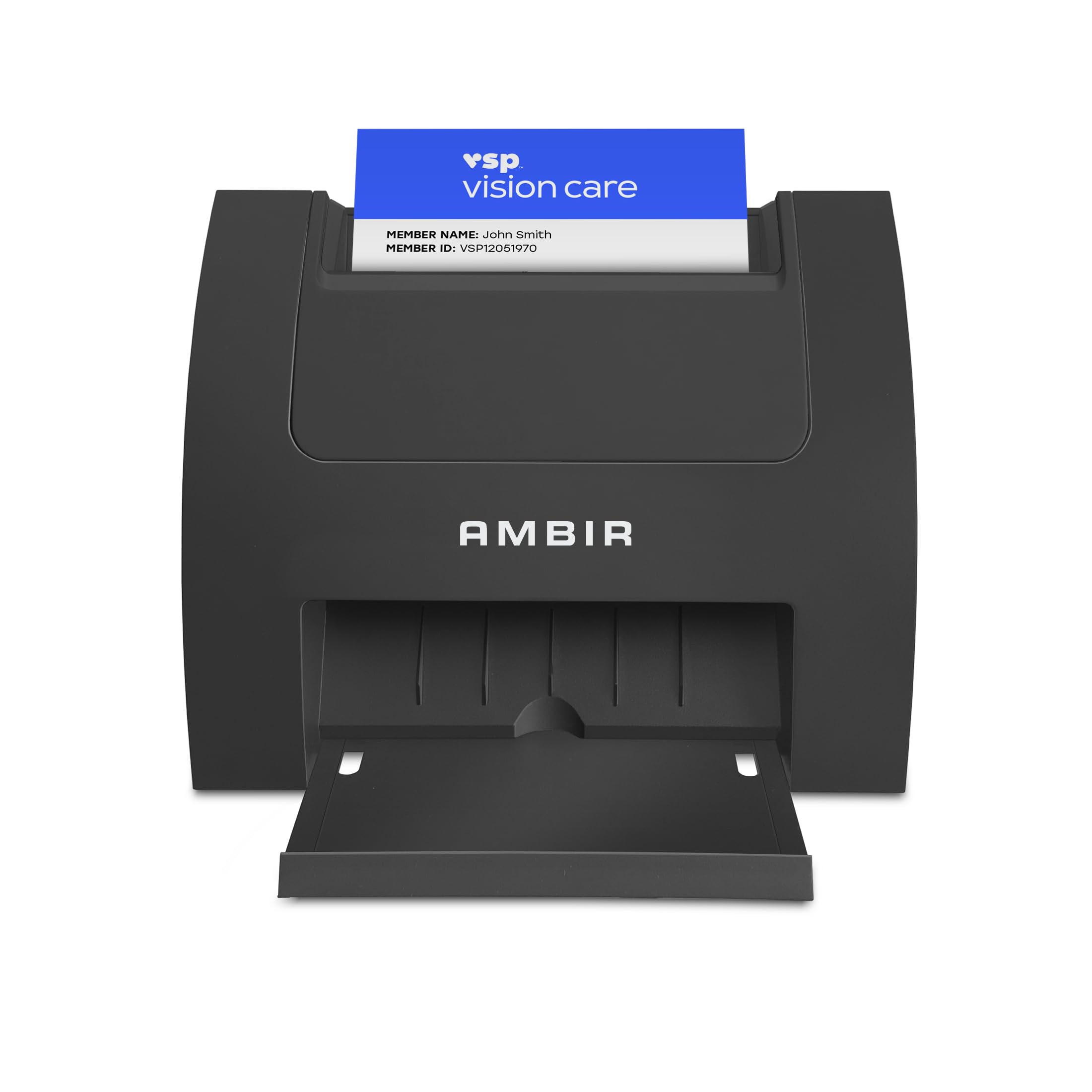
A desk-friendly vertical scanner that captures crisp 600 dpi card images in under two seconds.
Space is the first win with this one. The vertical feed path makes the footprint tiny at 3.3″D x 6.6″W x 5″H — a full 3.5x smaller than the Epson FastFoto above — so it tucks into a crowded office corner without taking over. It grabs a card in less than two seconds and delivers true 600 dpi images (dots per inch, the detail level you need for clean text and sharp corners) in color or grayscale, powered right off a single USB connection. That means no separate power brick cluttering your outlet.
The critical catch is the software: you must install the proprietary AmbirScan app before the scanner will export card data. Owners mention the scan quality is genuinely good, but the bundled AmbirScan software is needed to export card data, and without it the workflow stalls. There is also no guide rail to keep a card perfectly straight as you drop it in, so you have to feed carefully to avoid catching a corner on the slot. One owner noted cards need to be fed in reverse until you get the hang of it. The continuous scan mode lets you feed one card right after another without stopping for prompts, which keeps a small stack moving quickly.
It is built for Windows 10 and 11 and Mac OS 11 or higher, covering both 32-bit and 64-bit systems. The scan quality gets genuine praise, but the workflow friction is real — if you need to export card details into a spreadsheet, expect to wrestle with licensing. It is a niche pick for someone who wants a fast, single-card scan now and is willing to sort out the software config first.
Solid, with a software asterisk: the 600 dpi output for a single card is clean and quick, but plan on downloading the proprietary AmbirScan setup and loading it before you use the machine.
The workflow snag: one-slot feeding is fine for occasional scans but tedious for large collections, and data export requires a separate license.
Step up if: you want a tiny, USB-only scanner for quick single-card shots and you are comfortable setting up its software first.
Think twice if: your main goal is exporting card data to a spreadsheet, since that requires an extra license.
3. Epson Perfection V800

The archival heavyweight for collectors who want every print dot and corner reproduced exactly.
This is the flatbed for the serious collector. Its optical resolution hits 6400 dpi (dots per inch) — a huge step above the 600 dpi of the AMBIR — and its 48 bpp color depth is a full 2.0x richer than the FastFoto’s 24 bpp, which means smoother gradients and finer shadow detail in every scan. The CCD sensor (an older, higher-quality light-capture technology compared to the CIS sensors in cheaper machines) combined with a 4.0 Dmax tonal range delivers scans with deep, accurate blacks that matter for glossy, dark card faces. The Dual Lens System automatically picks between two lenses to tune sharpness for each scan.
The real distinction is its versatility: it scans oversized cards, postcards, and 35mm film in one machine. The large flatbed handles a 9×11 area, so you can scan oversized cards, postcards, and even multiple standard cards at once. Customers note fantastic results digitizing fragile 1940s prints and faded 1970s images. There is also a dedicated film holder that scans up to 18 frames of 35mm at a time — so if your collection extends to slides or negatives, this is the only pick here that covers that ground. The bundled software’s object outline feature auto-detects multiple photos on the glass, saving serious editing time on batch jobs.
The trade-off is weight and cost: at 20.9 pounds and a premium price, it demands dedicated desk space and budget. At 20.9 pounds, it is a substantial desk fixture, not a portable tool, and the price reflects the professional-grade internals. Owners find the bundled Epson Scan software intuitive, though the optional SilverFast SE software gets more mixed reviews for stability. For a collector who wants a true archive-grade digital master of a prized card, the 6400 dpi detail justifies the investment — it is the machine serious photographers and collectors reach for when quality outranks speed, earning a 4.3-star crowd rating.
Archival Muscle
- 6400 dpi optical resolution for extreme detail
- 48 bpp color depth for smooth tonal gradations
- Scans photos, slides, and negatives in one machine
- Dual Lens System tune focus automatically
Heavy Commitment
- 20.9 pounds needs dedicated desk space
- Slower per-card pace than any auto-feeder
- Dust can collect under the glass over time
Choose this for: one-by-one archival scans of valuable cards where maximum preservation of detail is the whole point.
Pass on it if: you need to digitize hundreds of commons quickly, since the flatbed pace will try your patience.
Understanding the Specs
Optical Resolution (dpi)
This is a measure of how many individual dots of detail the scanner captures per inch, and it is the single biggest quality lever for card scanning. A 600 dpi setting is fine for a digital binder or a quick social post, and it keeps files small. Jump up toward 6400 dpi only when you need to zoom way in — for instance, on a rare card where you want to inspect the print dot pattern or surface texture. Just remember that higher resolutions make each scan slower and produce much larger files, so you do not always want the max.
Color Depth (bpp)
Bits per pixel tells you how many shades of color each dot can represent, and higher bpp means smoother, richer transitions between tones. A 24 bpp scanner handles the colors of a typical baseball card perfectly well — bright team colors and clean white borders — and creates small, fast-loading files. A 48 bpp machine captures a much wider range of subtle shades, which matters when you are scanning a faded vintage card and want the software to have full color data to work with during restoration. For everyday trades and duplicates, 24 bpp is plenty; for valuable vintage stock, the extra depth helps.
FAQ
Will a sheet-fed scanner damage my baseball cards?
What is the best resolution for selling baseball cards online?
Can I scan both the front and the back of a card in one pass?
Will bundled scanning software save my scans as searchable text?
How many baseball cards can I scan in an hour?
Is a flatbed or a sheet-fed scanner better for card collecting?
Can these scanners handle thick cards, like relic or game-used cards?
What should I do with the scanned image files once I have them?
Final Thoughts: The Verdict
For most collectors, the baseball card scanner winner is the Epson FastFoto FF-680W because its sheet-fed duplex speed turns a shoebox of cards into an organized digital archive in one sitting — a task that would take days on a flatbed. If your focus is archival detail on valuable or vintage cardboard, the Epson Perfection V800 is the one to reach for with its 6400 dpi and gentle glass bed. And for a tiny desk footprint with quick single-card scans, the AMBIR PS670ST-AS fits a tight workspace. Choose by your collection size: feeders for volume, flatbeds for value.
How We Picked
We do not accept paid placement. Every pick is matched to a real buyer and a real use-case; we do not hands-on test units.
Sources & Methodology
Specifications: manufacturer listings and product documentation. Review insights: verified customer reviews, as of July 2026. Pricing: not shown on this page (it changes often); check the current price via the retailer link.
As an Amazon Associate, Gadgets Feed earns from qualifying purchases. This does not affect which products we feature.