
Our readers keep the lights on and my morning glass full of iced black tea. As an Amazon Associate, I earn from qualifying purchases.
Specs are compiled from manufacturer listings and verified buyer reviews and can change over time — please confirm the key details on the product page before buying.
An aching wrist or forearm after a long day of typing isn’t just annoying — it’s a signal that your keyboard is forcing your hands into an unnatural position.
I’m Min — the founder and writer behind Gadgets Feed. This guide is built by comparing the manufacturers’ published specifications and the patterns across verified customer reviews, so you get each pick’s real strengths and trade-offs instead of marketing spin.
You want an affordable ergonomic keyboard that eases wrist strain without emptying your wallet. This roundup focuses on what actually matters: cushioning, key feel, and wireless convenience, whether you prefer a full wave-style board, a true split layout, or a combo with a vertical mouse.
Our Picks at a Glance

How To Choose The Best Affordable Ergonomic Keyboard
The core job of any ergonomic keyboard is to keep your wrists straight and your shoulders relaxed. But the way each design achieves that varies, and the right choice depends on your pain points and desk setup.
Wave vs. Split vs. Tented Designs
Wave keyboards curve the key rows up in the middle so your fingers reach naturally without bending your wrists sideways. Split keyboards angle the two halves outward, which can be better for people with wider shoulders. Some designs also “tent” — propping the middle up — but that’s less common at this price point. If you’re new to ergonomics, a wave design is the easier transition since it keeps the familiar QWERTY layout.
Palm Rest and Tilt Adjustment
A cushioned palm rest gives your wrists a soft landing spot during pauses, and memory foam or leather options are far more comfortable than hard plastic. Adjustable tilt legs let you angle the board to keep your forearms parallel to the floor, which is the real posture win. Look for at least a couple of tilt positions so you can dial in your ideal angle.
Connectivity and Battery
Wireless boards typically connect via a 2.4GHz USB dongle or Bluetooth, and many now switch between three devices with a key press. Battery life varies widely — some run on two AAA batteries for months, while premium rechargeable models offer hundreds of hours on a single charge. If you switch between a laptop and desktop, multi-device switching is a feature worth prioritizing.
Quick Comparison
| Model | Best For | Design | Connectivity | Key Feature | Amazon |
|---|---|---|---|---|---|
| Logitech Wave Keys + Lift★ Best Overall | Complete ergonomic setup | Wave + Vertical Mouse | Bluetooth + Bolt | 57° Vertical Mouse | Amazon |
| Nulea RT08 Wave KeysBest Value | First-time ergo users | Wave | 2.4GHz | Leatherette wrist rest | Amazon |
| SABLUTE MA41 ComboQuiet Performer | Quiet shared offices | Wave + Mouse | 2.4GHz | 30dB Quiet Keys | Amazon |
| Kensington Pro Fit | Wired simplicity | Curved | Wired USB | Spill-proof keys | Amazon |
| Nulea Split Wireless | Rechargeable convenience | Split | Bluetooth + 2.4G | 206-hour battery | Amazon |
| SABLUTE MA31 Combo | Adjustable setup | Wave + Mouse | 2.4GHz | 3 DPI mouse | Amazon |
| SABLUTE MA31 Pro | Backlit typing | Wave + Mouse | 2.4GHz | 4000mAh battery | Amazon |
| ProtoArc EKM02 Wave | Small hands | Wave + Vertical Mouse | Bluetooth + USB | 100-hr rechargeable | Amazon |
| ProtoArc EKM01 Plus | Full-size split layout | Split Full-size | Bluetooth + 2.4G | 250-hr standby | Amazon |
In‑Depth Reviews
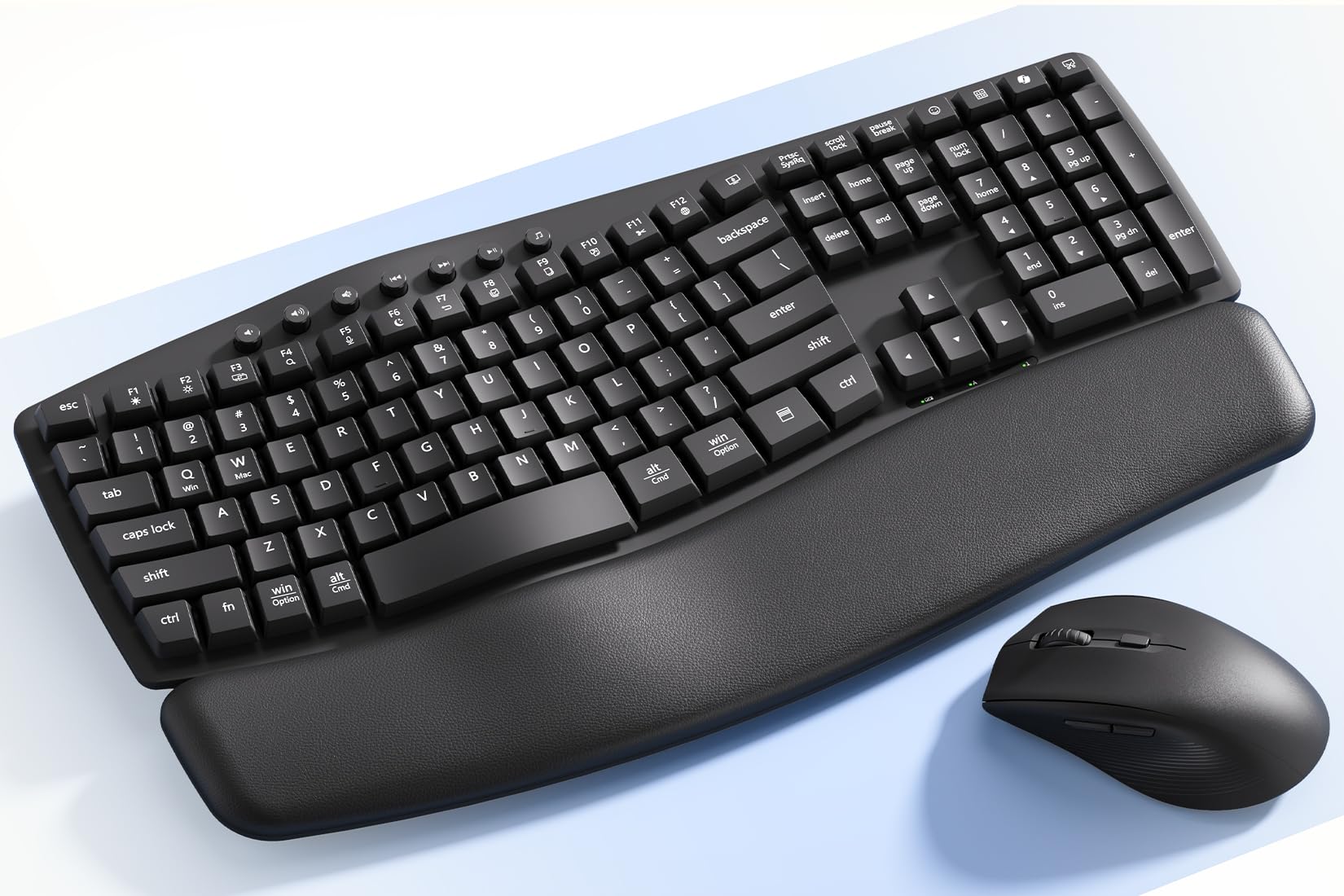
1. Logitech Wave Keys Keyboard & Lift Mouse Combo
Our pick — 4.5★ from 300+ verified ratings; the strongest balance of quality and price.
The complete wrist-saving duo that pairs a curved wave board with a 57° vertical mouse for a full ergonomic overhaul.
This combo tackles the whole problem, not just the keyboard half. The Wave Keys board uses a wavy layout that supports natural hand, wrist, and forearm alignment, so your arms rest in a relaxed position. The Lift mouse’s vertical shape — held at an optimal 57° angle — takes pressure off your wrist and promotes a more natural forearm posture. You get the ergonomic benefits on both hands in one box.
Comfort is the headline here, with a cushioned memory foam palm rest that provides all-day support, and the typing feel is tactile yet discreet thanks to plunger key switches. The duo connects via Bluetooth Low Energy or a Logi Bolt USB receiver, and it’s multi-OS compatible with Windows and Mac. The set weighs 1.7 pounds, and the mouse is designed specifically for small to medium hands, with a softly textured grip and snug thumb rest.
Buyers report easy device switching and note the quality of the build, with many saying it helps with hand fatigue. The recurring feedback is that the keyboard is compact, which some larger-handed typists find a bit small, and the wrist pad is not removable. The price is the entry-point consideration here, but as one owner put it: “Expensive, but worth it!”
What wins people over
- Quality build that earns the most praise from owners
- Quiet, tactile keys that reduce hand fatigue
- Vertical mouse eases wrist and index finger strain
Who should look elsewhere
- Compact size gets mixed feedback from large hands
- Wrist rest is non-removable
- Premium price tag sits above budget tiers
Reach for this if: you want a proven, quality-matched keyboard and mouse pair that fights wrist strain on both hands.
Think twice if: you have larger hands and prefer a wider, more spacious typing surface.
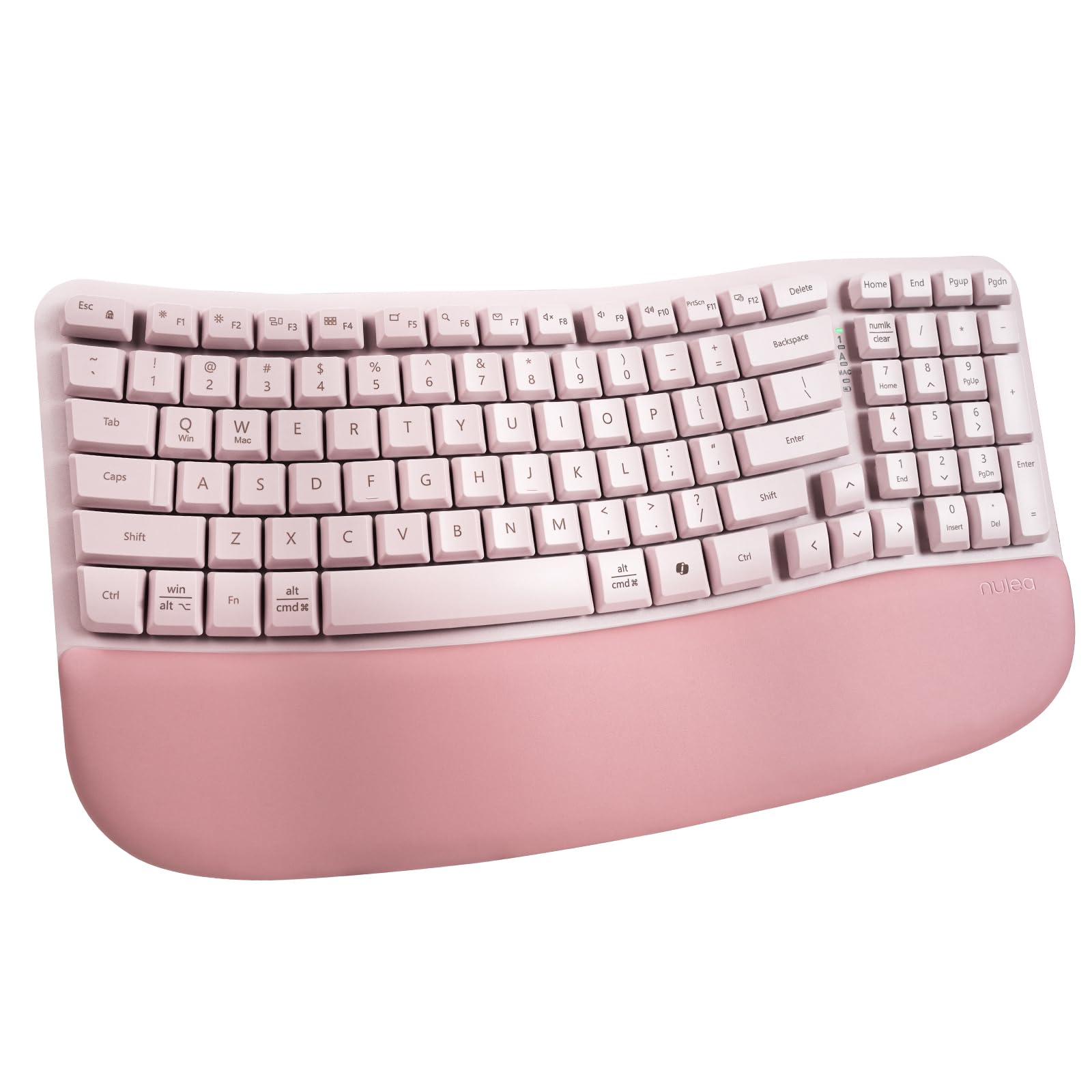
2. Nulea RT08 Wave Keys Wireless Ergonomic Keyboard
An approachable wave-shaped board with a plush leatherette wrist rest that skips the split-keyboard learning curve.
If the thought of relearning to type on a weird split layout worries you, this Nulea keeps the familiar full key layout while adding the ergonomic wave shape. The arc of each key row is crafted so your fingers stretch naturally, reducing hand fatigue without forcing you to change your typing habits — it’s genuinely plug-and-play for first-time ergonomic users.
The oversized wrist rest steals the show, wrapped in a soft, skin-friendly leatherette that supports your wrists and helps prevent strain. It’s a membrane keyboard connecting via a 2.4GHz dongle, and the ergonomic rear footrests let you adjust the tilt angle to disperse hand pressure. Owners love the quiet, soft keys, with one noting they can type for hours without feeling sore.
What wins people over is the quality feel for the price, with the ergonomic design and quiet operation both earning frequent praise. The trade-offs are minor: there’s no backlighting, it’s not mechanical, and the compact size gets mixed feedback — some find it perfect for their desk, others too small. One owner raved that “the wrist pad is also amazing” and called it a “great deal for a keyboard like this.”
A smart entry point: delivers the core ergonomic wave design and a cushioned rest at a budget-friendly price, ideal for anyone new to ergonomic boards.
The catch: if you need a backlit or mechanical feel, this membrane design won’t scratch that itch.
3. SABLUTE MA41 Wireless Keyboard and Mouse Combo
The near-silent wave combo built for shared offices, with a leather palm rest that owners say feels amazing after 9-hour shifts.
Noise matters when you’re on calls or sharing a workspace, and this SABLUTE combo keeps things calm with ultra-quiet typing rated at 30dB — described as reducing noise by up to 90%. The cushioned leather wrist rest is a standout, providing soft, supportive cushioning that helps reduce wrist pressure during long typing sessions, unlike traditional hard plastic rests.
It’s built to last, with laser-etched keys tested for up to 10 million keystrokes and backed by a 2-year replacement warranty. A single 2.4GHz receiver connects both keyboard and mouse, saving USB ports, and it includes a USB-C adapter with support for Windows, macOS, ChromeOS, Linux, and Android. The 12 productivity shortcuts give quick access to screenshots, media controls, and a calculator.
Buyers consistently highlight the comfort and quiet operation — the top praised aspects alongside overall quality — with one noting their hands feel amazing after long shifts. The reliability picture is more mixed, so it’s worth treating the wireless connection as generally solid but not flawless. Weighing in at 2.3 pounds, it’s a substantial desk presence with a 33ft wireless range.
Office-ready silence: the 30dB quiet keys and cushioned leather rest make this ideal for late-night work and shared spaces.
Honest fit note: a few owners mention connectivity hiccups, so it’s worth confirming your system’s compatibility first.
4. Kensington Pro Fit Ergonomic Wired Keyboard

A no-fuss wired workhorse with a built-in cushioned wrist rest and spill-proof keys that shrug off desk accidents.
Not everyone wants another dongle or a battery to manage, and this Kensington keeps things simple with a wired USB connection that never drops. The built-in wrist rest supports, cushions, and cradles your wrists for neutral hand alignment, and the quiet keys make typing smooth and non-disruptive. It’s a practical choice for office environments where reliability trumps wireless convenience.
Durability is a real selling point here: the spill-proof keys meet MIL-STD-810H Method 504.3 Contamination by Fluids testing, meaning they resist breakdown when exposed to cleaning and disinfecting solvents like alcohol and bleach for at least 24 hours. That’s a meaningful feature for shared desks and regular wipe-downs. The ambidextrous design works for any user, and it’s compatible with Windows, macOS, and ChromeOS.
Owners praise the quietness and comfort most, with the almost-silent touch and supportive cushion drawing consistent positive feedback. The ergonomic design gets more mixed reviews — some find it excellent, while others note the board tilts from front to back. The build quality shows some variance, and a few find the key spacing tight. It’s a dependable wired option, but the ergonomic curve is gentler than a wave or split design.
Set-and-forget reliability: the wire means zero pairing hassles, and the spill-proof rating handles real-world coffee mishaps.
Not for deep ergonomics: if you need aggressive wrist realignment, this gentler curve falls short of wave or split designs.
5. Nulea Ergonomic Split Wireless Keyboard
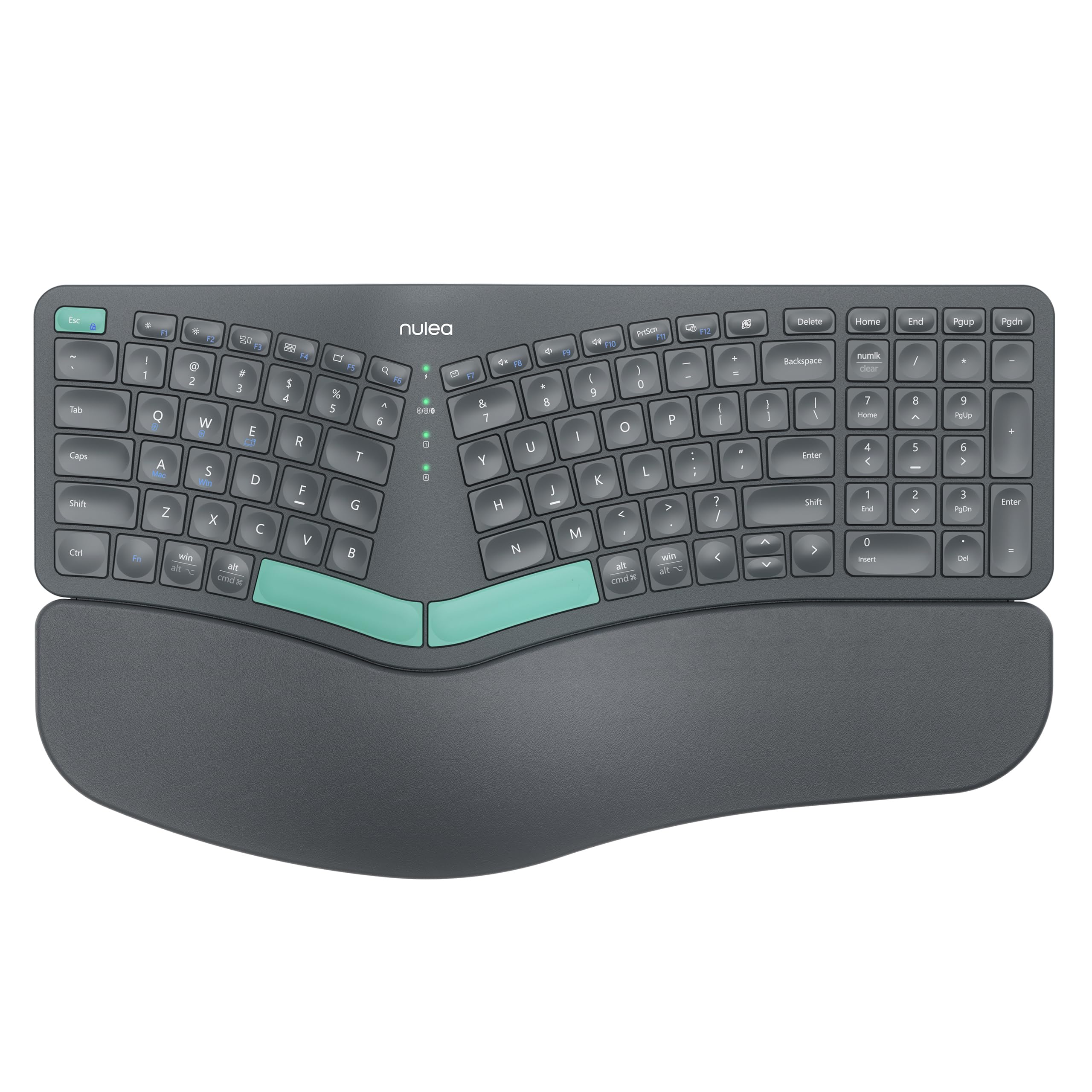
A true split layout with a rechargeable 206-hour battery, so you ditch both wrist strain and the battery drawer.
If you want the real ergonomic deal — a split design that adapts to the natural alignment of your hands — this Nulea delivers it without the constant cost of AAAs. The rechargeable battery delivers an impressive 206 hours of use, so you’re not swapping cells every few weeks. It’s a membrane keyboard with an oversized, skin-friendly leatherette wrist rest that provides ample support.
Connectivity is flexible with dual-mode Bluetooth and 2.4G wireless, letting you move between work and play setups. The adjustable support tilts offer three different angles so you can customize your typing posture for ergonomic alignment. Owners mention it helps their hands not hurt after a full day of work, and the quiet sound is a recurring positive.
The split design does take a little getting used to, as owners openly admit, but the payoff is reduced hand and finger pain. Battery life draws consistent praise, and the compact size works well on smaller desks. It’s a strong mid-range choice that jumps straight to a split layout — the more advanced ergonomic step — rather than starting with a wave shape. The grey-green color adds a bit of personality to the desk.
Grab this for: a genuine split layout that realigns your hands, paired with a battery that outlasts a work week.
Consider the learning curve: split layouts feel odd for the first few days, so it’s not the pick if you want instant familiarity.
6. SABLUTE MA31 Ergonomic Wireless Keyboard and Mouse Combo

A wave-key combo with front and rear tilt legs and a sculpted 3-DPI mouse that adapts to your desk height.
Standing desks need a keyboard that adapts, and this SABLUTE combo is built for exactly that — front and rear tilt legs let you customize your typing position whether you’re sitting or standing. The wave-shaped keys follow the natural curve of your fingers, reducing awkward hand movement, and the silky-soft, sweat-resistant leatherette wrist rest is easy to clean and more durable than fabric.
The included mouse is a step up from basic bundles: it’s sculpted for medium and large hands with 3 adjustable DPI settings (800/1200/1600) for work, browsing, and everyday tasks. A single 2.4GHz USB receiver connects both devices with a stable range up to 33 ft, so you can move freely around your desk. The 9 shortcut keys give quick access to Emoji, Screenshots, and a Calculator — though Calculator and Emoji shortcuts aren’t available on macOS.
Quality and ergonomics are the most-praised aspects, with owners highlighting the comfortable wrist pad and quiet operation. The build is rated for 10 million keystrokes with a 2-year replacement warranty. The main caveat is connectivity, which gets mixed feedback — it works great for most, but some Mac users report compatibility quirks, so verify your system works with the 2.4GHz dongle. At 2.7 pounds, it’s a solid, substantial set.
Flexible for any desk: the adjustable tilt and versatile mouse make it a great all-rounder for sit-stand setups.
Compatibility check: connectivity is solid overall, but a few Mac owners hit snags, so test it early.
7. SABLUTE MA31 Pro Rechargeable Backlit Keyboard and Mouse Combo

The premium wave combo with a 4000mAh battery and RGB backlighting that keeps typing comfortable into the night.
Typing in a dim room usually means hunting for keys, but this SABLUTE Pro solves that with backlighting in soft tones (blue, cyan, white) or bold colors (red, green, purple, yellow) to match your mood. Underneath the glow sits a serious battery: a 4000mAh rechargeable cell that lasts weeks on a single charge thanks to intelligent auto-sleep — with double the capacity of standard backlit keyboards.
Comfort gets the premium treatment too, with a silky-smooth faux lambskin leather palm rest that’s durable, sweat-proof, and easy to maintain. The wave keys deliver smoother typing so you can work 8 hours without fatigue, and the adjustable front and back stands support healthy wrist posture whether you sit or stand. The included RGB mouse brings a 700mAh battery, 6 buttons, and 3 DPI levels (800/1200/1600) with 6 fixed colors or 5 cycle modes.
Quality, lighting, and comfort are the most-praised aspects, with owners noting the soft, velvety keys and a palm rest that feels great in hand. One called it the “Best keyboard and mouse I’ve ever used,” praising the dual feet that tilt down for wrist comfort. The battery life draws consistent praise, and the 10M keystroke durability rating means it’s built for the long haul. Ergonomics get slightly mixed feedback, and at 2.7 pounds it’s a weightier presence on the desk.
Night-owl comfort: the backlit keys and cushioned faux lambskin rest make late-night typing a pleasure.
Weighty consideration: it’s a substantial set, and the ergonomic benefits are strong but not universally agreed upon.
8. ProtoArc EKM02 Wave Keys Ergonomic Keyboard and Mouse
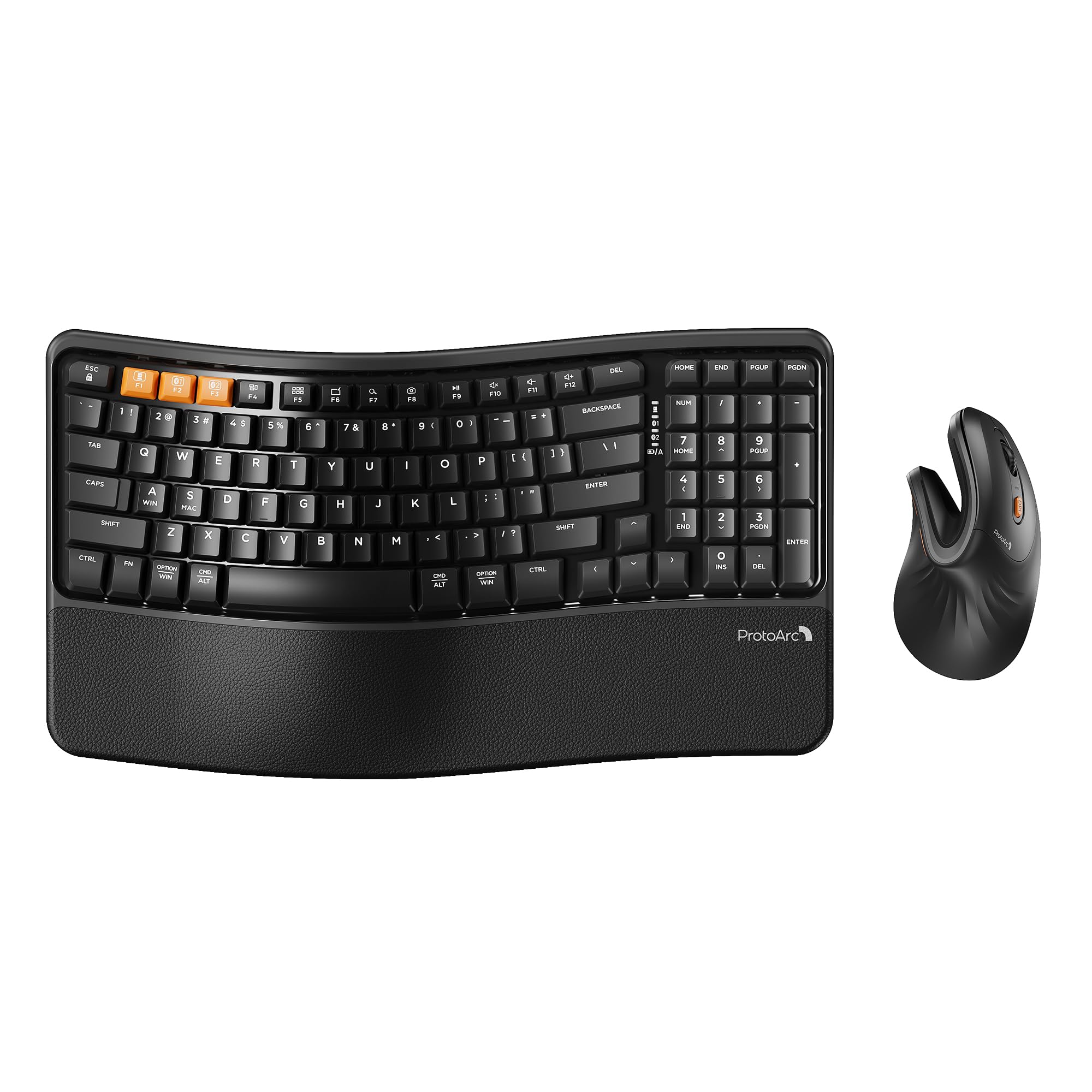
A thoughtfully compact wave combo with a vertical mouse and 100-hour battery, designed for hands under 7.5 inches.
This ProtoArc duo is engineered with a specific audience in mind: people with small to medium hands. The EM11 NL vertical mouse is designed for hand lengths under 7.5 inches (19.05 cm), keeping your forearm and wrist in a relaxed posture that reduces the risk of repetitive strain injuries. The compact keyboard layout keeps the mouse close for better shoulder alignment, saving desk space without losing the full function set.
Both devices are built with a 500mAh rechargeable lithium battery, and a 2-3 hour USB-C fast charge delivers 100 hours of working time. Auto sleep mode kicks in after 60 minutes of no operation to preserve battery. The keyboard features a built-in cushioned memory foam palm rest and 4 adjustable tilt legs, while multi-device switching handles 3 devices via Bluetooth or USB with an FN+A or FN+S toggle between Windows and macOS.
Owners rave about the quality and comfort, with one describing the unboxing as “extremely satisfying” and noting they felt appreciated as a customer. Another reported wrist relief after just 3 weeks of use. The learning curve is real — the vertical mouse takes 1-2 weeks to get used to, and there’s no wired connection option. It’s a niche premium pick that nails the small-hand ergonomic brief beautifully.
Best for: small to medium hands that want a complete, rechargeable ergonomic setup with a vertical mouse.
Know before buying: the vertical mouse has a genuine adjustment period, and there’s no wired fallback if you need one.
9. ProtoArc EKM01 Plus Split Wireless Keyboard Mouse Combo

A full-size split keyboard that keeps the number pad, with a curved wrist rest and 250 hours of standby on a charge.
If you can’t live without your number pad, the EKM01 Plus is the split keyboard that keeps it. The full-size layout features a curved and split keyframe design that positions your wrist and forearm in a more natural, relaxed typing posture, without sacrificing the numeric keypad that number-crunchers rely on. The curved wrist rest with a soft memory foam layer offers more wrist support and less wrist bending.
Connectivity is flexible, switching up to 3 devices via USB receiver or Bluetooth with a single button press, and it’s compatible with Windows 7/8/10, Mac OS X 10.12, and Android 4.3 or higher. The contoured mouse includes palm and thumb rests, and a 2000 DPI sensor provides precise control with forward/backward buttons for easier web browsing. Both devices are powered by a 500mAh rechargeable battery with 250 hours of standby after a 2-hour charge.
Quality is the most-praised aspect by a wide margin, with owners appreciating the responsive keys that have a short reset, and several noting immediate wrist relief. A dust cover is included for protection when not in use. The main caveats: the mouse gets mixed reliability feedback, with a few owners reporting it stops working, and the keyboard is not backlit. At 20.75″ long, it’s a substantial footprint that demands desk space — check your measurements before ordering.
The full-size ergo answer: you keep your number pad and gain proper wrist alignment, with multi-device switching as a bonus.
Watch out for: the mouse reliability is the weak spot, and the large footprint needs a spacious desk.
Understanding the Specs
Wave vs. Split vs. Vertical
The shape dictates how much your wrists have to bend. Wave designs curve key rows upward in the center so your hands stay straighter facing forward. Split designs angle the two halves outward to match your shoulder width. Vertical mice rotate your hand into a handshake position, taking pressure off the wrist. More aggressive shaping means a longer adjustment period, but also more relief.
Battery and Key Life
Rechargeable models with built-in batteries (measured in mAh, like 4000mAh) save you from buying AAAs, and auto-sleep modes stretch charge life to weeks or hundreds of hours. Key durability is often rated in keystrokes — 10 million keystrokes is a solid benchmark for years of daily typing. Laser-etched keys on some models resist fading, keeping the legends readable longer.
FAQ
Will an ergonomic keyboard actually reduce my wrist pain?
What is the difference between a wave keyboard and a split keyboard?
Will this keyboard work with my Mac or Windows computer?
How long does the battery last on a wireless ergonomic keyboard?
Is a cushioned palm rest really necessary?
How long does it take to get used to an ergonomic keyboard?
Why is the mouse included in some ergonomic keyboard combos?
Is a wired or wireless ergonomic keyboard better?
Why do some ergonomic keyboards cost more than others?
Final Thoughts: The Verdict
For most buyers, the best affordable ergonomic keyboard overall is the Logitech Wave Keys combo, because it pairs a proven wave board with a 57° vertical mouse for complete wrist relief — and it’s the crowd favorite with a 4.5-star rating from hundreds of owners. If you want a true split layout with a rechargeable battery, grab the Nulea Split Wireless with its 206-hour runtime. And for a quiet, budget-friendly entry into wave ergonomics, the Nulea RT08 is the one to reach for — it delivers the essential comfortable shape that over 300 owners have backed up with strong reviews.
How We Picked
We do not accept paid placement. Every pick is matched to a real buyer and a real use-case; we do not hands-on test units.
Sources & Methodology
Specifications: manufacturer listings and product documentation. Review insights: verified customer reviews, as of July 2026. Pricing: not shown on this page (it changes often); check the current price via the retailer link.
As an Amazon Associate, Gadgets Feed earns from qualifying purchases. This does not affect which products we feature.