
Our readers keep the lights on and my morning glass full of iced black tea. As an Amazon Associate, I earn from qualifying purchases.
Specs are compiled from manufacturer listings and verified buyer reviews and can change over time — please confirm the key details on the product page before buying.
You come home with your arms full of laundry, and your keys are buried somewhere in your pocket. A code lock ends that daily fumble. The real question is which type fits your life: a simple keypad knob, a full deadbolt, or a Wi-Fi smart lock. This guide focuses on the specs that matter—how many codes you can set, how it locks itself, and if you want app control or just a touchpad.
I’m Min — the founder and writer behind Gadgets Feed. This guide is built by comparing the manufacturers’ published specifications and the patterns across verified customer reviews, so you get each pick’s real strengths and trade-offs instead of marketing spin.
We’ve analyzed the keypad, deadbolt, and smart lock specs to find the most dependable models, and the standout bedroom lock with code balances quick access, solid security, and long battery life for daily use.
Our Picks at a Glance


How To Choose The Best Bedroom Lock With Code
Before you buy, check the hole already in your door. Most US bedroom doors have either a round knob hole (about 2 1/8 inches) or a larger bore hole (about 2 3/8 inches) for a deadbolt. Match that hole, then decide how “smart” you want the lock to be.
Knob vs. Lever vs. Deadbolt
A keypad knob replaces a standard bedroom knob directly—it’s the easiest swap and needs only a screwdriver. A lever handle (like the TEEHO TE004) gives you a more modern look and is easier to grip, which helps if you have arthritis or your hands are full. A deadbolt (like the Tapo DL110) is the heaviest-duty choice, but it requires a separate deadbolt hole above your handle. For a simple bedroom, a knob or lever is usually enough; for a front door or office that needs more security, a deadbolt is stronger.
Code Capacity and Access Control
Think about who needs in. A basic lock might offer 8-9 codes, which is plenty for a family. More advanced models accept 20 user codes or even 100 passcodes, letting you assign a unique code to each kid, guest, or pet sitter and delete it later. If you host visitors often, look for “one-time codes” that expire automatically after use—that way you never have to change your main code after the handyman leaves.
Auto-Lock and Battery Life
A code lock only helps if you actually lock it. Auto-lock features range from a 3-second delay to fully adjustable timers of 10-180 seconds—pick a model that gives you control, not one that locks before you’ve cleared the door. Battery life matters too: look for locks that run on 4 AA batteries with a year of life, and check for a low-battery warning light or an emergency USB-C or 9V backup port so you’re never locked out with a dead unit.
Quick Comparison
| Model | Best For | User Codes | Lock Type | Battery | Amazon |
|---|---|---|---|---|---|
| Tapo DL110★ Best Overall | Smart Home Hub Users | Up to 100 Fingerprints | Deadbolt | 1-Year Rechargeable | Amazon |
| Buoan Keyless KnobBudget Champion | Quick DIY Installation | Up to 8 Codes | Keypad Knob | 9V Backup | Amazon |
| HIDALIFE Keypad LockTop Performer | Heavy-Duty Value | 9 User Codes | Keypad Deadbolt | — | Amazon |
| TEEHO TE003 Knob | Weatherproof Entry | 20 User Codes | Keypad Knob | 1-Year (4 AA) | Amazon |
| TEEHO TE004 Lever | Modern Lever Style | 20 User Codes | Keypad Lever | 1-Year (4 AA) | Amazon |
| Tapo DL100 | Wi-Fi + Tactile Keys | 200 Custom Codes | Deadbolt | 200-300 Days (4 AA) | Amazon |
| Philips DDL210X | Fingerprint Speed | Unlimited One-Time | Deadbolt | 4 AA | Amazon |
| Philips DDL242X | Full Smart Home Control | Up to 100 Codes | Deadbolt | 8 AA | Amazon |
In‑Depth Reviews
1. Tapo Smart Wi-Fi Door Lock DL110
Our pick — 4.5★ from 750+ verified ratings; the strongest balance of quality and price.
A six-way access deadbolt that locks your bedroom down or cleverly welcomes guests—all from one compact unit.
Its fingerprint sensor open up in 0.42 seconds, faster than typing a code. You can register up to 100 different fingerprints, so the whole family can just touch the pad and walk in. For a bedroom, that means morning grogginess or a load of laundry doesn’t slow you down.
This is a true smart lock, not just a keypad. The Tapo app gives you remote locking, access history with timestamps, and scheduled codes for guests—say, a housekeeper who only gets in on Tuesdays. It all runs on a removable, rechargeable battery pack rated for a full year of operation, so you’re not buying AA batteries every few months. It’s BHMA Grade 2 certified, a step above the Grade 3 on most budget locks.
The Tapo takes up more door space than the Philips DDL210X—5.91 x 2.69 x 1.29 inches versus the Philips’ slimmer 6.29 x 2.79 x 0.63 inches—but it adds Wi-Fi and app features the Philips 1000 series lacks. Owners consistently cite build quality and reliability as the main reasons they picked it, and the auto-lock feature means you’ll never lie in bed wondering if you locked the door. As buyers report, it’s “easy install; fast accurate fingerprint, code entry, auto-lock; battery >95% after month+; reliable.”
The Smart Perks
- Six ways to open up: fingerprint, code, app, Bluetooth, voice, or backup key.
- Rechargeable battery lasts a year and can be topped up via USB.
- Create one-time or scheduled codes for guests directly in the app.
The Trade-Offs
- Wi-Fi connectivity drew mixed reviews, so a strong router signal matters.
- Some owners wanted native Home Assistant support, which isn’t built in.
Reach for this if: you want app-based remote control, scheduled guest codes, and the fastest fingerprint open up.
Look elsewhere if: you’d rather avoid apps entirely and just want a simple keypad with no connectivity.
2. Buoan Keyless Electronic Entry Door Knob
A no-frills bedroom knob that swaps in with just a screwdriver and locks itself 3 seconds after you close the door.
If you just want a code, not a computer on your door, the Buoan is the simplest answer. This keypad knob accepts up to 8 changeable codes, and the backlit keys light up so you can punch in your code in a dark hallway. It’s designed for interior doors specifically—bedrooms, bathrooms, offices—which keeps the price down.
The auto-lock function is the standout behavior here: the door locks itself 3 seconds after opening, and you can’t turn that off. If you have kids who never remember to lock their door, this is a blessing. The brushed zinc build gives it a solid feel that surprises people at this level, and the included backup battery port means a quick charge if the main batteries die.
Installation is the most-praised aspect, with owners noting it took around 10 minutes and felt just like replacing a standard doorknob. As owners mention, “Install was similar to any kind of doorknob. Programming was easy. I’ve been using this successfully for several months without issue.” The trade-off is long-term reliability—feedback is mixed on whether the locking mechanism holds up past the first year, so it’s best for low-traffic interior doors rather than a busy front entrance.
Why It’s Easy
- No wiring, no app—just a screwdriver and a backup battery port.
- Anti-spy code encryption lets you add random digits around your real code.
- Auto-lock engages 3 seconds after the door closes.
Before You Buy
- The smart auto-lock can’t be disabled, which may annoy some users.
- Long-term reliability has mixed reports; it’s best suited for moderate use.
The verdict: the ideal budget pick for a bedroom or office where you want keyless entry without the learning curve.
Think twice if: you need heavy-duty, daily-use durability on a frequently used entry door.
3. HIDALIFE Keypad Keyless Entry Door Lock
A heavy-duty deadbolt with a pressure-tested zinc body that feels twice its price and locks itself in 5 seconds.
Where the Buoan feels light and simple, the HIDALIFE feels like a vault. Its zinc alloy body withstands 2000N of pressure and 250,000 test cycles—front-door durability. The matte black finish drew consistent praise for looking far more premium than the price suggests.
It stores up to 9 unique PINs, so each family member or frequent guest gets their own code. The touchscreen keypad uses a blue backlight with no physical buttons to wear out, and you can add random digits before and after your real code—a privacy shield against anyone watching over your shoulder. The auto-lock kicks in 5 seconds after the door closes, which owners cite as perfect for busy households.
The keypad stays hidden until you touch the surface, which keeps the door looking clean. Compared to the TEEHO TE003, this HIDALIFE is physically larger—8.19 x 7.68 x 3.9 inches versus 5.43 x 3 x 3.5 inches—a more imposing presence on the door. Owners highlight the functionality and easy installation as top positives, though a few note the touch panel needs a tap first to wake it up, adding a slight delay before you can enter your code.
Built to last: the zinc alloy construction and 240-hour salt spray testing make this a lock that shrugs off daily family use.
The catch: ease of use drew mixed feedback—some owners found the wake-the-panel step slightly less intuitive.
Best for: anyone wanting deadbolt-level security with a premium feel and no app—just a touchpad and up to 9 codes.
skip it if: you want Wi-Fi connectivity or a sleek, slim profile; this is a chunky mechanical unit.
4. TEEHO TE003 Keypad Door Knob Lock
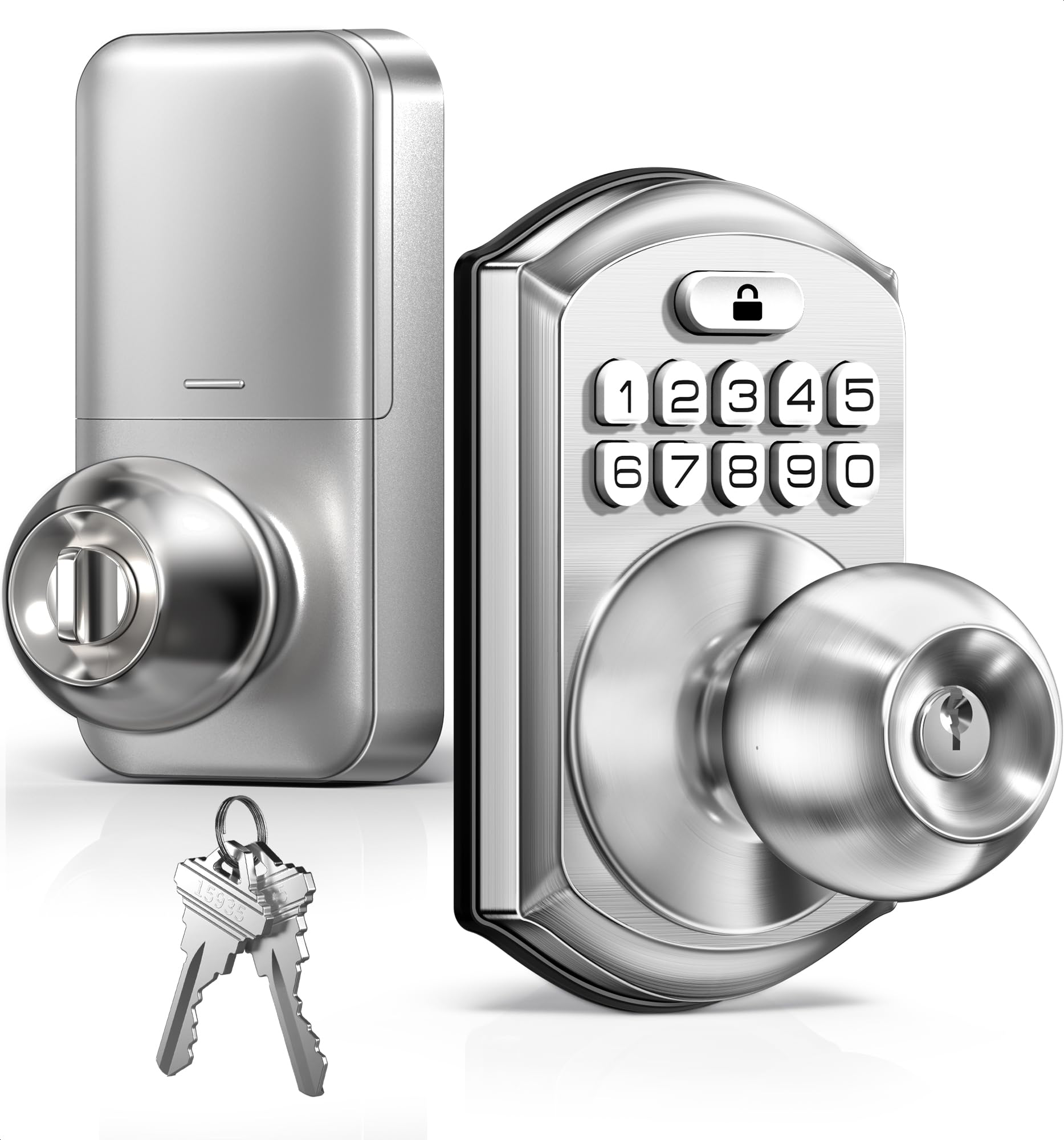
A keypad knob with a one-time code system and an IP54 rating that shrugs off rain—from bedrooms to garage doors.
The TEEHO TE003 is the most versatile knob here because it’s rated IP54 waterproof, meaning it handles rain, splashes, and dust. That makes it the rare keypad knob you could feasibly use on a side door, not just a bedroom. It’s powered by 4 AA batteries that last up to a year, with a red indicator light that flashes below 15% so you get plenty of warning before it dies.
It packs 20 user codes, one-time passcodes that auto-expire after use, and 2 physical backup keys—a full toolkit in a knob form factor. The auto-lock is adjustable from 10-99 seconds and is actually off by default, which is a smart design choice for anyone who found the Buoan’s fixed 3-second lock too aggressive. One-touch locking is there too: just hold any number for 2 seconds on your way out.
The stainless steel handle and aluminum keypad meet ANSI Grade 3 standards. Owners who installed it on garages report it survived a harsh NY winter, which speaks to the weatherproofing. The most-heard praise is for the straightforward installation—one owner timed it at about 15 minutes. There’s a minor, occasional gripe about the inside turn-lock jamming, but it’s rare and the code entry always works as the fallback.
Flexible by design: adjustable auto-lock timing and passage mode make this the most configurable knob on the list.
Who it’s not for: if you hate managing batteries, the 4 AA requirement (not included) is worth noting.
Reach for this if: you want one knob that works for a bedroom, a garage, or even a front door with rain exposure.
Look elsewhere if: you’d rather have a deadbolt’s heavier lock body than a knob’s convenience.
5. TEEHO TE004 Keyless Entry Door Lock Lever
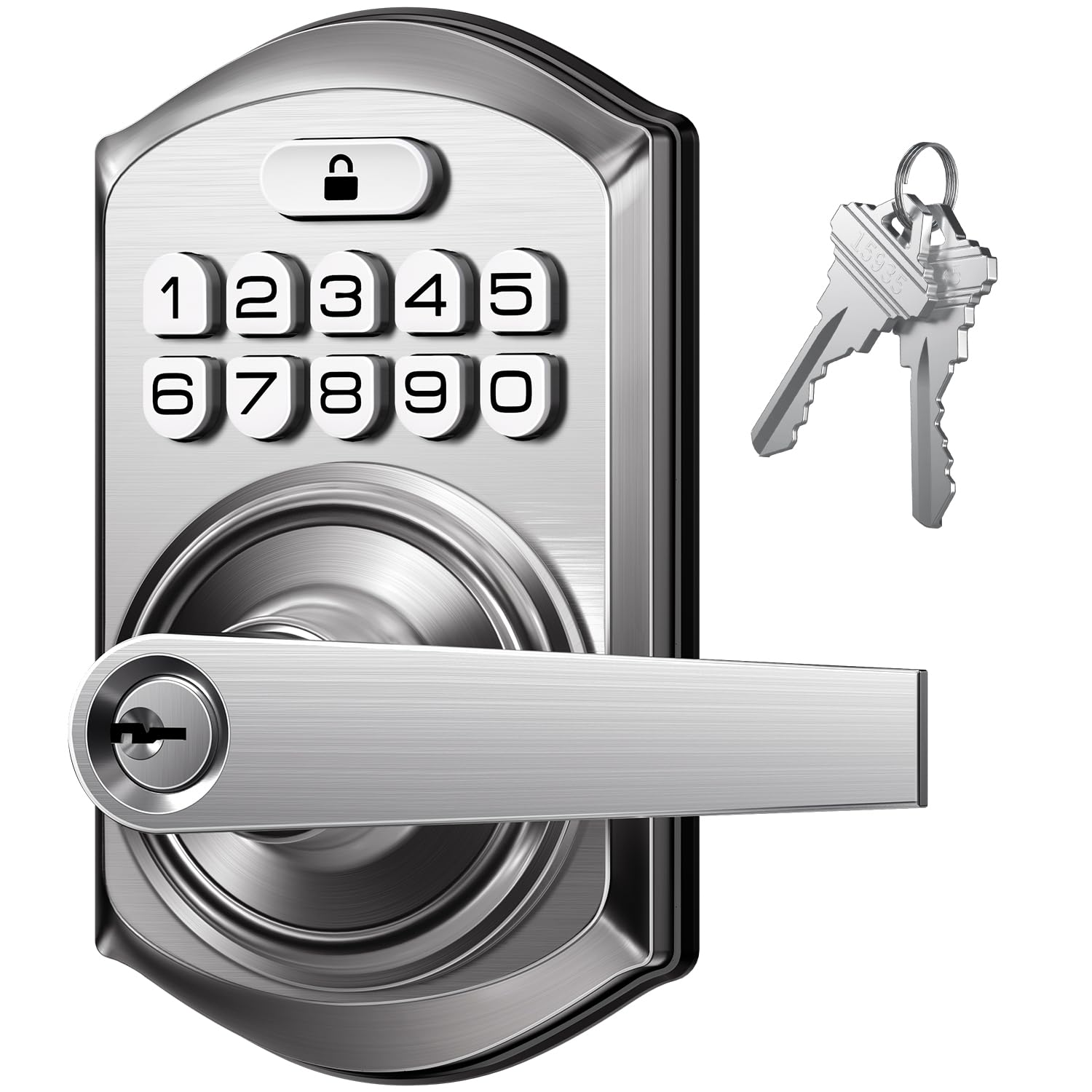
A lever-handled keypad lock that fits both hands and door orientations, with a 3-minute shutdown after 10 wrong attempts.
The TE004 is the lever-handle sibling to the TE003, and the lever design is a genuine upgrade for accessibility—easier to grip with an armful of stuff or for anyone with limited hand strength. It’s ambidextrous, fitting both left- and right-handed doors, and installs in about 10 minutes on standard 2-1/8″ bore holes.
Security features are a step up from the TE003. The break-in detection automatically shuts the lock down for 3 minutes after 10 consecutive failed PIN attempts, which is serious deterrence against code guessing. The anti-peeping keypad works the same way—enter random digits around your real code—and the backlit pad makes nighttime entry easy.
Battery life matches the TE003 at up to 1 year on 4 AA batteries, with a low-battery warning below 15%. The zinc alloy handle and IP54 weather-resistance make it suitable beyond the bedroom too, though it’s marketed for interior spaces primarily. Owners consistently note the installation is the highlight—it’s the most-praised aspect—and the solid feel. One buyer summed up the value simply: “Easy install, seems to be well made.”
Security-minded: the break-in detection and adjustable 10-99 second auto-lock put real protection on a lever format.
Mixed signal: durability drew some negative feedback in the data, so it’s best for standard interior use rather than punishing environments.
The verdict: the right pick if you prefer a lever’s ergonomics and want serious anti-tamper features.
Think twice if: you need a knob to match existing hardware on other doors in your home.
6. Tapo Smart Wi-Fi Deadbolt DL100

A Wi-Fi deadbolt with room for 200 custom codes, voice open up, and a 12-hour-a-day battery promise.
The DL100 is the more understated sibling to the DL110, but it’s a powerhouse for code management. It holds up to 200 customizable codes—far more than any other lock here—and lets you organize them into groups for family, guests, or visitors in the Tapo app. If you run a rental or just have a rotating cast of houseguests, this scale of control is class-leading.
Unlike the DL110’s fingerprint sensor, the DL100 uses tactile buttons with a backlight. They’re physical buttons, so no wake-the-panel delay. Battery life is rated for up to 200 days in Wi-Fi mode or 300 days in Bluetooth mode, and it includes a USB-C port for emergency power. Its BHMA Grade 3 certification and IP54 rating suit exterior doors.
Voice control works with Alexa, Google Home, and Samsung SmartThings—you can say “open up the door” and speak your PIN. It installs on standard 2-1/8″ holes with no drilling. The most-discussed feature is auto-lock, with owners loving the adjustable timer; one noted they set it to 15 minutes so the door locks itself after the kids get home. The main criticism is battery drain in Wi-Fi mode, which some found ran faster than the 200-day claim.
Control freak’s dream: 200 codes, groups, and full app monitoring with timestamps on every entry.
Small caveat: Wi-Fi mode sips power faster than Bluetooth, so expect to change the 4 AAs more often than the 200-day estimate.
Reach for this if: you want massive code capacity with app and voice control—ideal for a home office or rental.
Look elsewhere if: the DL110’s fingerprint sensor and rechargeable battery feel more like the “wow” upgrade.
7. Philips Fingerprint Keyless Entry Door Lock DDL210X

A biometric deadbolt that open up in 0.3 seconds and talks you through setup in English, French, or Spanish.
The Philips DDL210X leans into speed and simplicity. Its fingerprint sensor claims 99.99% accuracy and open up in 0.3 seconds—the fastest here. If you’ve ever struggled with finicky fingerprint readers, the feedback here is notably positive, with owners saying the scanner even works for people whose prints never register on other devices.
Setup is genuinely different: the lock uses voice-guided programming, so it talks you through the steps in English, French, or Spanish. No manual required. The touchscreen keypad is backlit, auto-lock is adjustable from 30-180 seconds, and it supports unlimited one-time PIN codes for guests. It’s a deadbolt, so it needs the upper bore hole, but installation is consistently rated easy.
One honest note from the manufacturer data: fingerprint recognition may be less effective for children under 6 and adults over 65, so keep that in mind if it’s for a grandparent’s room. This model also has no Wi-Fi or app—it’s purely keypad and fingerprint. Compared to the Tapo DL110, which integrates with an app and rechargeable battery, the Philips is more of a standalone device; it wins on fingerprint speed but loses on connectivity.
The speed king: 0.3-second fingerprint recognition beats every other open up method on this list.
Keep in mind: no Wi-Fi or app access—this is a self-contained deadbolt, not a smart-home node.
Best for: someone who wants the absolute fastest way in without typing a code or pulling out a phone.
pass on it if: remote access via an app is a must-have for your setup.
8. Philips Wi-Fi Smart Deadbolt Lock DDL242X

The full-featured Philips with built-in Wi-Fi, up to 100 passcodes, and an Away Mode that disables everything but your master code.
The DDL242X is the smart-home flagship of this list. It has built-in Wi-Fi, so there’s no extra hub or bridge needed to control it from your phone—just connect it to your 2.4GHz network and lock or open up from anywhere. It supports up to 100 custom passcodes, plus unlimited one-time or scheduled codes for guests, cleaners, or deliveries. That’s the most flexible code system here except for the Tapo DL100’s 200 codes.
open up options are the most complete of any pick: app, passcode, fingerprint, physical key, or voice via Alexa and Google Assistant. Owner feedback rates the fingerprint sensor at about 90% reliability—solid for multi-user use. Auto-lock is adjustable from 10 to 180 seconds, giving you a wide window to match how fast your family exits.
Security gets serious with Away Mode—when you’re traveling, it disables all open up methods except the master code. That’s a layer of protection most bedroom locks simply don’t offer. The fingerprint scanner’s hidden keyhole underneath is a clever design touch.
Feature-rich: Wi-Fi, voice control, Away Mode, and 100 codes make this the most complete smart lock here.
The cost: it eats 8 AA batteries and has no door sensor, so auto-lock can engage even if the door is ajar.
The verdict: the right choice for a tech-forward household that already uses Alexa or Google and wants total remote control.
Think twice if: you want a rechargeable battery like the Tapo DL110 or a simpler, less app-dependent lock.
Understanding the Specs
User Codes & Access Control
The number of codes a lock stores tells you how many people can have their own PIN. Simple knobs start at 8-9 codes (Buoan, HIDALIFE), which works for a family. Stepping up to 20 codes (TEEHO TE003/TE004) gives you room for guests or rotating access. Smart locks go further—Tapo DL100 offers 200, Philips DDL242X handles 100—and let you assign, schedule, and revoke codes from an app without touching the keypad. For a bedroom, 8-9 codes is usually plenty; for a home office with staff or visitors, you’ll want the higher counts.
Auto-Lock Timing
Auto-lock is the feature that makes a code lock actually convenient—it closes the bolt for you so you never forget. But timing matters. The Buoan locks after 3 seconds with no option to disable it, which is fine for a single person but can slam behind kids taking their time. The TEEHO locks are adjustable from 10-99 seconds and are off by default, giving you control. Smart locks like Tapo and Philips let you set intervals from 10-180 seconds, so you can match the lock to how fast your family exits. The key spec to check is whether the timer is fixed or adjustable.
FAQ
Will a keypad lock fit my existing bedroom door hole?
How many user codes do I actually need for a bedroom?
What is a one-time code and why does it matter?
How long do the batteries last on these locks?
Can I open up these locks with my phone or voice?
What is anti-peeping or anti-spy code, and how does it protect me?
Is a keypad knob as secure as a keyed lock?
What does “passage mode” mean?
Final Thoughts: The Verdict
Most buyers will be happiest with the Tapo DL110 because it delivers a fast 0.42-second fingerprint open up, a rechargeable 1-year battery, and full app control—the complete package in one device. If you want a simple, app-free keypad for a bedroom and value price, the Buoan Keyless Knob is the budget-friendly entry point with the easiest install. And for a tech-forward household that uses Alexa or Google Assistant daily, the Philips DDL242X is the one to reach for with its built-in Wi-Fi, 100 codes, and away mode for travel security.
How We Picked
We do not accept paid placement. Every pick is matched to a real buyer and a real use-case; we do not hands-on test units.
Sources & Methodology
Specifications: manufacturer listings and product documentation. Review insights: verified customer reviews, as of August 2026. Pricing: not shown on this page (it changes often); check the current price via the retailer link.
As an Amazon Associate, Gadgets Feed earns from qualifying purchases. This does not affect which products we feature.