
Our readers keep the lights on and my morning glass full of iced black tea. As an Amazon Associate, I earn from qualifying purchases.
Specs are compiled from manufacturer listings and verified buyer reviews and can change over time — please confirm the key details on the product page before buying.
The real question isn’t which car laptop mount looks best in the photos — it’s which one will actually stay rock-solid when you’re typing over potholes and rough pavement. Every mount here bolts to your passenger seat, but they differ wildly in weight, reach, and how much of your passenger’s legroom they eat alive. This guide breaks down the trade-offs so you pick the right workstation for your specific truck, van, or sedan.
I’m Min — the founder and writer behind Gadgets Feed. This guide is built by comparing the manufacturers’ published specifications and the patterns across verified customer reviews, so you get each pick’s real strengths and trade-offs instead of marketing spin.
If you need a stable, no-drill desk on the road, this breakdown of the car laptop mount category shows which models hold firm and which ones shake too much for daily field work.
Our Picks at a Glance


How To Choose The Best Car Laptop Mount
Before you click buy, you need to know how the mount attaches, how heavy it is, and whether it will still let someone sit in the passenger seat. These three decisions separate a daily-driver workstation from a frustrating, wobbly gadget that collects dust.
Match the Anchor to Your Seat Bolts
Most no-drill mounts clamp onto the exposed floor bolts under your passenger seat. Check that your seat rail is flat and the bolt is easy to see and reach before ordering. Some trucks have inset or angled bolts, which means you may need extra washers, longer bolts, or shims to get a level, stable base.
Weight and Reach Matter More Than You Think
A heavier mount usually means more steel and better stability, but it also takes up more passenger space and is harder to remove. Measure your laptop’s screen size and weight, then check the mount’s limits. Depth and height adjustment ranges decide whether you can actually type comfortably or whether you’re constantly craning your neck.
Quick Comparison
| Model | Best For | Weight | Laptop Size | Mount Type | Amazon |
|---|---|---|---|---|---|
| RAM MOUNTS No-Drill★ Best Overall | Ford Truck Owners | 13.2 lbs | 10″ – 16″ | Dual Swing Arm | Amazon |
| VIVO MOUNT-CAR01Most Versatile | Universal Fit | 11 lbs | Up to 17″ | Telescopic Pole | Amazon |
| Mobotron MS-426 | Lightweight Value | 5.7 lbs | Laptops & Tablets | Single Arm | Amazon |
| MELIPRON Universal | Cooling Fans | 12 lbs | Laptops | Telescopic Pole | Amazon |
| Mount-It! MI-7410 | Tall Reach | — | 12″ – 15.4″ | Full Motion Arm | Amazon |
| Mount-It! MI-527 | Compact Fold | 7.1 lbs | Up to 17″ | Full Motion Arm | Amazon |
| Mobotron MS-526B | Accessory Bundle | 8.6 lbs | 6″ – 17″ | Single Arm | Amazon |
In‑Depth Reviews
1. RAM MOUNTS No-Drill Laptop Mount
Our pick — over 4.5★ from 400+ verified ratings; the strongest balance of quality and price.
The tank-like workstation Ford truck owners bolt in and forget about, wobble be damned.
This is the heaviest mount in the lineup at 13.2 pounds, and you feel that heft in every component. It is purpose-built for specific Ford models — 2015-2026 F-150 including the Lightning and 2017-2026 F-250 through F-550 — and it mounts to your passenger side using the existing seat bolts with zero drilling. The dual articulating swing arm lets you position the screen where you need it, and the Tough-Tray clamps onto anything from a 10-inch to a 16-inch wide laptop.
Buyers report the install is straightforward: “Sturdy, well-made mount for 2020 F-150; 15-min install (5 with power tools), 45-min assembly.” That 45 minutes is assembly of the arm and tray, not just bolt-down. Once it’s in, the build is powder-coated steel and marine-grade aluminum, so it shrugs off rough roads and heavy daily typing without flexing. It holds a Panasonic Toughbook easily, and the stabilizer foot adds support when you’re hammering out estimates at a job site.
The honest trade-off shows up in two places. Assembly involves tiny nuts that one buyer found tedious, and a couple of nuts arrived not threading correctly — fixable with a trip to the hardware store. Second, the base is not height-adjustable and can block your cup holders unless you reposition it, which is a real annoyance in a daily driver. One owner recommended finding a really flat mounting spot or using a shim so the tray sits level and stable.
Why Owners Swear By It
- Built like a tank — minimal movement while driving and extremely sturdy for typing, per multiple owners
- Genuinely no-drill install using factory seat bolts
- Lifetime warranty backs the powder-coated steel and marine-grade aluminum build
The Fit Notes to Know
- Assembly is tedious with tiny nuts and takes roughly 45 minutes
- Height is not adjustable, so cup holders may get blocked
- Shakes some while driving on rough roads, even though it’s rigid for typing
Reach for this if: you drive a 2015-2026 Ford F-Series truck and want the most rigid, no-compromise mount money can buy for that specific truck.
Look elsewhere if: you need height adjustment or want to keep your cup holders fully accessible — this mount demands you work around its fixed column.
2. VIVO Single Laptop Car Mount
The chameleon that adapts to almost any seat bolt and accepts laptops, tablets, and more up to 11 pounds.
If you’re not sure what vehicle this will live in, the VIVO is the safest bet because it ships with three different mounting feet designed for the seat bolts commonly found in cars, SUVs, vans, and trucks. The spacious 14.2″ x 11.9″ tray holds laptops, notebooks, and tablets up to 17 inches and 11 pounds, and the ventilated surface helps airflow keep your machine cooler. You also get a telescopic pole that adjusts from 18.5″ to 26.3″, plus a 9″ range of adjustment along the arm bracket, so finding your ergonomic angle is genuinely possible.
At 11 pounds of alloy steel, this is a hefty, serious mount — one owner called it “thick, heavy metal” and installed it in a Kia Soul with a 20-minute assembly. The quick-disconnect mechanism is a standout: remove the thumb screws and the whole stand detaches from the base, returning your passenger seat to normal for non-work trips. It anchors to 0°, 90°, and 45° angled seat bolts, which covers most vehicles on the road.
The recurring gripe is stability during actual driving. Multiple owners mention the head “swings excessively while driving” and “swings at stops,” and the fix usually involves tightening the screws with an Allen key or adding a set screw through the poles. A few owners added felt padding to the brackets to kill vibration and noise. This is a mount that rewards a little tinkering — once dialed in, it’s rock solid, but it does not hold its angle perfectly from the start.
Who It’s For: the mobile worker with a mixed fleet or a personal vehicle that isn’t a Ford truck, who values a wide, ventilated tray and quick removal more than instant zero-wobble stability.
The Catch: customers note the head swings during stops and on bumpy roads until you tighten the joints or add a locking screw — plan a little setup time.
3. Mobotron MS-426 Standard Vehicle Laptop Mount

The featherweight that still handles 17 pounds when parked and slips in and out with a quick-release lever.
You get the lightest mount in this list without giving up strength: the MS-426 weighs just 5.7 pounds — nearly 2.3 times lighter than the RAM MOUNTS truck unit — yet it holds up to 17 pounds while parked and 11 pounds while moving. That toughness comes from an aluminum frame, which one long-haul user said is durable enough to “survive heavy use and Texas heat.” The 6-inch arm swings vertically a full 180° and horizontally 360°, so you can position your screen almost anywhere you need it.
Its compact 15 x 10 x 6-inch footprint and removable tray mean the mount is inconspicuous when you’re not working, and the quick-release lever plus knob-screw make repositioning fast. Buyers in patrol cruisers fit an iPad Air 2 with keyboard on the tray without issue. It doubles as a small table for road trips, and the installation is genuinely quick — one Civic owner had it mounted in about 10 minutes.
The most-discussed trade-off is stability on the move. Reviewers point out the tightening knobs loosen while driving and need periodic re-tightening, and the joints can feel wobbly over rough pavement. Fit is also vehicle-dependent: the hardware failed to match a 2016 Ford F-150’s inset floor bolt and the supplied bolts had the wrong thread count for another owner, requiring a hardware-store run. And because the tray is removable, it reduces passenger legroom less than most, though it still takes some space.
Best for: budget-conscious buyers who need a lightweight, easily removable mount for laptops and tablets and don’t drive on rutted roads all day.
Think twice if: your workday is full of bumpy highways — the knobs require regular re-tightening and the joints can wander on rough terrain.
4. MELIPRON Truck Laptop Mount

The road-tested rig with built-in USB fans that keeps your laptop cool through a full shift.
When your laptop throttles in summer heat, the MELIPRON is the only mount here that fights back with dual USB cooling fans built into the deck. One owner in an F-550 confirmed the setup “keeps computer cool” and that the fans “are not loud at all.” The frame is heavy-duty aluminum and steel, and the 12-pound build stays stable on rough roads — the manufacturer claims it’s road-tested and reliable, and owner reports back that up for most installs.
The design uses a tripod-style form factor with a telescopic pole, and it mounts to your passenger seat rail bolts with no drilling. The quick-release pole preserves 80% of passenger space when removed, a key benefit for shared or small vehicles. The tray clamps secure laptops firmly, and the 360° swivel plus tilt and height adjustment helps reduce neck, shoulder, and wrist strain during long hours in the cab.
Fit is the honest variable here. It worked flawlessly in trucks, vans, and an F-550, but in a Honda Fit it barely fit and blocked the glovebox. One owner needed 8 washers and longer bolts to level uneven seat bolts, which is a hardware run. The recurring durability complaint is the height-adjustment clamp — some shoppers say it cracking over time — so treat the tightening clamp gently.
The Appeal: active cooling on a rugged, heavy-duty frame with a quick-release pole that preserves passenger room — a genuine differentiator for fleet and shared vehicles.
Who Should Skip: small-car owners, since the bulky base eats legroom and can block the glovebox, and anyone who needs a laptop quick-release (you have to loosen the tray clamps manually).
5. Mount-It! Car Laptop Mount MI-7410

The tall, full-motion stand that reaches from the passenger seat all the way to the driver.
Unlike most mounts that stay in the passenger footprint, the MI-7410’s 23″ to 35″ height adjustment spans the cabin — one Silverado owner reported the extensions retract well and reach the driver side from the passenger seat, supporting a Dell Latitude securely. It handles 12″ to 15.4″ laptops up to 9 pounds, and the alloy steel and aluminum frame supports a heavy gaming laptop without complaint. The vented tray under the deck helps reduce heat buildup during long mobile sessions.
The no-drill install uses your front passenger seat bolts, and buyers report it’s a roughly 15-minute job with basic instructions. Integrated Velcro straps keep your laptop within the rated weight firmly in place and help cut wobble during use. It folds down easily and is removable when you need the passenger area back. For mobile business users, it’s genuinely more comfortable than balancing a laptop on your lap between stops.
The stability story is mixed, and the highest-count aspect is wobble — 44 owners flagged it. One owner said it does rattle and wished there were another bracket to secure the middle section. A small number of units also arrived missing parts. There’s also a rare but serious caution: one MacBook Pro owner found the arm couldn’t lower enough and cracked the screen when closing the lid, so measure your laptop’s depth and your reach needs carefully before committing.
What It Does Best
- 23″ to 35″ height range reaches the driver from the passenger seat
- Holds laptops up to 9 lbs and suits heavier gaming machines
- Quick 15-minute install with no drilling
What Owners Flag
- Rattles and wobbles at the middle joint without an extra stabilizing bracket
- Velcro straps can feel insecure with some laptop shapes
- A rare screen-crack risk if the arm can’t lower enough to clear the lid
Grab it for: tall drivers or crew-cab owners who need the screen to reach across the center console — the height range is unique in this list.
Pass on it if: your laptop is thick or over 9 pounds, or you expect zero play at the joints on washboard roads.
6. Mount-It! Car Laptop Mount MI-527

The fold-away workstation that sways with bumps so it doesn’t beat up your laptop.
The MI-527 weighs a moderate 7.1 pounds and packs a 360° swivel, 135° tilt, and 14″ to 22.25″ height adjustment into a design that folds nearly flat against the seat when you’re done. That fold-away behavior is the headline feature: it collapses the arm toward the seat for a clean interior, which matters for fleet drivers, inspectors, and anyone who doesn’t want a permanent desk cluttering the cab. The cooling tray — an open, vented deck — fits Chromebooks, PC laptops, and MacBooks up to 17 inches.
Installation is genuinely fast: one Toyota owner had it mounted in 5 minutes using the seat bolt, and the kit ships with three extra adapters for fit across many cars and trucks. The quick-release mechanism lets you detach the laptop in seconds, and the lockable joints plus a support brace keep it stable during daily professional use. It works with an iPad too, so it’s not single-purpose.
Stability is the most-discussed aspect and it’s genuinely split. A Dodge ProMaster City owner loved it — “it does sway a little on bumps but I actually don’t mind it. if it didn’t absorb the bumps it would beat my laptop up” — and that bump-absorption is a real design philosophy. But other owners mention broken parts, scratches on arrival, and ill-fitting pins that cause jiggle. One Ford Explorer owner found neither included bracket fit and needed custom fabrication, so check your seat bolt layout before ordering.
Why It Shines: the fold-away arm and quick-release tray keep your cab clean between work sessions, and the moderate build absorbs road shocks instead of transferring them to your screen.
The Honest Catch: build quality varies — some units arrive with loose pins or broken parts, and fit is not guaranteed across every Ford, so verify your seat bolt before you buy.
7. Mobotron MS-526B Heavy Duty Laptop Mount
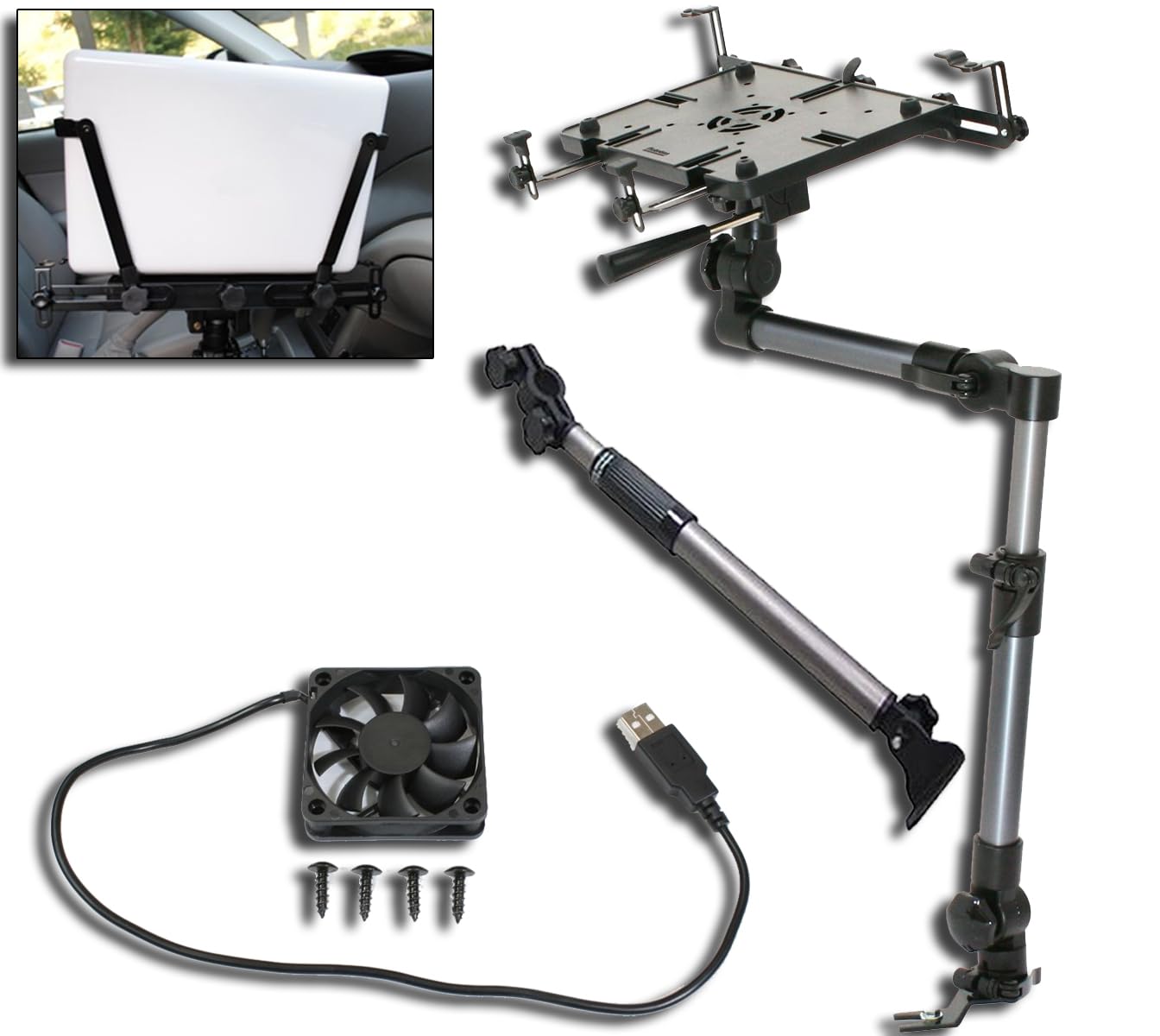
The complete kit with a preinstalled USB fan, support brace, and screen stabilizers ready for any vehicle.
The MS-526B is the “everything included” play: it ships with a support brace to stiffen the mount, a pair of screen stabilizers to hold your display in place, and a USB-powered cooling fan preinstalled in the deck. That bundle means you don’t have to buy extras later. The 17-inch arm and mounting deck secure most laptops from 6″ to 17″ plus tablets 6″ and up, and the aluminum frame weighs a solid 8.6 pounds. The universal base uses a no-drill seat-rail mount, and in some cases the whole install takes under 10 minutes.
Owners praise the quality and easy install — one daily lease-road driver said it “holds up to the bumps on the roads better than I thought,” and another called it the best mobile vehicle stand they’d used. The ergonomic adjustment lets you dial in a comfortable viewing angle for driver or passenger, and the quick-release makes removal simple when you need the seat for a person.
Stability is the most-discussed aspect and it’s mixed. The support arm is not optional — one owner flatly said “it does need the support arm to be steady,” and the cheap plastic knobs on the platform keep coming loose, which a drop of thread-locker fixes. On rough roads, some customers note bouncing that risks fatigue, and one noted it lacks a ball joint and can obstruct the gear shifter in certain vehicles. A few pros recommend DIY wedges or braces for near-zero movement.
Choose this if: you want a do-everything kit from the start — fan, stabilizers, and brace included — for a variety of laptops and tablets across different vehicles.
Reconsider if: you drive on serious washboard roads daily, because the plastic knobs loosen and the head can bounce without extra DIY bracing.
Understanding the Specs
Weight and Build Material
A mount’s total weight tells you how much steel is actually doing the work. A heavier unit like the 13.2-pound RAM MOUNTS is generally more rigid for typing, but it eats passenger space and is harder to remove. A lighter unit like the 5.7-pound Mobotron is easier to handle but may flex more. Aluminum and alloy steel are the common materials — steel is stiffer, aluminum keeps weight down.
Stability on the Move
Stability is the single most-discussed aspect across every mount in this category, and it’s almost always mixed. Mounts with a stabilizer foot or support brace are more solid for typing but take longer to assemble. Joints with lockable knobs hold position better, but many reviewers point out re-tightening them after rough drives. If you type while parked, most mounts are rock-solid; if you type while driving, expect some shake and plan for it.
FAQ
Will a car laptop mount fit my specific truck or SUV?
Can I leave the mount installed and still use the passenger seat?
What is the maximum laptop size and weight each mount can hold?
Do I need to drill holes in my vehicle to install one of these?
How do I stop the mount from wobbling or swinging while I drive?
What is the difference between the Mobotron MS-426 and the MS-526B?
How long does installation take?
Will these mounts work with a tablet or iPad as well as a laptop?
Final Thoughts: The Verdict
For most truck owners, the car laptop mount winner is the RAM MOUNTS No-Drill because it delivers the most rigid, workable typing surface for F-150 and Super Duty trucks — though it demands 45 minutes of assembly and asks you to live without height adjustment. If you want a quick-release mount that adapts to almost any vehicle, grab the VIVO. And for the lightest, most affordable option that still handles real work, the Mobotron MS-426 is the one to reach for.
How We Picked
We do not accept paid placement. Every pick is matched to a real buyer and a real use-case; we do not hands-on test units.
Sources & Methodology
Specifications: manufacturer listings and product documentation. Review insights: verified customer reviews, as of August 2026. Pricing: not shown on this page (it changes often); check the current price via the retailer link.
As an Amazon Associate, Gadgets Feed earns from qualifying purchases. This does not affect which products we feature.