
Our readers keep the lights on and my morning glass full of iced black tea. As an Amazon Associate, I earn from qualifying purchases.
Specs are compiled from manufacturer listings and verified buyer reviews and can change over time — please confirm the key details on the product page before buying.
Tripping over DMX cables during a gig is a classic nightmare, and losing the tiny USB dongle for your keyboard and mouse is a close second. The best 2.4G receivers solve both by cutting the cord entirely, but picking the right one means knowing if you need stage-lighting control or a desktop replacement part. You will find the top performers in both worlds here, with the specs that actually matter so you get a reliable link the first time.
I’m Min — the founder and writer behind Gadgets Feed. This guide is built by comparing the manufacturers’ published specifications and the patterns across verified customer reviews, so you get each pick’s real strengths and trade-offs instead of marketing spin.
If you need a rock-solid wireless DMX link for your light rig or a simple desktop fix, this breakdown of the best 2.4g receiver options focuses on real-world performance, compatibility, and the honest quirks owners actually live with.
Our Picks at a Glance


How To Choose The Best 2.4G Receiver
Before you click buy, you need to know which family of 2.4G receivers you’re shopping for. The technology is the same—a 2.4 GHz radio link—but a receiver built for DMX stage lighting is a completely different tool from one meant to reconnect a wireless mouse. Getting this wrong is the most common mistake, so start by identifying your gear.
Match the receiver to your ecosystem
For computer peripherals, compatibility is everything. A Logitech Unifying receiver only works with devices that carry the orange Unifying logo, even though they look identical to other dongles. A receiver like the MOFII is locked to that brand’s own keyboard and mouse sets. Always check for the logo or the exact model compatibility list before you buy, because a generic USB receiver won’t pair with just any device.
Battery versus AC power for lighting
For wireless DMX receivers, your power source dictates your workflow. A built-in battery means you can place a receiver anywhere without a wall outlet nearby, which is a lifesaver for mobile DJs and one-off events, but you’ll need to remember to charge it. An AC-powered receiver is tethered to an outlet, yet it gives you unlimited runtime for long events and one less thing to worry about mid-show.
Quick Comparison
| Model | Best For | Core Use | Power Source | Max Range | Amazon |
|---|---|---|---|---|---|
| CHINLY 8pcs DMX Kit★ Best Overall | Full Wireless Rig | DMX512 Lighting | Built-in Battery | — | Amazon |
| MOFII USB ReceiverBudget Lifesaver | Keyboard & Mouse Fix | Desktop Peripherals | USB Powered | — | Amazon |
| Logitech Unifying Receiver | Multi-Device Logitech | Desktop Peripherals | USB Powered | 10 meters (33 feet) | Amazon |
| Logitech Unifying (Mice) | Specific Mouse Models | Desktop Peripherals | USB Powered | — | Amazon |
| CHINLY DMX Single | Single Fixture Control | DMX512 Lighting | Built-in Battery | — | Amazon |
| Godox X1R-N | Nikon Flash Trigger | Camera Flash | Battery Powered | 100 meters | Amazon |
| JERRAY 3Pcs DMX Kit | Fixed Installations | DMX512 Lighting | AC Adapter | 1000 ft | Amazon |
In‑Depth Reviews
1. CHINLY 8pcs DMX512 Wireless Receiver Set
Our pick — 4.5★ from 150+ verified ratings; the strongest balance of quality and price.
The complete wireless DMX kit that replaces your entire cable run in one box.
The CHINLY set earns its spot because the signal holds rock-solid, which is the entire point of going wireless. Buyers report running four-hour shows with flawless, fast changes and no timing issues with DAW automation, meaning the latency matches a physical DMX cable. Each of the seven receivers packs a built-in Lithium Ion battery that takes about 2 hours to fully charge and lasts roughly 8 hours of work, so you can set up and tear down without hunting for power adapters.
The signal operates in the 2.4G ISM band with real-time data transmission and no time delay, and the metal black shell protects the electronics from the bumps of transport. With 7 groups of ID codes, you can run seven separate wireless networks in the same venue without interference. At 2.72 pounds for the whole package, it’s a hefty case, but you’re carrying a full lighting control solution. Unlike the AC-powered JERRAY kit, this one is battery-first, though you can use it while charging if you have a plug nearby.
Owners note that one occasional unit may fail while the others stay stable, and a few find the power button hole can be tricky to click off on the first try. The install is simple enough: plug the transmitter in first and set the same color on the receivers. Reviewers confirm you may need a terminator for a daisy chain setup, but one unit can run an entire chain by itself.
Wireless Freedom
- Eight-hour battery life per receiver for all-day events
- 7-group ID setup lets you run multiple rigs at once
- Real-time signal with cable-like latency
Setup Quirks
- Power switch hole can be finicky to press
- Requires a terminator for daisy-chaining
Built for the working DJ: this is the set to grab if you want a full battery-powered wireless rig without managing seven separate power cables.
One thing to know: the transmitter itself does not charge, so keep that plugged into your console’s USB port.
2. MOFII 2.4G Wireless Keyboard and Mouse Set USB Receiver
A tiny dongle that saves you from buying a whole new keyboard and mouse.
This MOFII receiver wins on pure functionality — it does exactly what it says, restoring a keyboard and mouse combo when the original dongle goes missing. Owners mention it worked to restore their keyboard and mouse after the original was lost, and even a keyboard from a bin-type store paired “perfectly…so much easier than I expected.” The trick is in the setup order: take out the battery, plug the receiver into the USB port, then install the battery. One USB port pairs both the MOFII keyboard and mouse simultaneously.
This receiver is strictly for MOFII 2.4G wireless keyboard and mouse sets, so it won’t pair with a single keyboard or a single mouse. It supports Ubuntu 16.04 and Windows 7 as minimum operating systems, so older PCs are covered. At just 0.02 kg, it’s featherweight and easy to tuck away, and the two-count package means you have a spare for your second computer or as a backup.
Compatibility is the top consideration here — it’s highly praised for working with MOFII and UBOTIE sets, but it is not a universal dongle. One buyer found it didn’t work, which usually means it wasn’t a compatible set. If your gear is a MOFII or UBOTIE 2.4G combo, this is a cheaper fix than a new set. The tight fit in the USB port also means it’s less likely to get knocked out and lost.
Cheap insurance: way more budget-friendly than replacing a whole keyboard and mouse combo over a lost dongle.
3. Logitech USB Unifying Receiver 2.4 GHz

One tiny USB plug that connects up to six Logitech devices at once.
The Ease of use here is outstanding — people find it simple to set up thanks to its compact size. Owners have used it to replace a lost dongle for a K520 keyboard and M310 mouse after five-plus years, syncing in under five minutes via the Logi Options+ software. One buyer even called it “a lifesaver” after discovering Logitech no longer made the receiver for their beloved K350 keyboard. The receiver uses advanced 2.4 GHz wireless technology to connect up to 10 metres (33 feet) away with virtually no delays or dropouts.
This is the receiver to get if you want to consolidate your USB ports. It connects up to 6 Unifying-compatible mice and keyboards to each computer, so you don’t sacrifice extra USB ports. It works with all Logitech Unifying products — just look for the Unifying logo on your device. The tiny receiver stays in your computer so your mouse is always connected and ready.
The recurring gripe is that it’s so small it can be hard to plug in and pull out, and compatibility is mixed if your device doesn’t carry the Unifying logo. Some buyers had it not work with their computers, which points to a non-Unifying device rather than a faulty receiver. If you have an older Logitech mouse or keyboard that uses the older Nano receiver instead of the Unifying logo, this won’t pair with it.
Why It Wins
- Pairs up to six mice and keyboards on one port
- 33-foot range covers the whole room
- Simple setup through Logi Options+
The Catch
- So tiny it’s fiddly to remove from a tight port
- Only works with devices bearing the Unifying logo
Best for multi-device desks: grab this if you run a Logitech mouse and keyboard and want both on a single USB port.
Think twice if: your Logitech gear predates the Unifying logo — you’ll need a different receiver.
4. Logitech Unifying USB Receiver for Mouse MX M905 M950 M505 M510

The specific replacement dongle that rescues a long-loved Logitech mouse.
The standout feature is quality — buyers find this receiver works perfectly as a replacement for broken or lost dongles, and it’s plug-and-play easy, taking just 30 seconds to a minute to set up. It worked as expected for an M510 mouse and K350 keyboard, and one owner fixed a flaky M510 connection that had been dropping for years. At just 9 g, it’s light enough to leave in the computer without worry.
This Unifying receiver pairs with any product carrying the orange Unifying star logo, but the headline compatibility list is specific: M505 Marathon Mouse M705, M905, keyboard K340 and K350. It works with 6 mice and keyboards at the same time. You’ll need the free Logitech Unifying Software for setup, though the experience is quick. It requires Mac OS 10.12 Sierra or Windows 10 as a minimum.
The honest downside is that instructions are thin, and compatibility is mixed if you step outside the listed models. One buyer found it would not work with an M310 despite the description — so check your exact model against the list. The lack of printed directions trips up a few people, but the Logitech Options software walks you through it.
A targeted rescue: the smart, budget-friendly move over buying a new mouse when your receiver dies.
5. CHINLY DMX512 DMX Dfi DJ 2.4G Wireless 1 Receiver

A single battery-powered receiver that kills the cable run to one fixture.
Reliability is what wins owners over here — the signal stays strong and stable, and the built-in battery is a major upgrade from non-battery versions. As a mobile DJ noted, with all lights working off DMX through these receivers, breaking down and putting away gear gets much easier without worrying about wire management. The internal battery takes about 2 hours to fully charge and lasts roughly 8 hours of work, and you can keep using it while plugged in.
This single-receiver unit runs on the 2.4G ISM band with real-time signal transmission and no time delay, and the metal black shell is made to travel. It features 7 groups of settable ID codes, so you can run multiple individual wireless nets in the same place without interference. The receiver works with any standard DMX512 console signal, and CHINLY backs it with a 3-year service availability window.
The battery life gets mixed feedback here — while some say it lasts surprisingly long, others find it doesn’t stretch past four hours, so keep a charger nearby for long events. A few units have arrived broken within a day, so it’s worth testing before showtime. The battery is built-in and not user-replaceable, which is fine for the lifespan but worth knowing before you commit.
One-fixture freedom: ideal for adding wireless control to a single moving head or PAR light without a full kit investment.
6. Godox X1R-N i-TTL 2.4G Wireless Remote Flash Trigger Receiver
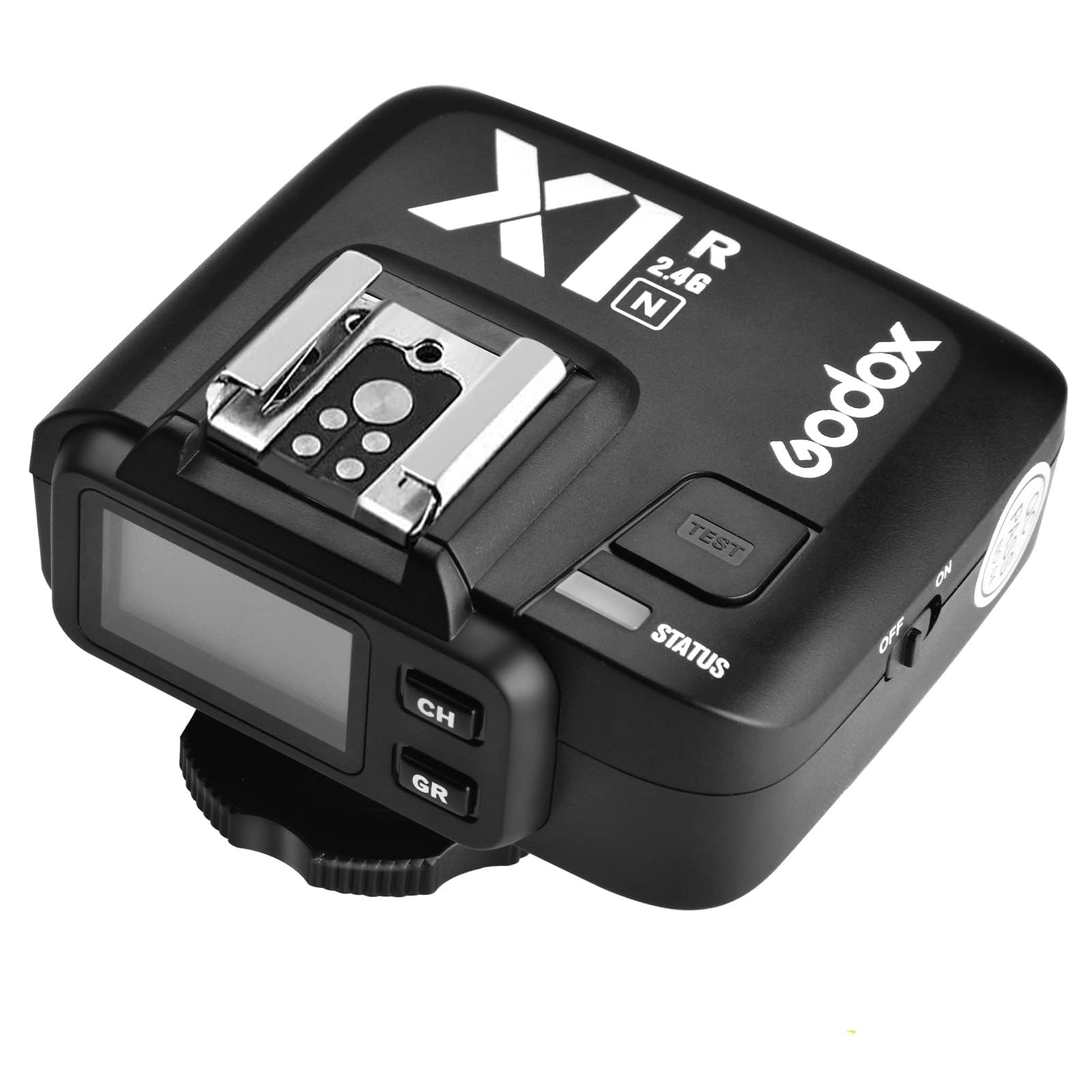
The Nikon flash receiver that brings TTL wireless control to studio and speedlight.
This is the crowd favorite for photographers — a 4.8-star performance across 102 owner ratings. The X1R-N is Godox’s first TTL wireless flash trigger receiver for Nikon i-TTL Autoflash DSLR cameras, and it works with Godox X1T-N, X2T-N, and XPro-N transmitters. It can trigger the camera shutter, studio flash, and camera flash. The built-in 2.4G wireless transmission provides up to 100 meters of distance for creative triggering methods, and it supports cameras with a PC Sync Socket.
Where this receiver shines is its feature set. It fully supports TTL Autoflash, 1/8000s High Speed Sync, flash exposure compensation, flash exposure lock, and modeling flash. The wireless remote control and grouping system supports 5 groups and 32 channels for triggering flash. The extra-large LCD panel and 5 group buttons make it very suitable for novices learning the craft, and it comes with everything needed to connect to both handheld and studio flashes.
Owners consistently report it’s excellent and easy to use, arriving in perfect condition and setting up quickly. It works with Canon flashes mounted on the hot shoe too, which is a nice flexibility bonus. This is a specialized tool for Nikon shooters already in the Godox ecosystem, so it’s not for everyone — but for that crowd, it’s a clear winner.
Wireless mastery: the receiver to choose if you shoot Nikon and want full TTL flash control without cables.
7. JERRAY 3Pcs Wireless DMX 2 Receivers & 1 Transmitter

An AC-powered wireless kit built for permanent installs where batteries are a hassle.
Reliability is what everyone praises most here — one owner replaced a 200-foot cable run with this kit and handled 14 fixtures, 2 splitters, and a haze machine without issues. Church audio teams love it too, calling it “super reliable” for their worship services, and a new DMX user reported it “never lost signal and easy to set up.” The 2.4G ISM frequency (the unlicensed radio band shared with WiFi and Bluetooth) uses 126-channel automatic frequency hopping to stay stable even in venues crowded with WiFi signals.
Unlike the battery-powered CHINLY options, this model is AC-powered with adapters included for each unit, so you never face recharging anxiety during a long event. The package includes one wireless DMX512 transmitter, two receivers, and three power adapters. Control 7 independent groups using tricolor LED indicators (Red, Green, Blue) that display distinct Group IDs, so you can run separate lighting rigs in the same venue without interference.
The claimed range here is a standout — up to 1000ft — which is longer than most other DMX receivers on this list. Setup is simple: color-coordinate by pressing a button until the lights flash to confirm the connection. One reviewer noted they only use one receiver and keep the second as a backup, which is a smart redundancy. The trade-off is that you need a power outlet nearby, so it’s less portable for mobile rigs that set up in odd spaces.
Built for Reliability
- 1000ft range covers large venues
- AC power means no battery anxiety
- 126-channel hopping shrugs off WiFi interference
Not So Portable
- Needs wall power for each unit
- Bulky adapters add to setup
Reach for this if: you’re installing a permanent rig in a church, venue, or studio and want a set-and-forget wireless link.
Look elsewhere if: you’re a mobile DJ who needs battery freedom — the CHINLY kits are the better fit.
Understanding the Specs
2.4G ISM Frequency Band
This is the unlicensed radio spectrum that both wireless DMX and computer peripherals use to send data. It’s the same band as WiFi and Bluetooth, which is why you see terms like “automatic frequency hopping” — a feature that lets the receiver jump between channels to avoid interference from your router or other gear in the room.
DMX512 Protocol
This is the standard language that lighting consoles use to talk to fixtures. A wireless DMX receiver takes that data stream and sends it over the air instead of through XLR cables, so your lights respond to fader moves and chases exactly as if they were hardwired. “No time delay” or “real-time” specs mean you won’t see lag between your console command and the light change.
FAQ
Will any 2.4G receiver work with my Logitech mouse?
What is the difference between a wireless DMX receiver and a transmitter?
How long does a battery-powered DMX receiver last on a charge?
Can I use a battery-powered receiver while it is charging?
How many lighting groups can a wireless DMX receiver set control?
Is the Godox X1R-N receiver compatible with Canon cameras?
What is the actual wireless range of these 2.4G receivers?
Can one USB receiver connect both my keyboard and mouse?
Final Thoughts: The Verdict
If you want one dependable pick, the 2.4g receiver winner is the CHINLY 8pc DMX kit because it delivers the complete battery-powered wireless lighting solution — seven receivers, eight-hour battery life, and rock-solid signal retention all in one box. If you want a simple desktop fix for a lost mouse dongle, grab the MOFII receiver. And for a permanent installation that never needs recharging, the JERRAY AC-powered kit is the one to reach for.
How We Picked
We do not accept paid placement. Every pick is matched to a real buyer and a real use-case; we do not hands-on test units.
Sources & Methodology
Specifications: manufacturer listings and product documentation. Review insights: verified customer reviews. Pricing: not shown on this page (it changes often); check the current price via the retailer link.
As an Amazon Associate, Gadgets Feed earns from qualifying purchases. This does not affect which products we feature.