
Our readers keep the lights on and my morning glass full of iced black tea. As an Amazon Associate, I earn from qualifying purchases.
Specs are compiled from manufacturer listings and verified buyer reviews and can change over time — please confirm the key details on the product page before buying.
You just bought a sleek new TV, and the picture is glorious. Then you hit play and realize the tinny built-in speakers are ruining every movie, and your perfectly good old soundbar or stereo receiver has no HDMI port to plug into. An ARC audio extractor is the small box that solves this exact problem by pulling the sound out of your TV’s HDMI port and feeding it to your older gear. The best pick for most people is the CAMWAY 192KHz eARC/ARC Audio Extractor because it hands you the most connection options at once, letting you run optical, RCA, and a headphone jack all at the same time without replacing a single piece of equipment.
I’m Min — the founder and writer behind Gadgets Feed. This guide is built by comparing the manufacturers’ published specifications and the patterns across verified customer reviews, so you get each pick’s real strengths and trade-offs instead of marketing spin.
We have filtered through the crowd favorites to find the models that actually bridge the gap between modern TVs and legacy audio systems, and our top choice offers the best blend of flexibility and ease. Here are the best arc audio extractor options worth your attention this year.
Our Picks at a Glance
How To Choose The Best ARC Audio Extractor
This is a small box with one job: take the digital audio your TV sends out through its HDMI port and convert it into a signal your older sound system can actually use. Before you spend a dime, you need to know what kind of audio your soundbar or receiver accepts, because that single fact decides which extractor you need.
The “ARC” Port Is Non-Negotiable
Every extractor on this list requires a TV with an HDMI port that is physically labeled “ARC” or “eARC.” These acronyms stand for Audio Return Channel, which is the special lane that lets audio travel backward from the TV to your sound system. A standard, unlabeled HDMI port will not carry audio back out to an extractor, and no adapter can change that.
Optical vs. RCA vs. 3.5mm — Know Your Output
Your soundbar or receiver probably uses one of three inputs. Optical output delivers digital sound and is the only way to get 5.1 surround formats like Dolby Digital and DTS. RCA and 3.5mm outputs are analog stereo only, perfect for older two-channel stereos, powered speakers, or headphones. Some extractors give you all three at once; others focus on just one, so match the box to the input your gear actually has.
Quick Comparison
| Model | Best For | Outputs | Audio Formats | Max Sample Rate | Amazon |
|---|---|---|---|---|---|
| CAMWAY Extractor★ Best Overall | Most flexible hookups | Optical, RCA, 3.5mm | Dolby 5.1, DTS 5.1 | 192 kHz | Amazon |
| Unstincer ConverterEasiest Setup | Literal plug-and-play | Optical only | Dolby 5.1, DTS 5.1 | 192 kHz | Amazon |
| avedio links DACAll-In-One Kit | Full accessory kit | Optical, Coaxial, RCA, 3.5mm | PCM only | 192 kHz | Amazon |
| LiNKFOR Extractor | Signal status LEDs | Optical only | Dolby 5.1, DTS 5.1 | 192 kHz | Amazon |
| J-Tech Digital | Gaming & Blu-ray sources | Optical, RCA | Dolby, DTS, Stereo | — | Amazon |
| AUTOUTLET Adapter | Clean, simple conversion | Optical only | Dolby 5.1, DTS 5.1 | 192 kHz | Amazon |
| eSynic Extractor | Legacy optical soundbars | Optical only | Dolby 5.1, DTS 5.1 | 192 kHz | Amazon |
| OREI Converter | Stereo RCA receivers | RCA, 3.5mm | PCM 2.0 only | 192 kHz | Amazon |
| Neoteck Extractor | Visual format confirmation | Optical only | Dolby 5.1, DTS 5.1 | 192 kHz | Amazon |
In‑Depth Reviews
1. CAMWAY 192KHz eARC/ARC Audio Extractor
Our pick — over 4★ from 300+ verified ratings; the strongest balance of quality and price.
The one-box answer for anyone juggling a soundbar, a stereo, and a pair of headphones at once.
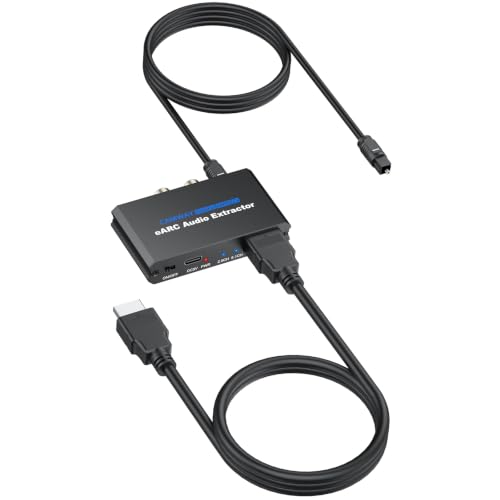
If you are not sure which output your audio gear needs, this is the safest bet because it covers every option. It runs optical for surround sound, RCA and 3.5mm for stereo, all simultaneously, so you could drive a 5.1 home theater and a set of wired headphones from one TV at the same time. It supports Dolby Digital 5.1 and DTS 5.1 over the optical line, which keeps movie soundtracks rich instead of flattening them to two channels.
Set up is genuinely quick: plug the extractor into the TV’s eARC or ARC port, switch on CEC, and set the audio output to HDMI ARC. The included 3.3ft optical, HDMI, and power cables mean you likely have everything you need in the box. Buyers report it pairs a 10-year-old Bose soundbar with a new Samsung TV without drama, and it passes DTS signals cleanly, though one note of caution: a few found it tricky to figure out the audio output settings the first time and needed their TV manual.
What wins people over is how it upgrades an old AV receiver instead of forcing a costly replacement. The one honest limitation: volume control over the optical output is not possible, so you adjust that on your amplifier or soundbar, while RCA and 3.5mm lines can follow your TV remote when CEC and PCM are enabled.
Why It Takes The Crown
- Optical, RCA, and 3.5mm outputs work at the same time
- Solid aluminum housing feels built to last
- Comes with the 3.3ft cables you need to start
The Trade-Offs
- Optical output has no volume control from the TV remote
- First-time setup can require reading the TV manual
Reach for this if: you want one extractor that can feed a soundbar, an old stereo, and headphones without choosing between them.
Think twice if: you need volume control through the TV remote on an optical connection, which this cannot do.
2. Unstincer 192KHz HDMI eARC/ARC to Optical Audio Converter
A featherweight 1.72 oz dongle that turns a new TV’s eARC jack into an optical port your old soundbar understands.
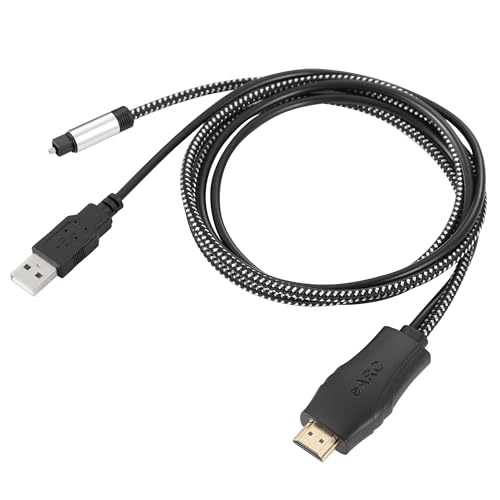
This one is for the person who wants zero fuss: the optical cable is built right into the unit, so there is no separate wire to lose or plug in backwards. You connect the HDMI end to the TV’s eARC or ARC port, run the attached 41-inch optical line to your soundbar, and power it through a USB port, often the one on the soundbar itself. Owners mention it connected a Samsung TV’s eARC HDMI to a Bose soundbar optical input with no configuration at all — the sound was recognized instantly.
At just 1.72 ounces, it is light enough to dangle behind a TV without support, and the 24-bit/192kHz sampling rate keeps the audio clean. Compatibility is the thing everyone praises most, and it handles PCM, Dolby 5.1, and DTS 5.1 as long as your TV’s audio format is set correctly. The catch is length: at 41 inches, you must measure the gap between your TV and soundbar first, and the optical link does not support CEC volume control, so the soundbar’s own remote handles volume.
The company behind it is Unstincer, and the package includes just the converter itself. If your TV and soundbar sit close together and you want the least setup possible, this is the most direct path to working sound.
Best for tight spaces: The built-in optical cable means fewer parts to manage, but measure that 41-inch reach before buying.
Grab it if: your TV and soundbar are within 41 inches of each other and you want true plug-and-play.
Look elsewhere if: your audio gear sits far from the TV or you need volume control from the TV remote.
3. avedio links HDMI ARC Audio Extractor DAC Converter
The complete kit that also works as a standalone digital-to-analog converter for gaming consoles and Blu-ray players.
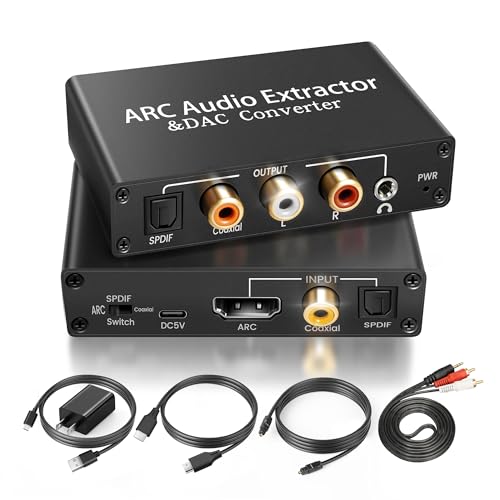
Unlike the single-purpose optical extractors, this box does double duty. It pulls audio from your TV’s ARC or eARC port, and it also has coaxial and optical inputs, so you can feed it a signal from a PS3, PS4, DVD player, or set-top box and get analog output for an old amplifier. The input selection switch on the panel lets you flip between optical and coaxial modes quickly, which makes it genuinely versatile for a mixed home theater setup.
The package is generous: an HDMI cable, an optical cable, a 3.5mm to L/R cable, and a power adapter all come in the box. Customers note it connected a new QN75Q7F Samsung TV to an ancient Insignia soundbar, and one even linked an old Samsung TV to a 1979 Hitachi receiver through a Chromecast — proof that this bridges generations of gear. The aluminium housing gives it a more premium feel than the all-plastic options.
Here is the honest catch: this unit supports PCM input only, so it will not decode Dolby or DTS surround sound. Reviewers point out the sound can cut in and out in some setups, and it occasionally needs a power cycle to come back. It is also worth knowing that RCA output allows TV-remote volume control while optical does not.
Know before you buy: This is a stereo PCM converter, not a surround sound decoder, so it suits two-channel setups best.
Choose this if: you want one box that handles both TV ARC audio and direct hookups from game consoles or DVD players.
skip it if: you need Dolby Digital 5.1 surround sound, which this model does not support.
4. LiNKFOR eARC/ARC Audio Extractor
The 30 g lightweight that tells you at a glance whether your TV is sending 5.1 surround or plain stereo.
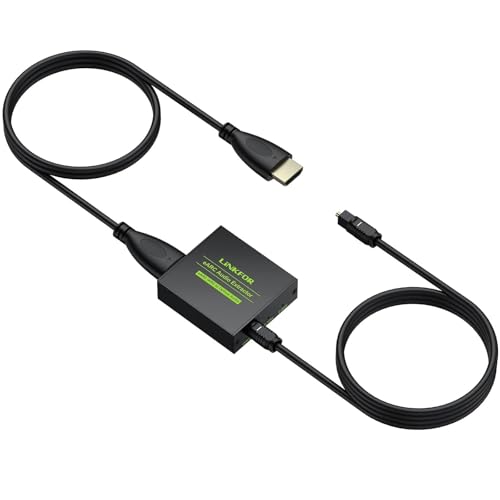
Wondering whether your soundbar is actually receiving Dolby 5.1 or just stereo is a common frustration, and this extractor answers it directly. It has clear channel indicator LEDs that show which audio format is coming through, so you get visual proof the signal is working instead of guessing. That makes it a surprisingly handy tool for football watch parties or game nights when you want to confirm the surround sound is live.
It supports PCM 2.0, Dolby 5.1, and DTS 5.1 at a 24-bit/192kHz sampling rate, and it is true plug-and-play with no software needed. Buyers found it saved them from buying a new soundbar by adding an optical hookup to a new Samsung TV that lacked one, and the setup took just a few minutes. It is built to handle smart TVs, soundbars, home theater systems, and wireless headphones.
The optical-only design means no CEC volume control, so you adjust sound on the soundbar itself. One practical tip from owners: skip the included HDMI cable and use a good high-speed HDMI cable if you want full 5.1, because the stock one may only deliver 2-channel audio. At 30 g, it is among the lightest options here, so mounting is a non-issue.
Confidence check: The LED indicators remove the guesswork from setup, but you may want to swap in a high-speed HDMI cable for true surround.
Perfect for: sports fans and gamers who want visual confirmation that 5.1 surround is actually playing.
Not ideal if: your soundbar is more than a short cable-run away, since this is optical-only.
5. J-Tech Digital HDMI Audio Extractor 4K 60Hz
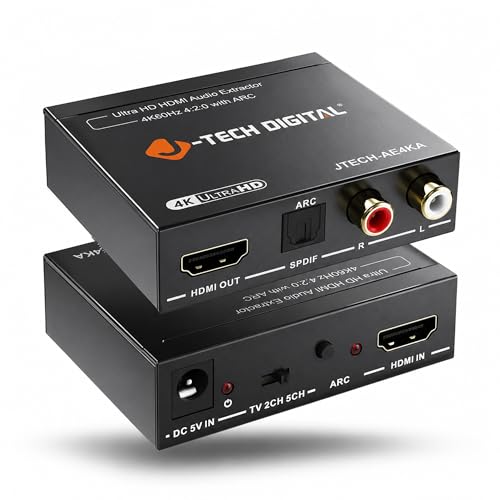
The extractor that pulls double duty, handling both 4K video pass-through and audio extraction from a PS5 or Blu-ray player.
Most extractors on this list assume the TV is the only source, but this one is built for people with a gaming console or Blu-ray player in the chain. It takes an HDMI input from devices like a PS5 or laptop, extracts the audio to optical or RCA, and passes the 4K video through to your display at 60Hz. One buyer runs audio from a PS5 through a Scarlet FocusRite interface to a PC with zero lag, which shows how flexible this box really is.
The EDID toggle switch is the secret weapon for solving compatibility headaches. It gives you three modes — TV, 2CH, and 5CH — so you can force the source device to output the right audio format instead of fighting handshake issues. J-Tech Digital also backs it with a one-year manufacturer replacement warranty and free lifetime technical support from their team in Stafford, TX.
Be aware this supports HDMI 1.4 and HDCP 1.4 standards and does not support eARC. Some owners found the ARC function only extracts audio through the optical output, and a few experienced odd behavior like the unit powering on by itself in the middle of the night. It works best when you have a specific source device, not just a TV-to-soundbar bridge.
Who It Serves
- 4K 60Hz video pass-through with audio extraction in one unit
- EDID switch solves source-device handshake issues
- North American support team and one-year warranty
Where It Stumbles
- No eARC support and ARC audio only via optical
- Some units auto-power-on at odd hours
Best for: gamers and Blu-ray users who need a single box between their console and TV.
Pass on it if: you just need a simple TV-to-soundbar bridge with modern eARC support.
6. AUTOUTLET HDMI eARC to Optical Audio Adapter

A polished little adapter that prioritizes clean, lossless audio signal for people who notice the difference.
Where some extractors chase versatility with extra jacks, this AUTOUTLET model stays focused on doing one thing exceptionally well: converting eARC to optical with up to 24-bit/192kHz audio. The brand markets it as a lossless experience, and buyers confirm it works perfectly with no delay or distortion. One owner reported saving a significant chunk of money by using it to reconnect an old soundbar system to a new, port-sparse TV instead of replacing the audio gear.
Setup is genuinely plug-and-play — connect to the HDMI eARC/ARC port, and the sound comes through instantly with no drivers or software. It supports PCM 2.0, Dolby 5.1, and DTS 5.1, giving you full surround sound for home theater content. The build quality earns consistent praise, with multiple buyers calling it easy to install and exactly as described.
The optical-only output is the limiting factor here; there is no RCA or headphone jack, so your soundbar or receiver must have an optical input. Like every optical extractor, it has no CEC volume control. It is the right pick when you want a clean, no-frills conversion and your audio gear already has the right input.
Signature strength: A focused, high-quality optical conversion that buyers repeatedly describe as working perfectly.
Reach for it if: you want a dependable, premium-feeling bridge from a modern TV to an optical-only soundbar.
Pass if: you need RCA or headphone outputs, which this adapter does not offer.
7. eSynic Professional 192Khz eARC & ARC to Optical Audio Extractor
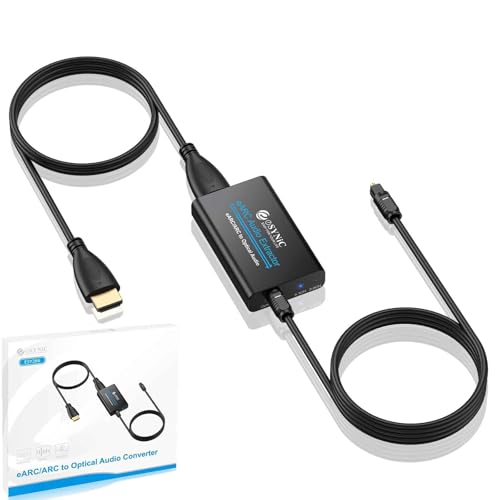
The crowd favorite with the most owner chatter, thanks to a long 7-foot cable and a famously quick setup.
This is the extractor that has earned the most widespread approval in the category, and the reason is simple: it works flawlessly for the most common job there is. If you have a modern TV with eARC and an older soundbar that only accepts optical, this box bridges them in about 30 seconds. Shoppers say connecting a Samsung TV to a Bose receiver with zero settings changes, and the unit auto-powers through the TV’s USB port so there is no separate wall wart to manage.
The included cables are a real differentiator. You get a 1.1M optical cable, a 1M HDMI cable, and a USB power cable, plus the 7-foot length gives you far more placement freedom than the 41-inch built-in cable on the Unstincer. It focuses on one pure optical output, which means fewer cables and less confusion behind your entertainment center. It supports PCM 2.0, Dolby 5.1, and DTS 5.1 at 192kHz.
Functionality is the thing owners praise most by a wide margin, and ease of use follows close behind. The recurring caveat is compatibility with some Sonos soundbars, so check that before ordering. There is no CEC volume control through optical, which is standard for this connection type, and the ABS plastic housing is lighter on build quality than the aluminum options.
Owner consensus: This is the one people describe as solving their audio problem in under a minute, with the long cable a clear bonus.
Pick this if: you want the most proven, widely-used optical bridge with extra cable reach for flexible placement.
Check first if: you own a Sonos soundbar, since some owners hit compatibility walls.
8. OREI HDMI ARC/eARC to Analog Audio Extractor Converter
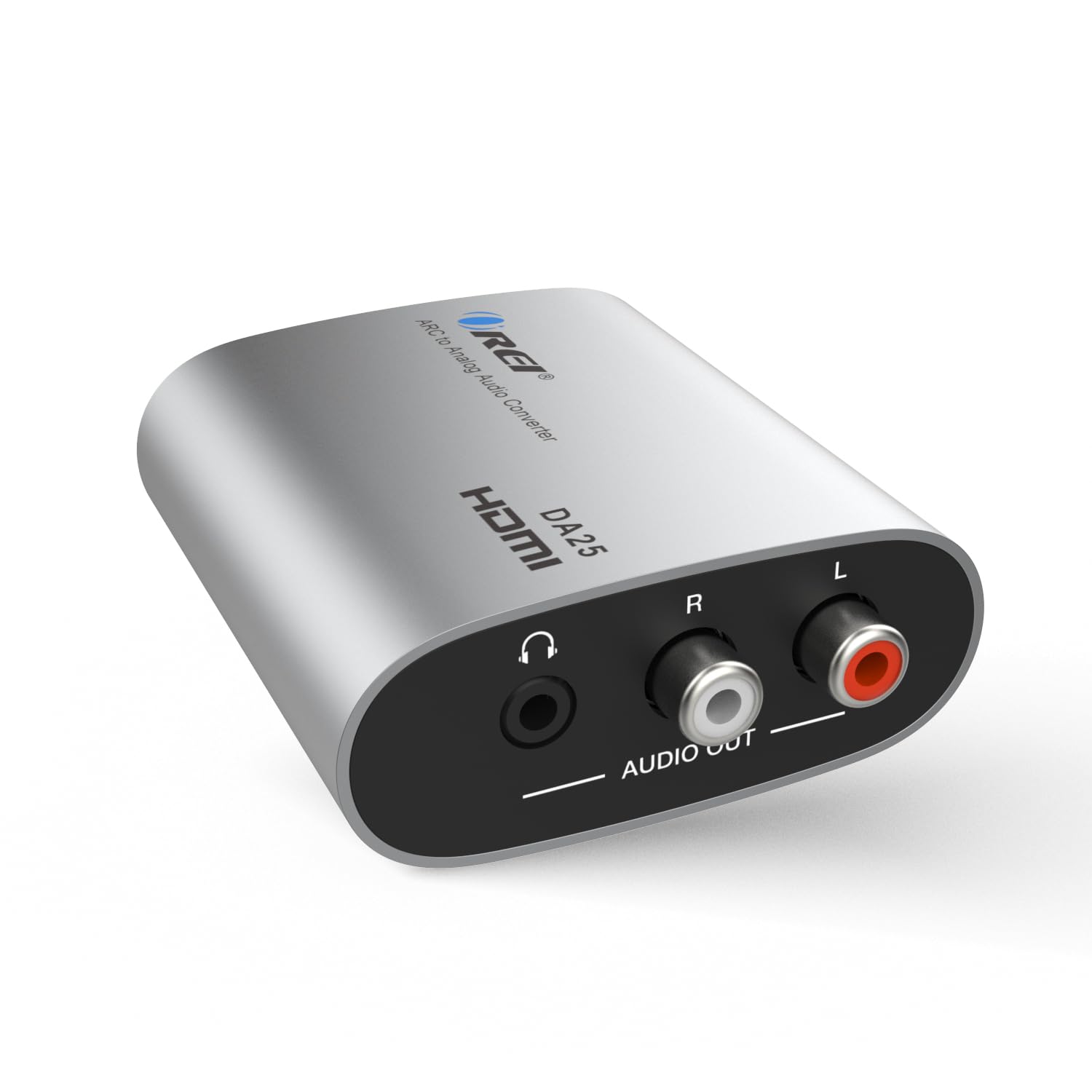
The compact square that breathes new life into a vintage stereo receiver using nothing but RCA cables.
If your prized audio gear is an older stereo receiver with only analog inputs, this OREI box is exactly what you need. It converts the digital HDMI ARC or eARC signal from your TV into 3.5mm AUX and L/R analog outputs, letting you finally use that classic amplifier with a modern display. One owner summed it up perfectly: “Old Stereo, New TV.” It is a 2.05-inch square that weighs just 3 ounces, so it tucks neatly behind any setup.
It supports PCM/LPCM 2.0 channel audio up to 192kHz and 24-bit, and the stereo output is simultaneous across both the RCA and 3.5mm jacks. Buyers consistently note it works well with Sony surround systems and Apple TV with no perceptible audio lag, and the on/off power switch with an LED indicator gives you a quick status check. This is not a full eARC extractor, and it does not process Dolby, DTS, or any multi-channel formats.
The honest caveats: this outputs 2-channel analog only, so you lose surround sound entirely, and it has no CEC or volume control support. RCA, 3.5mm, and HDMI cables are not included, so you need to supply those. A few buyers report a slight buzz when sound is playing, though most describe the audio as clean with no hiss.
Keep it simple: A dedicated stereo converter with a 192kHz ceiling, perfect for two-channel receivers and powered speakers.
Choose this for: reviving a vintage stereo or powered speakers that only accept RCA or 3.5mm inputs.
Avoid if: you expect surround sound passthrough or want volume control from your TV remote.
9. Neoteck ARC/eARC Audio Extractor
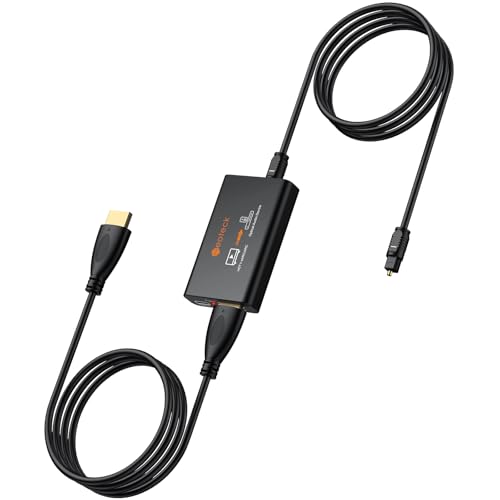
The detail-oriented extractor that shows you exactly what audio format your TV is sending, so you never second-guess the setup.
This Neoteck model is the most reassuring option for people who hate guessing whether their gear is working. Its exclusive 5.1 and 2.0 channel signal LEDs give you instant visual confirmation of the audio format, directly answering the nagging question of “Is it working?” If you are troubleshooting a Dolby or DTS surround setup, that tiny bit of feedback saves real time and frustration.
It delivers uncompromised fidelity up to 24-bit/192kHz and handles PCM 2.0, Dolby 5.1, and DTS 5.1 formats, so high-end audio systems get the clean signal they deserve. The setup is true plug-and-play with zero software, and the package includes an eARC extractor, an optical cable, an HDMI cable, a power cable, and a manual. Buyers describe it as doing everything it is supposed to and sounding great, with one noting it was a low-cost way to adapt sound from a new 4K TV to a 20-year-old AV receiver.
The warranty is a standout: Neoteck backs this with 18 months of coverage, which is longer than most in this category. The optical-only output means you need an optical input on your soundbar or receiver, and there is no CEC volume control. It is a premium-feeling, confidence-inspiring pick for the home theater enthusiast who wants to know their signal is clean.
confidence: The signal LEDs plus an 18-month warranty make this the lowest-risk choice for a fussy home theater.
Best for: detail-focused owners who want visual confirmation of their audio format and extra warranty coverage.
Skip if: your sound system relies on RCA or headphone inputs, as this is optical-only.
Understanding the Specs
Optical vs. RCA vs. 3.5mm Outputs
Your soundbar or receiver has one of these three input types, and that dictates which extractor you need. Optical is a digital connection that carries 5.1 surround formats like Dolby Digital and DTS, which makes it the only way to get true surround sound. RCA and 3.5mm are analog stereo connections that work with older two-channel stereos, powered speakers, and headphones, but they cannot carry surround sound. Some extractors give you all three at once; others offer just one.
PCM, Dolby 5.1, and DTS 5.1
These are the audio formats your TV can send out, and the extractor must support the one your TV is set to. PCM and LPCM are uncompressed stereo formats that every extractor handles. Dolby Digital 5.1 and DTS 5.1 are compressed surround formats, and you need an extractor that explicitly lists support for them plus a sound system that can decode them. Some budget extractors only handle PCM, which silently flattens your surround sound to stereo — so check the format list before buying.
Sampling Rate and 192kHz
This number describes how much audio detail the extractor can process. A higher sampling rate, like 192kHz, means the box can handle high-resolution audio without degrading it, which matters if you have a decent soundbar or receiver. A 24-bit/192kHz rating is the standard mark of a quality extractor in this category and indicates the audio path is clean enough for most listeners.
Volume Control and CEC
among the most common surprises is that optical connections do not support CEC volume control, meaning your TV remote cannot adjust the sound level and you must use your soundbar’s own remote. Extractors with RCA or 3.5mm outputs can sometimes let the TV remote control volume when CEC and PCM are enabled. If using one remote matters to you, pick an extractor with analog outputs rather than an optical-only model.
FAQ
What is the difference between ARC and eARC on my TV?
Will an ARC audio extractor work with my TV?
Can I control the volume with my TV remote?
Why do I need an audio extractor if my TV has an optical port?
Does the extractor need its own power source?
What is the difference between optical and coaxial audio output?
Will this give me surround sound from my TV’s apps?
Is there any audio delay or lag with these extractors?
Can I connect headphones to an ARC audio extractor?
Final Thoughts: The Verdict
If you want one dependable pick, the arc audio extractor winner is the CAMWAY 192KHz eARC/ARC Audio Extractor because it gives you optical, RCA, and 3.5mm outputs at the same time, covering every possible audio setup without compromise. If you want a simple to use optical-only bridge with a long cable and a proven track record, the eSynic Extractor is the crowd favorite that solves the most common TV-to-soundbar problem in seconds. And for bringing a vintage stereo receiver back to life with clean analog sound, the OREI Converter is the compact, budget-friendly choice that does exactly what it promises.
How We Picked
We do not accept paid placement. Every pick is matched to a real buyer and a real use-case; we do not hands-on test units.
Sources & Methodology
Specifications: manufacturer listings and product documentation. Review insights: verified customer reviews, as of August 2026. Pricing: not shown on this page (it changes often); check the current price via the retailer link.
As an Amazon Associate, Gadgets Feed earns from qualifying purchases. This does not affect which products we feature.