
Our readers keep the lights on and my morning glass full of iced black tea. As an Amazon Associate, I earn from qualifying purchases.
Specs are compiled from manufacturer listings and verified buyer reviews and can change over time — please confirm the key details on the product page before buying.
Before your internet plan catches up, a 10-gigabit router (a router that moves data at up to 10 Gbps, or 10,000 Mbps) future-proofs your whole network. You need to decide: do you want a full Wi-Fi system with a 10G port, or a wired-only workhorse that routes 10G traffic without breaking a sweat? This guide sorts out the genuine multi-gig performers from the ones that simply slap a port on the box.
I’m Min — the founder and writer behind Gadgets Feed. This guide is built by comparing the manufacturers’ published specifications and the patterns across verified customer reviews, so you get each pick’s real strengths and trade-offs instead of marketing spin.
The best 10gb router for your home depends on whether your devices are wired, wireless, or both. Note that some picks here are Wi-Fi routers with a 10G port, while others are wired-only routers that need a separate access point for wireless coverage.
Our Picks at a Glance


How To Choose The Best 10Gb Router
Buying a 10G router means deciding where that speed actually flows. Some homes need a blazing Wi-Fi mesh, while others just need a wired router that moves 10G between a NAS, a PC, and the internet without bottlenecking.
Wired 10G vs. Wi-Fi 7 Coverage
A 10G port on a router does nothing for your phone unless that router also broadcasts a strong wireless signal. If your devices are mostly laptops and phones, focus on the Wi-Fi standard (Wi-Fi 7) and the coverage number. If your NAS and desktop are wired, a router with multiple 10G or 2.5G LAN ports matters far more.
Copper RJ45 vs. SFP+ Fiber
There are two physical types of 10G ports. An RJ45 copper port (often called 10GBase-T) plugs into a standard Ethernet cable. An SFP+ port accepts a fiber module or a copper adapter, and is common in business gear. Check which one your modem or ONT provides before you pick a router.
Quick Comparison
| Model | Best For | Top Speed | 10G Ports | Coverage | Amazon |
|---|---|---|---|---|---|
| UbiQuiti UDR7★ Best Overall | All-in-one gateway + Wi-Fi 7 | 10.6 Gbps | 1x SFP+ | 1750 sq ft | Amazon |
| TP-Link Archer BE600Best Value | Large home Wi-Fi 7 value | 9.7 Gbps | 1x 10G WAN/LAN | 2600 sq ft | Amazon |
| TP-Link Archer BE700Top Performer | Fast 6GHz Wi-Fi 7 | 15 Gbps | 1x 10G WAN | 2200 sq ft | Amazon |
| Alta Labs Route10 | Wired-only multi-WAN | 10 Gbps | 2x SFP+ | — | Amazon |
| ASUS ROG GT-AXE16000 | Gamers on Wi-Fi 6E | 16 Gbps | 2x 10G WAN/LAN | Extended | Amazon |
| NETGEAR RS600 | Whole-home Wi-Fi 7 | 18 Gbps | 1x 10G | 3300 sq ft | Amazon |
| NETGEAR RS700S | Max Wi-Fi 7 coverage | 19 Gbps | 1x 10G | 3500 sq ft | Amazon |
| Amazon eero Max 7 | Simple mesh + smart home hub | 9.4 Gbps wired | 2x 10G | 2500 sq ft | Amazon |
| ASUS ROG GT-BE98 Pro | High-end gaming + wired | 30 Gbps | 2x 10G | Improved | Amazon |
In-Depth Reviews
1. UbiQuiti UDR7
Our pick — over 4.5★ from 250+ verified ratings; the strongest balance of quality and price.
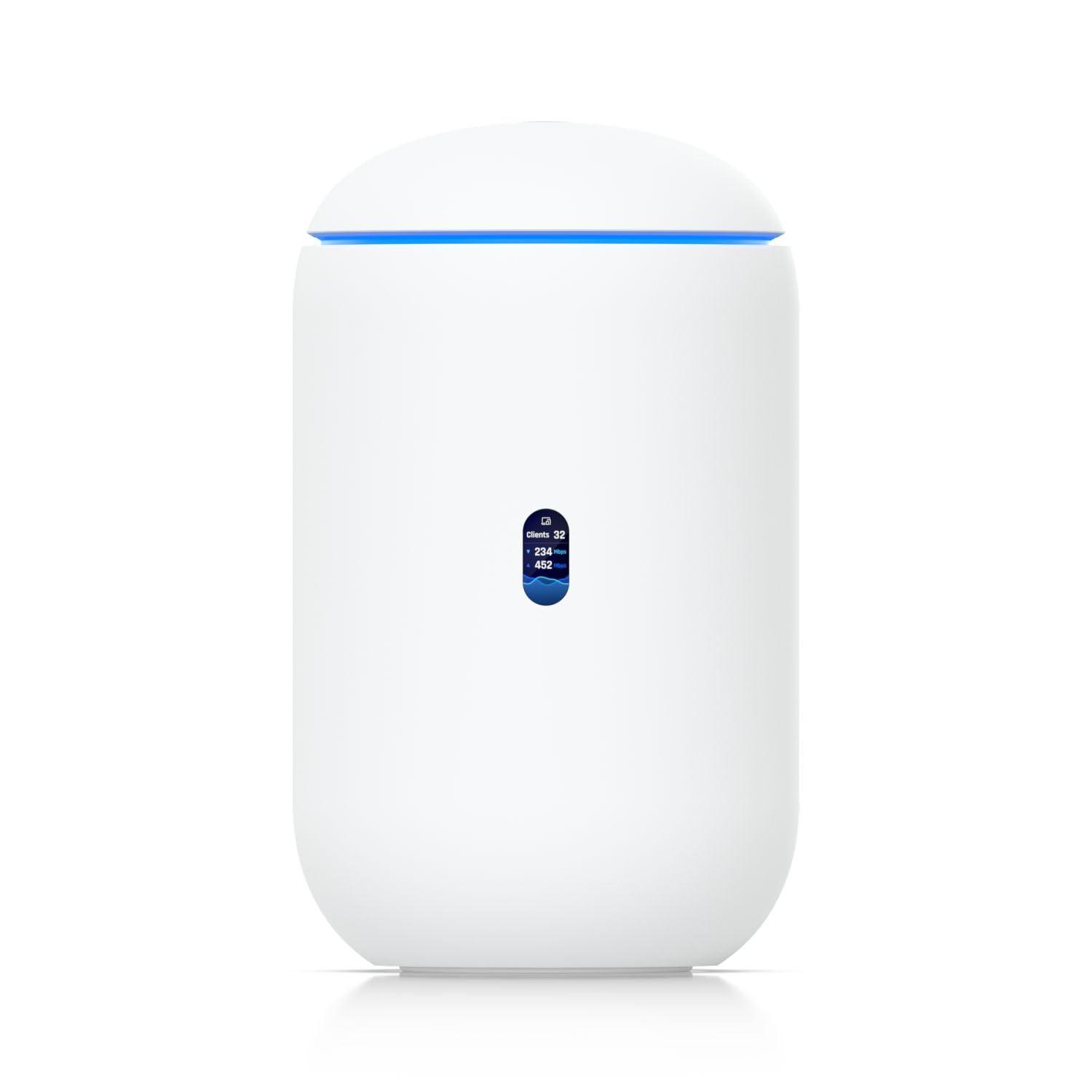
The all-in-one gateway that fuses a 10G router, PoE switch, and Wi-Fi 7 into one compact box.
This desktop unit pairs a 10G SFP+ fiber WAN port with a 2.5G RJ45 WAN port, so you can plug in either a fiber ONT or a standard modem. It also works as a PoE switch, delivering 15.4W to a connected device through one of its 3x 2.5G LAN ports — handy for powering a ceiling access point without extra hardware.
On the wireless side, it covers roughly 1750 square feet with tri-band Wi-Fi 7 across the 2.4, 5, and 6 GHz bands, hitting up to 10.6 Gb/s wireless transfer speeds with compatible gear. The built-in 0.96″ LCM display shows real-time device status, so you can glance at the network without opening an app.
What wins people over is the setup experience and the management depth. Buyers report it is the easiest firewall they have ever installed, with the phone app guiding the entire process. The preinstalled 64GB microSD card adds network video recorder capability for up to 5 HD cameras, or 2 x 2K cameras, or 1 x 4K camera (cameras sold separately).
What earns the praise
- 10G SFP+ fiber port plus 2.5G WAN for flexible ISP hookups
- Built-in PoE switch powers devices directly
- Full UniFi app support for 300+ managed clients
- Onboard microSD for camera recording
The honest caveat
- Single 10G port only — no 10G LAN for a wired NAS
- Coverage of 1750 sq ft is modest for very large homes
Reach for this if: you want one elegant box that routes, switches, records cameras, and broadcasts Wi-Fi 7 without a rack of separate gear.
Look elsewhere if: you need a second 10G port to wire a high-speed NAS directly to the router.
2. TP-Link Archer BE600
The value king that covers a large home with Wi-Fi 7 and still leaves you a true 10G port.
For a mid-range price, the Archer BE600 delivers a 7-stream tri-band setup with up to 5,765 Mbps on the 6 GHz band, 2,882 Mbps on the 5 GHz band, and 1,032 Mbps on the 2.4 GHz band. That translates to smooth 4K and 8K streaming along with fast downloads for Wi-Fi 7 laptops like the iPhone 16 Pro or Samsung Galaxy S24 Ultra.
Port flexibility is the standout feature here — you get one 10 Gbps WAN/LAN port, one 2.5 Gbps WAN/LAN port, and three 2.5 Gbps LAN ports. That gives you room to plug a multi-gig modem into one port and a wired NAS into another without sacrificing speed. Coverage stretches to 2,600 sq. ft. for up to 120 devices, with 6 antennas and Beamforming focusing signal toward hard-to-reach corners.
Buyers praise the build quality and easy setup, with many running 75 devices stable after a quick IP conflict fix. The recurring complaint is 2.4 GHz performance, which some find weak for older IoT gadgets — a fair trade-off given the price.
Why owners like it
- Strong value for Wi-Fi 7 with a real 10G port
- Triple 2.5G LAN ports for wired multi-gig devices
- VPN client and server support built in
- HomeShield security with parental controls
Who should skip it
- 2.4 GHz band performance is a known weak spot for IoT
- Runs slightly warm — needs open ventilation
Best for: a large home with many devices where you want Wi-Fi 7 and a 10G port without spending premium money.
Think twice if: your network is heavy on old 2.4 GHz smart-home gadgets that need a rock-solid signal.
3. TP-Link Archer BE700
A speed-focused Wi-Fi 7 tower that hits 11,528 Mbps on the 6 GHz band for modern devices.
The Archer BE700 is built for people who already own Wi-Fi 7 gear and want to push it to the limit. Its 6 GHz band peaks at 11,528 Mbps, with the 5 GHz band at 2,882 Mbps and the 2.4 GHz band at 688 Mbps. That makes it a genuine upgrade over the BE600 for 6 GHz-only laptops and phones, delivering fluent 4K and 8K streaming plus AR and VR gaming.
Ports here are slightly different from the BE600: one 10 Gbps WAN port, one 2.5 Gbps LAN port, and two 1 Gbps LAN ports. The 10G WAN connects to a multi-gig modem for gig-plus internet, while the 2.5G port handles a wired NAS. Six internal antennas with Beamforming concentrate the signal across 2,200 sq. ft., and EasyMesh support lets you add extenders to kill dead zones.
What owners highlight is the easy setup and the sheer speed, with one noting 4 Gbps up and down on a wired PC and another praising simple Tether app control. The honest caveat is that the 6 GHz band can be finicky with certain phones — a few report connection drops on Pixel 9 Pro and S25 Ultra models.
Speed-focused pick: the 6 GHz throughput here beats the BE600 substantially, at 11,528 Mbps versus 5,765 Mbps, so Wi-Fi 7 laptops get the full benefit.
Grab it for: a Wi-Fi 7 household that wants maximum 6 GHz speed and easy EasyMesh expansion.
Be aware: the 6 GHz band can drop on some flagship phones, and there is no WAN failover for multi-WAN setups.
4. Alta Labs Route10

The pure wired router with dual 10G SFP+ ports and enterprise firewall muscle for advanced homes.
If you already have Wi-Fi access points and just need serious routing, the Route10 skips wireless entirely. It is a wired-only 10 Gigabit router with two 10 Gbps SFP+ ports and four 2.5 Gbps ports, powered by a quad-core Qualcomm network accelerator for fast packet processing and low latency under heavy firewall and VPN load.
This is a network-savvy pick. It supports VLAN tagging, QoS prioritization, NAT port forwarding, and DHCP services, plus IPsec and WireGuard VPN protocols for secure remote access. Multi-WAN setups with DHCP, static IP, or PPPoE give you failover and load balancing across two internet connections — ideal for a home office that cannot afford downtime.
Buyers highlight the performance and value, calling it cheaper than Netgear, Linksys, or OPNsense mini-PCs while offering the same features. The catch is the interface: there is no onboard management, so you configure it through the cloud platform or a separate controller, which some find confusing at first.
The professional edge
- Dual 10G SFP+ ports for true 10G wired routing
- 40W PoE+ on one port powers an access point or ONT
- Multi-WAN failover and load balancing
- IPsec and WireGuard VPN support
The learning curve
- No Wi-Fi — you must pair it with separate access points
- Cloud-only management confuses some buyers initially
Perfect for: an IT-savvy user or small business that wants a true 10G wired router with VPN and multi-WAN, and already owns access points.
skip it if: you want an all-in-one box with built-in Wi-Fi and an app-guided setup.
5. ASUS ROG Rapture GT-AXE16000

The quad-band gaming beast with dual 10G ports and Wi-Fi 6E speeds up to 16,000 Mbps.
This is a Wi-Fi 6E router, not Wi-Fi 7, but it still earns its place with two 10 Gbps WAN/LAN ports and a 2.5G WAN port. The quad-band design includes a dedicated 6 GHz band for low-latency gaming and AR or VR, while the dual 10G ports let you wire both a gaming PC and a NAS at full speed simultaneously.
ASUS pitches this as the world’s first quad-band Wi-Fi 6E gaming router, with speeds up to 16,000 Mbps. RangeBoost Plus extends coverage, and Triple-Level Game Acceleration prioritizes traffic from your PC all the way to the game server. AiMesh support lets you pair it with other ASUS routers to cover a 4,300 sq ft home, as some owners mention doing.
Buyers love the speed and the strong wall penetration, with one replacing a Nighthawk combo and covering a whole two-story home. The honest warning is reliability over time — some customers note instability after about two years, and default settings sometimes cause drops with mixed IoT devices until tweaked.
Gamer’s verdict: low latency and dual 10G ports make this a top choice for serious gamers, but you must be willing to tweak settings for mixed-device homes.
Choose this for: a gamer who wants dual 10G wired ports and a dedicated 6 GHz band, and does not mind a larger desktop footprint.
Consider the catch: Wi-Fi 6E is a gen behind Wi-Fi 7, and long-term reliability is a mixed story in owner feedback.
6. NETGEAR Nighthawk RS600

A compact tri-band Wi-Fi 7 router that blankets 3,300 sq. ft. with up to 18Gbps of speed.
The Nighthawk RS600 delivers Wi-Fi 7 speeds up to 18 Gbps from a smaller footprint than previous Nighthawks. That speed is what keeps 4K and 8K streaming, UHD video conferencing, and AR or VR experiences smooth even with many devices connected.
For wired connections, you get one 10 Gig internet port and four 1 Gig LAN ports. The 10G port plugs into a multi-gig modem and unleashes the fastest download speeds available today, while the four gigabit ports handle the rest of your wired gear. Coverage reaches 3,300 sq. ft. with 360-degree antennas, handling up to 150 devices.
What owners rave about is the reliability and the simple app setup — one buyer saw download speeds jump 5x to 10x over Spectrum cable. A minority report poor WAN and LAN throughput that improved after disabling the Armor protection engine, so the security features are worth testing early.
The strong points
- Fast and reliable Wi-Fi 7 across a large home
- Compact design with a smaller footprint
- 10G WAN port handles future multi-gig plans
- NETGEAR Armor security with Bitdefender
Watch for
- No built-in modem — a separate cable modem is required
- Armor protection can throttle speed on some setups
Reach for this if: you want a reliable, compact Wi-Fi 7 router with a 10G port and excellent whole-home coverage.
Look elsewhere if: you need multiple 10G LAN ports for wired devices, or want a modem built in.
7. NETGEAR Nighthawk RS700S

The most powerful Nighthawk yet, pushing Wi-Fi 7 to 19Gbps across 3,500 sq. ft.
This is the flagship Nighthawk, with unrivaled Wi-Fi 7 speeds up to 19 Gbps for real-time gaming, 4K and 8K streaming, and UHD video conferencing. Its high-performance antenna design leverages over 25 years of NETGEAR engineering to deliver a significantly smaller footprint than older models while covering up to 3,500 sq. ft. at 360 degrees.
Wired connectivity mirrors the RS600 with one 10 Gig internet port and four 1 Gig LAN ports. The 10G port maxes out gigabit internet connections wirelessly, as one reviewer noted, and connects to any ISP’s modem (sold separately). A 1-year subscription to NETGEAR Armor is included for 3-level protection.
Buyers consistently praise the speed and reliability, with one calling it the best standalone Wi-Fi 7 router after outperforming the TP-Link BE800 and Asus RT-BE96U. The main caveat is firmware maturity — one IT professional reports a 6 GHz dropout bug that needs a fix, and Smart Connect can cause Apple device issues until disabled.
Coverage leader: at 3,500 sq. ft., this out-covers the RS600’s 3,300 sq. ft. and handles brick-wall penetration better than most rivals.
Best for: a large multi-story home where wall penetration and max Wi-Fi 7 speed matter more than wired 10G LAN ports.
The trade-off: the 10G port is WAN-only here, and firmware is still maturing for some 6 GHz devices.
8. Amazon eero Max 7

The mesh router that doubles as a smart home hub, with dual 10G ports and Wi-Fi 7.
The eero Max 7 stands out for its wired capabilities: two 10 Gigabit Ethernet ports deliver wired speeds up to 9.4 Gbps, wireless speeds up to 4.3 Gbps, and multi-gigabit backhaul speeds. This is a mesh system, so you can add more eero units to expand coverage beyond the 2,500 sq. ft. single-pack footprint (a 28-foot radius) and connect 250+ devices.
Its TrueMesh intelligence dynamically finds the ideal path for data transfer, limiting interference and keeping connections reliable. The app guides you through setup in minutes, and you can manage the network from anywhere. It also works as a smart home hub for Thread, Matter, and Zigbee devices, reducing the need for separate bridges.
Buyers love the easy setup and the speed jump — one upgraded from a 3-node eero 6 to a 2-node Max 7 and saw speeds leap from 40 Mbps to 1 Gbps in a studio, with 4K stutters gone entirely. The honest critique is value: some find the price high for a single unit, and a minority report video-chat issues on Teams and Zoom despite a strong signal.
Why it stands out
- Dual 10G Ethernet ports for wired and backhaul
- Built-in Thread, Matter, and Zigbee smart home hub
- App setup takes minutes and manages from anywhere
- Three-year warranty for confidence
The honest limits
- Single-pack price feels high without a second node
- Some reviewers point out video-call performance issues
Reach for this if: you want dead-simple mesh Wi-Fi 7, dual 10G wired ports, and a hub that consolidates your smart home gear.
Look elsewhere if: you want maximum wireless speed over the air, or you are on a tight budget for a single router.
9. ASUS ROG Rapture GT-BE98 Pro

The quad-band flagship that hits 30 Gbps and packs dual 10G ports plus quad 2.5G LAN.
This is ASUS’s top-tier Wi-Fi 7 gaming router, with speeds up to 30 Gbps thanks to new 320 MHz channels in the 6 GHz band and 4096-QAM that boost network capacity and throughput. Multi-Link Operation links multiple bands at once to keep connections stable and data transfers efficient, which matters for competitive gaming and large file moves.
Wired connectivity is the strongest of any pick here: dual 10G ports and quad 2.5G ports give you massive flexibility to wire a gaming PC, a NAS, and more at multi-gig speeds. Triple-Level Game Acceleration boosts PC gaming traffic from your port all the way to the game server, and external dual-feeding antennas enhance coverage.
Buyers praise the build quality and the speeds, with one measuring roughly 4 Gbps on Wi-Fi 7 within 25 feet and 1.1 Gbps consistently across distances. The caveat is connectivity: a serious owner reports 2.4 GHz IoT devices disconnecting between mesh nodes due to kernel-level Broadcom driver bugs, and the setup is complex enough to frustrate average households.
Raw power pick: the 30 Gbps top speed and dual 10G plus quad 2.5G ports make this the most future-proof wired and wireless option, if you can handle the setup.
Choose this for: an enthusiast or gamer with gig-plus fiber who wants the absolute fastest Wi-Fi 7 and maximum wired flexibility.
Be prepared: complex configuration and occasional 2.4 GHz IoT quirks mean this rewards patient, tech-savvy owners.
Understanding the Specs
10G WAN vs. 10G LAN Ports
A 10G WAN port is what connects to your modem or ONT for gig-plus internet. A 10G LAN port is what wires your NAS or PC at 10G speed. Some routers have one 10G port that can do both but only one at a time. If you want to wire multiple 10G devices, look for a router with at least two 10G ports.
Wi-Fi 7 Throughput vs. Wired 10G
Wi-Fi 7 is fast, but it rarely hits 10 Gbps in real homes. The top speeds you see — like 18 Gbps or 30 Gbps — are aggregate across all bands. A single device over Wi-Fi 7 typically gets 2 to 4 Gbps. If you need true 10G, the only reliable path is a wired Ethernet connection to a 10G port.
FAQ
Do I need a 10G router if my internet plan is only 1 Gbps?
What is the difference between a 10G RJ45 port and a 10G SFP+ port?
Can a Wi-Fi 7 router actually deliver 10 Gbps over wireless?
Will a 10G router work with my existing modem and devices?
How many devices can a 10G Wi-Fi 7 router handle?
Is a wired-only router like the Alta Labs Route10 better than a Wi-Fi router?
What is a multi-WAN router and do I need one?
Does a 10G router include a built-in modem?
Final Thoughts: The Verdict
For most people, the 10gb router winner is the UbiQuiti UDR7 because it fuses a 10G router, PoE switch, and Wi-Fi 7 into one box that even beginners can set up. If you want the best value for a large home, grab the TP-Link Archer BE600. And for pure wired 10G routing with multi-WAN failover, the Alta Labs Route10 is the one to reach for.
How We Picked
We do not accept paid placement. Every pick is matched to a real buyer and a real use-case; we do not hands-on test units.
Sources & Methodology
Specifications: manufacturer listings and product documentation. Review insights: verified customer reviews, as of August 2026. Pricing: not shown on this page (it changes often); check the current price via the retailer link.
As an Amazon Associate, Gadgets Feed earns from qualifying purchases. This does not affect which products we feature.