
Our readers keep the lights on and my morning glass full of iced black tea. As an Amazon Associate, I earn from qualifying purchases.
Specs are compiled from manufacturer listings and verified buyer reviews and can change over time — please confirm the key details on the product page before buying.
You are at a market stall, a pop-up shop, or a restaurant counter, and the customer is ready to pay. The right card machine makes that moment feel instant and professional, while the wrong one can cost you a sale when the connection drops or the screen freezes. Card machines for small businesses now come in two main types: all-in-one touchscreen terminals that work on their own, and handheld portable units you can carry right to the customer.
I’m Min — the founder and writer behind Gadgets Feed. This guide is built by comparing the manufacturers’ published specifications and the patterns across verified customer reviews, so you get each pick’s real strengths and trade-offs instead of marketing spin.
The perfect card machine for small business balances fast chip processing, reliable connectivity, and honest fees so you can take payments anywhere without the dreaded frozen screen.
Our Picks at a Glance


How To Choose The Best Card Machine For Small Business
The biggest mistake new sellers make is picking a terminal before thinking about how it gets approved and programmed. Many standalone terminals need to be linked to a specific payment processor or bank before they will take a single payment. That alone can turn a brand-new device into an expensive paperweight for a week or two.
Battery and portability
If you sell at farmers markets, craft fairs, or tableside at a restaurant, the built-in battery is the spec that keeps you selling. A device designed to last through a full shift changes how you work — you stop hunting for a wall outlet mid-transaction. For a fixed counter setup, battery life matters far less because the machine stays plugged in all day.
Processing fees and contracts
The hardware price is only half the story. The processor you sign up with charges a rate on every transaction, and some lock you into long-term contracts with hidden fees. Flat-rate pricing with no contracts keeps your costs predictable, which is a genuine comfort when you are just starting out.
Quick Comparison
| Model | Best For | Chip Speed | Battery | Connectivity | Amazon |
|---|---|---|---|---|---|
| Square Terminal★ Best Overall | Countertop stores wanting all-in-one | 2 seconds | All-day, ~2 days light use | Built-in Wi-Fi | Amazon |
| Square HandheldMost Portable | Restaurants and markets on the go | Tap, insert, swipe | All-day shift | Wi-Fi + offline mode | Amazon |
| Square Register | Busy fixed counters with big menus | High-speed processing | Corded electric | Wi-Fi, Bluetooth, USB | Amazon |
| SumUp Solo | Budget sellers wanting low fees | Responsive touchscreen | Charging station included | Wi-Fi + free SIM data | Amazon |
| Verifone VX520 | Merchants with a bank processor | EMV smart card reader | Not specified | Dial/Ethernet dual | Amazon |
In‑Depth Reviews
1. Square Terminal
Our pick — 4.5★ from 4,000+ verified ratings; the strongest balance of quality and price.
The countertop all-rounder that prints a receipt and takes every card without a separate phone or tablet.
The whole point here is that one device does the full job — you ring up sales, accept payments, and print receipts all from a single 14.7-ounce unit. It is noticeably more compact than a traditional counter terminal, about 5.6 x 3.4 x 2.5 inches, so it clears counter space rather than hogging it.
Chip cards process in just two seconds, which is the kind of speed that keeps a lunch rush moving. The built-in battery is designed to last all day, and in everyday use it stretches to roughly two days on a single charge with 20-plus daily transactions. Funds land in your account as soon as the next business day, and there are no long-term contracts to sign.
What wins people over here is sheer ease of use — loading receipt paper is a simple task, and the device accepts a wide range of payment forms without fuss. There is no contract lock-in, so you can walk away whenever you like. The honest trade-off is occasional reliability gloom; the signature screen can glitch with stray lines, and connectivity hiccups are not unheard of. That is the one ding on an otherwise friction-free checkout experience.
Why Owners Stay
- Processes chip cards in two seconds flat
- Battery runs roughly two days on 20+ daily uses
- Prints receipts with no separate printer needed
- No hidden fees and no long-term contracts
The Real Gripes
- Signature screen can glitch with stray lines
- Connectivity reliability gets mixed feedback
Reach for this if: you want one self-contained terminal that handles checkout, receipts, and card payments with zero extra gear and a next-business-day payout.
Look elsewhere if: your priority is walking around a dining room to take payments — this is built for the counter, not the pocket.
2. Square Handheld
A slim palm-sized POS that takes tableside orders and scans barcodes without a camera.
At 7.04 x 3.12 x 0.62 inches, this slips into a pocket and rides along to tables, market stalls, or greenhouse rows. You take orders, ring up sales, and scan barcodes with the built-in scanner — all without ever pulling out a phone. It feels heavier than an iPhone 17 in the hand, so it is reassuringly solid rather than flimsy.
The battery is built to power through a shift, and offline payments keep selling even when your internet drops. Payments taken while offline process automatically once Wi-Fi returns — a genuine lifesaver at a busy festival with spotty signal. The list of accepted methods covers tap, insert, and swipe, and the design shrugs off water splashes and dust. There are no paper receipts here; customers get email or text confirmations instead.
What owners love most is the functionality — camera-free scanning is noticeably faster than phone-based alternatives, and the device switches between multiple businesses or locations cleanly. The trade-off is fragility; the screen has a reputation for cracking in the first week of use, so the optional protective case is close to mandatory. The barcode button also sits where a thumb can hit it by accident, popping up a menu mid-checkout.
Built for the road: pop-up markets and tableside service are where this earns its keep, and the offline queue means a dead Wi-Fi signal does not kill a sale.
Handle with care: the slim body needs the protective case, and the accidental barcode-button presses are a small daily annoyance.
Choose this one if: you move around your business — tables, stalls, or fields — and want orders, payments, and barcode scans in one pocketable device.
Think twice if: you expect customers to walk away with a paper receipt, since this works on email and text confirmations.
3. Square Register (2nd Generation)
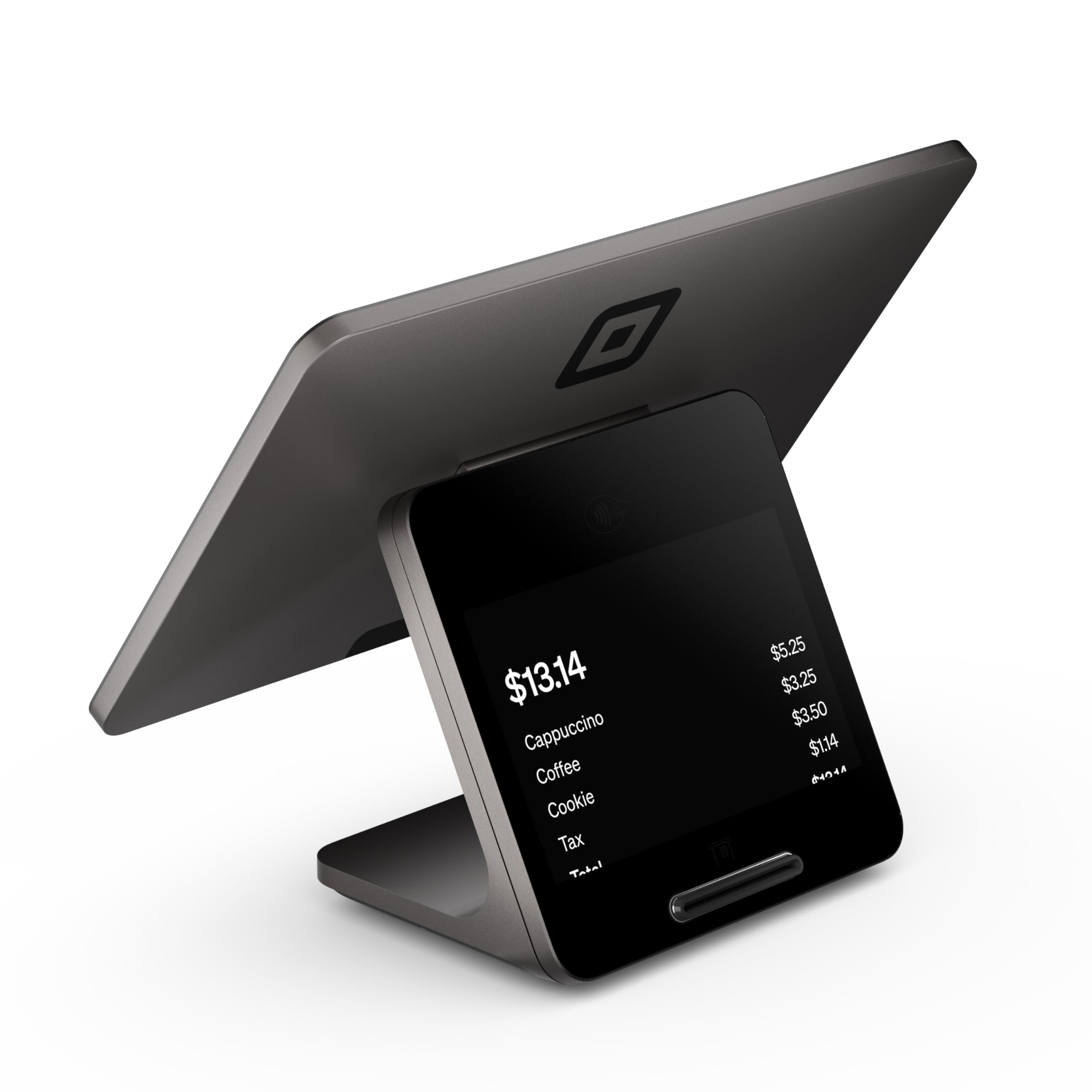
A fixed counter station with dual touchscreens that keeps complex menus and big orders moving smoothly.
This is the full countertop rig for a busy fixed location. Dual responsive touchscreens give you a customer-facing display alongside your own operator screen, so buyers see their total while you punch in their order. It runs on corded electric power, meaning there is no battery anxiety — you plug it in and it stays ready through an entire shift.
High-speed processing and responsive displays are built for rushes, busy menus, and large orders without lag. The device accepts every major card at one simple rate with no hidden fees or long-term contracts, and funds arrive as soon as the next business day. An IP54-rated design resists everyday spills, dust, and wear — a real comfort for a counter that sees coffee cups and food splashes.
Buyers report it integrates flawlessly with a Square account and Faire wholesale, and staff warm to the touchscreen quickly for keeping orders consistent. The catch is the hardware story: this second generation ships without the swipe reader of the previous version, so gift cards may need extra hardware or manual entry. The seller-facing screen is also dimmer with a flickering UI, and the customer terminal can take two to three minutes to boot up.
A serious counter piece: the twin screens and spill-resistant build make it a professional checkout center for stores with steady foot traffic.
Not a leap forward: the missing swipe reader and slow boot are the main complaints from owners expecting more than a minor refresh.
Grab this for: a fixed retail shop or restaurant counter where you need speed, a customer-facing display, and a machine that ignores spills.
Pass if: you work mobile and need portability — this one is corded and meant to stay put.
4. SumUp Solo

The entry-level terminal that pairs a free SIM card with a charging station so you can sell anywhere.
The appeal here is a genuinely portable setup at a budget-friendly price. The device uses a full OLED touchscreen and comes with a charging station plus a free SIM card with mobile data, so you are not chained to Wi-Fi. That combination lets you take payments at pop-ups, stalls, or anywhere the customers are. Setup is fast once you register the unit on the SumUp website or mobile app.
Owners who switch over from Square do it for lower per-transaction fees, and the touchscreen itself gets called responsive and glitch-free. There is real enthusiasm for the battery life and the sleek, compact build. The story turns sour when reliability comes into play — the highest-count customer feedback is mixed, and a good share of buyers hit frequent transaction failures with two-to-five-minute waits. Invoicing and payment links are also missing from the device and app, available only on the desktop site, which slows down a purely mobile seller.
Before you buy, know the approval hurdle: if your account is not pre-approved, the device shows a vague “Transaction Failed” message, and onboarding can take up to 14 days, requiring business photos, licenses, and permits. Budget-conscious sellers like the fees, but the reliability split means it does not suit everyone.
Value Angle
- Free SIM card and mobile data for anywhere payments
- OLED touchscreen that responds quickly
- Charging station extends battery convenience
- Lower fees than popular rivals
Reality Check
- Transaction failures with multi-minute waits reported
- No invoicing or payment links on the app or device
- Approval process can take up to 14 days
Buy it for: a tight budget and a desire to escape high per-swipe fees, especially if your sales volume is modest and you can wait out onboarding.
Avoid if: you need rock-solid reliability at high volume — the recurring failures and missing invoicing will frustrate a serious seller.
5. Verifone VX520

A traditional counter terminal with dial and Ethernet links, ready to be programmed by your bank.
This is the classic full-size counter terminal — 9 x 6 x 3 inches — with an ergonomic design and a small footprint that keeps a tidy checkout area. It is built around dual connectivity, meaning dial and Ethernet, so it suits a merchant who already works with a bank-linked processor rather than a modern cloud system. The smart card reader handles EMV chip transactions, the kind most US cards use today.
Owners who get it working report a solid, reliable machine that installs in about ten minutes with no real training needed. It plays well with internet services like COX Communication and links cleanly to whatever US bank approves it. The build quality earns consistent praise for the price, and setup is genuinely straightforward for a traditional terminal.
The reality check is that this machine arrives without a processor, so your bank must program it before any transaction goes through. A small share of buyers hit a unit locked by the manufacturer that no bank could program. There are also reports of the EMV reader failing early — though one owner notes the seller replaced the unit the very next day. Receipt printing runs slow, and the bulky size anchors it firmly to one spot.
Good for: established merchants who already have a bank processor and want a dependable, budget-friendly counter terminal with a smart card reader.
The catch: it arrives unprogrammed and needs bank approval, and the occasional locked unit or early reader failure means researching your seller matters.
Work with it if: your bank or processor supplies the programming and you want a no-nonsense terminal that also works over a plain dial line.
skip it if: you want a plug-and-play machine that works from the start — this one demands a processor relationship first.
Understanding the Specs
Chip Processing Speed
This is the time it takes a terminal to read an EMV chip card and approve the transaction. Faster times keep queues moving, which is why a two-second chip read feels dramatically better than an older machine that makes customers wait. The standard EMV chip is the small metallic square on most cards, and every terminal here reads it.
Connectivity and Offline Mode
Terminals connect three main ways: Wi-Fi for most modern counter setups, a built-in SIM for selling away from any network, and dial or Ethernet for traditional bank-linked machines. Offline payments matter if you sell at markets or festivals — the device stores the transaction and uploads it once your connection returns.
FAQ
Do I need a separate bank account or processor to use these machines?
Will these card machines work without an internet connection?
Can I take payments at a farmers market or pop-up stall?
How long does the battery last on a portable card machine?
Is the Square Register worth it for a small shop?
Why would a seller choose SumUp over Square?
How do I get money from my card sales?
Can I print paper receipts with these machines?
Final Thoughts: The Verdict
Across the board, the card machine for small business winner is the Square Terminal because it delivers two-second chip processing and built-in receipt printing in a compact 14.7-ounce body with no long-term contracts. If you run a restaurant or sell at markets, grab the Square Handheld for pocketable, offline-ready payments. And for a busy fixed counter that needs a customer-facing display and spill resistance, the Square Register is the one to reach for.
How We Picked
We do not accept paid placement. Every pick is matched to a real buyer and a real use-case; we do not hands-on test units.
Sources & Methodology
Specifications: manufacturer listings and product documentation. Review insights: verified customer reviews, as of August 2026. Pricing: not shown on this page (it changes often); check the current price via the retailer link.
As an Amazon Associate, Gadgets Feed earns from qualifying purchases. This does not affect which products we feature.