
Our readers keep the lights on and my morning glass full of iced black tea. As an Amazon Associate, I earn from qualifying purchases.
Specs are compiled from manufacturer listings and verified buyer reviews and can change over time — please confirm the key details on the product page before buying.
When you’re learning piano, producing tracks, or setting up a home studio, the key feel makes or breaks your playing experience. A 61-key weighted keyboard delivers that responsive, piano-like touch in a compact size that fits on a desk without taking over the room. Your main decision is if you need a controller for software instruments or a self-contained digital piano with built-in sounds — this guide helps you pick the right one.
I’m Min — the founder and writer behind Gadgets Feed. This guide is built by comparing the manufacturers’ published specifications and the patterns across verified customer reviews, so you get each pick’s real strengths and trade-offs instead of marketing spin.
From studio controllers with deep software integration to portable digital pianos for practice, here is the honest breakdown of the best 61 key weighted keyboard options across every budget and use case.
Our Picks at a Glance

How To Choose The Best 61 Key Weighted Keyboard
Your core choice is simple: control software on a computer, or play sounds built into the keyboard itself. Controllers are lighter and work smoothly with recording software, while digital pianos operate standalone — perfect for beginners who just want to press a key and hear a sound immediately.
Key Action: Semi-Weighted vs. Hammer Action
Semi-weighted keys offer resistance without the full mechanical complexity of a grand piano action. They respond to how hard you press (velocity-sensitive) and feel natural for both piano parts and synth leads. Fully hammer-action keys feel heavier and more like an acoustic piano, but they’re rare on 61-key models because the mechanism adds bulk and cost.
Connectivity and Computer Integration
Most of these keyboards connect via a single USB cable for both power and data. If you plan to record in a DAW like Ableton Live, Logic, or Cubase, check whether the keyboard has built-in mapping for your software. This means the transport buttons and faders automatically control your recording software without manual setup — a huge time-saver.
Quick Comparison
| Model | Best For | Key Type | Aftertouch | Bundled Software | Amazon |
|---|---|---|---|---|---|
| M-AUDIO Keystation 61 MK3★ Best Overall | Reliable studio controller | Semi-weighted | No | MPC Beats, Ableton Live Lite | Amazon |
| Artesia 61-Key Portable PianoBest Value | Beginners and practice | Semi-weighted | No | Melodics lessons | Amazon |
| Nektar Impact GXP61 | Expressive performance | Semi-weighted | Yes | Cubase LE, Retrologue 2 | Amazon |
| Native Instruments Komplete Kontrol A61 | NI software users | Semi-weighted | No | Ableton Live Lite, Komplete bundle | Amazon |
| Novation Launchkey 61 MK4 | Beat makers and producers | Semi-weighted | Yes (pads) | Ableton Live Lite, Cubase LE, Melodics | Amazon |
| Arturia KeyLab 61 MkII | Serious studio production | Semi-weighted | Yes | Analog Lab 3, Piano V, Ableton Live Lite | Amazon |
In‑Depth Reviews
1. M-AUDIO Keystation 61 MK3
Our pick — over 4.5★ from 6,756 verified ratings; the strongest balance of quality and price.
The crowd favorite that has proven itself through years of daily studio use
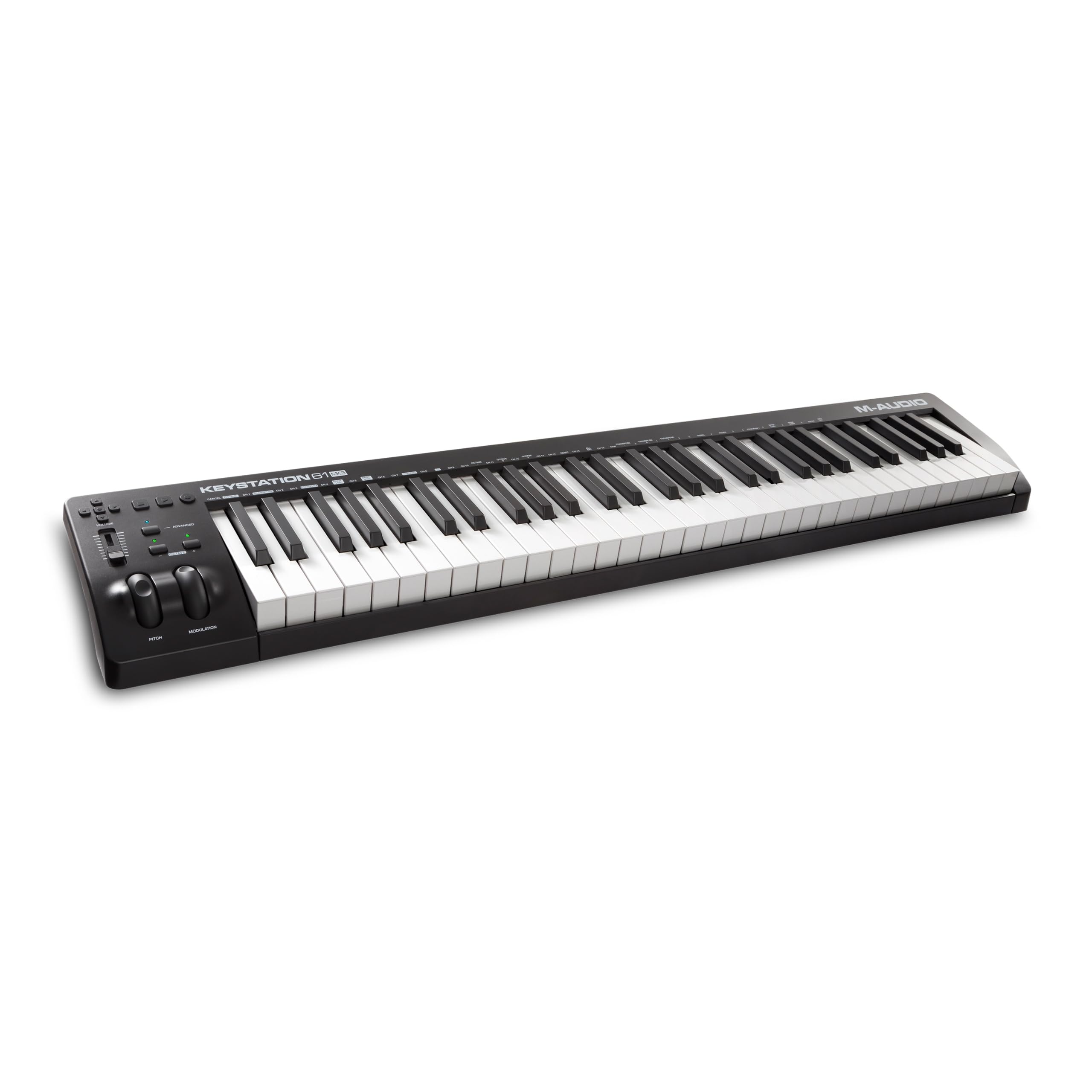
This is the keyboard owners describe as the best semi-weighted option in its price range, and the reason is simple: it just works. The 61 full-size, velocity-sensitive semi-weighted keys capture the subtle differences in how hard you press, so soft passages stay delicate and loud hits stay punchy. Plug it into a Mac or PC with the USB cable and it’s instantly recognized — no drivers, no power supply, no fuss.
What wins people over is the build quality and reliability, with the word “quality” dominating owner feedback. The volume fader, transport buttons, and pitch and modulation wheels give you hands-on control over your recording software, while the octave up and down buttons extend your range beyond the 61 keys. The included software suite — MPC Beats, Ableton Live Lite, Velvet, XPand2, Mini Grand, and Touch Loops — is genuinely enough to start producing immediately.
Buyers report three years of trouble-free use, and the recurring praise is that it’s a dependable workhorse rather than a flashy showpiece. The key feel is lighter than a true piano, which suits synth players and producers who move between instruments. The recurring gripe is the Windows setup process, which some owners found difficult compared to the plug-and-play Mac experience.
Why It Wins Fans
- Plug-and-play USB connection works instantly with Mac and PC
- Includes MPC Beats and Ableton Live Lite for immediate production
- Pitch and mod wheels plus octave buttons for expressive control
What to Watch
- Windows setup can be frustrating, requiring extra steps for some owners
- Keys feel lighter than a true piano action — not ideal for serious piano practice
The studio staple: This is the safest, most proven choice for anyone producing music on a computer who wants a reliable, good-feeling controller while staying affordable.
A fair caveat: If your only goal is practicing piano with authentic heavy key weight, a hammer-action digital piano suits you better than this lightweight controller.
2. Artesia 61-Key Portable Digital Piano
A self-contained digital piano that lets beginners hear sounds without touching a computer
Unlike the controllers above, the Artesia A-61 is a true digital piano with 8 built-in voices — grand piano, electric piano, and organ among them — so you can play immediately without launching any software. The 61 touch-sensitive, semi-weighted, full-size keys deliver a dynamic response, and the 3D acoustic instrument samples give the grand piano voice a clean, natural tone. At just under 13 lbs., it’s genuinely portable.
What makes this a standout value is what’s in the box: a sustain pedal, a music rack, and free Melodics piano lessons. The headphone jack and quiet action make it practical for late-night practice in shared spaces, and the USB MIDI and USB audio interface let you connect to a computer for recording when you’re ready. Owners who compared it to pricier options called it a “budget sleeper” — with one owner saying it beat a keyboard they owned.
The honest trade-off is the onboard sound quality, which gets the most mixed feedback of any aspect. Some owners love the grand piano voice, while others find the electric piano sounds less pleasing. The key weight is also a fit question — some find it just right for beginners, others want more resistance. It’s a fantastic entry point, not a concert grand.
Who it’s for: Beginners and returning players who want a standalone piano with a sustain pedal, music rack, and built-in lessons — no computer required.
Who should look elsewhere: Players who demand rich, varied onboard sounds or heavy hammer-action keys; this is an entry-level instrument, and the electric piano voices show it.
3. Nektar Impact GXP61

The expressive performer with aftertouch — press harder after a note and the sound bends
Here’s the feature that sets the Nektar apart: aftertouch. On top of the 61 premium-quality semi-weighted, velocity-sensitive keys, you can press a held note harder and trigger additional expression — a response that owners describe as easy to trigger and more accurate than pricier competitors. This is the key reason synth players and jazz pianists gravitate toward it.
The Nektar DAW integration maps the transport controls and 14 MIDI assignable buttons directly to most popular recording software, so you’re not wrestling with manual setup. It includes a MIDI 5-pin Out for connecting to older hardware synths, plus sustain and expression pedal sockets. The package includes Cubase LE and the Retrologue 2 synthesizer plugin, giving you a full recording setup from the start.
Owners call it “killer value” and praise the solid, rugged build on stage and in the studio. The trade-off appears in quiet solo playing: the keybed has a noticeable “clanky-squeaky” noise that some owners flagged. It’s not a problem in a mix or with headphones on, but it’s there if you play unplugged in a silent room.
Why it stands out: The accurate aftertouch and deep DAW integration make it the most expressive controller in this price range — a feature set that costs significantly more elsewhere.
The catch: The keybed noise is real, so if you primarily play in complete silence without headphones, test it first or accept the clatter.
4. Native Instruments Komplete Kontrol A61

The smart controller that lights up when you use Native Instruments software
If you already use Komplete Kontrol or Kontakt, this keyboard offers the most smooth integration you can get. The semi-weighted custom NI keybed feels responsive, and the OLED display (a small screen that shows what each knob controls) keeps you oriented as you browse instruments and effects. The 8 touch-sensitive control knobs let you tweak sounds directly, without digging through your software’s menus.
The real magic is the integration: load a Komplete instrument and the keyboard automatically maps its key parameters to the knobs, with the OLED display showing you the names. Owners praise the key feel as better than competitors and note the low latency mimics a real piano. The included software — Ableton Live Lite plus Komplete’s bundled instruments — is substantial value for NI fans.
The honest limitation is that this integration only shines within the Native Instruments ecosystem. If you use other software, you’re paying a premium for a feature you won’t fully use. Owners also note the A61 lacks aftertouch and drum pads — those live on the pricier S-series models. And the recurring request is for a transpose button, which this model doesn’t have.
The NI native: This is the right pick for anyone building their setup around Komplete or Kontakt who wants plug-and-play control with an OLED guide.
Look elsewhere if: You don’t use Native Instruments software — the integration premium won’t benefit you, and pads and aftertouch are missing for other workflows.
5. Novation Launchkey 61 MK4
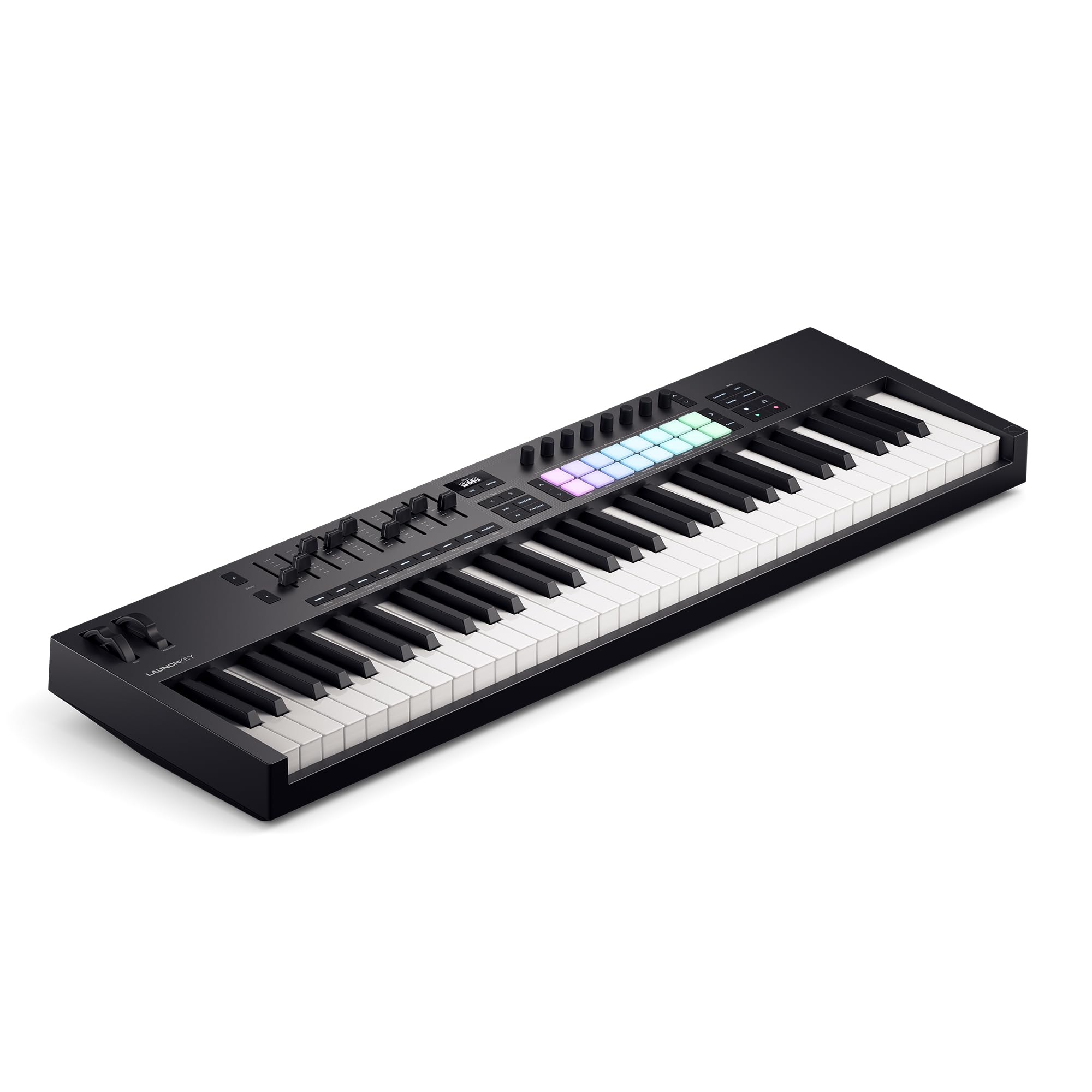
The beat-making powerhouse with 16 pads, 9 faders, and Scale Mode that prevents wrong notes
This is the newest and most feature-dense controller here, built for producers who want more than just keys. The 61 semi-weighted keys handle piano parts, but the real action is in the 16 FSR drum pads with polyphonic aftertouch — they double as step sequencers, clip launchers, and chord triggers, not just drum pads. The 9 faders give you hands-on mixing, and the OLED display keeps everything visible.
Scale Mode is the standout creative tool: it locks your playing to a chosen musical scale so you never hit a wrong note, making it easy to experiment with melodies even if you’re not a trained pianist. Chord Mode lets you trigger lush chords from a single key. The Ableton Live integration is the best in class, with built-in transport control that works right from the start.
Owners praise the solid build quality and describe it as the best controller they’ve ever used. The honest caveat is for users of less popular DAWs: owners of Reason 13 reported that manual knob and fader mapping was flaky at launch, though built-in transport and pad mappings worked fine. The free software bundle — Ableton Live Lite, Cubase LE, Novation Play, plus sounds from GForce, Klevgrand, Orchestral Tools, and Native Instruments — is the most generous here.
The Creative Toolkit
- 16 FSR drum pads with polyphonic aftertouch serve as step sequencers and clip launchers
- Scale and Chord modes let you play musically even without formal training
- 9 faders and OLED display for hands-on DAW control
Before You Buy
- Manual mapping is flaky for non-mainstream DAWs like Reason 13 — check compatibility for your software
- Ableton-oriented design; other DAW users get fewer out-of-box benefits
Built for Ableton producers: If you make beats or produce in Ableton Live and want deep creative tools beyond piano playing, this is the most powerful 61-key choice here.
Think twice if: You use a less common DAW and don’t want to risk manual mapping quirks; check your software’s support first.
6. Arturia KeyLab 61 MkII

The premium studio centerpiece with an aluminum chassis and CV outputs for modular synths
This is the flagship of the group — a heavy, aluminum-chassis controller with wood panels and a premium keybed that feels like a serious instrument from the first touch. The aftertouch-enabled keybed (which responds to pressure after the initial press) is sensitive for delicate playing and sturdy for high-impact performances. The 9 faders can control organ drawbars one moment and your DAW mixer the next.
What truly separates the KeyLab 61 MkII is the connectivity: full-sized MIDI in and out, plus 4 CV outputs and a CV input for controlling Eurorack modular gear and vintage synths. The 5 expression pedal inputs accommodate even advanced performance setups. The bundled software is substantial — Analog Lab 3 with over 6000 presets, the physically modeled Piano V, and Ableton Live Lite.
Owners consistently call it the best controller in its class, praising the build quality and the vast sound library. However, some find the key action shallow compared to a true piano, and a few report software crashes. It’s also heavy — owners say it’s best for a home studio rather than frequent transport. The 2-year warranty adds confidence for the investment.
The studio investment: For serious producers who want a top-tier keybed, deep software, and modular connectivity in one premium package, this is the one.
Who it’s not for: If you need portability, or if you want a heavy piano-like action, the KeyLab’s shallow keys and weight are real considerations.
Understanding the Specs
Velocity Sensitivity vs. Aftertouch
Velocity sensitivity means the keyboard detects how hard you press a key and translates that into louder or softer sound — essential for expressive piano playing. Aftertouch goes further: after you press a key down, pressing harder on the held note changes the sound, adding vibrato or filter effects. Synth players value aftertouch; piano-focused players prioritize velocity response.
DAW Integration and Bundled Software
DAW integration means the keyboard’s transport buttons, faders, and knobs automatically control your recording software without manual mapping. Some brands map deeply to specific DAWs — Novation to Ableton, Native Instruments to Komplete — while others offer broader but shallower support. The bundled software is real value: Ableton Live Lite, Cubase LE, and instrument collections can save you hundreds versus buying them separately.
FAQ
What is the difference between semi-weighted and fully weighted keys on a 61-key keyboard?
Does the M-AUDIO Keystation 61 MK3 work with an iPad?
Can I use the Artesia 61-Key piano without a computer?
What is aftertouch and why does it matter on the Nektar Impact GXP61?
Will the Native Instruments Komplete Kontrol A61 work with Ableton Live?
What makes the Novation Launchkey 61 MK4 good for beat making?
Can the Arturia KeyLab 61 MkII control modular synthesizers?
Do these 61-key weighted keyboards work as standalone pianos?
Final Thoughts: The Verdict
For most buyers, the 61 key weighted keyboard winner is the M-AUDIO Keystation 61 MK3 because it pairs a proven, reliable semi-weighted keybed with plug-and-play simplicity and a generous software bundle that the crowd has trusted for years. If you want a standalone piano that works without a computer, grab the Artesia 61-Key for its built-in voices and beginner-friendly bundle. And for the most creative production power with pads, faders, and Scale Mode, the Novation Launchkey 61 MK4 is the one to reach for.
How We Picked
We do not accept paid placement. Every pick is matched to a real buyer and a real use-case; we do not hands-on test units.
Sources & Methodology
Specifications: manufacturer listings and product documentation. Review insights: verified customer reviews, as of August 2026. Pricing: not shown on this page (it changes often); check the current price via the retailer link.
As an Amazon Associate, Gadgets Feed earns from qualifying purchases. This does not affect which products we feature.