
Our readers keep the lights on and my morning glass full of iced black tea. As an Amazon Associate, I earn from qualifying purchases.
Specs are compiled from manufacturer listings and verified buyer reviews and can change over time — please confirm the key details on the product page before buying.
Choosing a 60% keyboard means giving up the number pad, function row, and arrow keys to free up desk space for your mouse. The real decision isn’t the size—it’s if you need a traditional mechanical switch or the newer magnetic (Hall effect) switches that can register a press before you fully bottom out. For competitive FPS players, that speed advantage is the whole point, while typists might prefer the familiar feel of a classic switch.
I’m Min — the founder and writer behind Gadgets Feed. This guide is built by comparing the manufacturers’ published specifications and the patterns across verified customer reviews, so you get each pick’s real strengths and trade-offs instead of marketing spin.
To help you find the right match, we’ve analyzed the specs and buyer feedback to rank the best 60 key keyboard options for both competitive gaming and everyday use.
Our Picks at a Glance


How To Choose The Best 60 Key Keyboard
The biggest question isn’t about the number of keys—it’s about the switch technology inside. Traditional mechanical keyboards use a physical spring and metal contact to register a keypress, while Hall effect magnetic switches use a magnetic field to detect movement. This changes not just how the keyboard feels, but how fast it can respond to your inputs.
Switch Type: Mechanical vs. Hall Effect
If you’re a competitive gamer, Hall effect switches offer a clear advantage. They allow for “rapid trigger” functionality, which means the key can reset and re-trigger without you having to release it fully. This makes rapid strafing in games like Valorant much faster. For general typing or casual gaming, a standard mechanical switch is perfectly fine and often cheaper.
Polling Rate & Actuation Point
The polling rate (measured in Hz) tells you how often the keyboard reports its status to your computer. A standard keyboard polls at 1000Hz, but many modern gaming boards offer 8000Hz, which can feel more instantaneous. Related to this, the actuation point is the distance you need to press a key before it registers. Magnetic boards let you adjust this distance in tiny increments, so you can make keys super sensitive for gaming or more deliberate for typing.
Quick Comparison
| Model | Best For | Switch Type | Polling Rate | Adjustable Actuation | Amazon |
|---|---|---|---|---|---|
| Womier WK61 V2★ Best Overall | Budget DIY Enthusiasts | Mechanical Red | N/A | No | Amazon |
| EPOMAKER Aula WIN60 HETop Performer | FPS Gamers on a Budget | Magnetic | 8000 Hz | 0.08mm–3.4mm | Amazon |
| AULA WIN68 HEFast Trigger Pick | Gamers & Coders | Magnetic | 8000 Hz | 0.02mm–3.44mm | Amazon |
| Redragon K617 | Entry-Level Customization | Mechanical Red | N/A | No | Amazon |
| ATTACK SHARK X68 HE | Esports & Precision Play | Magnetic | 8000 Hz | 0.1mm–3.4mm | Amazon |
| Aula WIN60 HE (White) | Budget Premium Feel | Magnetic | 8000 Hz | 0.02mm RT step | Amazon |
| DAREU COOL60 | Travel & Aesthetic | Magnetic | 8000 Hz | 0.2mm–3.5mm | Amazon |
| Razer Huntsman Mini | Brand Reliability & Speed | Optical Linear | N/A | No (1.0 mm actuation) | Amazon |
| Logitech G PRO X 60 | Wireless Portability | Optical Tactile | 1000 Hz (LIGHTSPEED) | No | Amazon |
In-Depth Reviews
1. Womier WK61 V2
Our pick — over 4.5★ from 700+ verified ratings; the strongest balance of quality and price.
The crowd-pleasing budget board that proves you don’t need to spend big for a great feel.
This one is for the tinkerer who wants a solid base to mod. The Womier WK61 V2 comes with quiet red linear switches, so the clicks are soft, smooth, and easy to register. A standout feature is the multi-layer sound-dampening filling, which cuts the hollow noise and gives a more stable typing feel right from the start.
The 61-key layout frees up desk space, and with the matte translucent bottom cover, the RGB lighting glows in all directions for a clean, frosted look. Unlike the Redragon below, this one includes 3 sublimation keycaps you can swap in, letting you match colors without buying new caps immediately. The hot-swappable socket means you can change out the switches later without any soldering.
The biggest crowd-pleaser here is the build quality—it’s the thing owners single out far more than anything else, noted by 62 people. They describe it as high-quality with vibrant colors and crisp clicking sounds, and “value for money” comes up again and again.
The Good: This is the best entry point into mechanical keyboards if you want quiet switches, a customizable look, and the freedom to swap switches without soldering—all in a compact 60% layout.
The Trade-off: It lacks the extreme speed features of magnetic boards; for that, you’d need the EPOMAKER below.
Reach for this if: you’re a beginner or DIY fan on a budget who values a great feel and looks over raw esports performance.
Look elsewhere if: you need Mac compatibility or the fastest possible response times for competitive FPS games.
2. EPOMAKER Aula WIN60 HE
A magnetic switch powerhouse that brings esports-grade speed to a mid-range price.
If you play fast-paced shooters, this board is engineered for you. The WIN60 HE’s Hall effect magnetic switches poll at 8000Hz, delivering up to 8x faster response than standard 1000Hz boards. Its tested 0.3ms latency makes key commands register almost instantly.
What makes it special is the adjustable actuation point—you can customize each key from 0.08mm to 3.4mm in 0.02mm increments. This means you can set your movement keys to be ultra-sensitive for rapid strafing, while keeping your typing keys more deliberate. The Snap Tap feature prioritizes the latest input between two keys, making directional changes in FPS games lightning-fast.
The build quality is a clear highlight according to owner feedback, and the sound it produces is a recurring topic. As buyers report: “Amazing product and still surprised with how it sounds.” It feels “very premium and not like some cheap plastic keyboard,” with a sturdy, heavy build. There are some mixed notes about the default ABS keycaps being mediocre, and the online web driver requires calibration for the actuation to work properly, but the speed is undeniable.
Why It Wins
- 8000Hz polling with 0.3ms latency for instant response
- Adjustable actuation from 0.08mm to 3.4mm
- Includes 2 spare switches for hot-swapping
The Catch
- Stock keycaps feel cheap (ABS plastic)
- Web driver needs setup before full functionality
Pick this for: competitive gamers who want magnetic switch speed without jumping to a premium price tier.
Think twice if: you’re not willing to tinker with the web driver to dial in the actuation points.
3. AULA WIN68 HE
A compact 68-key board that keeps its arrow keys while delivering fast magnetic switching.
Stuck between wanting a small footprint but needing arrow keys? The AULA WIN68 HE splits the difference. It keeps dedicated arrow keys for an easy switch from full-size boards. It’s a 60% layout in spirit, but with the extra cluster that typists and coders often miss.
Performance-wise, it holds its own with an 8000Hz polling rate and a 0.3ms latency. The adjustable actuation point spans 0.02mm to 3.44mm, with per-key personalization down to 0.1mm increments. The web driver lets you customize RT/SOCD/DKS functions for gaming, though it only supports Windows—no Mac driver here.
The build quality is the top praise point, mentioned by 66 owners, with a heavy, solid feel that surprises at its price. The typing experience is described as “silky smooth” with an amazing sound. One owner even called it a “clone alternative” that outperforms more expensive name brands, noting the quiet magnetic switches beat traditional clicky blues for both gaming and typing. The main caveat is the software drivers can be hard to find initially, and a few report the space bar failing within weeks—a durability concern to keep in mind.
Who It’s For: This is the balance for gamers and coders who want the speed of Hall effect switches but don’t want to give up arrow keys for daily desktop work.
Keep In Mind: You’ll need Windows for the full driver experience, and the included web driver link is a bit tricky to locate.
Choose it for: the best balance of compact size, essential keys, and fast magnetic switching.
skip it if: you’re a Mac user or you’re concerned about the occasional durability report on the space bar.
4. Redragon K617

The ultimate budget pick that frees up desk space for wide, accurate mouse swipes.
If your gaming style relies on low sensitivity and big arm movements, this compact board gives you the room you need. The K617 ditching the numpad and nav cluster frees up desk space for wide mouse swipes, so your sensitivity stays low and your flicks stay accurate. It’s a simple, focused design for the player who just wants more room.
The upgraded socket accepts almost any 3-pin or 5-pin switch, so you can swap in your preferred switches without soldering. It comes with stock Red linear switches that keep clicks discreet, ideal for shared spaces or late-night sessions. With up to 20 preset lighting modes and adjustable brightness, the desk glow is genuinely impressive for the price.
Owners praise the quality above all, with 78 calling it out. They say it feels like “a quality product for cheap” and is “very responsive and smooth,” with RGB lighting described as “the best on a keyboard I’ve had.” One owner bought it three times for three different builds with zero issues. The only mixed feedback is on long-term reliability, with a few reporting it stopped working—but that’s a small minority against a very happy crowd.
The High Points
- Hot-swappable sockets for 3-pin or 5-pin switches
- Lightweight at 9.6 ounces for easy portability
- 20 RGB modes with adjustable brightness and flow
The Low Points
- No adjustable actuation—it’s a standard mechanical board
- Some reliability concerns reported after extended use
Ideal for: budget buyers who want a reliable, customizable RGB board that’s easy to mod.
Not for: gamers who need the rapid-trigger speed of magnetic switches.
5. ATTACK SHARK X68 HE

A top-mount build with a 0.01mm rapid trigger.
For the player who lives in Valorant or osu, the X68 HE is built for precision. It uses adjustable Hall effect magnetic switches where you can set the actuation point from a light 0.1mm to a strong 3.4mm. Its rapid trigger hits 0.01mm accuracy with a theoretical 0.125ms latency, ranking among the fastest boards.
The structure is different from most budget boards. It uses a top-mounted structure with an aluminum alloy anodizing positioning plate and double-layer PORON for a quiet, stable, and smooth typing operation. The pre-lubed stabilizers mean the big keys (space bar, shift) don’t wobble, which is a common issue on cheaper boards. This gives it a premium feel that rivals much pricier options.
Owners are emphatic about the value, with quality mentioned by 48 buyers. Some go as far as to say it outperforms a Wooting 60HE v2 in gaming performance and sound. The web driver at qmk.top works for remapping and macros, though it feels a bit unfinished. Note that the keycaps feel cheap, and you’ll want to swap them for a better typing experience.
The Verdict: This is the pick for esports players who want top-mount stability and 0.01mm rapid trigger precision without paying a fortune.
The Compromise: You’ll need to budget for new keycaps if the stock ABS ones bother you, and the web driver has a raw edge to it.
Grab it for: the most competitive edge per dollar, with PC and Mac dual-system support via a one-button switch.
Pass on it if: you want a polished, finished software experience right from the start.
6. Aula WIN60 HE (White)
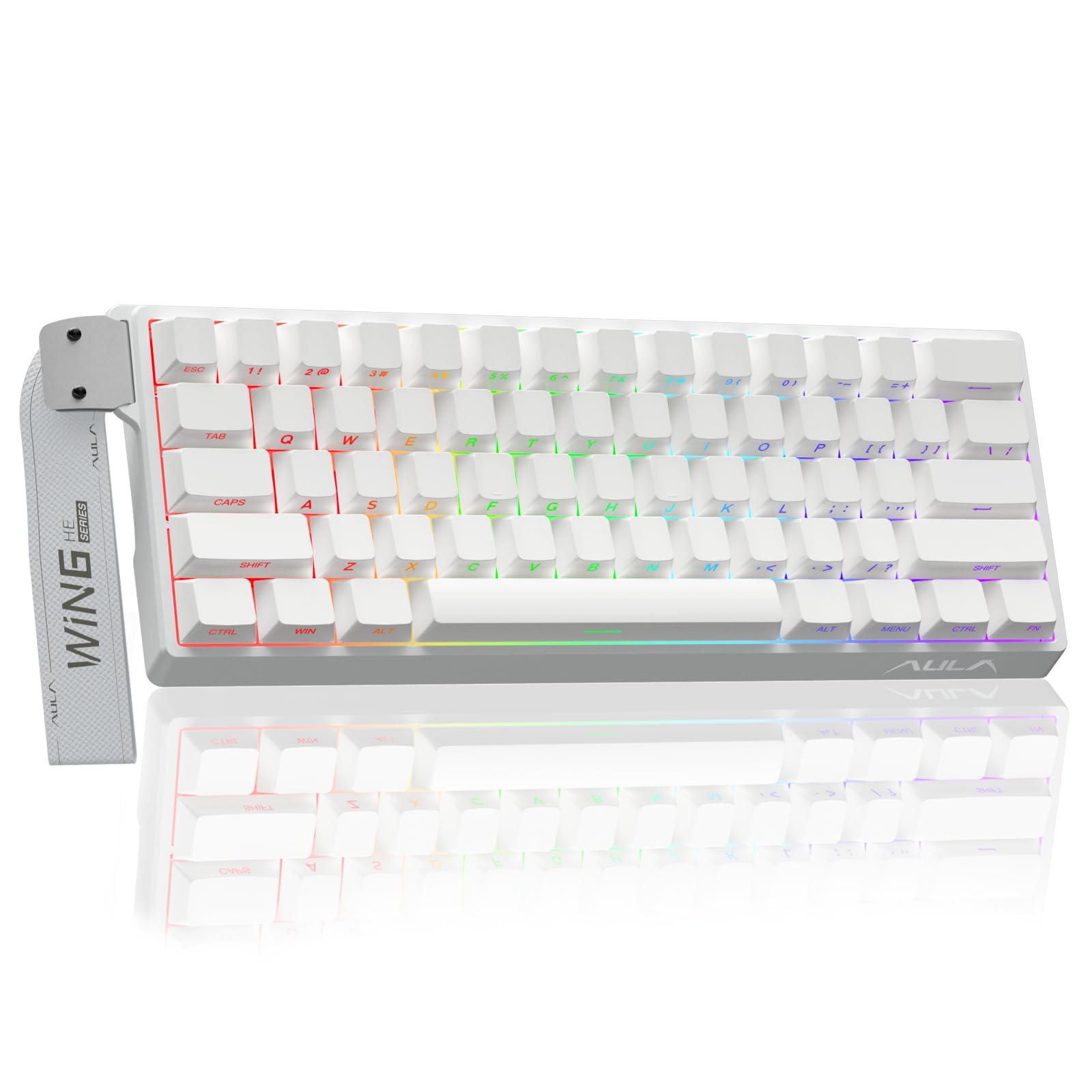
A side-printed PBT keycap board with the feel of a custom build, minus the build.
This one is for people who care about the finer details of feel and aesthetics. The Aula WIN60 HE White model comes with side-printed PBT keycaps, which are more durable and resistant to shine compared to ABS caps. The lower light position design illuminates these keycaps beautifully, creating a clean, understated glow that looks more premium than your standard top-lit RGB.
Under the hood, it’s still a serious gaming machine with an 8000Hz polling rate and a rapid trigger step distance of just 0.02mm. The self-developed magnetic switches deliver that fast, consistent feel needed for competitive FPS titles. It’s tune for games like Valorant and CS2, where faster peeking and quick-stop shooting become a real advantage.
Quality is the most-praised aspect here, with 90 owners noting it, and sound quality follows closely with 52 mentions. The consensus is that it sounds great without being noisy, and the typing feels fluid. As one owner put it, it’s “like a wooting if it was WAY cheaper.” The main software gripe is real—the driver is less polished, and some had input lag that took a PC restart to fix—but the hardware itself feels solid.
What Stands Out
- Side-printed PBT keycaps for a unique, durable finish
- 0.02mm rapid trigger step for lightning-fast response
- Lightweight, non-memory-consuming web driver
What Holds It Back
- Software is unpolished and occasionally buggy
- No Bluetooth or wireless connectivity
Best fit for: players who want premium keycaps and a clean aesthetic without paying custom-build prices.
Skip if: you need wireless freedom or a flawless software experience.
7. DAREU COOL60
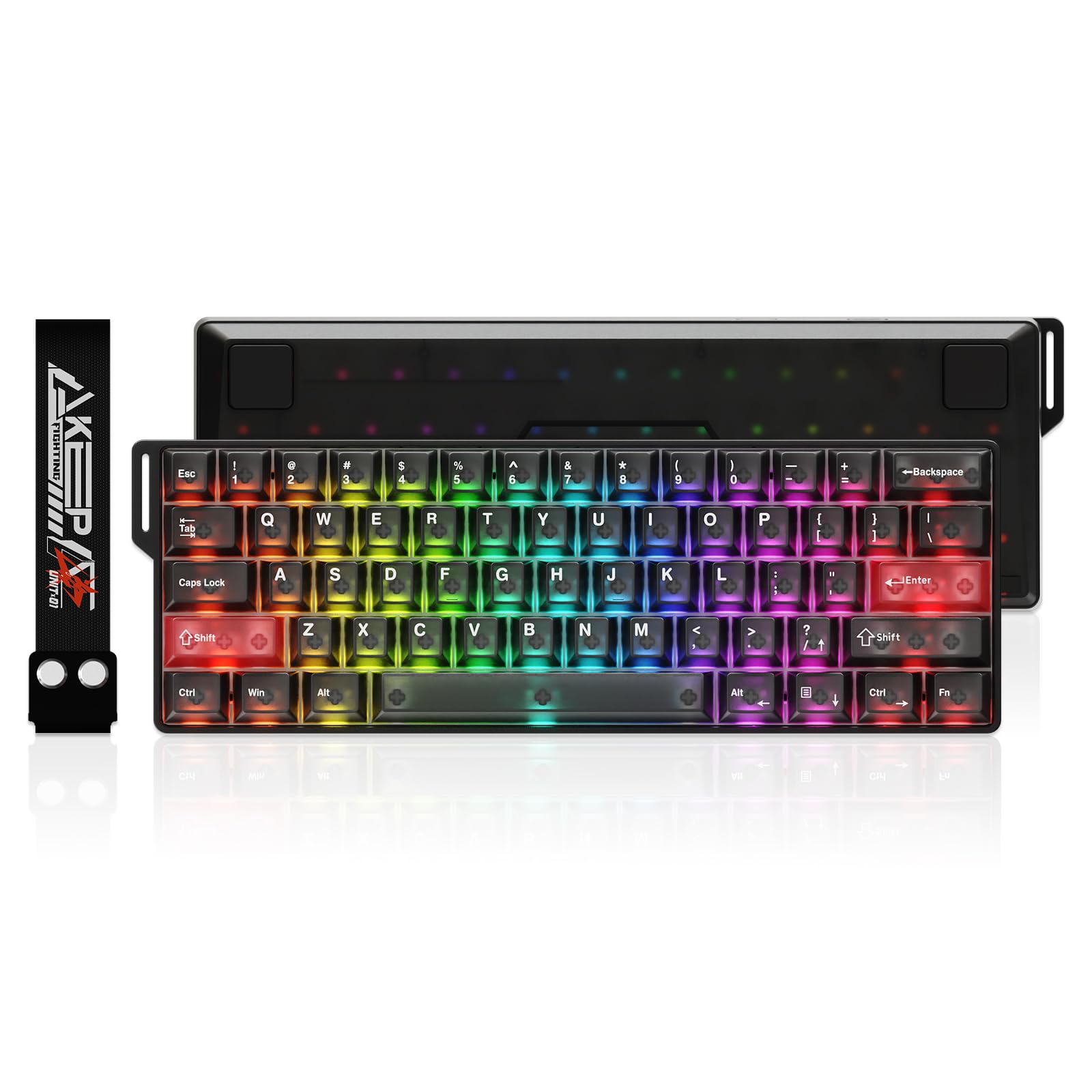
An ultra-lightweight translucent board that’s easy to toss in a bag for LAN events.
If you travel to LAN parties or like to switch setups, this is the most portable pick here. The DAREU COOL60 weighs just 430 grams, so it slips into a backpack without adding bulk. The frosted translucent casing and keycaps use optical-grade PC material, giving a hazy, mist-like texture that diffuses the RGB beautifully and resists fingerprints.
Performance isn’t sacrificed for weight. It polls at 8000Hz with tested latency as low as 0.04ms and a 0.01mm rapid trigger step. The adjustable actuation spans 0.2mm to 3.5mm, and it supports SOCD/DKS/MT/TGL functions via the DAREU Hyper Algorithm. Fifteen dedicated IC chips manage key zones independently, ensuring stable inputs during intense play.
The sound is described as a perfect mix of “clicky-thocky,” with a creamy “toc” that sounds satisfying without being obnoxious. Owners recommend it for Valorant, noting a clear strafe difference versus a standard mechanical board. The dual web and desktop software driver covers remapping, macros, and RGB, with a music rhythm mode that reacts to your audio. Just know that only the web driver supports macOS.
Why It Wins: It’s the lightest high-performance magnetic board, making it the easiest to carry without giving up rapid trigger features.
Note: There are fewer lighting effects than some rivals—around 8 RGB modes—and macros aren’t fully tested by users.
Pick this for: the portable gamer who wants a unique frosted look and solid magnetic performance.
Look elsewhere if: you need a ton of RGB effects or you’re strictly a desktop user who doesn’t care about weight.
8. Razer Huntsman Mini

An aluminum-framed optical switch board from the biggest name in gaming peripherals.
If you want a keyboard from a brand you trust, the Huntsman Mini delivers. Instead of magnetic switches, it uses Razer Linear Optical switches that register key presses at the speed of light. Its 1.0mm actuation allows presses to register faster with less travel.
The build quality is a step above the budget tier. It features a matte aluminum top frame for structural integrity, which gives it a premium, rigid feel. The oil-resistant doubleshot PBT keycaps are textured and high-grade, so they resist the grime buildup that plagues cheaper ABS caps. You also get Razer Snap Tap via Synapse 4, which prioritizes the latest input between a pair of assigned keys for smooth in-game movement.
Owners call it “super silent” and “built very nicely,” with smooth key presses and fast responsiveness being the top talking points. It’s compact—taking up “literally no space” on a desk—and the Razer Chroma RGB syncs with games and 30+ partner brands. The mixed feedback focuses on the size (some find buttons too large) and value, but the quality (25 positive mentions) and keyboard feel (9 mentions) are clear strengths.
The Strengths
- Aluminum top frame for a rigid, premium build
- 1.0mm optical actuation for fast response
- Razer Synapse snap tap and macro support
The Weaknesses
- No adjustable actuation like magnetic rivals
- Opinions on value are divided
Choose it for: the assurance of a big-brand warranty, a great typing feel, and that satisfying optical switch speed.
pass on it if: you want per-key actuation adjustment without paying extra for the Razer name.
9. Logitech G PRO X 60

The wireless-tournament champ that cuts the cable without cutting performance.
The only wireless board on this list, the Logitech G PRO X 60 is for players who hate cable clutter or need to travel light. It connects via LIGHTSPEED wireless at 1ms response, Bluetooth for casual use, or USB as a backup. It’s completely tournament-proven, meaning the wireless reliability is tested in high-stakes environments.
Inside are GX optical switches with faster actuation and zero debounce delay. The KEYCONTROL technology allows pro-level customization of every key with 5 unique layers, turning this small board into a control center for complex macros. The included carrying case makes it easy to protect during transport, and the dual-shot PBT keycaps are built to last.
It feels “very good quality” and “quite heavy” according to owners, which is a positive for stability on a desk. Typing is “very comfortable” and the touch is “simply beautiful.” Some find the arrow key layout different from what they’re used to—it’s a 60% board, so arrow keys are layered—but most adapt over time. The main criticisms are that it’s “somewhat overpriced” and the sound is “nothing out of this world.”
The Takeaway: This is the smoothest wireless experience you’ll get in a 60% form factor, backed by Logitech’s esports credibility.
The Trade-off: You pay a premium for wireless and the brand, and you don’t get the magnetic rapid trigger features of the cheaper boards above.
Best for: pro players and frequent travelers who refuse to compromise on wireless reliability.
Not for: budget shoppers or those who want the 8000Hz magnetic switch performance.
Understanding the Specs
Switch Type & Actuation
The switch is the heart of the keyboard. Traditional mechanical switches use a spring and contact, while optical and Hall effect (magnetic) switches use light or magnets to detect movement. Magnetic switches allow you to adjust the actuation point (how far you press before it registers), which is a massive advantage for gaming—you can set keys to be ultra-sensitive for rapid movement in FPS games.
Polling Rate & Response Time
The polling rate (in Hz) tells you how often the keyboard reports its status to your PC. A standard board reports 1000Hz, while many new gaming boards hit 8000Hz—at 8000Hz versus the standard 1000Hz polling. Combined with a low latency figure (in milliseconds), this translates to faster, more consistent response when you’re mashing keys in intense moments.
FAQ
What does 60% mean for a keyboard layout?
Is a Hall effect magnetic switch better than a mechanical switch for gaming?
What is an adjustable actuation point?
Why are arrow keys missing on a 60% keyboard?
Are hot-swappable keyboards worth it?
Will these 60% keyboards work with my Mac?
What does the polling rate of 8000Hz actually do for me?
What is Snap Tap or Rapid Trigger in FPS games?
Which is easier to use for a beginner: a 60% or a 75% keyboard?
Do I need software to use these keyboards?
Final Thoughts: The Verdict
For most buyers, the 60 key keyboard winner is the Womier WK61 V2 because it nails the fundamentals—great feel, hot-swappable switches, and fantastic value—for the majority of buyers. If you want the competitive speed of Hall effect switches, grab the EPOMAKER Aula WIN60 HE. And for the wireless freedom pros demand, the Logitech G PRO X 60 is the one to reach for.
How We Picked
We do not accept paid placement. Every pick is matched to a real buyer and a real use-case; we do not hands-on test units.
Sources & Methodology
Specifications: manufacturer listings and product documentation. Review insights: verified customer reviews, as of August 2026. Pricing: not shown on this page (it changes often); check the current price via the retailer link.
As an Amazon Associate, Gadgets Feed earns from qualifying purchases. This does not affect which products we feature.