
Our readers keep the lights on and my morning glass full of iced black tea. As an Amazon Associate, I earn from qualifying purchases.
Specs are compiled from manufacturer listings and verified buyer reviews and can change over time — please confirm the key details on the product page before buying.
Adult robot kits have moved far beyond simple line-following cars. The current generation spans wearable mechanical hands, self-balancing rovers, and AI-powered robot dogs that can hold a conversation. The real challenge is matching a kit’s build time, coding depth, and surface requirements to your skill level and goals.
I’m Min — the founder and writer behind Gadgets Feed. This guide is built by comparing the manufacturers’ published specifications and the patterns across verified customer reviews, so you get each pick’s real strengths and trade-offs instead of marketing spin.
Whether you crave a 586-piece wooden challenge or a voice-controlled quadruped, this roundup of the best adult robot kit options cuts through the noise for you.
Our Picks at a Glance


How To Choose The Best Adult Robot Kit
Choosing a kit starts with defining your goal: a mechanical display, a coding lesson, or a walking companion. Do you want a display piece that tests your patience, a rolling robot that teaches you to code, or a walking machine that feels like a real pet? Each style demands different skills and time.
Match the build to your patience level
Before you buy, decide what kind of project you want. A 586-piece wooden model is a pure mechanical puzzle — no coding, no electronics — but it demands care and roughly 8 hours of assembly. On the other end, a robot dog for Raspberry Pi involves wiring, software setup, and calibrating servos (the small motors that move its joints). Decide upfront if you want a relaxing weekend project or a multi-day engineering challenge.
Check what you must supply yourself
Many advanced kits deliberately leave out the brain and the power. Some require a separate Raspberry Pi board, while others need 18650 lithium batteries or 6 AA batteries. Budget for required add-ons like a Raspberry Pi or batteries, or the kit may sit unopened.
Look beyond the parts count
A higher parts count does not automatically mean a harder or better robot. The real differences are in the programming environment, the build documentation, and the quality of the sensors. Prioritize kits with step-by-step tutorials and responsive support over those with impressive specs but sparse documentation.
Quick Comparison
| Model | Best For | Build Type | Difficulty | Required Add-ons | Amazon |
|---|---|---|---|---|---|
| Wood Trick Cyber Hand★ Best Overall | Mechanical Display | 586-Piece Wooden Model | High (8 hrs) | None | Amazon |
| ELEGOO TumbllerBest for Beginners | Beginner Coding | Self-Balancing 2-Wheel Car | Low | None | Amazon |
| SunFounder Smart CarBest FPV Feature | FPV + Sensors | 4WD Aluminum Car | Medium | Arduino UNO R3 | Amazon |
| FREENOVE Robot Dog | Walking Quadruped | 4-Leg Servo Robot | Medium-High | Raspberry Pi + Battery | Amazon |
| LewanSoul Robotic Arm | Desktop Automation | 6DOF Metal Arm | Medium | None | Amazon |
| Freenove Big Hexapod | 6-Leg Exploration | 6-Leg Servo Robot | High | Raspberry Pi + Battery | Amazon |
| SunFounder PiDog | AI + Voice Chat | Quadruped Robot Dog | High | Raspberry Pi | Amazon |
| Petoi Bittle X V2 | Pre-Built Convenience | Quadruped Robot Dog | Low (Pre-Assembled) | None | Amazon |
| Makeblock mBot Ultimate | 10-in-1 Versatility | Aluminum Modular Kit | Medium | 6x AA Batteries | Amazon |
In‑Depth Reviews
1. Wood Trick Cyber Hand 3D Wooden Puzzles for Adults to Build
Our pick — over 4.5★ from 90+ verified ratings; the strongest balance of quality and price.
The wearable wooden hand that turns 586 laser-cut pieces into a mechanical extension of your own fingers
This is the purest mechanical challenge in the lineup — no batteries, no code, just physics and patience. You assemble 586 wooden pieces into a robotic hand that straps onto your own, letting you perform handshakes, high-fives, and even rock-paper-scissors through working finger mechanisms. It’s a 1.32 kg build that fits over your hand like a glove, with special slots for your fingers to drive the movement.
The learning curve is real. Designed by engineers and aimed at experienced DIY hobbyists, it takes about 8 hours to complete, and the illustrated step-by-step guide skips the glue entirely. Buyers report it’s a “Fun beginner build for prosthetic fundamentals” — but they also warn that delicate parts need care when removing them from the sheets, and the thumb’s movement is limited but acceptable for a wood-and-string mechanism.
The finished hand’s interactive wow factor—wearable gestures and phone-holding—is what wins buyers over. You don’t just build a model; you end up with an interactive sculpture you can wear, gesture with, or even use as a holder for your phone or tablet. It doubles as a conversation-starting display piece that also builds fine motor skills.
What Makes It Special
- Wearable design that actually moves with your hand
- No glue or electronics required — pure mechanical build
- Multi-functional: gestures, phone holder, display sculpture
Where It Tests You
- Delicate wooden parts can break if you’re rough when removing them
- The string mechanism snapped for a few builders mid-use
- Thumb articulation is limited — don’t expect full dexterity
Reach for this if: you want a screen-free, hands-on mechanical puzzle that doubles as a wearable sculpture for your desk.
Think twice if: you’re looking for something with motors, software, or remote control — this has none of that.
2. ELEGOO Tumbller Self-Balancing Robot Car Kit
A self-balancing two-wheeler that introduces real robotics and coding concepts without a single soldering iron
The Tumbller is the most beginner-friendly entry into Arduino coding, requiring no soldering. The Tumbller balances on two wheels and packs six ways to play: IR remote control, mobile app control, auto-follow, obstacle avoidance, bounce mode, and a matrix of glowing LED effects. The build itself requires no soldering — just a screwdriver that’s included — and the illustrated tutorial walks you through every step.
What makes it a standout for adult learners is the upgrade path. Since it’s Arduino-compatible, you can open the default code in the Arduino IDE (the free programming environment used to write code for these boards), tweak it, and upload your own programs. Reserved pins let you add extra sensors later, so it grows with your skills. A 56-year-old builder captured the spirit perfectly: he and his grandson assembled it together after a year and a half, and after charging the batteries overnight, found it was “a lot of fun and educational.”
Build quality earns the most praise by far — 34 owners single out how well-made and weighty it feels. The main learning curve is software: the app works well on Apple devices but takes a bit to figure out, and the source code’s location on the ELEGOO website isn’t obvious at first. Their support team responds within a day, which smooths over those rough patches.
Solid start: If you’ve never touched Arduino, this is the kit that makes the first project feel achievable — quick assembly, clear instructions, and a robot that does something cool the moment it powers up.
Best for: first-time robot builders and parents who want a project they can complete in one evening.
Keep in mind: the small parts need steady hands, and the Bluetooth connection is occasionally finicky — expect to re-pair the app now and then.
3. SunFounder Smart Robot Car Kit Compatible with Arduino UNO R3
A 4WD aluminum racer with a camera that lets you drive from the robot’s point of view
SunFounder’s Zeus Car gives you the thrill of FPV — First Person View — driving, so you see what the car sees. It uses an ESP32 CAM module (a small camera board that streams video) so you can pilot the car from its perspective using an app, watching it race forwards, backwards, then sideways and diagonally thanks to 4WD omnidirectional movement (all four wheels drive and steer independently). The metal frame is noticeably sturdier than the plastic cars aimed at kids, so it survives bumps and crashes better.
Under the hood, it’s a versatile programming platform. The kit works with an Arduino UNO R3 board and includes sensors for obstacle avoidance, line tracking, face detection, and even gesture and voice recognition. You program it in C++ with step-by-step online tutorials designed for beginners. A 56-year-old owner said a YouTube video of the car’s sideways drifting sold him instantly, and the assembly was straightforward.
The honest trade-off: the camera is the weak point for some. A number of owners mention the ESP32 CAM doesn’t work from the start, and one noted that a firmware update “bricked it” — rendering the camera module useless. The core driving and sensor functions hold up well, but the camera experience is not guaranteed. It weighs just 1.08 kg, which is lighter than it looks and makes it easy to haul to a parking lot for a test run.
Why It Stands Out
- True FPV driving with the ESP32 CAM video stream
- Omnidirectional movement — slides sideways and diagonally
- Rich sensor suite for face, gesture, and voice recognition
Watch Out For
- Camera module can arrive faulty or fail after a firmware update
- Requires an Arduino UNO R3 board to operate — not included
- Best suited to those with some basic coding or electronics experience
Grab it for: the rush of FPV driving and a metal chassis that can take a few bumps.
Look elsewhere if: a working camera is critical for you — the sensor has a spotty track record in customer reports.
4. FREENOVE Robot Dog Kit for Raspberry Pi

A four-legged quadruped with 13 servos that walks, balances, and tracks faces using a camera
If you want something that walks rather than rolls, this FREENOVE robot dog is a compelling middle ground. Each of its four legs has three motors, and the rotatable head hosts a camera plus an ultrasonic distance sensor (a sensor that measures distance by bouncing sound waves off objects). It can self-balance, recognize faces, and trace a ball, all controlled wirelessly from an Android or iPhone via the Freenove app, or from a computer.
The build is genuinely involving. Customers note it’s a fun, educational project that takes several hours, with laser-cut parts and a well-designed PCB (the circuit board that ties everything together). A detailed 122-page PDF manual walks you through the assembly and Python code — and yes, that “Python” is the programming language, which gives you complete control over the dog’s behavior. Enthusiasts call it outstanding value given the component list: 13 servos, Pi Camera, ultrasonic sensor, RGB LEDs.
The catch is environment and patience. It doesn’t work on carpet — it needs smooth concrete or plywood — and you must supply a Raspberry Pi board, batteries, and a micro-SD card. Assembly illustrations can be unclear, and the software is a mixed bag, with some owners hitting crashes that a reboot fixes. It’s best for someone who enjoys tinkering as much as playing.
Learning investment: This isn’t a toy for kids. It’s a real robotics introduction that rewards careful assembly and basic Raspberry Pi OS knowledge.
Choose this if: you’re ready to source a Raspberry Pi and spend an afternoon on a genuinely educational build.
skip it if: you want something that works right from the start on any surface — this needs smooth floors and setup effort.
5. LewanSoul Robotic Arm Kit 6DOF Programming Robot Arm

A 6DOF metal arm with an industrial bearing base, built for precision grasping and object transport on your desk
This is the pick for anyone fascinated by factory automation. The LeArm is a 6DOF — six degrees of freedom, meaning six independent joints — desktop robotic arm constructed from exquisite metal brackets with a fortified base using high-torque servos and industrial-grade bearings. It can grasp objects, transport them, and execute custom actions you program yourself.
Quality is the overwhelming consensus: 37 owners praise the build, noting the excellent machining and anodizing of the aluminum parts. The design includes three anti-blocking servos with gear clutches on the arm’s end, which protects the servos from damage when the claw meets resistance — a feature that significantly extends the arm’s lifespan. It supports PC, mobile app, mouse, and wireless handle control, so you’re never locked into one interface.
Assembly is more forgiving than the walking robots. Clear 3D tutorial videos guide you through, and the pre-assembled gripper saves the trickiest step. It lifts roughly a pound, which is plenty for small objects. The honest complaints: the assembly instructions are video-only with no paper manual, and a handful of builders dealt with misaligned screw holes or a pinched servo connector that needed patience to sort out.
Engineering First
- Premium metal construction with industrial bearing turntable
- Anti-stall protection extends servo lifespan
- Multiple control methods: PC, app, mouse, wireless handle
Build Notes
- No paper manual — tutorials are video-based
- Occasional part fit issues like misaligned holes
- Coding uses standard PWM signals — basic but not beginner-simple
Ideal for: students, engineers, and hobbyists who want a sturdy arm they can program for experiments.
Not ideal for: absolute beginners who need hand-holding — the software setup expects some problem-solving comfort.
6. Freenove Big Hexapod Robot Kit for Raspberry Pi

A six-legged crawler with 18 motors that walks, raises its body height, and streams real-time video
When one robot dog isn’t enough, the hexapod brings six legs to the party — each one driven by three motors for a total of 18 servos. It doesn’t just walk; it can adjust its body height, move omnidirectionally, and swing a rotatable head with a camera and ultrasonic distance sensor. The result is a creature-like machine that feels like a genuine investigation tool, not just a toy.
Assembly time lands around 5 hours, and owners consistently call the illustrated guide and videos excellent. The programming side runs on Python — fully reprogrammable source code lets you remix its behaviors, and some builders have extended battery life from under 20 minutes to 45-180 minutes by programming idle-relax modes. It’s described as best for complex robotics, inverse kinematics (the math of calculating joint angles to reach a position), and reinforcement learning.
The size and power needs are real commitments. At 4 lb 9.5 oz with a Pi 4 installed, it’s heavy, and it draws a hefty 15 amps when active — which is why it demands high-quality flat-top 18650 batteries rather than flimsy off-brands. Battery life is short in active mode, and there’s no built-in charger. Assembly instructions also get the most mixed feedback in the data: 56 owners flag them as hard to follow at times.
Serious tool: This is the most capable mover in the lineup — a real platform for learning inverse kinematics and advanced Python, not a weekend toy.
Built for: robotics enthusiasts ready to learn inverse kinematics and advanced Python programming.
Who should pass: anyone wanting plug-and-play — this needs specific batteries, a Raspberry Pi, and careful assembly.
7. SunFounder PiDog AI Robot Dog Kit for Raspberry Pi
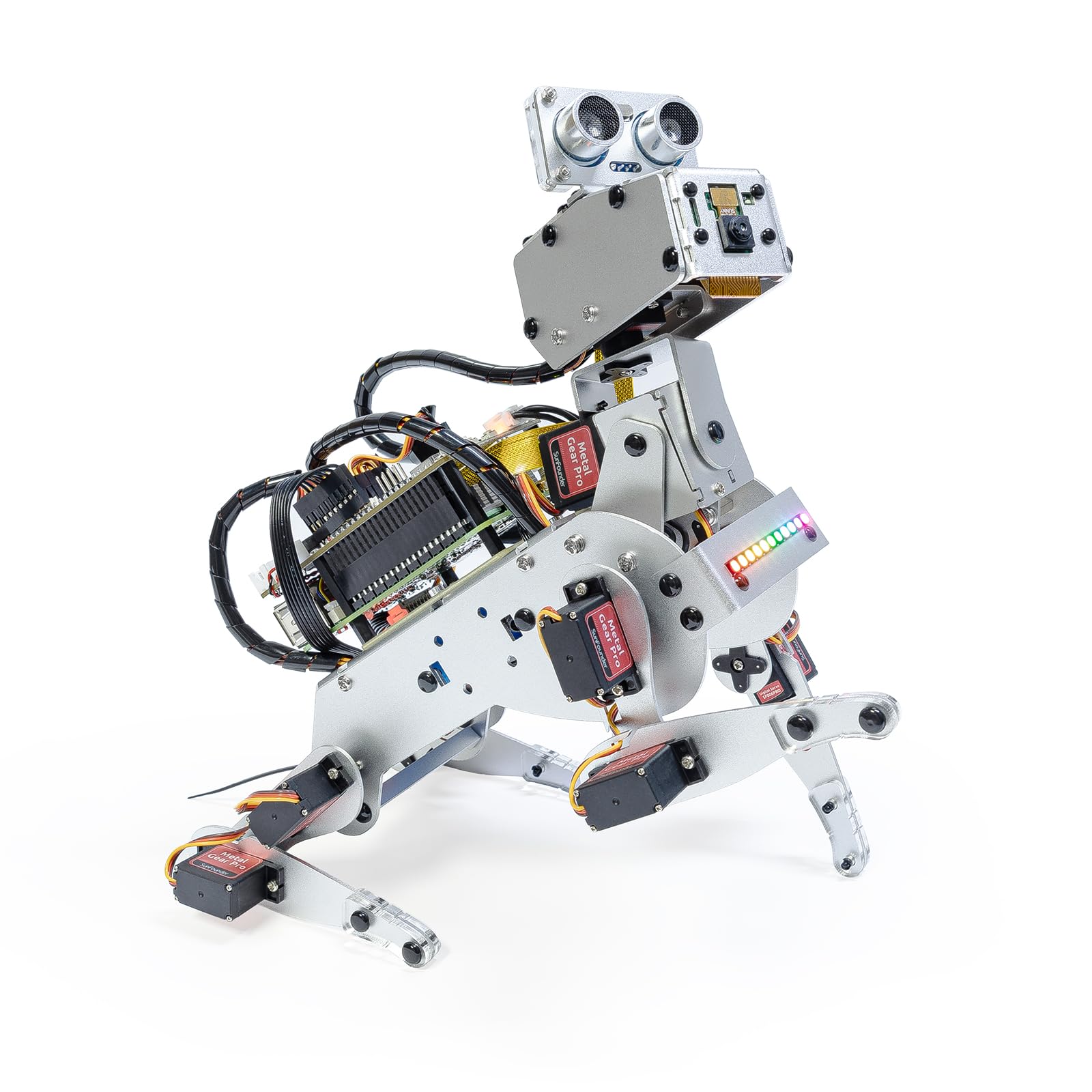
An AI robot dog that talks back through ChatGPT, recognizes faces, and reads math problems out loud
The PiDog is where robot kits cross into genuine artificial intelligence. Powered by a Raspberry Pi and OpenClaw software, it connects to large language models like ChatGPT, Gemini, and Grok, so it can hold conversations, recognize hand gestures, and even interpret math problems. Twelve servos drive 32 dog-like actions — walking, sitting, wagging its tail — while a full sensor suite gives it hearing, vision, and touch.
What delights owners is how lifelike the interactions feel. The robot hat combines ultrasonic, touch, gyroscope, sound, camera, speaker, and microphone sensors, and the quality of the build is the most-praised aspect at 23 mentions. Documentation earns strong marks too — clear labeling and excellent website examples make the Python programming approachable, and an autoboot option means the dog can start on power-up. Support teams ship replacement parts quickly, which owners appreciate after a drop or two.
The honest warning: this is not a beginner kit. The build runs about 70 steps and requires patience and dexterity, and one seasoned builder warned that without programming experience, you’ll be troubleshooting. A few flag that the Raspberry Pi 5 can burn out the servos — they recommend the Pi 4 instead. If you have hardware and software skills, it’s a phenomenal AI playground; if not, expect a steep climb.
The AI Edge
- Multi-LLM support — ChatGPT, Gemini, Grok, and local models
- 32 lifelike dog actions across 12 servos
- Rich sensor suite for vision, hearing, and touch
The Climb
- Challenging ~70-step assembly with complex wiring
- Requires Raspberry Pi and coding knowledge
- Pi 5 has servo burn-out reports — Pi 4 is safer
Worth it for: engineers and AI-curious tinkerers who want to program a robot that talks back and learns their voice.
Not for: first-time builders — start with a simpler wheeled kit before tackling this.
8. Petoi Programmable Robot Dog Bittle X V2

The robot dog that arrives ready to walk, flip, and respond to your voice right from the start
Petoi’s Bittle X skips the multi-hour build entirely — this one comes pre-assembled, so you can go from unboxing to programming within minutes rather than evenings. It’s a compact quadruped at 1.3 pounds that performs 35+ lifelike actions including a backflip, and you can customize up to 10 voice commands using C++ (a fundamental programming language also used in Arduino). The upgraded feedback servos give it smarter, more real-dog-like navigation.
This is a learning platform disguised as a pet. You start with block-based coding in the Codecraft app, then advance to Arduino C++ and Python. It’s open-source, powered by the OpenCat platform, and works with a Raspberry Pi for more advanced control. The package includes a free robotics curriculum, making it a solid STEM educational tool for students and adults alike. Owners note it’s a hit with ages 11-13 and up, with the size being its most-praised feature at 20 mentions.
The trade-off for the convenience: it’s surface-sensitive. Petoi’s own guidance says it’s tune for flat concrete and hardwood — avoid carpet, grass, mud, or snow. A few owners found the assembly instructions unclear during the minor setup steps, and calibration requires a Wi-Fi, Bluetooth, and USB module that isn’t clearly indicated. But the responsive support team has helped users troubleshoot even down to video calls.
Out-of-box magic: The closest thing to an instant robot pet here — assembly takes under an hour, and the coding depth is genuinely endless.
Best if: you want the coding and AI experience without the all-day build — this is the fastest path to a working robot dog.
Consider the floor: this only performs on smooth, hard surfaces, so it’s not a carpet-friendly companion.
9. Makeblock mBot Ultimate 10 in 1 Robot Building Kit

A 10-in-1 aluminum kit that transforms from a robotic arm into a tank into whatever you can imagine next
If you want variety on a budget, the mBot Ultimate delivers a decade of projects in one box. It includes parts to build 10 different robots — a functional robotic arm, a remote-controlled tank, an obstacle-avoiding vehicle, and more — using industrial-grade aluminum alloy parts with threaded grooves. Despite the name, it’s a substantial 8-pound kit built for teenagers and adults aged 12 and up.
The coding journey is remarkably smooth. Beginners start with drag-and-drop blocks in the free mBlock software, then graduate to text-based Arduino IDE or Python via a Raspberry Pi connection. The powerful MegaPi control board handles multiple motors and servos in sync, and the aluminum construction means this thing will survive years of classroom or home use. Owners who’ve built multiple models report they “worked flawlessly” with zero missing parts.
Real-world quirks: the battery compartment is a weak spot — batteries can pop out, and the physical instructions only cover 3 of the 10 designs, with the rest requiring online access. It also needs 6 AA batteries, which aren’t included. Value judgments split, with some calling it a waste of money while others say you get what you pay for — the quality of the components and instructions earns the most praise at 32 mentions.
The Long Game
- 10 unique models in one box — months of projects
- Industrial aluminum alloy that survives heavy use
- Block coding to Python progression path built in
The Shortfalls
- Battery compartment fits poorly and lacks a cover
- Only 3 of 10 builds have paper instructions
- Requires 6 AA batteries not included in the kit
Perfect for: families or classrooms who want one kit that covers a full range of robotics concepts and keeps giving.
Know before you buy: the online instruction dependency means you’ll want stable internet access during builds.
Understanding the Specs
Servo Count and Movement
The number of servos — the small motors that rotate joints — determines how lifelike a robot’s movement is. A car with 2 wheels only needs a couple, while a walking quadruped uses 12 or more (one per leg joint, plus head rotation). More servos mean more complex movement, but also more things to calibrate and more battery drain. A 6DOF arm with six joint positions lets the claw reach almost anywhere in its workspace, while a 3-servo leg is simpler and sturdier.
Compatibility and Add-Ons
Many advanced kits don’t include the brain. “Compatible with Arduino” means you’ll supply your own Arduino UNO board, while “for Raspberry Pi” kits require that single-board computer separately. Check whether batteries, chargers, and even micro-SD cards are included or need purchasing. A kit labeled “pre-assembled” skips the build but still needs these extras. The true cost of a robot kit is often the parts you must buy to make it run.
FAQ
What is the difference between an Arduino and a Raspberry Pi robot kit?
How long does it take to build an adult robot kit?
Do I need to know how to code before buying one?
Can adults enjoy robot kits meant for kids?
What extra parts or tools do I likely need to supply?
Which robot kit is the easiest to assemble?
Why are the batteries not included in many robot kits?
How do I know if a kit will work on my carpet?
Final Thoughts: The Verdict
For most people, the adult robot kit winner is the Wood Trick Cyber Hand because it delivers a uniquely wearable mechanical experience with a 4.7-star crowd favorite rating. If you want the coding journey, grab the ELEGOO Tumbller. And for AI-powered conversations and the most advanced features, the SunFounder PiDog is the one to reach for.
How We Picked
We do not accept paid placement. Every pick is matched to a real buyer and a real use-case; we do not hands-on test units.
Sources & Methodology
Specifications: manufacturer listings and product documentation. Review insights: verified customer reviews, as of August 2026. Pricing: not shown on this page (it changes often); check the current price via the retailer link.
As an Amazon Associate, Gadgets Feed earns from qualifying purchases. This does not affect which products we feature.