
Our readers keep the lights on and my morning glass full of iced black tea. As an Amazon Associate, I earn from qualifying purchases.
Specs are compiled from manufacturer listings and verified buyer reviews and can change over time — please confirm the key details on the product page before buying.
Choosing a 27-inch monitor is about balancing three things: how sharp the picture is, how smoothly it moves, and how kind it is to your eyes during long sessions. Match the monitor to your daily tasks—gaming, office work, or photo editing—to get the right balance of refresh rate, resolution, and color accuracy.
I’m Min — the founder and writer behind Gadgets Feed. This guide is built by comparing the manufacturers’ published specifications and the patterns across verified customer reviews, so you get each pick’s real strengths and trade-offs instead of marketing spin.
From 4K UHD panels to 240Hz gaming displays, these are the best 27 inch monitor options across budget, mid-range, and premium tiers, chosen for value and real-world performance.
Our Picks at a Glance


How To Choose The Best 27 Inch Monitor
Most desks hit a balance at 27 inches — you get plenty of screen for side-by-side windows without constantly turning your head. The real differences come down to refresh rate, panel type, and ports, so here’s what to look for.
Resolution: 1080p, QHD, or 4K
Full HD (1920×1080) is the budget-friendly standard — fine for office work but you may notice individual pixels on a 27-inch screen. QHD (2560×1440) gives you noticeably crisper text and more desktop space. 4K UHD (3840×2160) packs four times the pixels of 1080p, making small text razor sharp and giving you maximum screen real estate for editing timelines or spreadsheets.
Refresh Rate: 60Hz vs 100Hz vs 120Hz vs 240Hz
Refresh rate is how many times per second the screen redraws the image. A higher number means smoother motion. For everyday tasks, 60Hz is fine. Office users will appreciate the smoother scrolling of 100Hz. Gamers and anyone who wants silky cursor movement will want 120Hz, or even 240Hz for competitive play.
Panel Type: IPS is the Safe Bet
IPS (In-Plane Switching) panels offer the best color accuracy and the widest viewing angles — colors stay true even when you’re not directly in front. OLED panels take contrast to another level with perfect blacks, but they come at a higher price. VA panels offer good contrast but narrower angles.
Quick Comparison
| Model | Best For | Resolution | Refresh Rate | Panel Type | Amazon |
|---|---|---|---|---|---|
| Dell SE2725HM★ Best Overall | Office & eye comfort | 1920×1080 | 100Hz | IPS | Amazon |
| ViewSonic VA2756A-MHDBest Value | Budget gaming & value | 1920×1080 | 120Hz | IPS | Amazon |
| Samsung S32GFSmooth All-Rounder | Smooth home display | 1920×1080 | 120Hz | IPS | Amazon |
| Amazon Basics 27″ | Plug-and-play simplicity | 1920×1080 | 100Hz | IPS | Amazon |
| AOC Q27G41ZE | Competitive gaming | 2560×1440 | 240Hz | IPS | Amazon |
| Acer Nitro XV272U W2 | Ergonomic gaming | 2560×1440 | 240Hz | IPS | Amazon |
| LG 27US500-W | 4K productivity | 3840×2160 | 60Hz | IPS | Amazon |
| Dell S2725QS | 4K & all-day comfort | 3840×2160 | 120Hz | IPS | Amazon |
| Alienware AW2725DM | High-refresh gaming | 2560×1440 | 180Hz | IPS | Amazon |
| ASUS ProArt PA279CRV | Professional color work | 3840×2160 | 60Hz | IPS | Amazon |
| Samsung Odyssey OLED G5 | Ultimate contrast & speed | 2560×1440 | 180Hz | OLED | Amazon |
In‑Depth Reviews
1. Dell 27 Monitor SE2725HM
Our pick — over 4.5★ from 800+ verified ratings; the strongest balance of quality and price.
The office workhorse that treats your eyes as kindly as your budget.
This Dell earns the top spot by making long workdays easier on your eyes. Its 100Hz refresh rate (how many times the screen updates per second) reduces flicker, so scrolling through long documents feels smoother than a standard 60Hz screen. The built-in ComfortView Plus (a blue-light filter) cuts harmful blue light without washing out colors — exactly what you want for an eight-hour workday.
What wins people over is the build consistency — the crowd favorite here holds a 4.8-star average from 800+ ratings. The quality is so uniform that buyers report using it for fine-detail work like reading tiny text on construction plans: “My eyes are getting worse as I age. This model has really helped with quality, affordability and simple install,” as one owner put it. The 72% NTSC color gamut and 1000:1 contrast ratio deliver accurate, vivid colors for an IPS panel at this level.
The catch is a lean feature set. There are no built-in speakers and no USB hub, so you’ll rely on the HDMI and VGA inputs. It also has a basic stand that tilts but doesn’t adjust height, though it is VESA-compatible if you have a monitor arm.
What Owners Love
- Crisp, clear images with a matte finish that’s easy on the eyes
- Eye-comfort tech that minimizes blue light exposure
- Compact footprint with cable holder for a tidy desk
Before You Buy
- No built-in speakers
- No USB ports for peripherals
- Stand adjusts tilt only, not height
Reach for this if: you spend hours in spreadsheets, documents, or reading fine print and want a dependable screen that protects your eyes.
Look elsewhere if: you need a monitor with built-in speakers or a USB hub for your desk setup.
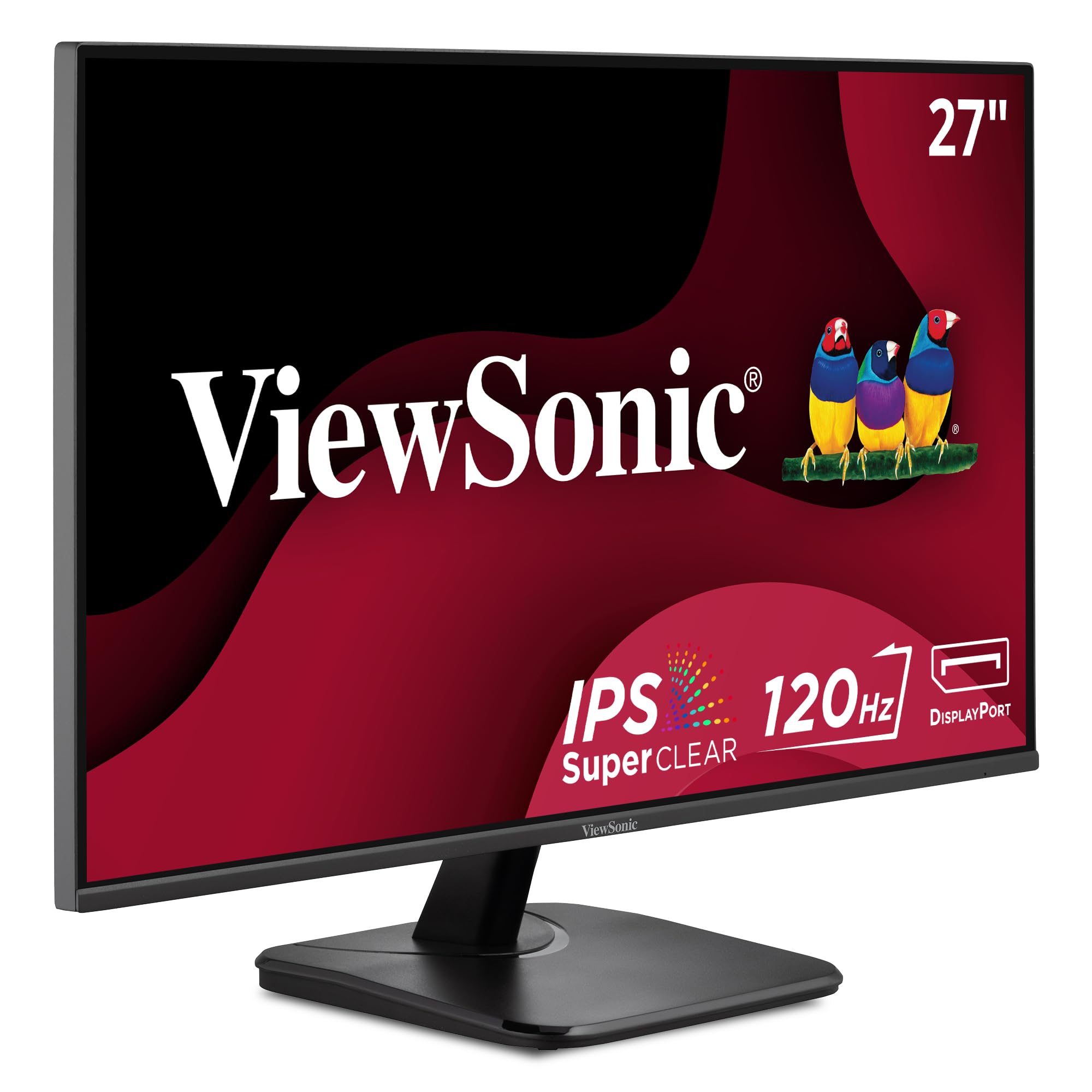
2. ViewSonic VA2756A-MHD
The 120Hz budget pick that punches far above its price tag for mixed use.
This is the monitor that refuses to compromise where it counts. The 120Hz refresh rate beats the Dell’s 100Hz for a 20% smoother experience, making motion feel fluid whether you’re gaming casually or just dragging windows around. The 1ms response time is a full 5x faster than the Dell SE2725HM, so fast-paced action stays crisp without ghosting.
Picture quality here is a standout for the price. The 1500:1 contrast ratio gives it 50% more contrast than the Dell SE2725HM’s 1000:1, resulting in deeper blacks and more depth in dark scenes. Owners note the IPS panel delivers accurate, vivid colors with consistent brightness from any angle — and with a 4.6-star average across 400+ ratings, reliability is a recurring theme.
The stand only tilts, and the 250-nit brightness is modest for bright rooms.
Smart spend: The combination of 120Hz, a 1ms response time, and a 1500:1 panel is the strongest feature-per-dollar ratio in this list.
Who it suits: anyone who wants one affordable screen that handles both office tasks and casual gaming smoothly.
Who might pass: those who need a fully ergonomic stand with height and swivel adjustment.
3. Samsung 27″ S3 (S32GF) Series
A 120Hz IPS panel from a trusted name, ready in five minutes flat.
Getting this Samsung running is famously easy — owners mention it ready to go in about five minutes, armed with “excellent color & clarity” right from the start. The 120Hz refresh rate reduces lag and motion blur across games, videos, and creative projects, while the IPS panel keeps colors bright and clear even when you shift viewing angles.
The design is a real highlight here. The super slim profile and ultra-thin border bezels make it a sleek addition to any desk, and at just 7.87 inches deep, it sits close to the wall. The 1000:1 contrast ratio and 250 cd/m2 brightness are standard for the class, but the eye-saver mode with reduced blue light and flicker-free operation makes long sessions more bearable.
Connectivity is limited to a single HDMI port, the stand lacks height adjustment, and the menu button requires a firm press. One buyer did report the screen occasionally goes black for a few seconds at random — a rare but notable quirk.
High Points
- Truly simple plug-and-play setup
- Slim, lightweight design with ultra-thin bezels
- Game Picture Mode tune content to fill the screen
Trade-Offs
- Only a single HDMI input
- No height adjustment on the stand
- Brightness and mounting get mixed feedback from owners
Grab it for: a dependable, good-looking home office or study monitor that feels more expensive than it is.
Think twice if: you need multiple inputs or full ergonomic adjustment.
4. Amazon Basics 27 Inch Monitor

A surprisingly capable 27-inch panel that turns your monitor into a USB hub.
The thing that sets this Amazon Basics monitor apart is the four extra USB ports. You can plug your keyboard, mouse, and other peripherals straight into the monitor, turning it into a mini hub and cutting cable clutter on your desk. Reviewers consistently call it a solid, budget-friendly option with picture quality that “isn’t washed out like some monitors” — a common complaint at this price tier.
It’s built for office and everyday use. The 100Hz refresh rate delivers a smooth, crisp 1080P picture, while the 1500:1 contrast ratio (the difference between the brightest white and darkest black) on an IPS panel (a type of screen with wide viewing angles) gives better depth than many comparably priced displays. The built-in speakers produce clean, clear audio, saving you from hunting for a separate speaker set. It’s also on the heavier side at 8.4 pounds, so make sure your desk can handle it.
Owners do flag one setup quirk: you must remove the protective film with the date code from the panel surface before use, as it’s designed to guard against shipping scratches. The stand tilts forward and backward but has no height adjustment, and a couple of customers note it leans slightly forward on a desk.
The verdict: For the price, the combination of 4 USB ports, speakers, and a 1500:1 IPS panel is remarkably tough to top for a tidy home office — you get all the essentials without hunting for extras.
Best for: students and hybrid workers who want a single, streamlined monitor with built-in speakers and easy peripheral connections.
skip it if: you need height adjustment or exact color calibration.
5. AOC 27″ Gaming Monitor Q27G41ZE

The 240Hz QHD panel that makes 60Hz feel ancient the moment you move your mouse.
This 240Hz QHD panel delivers competitive-grade smoothness at a mid-range price. The 240Hz refresh rate via DisplayPort is buttery smooth, and the 0.3ms MPRT response time keeps fast-moving action completely free of blur. At QHD resolution (2560×1440), you get a sharper picture than 1080p — and owners who made the jump say it’s a huge difference in clarity.
For competitive players, the feature set is purpose-built. Adaptive-Sync support (a technology that matches the screen’s refresh rate to your graphics card) covers both AMD and NVIDIA GPUs to eliminate screen tearing, and the extra gaming features — Shadow Control, Game Mode presets, sniper mode, crosshair, and a timer — are exactly the tools you’d expect on a dedicated gaming display. Buyers rate it 4.6 stars across 470+ ratings, and many call the HDR performance vibrant despite the modest 300-nit brightness (a measure of screen luminance).
The 300-nit brightness does draw mixed feedback, with some owners finding it a touch dim for very bright rooms. The stand only tilts (from -3° to +21°), so you’ll want a VESA mount for full adjustment. Connectivity is solid with 1x DisplayPort 1.4 and 2x HDMI 2.0 ports.
The Gaming Edge
- 240Hz native refresh rate with 0.3ms response
- Sharp QHD resolution over 1080p
- G-Sync compatible and FreeSync support
The Compromise
- Stand offers tilt only, no height or swivel
- Brightness is a common point of mixed feedback
The right call for: competitive gamers who want high refresh and high resolution without jumping to a premium price tier.
Not the pick if: you need a fully adjustable ergonomic stand from the start.
6. Acer Nitro XV272U W2

A 240Hz gaming screen that adjusts to every angle your body demands.
Where the AOC above is all about raw speed, this Acer pairs that same 240Hz refresh rate with the most complete ergonomic stand in the gaming tier. Height adjustment covers a full 4.7 inches, it swivels 360°, pivots to portrait at ±90°, and tilts from -5° to 15°. If you’ve ever craned your neck at a fixed monitor, this is a revelation.
The visual spec sheet is strong: 2560×1440 QHD resolution, 99% sRGB color coverage, and 400-nit brightness that’s noticeably brighter than the AOC’s 300 nits. At 1ms (G to G) response time, it’s fast enough for competitive play, with up to 0.5ms available. Owners describe it as an “amazing upgrade from 1080”, and the 4.3-star average across 800+ ratings reflects broad satisfaction.
Owner feedback reveals quality-control issues that the high ratings don’t fully capture. Backlight bleed is the recurring complaint, with some owners seeing it in corners on two separate units. DisplayPort connectivity also gets mixed feedback, with a handful of units failing to turn on. Brightness and color quality are both flagged as mixed, though plenty of buyers find them excellent after a small brightness adjustment.
Standout feature: The full ergonomic stand — height, swivel, pivot, and tilt — makes it uniquely comfortable for all-day use compared to tilt-only gaming rivals.
Choose this if: ergonomics matter as much as refresh rate and you want a 240Hz QHD panel that adapts to your body.
Weigh the risk: backlight bleed and occasional DisplayPort issues mean quality control can vary between units.
7. LG 27US500-W UltraFine 4K

The most affordable route to razor-sharp 4K text on a 27-inch screen.
If your work lives in small fonts — code, design files, dense spreadsheets — this LG is the budget bridge to 4K clarity. The 3840×2160 UHD resolution packs four times the pixels of 1080p, making even 10-point font at 200% scale look perfectly clear, a detail Linux users specifically praise. The 1000:1 contrast ratio and wide 178° IPS viewing angles keep colors accurate from almost any position.
Color performance punches above its tier with HDR10 support and up to 90% DCI-P3 gamut expression — that’s the wider color spectrum used in professional video work. The borderless white design is genuinely striking, and the Onscreen Control app lets you split the display into custom windows with a few mouse clicks. Owners consistently describe the display quality as excellent for the price.
The physical stand is the weak link here. It only tilts, and multiple reviews describe it as wobbly or unstable — the recurring negative in an otherwise positive picture. The included power adapter is bulky and blocks outlets, and the 4-foot cable feels short. An occasional unit reportedly stops working after about a month, though this is rare.
Why It Shines
- Crisp 4K UHD resolution for tiny text
- 90% DCI-P3 color gamut for vibrant, accurate color
- Sleek borderless white design
Why It Falters
- Wobbly, tilt-only stand is the top complaint
- Bulky power adapter and short cable
- Rare reports of units failing after a month
Opt for this if: you want 4K sharpness on a budget and have a monitor arm or VESA mount to replace the wobbly stand.
Skip if: you need a stable, adjustable stand right from the start.
8. Dell 27 Monitor S2725QS

The 4K 120Hz hybrid that ends the fight between work sharpness and gaming smoothness.
This is the rare Dell that tries to be everything: 4K sharpness for work and 120Hz smoothness for play. The 3840×2160 resolution delivers breathtaking detail, and the 99% sRGB coverage with a 1500:1 contrast ratio produces colors owners compare to much pricier displays — some even say it performs as well as OLED for their work. Image quality is the single most-praised feature by a wide margin.
For all-day comfort, Dell’s improved ComfortView Plus reduces harmful blue light emissions to 35% or less without sacrificing color accuracy. The speakers are a genuine surprise — reviewers point out they’re “incredibly loud” for built-ins, with more output power and decibel range than the company’s previous generation. The ash white finish and ultra-thin bezels complete a premium, minimalist look.
The ergonomic stand is a highlight, offering height, swivel, and pivot adjustment. Some shoppers say slight ghosting in fast-paced games, and a rare unit may have a yellow tint. It’s also note the USB-C connection, ideal for modern laptops, is present on this model — a step up from the SE2725HM’s leaner ports.
Why It Wins
- Sharp 4K plus smooth 120Hz in one panel
- Loud, detailed built-in speakers
- Full ergonomic stand with USB-C connectivity
The Small Print
- Some ghosting visible in fast-paced games
- Slight matte coating grain on some units
- Rare yellow tint reported
Great fit for: professionals who want one monitor for both crisp work and casual gaming without picking a side.
Might not suit: hardcore competitive gamers who need the absolute fastest response times.
9. Alienware 27 AW2725DM

Alienware’s 180Hz QHD display that brings premium gaming polish without the usual premium tax.
The Alienware name carries weight, but the 4.7-star average across 448 ratings suggests this one lives up to it. The 2560×1440 QHD resolution with a 180Hz refresh rate and 1ms gray-to-gray response time delivers the fluid, responsive feel competitive players demand. What owners rave about most is the color: 95% DCI-P3 coverage and 1.07 billion colors backed by VESA DisplayHDR 400 certification produces visuals that “pop” without needing calibration.
This is the second-highest rated monitor here, and the build quality justifies the premium. The sturdy, fully adjustable stand offers height, swivel, and pivot adjustment, and the 400 cd/m2 brightness with 3H anti-glare coating handles bright rooms well. A dedicated console mode locks in proper refresh rates for PS5 play, and the hardware-based low blue light solution reduces eye strain while preserving color.
There are two things to know. First, you only get the full 180Hz via DisplayPort — HDMI tops out at 144Hz, which matters if you’re plugging into a console exclusively. Second, there’s no USB-C port. Reliability draws mixed feedback, with most owners praising durability but some reporting the screen occasionally flashing black.
What Stands Out
- Vibrant, accurate colors with 95% DCI-P3
- Premium fully adjustable stand
- G-Sync and FreeSync compatible
Keep In Mind
- Full 180Hz requires DisplayPort, not HDMI
- No USB-C connectivity
- Occasional black-screen flash reported
Worth it for: gamers who want the brand-name build quality and gorgeous colors without stepping up to a 240Hz price.
Look beyond if: you’re a console-only player who needs 180Hz over HDMI or requires USB-C.
10. ASUS ProArt PA279CRV

The colorist’s choice that delivers factory-calibrated accuracy and charges your laptop at the same time.
If your income depends on color being right, this ASUS is the one. It’s factory pre-calibrated to Delta E < 2 — that’s a measure of color deviation so small the human eye can’t reliably detect it — and it’s Calman Verified, a professional-grade certification. The 99% DCI-P3 and 99% Adobe RGB coverage means it reproduces the wide color spaces used in video and print production accurately from the start.
What makes it a Mac user’s dream is the USB-C port with 96-watt Power Delivery. One cable carries 4K video from your laptop and charges it simultaneously, eliminating the need for a separate power adapter on your desk. The included DisplayPort supports daisy-chaining, letting you run multiple monitors from a single cable. Photo editors describe it as providing “the resolution and color accuracy that I need” right from the start.
Its 60Hz refresh rate makes it unsuitable for gaming, but ideal for color-critical work. The four-way adjustable stand (tilt, swivel, pivot, height) is premium, though the monitor is heavy to assemble. One owner discovered the default power saving settings cause wake/connect issues — a quick settings tweak fixes it, but it’s worth knowing. Some functionality issues are reported with certain Mac Mini configurations.
Pro Credentials
- Factory-calibrated Delta E < 2 color accuracy
- 99% DCI-P3 and 99% Adobe RGB coverage
- USB-C with 96W power delivery charges your laptop
Consider This
- 60Hz refresh means no gaming headroom
- Default power settings need tweaking
- Heavy to assemble
The pick for: photographers, videographers, and designers who need professional color accuracy and single-cable laptop connectivity.
Not for: anyone who wants high refresh rates for gaming on the same screen.
11. Samsung Odyssey OLED G5

The QD-OLED panel that turns perfect blacks and instant response into your new daily reality.
This is the enthusiast’s endgame. The QD-OLED panel delivers contrast that makes everything else in this list look flat — a 1000000:1 contrast ratio produces perfect, true blacks that IPS panels simply cannot reach. The 0.03ms (GtG) response time is effectively instant, and the 180Hz refresh rate keeps motion buttery smooth. It’s no exaggeration to call this a generational leap in picture quality.
The color performance is the standout here. Pantone Validated means the screen accurately reproduces 2100+ colors, and HDR10 provides brighter highlights and nuanced shadows for real depth. Glare Free technology keeps reflections off the screen for uninterrupted gaming sessions, and owners describe the 1440p picture as “superb,” even praising how well it handles downscaled 4K content. The 4.4-star average across 400+ ratings reflects a deeply satisfied user base.
The compromises are in convenience features, not in image quality. There are no built-in speakers, so audio requires a separate setup. Inputs are limited to one HDMI and one DisplayPort. The 280 cd/m² brightness is modest by OLED standards, drawing mixed feedback, and the all-plastic build is fine but not premium. Priced at the top of this list, it’s the clearest statement you can make that picture quality is your priority.
The OLED Magic
- Perfect black levels with 1000000:1 contrast
- 180Hz refresh and 0.03ms response
- OLED Safeguard helps prevent burn-in
The Realities
- No built-in speakers
- Only two video inputs (1x HDMI, 1x DP)
- Modest brightness for an OLED
The ultimate for: gamers and media lovers who want the best possible image quality and are willing to pay for it.
Think twice if: you need built-in speakers, multiple inputs, or maximum brightness in a very bright room.
Understanding the Specs
Panel Technology
IPS (In-Plane Switching) is the most common type in this list. It gives you accurate colors and wide viewing angles, meaning the picture stays consistent even when you’re not directly in front of the screen. OLED panels, like the one in the Samsung Odyssey G5, go further by turning individual pixels off to create perfect blacks and infinite contrast — but they cost more and have more modest brightness.
Color Gamut
This tells you how much of the visible color spectrum the monitor can show. sRGB is the standard for web content — 99% sRGB means every color your browser displays is covered. DCI-P3 is a wider gamut used in film and video production. A monitor like the ASUS ProArt covers 99% DCI-P3 and 99% Adobe RGB, making it ideal for professional print and video work, while office monitors typically cover a smaller NTSC percentage.
FAQ
Is a 27-inch monitor worth it over a 24-inch?
What is the difference between 1080p, QHD, and 4K on a 27-inch screen?
What refresh rate should I choose for a 27-inch monitor?
Will a 4K 27-inch monitor work with my Mac or laptop?
Are built-in monitor speakers good enough?
What does VESA mounting mean and why should I care?
What is the difference between IPS and OLED for a 27-inch monitor?
Is a 27-inch monitor good for gaming?
What does a higher contrast ratio actually do?
How do I know if my graphics card can run a high-refresh monitor?
Can I use a 27-inch 4K monitor with a gaming console?
Final Thoughts: The Verdict
For most people, the best 27 inch monitor winner is the Dell SE2725HM because it nails the essentials — sharp 1080p, a smooth 100Hz refresh rate, and industry-leading eye comfort — at a price that feels like a steal, backed by a 4.8-star crowd consensus. If you want fluid 120Hz motion for casual gaming without overpaying, grab the ViewSonic VA2756A-MHD for its 1ms response time and deeper 1500:1 contrast. And if your work is all about color accuracy, the ASUS ProArt PA279CRV is the one to reach for — its factory-calibrated Delta E < 2 precision (a measure of color accuracy, where lower is better) and 96W USB-C charging make it the professional’s pick.
How We Picked
We do not accept paid placement. Every pick is matched to a real buyer and a real use-case; we do not hands-on test units.
Sources & Methodology
Specifications: manufacturer listings and product documentation. Review insights: verified customer reviews, as of August 2026. Pricing: not shown on this page (it changes often); check the current price via the retailer link.
As an Amazon Associate, Gadgets Feed earns from qualifying purchases. This does not affect which products we feature.