
Our readers keep the lights on and my morning glass full of iced black tea. As an Amazon Associate, I earn from qualifying purchases.
Specs are compiled from manufacturer listings and verified buyer reviews and can change over time — please confirm the key details on the product page before buying.
Finding a laptop for everyday life is about matching the machine to your habits, not chasing the biggest spec sheet. Look for a model that boots quickly, streams smoothly, and lasts a full workday on a single charge. Budget and mid-range laptops now handle these tasks easily, so focus on balancing battery life, storage, and screen size to match your routine.
I’m Min — the founder and writer behind Gadgets Feed. This guide is built by comparing the manufacturers’ published specifications and the patterns across verified customer reviews, so you get each pick’s real strengths and trade-offs instead of marketing spin.
For classes, remote work, or weekend streaming, choose a laptop that keeps up without lag. This roundup of the best laptop for casual use compares eleven top contenders so you can pick the right one for your routine.
Our Picks at a Glance

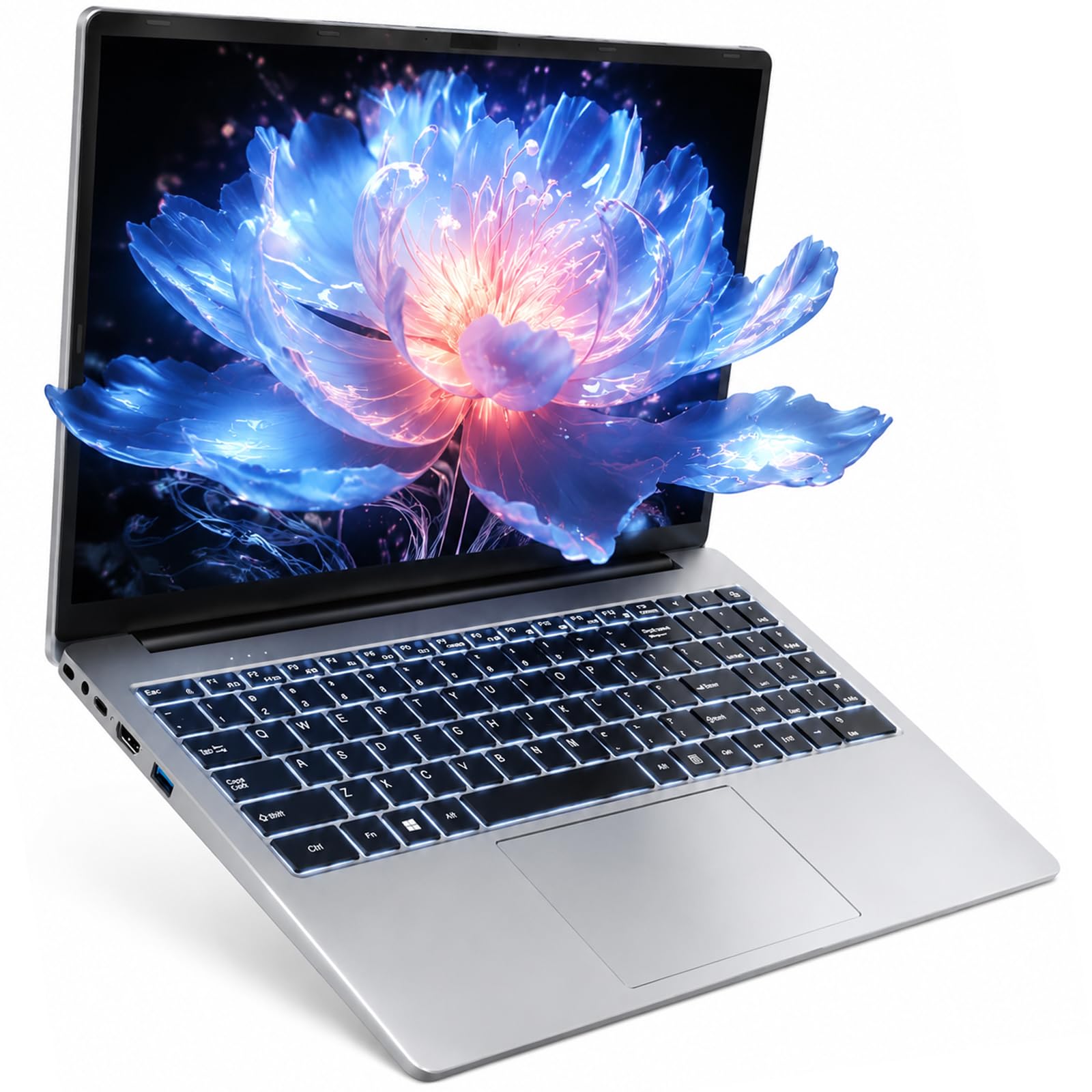

How To Choose The Best Laptop For Casual Use
Choosing a laptop for everyday tasks is about comfort and usability, not raw power. Prioritize a responsive device that handles multiple tabs and stays light enough to carry. Focus on a few key specs that directly affect your daily experience.
Balance Performance with Battery Life
Casual use includes web browsing, word processing, and video streaming, which don’t need a high-end processor. A mid-range chip like the Intel Core i3 or AMD Ryzen 3 is more than enough, and it sips power. This balance delivers cool, quiet operation and all-day battery life, avoiding wasted power and excess heat.
Don’t Skimp on RAM and Storage
RAM (random access memory) is what lets your laptop juggle multiple programs and browser tabs at once. For casual use, 8GB is the comfortable starting point, with 12GB or 16GB giving you more headroom for heavy multitasking. For storage, prioritize a solid-state drive (SSD) over a traditional hard drive; An SSD makes booting and app launches feel instant, a major everyday convenience.
Quick Comparison
| Model | Best For | Processor | Battery Life | Storage | Amazon |
|---|---|---|---|---|---|
| Acer Aspire Go 15★ Best Overall | Overall Value & Performance | Intel Core 3 N355 | 12.5 hours | 128GB UFS | Amazon |
| WISESWAN i3 LaptopBudget Champion | Budget Multitasking | Intel Core i3 | 7 hours | 256GB SSD | Amazon |
| ASUS Vivobook Go 15 (Ryzen 3)Tough & Reliable | Durability & Essential Tasks | AMD Ryzen 3 7320U | 11 hours | 256GB SSD | Amazon |
| Acer Chromebook Plus 515 | Google Ecosystem Lovers | Intel Core i3-1305U | 10 hours | 256GB SSD | Amazon |
| ASUS Vivobook Go 15 (Ryzen 5) | Extra Storage & Speed | AMD Ryzen 5 7520U | Up to 11 hours | 512GB SSD | Amazon |
| HP OmniBook 3 17.3” | Big Screen Entertainment | AMD Ryzen 3 | 14 hr 15 min | 512GB SSD | Amazon |
| Dell 15 (Core 3) | Reliable Name-Brand Computing | Intel Core 3 100U | Not specified | 512GB SSD | Amazon |
| Dell 15 (Ryzen 5) | Smooth Everyday Performance | AMD Ryzen 5 7520U | Not specified | 512GB SSD | Amazon |
| HP Laptop (Intel N100) | Power Multitaskers | Intel Processor N100 | ~8 hours | 512GB SSD | Amazon |
| Lenovo IdeaPad 15.6” | Touchscreen Productivity | Intel Core i5-1335U | 10 hours | 256GB SSD+512GB Ext | Amazon |
| Lenovo V15 Gen 4 | Business-Class Power | Intel Core i5-13420H | Not specified | 512GB SSD | Amazon |
In‑Depth Reviews
1. Acer Aspire Go 15 (AG15-32P-39R2)
Our pick — over 4★ from 850+ verified ratings; the strongest balance of quality and price.
The all-day workhorse that balances price, performance, and a marathon 12.5-hour battery.
The Aspire Go 15 is the pick that ticks every box for a casual user. It’s powered by an 8-core Intel Core 3 processor N355 that peaks at 3.9 GHz, giving you smooth, responsive performance for multitasking and streaming. The 15.6″ Full HD IPS display has a narrow bezel design, making movies and web pages look sharp and detailed, and it stays easy on your eyes with Acer BluelightShield reducing blue light exposure.
You can leave the charger at home for a full workday and then some, because this machine is rated for 12.5 hours of battery life. Buyers report that fast charging is a highlight, with the laptop reaching about 93% in roughly 30 minutes, giving you over 5 hours of use from a quick top-up. The dual full-function USB Type-C ports (USB 3.2 Gen 2, up to 10 Gbps) let you charge and connect devices easily, and Wi-Fi 6 (the latest wireless standard) keeps your connection fast and stable.
The trade-off is storage, as it comes with 128GB of UFS (Universal Flash Storage). That’s enough for documents and apps, but you’ll want an external drive or cloud storage for large media libraries. Buyers also note the plastic case can scratch, which is a fair compromise for the price. With 8GB of DDR5 RAM, it handles everyday tasks well, and one practical owner mentioned installing a larger SSD to expand capacity. The crowd favorite here — 4.4 stars across 800+ owners — points to strong performance and value as the top praise.
What Wins People Over
- Exceptional 12.5-hour battery life for all-day use
- Fast charging reaches ~93% in about 30 minutes
- Solid performance for the price from the 8-core Core 3 processor
- Convenient dual USB-C ports for charging and data
The Compromises
- 128GB storage fills up fast for media hoarders
- Plastic case is prone to scratching
- Windows 11 in S Mode may need switching for some apps
Who it’s for: The student, remote worker, or everyday browser who wants one reliable machine that lasts all day without hunting for an outlet.
The honest catch: If you plan to store lots of movies or games locally, the 128GB drive means you’ll need a backup plan from day one.
2. WISESWAN 15.6″ i3 Laptop (12GB RAM)
A multitasking marvel that packs more RAM than laptops costing twice as much.
If you live with a dozen browser tabs open, this WISESWAN laptop deserves a hard look. It pairs a 2-core, 4-thread Intel Core i3 processor (up to 3.4 GHz) with an impressive 12GB of RAM and a 256GB SSD, which is a combination that punches well above its price class. That’s 50% more memory than the 8GB found in the Acer Aspire Go 15, so you can keep email, streaming, and documents running side-by-side without slowdown.
Students and late-night workers will appreciate the backlit keyboard, which makes typing in dim dorm rooms or on evening flights easy. The full HD 1920×1080 anti-glare screen keeps reflections down, and the 16:9 aspect ratio is perfect for lectures and movies. At just 1.63 kg (3.6 lbs) and 19.5mm thin, it slips into a backpack without adding bulk.
The main drawback reported by owners is the battery life, which is rated for about 7 hours of mixed use. That’s a full day of classes, but you’ll want the charger nearby for evening streaming. One owner summed up the experience: “It’s fast doesn’t overheat like my hp great for students I love the light up keyboard especially it’s light weight the battery life is excellent” — the only complaint being the bulky plug head on the charger. The built-in 57.75Wh battery and fast Type-C PD3.0 charging (a standard that powers up quickly) help mitigate the runtime concern.
Why It Stands Out
- Generous 12GB RAM handles heavy multitasking
- Backlit keyboard is a rare find at this price
- Light 3.6 lbs frame is easy to carry to class
- Storage expands up to 2TB via TF card slot
Where It Falls Short
- 7-hour battery life requires planning for long days
- Charger plug is bulkier than ideal
Reach for this if: You’re a student or multitasker on a tight budget who needs the headroom of 12GB RAM for running many apps at once.
Look elsewhere if: You need all-day battery endurance beyond a typical school day, as the 7-hour rating is shorter than top competitors.
3. ASUS Vivobook Go 15 (Ryzen 3)
The sturdy sidekick for fieldwork and students that passes military-grade durability tests.
If your laptop rides in a chaotic backpack or faces a bumpy commute, the ASUS Vivobook Go 15 is built to survive. It passed five US MIL-STD 810H tests (a military standard for durability) for high and low temperature, shock, vibration, and altitude, so it’s tougher than the average budget laptop. Under the hood, the AMD Ryzen 3 7320U processor (4 cores, 8 threads) tops out at 4.1 GHz, which is 21% faster than the 3.4 GHz peak of the WISESWAN i3, making it snappy for browsing and light multitasking.
The 15.6″ FHD display offers 250-nit sustained brightness and a 45% NTSC color gamut, which is plenty vivid for everyday videos and work. It comes with 8GB of DDR5 RAM and a 256GB SSD, providing a responsive experience for the modern everyday. The 42Wh battery is rated for up to 11 hours, and with fast charging you can minimize downtime. A 720p HD camera with a privacy shutter lets you slide the lens cover over when you’re not on a call, which is a thoughtful touch for privacy.
The honest downside is that the 8GB RAM is soldered and cannot be upgraded, which some owners note as a lifespan concern. There are also mixed reports about reliability, with a few buyers experiencing power-on issues, though the majority praise its quality and value. For basic tasks like typing, research, and streaming, this no-frills machine does its job well, with one owner noting it even runs non-modded Minecraft. The large, comfortable Chiclet keyboard with a numeric keypad is a highlight for data entry.
The Strong Points
- Passes 5 MIL-STD 810H durability tests
- Fast 4.1 GHz processor for smooth browsing
- Full-sized keyboard with numeric keypad
- Privacy shutter on the 720p HD webcam
The Trade-offs
- 8GB RAM is soldered, so no upgrades later
- Some reliability complaints about power-on behavior
- Uses older Wi-Fi 5 instead of Wi-Fi 6
Best if: You’re a student or field worker who needs a laptop that can survive real-world knocks and still deliver 11 hours of battery life.
Think twice if: You plan to keep the same laptop for 5+ years and want to add more RAM down the line, as that option is locked out.
4. Acer Chromebook Plus 515

A fast, secure ChromeOS companion for anyone who lives inside Google apps.
If your life revolves around Gmail, Docs, and Chrome, this Chromebook is the perfect fit. It runs ChromeOS, the secure operating system from Google, which means it boots up fast, stays protected against viruses, and syncs easily with your Google account. Powered by an Intel Core i3-1305U processor that can reach 4.5 GHz, it’s built to be responsive, and the 15.6″ Full HD touch display adds a layer of convenience for scrolling and tapping.
With 8GB of LPDDR5X memory and a 256GB PCIe Gen4 SSD, this is a substantial upgrade over older Chromebooks, letting you edit files while streaming shows. It’s rated for up to 10 hours of battery life, and the Wi-Fi 6E connectivity supports the 6GHz band for faster, more stable wireless. The 720p FHD camera with temporal noise reduction makes video calls look clearer, and the Titan C2 security chip adds a hardware-level layer of protection against attacks.
There are a couple of caveats to note. The keyboard does not have a backlight, which is a common complaint among owners who expected it for typing in the dark. Also, some users report mixed experiences with reliability and connectivity, though the overall consensus is that it’s a great, fast machine with a crisp screen. As an added bonus, purchasing it includes 12 months of Google AI Pro with 2TB of storage at no cost, bringing Gemini AI assistance to your fingertips.
What It Does Best
- Fast i3-1305U processor up to 4.5 GHz
- Virus-resistant ChromeOS with Titan C2 chip
- Responsive Full HD touchscreen display
- Modern Wi-Fi 6E for faster connections
Before You Buy
- No keyboard backlight for dark rooms
- Requires internet connection for most apps
- 8GB RAM is sufficient but not expandable
Grab this if: You’re fully invested in Google’s ecosystem and want a secure, low-maintenance laptop for browsing, streaming, and document work.
skip it if: You rely on heavy offline software like advanced video editing or specific Windows-only programs, as ChromeOS has limits.
5. ASUS Vivobook Go 15 (Ryzen 5)

The upgraded Vivobook with double the storage and a faster Ryzen 5 for power users.
This is the step-up version of our Tough & Reliable pick, and the extra power is noticeable. The AMD Ryzen 5 7520U processor, which boosts up to 4.3 GHz, is designed for thin laptops and delivers fast performance for browsing, streaming, and even light gaming. It comes with 8GB of memory and a generous 512GB SSD, which gives you double the storage of its Ryzen 3 sibling, so you have ample room for files, documents, and applications.
Owners highlight its lightweight build and solid construction, making it an excellent choice for college use. The 15.6″ NanoEdge display has a super slim bezel design with a 60Hz refresh rate, 45% NTSC color gamut, and 250-nit brightness, delivering crisp visuals. Sound is handled by SonicMaster, providing crisp, multi-dimensional audio for movies and music. It also retains the military-grade durability and privacy webcam shutter from the Ryzen 3 model, ensuring it can handle daily travel.
The screen quality and battery life both receive mixed feedback in reviews. While some owners find the screen crisp and the battery impressive, others report blurry displays and underwhelming battery performance on heavy use. One owner praised it as “a good laptop for college,” noting the size is easy to take to class and the battery lasts. The 8GB RAM is soldered, a common trait in this price range, so consider how long you plan to keep it before committing.
Upgrade Highlights
- 512GB SSD provides double the storage of the base model
- Ryzen 5 7520U offers fast, efficient performance
- Lightweight and well-built for carrying to class
- Modern SonicMaster audio for media
Potential Drawbacks
- Screen quality reports are mixed among owners
- Battery life varies significantly with usage
- 8GB RAM is soldered and not upgradable
Choose this for: A student or home user who wants a bit more processing headroom and double the storage of typical budget laptops for a small price bump.
The catch: The variable screen and battery quality means you might get better or worse results depending on how you use it, so temper expectations.
6. HP OmniBook 3 17.3″

A desktop-replacement-sized screen with marathon endurance for home entertainment.
If your “casual use” involves a lot of movies, spreadsheets, or multitasking with windows side-by-side, The 17.3-inch Full HD IPS display delivers a desktop-like viewing experience for movies and side-by-side multitasking.. The 17.3-inch Full HD IPS display offers 178-degree wide-viewing angles, so the picture stays clear and vibrant even when you’re not sitting directly in front of it. It’s powered by an AMD Ryzen 3 processor that reaches 4.1 GHz and pairs with 8GB of LPDDR5 RAM for responsive everyday performance.
Battery life is this machine’s superpower. It’s rated for up to 14 hours and 15 minutes on a single charge, which is one of the longest runtimes in this roundup. When you do need to top up, HP Fast Charge restores the battery from 0 to 50% in approximately 45 minutes, getting you back up and running quickly. The 512GB PCIe NVMe M.2 SSD provides fast speed and efficient storage for all your media.
For video calls, the FHD camera with HDR auto-switch balances contrast and color even in challenging backlight, and the advanced AI noise reduction tracks only your voice during conferences, filtering out other sounds. One owner called it the “perfect home laptop,” praising its speed for internet scrolling and video watching. The main caveats are that it’s a larger and heavier machine, so it’s not ideal for frequent travel, and some buyers mention the pre-installed McAfee software is hard to uninstall.
Why It’s Great
- Massive 17.3″ FHD IPS screen for rich viewing
- Excellent 14 hr 15 min battery life
- Fast charging to 50% in about 45 minutes
- 512GB SSD for ample media storage
The Downsides
- Large size and weight make it less portable
- Pre-installed software like McAfee is intrusive
Best for: Home users who want a laptop that feels like a desktop, perfect for streaming, managing finances, and reading articles without squinting.
Not ideal for: Frequent travelers or commuters who need a lightweight machine that fits easily into a small bag.
7. Dell 15 (Intel Core 3)

The dependable Dell for everyday computing, backed by true Dell quality and onsite service.
confidence can matter more than a spec upgrade, and that’s where the Dell 15 shines. It’s backed by Dell’s 1 Year Onsite Service, meaning a technician will come to your home or office if an issue covered by the warranty can’t be resolved remotely. Under the hood, the Intel Core 3 100U processor reaches a swift 4.7 GHz, providing brisk performance for everyday tasks like email, browsing, and office work. The 15.6″ anti-glare IPS WVA display with 250 nits (a measure of brightness) keeps your eyes comfortable during long sessions.
Typing comfort is a clear focus here, with roomy keypads, a separate numeric keypad, and a built-in calculator hotkey for quick math. The lifted hinges provide an ergonomic typing angle, keeping your wrists in a comfortable position. It also features Dell ComfortView software, which reduces harmful blue light emissions for extended viewing. Owners frequently note it’s “true Dell quality” and easy to set up, with one even running Fallout New Vegas at high quality at 60 FPS.
The main criticisms are battery life and fan noise. Battery life is rated poorly, and there are complaints about a loud fan, which could be distracting in quiet environments. The screen is also noted as being somewhat dark, even at the lightest setting. If you’re looking for a dependable brand name with excellent support and you’ll mostly be plugged in, this is a strong contender, but if battery endurance is your priority, the Acer Aspire Go 15 is a better fit, offering 12.5 hours compared to this machine’s weaker performance on that front.
The Dell Advantage
- 1 Year Onsite Service for in-home support
- Fast 4.7 GHz processor for snappy response
- Comfortable keyboard with numeric keypad
- Solid brand reputation for quality
Where It Struggles
- Battery life is a common complaint
- Fan can be noisy under load
- Display brightness is limited
The verdict: A reliable, well-supported workhorse for those who value having a service plan and a comfortable typing experience over marathon battery life.
The limitation: If you need to work unplugged for hours in a library, the poor battery performance and loud fan will frustrate you.
8. Dell 15 (AMD Ryzen 5)

A Dell with a buttery-smooth 120Hz screen and a capable Ryzen 5 inside.
Here’s a spec you rarely see at this level: a 120Hz IPS display. The 15.6″ Full HD screen on this Dell 15 refreshes twice as fast as standard laptops, making scrolling through web pages and documents feel remarkably fluid and reducing eye strain. This makes it a joy for reading articles, managing spreadsheets, or just navigating Windows 11. It’s powered by the AMD Ryzen 5 7520U with Radeon 610M graphics, which offers fast, efficient performance for everyday work, and even handles some light online gaming without breaking a sweat.
The 8GB of LPDDR5 memory (a fast type of RAM) and 512GB SSD ensure quick boot times and smooth multitasking. Owners find it “great for grandma” due to its speed and ease of use, with one noting it “worked right from the start.” It also has adaptive thermals that intelligently adjust power to keep the PC running smoothly whether it’s on a desk or your lap, and the lifted hinges provide an ergonomic typing angle. You also get Dell’s 1 Year Onsite Service for added confidence.
The honest trade-off is that the memory is soldered. As one reviewer noted, “Ryzen and Dell are soldered on memory, so you cannot upgrade the memory on these Ryzen laptops.” This means you should be confident that 8GB is enough for your needs for the life of the machine. There are also mixed reviews on overall performance and speed, with some finding it fast and others slower, so it may vary by unit or workload.
Standout Features
- Smooth 120Hz FHD IPS display for fluid scrolling
- Capable Ryzen 5 7520U processor with Radeon graphics
- Fast 512GB SSD for quick boot and load times
- Adaptive thermals for cool operation
Keep In Mind
- 8GB RAM is soldered and cannot be upgraded
- No keyboard backlight mentioned
- Performance feedback is mixed
Pick this for: A home user who appreciates a smoother screen experience for daily web surfing and wants a trusted brand with good support.
Consider the con: If you think you’ll need to upgrade memory in the future for heavier tasks, the soldered RAM is a hard limit.
9. HP Laptop (Intel N100, 16GB RAM)
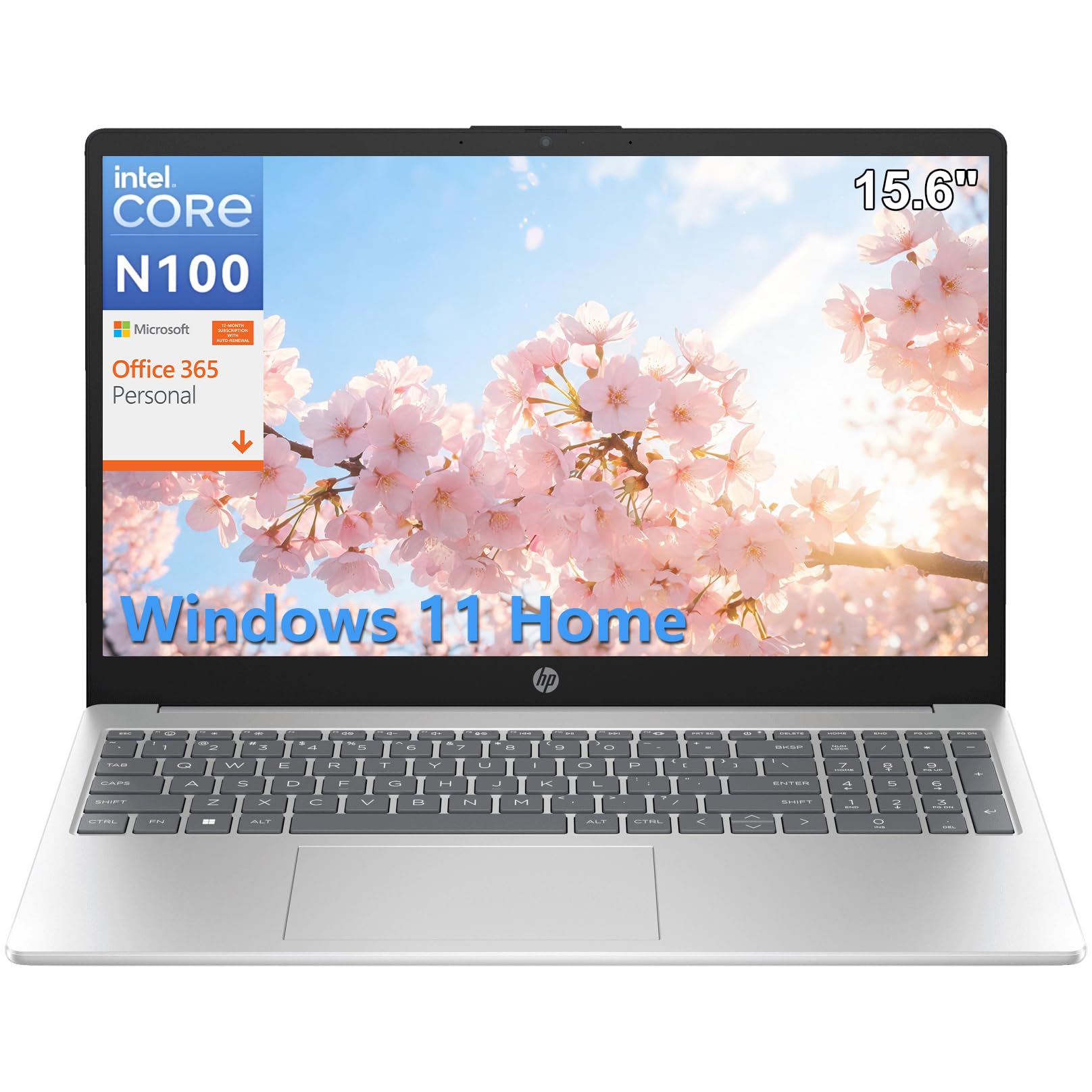
A RAM-packed multitasker that keeps a dozen apps and a hundred tabs running smoothly.
This HP laptop is built for one thing: handling a heavy workload of open applications without stuttering. It comes with 16GB of RAM, which is double what most budget laptops offer and a balance for serious multitaskers. Whether you’re in a video call, editing photos in Lightroom, and streaming music all at once, this machine is designed to keep up. The Intel N100 processor, reaching 3.4 GHz, combined with that large memory, ensures smooth multitasking for work, study, and entertainment.
Storage is handled by a 512GB SSD, which provides fast boot times and quick file access. The spacious 15.6-inch IPS display is perfect for spreadsheets, presentations, and streaming, with a generous screen size that reduces eye strain during extended sessions. It also comes pre-installed with Windows 11 Home, offering an intuitive interface and enhanced security features. Owners praise its “fast and reliable” performance, with one noting it can outperform a desktop for daily tasks.
The primary trade-off for that RAM capacity is the processor. The Intel N100 is an entry-level chip, so it won’t handle demanding video editing or modern gaming as well as a higher-end i5 or Ryzen 5. There are also mixed reports on reliability and touch sensitivity, though the positive feedback on performance is strong. As one buyer summed up, it’s a “fast, reliable laptop” that’s “great for multiple tasks at once.”
What It Excels At
- Generous 16GB RAM for heavy multitasking
- Fast 512GB SSD storage with quick boot
- Spacious 15.6″ IPS display for comfortable viewing
- Good value for a RAM-heavy configuration
Its Limits
- Entry-level Intel N100 processor is not for heavy gaming
- Battery life is around 8 hours, not a full-day leader
- Some reliability and touch responsiveness complaints
Reach for this if: You often have many applications and browser tabs open at once, and you keep a charger nearby for a solid work day.
pass on it if: Your “casual” workload includes modern gaming or intensive video rendering, which will test the entry-level processor.
10. Lenovo IdeaPad 15.6″ Touchscreen
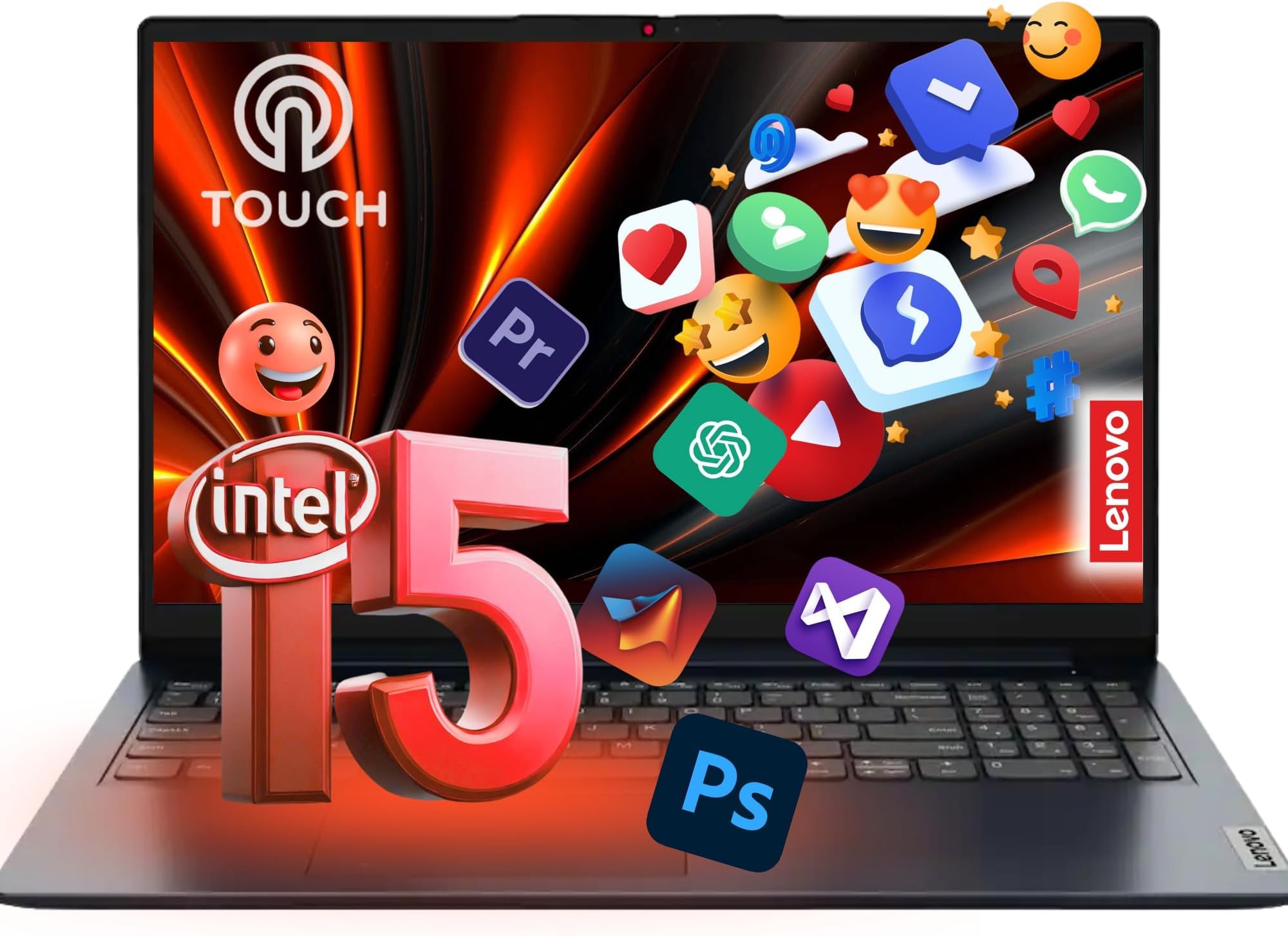
A touchscreen IdeaPad with a powerful 10-core i5 for responsive, hands-on computing.
There’s something intuitive about tapping and swiping on your laptop screen, and the Lenovo IdeaPad makes that a core part of the experience. The 15.6-inch Full HD touchscreen is responsive and precise, with an anti-glare coating that reduces reflections for comfortable viewing. This makes it ideal for students who like to interact directly with their content or anyone who finds a touch interface more natural for scrolling through feeds and documents. Under the hood, it’s powered by a 13th Gen Intel Core i5-1335U with 10 cores, reaching up to 4.6 GHz, delivering responsive performance for multitasking and everyday work.
The configuration is generous, with 16GB of RAM and a unique storage setup: 256GB SSD plus a 512GB external drive, giving you a total of 768GB to work with. This offers a fast main drive for your OS and programs, plus extra space for files. It also comes with Lifetime Web Office 365, and Wi-Fi 6 and Bluetooth 5.1 provide fast, stable connections. The Dolby Audio dual speakers and HD webcam with a privacy shutter make it a solid choice for streaming and video calls.
The standout issue reported by some buyers is that the bundled software isn’t as advertised. A few owners note that apps like Microsoft Excel, Word, and PowerPoint seem to require payment instead of being included for free. The laptop itself works perfectly, with owners praising it as “super reliable and fast,” but you should verify the software bundle before relying on it for work. It’s also a heavier machine, so portability is less of a priority here.
The Great Parts
- Responsive Full HD touchscreen display
- Powerful 10-core i5-1335U processor up to 4.6 GHz
- 16GB RAM and 768GB total storage
- Dolby Audio dual speakers for media
The Frustrations
- Office apps may not be free as advertised
- Heavier than typical 15.6″ laptops
- Webcam is only 720p
Perfect for: A student or creative who wants the convenience of a touchscreen and the power of an i5 processor for smooth, interactive productivity.
The lone warning: Go into it expecting a great laptop, but double-check the included software subscriptions to avoid surprise paywalls on Office apps.
11. Lenovo V15 Gen 4 (i5-13420H)

A powerful business workhorse with an H-series i5 that brings desktop-class speed.
For the casual user who sometimes pushes their machine with heavier tasks, the Lenovo V15 Gen 4 offers a significant performance boost. It’s powered by the Intel Core i5-13420H, an H-series processor designed for higher performance, with 8 cores and 12 threads that can turbo up to 4.6 GHz. This makes it far more capable than the U-series chips found in most casual laptops, handling demanding spreadsheets, coding environments, or even running games like Sims 4 without lag.
As a business laptop, it’s loaded with professional features and ports. The 15.6″ FHD (1920 x 1080) display is clear and bright, and the full-size keyboardincludes a numeric keypad for efficient data entry, and the webcam is ready for video conferencing. Crucially, it offers an RJ45 Ethernet port alongside HDMI and USB Type-C, ensuring you can connect to wired networks—a lifesaver in offices or dorms with spotty Wi-Fi. It runs Windows 11 Pro, which includes advanced features for organizing apps and collaborating with teams, making it a future-proof choice for those who might need business-grade tools.
Owners are consistently impressed with its performance and value. One review highlights it as “reliable, efficient, affordable,” noting the satisfying keyboard and smooth connectivity. Another user praised it for running Sims 4 without lag and being fast for work. The main drawback is battery life; the H-series processor prioritizes power over efficiency, so you’ll want to keep the charger handy for a full day of use. It’s a compromise that favors raw speed over endurance, but for anyone who values a responsive, capable machine, it’s a trade-off worth making.
The Power Play
- High-performance H-series i5 processor (up to 4.6 GHz)
- Business-focused feature set including RJ45 ethernet port
- Windows 11 Pro for advanced collaboration tools
- Capable of handling light gaming and demanding programs
The Energy Cost
- Shorter battery life than efficient U-series laptops
- Heavier build due to the powerful processor
- May be overkill for simple web browsing only
The decision: Choose this if your “casual” use occasionally expands into heavier tasks like programming, complex data work, or even light gaming, and you need the full suite of business connectivity options.
The balance to strike: If you prioritize all-day portability and never push your processor, the Acer Aspire Go 15’s longer battery life and lower power draw will serve you better.
Understanding the Specs
RAM and the Multitasking Myth
RAM (random access memory) is your laptop’s short-term workspace. Every open program and browser tab takes a slice of it. For casual use, 8GB is the baseline that allows you to have a few programs and a dozen tabs open comfortably. Jumping to 12GB or 16GB, like the WISESWAN or HP models offer, gives you the freedom to juggle a video call, a streaming service, and a massive spreadsheet without any lag. If you close apps when you’re done, 8GB is fine; if you let things accumulate, more RAM delivers a smoother, more responsive feel for years to come.
Processor Tiers: U-Series vs. H-Series
The letter at the end of an Intel or AMD processor model indicates its power profile. U-series chips (like the Core i3-1305U or Ryzen 5 7520U) are designed for efficiency—they sip battery power and run cool, making them perfect for web, Office, and video streaming. H-series chips (like the Core i5-13420H) are tuned for higher sustained performance, which is great for heavier tasks but drains the battery faster. For pure casual use, a U-series chip is the sensible, battery-friendly choice. Choose an H-series only if you know you need that extra speed for demanding applications.
FAQ
How much RAM do I really need for browsing and streaming?
Is a Chromebook good for casual use or should I get a Windows laptop?
What is the difference between a 7-hour and a 12-hour battery life?
Why do some laptops have soldered RAM?
Is an SSD worth it for everyday tasks?
What does a 120Hz display mean for me?
Should I worry about a backlit keyboard?
How does Windows 11 in S Mode work?
Final Thoughts: The Verdict
For most people, the best laptop for casual use is the Acer Aspire Go 15 because it offers the best balance of strong performance, a huge 12.5-hour battery, and fast charging at a price that’s tough to top. If you’re a multitasker who wants more RAM headroom on a strict budget, the WISESWAN i3 Laptop is an outstanding value pick. And for those who want a bigger screen for movies or a touchscreen for convenience, the HP OmniBook 3 with its 17.3-inch display and 14-hour battery is the one to reach for.
How We Picked
We do not accept paid placement. Every pick is matched to a real buyer and a real use-case; we do not hands-on test units.
Sources & Methodology
Specifications: manufacturer listings and product documentation. Review insights: verified customer reviews, as of August 2026. Pricing: not shown on this page (it changes often); check the current price via the retailer link.
As an Amazon Associate, Gadgets Feed earns from qualifying purchases. This does not affect which products we feature.