
Our readers keep the lights on and my morning glass full of iced black tea. As an Amazon Associate, I earn from qualifying purchases.
Specs are compiled from manufacturer listings and verified buyer reviews and can change over time — please confirm the key details on the product page before buying.
The 2.4GHz wireless keyboard is the quiet workhorse of the desk world—the one that connects the instant you plug in the tiny USB receiver and never asks you to pair it again. If you are tired of Bluetooth drop-outs or Bluetooth pairing menus that eat your morning, a 2.4GHz keyboard is the fix you are looking for.
I’m Min — the founder and writer behind Gadgets Feed. This guide is built by comparing the manufacturers’ published specifications and the patterns across verified customer reviews, so you get each pick’s real strengths and trade-offs instead of marketing spin.
We look at full-size layouts, battery life, and quiet key feel to find the best reliable 2.4ghz wireless keyboard for your desk setup, whether you type all day or just need a dependable spare.
Our Picks at a Glance


How To Choose The Best 2.4GHz Wireless Keyboard
Every keyboard here uses a small USB dongle for its connection, which is the core difference from Bluetooth. That dongle gives you a rock-solid, low-latency link that is ready the moment you plug it in—no pairing code, no searching for devices.
Full-Size vs. Compact Layout
Full-size keyboards include the number pad on the right, which is essential if you do data entry, accounting, or any work that relies on typing digits quickly. Compact layouts (around 78 to 94 keys) save desk space and are easier to toss in a bag, but they drop the number pad and sometimes the navigation cluster.
Battery Life and Power Source
Pay attention to how the keyboard is powered. Some use replaceable AA or AAA batteries and can run for months or even years, while others have a built-in rechargeable cell you top up with a USB cable. A keyboard with an auto-sleep mode will stretch that battery much further between charges or swaps.
Key Feel and Noise Level
Most 2.4GHz keyboards use membrane keys, which are soft and quiet, or scissor-switch keys, which are slightly firmer and more precise for fast typing. If you share an office or type late at night, look for a model that specifically advertises quiet or silent operation.
Quick Comparison
| Model | Best For | Layout | Battery | Connection | Amazon |
|---|---|---|---|---|---|
| Logitech MK270★ Best Overall | Best Overall Value | Full-Size | 36-month keyboard | USB Receiver | Amazon |
| QUASIO Ergonomic ComboQuiet Performer | Quiet Office Work | Full-Size | Up to 365 days | Nano USB Receiver | Amazon |
| QUASIO Keyboard OnlyWrist Saver | Wrist Comfort | 104 Keys | Auto-sleep | 2.4GHz USB | Amazon |
| EDJO Combo | Multimedia Control | Full-Size | Auto-sleep | 2.4GHz USB | Amazon |
| ONIKUMA Tri-Mode | Multi-Device Gaming | 94 Keys | 2000mAh | BT/2.4G/Wired | Amazon |
| TECKNET KB014 | Rechargeable Slim | Full-Size | 500mAh / 180 days | 2.4GHz USB-A | Amazon |
| ALLIFE Stainless | Slim Aesthetics | 78 Keys | 6-month rechargeable | 2.4GHz USB | Amazon |
| EAYBLLY Wave Keys | Ergonomic Support | 107 Keys | 1 AA battery | 2.4GHz RF | Amazon |
| Logitech MK345 | Premium Combo | Full-Size | 3-year keyboard | USB-A Nano Receiver | Amazon |
In‑Depth Reviews
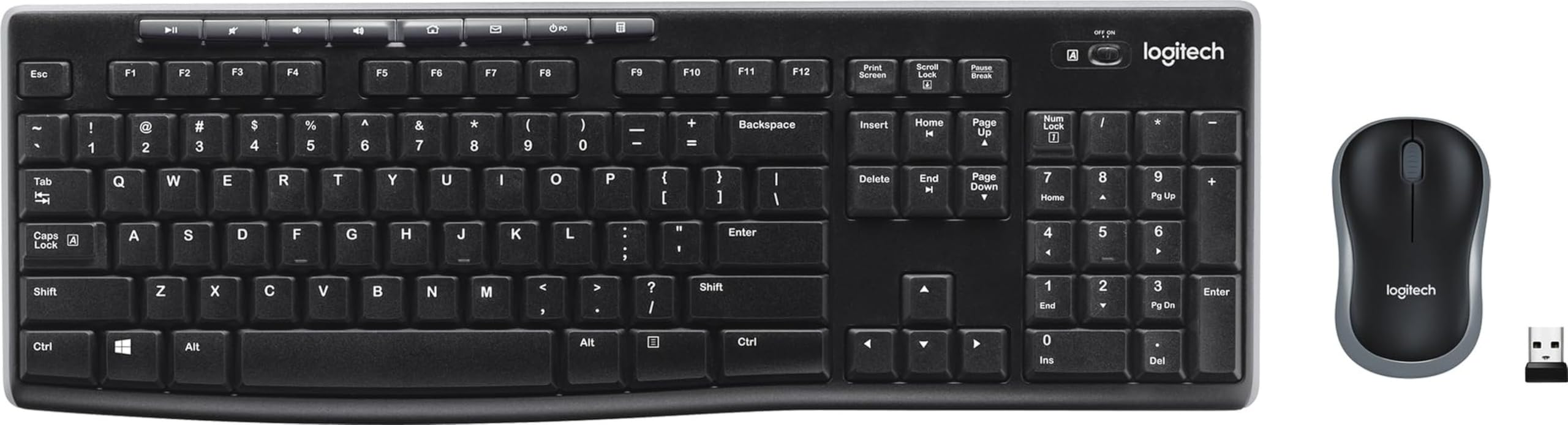
1. Logitech MK270 Full Size Wireless Keyboard and Mouse Combo – Black
Our pick — 4.5★ from 110,000+ verified ratings; the strongest balance of quality and price.
The dependable classic that keeps typing for three years on one set of batteries.
The headline here is the 36-month keyboard battery life—you can genuinely forget where you put the spare AAAs. The full-size layout with number pad, arrow keys, and full F-keys gives you a familiar, comfortable typing experience with low-profile, quiet keys that won’t annoy a shared office.
Connectivity is a simple plug-and-play USB receiver with a reliable range up to 33 ft, so you can move around your desk or home office without drop-outs. It also brings 8 multimedia hotkeys for instant access to the internet, email, and volume, and the spill-resistant design adds a layer of safety for clumsy coffee moments.
The mouse is ambidextrous and compact, though some owners find it small even for average hands. The recurring gripe is durability over months of use, but the sheer value and reliability make it the crowd favorite. Note that the keys do not light up, as buyers report.
Why It Wins
- 36-month keyboard / 12-month mouse battery life
- Spill-resistant design with sturdy tilt legs
- Plug-and-play USB receiver up to 33 ft
What to Know
- No backlighting on the keys
- Compact mouse may feel small
- Some report durability issues after months
Reach for this if: you want a no-fuss, full-size combo with legendary battery life that just works from the start.
Look elsewhere if: you need backlit keys or have larger hands that demand a bigger mouse.
2. QUASIO Wireless Keyboard and Mouse Combo
Near-silent keys and a mouse that clicks without a sound—built for shared spaces.
If your typing happens in a library, a cubicle, or a room where someone is sleeping, this combo is engineered for you. The soft membrane keys and silent micro-motion mouse are almost completely silent when clicked, so you can type with confidence without disturbing anyone within earshot.
The 2.4GHz connection is stable up to 10 meters (33 ft) via a single nano USB receiver, and it works across Windows, Mac OS, Chrome OS, and Linux. The mouse offers 1600 DPI tracking, and the keyboard includes a numeric keypad plus 12 multimedia shortcut keys for play/pause, volume, and email.
Battery life is up to 365 days for both devices, with auto-sleep after 10 minutes of inactivity to save power. The keyboard uses one AAA battery, and the mouse uses one AA. Weighing in with a 12-month warranty and 30-day no-reason refund, it’s a low-risk premium-feeling upgrade.
Standout quality: The quiet operation is the thing everyone raves about—owners consistently note they can barely hear themselves type.
Honest caveat: The key feel is functional but not exceptional, so keyboard purists might want firmer switches.
Grab this for: offices, dorms, or any spot where silence is golden.
Think twice if: you want a tactile, clicky typing feel.
3. QUASIO Wireless Keyboard with Wrist Rest
A full 104-key board with a cushioned palm rest for long typing sessions.
This keyboard-only pick (no mouse included) is built for people who type for hours and want wrist support built right in. The comfortable palm rest and folding holder keep the board at an optimum slope to prevent wrist strain, while anti-slide pads on the bottom stop it from drifting mid-sentence.
It uses the classic 104-key design with a number pad, plus Number Lock, Caps Lock, and Power indicators in the upper right corner. The 2.4GHz connection is plug-and-play up to 33 feet (10m), and the auto-sleep mode kicks in after 30 minutes of inactivity to save battery.
Compatibility spans Windows XP/Vista/7/8/10/X, Mac, and Chromebooks. One catch: it requires an AA battery that is not included, and some owners note the keyboard cuts off the first letter when waking from sleep mode.
Comfort first: The wrist rest and bouncy, quiet keys are what win people over for daily typing.
Fit note: The auto-sleep can clip your first keystroke, so give it a tap before you start a sentence.
Best suited for: writers and data-entry folks who want ergonomic support without buying a mouse.
Not ideal if: you want a combo set or dislike wake-up lag on the first keypress.
4. EDJO Wireless Keyboard and Mouse Combo

Twelve hotkeys put music, mail, and favorites one tap away on a full-size board.
For anyone who lives in shortcuts, this EDJO combo is a productivity booster. The 12 multimedia hotkeys give you instant access to your music, mail, computer, and favorites, and there are Number Lock, Caps Lock, and Power indicators so you always know the board’s status at a glance.
The 2.4GHz connection is strong and stable at a range of 33 ft (10m) with a single USB receiver, and it can also be used separately. The keyboard features a foldable stand and anti-slip pads, while the optical mouse offers precise tracking on most smooth surfaces with a symmetrical design for either hand.
Auto power saving is aggressive—the keyboard sleeps after 6 minutes of inactivity and the mouse after 25 seconds—which keeps batteries alive longer. It needs 1 AA battery for the keyboard and 2 AAA for the mouse, none included. Note that some multimedia functions are not available with Mac OS.
Efficiency pick: The hotkey layout and direct F12 key are a hit with programmers and office workers.
Honest note: It is not built for gaming—some report keys jamming after light use.
Pick this if: you want quick media control and a reliable full-size combo for work or school.
skip it if: you plan to game or need Mac multimedia shortcuts.
5. ONIKUMA Tri-Mode Wireless Keyboard
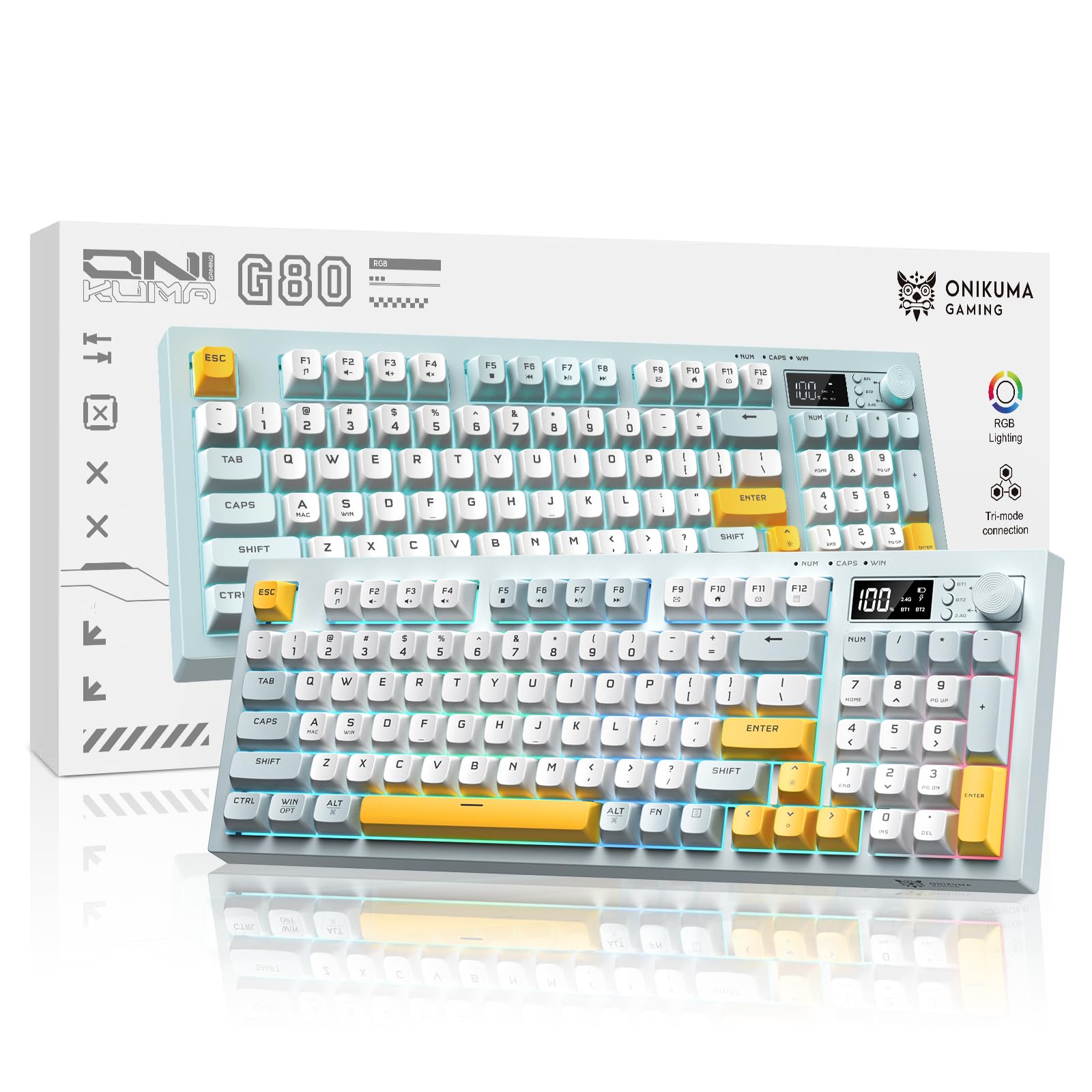
Three ways to connect, a screen for battery status, and a knob for volume.
You can switch between a PC, laptop, Mac, phone, or gaming console without unplugging anything, thanks to three connection options: Bluetooth 5.0 (a wireless standard for short-range connections), 2.4G wireless (a USB dongle-based connection), and wired USB-C (a reversible cable port). This makes it a strong fit for multi-device setups.
The 94-key compact layout saves desk space while keeping all essential keys, and the 2000mAh battery (a measure of energy capacity) lasts a long time between charges. A small display screen shows battery level, connection mode, and lighting status at a glance, so you never guess if you need to charge.
The multifunction knob controls volume, RGB brightness, and lighting effects directly with a twist. It uses PBT keycaps and silent membrane keys that reduce typing noise, ideal for late-night gaming or shared spaces. Owners praise the solid build and flawless Linux performance, though the backlight doesn’t illuminate key legends in the dark.
What Stands Out
- Tri-mode: Bluetooth 5.0, 2.4G, wired USB-C
- On-board display + multifunction knob
- 2000mAh battery with long life
What to Note
- No dedicated Delete key (requires NUM toggle)
- Windows key position can feel awkward for gaming
- Backlight doesn’t light up key legends
Choose this if: you juggle multiple devices and want a feature-packed, quiet board with a battery display.
Consider another if: you need a standard Windows key placement for competitive gaming.
6. TECKNET Wireless Keyboard Rechargeable
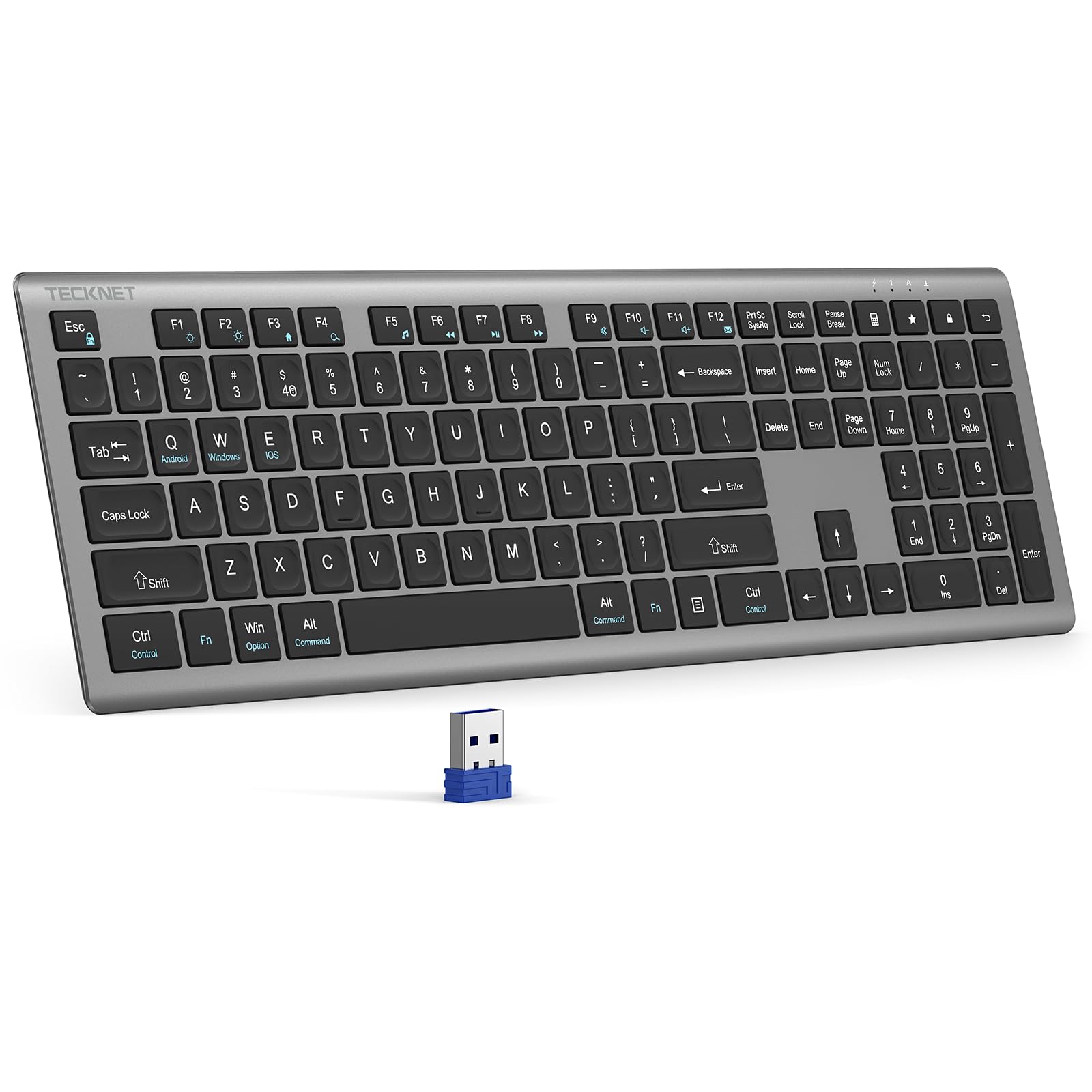
A slim board with a built-in 500mAh battery that lasts 180 days per charge.
Say goodbye to buying batteries—this TECKNET keyboard has a built-in 500mAh rechargeable battery that lasts up to 180 days on a roughly 2-hour charge, based on 2 hours of daily use. It wakes instantly with any key press, so you never wait for it to reconnect.
The 110 upgraded scissor-switch keys deliver a smooth, responsive feel with a moderate 2mm key travel while reducing noise by more than 90%. The full-size layout includes a number pad, and the finger-fit key design conforms to your fingertips to reduce hand fatigue during long sessions.
Connectivity reaches a 15-meter range on the 2.4G connection, and it works with Windows, iOS, macOS, and Android, including smart TVs. The adjustable stand and non-slip pads add stability. It’s a keyboard-only option, so you’ll need your own mouse.
Best feature: The rechargeable battery and ultra-quiet scissor keys make it a low-maintenance daily driver.
Fair warning: Owners mention mixed experiences with durability, so treat it as a solid budget option rather than an heirloom.
Great for: minimalists who hate swapping batteries and want a slim, quiet board for desk or smart TV.
Pass if: you need a bundled mouse or expect heavy-duty build quality.
7. ALLIFE Stainless Steel Wireless Keyboard

A stainless steel body that feels heavy-duty and slips into a briefcase.
This is the keyboard for people who care about aesthetics as much as function. The stainless steel material gives it a dense, premium feel, and the ultra-thin profile (16.9 x 4.9 x 0.6 in) weighs just 14.9 oz—thin enough to slide into a briefcase, as owners note.
The 78-key layout keeps the function row and shortcuts while staying compact, but it drops the number pad. The rechargeable lithium battery lasts up to 6 months on a single charge based on 2 hours of non-stop use per day, and customers note even longer with heavy use—one measured 7 months.
Setup is instant: insert the nano USB receiver and start typing. It comes with a 24-month warranty and friendly customer service, which has been tested—the company honors replacements when units fail. The low-profile keys are smooth and quiet, though some find them delicate.
Design win: The slim metal build and incredible battery life are what owners praise most.
Honest trade-off: No number pad, and the keys can feel fragile; durability is the recurring question mark.
Best for: travelers and minimalists who want a light, stylish board with great battery life.
Not for: number crunchers who need a dedicated numpad or heavy-handed typists.
8. EAYBLLY Wave Keys Wireless Keyboard
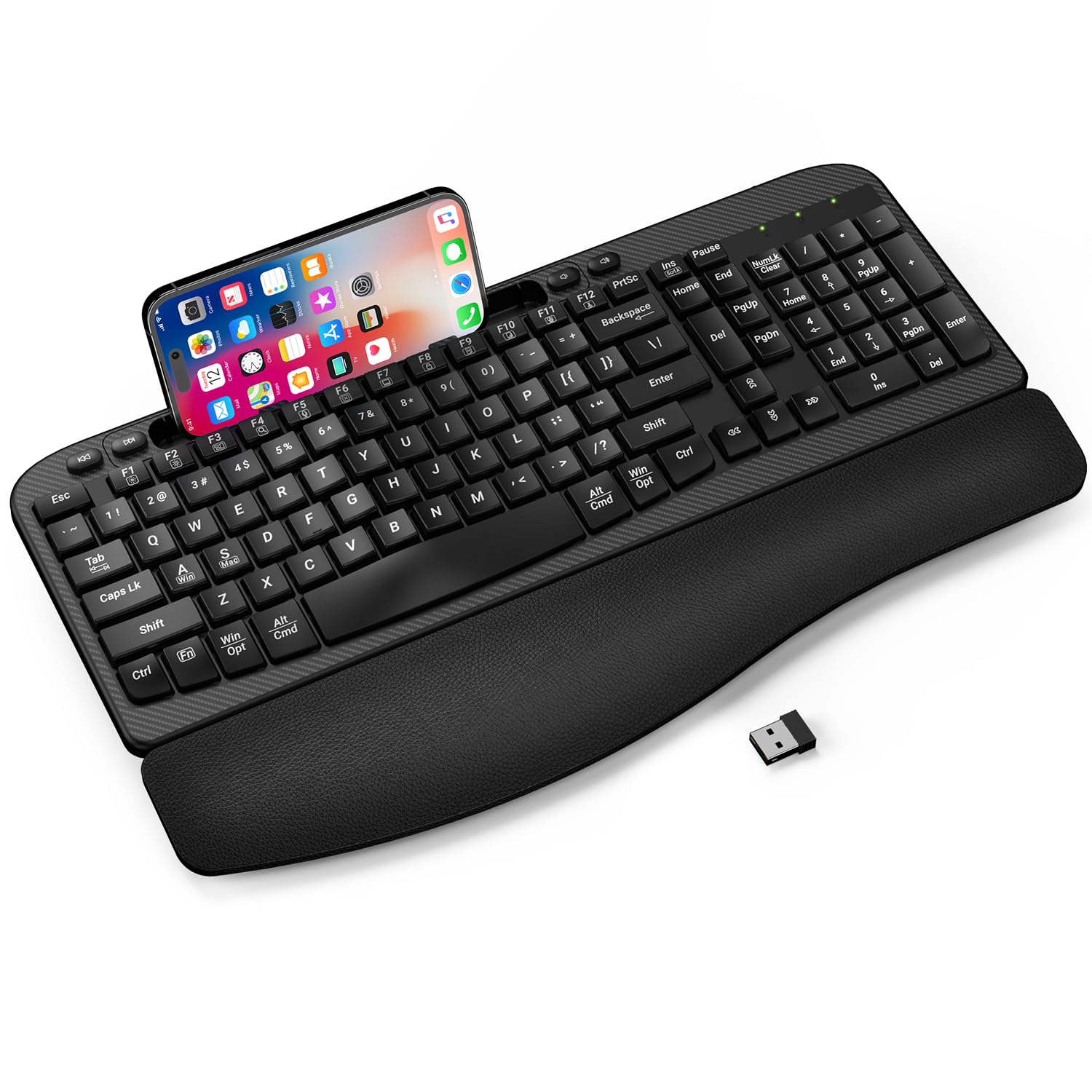
Curved wave keys and a cushioned palm rest designed for 6-8 hour typing days.
If your wrists ache after a long day of typing, this EAYBLLY board is engineered as a solution. The curved wave-shaped keys and high-density memory foam cushioned palm rest fit your natural hand posture to reduce wrist fatigue during 6-8 hours of daily typing—especially appreciated by office workers and students.
The standout feature is the built-in 7.28-inch device holder that supports vertical and horizontal placement of smartphones and small tablets. That means you can follow a video call or online class right next to your keyboard without an extra stand cluttering your desk.
The 2.4G RF connection is stable up to 33 feet with no driver installation, and it comes with an extra USB-C adapter for Windows, Mac OS, and Chrome OS. It has adjustable tilt legs at 8°/12° angles and a splash-proof structure, all powered by a single AA battery (not included).
Comfort first: The memory foam wrist rest and soft, quiet keys are what win people over—some say it helps with carpal tunnel discomfort.
Fit note: The layout runs a bit small for some hands, leading to typing errors, and the phone slot may not fit large phones with thick cases.
Ideal for: anyone with wrist pain who wants ergonomic support plus a built-in phone slot.
Consider size: if you have larger hands, measure your reach before committing to a smaller wave layout.
9. Logitech MK345 Full Size Wireless Keyboard and Mouse Combo

A full-size keyboard with an integrated palm rest and a comfy right-handed mouse.
This is the more premium sibling to the MK270, adding an integrated palm rest to the full-size keyboard for a more comfortable all-day typing position. The layout stays familiar with quiet keys, a spill-resistant design, and easy-access media keys for quick control.
Battery life is the headline: up to 3 years for the keyboard and 18 months for the mouse, with batteries included in the box. The 2.4 GHz (a wireless frequency band) connection reaches up to 10 meters, so you can type from across the room. It works with Windows, macOS, and ChromeOS using one USB-A Nano Receiver (a tiny plug-in dongle).
The right-handed mouse has a contoured shape for all-day comfort with smooth, precise tracking and scrolling. It’s a dependable Logitech combo, though the palm rest is hard plastic rather than padded, and the mouse runs small for some users. Connectivity and responsiveness get mixed feedback, with some reporting disconnections.
The dependable choice: Logitech’s brand reliability and the 3-year battery life make it a low-maintenance office upgrade.
Honest note: The hard palm rest and occasional lag reports mean it’s great value, not a flawless flagship.
Choose this if: you want a trusted brand combo with a palm rest and multi-year battery life.
Pass if: you need a padded wrist rest or a larger mouse for big hands.
Understanding the Specs
2.4GHz Wireless Connection
This is the USB dongle connection that makes these keyboards special. Unlike Bluetooth, a 2.4GHz receiver gives you a dedicated, low-latency link that connects instantly when you plug it in—no pairing menus, no searching, no drop-outs. The trade-off is that you use one USB port on your computer to keep it working.
Battery Life and Power Source
Look at how the keyboard is powered. Some use replaceable AA or AAA batteries that can last months or years (like the Logitech MK270’s 36-month claim), while others have built-in rechargeable cells you top up with a USB cable. Auto-sleep modes stretch battery life further by powering down after inactivity, so you don’t waste power when you step away.
FAQ
What is the difference between a 2.4GHz keyboard and a Bluetooth keyboard?
Will a 2.4GHz keyboard work with my Mac or Chromebook?
How long does the battery last on a 2.4GHz wireless keyboard?
What is the wireless range of a 2.4GHz keyboard?
Are 2.4GHz keyboards good for gaming?
Will I need to install software or drivers?
What is the difference between a full-size and a compact keyboard layout?
Are the keys on these keyboards quiet?
Final Thoughts: The Verdict
For most buyers, the winner is the 2.4ghz wireless keyboard Logitech MK270 because it pairs a 36-month battery life with a reliable, plug-and-play connection that over a hundred thousand owners have trusted. If you want a near-silent typing experience with a premium feel, grab the QUASIO combo. And for gamers juggling multiple devices, the ONIKUMA tri-mode is the one to reach for with its blend of Bluetooth, 2.4G, and wired connectivity.
How We Picked
We do not accept paid placement. Every pick is matched to a real buyer and a real use-case; we do not hands-on test units.
Sources & Methodology
Specifications: manufacturer listings and product documentation. Review insights: verified customer reviews, as of August 2026. Pricing: not shown on this page (it changes often); check the current price via the retailer link.
As an Amazon Associate, Gadgets Feed earns from qualifying purchases. This does not affect which products we feature.