
Our readers keep the lights on and my morning glass full of iced black tea. As an Amazon Associate, I earn from qualifying purchases.
Specs are compiled from manufacturer listings and verified buyer reviews and can change over time — please confirm the key details on the product page before buying.
An affordable mechanical keyboard is where the typing sound, the feel of each keystroke, and the layout size all collide in one decision. Most buyers want that satisfying “thock” without the high-end price tag, and they want a board that fits their desk and their gaming or work habits. The real question is which one delivers the creamy sound and build quality you actually notice every single day.
I’m Min — the founder and writer behind Gadgets Feed. This guide is built by comparing the manufacturers’ published specifications and the patterns across verified customer reviews, so you get each pick’s real strengths and trade-offs instead of marketing spin.
You will learn which features matter most—from hot-swappable switches to gasket mounts—and see how the top affordable mechanical keyboard options compare on the specs that define daily typing.
Our Picks at a Glance


How To Choose The Best Affordable Mechanical Keyboard
To pick a budget keyboard that feels right, focus on three things: the switch type, the layout, and whether you can customize it later. The switch type controls the sound and feel of each keystroke, while the layout determines how much desk space you have left for your mouse. Getting these two right matters more than any brand name.
Match the switch type to your task
Mechanical switches come in three main flavors: linear (smooth and quiet), tactile (a bump at the press point), and clicky (a bump plus an audible click). For a shared office or late-night gaming, linear or tactile switches are usually the safer pick because they are noticeably quieter than clicky ones. If you crave that loud, typewriter-like feedback, a clicky switch delivers it every keystroke.
Pick a size that fits your desk
Layouts range from compact 60% boards (no number pad, no arrow cluster) up to full-size 100% boards with everything included. A 75% or 96% layout keeps the arrow keys and most function keys while freeing up a significant chunk of space for mouse movement. If you work with numbers daily, a full-size board with a number pad is worth the extra desktop footprint.
Quick Comparison
| Model | Best For | Layout / Keys | Switch Type | Connection | Amazon |
|---|---|---|---|---|---|
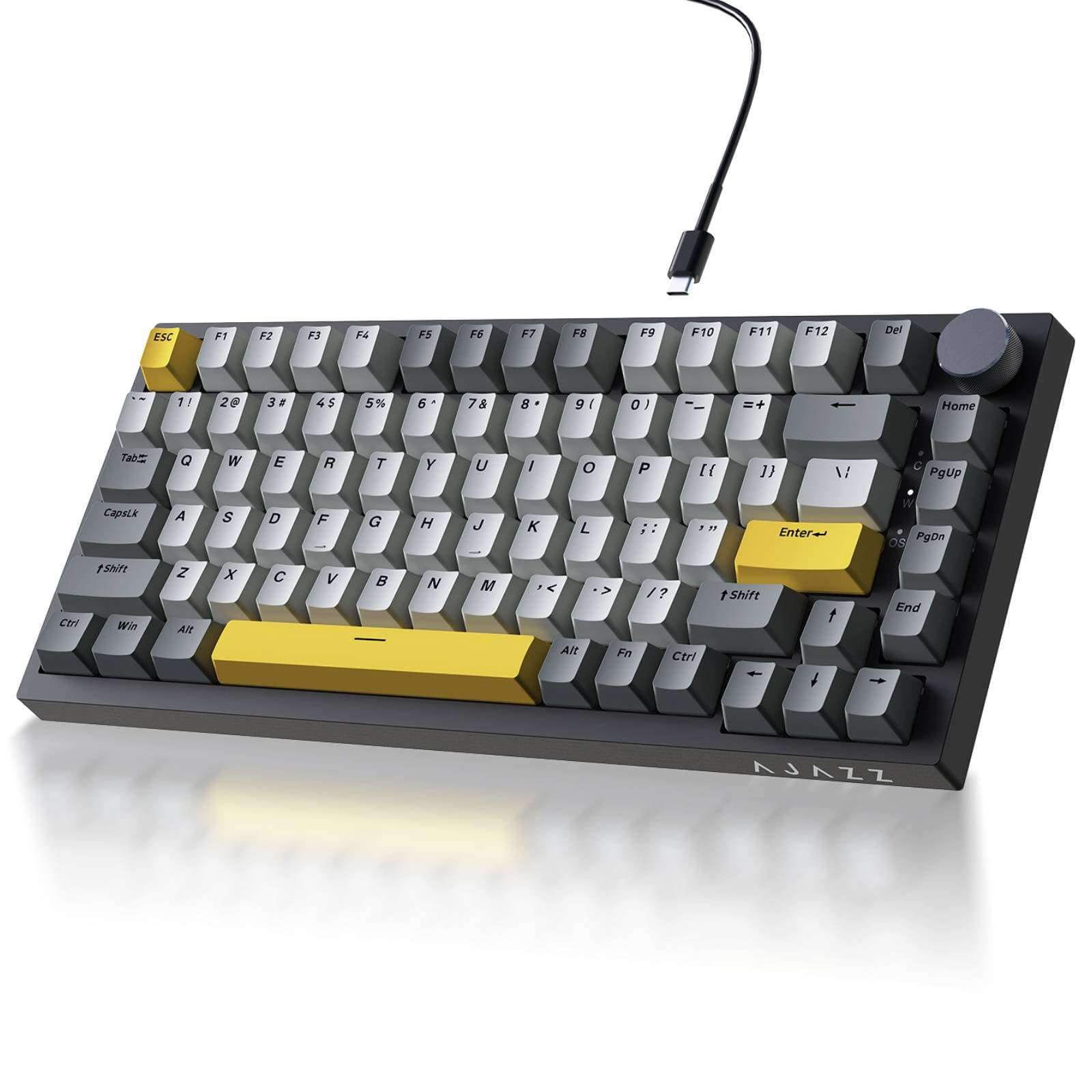
| Ajazz AK820 TKL★ Best Overall | Compact desktop control | 75% / 82 keys | Pre-lubed Linear | Wired USB-C | Amazon |
| HUO JI E-Yooso Z-99Best Value | Full functionality, smaller frame | 96% / 99 keys | Pre-lubed Linear | Wired USB-C | Amazon |
| AULA WIN68 HEGaming Edge | Competitive FPS gaming | 60% / 68 keys | Hall Effect Magnetic | Wired USB-C | Amazon |
| Keychron C2 | Mac users who need a number pad | 100% / 104 keys | Gateron G Pro Brown | Wired USB-C | Amazon |
| Redragon K580 PRO | Wireless freedom across devices | 100% / 104 keys | Red Linear (Hot-swap) | Tri-mode (USB-C/2.4GHz/BT) | Amazon |
| Redragon K710 Typewriter | Retro style with a heavy build | 100% / 104 keys | Blue Clicky | Tri-mode (USB-C/2.4GHz/BT) | Amazon |
| RK R98 Pro | Creamy sound with a volume knob | 96% / 98 keys | Pre-lubed Cream Linear | Wired USB-C | Amazon |
| ASUS ROG Strix Scope II X | Premium feel with gaming extras | 100% / full-size | ROG NX Snow V2 Linear | Wired USB-C | Amazon |
| Keychron V6 | Deep customization via QMK/VIA | 100% / 108 keys | Keychron K Pro Brown | Wired USB-C | Amazon |
In-Depth Reviews
1. Ajazz AK820 TKL
Our pick — over 4.5★ from 500+ verified ratings; the strongest balance of quality and price.
The compact 75% board that nails the creamy sound without eating your whole desk.
This is the pick that balances everything most buyers want at once: a small footprint, a premium feel, and that satisfying, quiet “thock” sound. Its 82-key layout keeps the function row and arrow keys while freeing up 30% more desk space for your mouse—a real win for gamers who need room to aim. The gasket mount, with Poron and high-density foam layers, eliminates hollow echo for a solid, creamy keystroke.
The switches here are the crowd-pleasing detail. They are factory-lubricated linear switches, which means they feel smooth and crisp straight from the start with no scratchy sensation. Because the PCB is hot-swappable, you can pull them out and install any 3-pin or 5-pin switch later if you want a different feel, no soldering required. The south-facing RGB LEDs and double-shot PBT keycaps keep the lighting vibrant and the legends resistant to wear over time.
The one honest trade-off is long-term reliability. Buyers report that while the keyboard works flawlessly at first, some owners see keys failing after two months of use. That makes it a fantastic entry point into the hobby, but if you want a board that will last for years of heavy daily abuse, you might look to a more premium pick further down this list.
What Wins People Over
- Quiet, bubble-wrap-like sound that won’t annoy a shared office
- Solid, weighty plastic build that feels more premium than the price suggests
- Pre-lubed switches give a smooth keystroke right from the start
Where It Stumbles
- Recurring reports of individual keys failing after a couple of months
- Wired-only connectivity, so no Bluetooth option here
Reach for this if: you want a compact, satisfying typing experience that leaves plenty of room for your mouse.
Look elsewhere if: you need rock-solid reliability for years of heavy, daily professional use.
2. HUO JI E-Yooso Z-99
A 99-key layout that keeps the number pad while shrinking the overall footprint.
If you cannot give up your number pad but want a smaller frame than a full-size board, this is the pick that threads that needle. The 96% layout with 99 keys shrinks the footprint to 39×13.5x4cm while retaining full functionality. It is a wired board with a detachable USB-C to USB-A cable, so setup is simple and the connection stays stable with zero latency.
What makes this board a value standout is its sound engineering. Five foam layers and a silicone pad cut noise by 40% and hollow sound by 80%. The result is creamy, natural feedback that owners call “almost therapeutic” to type on. The pre-lubed linear switches arrive smooth, and they deliver fast response for games.
Durability is the quietly impressive part here. Owners mention the board holds up well after roughly a year of daily use, with adjustable colors, fast response for games, and a good layout. The main drawbacks are the rough companion software and a switch-swap process that is a bit tight, but neither affects the core typing experience. At this price, the longevity and sound quality make it a serious contender.
Sound-First Design: The creamy, muted thock is the headline feature, backed by 5 layers of foam and a silicone pad that erase the hollow echo.
Minor Quirks: The software feels unfinished, and swapping switches takes more force than expected, but the typing feel is excellent.
3. AULA WIN68 HE
The compact 60% board that cuts input lag to near nothing for serious gamers.
This is the specialist’s pick for competitive play, and it uses a completely different technology than the other boards here. Instead of a traditional mechanical switch, it uses Hall Effect magnetic switches that let you adjust the actuation point anywhere from 0.02mm to 3.44mm, personalized down to 0.1mm increments. That means you can set the keys to register a press the instant you barely touch them, or make them require a deeper press to avoid accidental inputs.
The speed numbers are the reason gamers gravitate to it. An 8000Hz polling rate and 0.3ms latency deliver near-instant commands for a competitive edge in fast shooters. It also packs 16.8 million colors of RGB with 14 preset lighting effects, and the south-facing LEDs make the backlighting pop from your viewing angle.
The 60% layout with 68 keys frees up to 40% of desk space, and at 686g it’s portable for travel. The catch is that the professional web driver for customizing the magnetic actuation only supports Windows, not Mac. Also, while build quality wins praise, a few customers note the space bar can fail within three weeks—so this is for gamers who want speed over long-term certainty.
The Competitive Edge
- Adjustable magnetic actuation down to 0.1mm for personalized key response
- Silky smooth, quiet switches that work well for rhythm games, shooters, and typing
- Compact and light enough to carry on a trip
The Trade-Offs
- Web driver software only works on Windows, not Mac
- Occasional reports of the space bar failing within three weeks
Pick this for: competitive gamers who want adjustable trigger points and minimal input lag on a tiny footprint.
Skip it for: Mac users and anyone who needs a number pad for data entry.
4. Keychron C2

The full-size workhorse built specifically with Mac users in mind.
If you live in the Apple ecosystem, this board removes the usual pain of trying to make a Windows keyboard play nice with your Mac. It comes with a layout tune for Mac, including a dedicated Siri or Cortana key, and it ships with extra keycaps for both Mac and Windows systems. A system toggle and the included keycap puller mean you can switch your layout in minutes.
Gateron G Pro Brown switches, rated for 50 million keystrokes, provide a tactile bump that’s quiet and confirms each press. Owners consistently praise the significantly lower noise levels and the solid build quality. The double-shot ABS keycaps let the white LED backlight shine through the letters, though some find the black keycap labels a bit dim.
The full-size 104-key layout means you get the number pad, making it a productivity pick for anyone who crunches numbers. A few owners note minor quirks like the Num Lock light staying on during sleep and some undocumented light patterns, but these are small bumps on a board that delivers strong value for the money.
Mac-Ready from the start: The dedicated Mac layout, included keycaps, and system toggle make this the easiest switch for Apple users.
Quiet Tactile Feel: Brown switches offer a satisfying bump without the click, which keeps the noise down in an office.
5. Redragon K580 PRO

The wireless full-size board with dedicated macro keys for MMO and MOBA players.
This is the pick for anyone who wants to ditch the cable without sacrificing speed. Its tri-mode connectivity jumps between USB-C, Bluetooth, and 2.4GHz wireless with near-wired responsiveness, so you can switch from your PC to a tablet or phone without re-pairing. The 2.4GHz dongle keeps things lag-free for gaming, while Bluetooth handles the day-to-day convenience.
MMO and MOBA players get a genuine boost from the 5 dedicated macro keys (G1-G5), which let you save ability rotations directly on the keyboard with no software required. There is also a media wheel for quick volume and playback control. Under the hood, the hot-swappable socket accepts almost any 3-pin or 5-pin switch, so you can experiment with different feels whenever you like.
The build quality is a clear strength, with a solid, heavy base and satisfying buttons. The catch is that Bluetooth connectivity can become shoddy over time for some owners, and the documentation is notoriously thin—one owner described the setup as frustrating due to a blank download page. If you primarily use the 2.4GHz dongle, this is an excellent value, but Bluetooth reliability is a roll of the dice.
Why It Stands Out
- Dedicated G1-G5 macro keys for one-press ability combos in games
- Solid, heavy base with a smooth metal volume wheel
- Hot-swappable switches and keycaps for easy customization
The Rough Edges
- Bluetooth reliability can degrade over time for some owners
- Documentation is poor, making initial setup a guessing game
Best for: gamers who juggle multiple devices and want macro keys without paying a premium.
Think twice if: you rely solely on Bluetooth and cannot tolerate occasional connectivity hiccups.
6. Redragon K710 Typewriter

The vintage typewriter design with a solid metal panel and a satisfying click.
This board is for anyone who wants their keyboard to be a conversation piece, and it delivers with round, steampunk-style keycaps and a tank-solid metal panel. It weighs 2 pounds, which gives it a substantial, premium presence that stays put on your desk. The retro design draws compliments, and multiple reviewers point out coworkers buying their own after seeing it in action.
You get a satisfying typing feel from the blue clicky switches (switches that make a loud click and a bump when you press a key), which offer medium resistance and tactile feedback. The sound is a nostalgic, satisfying “90s IBM” click that is not too loud—one owner called it “very satisfying to hear when typing.” You can connect three ways: USB-C wired, Bluetooth 3.0/5.0, or 2.4GHz wireless (a wireless dongle that plugs into your computer), so you can switch between devices easily. The rechargeable 4000mAh battery lasts days on a charge, so you won’t need to plug in often.
The RGB lighting is vibrant with up to 16 presets and 7 solid colors you can select on the board. The main frustration is the software: the link to download the app does not work, so you are limited to the onboard presets for lighting customization. If you can live without deep software control, this is a sturdy, long-lasting board with personality.
Design That Turns Heads: The round typewriter keycaps and metal panel give it a retro look that stands out in any setup.
Clicky Satisfaction: The blue switches deliver an audible, tactile click that feels great and stays reasonably quiet for a clicky board.
7. RK R98 Pro

A 96% layout with pre-lubed cream switches that feels buttery smooth from the first press.
This board delivers the “creamy” sound that mechanical keyboard fans love, thanks to five layers of sound-absorbing foam and pre-lubed cream linear switches (switches that move straight down with no bump or click). The result is a thocky, satisfying, and notably quiet typing experience—one owner described it as “ultra quiet” and “buttery smooth.” Because it is a wired board, you get zero delay, so your keystrokes register instantly. The 98-key layout keeps the number pad and arrow keys while saving desktop space, so you have more room for your mouse.
The build quality punches above its class. The MDA profile PBT keycaps, made with a double-shot process, have a matte surface that fits fingers well and resists fading over time. The detachable aluminum CNC metal volume knob allows quick audio adjustments, and four indicator lights clearly show Num Lock, Caps Lock, Win Lock, and Mac Mode status. Programmable online driver support lets you remap keys, set macros, and customize RGB on Windows and Mac.
The most-discussed drawbacks are minor but real. The keycaps do not let the backlight shine through, leaving the letters dark, and the backlighting is dimmer than some rivals. The volume knob sits close to the Page Down key, making it slightly hard to grip. These are small complaints on a board that owners say is “exceptional value” for the creamy feel and solid construction.
The Creamy Factor
- Pre-lubed cream switches and five foam layers deliver a quiet, thocky sound
- Solid, heavy build with a premium feel and an aluminum volume knob
- Works with Windows and Mac via an online driver
What Holds It Back
- Keycap legends are not backlit, leaving letters dark at night
- RGB is dimmer than other boards and the knob is tricky to grip
Choose this for: writers and gamers who prize a quiet, satisfying, creamy typing feel above all else.
Pass if: you need bright, shine-through keycap lighting for dark rooms.
8. ASUS ROG Strix Scope II X

A full-size board with a weighty aluminum top plate and gaming-focused extras.
This is the pick for gamers who want a premium, full-size board that feels like it will outlast everything else on this list. The aluminum top plate and PBT doubleshot keycaps give it a weighty, durable presence that resists wear, and the 2.1-pound build feels rock solid with no flex. It uses wired USB-C connectivity, ensuring a stable, zero-latency connection for competitive play.
The typing feel comes from pre-lubed ROG NX Snow V2 linear switches, which deliver smooth, thocky keystrokes. Integrated sound-dampening foam and switch-dampening pads absorb pinging noises and echoes, keeping the board quieter than you would expect from a mechanical gaming keyboard. Owners specifically praise the “creamy key click” and the responsive feel that rivals much more expensive boards.
Gamers get real extras here: pre-programmed hotkeys (F1-F5) for Xbox Game Bar and recording functions, a multi-function wheel for media and lighting adjustments, and fully macro-programmable keys. The detachable wrist rest positions your hands for long sessions, and three angle adjustments let you dial in the tilt. The trade-off is that some shoppers say a sticky spacebar or left shift key from the start, though spare parts are included to address it.
Built Like a Tank: The aluminum top plate and heavy base make this one of the sturdiest boards in this price tier.
Quiet & Smooth: The pre-lubed linear switches and sound-dampening foam deliver a creamy feel without the clatter.
9. Keychron V6

The full-size tinkerer’s board with open-source firmware for endless customization.
This is the pick for keyboard enthusiasts who want total control, and it delivers through QMK/VIA support—open-source firmware that lets you program and remap every single key, create macros, and design custom layouts. The reprogrammable volume knob is a highlight, with owners noting it can be assigned to different functions entirely. For writers and coders, the even resistance and pleasant sound make it a joy for long sessions.
The build is heavy and solid, with owners noting it is hard to nudge out of place on a desk. Double-shot PBT keycaps and a south-facing backlight are designed for comfortable, oil-resistant feel and better illumination from the typist’s angle. Pre-lubed K Pro Brown switches offer tactile response, a 50-million-keystroke lifespan, and hot-swap compatibility with 3-pin or 5-pin MX switches.
Compatibility is a double-edged sword. It works with Mac, Windows, and Linux, and a system toggle lets you save two different layouts. However, Mac users report the backlighting illuminates the edges of the keys rather than the legends, making the letters hard to see, and some find the lighting distracting. One owner found the Mac remapping required extra software like Karabiner, but the sheer depth of customization makes this a favorite for those who want it.
Endless Customization: QMK/VIA firmware and the programmable knob give you control that no other board here matches.
Heavy & Solid: The substantial weight and durable PBT keycaps make it a desk anchor that feels premium.
Understanding the Specs
Gasket Mount vs. Tray Mount
A gasket mount (a design where the plate sits on soft rubber gaskets instead of being screwed directly to the case) gives the board a bit of flex and a deeper, less hollow sound—often described as “thocky” or “creamy.” If you care about the sound and feel of each keystroke, a gasket-mounted board like the Ajazz AK820 or RK R98 Pro is the way to go, because it noticeably reduces the pinging and echo you get from cheaper designs.
Hot-Swappable Switches
Hot-swappable means you can pull out the switches with a tool and replace them without soldering. This is a huge deal for an affordable board because it lets you change the feel from linear to tactile to clicky whenever you want, or swap out a broken switch in seconds. Look for a board that supports both 3-pin and 5-pin switches to keep your upgrade options open.
FAQ
What is the difference between linear, tactile, and clicky switches?
Is a gasket mount worth it on a budget keyboard?
What does hot-swappable mean and why should I care?
Will a Mac-compatible keyboard work with my Windows PC?
Which keyboard layout is best for gaming?
Is a wired or wireless mechanical keyboard better?
Do PBT keycaps matter compared to ABS?
How long will a cheap mechanical keyboard last?
Final Thoughts: The Verdict
For the majority of shoppers, the affordable mechanical keyboard winner is the Ajazz AK820 because it delivers the creamy sound, compact size, and smooth pre-lubed switches that make typing fun, all in a package that leaves room on your desk. If you want the full number pad without the giant footprint, grab the HUO JI E-Yooso Z-99. And for competitive gamers chasing minimal input lag, the AULA WIN68 HE with its Hall Effect magnetic switches is the one to reach for.
How We Picked
We do not accept paid placement. Every pick is matched to a real buyer and a real use-case; we do not hands-on test units.
Sources & Methodology
Specifications: manufacturer listings and product documentation. Review insights: verified customer reviews, as of August 2026. Pricing: not shown on this page (it changes often); check the current price via the retailer link.
As an Amazon Associate, Gadgets Feed earns from qualifying purchases. This does not affect which products we feature.