
Our readers keep the lights on and my morning glass full of iced black tea. As an Amazon Associate, I earn from qualifying purchases.
Specs are compiled from manufacturer listings and verified buyer reviews and can change over time — please confirm the key details on the product page before buying.
Your CPU is the engine of your PC, and a weak cooler is like a clogged radiator — performance suffers, fans scream, and you worry about long-term damage. The real question isn’t if you need an air cooler, but which dual-tower design actually tames your specific processor without turning your desk into a wind tunnel. You want a cooler that delivers real temperature drops, quiet operation, and straightforward installation for your build — and this guide helps you pick the one that fits your CPU and case.
I’m Min — the founder and writer behind Gadgets Feed. This guide is built by comparing the manufacturers’ published specifications and the patterns across verified customer reviews, so you get each pick’s real strengths and trade-offs instead of marketing spin.
Inside, you’ll find the best air cooler for cpu that balances raw cooling power with whisper-quiet fans and painless mounting for both Intel and AMD platforms.
Our Picks at a Glance


How To Choose The Best Air Cooler For CPU
Choosing an air cooler depends on matching the cooler’s thermal capacity (measured in watts, or TDP) to your CPU’s heat output, and making sure it physically fits inside your case. You don’t need a massive dual-tower cooler for a mid-range chip, but a hot high-end processor demands serious cooling hardware.
Match TDP to Your Processor
Your processor’s heat output is often described by its TDP (thermal design power) in watts — think of it as the amount of heat the CPU produces under load. A cooler with a higher wattage rating can handle hotter chips; pair a 65W processor with a budget 220W cooler and you’ll have tons of headroom, but a 170W+ flagship needs a top-tier dual-tower design to stay cool.
Check Height and RAM Clearance
Before you buy, measure the width of your PC case to ensure the cooler’s height fits. Also, tall RAM modules with big heatsinks can physically block a large dual-tower cooler, so look for models with offset designs or adjustable fans that can slide up to clear your memory slots.
Quick Comparison
| Model | Best For | Heat Pipes | Max Fan Speed | Noise Level | Amazon |
|---|---|---|---|---|---|
| Thermalright Phantom Spirit 120SE★ Best Overall | Overall Performance | 7 | 1500 rpm | 25.6 dB | Amazon |
| upHere 6 Heat PipesHigh Airflow | High Airflow | 6 | 1600 rpm | 25 dB | Amazon |
| upHere UE2K6Budget Champion | Budget-Friendly | 6 | 1650 rpm | 25 dB | Amazon |
| ID-COOLING FROZN A620 PRO SE | Value Dual-Tower | 6 | 2000 rpm | 27.2 dB | Amazon |
| ID-COOLING SE-224-XTS | Compact Builds | 4 | 1500 rpm | 28.9 dB | Amazon |
| Thermalright PS120SE ARGB | RGB Aesthetics | 7 | 1500 rpm | 25.6 dB | Amazon |
| be quiet! Dark Rock 5 | Premium Single Tower | 6 | 2100 rpm | 29.8 dB | Amazon |
| be quiet! Dark Rock Elite | High-End Overclocking | 7 | 2000 rpm | 25.8 dB | Amazon |
| Noctua NH-D15 G2 LBC | Maximum Performance | 8 | 1500 rpm | 24.8 dB | Amazon |
In‑Depth Reviews
1. Thermalright Phantom Spirit 120SE
Our pick — over 4.5★ from 900+ verified ratings; the strongest balance of quality and price.
The dual-tower heavyweight that makes expensive liquid coolers feel unnecessary.
This is the cooler people point to when they want proof that air cooling can rival an AIO. Its 7 heat pipes and dual 120mm TL-C12B V2 PWM fans — spinning up to 1500rpm — push 66.17 CFM of air while staying at or below 25.6dB(A), so you get serious cooling without a jet-engine whine. Buyers report replacing a 240mm AIO and finding similar cooling with lower idle temperatures, which is about the highest praise an air cooler can earn.
Cooling performance is the thing everyone raves about, and the numbers back it up — Owners see temperature drops of over 25°C, with hot chips like the Ryzen 7800X3D idling in the 40s and gaming in the 50-60s.. It handles a 170W 9950X3D at idle 28°C and gaming 67°C in some builds. The catch is its size: at 154mm tall, it fits most cases but feels huge, and some owners note it can make accessing the M.2 slot or other motherboard components tricky.
Installation is a strong point, with tool-free fan clips and a straightforward mounting system for Intel LGA1851/1700/1150/1151/1200 and AMD AM4/AM5. The fans are quiet under load, though a few owners mention a turbine-like noise at maximum RPM after months of use. For the price, it’s hard to find a dual-tower cooler that matches this level of performance and build quality.
What Wins People Over
- Exceptional cooling with 7 heat pipes and dual 120mm fans
- Quiet operation at 25.6dB(A) even under load
- Easy installation with tool-free fan clips
The Trade-Offs
- Tall 154mm design may block access to motherboard components
- Fans can get noisy at maximum speed after extended use
The Verdict: If you want flagship-level cooling without the pump-failure risks of liquid cooling, this is the one — it handles hot Ryzen X3D chips with ease.
One thing to know: Its height means you should double-check your case width, and plan for slightly harder access to your M.2 slot.
2. upHere CPU Air Cooler with 6 Heat Pipes
A budget-friendly dual-tower that moves more air than coolers twice its price.
This upHere cooler proves you don’t need to spend a fortune for real thermal headroom. Owners mention dropping load temperatures by 25°C on a 165W TDP LGA2066 chip.
What wins people over is overall performance, with one owner noting it “works great on my old AMD FX 9590 system” and keeps it cool even under heavy load. Another tested it on a 130W i7 and saw under 70°C at stock speeds. The fans are nothing fancy but quietly move a lot of air. However, the installation gets the most mixed feedback — some find it easy, others find it slightly more difficult due to the cooler’s size, and several note the fan clips are very tight and hard to remove once installed.
The design cleverly clears tall RAM modules with dedicated memory clearance, and the non-disassembly fan installation means you don’t have to remove your motherboard. One owner had to buy a separate mounting plate to fit their specific motherboard, so check your socket support — it covers AMD AM5/AM4/AM3 and Intel LGA 1851/1700/1150/1155/1156/2011/2066 (X79/X99), but not every board is identical. The included thermal paste can arrive thick and dried out, so having spare paste on hand is a smart move.
Worth the money: For the airflow it moves and the temps it delivers, this is a strong value pick for older or high-TDP AMD chips. Watch out: The tight fan clips and potentially tricky installation make it better suited to builders who are comfortable working inside a case.
3. upHere UE2K6 Dual Tower CPU Cooler
An entry-level dual-tower that tames hot chips without taxing your wallet.
For a first-time builder or someone upgrading from a stock cooler, this upHere model is a forgiving place to start. Its dual 120mm PWM fans automatically adjust speed based on CPU temperature, spinning up to 1650 RPM while staying at or below 25 dB — quiet enough for a peaceful workspace. With six heat pipes and a dual-tower structure, owners have seen dramatic drops, including one Ryzen system that went from throttling at 90°C down to under 70°C at 100% load.
Cooling performance is what owners praise most, and the install process gets credit for being simple with clear, labeled parts and easy-to-follow instructions. The design keeps full access to your RAM slots, so you won’t have to worry about tall memory modules blocking the cooler. One owner notes it “keeps my 9800X3D nice cool, even under full load,” which is impressive for a cooler at this level.
The main caveat is the mounting hardware, which gets mixed reviews — some owners found screw holes misaligned and needed to remove the top cover to adjust, and a few mention missing components. It supports a huge range of sockets including Intel LGA 2011/2066/1851/1700/1200/1150/1155/1156/1366/1356 and AMD AM5/AM4/AM3/AM2/AM3+/AM2+/FM2/FM1. Despite the occasional hardware hiccup, the performance per dollar is genuinely tough to top, and the included screwdriver is a handy bonus — just don’t lose it.
This is the cooler to reach for if you’re on a tight budget but don’t want to compromise on cooling power. It handles hot legacy chips like the FX-8350 and modern ones like the 9800X3D, making it a versatile choice for value-focused builders.
Why It’s a Bargain
- Automatic PWM fan speed keeps noise low at 25 dB
- Dual-tower design with 6 heat pipes cools hot CPUs effectively
- RAM slots stay fully accessible for easy upgrades
Build Quality Notes
- Mounting hardware can arrive misaligned or missing parts
- Occasional need to remove top cover to adjust screws
Reach for this if: you want a low-cost, high-performance upgrade that works across a huge range of Intel and AMD sockets. Look elsewhere if: you want a flawless out-of-the-box mounting experience — the hardware can be finicky.
4. ID-COOLING FROZN A620 PRO SE

A 2000rpm dual-tower beast that cools like a 260W champ for the price of a mid-range fan.
This ID-COOLING cooler punches way above its price class. It’s rated for 260W TDP (thermal design power, or the maximum heat it can dissipate), meaning it can handle seriously hot processors, and its two 120mm PWM fans (pulse-width modulation, which lets the motherboard control speed) spin up to an impressive 2000rpm to move air aggressively. Six Ф6mm copper heat pipes efficiently pull heat from the CPU. Owners have run it on an Intel Core Ultra 7 270K and seen idle temps of 30-35°C with a max load of 65°C, while a Ryzen 7 9700X build finds it complete overkill — that’s the kind of headroom you want.
Cooling performance is what gets the most praise, with one owner replacing a stock cooler on a Ryzen 5 5600X and seeing gaming temps drop from 90°C to 40-50°C. The value for money is a close second, since it delivers dual-tower performance at a price that undercuts larger alternatives. The fan quality gets specific credit — these are high-quality 2000rpm fans, and the included hardware makes installation straightforward.
The all-black aesthetic blends smoothly into dark cases, and at 157mm tall it fits most tower cases. RAM clearance is solid: 40mm for standard memory and up to 63mm with the cut-out fin design. The biggest point of disagreement is noise — most find it quiet, but a few report rattling sounds, so it’s note if you’re hypersensitive to fan noise. It supports Intel LGA1851/1700/1200/115X and AMD AM5/AM4.
High-value cooling: If your CPU runs hot and you want serious dual-tower power without the premium price tag, this delivers. Fair warning: The mixed noise feedback means it’s not the pick for absolute silence purists.
5. ID-COOLING SE-224-XTS

A slim single-tower that slides into tight builds without sacrificing solid cooling.
Sometimes you don’t need a massive dual-tower — you need something that fits. This ID-COOLING model is a single-tower cooler with four direct-contact heat pipes and a 120mm PWM fan rated at 70 CFM of airflow. It’s rated for 220W, so it handles mid-range and even some higher-end chips with ease. One owner cooled an i5-14500 (65W TDP) without breaking a sweat, and another saw a Ryzen 3600 idle at roughly 32°C.
The stand-out feature here is the RAM compatibility. The heatsink uses a slant design that keeps it clear of memory slots, even on mini-ITX motherboards — a huge relief for builders with tall RAM or cramped boards. It supports Intel LGA1700/1200/1150/1151/1155/1156 and AMD AM4/AM5. Owners praise the cooling performance most, noting it keeps temperatures below 60°C under load and runs quietly at idle.
The installation experience is mixed. Some find it simple and straightforward, while others report issues with alignment and fan clips that are tricky to attach. A couple of owners note that in small cases, you may need to remove the motherboard to install it properly. Weighing just 650g, it’s much lighter than a dual-tower, making it gentler on your motherboard and easier to handle during installation.
Best for small builds: The slant design and light weight make it ideal for mini-ITX and compact cases where space is tight. Consider this: Installation can be fiddly in small cases, so plan for careful handling of the fan clips.
6. Thermalright PS120SE ARGB

Flagship cooling with a light show that makes your side panel the center of attention.
If you want the Phantom Spirit’s legendary cooling but your build needs RGB, this is the version to get. It packs the same 7 heat pipes with AGHP 4.0 technology and dual 120mm TL-C12B-S V2 PWM fans, delivering 66.17 CFM at up to 1500rpm with noise at or below 25.6dB(A). The difference is the high-brightness LED atomizing ARGB fan blades, which reflect light off the fins for a softer, more premium glow. Up to 17 light modes can be synced through your motherboard’s 5V 3pin ARGB header.
Cooling performance is what owners praise most, maintaining CPU temperatures around 69°C under load in many builds. One owner replaced an older Cooler Master Hyper 212 and saw dramatic temperature drops while getting a whisper-quiet operation. The fans are modular, so you can slide them up slightly to clear tall RAM like Corsair Vengeance LPX, and you can even swap in most 120mm fans if you want to customize further. The included brackets support Intel LGA1700/1851/1150/1151/1155/1156/1200 and AMD AM4/AM5.
At 154mm tall, it’s the same size as the non-RGB version, so it fits a wide range of cases. The daisy-chain fan connectors save motherboard slots, and the RGB syncs cleanly with compatible boards. The main considerations are its size with four RAM sticks — you may need to shift the fan up slightly — and its weight, which is substantial. It’s repairable and well-built, making it a long-term investment for RGB-focused builders.
Why It Shines
- Same 7-heat-pipe performance as the non-RGB Phantom Spirit
- 17 ARGB lighting modes for full customization
- Modular fans slide up to clear tall RAM
Before You Buy
- Large size may interfere with non-low-profile RAM
- Thick included thermal paste requires careful application
Choose this if: you want flagship cooling performance and a customizable light show in your case. Keep in mind: Check your RAM height — you might need to slide the fan up a notch to make everything fit.
7. be quiet! Dark Rock 5

A brilliantly engineered single-tower that’s quieter than many dual-towers and clears any RAM you throw at it.
The Dark Rock 5 is a masterclass in smart design. Its asymmetrical layout and heatsink cut-outs give it limitless memory height compatibility — you can run the tallest RAM on the market without interference. A single Silent Wings 4 120mm fan with a fluid-dynamic bearing spins up to 2100rpm, and the rubberized frame prevents vibrations from transferring to the heatsink. The result is cooling that one owner described as “cools like a snow beast on the frozen tundra,” while staying nearly silent.
Noise level is what owners praise second most, and it’s well-deserved. On an i7-14700K at 215W, one owner saw gaming temps of 60-75°C. Another saw idle temps drop from the upper 40s to around 32°C. The fan is so quiet that at regular speeds it’s virtually inaudible. The special black coating with ceramic particles isn’t just for looks — it improves heat transfer from the heatsink to the air.
Installation is easier than ever thanks to a preinstalled mounting bridge, and a long-neck screwdriver is included in the box — a thoughtful touch. The magnetic mesh top cover hides the heat pipe ends for a sleek, clean look. It supports Intel sockets 1851/1700/1200/1151/1150/1155 and AMD AM5/AM4. At 2.2 pounds, it’s substantial but well-balanced, and the option to add a second fan at the exhaust gives you a performance boost path if you ever need it.
Engineering excellence: If you want premium build quality, near-silent operation, and zero RAM clearance worries, this is the single-tower to get. One note: The fan cable can be hard to plug in due to its position, so be patient during installation.
8. be quiet! Dark Rock Elite
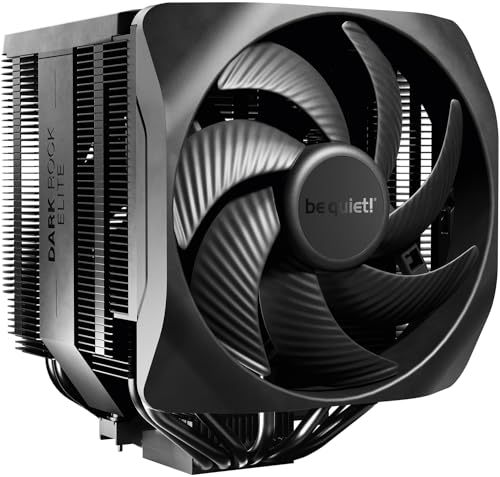
A high-end dual-fan tower with a speed switch that adapts from whisper-quiet to full overclocking fury.
This is the cooler for builders who want everything: massive cooling, adjustable performance, and premium materials. The Dark Rock Elite features 7 copper heat pipes and two Silent Wings 135mm PWM fans. The clever 2-mode Speed Switch lets you choose between Quiet Mode at 1500rpm max — a mere 25.8dB(A) — and Performance Mode that spins the fans up to 2000rpm for maximum cooling. The front fan uses an innovative rail system that lets you adjust its height in 5 steps, making it compatible with almost any RAM configuration.
Noise level is what owners praise most, with feedback that it’s “dead silent even in performance mode” and that GPU fans end up being the loudest part of a build. On a 7950X, one owner saw the CPU stay in the 50s under load, and another with an i7-14700K noted it works extremely well. Flowing up to 80.2 CFM, it’s the highest airflow rating in this lineup. The top cover features ARGB LEDs that can be configured with any ARGB controller, adding a subtle glow to black interiors.
The build quality is top-notch — one owner called it “a beast of a fan cooler” with a quality feel throughout. Installation is generally easy, aided by an included long screwdriver, but be careful of CPU pressure during mounting. The cooler is large and heavy at 3.4 pounds, so check your case clearance, especially with four DIMM slots or a glass side panel. A few owners note the fan cables are short, potentially requiring you to route them carefully or remove your GPU for access.
Why It’s Elite
- Dual 135mm fans deliver 80.2 CFM of airflow
- 2-mode speed switch for quiet or performance operation
- Adjustable front fan rail fits almost any RAM setup
Considerations
- Large and heavy at 3.4 pounds — verify case clearance
- Fan cables can be short and hard to route
Built for overclockers: If you push your CPU hard and want a cooler that switches from silent to savage at the flip of a switch, this is it. Think about: The size demands a spacious case, and the short fan cables need careful routing.
9. Noctua NH-D15 G2 LBC

The legendary dual-tower, refined with 8 heat pipes and fans so quiet you’ll forget they’re spinning.
This is the cooler that defines “buy once, cry once.” The NH-D15 G2 LBC is the second generation of an iconic cooler, now with 8 heat pipes, 20% more surface area, and novel NF-A14x25r G2 140mm fans. The LBC (Low Base Convexity) version is specifically tune for relatively flat CPUs like AMD AM5 chips — a deluxe choice for Ryzen 9950X, 9900X, 9700X, and 9600X. With noise at just 24.8dB(A), it’s the quietest cooler in this lineup while delivering massive cooling power.
Build quality is what owners praise most, and it’s easy to see why. The construction uses copper for the base and heat pipes, aluminum for the fins, with soldered joints and nickel plating throughout. One owner on a 7800X3D saw temps under 56°C, beating their previous cooler by a solid margin. The fans are “silent at 80%” and the whole unit feels like it could outlast your PC. It even includes a Torx T20 screwdriver, thermal paste, and cable extensions in the box.
The offset design with recessed lower fins clears the top PCIe x16 slot on most current motherboards, and offers 59mm RAM clearance in single-fan mode. The fans use speed-offset for acoustic fine-tuning, with Low-Noise Adaptors and PWM for automatic speed control. The included SecuFirm2+ mounting system makes installation straightforward, and the 140mm fans even use 120mm mounting holes for maximum compatibility. Owners note it fits modern builds like the 9800X3D on X870 boards with room to spare.
The ultimate air cooler: If you want the best possible air cooling for a hot AMD chip and value longevity and silence above all, this is the standard-bearer. Heads up: This LBC version is not recommended for Intel LGA1700, LGA1200, or LGA115x platforms — check your socket before buying.
Understanding the Specs
Heat Pipes and TDP
Heat pipes are copper tubes that transfer heat away from the CPU to the cooling fins. More heat pipes generally mean better heat transfer, which is why high-end coolers have 7 or 8 pipes. TDP (thermal design power) tells you how much heat in watts a cooler can handle — match it to your CPU’s TDP for the best performance.
Fan Speed and Noise
Fan speed, measured in RPM (revolutions per minute), determines how much air a fan moves. Higher RPM means more cooling but also more noise, measured in decibels (dB). A cooler with PWM (pulse width modulation) can automatically adjust its speed based on CPU temperature, keeping things quiet at idle and powerful under load.
FAQ
How do I know if a CPU air cooler will fit my motherboard?
What is the difference between a single tower and a dual tower cooler?
Will a large dual-tower cooler block my RAM slots?
How long does a CPU air cooler last?
Is air cooling better than liquid cooling for a CPU?
What does TDP mean when shopping for a CPU cooler?
Do I need to apply my own thermal paste?
What is a PWM fan and why does it matter?
Final Thoughts: The Verdict
For most people, the best air cooler for cpu is the Thermalright Phantom Spirit 120SE because it delivers flagship-level cooling with 7 heat pipes and dual 120mm fans at a price that undercuts competitors. If you want to add RGB lighting to your build without sacrificing performance, the Thermalright PS120SE ARGB offers the same cooling with customizable colors. And if you’re running a hot AMD chip and want the absolute pinnacle of air cooling, the Noctua NH-D15 G2 LBC is the one to reach for — it’s the quietest and most premium cooler here.
How We Picked
We do not accept paid placement. Every pick is matched to a real buyer and a real use-case; we do not hands-on test units.
Sources & Methodology
Specifications: manufacturer listings and product documentation. Review insights: verified customer reviews, as of August 2026. Pricing: not shown on this page (it changes often); check the current price via the retailer link.
As an Amazon Associate, Gadgets Feed earns from qualifying purchases. This does not affect which products we feature.