
Building a clean, all-white gaming PC demands a GPU that matches the aesthetic without sacrificing 1440p performance, and the AMD Radeon RX 7800 XT delivers that balance with authority. With 16GB of GDDR6 memory and RDNA 3 architecture designed for high-refresh-rate gaming, this card sits in the sweet spot between raw rasterization power and efficiency — but finding one cloaked in white silicon takes some hunting.
I’m Min — the co-founder and writer behind Gadgets Feed. I spend my days combing through GPU spec sheets, benchmarking data, and thermal performance charts to separate marketing hype from real-world value, especially in the Radeon RX 7000 series. (And Homer 🐱 approves of cards that double as hand warmers during winter gaming sessions).
This guide zeroes in on the models that pair pure white shrouds with the cooling and clock speeds serious gamers demand. Whether you prioritize factory overclocks, silent operation, or compact builds, the right 7800 xt white gpu can elevate both your frame rates and your rig’s visual identity.
How To Choose The Best 7800 XT White GPU
The RX 7800 XT delivers consistent 100+ FPS in demanding titles at 1440p, making it a top-tier pick for high-refresh-rate gaming without crossing into 4K flagship pricing. But white variants introduce specific trade-offs in cooling design, physical dimensions, and factory tuning that require careful attention.
Cooling System and Fan Design
White GPU shrouds often use different plastic compositions and paint finishes that can subtly affect thermal dissipation. Triple-fan models like the Gigabyte Gaming OC Windforce system or the XFX QICK319 provide superior heat management with larger heatsinks and composite copper heatpipes. Dual-fan designs such as the PowerColor Twin Fan trade some thermal headroom for shorter card lengths, making them ideal for smaller chassis but potentially louder under sustained loads.
Boost Clock and Factory Overclocking
Stock reference clocks for the 7800 XT sit around 2124 MHz game clock and 2430 MHz boost, but factory-overclocked white models can push boost frequencies up to 2565 MHz or higher. Higher clocks demand better thermal solutions — verify whether the card uses a phase-change GPU thermal pad or standard paste, and check if it offers dual-BIOS switches for toggling between quiet and performance profiles.
Physical Dimensions and Chassis Compatibility
White 7800 XT cards range from compact 260mm dual-fan units to massive 340mm triple-fan beasts. Measure your case’s GPU clearance, especially length and width near the front fan or radiator mounts. Cards wider than 2.5 slots may obstruct side panels in compact mid-towers, and heavy triple-fan models often benefit from included support brackets to prevent PCB sag.
Quick Comparison
On smaller screens, swipe sideways to see the full table.
| Model | Category | Best For | Key Spec | Amazon |
|---|---|---|---|---|
| XFX Speedster QICK319 7800 XT | Premium RDNA 3 | High-refresh 1440p gaming | 2430 MHz boost clock | Amazon |
| ASUS Prime RX 9070 XT White | Next-Gen Flagship | Ray tracing & PCIe 5.0 | 3030 MHz boost clock | Amazon |
| Gigabyte 7800 XT Gaming OC | Mid-Range Workhorse | 1440p ultra settings | 2565 MHz boost clock | Amazon |
| PowerColor Twin Fan 7800 XT | Compact Value | Small form-factor builds | 260mm card length | Amazon |
| Yeston RX 7800 XT | Aesthetic Special | White-themed builds | 2430 MHz boost clock | Amazon |
| Sapphire Pulse 7800 XT | Quiet Performer | Silent operation | 19% more airflow | Amazon |
| PowerColor Fighter 7800 XT | Entry-Level Pick | Budget 1440p upgrade | 2475 MHz boost clock | Amazon |
| XFX Mercury RX 9070 XT White | OC Beast | Overclocking & RGB | 3100 MHz boost clock | Amazon |
| XFX Swift RX 9070 XT White | Triple-Fan Value | High FPS at 1440p | 2970 MHz boost clock | Amazon |
| ASUS Dual RX 9060 XT White | Compact Performer | Space-limited builds | 3250 MHz boost clock | Amazon |
| Gigabyte 7800 XT Gaming OC (Alt) | Reliable Mid-Range | Linux & Ollama | 2565 MHz boost clock | Amazon |
In‑Depth Reviews
1. XFX Speedster QICK319 RX 7800 XT Core White

The XFX Speedster QICK319 is the definitive white 7800 XT for gamers who want maximum cooling headroom without paying a premium for RGB. Its triple-fan solution with a large aluminum fin stack keeps GPU core temperatures well under 60°C under sustained loads, and the anodized white shroud resists yellowing over time. The dual-ball bearing fans use a barrier ring design that increases downward air pressure, which translates to quieter operation compared to earlier generations.
At a boost clock of 2430 MHz out of the box, this card consistently delivers 100+ FPS in titles like Cyberpunk 2077 and Baldur’s Gate 3 at 1440p ultra settings. The 16GB GDDR6 buffer gives it extra headroom for texture-heavy mods and future game releases. Owners upgrading from older cards like the GTX 1070 report significantly lower noise levels and superior contrast from the AMD Adrenalin driver suite.
The primary trade-off is size — at 13.2 inches long, the QICK319 requires a spacious case with good front clearance. Fan noise becomes noticeable above 60% RPM, though most users find the card stays cool enough to keep fan speeds low during typical gaming sessions. It pairs exceptionally well with a 750W power supply and benefits from the included support bracket to prevent PCB sag in vertical or standard mounts.
Why it’s great
- Excellent thermal performance with triple-fan design
- High 2430 MHz boost clock for 1440p gaming
- Durable dual-ball bearing fans
Good to know
- Large physical footprint requires ample case space
- Fans can be audible above 60% speed
2. PowerColor Twin Fan AMD Radeon RX 7800 XT White

The PowerColor Twin Fan is one of the shortest white 7800 XT models available at just 260mm, making it a strong candidate for compact mid-tower and smaller ATX cases. Despite its reduced length, the dual-fan cooler keeps GPU temperatures around 65°C under load and hotspot temperatures at 87°C, which is well within the safe operating range for RDNA 3 silicon. The card uses a conventional 8-pin power arrangement, avoiding adapter headaches that come with newer 12VHPWR connectors.
Gamers upgrading from cards like the RX 7600 or GTX 1070 consistently report massive generational leaps in performance — the Twin Fan handles 1440p at high settings with ease across modern titles, including demanding ray-traced scenarios. The dual-fan design runs quietly enough to be inaudible in a standard desktop placement, even during extended sessions. Owners pairing it with a 5800X CPU note that the card reaches 99.7% stability in benchmarks with default fan curves.
The main limitation is the lower factory boost clock of 2124 MHz base, which means slightly less out-of-box performance compared to triple-fan overclocked variants. Overclocking manually through the Adrenalin software can close this gap, but thermal headroom is thinner with only two fans. The white shroud is clean and minimalist, blending into all-white builds without drawing attention away from other components.
Why it’s great
- Compact 260mm length fits smaller cases
- Standard 8-pin power connectors
- Quiet operation under typical gaming loads
Good to know
- Lower factory clock limits out-of-box performance
- Less thermal headroom for aggressive overclocking
3. Yeston AMD Radeon RX 7800 XT 16G White

Yeston brings a distinctive look to the 7800 XT white segment with a card that blends traditional white cooling shrouds with anime-inspired design cues and clean geometric lines. The 5nm Navi 32 die delivers the same 16GB GDDR6 memory and 256-bit bus as other 7800 XT models but with a factory overclock that pushes boost clock to 2520 MHz in OC mode. The card outputs up to 7680 x 4320 resolution via three DisplayPort connectors and one HDMI 2.1 port.
Real-world performance is competitive with triple-fan offerings from larger brands. Users upgrading from an RTX 2060 report smooth 4K gaming in Monster Hunter Wilds and Cyberpunk 2077 with good thermal behavior, provided the case has adequate airflow. The fan system runs quietly during normal gaming and only becomes audible under sustained synthetic loads. A common recommendation among owners is to use the included bracket or a third-party GPU support to counteract sag that can develop over weeks of use.
The biggest challenge is availability and brand recognition outside enthusiast circles, though Yeston has built a solid reputation in Asian markets over the past decade. The card’s large dimensions — roughly 340mm long — require careful case measurement before purchase. Overclocking performance is solid, and the card handles voltage tuning well thanks to the 5nm process efficiency.
Why it’s great
- Unique white aesthetic with premium finish
- High 2520 MHz boost clock in OC mode
- Quiet fan operation during gaming
Good to know
- Very long card requires spacious case
- May develop GPU sag without support bracket
4. PowerColor Fighter AMD Radeon RX 7800 XT White

The PowerColor Fighter 7800 XT delivers the full RDNA 3 experience at a more accessible price point without compromising the core 16GB VRAM configuration. With a game clock of 2169 MHz and boost clock of 2475 MHz, it sits slightly below premium overclocked models but still outpaces the reference specification comfortably. The dual-fan cooling system, while simpler than triple-fan designs, keeps the card running at manageable temperatures in well-ventilated cases.
Owners consistently highlight the Fighter’s ability to drive 1440p at ultra settings and even handle 4K at 60 FPS in less demanding titles, making it a versatile upgrade for gamers moving from decade-old cards. The card’s relatively light weight — just 330 grams — reduces stress on PCIe slots and makes it suitable for vertical mounting without additional support. User reports confirm no coil whine in most units and stable operation with AMD’s latest driver releases.
The main trade-offs are the smaller heatsink and fan arrangement, which means the card may run warmer or louder than larger variants under sustained heavy loads. The fighter is also slightly longer at 11.93 inches than the Twin Fan, so double-check your case clearance. Linux users appreciate the Fighter’s excellent kernel-level driver support and smooth integration with open-source environments like Ubuntu and Fedora.
Why it’s great
- Strong 2475 MHz boost clock for 1440p gaming
- Lightweight design reduces PCIe slot strain
- Compatible with 4K 60 FPS gaming
Good to know
- Dual-fan cooling runs warmer under heavy loads
- Longer than expected at 11.93 inches
5. Gigabyte Radeon RX 7800 XT Gaming OC 16G White

Gigabyte’s Gaming OC white variant of the 7800 XT is built for enthusiasts who demand high factory clocks without manually tuning. The card ships with a boost clock of 2565 MHz — among the highest for white RDNA 3 cards — and uses the proven Windforce cooling system with three 90mm blade fans, seven composite copper heatpipes, and a large copper plate that makes direct contact with the GPU die. The result is excellent thermal performance that keeps core temperatures well under 70°C under gaming loads.
Gamers praise this card for delivering 100+ FPS at 1440p ultra settings across a wide range of modern titles, including ray-traced games where AMD’s second-generation RT accelerators show noticeable gains over the RX 6000 series. The dual HDMI 2.1 and dual DisplayPort 2.1 connectivity supports high refresh rates on modern monitors and multi-display setups. The RGB Fusion lighting on the Gigabyte logo adds a subtle glow that complements white builds without overwhelming the aesthetic.
The card requires a 700W power supply minimum and pulls up to 300W under heavy load, which is consistent with the 7800 XT’s power envelope. Some users note occasional audio dropouts or black screens in specific game titles, typically resolved by driver updates or adjusting the PCIe power management settings in Windows. The 3-year warranty provides peace of mind for long-term ownership.
Why it’s great
- Excellent 2565 MHz boost clock for high FPS
- Windforce cooling system runs cool and quiet
- Dual HDMI 2.1 ports for multi-monitor setups
Good to know
- Occasional driver-related black screen issues reported
- Pulls up to 300W under sustained gaming load
6. Sapphire Pulse AMD Radeon RX 7800 XT Gaming 16GB

Sapphire’s Pulse 7800 XT is engineered for nearly silent operation without sacrificing 1440p performance. The angled velocity fan design delivers 44% more downward air pressure and 19% more airflow than previous Pulse generations, which allows fans to spin slower while maintaining low GPU temperatures. The composite heatpipe arrangement is tuned specifically for each cooling zone on the PCB, efficiently distributing heat and reducing hotspots.
Users upgrading from older cards describe the Pulse as “barely audible” even in open-air test benches, and the card runs exceptionally cool when paired with a modern CPU like the 7800X3D. At 1440p ultra settings, it consistently hits over 100 FPS in most AAA titles released before 2024, and it handles lighter ray-traced games without dipping below 60 FPS. The included fuse protection on the PCIe power connector circuit adds a safety layer against electrical faults.
The standard version of the Pulse is black, but Sapphire occasionally releases white special editions through select retailers. Check availability before purchasing if the white aesthetic is mandatory for your build. The card’s physical dimensions are comparable to other dual-fan designs at 260mm, making it suitable for m-ITX cases like the Fractal Terra.
Why it’s great
- Extremely quiet fan operation under load
- 44% more downward air pressure for better cooling
- Fuse protection on power circuit for safety
Good to know
- White variant may be harder to find
- Standard dual-fan cooling limits overclocking headroom
7. ASUS Prime AMD Radeon RX 9070 XT White OC Edition
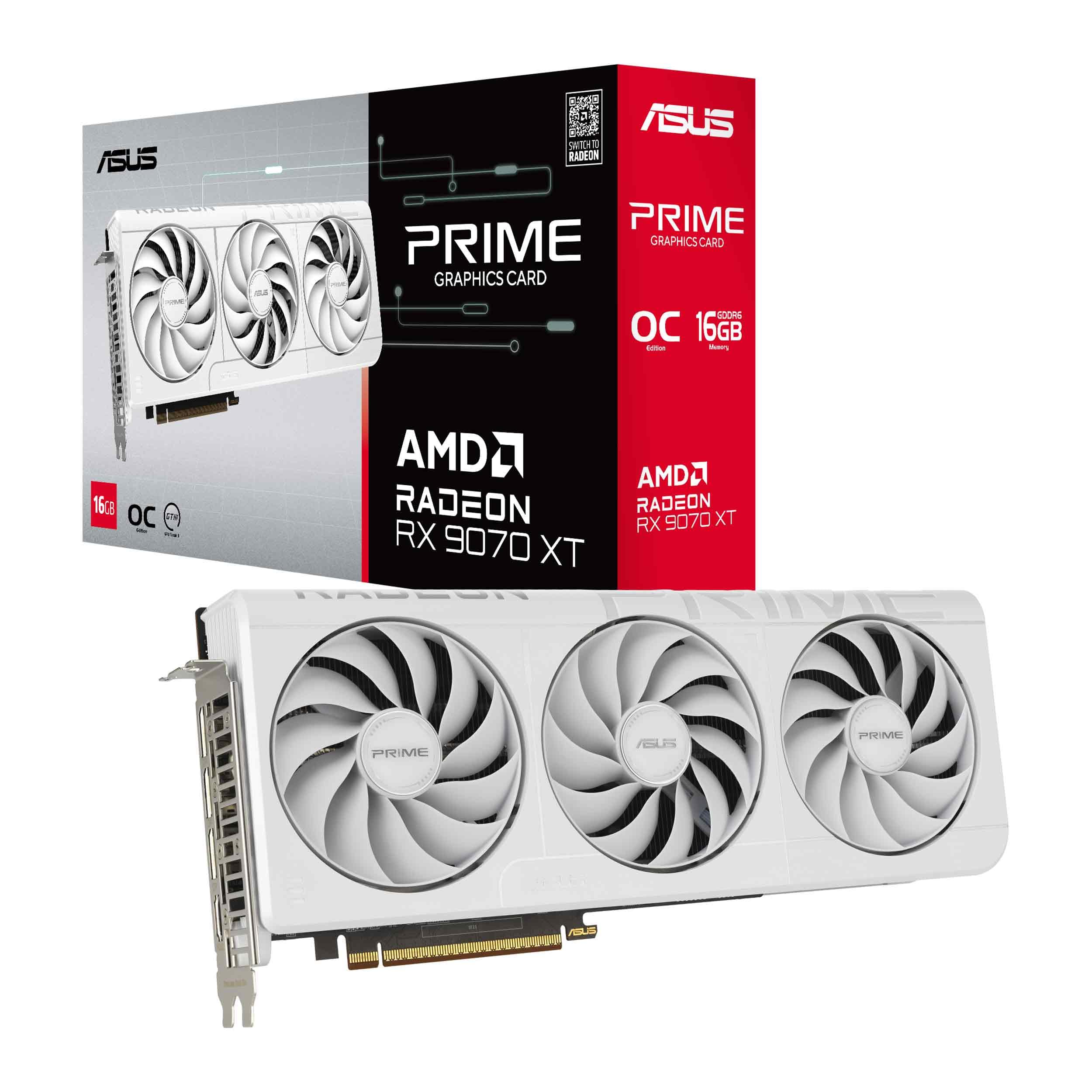
The ASUS Prime RX 9070 XT White OC Edition represents the bleeding edge of AMD’s RDNA 4 architecture, pushing boost clocks to an astonishing 3030 MHz in OC mode. This card brings PCIe 5.0 support, next-gen ray tracing improvements, and a massive 3.7-pound heatsink assembly that incorporates a phase-change GPU thermal pad for superior heat transfer. The 2.5-slot design, while larger than typical cards, maintains compatibility with most standard mid-tower cases.
Early adopters report GPU temperatures hovering around 50°C under peak gaming loads, making this one of the coolest-running high-end AMD cards available in white. The dual-ball fan bearings are rated for twice the lifespan of sleeve bearing designs, and the dual-BIOS switch lets users toggle between quiet and performance profiles. The card includes a GPU Guard support bracket to handle its substantial weight and prevent sag over time.
The main consideration is that this is a 9070 XT, not a 7800 XT, so it commands a higher tier in AMD’s lineup and comes with a corresponding step up in both performance and cost. The white shroud design is exceptionally clean and matches perfectly with ASUS Prime and ROG white motherboards. Ensure your PSU has at least 850W capacity and that your case can accommodate a 12.3-inch card.
Why it’s great
- Monstrous 3030 MHz boost clock for elite gaming
- PCIe 5.0 support for future-proof builds
- Phase-change GPU thermal pad for lower temps
Good to know
- Large and heavy card requires support bracket
- Uses newer architecture — check driver maturity
8. XFX Mercury AMD Radeon RX 9070 XT OC Gaming White Edition

XFX’s Mercury RX 9070 XT White Edition takes overclocking to the extreme with a factory boost clock of 3100 MHz, making it the highest-clocked white GPU in this lineup. It uses a massive triple-fan cooler that spans over three slots in width and includes full RGB lighting across the shroud. The card requires three 8-pin power connectors and an 800W power supply minimum, reflecting its appetite for power to sustain those clock speeds.
Owners describe the Mercury as a “beast card” that runs any modern game at maximum settings with high frame rates, including demanding titles at 4K. The included GPU stand prevents sag and complements the overall aesthetic. Users report that the fans run quietly despite the aggressive cooler design, and the AMD Adrenalin software provides ample tuning options for those who want to push even further beyond factory settings.
The thermal solution is so effective that one user noted replacing a previous flagship card with the Mercury and finding it quieter and cooler under load. However, double-check your case clearance carefully — this card is one of the largest consumer GPUs available, and clearance issues near front-mounted radiators or bottom-mounted fans are common. The Mercury also commands a significant price premium reflective of its tier and factory tuning.
Why it’s great
- Top-tier 3100 MHz boost clock for max performance
- Full RGB lighting for white build aesthetics
- Excellent thermal performance under load
Good to know
- Very large cooler requires careful case measurement
- Needs 800W PSU and three 8-pin connectors
9. XFX Swift AMD Radeon RX 9070 XT Triple Fan White Gaming Edition

The XFX Swift RX 9070 XT White Edition is a more accessible entry point into RDNA 4 gaming while still offering substantial performance improvements over the RX 7800 XT. With a boost clock of 2970 MHz and the same 16GB GDDR6 configuration, this card delivers massive frame rate gains over builds based on older GPUs like the RTX 2060 Super or RX 6600 XT. Users upgrading from an RTX 3080 report roughly doubling their frame rates in titles like Baldur’s Gate 3 and Helldivers 2.
The triple-fan SWFT cooling solution keeps temperatures in check during extended gaming sessions, and the white shroud design is clean without being flashy. The card avoids the 12VHPWR connector that has caused issues on some Nvidia cards, using standard power inputs for greater compatibility and reliability. At 4K, this card delivers playable frame rates in most games, though some titles may require FSR upscaling to maintain 60 FPS.
The Swift is a large card that fits well in a Corsair 300D case with plenty of room for airflow, but buyers should verify dimensions before purchasing. Some users note that shipping times can be longer than Amazon direct stock due to pre-order fulfillment, so plan ahead if you need the card for a specific build deadline. The XFX warranty and build quality have been well-regarded across multiple generations of Radeon cards.
Why it’s great
- High 2970 MHz boost for RDNA 4 performance
- No 12VHPWR connector — safer power setup
- Triple-fan cooling keeps temperatures low
Good to know
- Large physical size may limit case compatibility
- Availability can be tight during launch periods
10. ASUS Dual Radeon RX 9060 XT White Edition
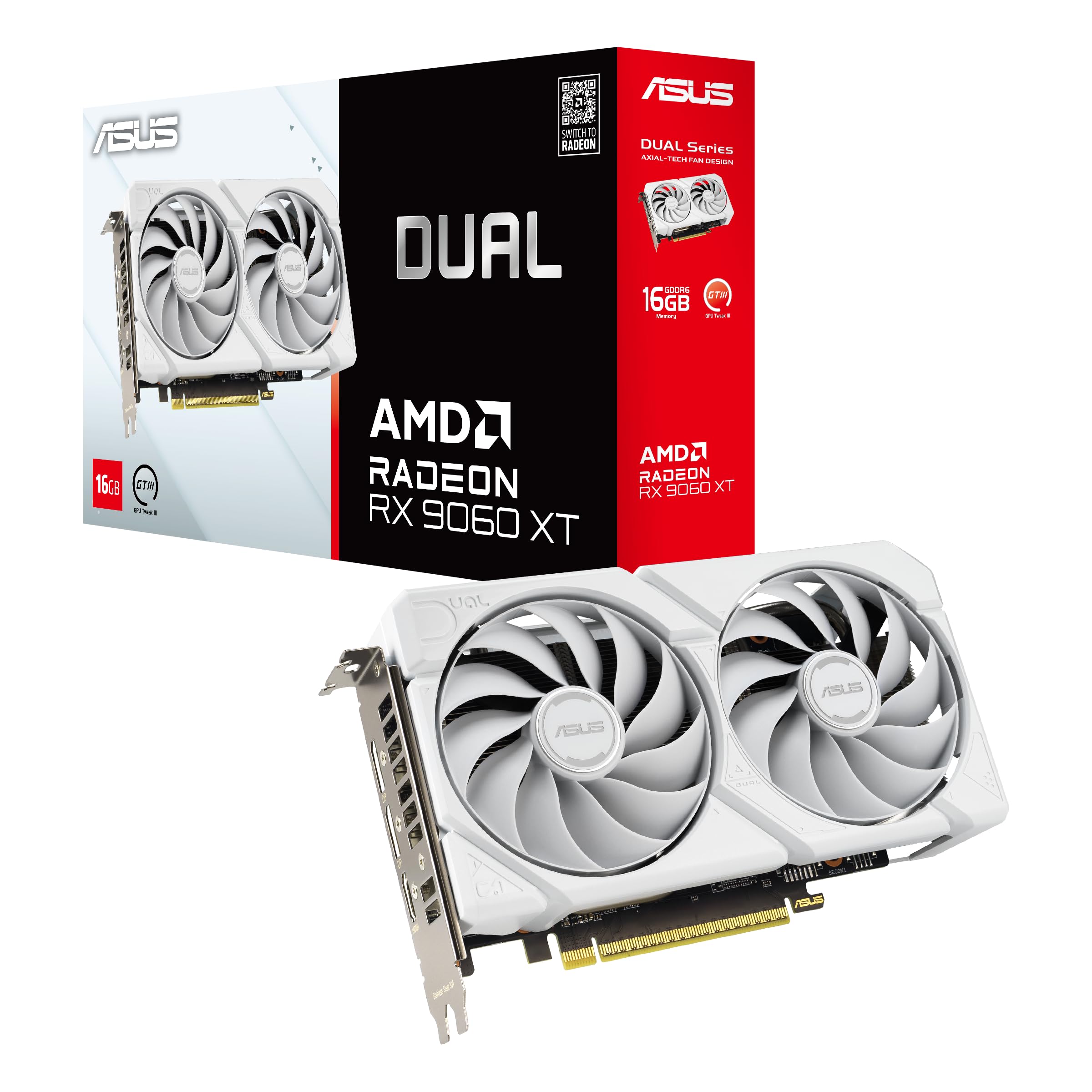
The ASUS Dual RX 9060 XT White Edition brings the compact, space-efficient dual-fan design to a higher clocked RDNA 4 card with a 3250 MHz boost clock. This 2.5-slot card is ideal for users with smaller cases who still want a white GPU with modern features like PCIe 5.0 support and HDMI 2.1b. The axial-tech fans use a smaller hub to accommodate longer blades, and the barrier ring increases downward air pressure for better cooling efficiency.
Owners upgrading from the RX 6600 XT report the card as a “perfect upgrade” that maintains similar power draw and physical footprint while delivering substantially better performance. The 0dB technology allows the fans to stop entirely during light gaming or desktop use, making the card completely silent when not under load. The dual-ball fan bearings are rated for twice the lifespan of sleeve designs, ensuring long-term reliability.
The Dual BIOS switch is particularly useful for users who want to toggle between quiet and performance modes without entering software. The white shroud design is minimalist and pairs well with all-white ASUS Prime motherboards for a cohesive build. Note that this is a 9060 XT card, which represents a different market position than the 7800 XT — check your required performance level before purchase.
Why it’s great
- Compact 2.5-slot design fits smaller cases
- 0dB fan-stop for silent desktop use
- Dual BIOS for quiet and performance profiles
Good to know
- 9060 XT has different performance tier than 7800 XT
- Dual-fan has less thermal headroom than triple-fan
11. Gigabyte Radeon RX 7800 XT Gaming OC 16G (Alt)

This alternative Gigabyte Gaming OC 7800 XT variant shares the same Windforce triple-fan cooling system and 2565 MHz boost clock as the earlier listing but may come with slightly different packaging or regional SKU variations. It delivers the same excellent 1440p gaming performance and 16GB GDDR6 buffer, ensuring compatibility with demanding titles and future game releases. The metal backplate adds rigidity and a premium feel to the card.
Linux users particularly favor this card for its excellent compatibility with open-source drivers and tools like Ollama for running large language models locally. With the ROCm stack, users report over 70% speed improvements on common LLM workloads compared to Intel Arc alternatives, plus better noise and thermal behavior. The card handles modern Linux gaming via Proton and native titles without driver headaches.
Users note that the RGB lighting is minimal — just a small Gigabyte logo — which works well for builds where lighting is handled by other components. The card runs quiet and cool after tuning fan curves through the Adrenalin software, though default settings can produce audible fan noise under maximum load. Some users report occasional audio dropouts or black screens in certain games, typically resolved through driver updates or PCIe power management adjustments.
Why it’s great
- Excellent Linux driver support and LLM compatibility
- Windforce cooling system runs cool under load
- Minimal RGB fits clean white builds
Good to know
- Default fan curves can be loud at max speeds
- Driver-related black screen issues reported occasionally
FAQ
Will a white 7800 XT fit in my Fractal Terra or other SFF case?
Does the white paint on these GPUs affect thermal performance?
Can I use a white 7800 XT with a standard black PSU without issues?
Which white 7800 XT has the best performance for ray tracing?
Will a white 7800 XT look good with a white and pastel build theme?
Final Thoughts: The Verdict
For most users, the 7800 xt white gpu winner is the XFX Speedster QICK319 RX 7800 XT Core because it combines an excellent white aesthetic with triple-fan cooling and a 2430 MHz boost clock that handles 1440p gaming flawlessly. If you need the most compact white option for a tighter case, grab the PowerColor Twin Fan 7800 XT. And for maximum factory overclocking performance in a white shroud, nothing beats the Gigabyte 7800 XT Gaming OC with its 2565 MHz boost clock.