
Our readers keep the lights on and my morning glass full of iced black tea. As an Amazon Associate, I earn from qualifying purchases.
Specs are compiled from manufacturer listings and verified buyer reviews and can change over time — please confirm the key details on the product page before buying.
Finding a keyboard and mouse that won’t break the bank usually means sorting through a pile of flimsy, cheap-feeling plastic that dies in a month. That’s the real problem: you want the satisfying feel and reliable response for your games without paying premium prices for a brand name. This guide cuts through the noise to find the combos that actually hold up for both gaming sessions and daily work.
I’m Min — the founder and writer behind Gadgets Feed. This guide is built by comparing the manufacturers’ published specifications and the patterns across verified customer reviews, so you get each pick’s real strengths and trade-offs instead of marketing spin.
What matters is finding a set that lasts, feels decent, and has the right features for your setup, which is why I’ve dug into the specs and owner feedback to rank the budget gaming keyboard and mouse options worth your money.
Our Picks at a Glance


How To Choose The Best Budget Gaming Keyboard And Mouse
On a budget, prioritize the features that matter most for your gaming needs. The budget market now offers solid performance, decent build quality, and RGB lighting at affordable prices.
Wired vs. Wireless: Know Your Lag and Battery
Wired sets are simpler: plug them in and they work with no battery worries or connection drops. Wireless sets like the Cakce offer a cleaner desk and 2.4G transmission (a type of wireless signal that uses a small USB receiver for a fast, stable connection), but you’ll need to keep an eye on the charging. Some wireless models have a battery life that’s great for a few days, while others might surprise you with how quickly they drain, so check the milliampere-hour (mAh) rating on the battery.
The Feel: Membrane vs. Mechanical
Most budget combos use membrane keys, which are quiet and soft but can feel a bit mushy. Mechanical keyboards use individual switches under each key; blue switches give a loud, satisfying click and tactile bump that many gamers love. On a budget, a true mechanical switch is rare, but some sets, like the Taiahiro, offer that authentic clicky experience. Others, like the RedThunder, give a “mechanical feel” without the actual mechanical switches, which is a good middle ground.
DPI and Sensitivity
DPI (dots per inch) measures how far your cursor moves across the screen when you move the mouse. A higher DPI is not always better; it just means the cursor moves faster. For gaming, having a few adjustable DPI levels is more useful than having one super-high setting. Look for a mouse with a DPI button on it, so you can switch between a slow, precise setting for sniping and a fast one for turning around quickly.
Quick Comparison
| Model | Best For | Connection | Switch Type | Max DPI | Amazon |
|---|---|---|---|---|---|
| Redragon S101-3 PRO★ Best Overall | Overall value & customization | Wired USB | Membrane | 7200 | Amazon |
| RedThunder K62Most Versatile | Portability & space-saving | 2.4G Wireless | Mechanical Feel | — | Amazon |
| CHONCHOW 4-in-1 | Console & multi-device bundles | Wired USB | Membrane | 3600 | Amazon |
| DGG Gaming Combo | All-in-one starter kits | Wired USB | Membrane | — | Amazon |
| Cakce Wireless RGB | Clean, cable-free desks | 2.4G Wireless | Mechanical Feel | 2400 | Amazon |
| MSI Forge GK110 | Brand reliability | Wired USB | Membrane | 12800 | Amazon |
| Taiahiro Typewriter | Nostalgic typing experience | Wired USB | Mechanical Blue | 3200 | Amazon |
In‑Depth Reviews
1. Redragon S101-3 PRO Gaming Keyboard and Mouse
Our pick — 4.5★ from 51,500+ verified ratings; the strongest balance of quality and price.
The feature-packed crowd favorite that sets the bar for budget combos
The Redragon S101-3 PRO delivers exceptional value for its price. It’s a full-size wired keyboard with soft-touch membrane keys that stay quiet even during frantic gaming, so it won’t disturb anyone in the room. The included ergonomic wrist rest helps reduce fatigue during long typing sessions, and the anti-ghosting feature means you can press many keys at once and they’ll all register instantly.
Customization is this set’s biggest strength. You get 6 vibrant backlight modes on the keyboard, 10 lighting effects on the mouse, and 5 dedicated macro keys to record complex command sequences for a competitive edge. You can download the software from redragon.com to tweak colors and brightness, and your settings save directly to the hardware, so they stay exactly as you set them even after you restart your PC.
The mouse sensitivity is adjustable on the fly using a dedicated button, ranging from 800 up to 7200 DPI (dots per inch, or how fast the cursor moves), letting you switch from precise aiming to quick turns without pausing the game. Owners praise the build quality and value, noting the keys resist fading even after a year of use. The one recurring gripe is that the keyboard’s sleep mode can cause a 5-10 second reconnect delay, so you’ll want to toggle the keys during gaming to avoid that hiccup.
Why It Wins
- Software customization with onboard memory
- Quiet, soft keys with anti-ghosting
- Wide 800-7200 DPI range
The Trade-offs
- Keys need a bit more force than a mechanical switch
- Sleep mode can cause a short reconnect delay
The pick for most: This is the safest all-rounder on the list — ideal for first-time gamers, students, and anyone who wants a reliable daily driver with real customization.
Think twice if: You specifically want the loud “click” of a mechanical switch, because this membrane set is designed to be quiet.
2. RedThunder K62 60% Wireless Combo
A tiny wireless duo that frees up your desk without sacrificing battery life
The RedThunder K62 is for the gamer or business traveler who values desk space above all else. It’s a 60% keyboard, meaning it ditches the number pad and function row, leaving plenty of room for mouse movement. The honeycomb-shell mouse weighs a featherlight 65 grams, so it’s flexible and comfortable even through long sessions without causing fatigue.
Battery life is where the specs get interesting. The keyboard’s 1850 mAh battery and mouse’s 500 mAh battery deliver up to 8 hours of continuous use with lighting enabled. Both have a smart energy-saving function that sends them to sleep after 2 minutes of no activity, waking instantly on any key press.
The keys are rated for 10 million keystrokes and use double-shot injection molding to prevent letter fading. Owners love that it’s compact, quiet, and perfect for work on business trips or gaming on a console. However, there are mixed reports on reliability, with some units having connectivity issues or the keyboard stopping entirely. It’s a great value, but a small gamble on the long-term durability front.
Space-maximizing perks: The 60% layout and 65-gram mouse make this the best pick for tiny desks or travel bags, and the keyboard offers 4 RGB backlight modes with 7 monochrome options.
The honest catch: Reliability gets mixed feedback in the review data, so treat the long-term connection as a bit of a lottery.
Reach for this if: You want a truly compact, wireless setup for a clean desk that doubles as a travel companion.
Look elsewhere if: You need a number pad for spreadsheets or data entry, since this keyboard has no 10-key numeric keypad.
3. Taiahiro Typewriter Style Mechanical Combo

A clicky, retro-styled keyboard that turns typing into an event
Forget blending in with black plastic. The Taiahiro is a metallic silver typewriter-style keyboard with round, punk-inspired keycaps that people will definitely notice. It uses genuine mechanical blue switches, which means every keystroke gives you a crisp, audible click and a satisfying tactile “bump” that confirms your press, making it a joy for both gaming and heavy typing.
Under the retro skin, it’s surprisingly well-built. The top plate is made of aluminum alloy with a matte finish, and the double-shot-molded ABS keycaps are wear-resistant and non-fading, plus they’re removable for easy cleaning. The full-size 104-key layout includes 12 multimedia keys and a number pad, with adjustable double kickstand feet to reduce hand fatigue during long sessions.
The mouse features a high-precision optical sensor with 4 adjustable DPI levels (800/1600/2400/3200) and a 7-color breathing RGB light. Owners describe the sound as “super satisfying” and note it looks like a musical instrument on the desk. One common note: the RGB lighting lacks full color customization (no white option), and with the lights off, the keys are hard to read. The clicky sound is a feature, but only if your family or coworkers agree.
Standout Features
- True mechanical blue switches with a loud, satisfying click
- Premium aluminum alloy metal panel
- 11 RGB lighting modes with adjustable brightness
Good To Know
- RGB has no white color option
- Loud clicks aren’t ideal for quiet shared spaces
The nostalgia pick: If you miss the feel of an old-school typewriter or want a desk centerpiece, this mechanical set delivers the experience.
Not for you if: You need a stealthy, quiet keyboard for an office with thin walls — this one clicks loudly by design.
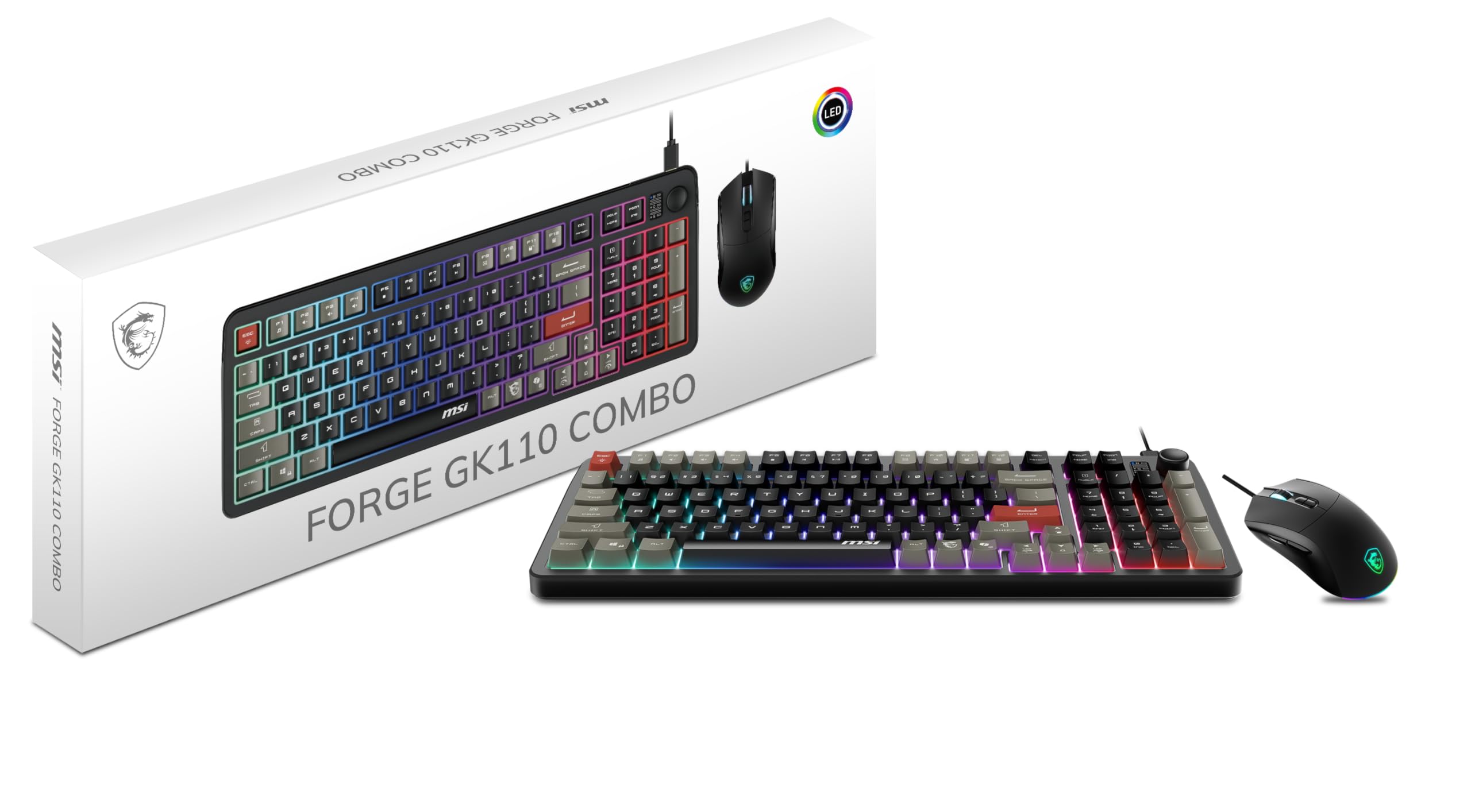
4. MSI Forge GK110 Combo
A big brand name brings polish and buttery-smooth tracking to the budget tier
When you see “MSI” on a peripheral, you expect quality, and the Forge GK110 delivers without the usual brand markup. It’s a wired membrane combo that focuses on the essentials and does them exceptionally well. The typing experience is quiet and responsive, with a soft, muted feel that won’t aggravate your ears or your roommates, making it perfect for long productivity sessions as well as casual gaming.
The standout spec here is the optical sensor on the mouse, which goes up to an impressive 12,800 DPI — more than double the Redragon’s top end, giving you ultra-fine tracking precision if you ever want it. It also features a dedicated volume scroll wheel on the keyboard, letting you adjust audio on the fly (scroll up and down for volume, press to mute), which is a rare and genuinely useful convenience in this price range.
Owners consistently report that it feels well-built “like it costs more” and enjoys the bright RGB lighting and ergonomic feel. The mouse switches are rated for 20 million clicks, ensuring long-term durability. The main limitation is that the RGB lighting is controlled via hotkeys only, not software, so you get predefined effects rather than per-key customization. It’s a superb starter set that works perfectly as a plug-and-play unit.
Brand-grade build: This is the most polished-feeling combo on the list, with a 12,800 DPI sensor and a dedicated volume roller that beats anything else at this level.
The simple limitation: RGB controls are basic (hotkeys only), so skip this if you want deep per-key lighting customization.
Grab this for: Gamers who want a trusted, reliable brand and the highest DPI headroom on this list without entering premium price territory.
skip it if: You’re after a clicky mechanical feel, because this is a quiet membrane keyboard through and through.
5. CHONCHOW Wired Rainbow 4-in-1 Bundle

A one-box starter kit that throws in a headset and mouse pad for good measure
The CHONCHOW bundle answers the question of what to buy when you need everything at once. Alongside the keyboard and mouse, you get a gaming headset and a 10 x 7.8-inch mouse pad, all in one box. It’s a complete setup for a young gamer’s first rig or for hooking up to a console, and it’s compatible with PC, laptop, Mac, PS5, PS4, and Xbox One.
The keyboard features 19 commonly used keys that don’t conflict, so your rapid key presses register correctly during intense games. It also includes 4 interchangeable W/A/S/D keys, a WIN key that can be disabled to prevent accidental menu pop-ups, and it’s both non-slip and splash-proof. The mouse offers 4 switchable DPI levels (1200, 1800, 2400, 3600) and 6 buttons, including 2 side buttons.
There’s a 30-day refund or replacement guarantee and a 12-month maintenance policy for quality issues, which is reassuring at this level. Owners love the value and appearance, calling it a great starter set. There are two honest caveats: the headset needs both the USB and the microphone jack plugged in to work (USB alone won’t do it), and durability gets mixed feedback, so it’s best viewed as an entry-level kit rather than a long-term investment.
The all-in-one draw: Getting a keyboard, mouse, headset, and pad in one package makes this the easiest way to equip a whole setup at once.
The main catch: Functionality and durability get mixed reviews, so this is a great starter but not a “buy it for five years” pick.
Best for: Parents equipping a first gaming setup or anyone wanting a full kit for a console without buying four separate items.
Think twice if: You want a headset that works from a single USB port — this one requires both USB and audio jacks.
6. DGG Gaming Keyboard Mouse and Headphones Combo

A lightweight, universal-compatible bundle with a comfy headset for long night sessions
The DGG bundle is designed for the gamer who wants a full setup that plays nice with everything. The keyboard and mouse are compatible with Windows 2000/Vista/Win7/Win8/Win10/MAC/Linux, while the headphone works with PS4, PS4 Pro, XBOX ONE/S/X, Nintendo Switch, and mobile devices. That cross-platform flexibility makes it a great single purchase for a household with multiple consoles.
The keyboard is a light and thin 104-key design with a floating keycap style that’s easy to clean. It can switch between three color modes, while the mouse features a 7-color circular breathing LED. The headset is the star here, offering a 40mm driver for sound quality, strong noise isolation, and a retractable headband with synthetic leather-wrapped ear cushions for hours of comfortable play.
Everything is plug-and-play with no driver needed. Buyers report it’s great for daily computer gaming with no lag on the mouse, and it’s a popular buy for teenagers diving into their first serious setup. The honest caveat is that the headphones get mixed feedback — they work great for some, but don’t work on Xbox for others, so double-check your primary console before relying on the headset.
The complete package: A 40mm-driver headset with a retractable band plus a full-size keyboard makes this the most complete audio-and-input bundle here.
The compatibility question: Headphone performance on Xbox is hit-or-miss, so verify your console before depending on it.
Ideal for: A young gamer or a household with mixed PCs and consoles who wants one box that covers keyboard, mouse, and audio.
Not ideal if: The headset is your main priority for Xbox play — test it early since compatibility is mixed.
7. Cakce Wireless RGB Keyboard and Mouse

A wireless desk-cleaner with a full metal top and an eight-meter reach
The Cakce combo is for the person who hates cables. It uses 2.4G wireless technology with a single shared nano receiver, so both keyboard and mouse work from one tiny USB dongle tucked into the bottom of the mouse. The 2.4G wireless range extends up to 8 meters, allowing flexible use from across the room.
Build quality is a step up from typical budget wireless sets. The keyboard features a sturdy metal panel that adds a sense of heaviness and durability, and it’s both dustproof and waterproof. All keycaps have backlight functionality with letters that never fade, and there are 12 multimedia keys plus a phone holder bracket built into the keyboard for convenient communication while gaming.
The keyboard offers FN key combinations for various RGB modes, including a running water effect, spectrum cycling, and light wave modes. The mouse has a 7-color alternately breathing light, 6 buttons, and 4 adjustable DPI levels (800, 1200, 1600, 2400). Owners praise the quiet keys and easy lighting adjustment, but the battery life is the elephant in the room — some units stop charging after about 6 months, and connectivity can be spotty, so this is a “love it while it lasts” budget wireless pick.
Wireless Wins
- 8-meter 2.4G wireless range
- Sturdy metal panel build
- 26 no-conflict keys and 12 multimedia keys
Battery Concerns
- Battery life gets negative feedback, with some stopping charging
- Connectivity issues reported by some owners
Choose this for: A tidy, cable-free desk setup where the metal build and long wireless range matter more than absolute reliability.
Be cautious if: You need a dependable daily driver — battery and connection issues appear in the feedback, so treat this as a short-term convenience.
Understanding the Specs
DPI and Mouse Sensors
DPI, or dots per inch, is the standard way to measure mouse sensitivity. A higher DPI means the cursor moves further across the screen for the same physical movement of your hand. For gaming, you generally want a mouse with a DPI button that lets you toggle between settings — a lower DPI (around 800-1200) for precise aiming and a higher DPI for fast tracking. Don’t get hung up on chasing the highest number; a dependable sensor with on-the-fly adjustment is more useful than a massive spec you’ll never use.
Anti-Ghosting vs. N-Key Rollover
Anti-ghosting is a feature that prevents multiple keys you press from being ignored or registering incorrectly during fast gameplay. When you’re mashing several keys at once in a game, a keyboard without it might “ghost” one of the presses, meaning nothing happens. Look for a keyboard that explicitly says it supports a certain number of “no-conflict” keys — like the Cakce’s 26 keys or the CHONCHOW’s 19 common keys — so your combos always register. This is the single most important spec for a budget gaming keyboard.
FAQ
What does DPI mean on a gaming mouse?
Is a wireless gaming keyboard mouse combo laggy?
What is the difference between mechanical and membrane keyboards?
Will a gaming keyboard and mouse work on my Xbox or PlayStation?
What is anti-ghosting and why does it matter?
How long does the battery last on a wireless combo?
My keys are fading or sticking, is that normal for budget sets?
Should I buy a bundle or separate keyboard and mouse?
Can I customize the RGB lighting on a budget combo?
What does a 60% keyboard mean and do I need one?
Final Thoughts: The Verdict
For most people, the budget gaming keyboard and mouse winner is the Redragon S101-3 PRO because it combines deep customization, a wide 800-7200 DPI range, and proven build quality from a massive base of happy owners. If you want a clean, cable-free desk with a tiny footprint, grab the RedThunder K62. And for a nostalgic clicky typing experience that feels like a real mechanical board, the Taiahiro Typewriter is the one to reach for.
How We Picked
We do not accept paid placement. Every pick is matched to a real buyer and a real use-case; we do not hands-on test units.
Sources & Methodology
Specifications: manufacturer listings and product documentation. Review insights: verified customer reviews, as of August 2026. Pricing: not shown on this page (it changes often); check the current price via the retailer link.
As an Amazon Associate, Gadgets Feed earns from qualifying purchases. This does not affect which products we feature.