
Our readers keep the lights on and my morning glass full of iced black tea. As an Amazon Associate, I earn from qualifying purchases.
Specs are compiled from manufacturer listings and verified buyer reviews and can change over time — please confirm the key details on the product page before buying.
When your camera card fills mid-shoot, every second counts. You need those files off the card and onto your computer fast, without hunting for the right adapter or worrying about a corrupt transfer. A reliable card reader prevents that stall, but cheap dongles often fail at the worst moment. per verified buyer reviews top models to find the ones that deliver real speed and reliability.
I’m Min — the founder and writer behind Gadgets Feed. This guide is built by comparing the manufacturers’ published specifications and the patterns across verified customer reviews, so you get each pick’s real strengths and trade-offs instead of marketing spin.
Whether you are offloading a day of 4K video or just need to grab a few photos, the right card reader saves you time and protects your footage with consistent, dependable transfers.
Our Picks at a Glance


How To Choose The Best Card Reader
Choosing the wrong reader can mean slow transfers, dead slots, or unreadable cards. The first thing to nail down is which card formats you actually use — a photographer with a CompactFlash camera has very different needs than someone who only ever touches a microSD from a drone.
Match the reader to your card formats
Every reader has a set of physical slots, and each slot accepts specific card types. If you shoot on a camera that uses CompactFlash or the newer CFast 2.0, make sure the reader has that dedicated slot before you buy. Readers that only handle SD and microSD are cheaper, but they leave you stuck if you own an older camera or a pro video rig.
Speed is more than the USB port
The USB port sets the max speed, but your card’s speed class often limits real-world performance. A USB 3.0 reader can move data at up to 5Gbps, yet a basic UHS-I card will only deliver around 100MB/s no matter what. Check both numbers — the reader’s rated transfer rate and the card’s UHS-I or UHS-II rating — so you know where the bottleneck actually sits.
Consider how many cards you juggle
If you shoot with two cameras or swap cards all day, a multi-slot reader that reads several cards at once saves you the hassle of constant unplugging and re-plugging. Some readers handle four or five cards simultaneously, letting you batch-export an entire shoot in one pass instead of card by card.
Quick Comparison
| Model | Best For | Card Slots | Max Speed | Connector | Amazon |
|---|---|---|---|---|---|
| Lexar 3-in-1★ Best Overall | All-round versatility | SD, microSD, CF | 312MB/s | USB-C/A | Amazon |
| ZIYUETEK 5-slotBudget Champion | Budget multi-card | 5 Slots | 5Gbps | USB-A | Amazon |
| Lexar 2-in-1 | Travel-friendly SD/microSD | SD, microSD | 312MB/s | USB-C/A | Amazon |
| llano 5-in-1 | Photographers on USB-C | CF, SD, TF, MS, M2 | 5Gbps | USB-C | Amazon |
| Kxable 7-in-1 | Legacy card formats | 7 Slots | 5Gbps | USB-C/A | Amazon |
| SANDISK MobileMate | MicroSD-only simplicity | microSD | 170MB/s | USB-A | Amazon |
| Rytaki CFast 5-in-1 | Pro CFast 2.0 workflow | CFast, SD, TF, XD, CF | 5Gbps | USB-C/A | Amazon |
In‑Depth Reviews
1. Lexar Multi-Card 3-in-1 SD/Micro SD/CF Card Reader
Our pick — over 4.5★ from 850+ verified ratings; the strongest balance of quality and price.
The do-everything reader that pairs pro-grade build with genuinely useful speeds across three card types
Reliability is the thing owners praise most about this Lexar, and the reason is easy to see. It crams SD, microSD, and CompactFlash slots into a compact triangular housing, so you can clear a full camera card and a drone card without reaching for a second device. The rubber base underneath keeps it planted on your desk while you pull cards in and out, and the weight in hand feels substantial rather than flimsy.
On speed, it is a clear step up from older gear. Buyers report genuine read speeds around 255MB/s on SD cards and roughly 82MB/s on CompactFlash — close to the rated 312MB/s and 160MB/s ceilings respectively. That makes it noticeably faster than an old USB 2.0 reader, and the included USB-C to USB-A cable means it works with both modern laptops and older desktops right from the start.
This is the crowd favorite for a reason — it earns 4.8 stars across 800+ ratings, and the review pages sum it up: “plug and play—worked flawlessly right from the start.” The only real caveat is that the cord is replaceable by design, so if you are rough on cables, keep the spare handy rather than expecting a permanently attached one.
What wins people over
- Fast, consistent SD and microSD transfers that keep up with busy shoots
- Sturdy housing with a non-slip rubber base that stays put on a desk
- Includes both USB-C and USB-A cable options for broad device support
Note before you buy
- The separate cable adds a small part to keep track of while traveling
- CompactFlash speeds trail SD, so CF-heavy shooters may want a CF-first reader
Reach for this if: you want one reader that handles SD, microSD, and CompactFlash reliably for daily photo and video work.
Look elsewhere if: you shoot primarily with CFast 2.0 cards, which this reader does not support.
2. CF Card Reader, USB 3.0 to Compact Flash Memory Card Reader Adapter 5Gbps
Five physical slots in a slim aluminum body for roughly the price of a lunch, just read the card-list before you commit
This ZIYUETEK reader is the value pick because it stuffs five card slots — SDXC, Micro SD, MS M2, and CF — into a package that measures just 4.17″L x 1.5″W x 0.47″H. The aluminum alloy cover keeps it light and durable enough to toss in a bag, and the plug-and-play operation means no driver installation on Windows, Mac OS, Linux, or Chrome OS.
What wins buyers over is ease of use, with owners noting it reads all types of memory cards easily. The catch is that card compatibility has some edges: it does not work with Pro Duo cards, and the functionality verdict is genuinely mixed across the review pool, so check your specific card format before relying on it for critical work. It also connects via USB Type A only, leaving USB-C laptop owners to carry an adapter.
Measured against the Lexar 3-in-1 above, this one trades a little polish and speed consistency for more slots at a friendlier price. It is a smart budget grab for anyone with a grab bag of older cards, but treat the multi-card speed claims with some skepticism — individual card types perform differently.
Why it earns its spot
- Five slots handle SD, microSD, M2, MS, and CompactFlash in one device
- Slim aluminum shell is easy to carry and resistant to daily wear
- True plug-and-play with no drivers needed across major operating systems
Know the limits
- No Pro Duo support, which rules out some legacy Sony cards
- USB Type A only, so modern USB-C laptops need an extra adapter
Snag it if: you need an inexpensive multi-format reader for occasional use with a mix of card types.
Pass if: your workflow depends on a single card format that needs maximum speed, since results vary here.
3. Lexar Multi-Card 2-in-1 SD/Micro SD Card Reader
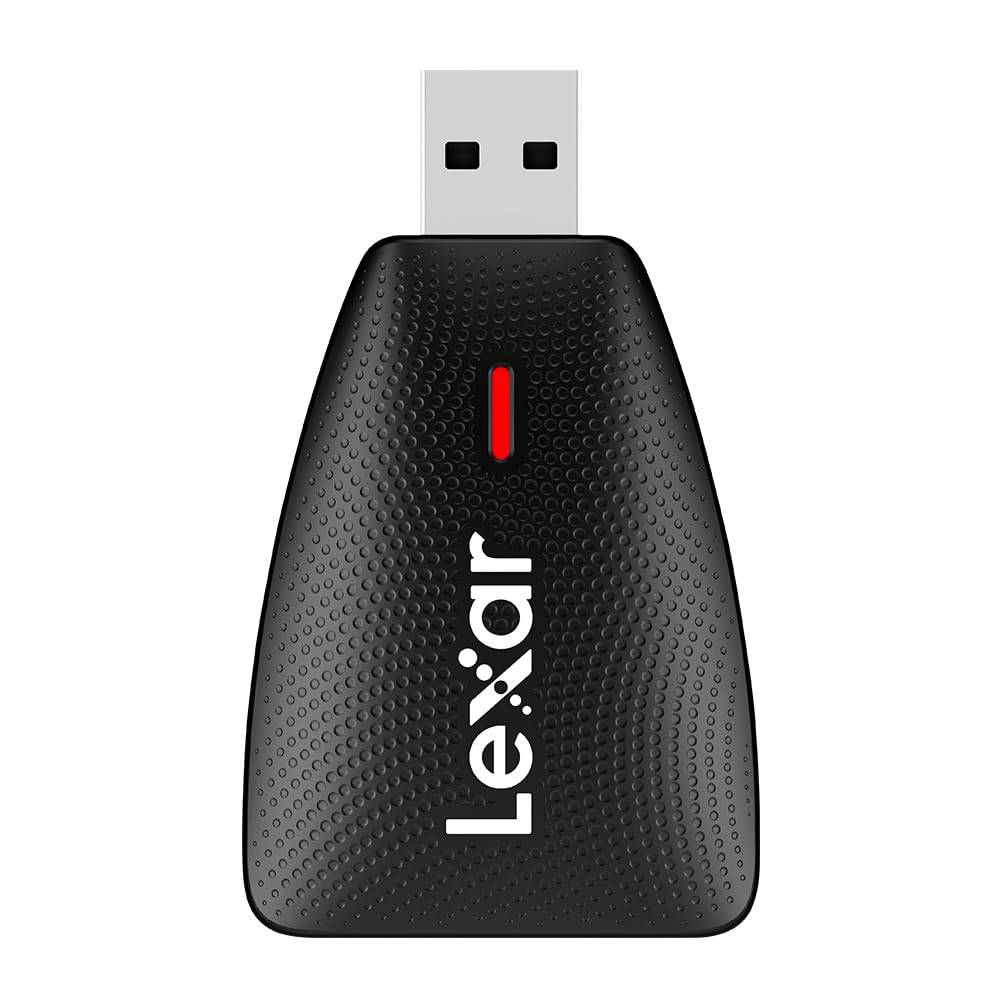
A compact two-slot Lexar that lets you offload SD and microSD at the same time without a second reader
If your life is SD and microSD only, this is the slim, focused option. It is noticeably more portable than the 3-in-1 Lexar above — the body measures just 2.51″L x 1.5″W x 0.6″H versus 3.15″L x 3.15″W x 0.85″H — and the simultaneous transfer support means you can load a full SD and a microSD at once and work with both. Owners describe it as surprisingly fast and very convenient for exactly that dual-card workflow.
Reliability is the strongest thread in the review pool, and the USB-A to USB-C compatibility makes it flexible across a laptop, a desktop, or even a tablet or smartphone. The trade-off is the build: it is plastic rather than metal, and a fair number of owners note it runs slightly big for a pocket dongle.
Weighing it against the SANDISK MobileMate further down, the Lexar 2-in-1 wins on versatility because it accepts full-size SD cards, not just microSD. The plastic shell is the honest compromise you accept for the lower weight and the dual-card convenience.
The strong points
- Reads SD and microSD simultaneously for one-pass offloads
- Comes with USB-C and USB-A compatibility across devices
- Small footprint at 2.51″L that slips easily into a camera bag
The honest trade-offs
- Plastic casing, so it won’t shrug off rough treatment the way metal readers do
- Some owners find it slightly larger than a true keychain-size reader
Pick it up if: you work with SD and microSD cards and want a dependable, fast dual-slot reader for travel.
skip it if: you need CompactFlash or CFast support, which this model does not offer.
4. llano 5 in 1 Micro SD Card Reader
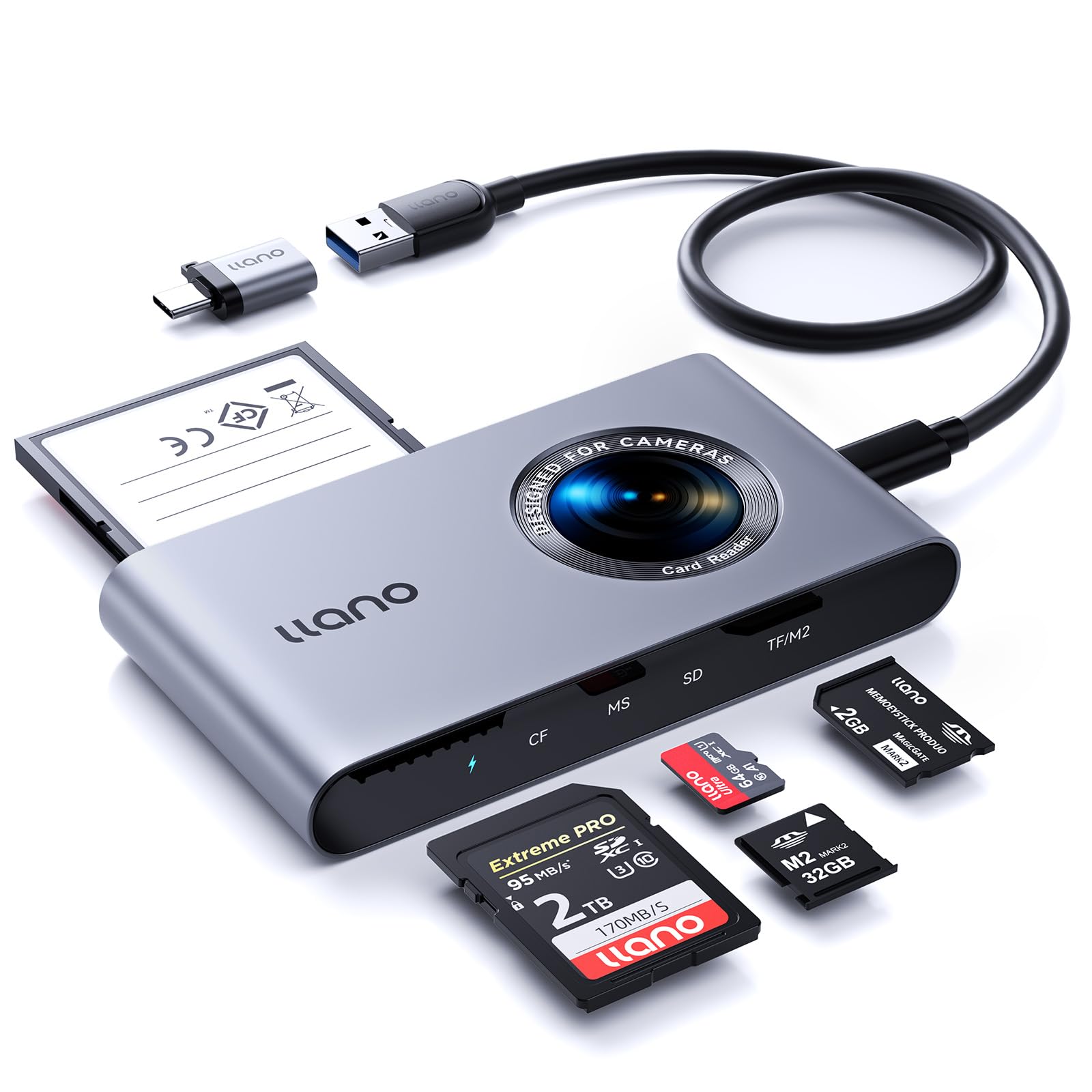
A photographer-focused USB-C reader that reads four cards at once and taps straight into a smartphone
Built with a USB-C interface, this llano reader is designed for photographers who want to offload to a modern MacBook or even a smartphone without hunting for dongles. It reads CF, SD, microSD, MS, and M2 cards, with support for cards up to 2TB, and the OTG function means you can plug it into a phone and pull files directly. The 5Gbps USB 3.2 Gen 1 connection delivers read speeds up to 104MB/s in real use.
The multi-slot design lets you batch-export from CF, MS, SD, and microSD at once — handy after a long shoot across two camera bodies. One important quirk to know: the TF and M2 slots share a single channel, so those two cannot be read simultaneously. Owners also flag the CompactFlash slot’s two rows of very fine pins, which need careful alignment before inserting a card.
Compared to the Kxable 7-in-1 below, the llano is more focused on the photographer’s modern workflow with its USB-C connection and bigger 2TB card support, while the Kxable leans toward legacy formats. The build is solid if light, and the lack of a connector cap is a minor gripe for anyone who tosses readers loose into a bag.
Built for the field
- USB-C with OTG support reads cards directly on smartphones and laptops
- Reads four cards simultaneously for fast batch exports
- Handles cards up to 2TB, covering modern high-capacity media
Handle with care
- TF and M2 slots cannot be used at the same time
- Fine pins in the CF slot demand careful card alignment
Grab it if: you are a photographer on a USB-C laptop who wants multi-card offloads and smartphone access in one device.
Think twice if: you need TF and M2 cards transferred simultaneously, since they share one channel.
5. SD Card Reader 7 in 1, Kxable USB 3.0 Memory Card Reader/Writer

Seven slots and two cables that rescue ancient Memory Sticks and xD cards from digital oblivion
This Kxable reader is the one to reach for when your drawer is full of cards no modern laptop can touch. It packs seven slots — SD x2, CF, TF, Micro SD, XD, and MS — and owners confirm it successfully reads and writes to old Sony Memory Sticks that other readers refuse to acknowledge. The metal shell and 45g weight make it a solid, portable companion, and the included USB-A and USB-C cables (4ft and 0.6ft) cover both port types.
The 5Gbps USB 3.0 transfer speed is 10x faster than USB 2.0 and backward compatible with older ports, so high-definition video and photo libraries move over quickly. Reliability is the standout theme in owner feedback, with reviewers praising that it “works to read cards” and handles older, less common formats without complaint.
The honest caveat is build quality, which earns mixed feedback — some call it well-built, while a few find it poorly made. For around the same money as the ZIYUETEK 5-slot above, you get more slots and the dual-cable convenience, making this the stronger pick for legacy-format collectors.
Why it stands out
- Seven slots cover SD, CF, TF, Micro SD, XD, and MS formats
- Reliably reads legacy Memory Sticks that other readers reject
- Comes with both USB-A and USB-C cables for port flexibility
Keep in mind
- Build quality earns mixed feedback across the review pool
- Some owners mention occasional connectivity stability issues
Choose it if: you need to recover files from old Sony cameras, xD cards, or other forgotten formats.
Look past it if: you only ever use modern SD cards and want a smaller, more premium-feeling unit.
6. SANDISK MobileMate USB 3.0 microSD Card Reader

The microSD-only dongle that is small enough to live in a car console and fast enough for a full OS install
For pure microSD duty, this SANDISK is a tiny legend — the body measures just 1.2″L x 0.82″W x 0.35″H, small enough to fit in a center console or a camera bag pocket and basically disappear. It delivers UHS-I transfer speeds up to 170MB/s, and the USB 3.0 connection moves content up to 10x faster than a USB 2.0 reader. Customers note real-world speeds of 80 to 90MB/s, which is plenty for photo dumps and quick file moves.
Its size is the defining trait — reviewers use it to run a 200+GB game directly off a microSD card and praise how it reads and writes faster than a wireless download. Quality is the most-praised aspect across the board, and the plug-and-play design means zero drivers for OS installs or daily transfers.
The limits are real but narrow: it is microSD only, with no full-size SD slot, and it uses USB Type A with no USB-C option. Compared to the Lexar 2-in-1 above, this is the more pocketable and more focused pick, but the Lexar wins if you also handle full SD cards.
The appeal
- Ultra-compact 1.2″L body slips into any pocket or case
- Fast UHS-I transfers up to 170MB/s for quick offloads
- Plug-and-play simplicity ideal for OS installs and DIY USB sticks
The limits
- Accepts microSD only — no full-size SD or CF support
- USB Type A connector with no USB-C alternative
Reach for it if: microSD is your only card type and you want the smallest, most dependable reader possible.
Move on if: you shoot with a camera that uses full SD or CompactFlash cards.
7. CFast Card Reader, 5-in-1 USB C/A Card Reader with Dedicated CFast 2.0 Slot

A dedicated CFast 2.0 slot in a tank-like aluminum body built for high-end video cameras
If you record on a Black Magic or other pro cinema camera, this Rytaki reader is built for your exact workflow. Its defining feature is the dedicated CFast 2.0 slot, which supports the blazing-fast transfer of 4K and 8K video footage at up to 5Gbps over USB 3.0. Owners note it feels like a tank, with a solid aluminum housing that handles large transfers without overheating.
Beyond CFast, it reads SD, Micro SD (TF), XD-Picture Card, and Compact Flash, so a mixed kit of legacy and modern cards is all covered by one device. Owners using PixelFlash 4K cards confirm it offloads high-resolution video fast and reliably, and the dual USB-A to USB-C cable connects to MacBooks, PCs, and tablets without adapters.
Next to the Lexar 3-in-1 at the top of this list, the Rytaki leads on CFast support and pro-video speed, while the Lexar is the more everyday-versatile option. Build quality and packaging earn strong praise, and the 2-year warranty backs the investment — a sensible pick for anyone whose camera demands CFast.
The pro edge
- Dedicated CFast 2.0 slot for professional-grade camera cards
- Solid aluminum body that feels durable and dissipates heat well
- Reads up to 5 cards at once across CFast, SD, TF, XD, and CF
Know before you buy
- CFast cards themselves are expensive, so this reader suits serious shooters
- Legacy XD support is a bonus, but most users will stick to CFast and SD
Buy it if: you shoot on a CFast 2.0 cinema camera and need fast, dependable offloads for 4K or 8K footage.
pass on it if: your camera uses standard SD or CompactFlash only — the CFast slot would go unused.
Understanding the Specs
Transfer Speed (MB/s and Gbps)
Transfer speed determines how long you wait for files to move. It is measured two ways: the reader’s rated maximum (like 5Gbps or 312MB/s) and the real-world speed your card actually delivers. A USB 3.0 reader can theoretically hit 5Gbps, but a standard UHS-I card is the real bottleneck at around 100MB/s. Check both numbers so you know your card, not your reader, is the limit.
Card Slots and Formats
The slots determine which card formats the reader accepts. SD and microSD are the common pair, while CompactFlash (CF), CFast 2.0, Memory Stick, M2, and XD are less common formats used by specific cameras. Count your actual cards before buying — a photographer’s CFast camera needs a dedicated CFast slot, while a casual user may only ever touch microSD.
FAQ
What is the difference between UHS-I and UHS-II cards?
Will a USB 3.0 card reader work with a USB 2.0 port?
Can I read multiple cards at the same time?
Do card readers work with smartphones and tablets?
What is a CFast 2.0 card and why would I need a special reader?
Why is my card reader transferring files slower than expected?
Is a metal or plastic card reader better?
Can I leave a card in the reader when it is not in use?
Final Thoughts: The Verdict
For most buyers, the card reader winner is the Lexar 3-in-1 because it balances triple-format support, reliable speeds, and a sturdy build that the 4.8-star consensus backs up. If you want CFast 2.0 support for pro video, grab the Rytaki 5-in-1. And for budget multi-card duty, the ZIYUETEK 5-slot is the one to reach for.
How We Picked
We do not accept paid placement. Every pick is matched to a real buyer and a real use-case; we do not hands-on test units.
Sources & Methodology
Specifications: manufacturer listings and product documentation. Review insights: verified customer reviews, as of August 2026. Pricing: not shown on this page (it changes often); check the current price via the retailer link.
As an Amazon Associate, Gadgets Feed earns from qualifying purchases. This does not affect which products we feature.