
Our readers keep the lights on and my morning glass full of iced black tea. As an Amazon Associate, I earn from qualifying purchases.
Specs are compiled from manufacturer listings and verified buyer reviews and can change over time — please confirm the key details on the product page before buying.
Moving from a standard LCD to a 27-inch OLED gaming monitor is the single biggest visual upgrade you can make to your setup. OLED’s per-pixel lighting delivers perfect blacks and vivid colors, a major upgrade over standard LCDs. This technology enhances both fast-paced shooters and cinematic games with superior contrast and motion clarity.
I’m Min — the founder and writer behind Gadgets Feed. This guide is built by comparing the manufacturers’ published specifications and the patterns across verified customer reviews, so you get each pick’s real strengths and trade-offs instead of marketing spin.
Your key decisions are refresh rate, brightness, and burn-in protection. Here is the breakdown of the best 27 inch oled gaming monitor on the market to help you choose the right one for your games and your desk.
Our Picks at a Glance



How To Choose The Best 27 Inch OLED Gaming Monitor
You get that signature OLED contrast on any 27-inch model, so your real choice is speed, brightness, and screen coating. Focus on these three decisions to pick the right one.
Refresh Rate: 240Hz vs 360Hz vs 480Hz
Refresh rate measures how many frames per second the monitor can display. A 240Hz panel is a major upgrade over standard 60Hz or 144Hz displays. The jump to 360Hz offers a competitive edge in fast esports titles like Counter-Strike or Valorant. 480Hz models feel nearly instant but require a powerful GPU to reach those frame rates.
Glossy vs Matte Screen Finish
Many QD-OLED panels use a glossy coating that makes colors look punchier and more saturated. This glossy finish looks stunning in a dark room. If you play near a window or have bright lights overhead, though, glare can be distracting. Some monitors use a matte, anti-glare finish that cuts reflections but can slightly soften the image. Owners of glossy screens often call them “purple tint” magnets and fingerprint magnets, while matte screens are easier to live with in bright spaces.
Burn-in Protection and Warranty
OLED screens can permanently “burn in” static images, like a taskbar or a game’s health bar, if left on screen too long. Every serious manufacturer includes software to fight this, such as pixel shift, logo detection, and screen savers that kick in after 10 minutes of inactivity. Equally important is the warranty. Look for a 3-year warranty that explicitly covers burn-in, which gives you confidence for the long haul.
Quick Comparison
| Model | Best For | Refresh Rate | Brightness (nits) | Panel Type | Amazon |
|---|---|---|---|---|---|
| LG 27GS93QE-B★ Best Overall | Balanced Value | 240Hz | 400 | WOLED | Amazon |
| MSI MAG 271QPXBest Value Speed | Budget Speed | 360Hz | — | QD-OLED | Amazon |
| MSI MPG 271QRXKVM Productivity Pick | Gaming & Work | 360Hz | 250 | QD-OLED | Amazon |
| Alienware AW2725DF | Ultimate Contrast | 360Hz | — | QD-OLED | Amazon |
| LG 27GS95QE-B | Multimedia | 240Hz | — | OLED | Amazon |
| GIGABYTE MO27U2 | 4K Work & Play | 240Hz | — | QD-OLED | Amazon |
| Samsung G60SD | Esports Speed | 360Hz | 250 | QD-OLED | Amazon |
| ASUS ROG PG27AQDP | Extreme Motion Clarity | 480Hz | — | WOLED | Amazon |
| ASUS ROG XG27ACDNG | Premium All-Rounder | 360Hz | — | QD-OLED | Amazon |
| Samsung G61SD | Design & Smoothness | 240Hz | 250 | QD-OLED | Amazon |
| Sony INZONE M10S | Tournament Play | 480Hz | — | OLED | Amazon |
In-Depth Reviews
1. LG 27GS93QE-B
Our pick — over 4.5★ from 350+ verified ratings; the strongest balance of quality and price.
A crowd-pleasing WOLED that nails the balance between price, speed, and color.
The LG 27GS93QE-B is the strongest all-around pick because it checks the most important boxes without stretching your budget into the high-end tier. It runs at a smooth 240Hz with a 0.03ms response time, which is more than enough speed for most gamers to react fast and see crisp motion. The picture quality is what wins people over, with display quality being the top thing owners praise; the 400 nits of brightness and a 1.5M:1 contrast ratio give dark scenes serious depth and detail.
It uses a WOLED panel, and owners who compared it to QD-OLED rivals say this one delivers true black, not a purple tint, and that the matte finish is scratch-resistant and near-glossy. Color coverage reaches 98.5% of DCI-P3, so HDR content looks vivid and lifelike. The stand offers height, tilt, and pivot adjustments, letting you dial in a comfortable viewing angle. The verdict from buyers is clear: “this panel beats QD OLED easily” appears in the multiple 5-star reviews, pointing to its excellent value.
The recurring caveat here is the OLED brightness level itself. As buyers report: “Brightness is low due to it being oled so play in a darker room.” That is the trade-off of true blacks on this tech. It supports both NVIDIA G-Sync Compatible and AMD FreeSync Premium Pro, so it pairs well with either GPU camp over its HDMI 2.1 and DisplayPort 1.4 connections.
Why It Wins The Crowd
- True black WOLED panel avoids the purple tint of some rivals
- 240Hz refresh with a 0.03ms response for smooth, lag-free play
- Full tilt, height, and pivot stand for easy ergonomic setup
The Real Trade-off
- OLED brightness is modest, so it performs best in a dimmer room
- Owners advise reading the manual on pixel-cleaning maintenance
The smart first OLED: Reach for this LG if you want the best blend of speed, color, and price in one package.
Think twice if: You play in a very bright room and need a panel that fights glare with higher brightness.
2. MSI MAG 271QPX QD-OLED
An esports-focused QD-OLED that brings 360Hz speed to the value tier.
If your priority is pure frame rate for competitive shooters, the MSI MAG 271QPX delivers a 360Hz refresh rate that is 50% faster than the LG pick above, making motion feel incredibly fluid. It is a 3rd Gen QD-OLED panel, and buyers rave about its color quality above all else, calling deep blacks and vibrant colors the standout features. The 0.03ms GtG response time means near-zero ghosting, so fast-moving targets stay sharp.
One owner picked this up on a Black Friday deal for and called it the best bang for the buck OLED, praising the vibrant colors and the “game-changing” 360Hz experience. It also comes with MSI OLED Care 2.0 to reduce burn-in risk, which is a must-have feature for any OLED owner. The HDMI 2.1 port supports WQHD at 360Hz with full 48 Gbps bandwidth, so it is ready for high-end GPUs and next-gen consoles.
The honest catch is that OLED longevity depends on how you use it. Owners note there is always a burn-in risk, though features like static image protection and a pixel cycle help manage it. Some also report occasional VRR flicker and that the Display Stream Compression (DSC, a way to fit more data through one cable) can slow down alt-tabbing, which is a minor annoyance for desktop use.
Built For Speed
- 360Hz refresh rate for ultra-smooth competitive play
- Owners consistently praise the vivid QD-OLED color
- Includes OLED Care 2.0 for burn-in protection
What To Manage
- Burn-in risk is real and requires care, like pixel cycling
- DSC can make alt-tabbing slightly sluggish
A speed-first value pick: Grab this MSI if you mainly play fast esports titles and want 360Hz without paying premium prices.
Not the one if: You want the brightest HDR possible, since brightness data is not listed for this model.
3. MSI MPG 271QRX QD-OLED
A step-up MSI that adds KVM switching and app control to its 360Hz QD-OLED core.
The MPG 271QRX takes the same 360Hz speed and 0.03ms response time as the MAG model and adds features for a more flexible desk setup. Its defining a neat extra is the built-in KVM (Keyboard, Video, Mouse switch), which lets you control multiple devices with one set of peripherals, making it ideal if you game on a PC and work on a laptop. Owners absolutely love the display quality, with it being the most praised aspect, and they consistently call the colors vibrant and the image sharply detailed.
A key point of praise is that this panel runs silently. It uses passive cooling with no fan, so you get the premium feel and solid build without any whirring noise. The Glossy QD-OLED finish delivers stunning color depth that owners say is “breathtaking” compared to IPS panels. It also includes the MSI Gaming Intelligence App, which lets you create and save specific viewing settings for different games.
The trade-off for this extra utility is that a few owners mention the OLED protection’s auto-shutdown can be annoying, and there have been some complaints about sleep/wake failures. It is a minor software quirk rather than a hardware flaw. It is a great recommendation for 1440p gaming, especially if you value a multi-device workflow.
Crafted For Flexibility
- KVM switch simplifies controlling a PC and a laptop
- Fan-less passive cooling keeps things silent
- Display quality is the top thing owners rave about
Software Quirks
- OLED protection auto-shutdown can be intrusive
- Occasional sleep and wake failures reported
The desk organizer’s OLED: Choose the MPG if you juggle a work laptop and a gaming PC and want one monitor for both.
Keep in mind: The stand is plastic, so you may want a monitor arm for a sturdier feel.
4. Alienware AW2725DF

A 360Hz QD-OLED with flagship color accuracy and a build that feels premium.
The Alienware AW2725DF is the monitor for buyers who want a top-tier QD-OLED experience backed by a trusted PC gaming brand. Its quality is universally praised, with owners calling it one of the best QD-OLEDs for gaming. The color performance is a headline feature, covering 99.3% of DCI-P3 with a Delta E <2 accuracy for true-to-life visuals. This makes it a strong pick for gamers who also care about content creation or simply want the most accurate picture.
It delivers the full package: 360Hz refresh rate for superb motion clarity, a 0.03ms gray-to-gray response time that virtually eliminates blur, and a 1.5 million:1 contrast ratio. It even includes a factory calibration report in the box. The stand offers full height, tilt, swivel, and pivot adjustments, so you can find the perfect position for long sessions. Customers note that the 360Hz refresh makes the picture “look amazing.”
The honest downsides are the physical coating and the maintenance routine. The glossy screen is a fingerprint magnet and has a faint purple tint, which some owners dislike. You also cannot escape OLED care; owners note the 5-minute pixel refresh runs every few hours. Its burn-in warranty is a solid 3-year cover, which eases the biggest worry about OLED.
Flagship Credentials
- 99.3% DCI-P3 color coverage with exceptional accuracy
- Full ergonomic stand with height, tilt, swivel, and pivot
- 3-year burn-in warranty provides long-term confidence
Daily Life Caveats
- Glossy screen shows fingerprints and has a purple tint
- Requires periodic pixel refresh maintenance
The color purist’s pick: Go Alienware if you want the highest color accuracy alongside esports-level speed.
Be aware: The glossy finish demands a dark, controlled room to look its best.
5. LG 27GS95QE-B

A 240Hz OLED with a remote control and a swivel stand for mixed-use setups.
The LG 27GS95QE-B is the sibling to our top pick that trades the pivot adjustment for a swivel function and includes a remote control, which makes navigating menus and turning the screen off much easier. It is praised for its crisp picture quality and beautiful contrast, with owners specifically highlighting that “dark scenes look incredible.” It is an amazing screen to stare at for hours, making it great for long gaming sessions or late-night streaming.
Under the hood, it offers the same 240Hz refresh rate with a 0.03ms response time, so it is just as smooth as the top pick for gaming. The 1,500,000:1 contrast ratio delivers deep, detailed blacks, and the 98.5% DCI-P3 coverage keeps colors looking rich. It supports both NVIDIA G-Sync Compatible and AMD FreeSync Premium Pro, ensuring tear-free performance with almost any graphics card.
The caveat with this model is that it has a higher rate of reported reliability issues compared to others. Some owners mention units failing after several months of use, though many others report it being rock solid after a full year. There are also isolated complaints about flickering. Because of these mixed reliability reports, it is worth considering an extended warranty for confidence.
Comfort And Control
- Remote control adds convenience for daily use
- Beautiful contrast makes dark scenes look excellent
- Swivel stand is flexible for shared or changing setups
Reliability Watch
- Some reviewers point out failures after several months
- Reports of flickering in isolated cases
Great for mixed use: Pick the LG 27GS95QE if you watch a lot of movies and value the remote convenience.
Who should look elsewhere: If you want the highest reliability rating, a monitor with fewer QC complaints is a safer bet.
6. GIGABYTE MO27U2
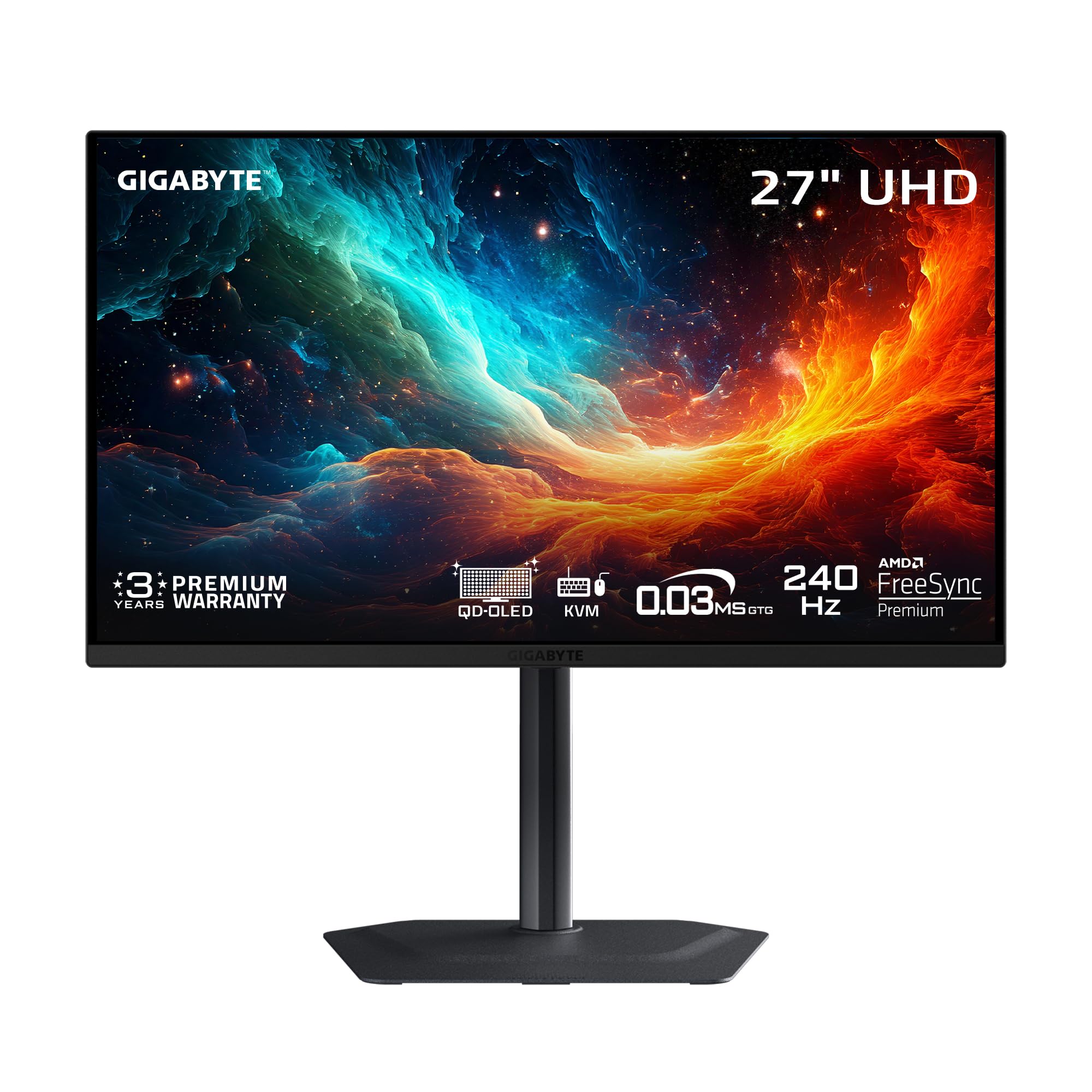
A 4K QD-OLED that gives you stunning sharpness and 240Hz speed in one 27-inch frame.
The GIGABYTE MO27U2 is the pick for buyers who want the finest detail. It is a 27-inch QD-OLED with a full UHD 3840×2160 resolution, meaning it packs an ultra-high 166 PPI pixel density into the frame. Owners describe it as the “best OLED 4K monitor” with “great sharpness and colors.” The picture quality is the clear highlight, and its 1.5M:1 contrast ratio and 99% DCI-P3 color gamut make everything look lifelike.
It does not sacrifice speed for clarity, offering a 240Hz refresh rate and 0.03ms GTG response time. It also has a KVM function built in, letting you control a desktop and a laptop with one keyboard and mouse. The build quality is a surprise standout; owners praise the “thick powder-coated metal” and a “genuinely premium construction.” It is a fan-less, 4-sided ventilated design, so it stays quiet under load.
The main consideration is the GPU horsepower required to drive 4K at high frame rates. You need a very powerful graphics card to take advantage of the 240Hz refresh in modern games. One owner noted it lacks DisplayPort 2.1, but it works fine for PS5 Pro and Mac via HDMI 2.1. It is a premium buy, but the 4K clarity is class-leading in this list.
Sharpness Leader
- 4K resolution delivers exceptional 166 PPI sharpness
- Owners praise the premium powder-coated metal build
- KVM functionality for easy multi-device control
Demanding Partner
- Needs a high-end GPU to hit high frame rates at 4K
- Lacks the latest DisplayPort 2.1 connection
For the sharpness seekers: Choose GIGABYTE if 4K detail is your top priority and you have a powerful graphics card.
Consider skipping if: You have a mid-range GPU that will struggle to push 4K frame rates.
7. Samsung Odyssey OLED G6 (G60SD)

Samsung’s 360Hz QD-OLED with a built-in cooling system for serious esports sessions.
The Samsung Odyssey OLED G6 (G60SD) is built for players who live in competitive shooters. To keep that performance consistent, it uses a unique Pulsating Heat Pipe cooling system, which Samsung says diffuses heat 5x better than older graphite sheet methods, helping prevent burn-in and maintaining image quality.
The monitor is also smart about protecting itself. It has a Thermal Modulation System that predicts surface temperature and adjusts brightness to reduce heat. It also detects static logos and taskbars, automatically dimming them to prevent burn-in. The screen even dims itself after 10 minutes of inactivity, so you do not have to remember to turn it off. Owners praise its “sturdy, heavy” metal base and sleek design, calling it comfortable for long sessions.
The biggest complaint, however, is a significant one. A widespread issue, as noted by owners, is that the power button has broken after several months of use. Samsung has reportedly denied warranty claims on this as “cosmetic damage,” which has frustrated many buyers. It is a risk to be aware of, even though the core display quality is outstanding.
Competitive Edge
- 360Hz refresh with 0.03ms response is a pure esports weapon
- Advanced Pulsating Heat Pipe cooling prevents burn-in
- Auto-dimming features protect the panel easily
The Reliability Concern
- Recurring reports of the power button failing
- Some owners say warranty claims on this are denied
Built for the hardcore: Reach for the Samsung G60SD if frame rate is everything and you value proactive burn-in protection.
Be cautious if: You want maximum long-term reliability, as the power button issue is a known pattern.
8. ASUS ROG PG27AQDP

A 480Hz WOLED that sets the bar for motion clarity in competitive gaming.
The ASUS ROG PG27AQDP is the world’s first 1440p OLED monitor to hit a blinding 480Hz refresh rate, making it the ultimate tool for players chasing every millisecond of advantage. This is not a small jump; it delivers a 0.03ms response time, so motion blur is virtually non-existent. Owners say the smoothness matches a 540Hz TN panel in competitive games, calling OLED “the biggest gaming upgrade in 10 years.” If you need the fastest, smoothest image possible, this is it.
To manage the heat from such a high refresh, it has a custom heatsink for passive cooling and ROG OLED Anti-Flicker Technology to reduce eye strain during refresh rate fluctuations. The 99% DCI-P3 color gamut and Delta E <2 accuracy mean it is not just fast, but also color-accurate. It is G-SYNC Compatible and comes with a 3-year warranty with Advance Replacement and burn-in coverage.
The trade-offs here are the color quality and the matte finish. While some owners love the vivid colors, others report “terrible color banding issues” and a matte coating that can look smeary. It also requires calibration from the start to look its best, as owners note it can appear a little dark initially. It is a specialist tool for the fastest gamers, not a perfect all-rounder.
Motion Clarity King
- 480Hz refresh rate is the fastest in its class
- Custom heatsink handles heat without a fan
- 3-year warranty includes burn-in coverage
Not A Perfect Panel
- Mixed reports of color banding and uniformity issues
- Matte coating can look smeary to some eyes
For the frame chasers: Choose the ROG PG27AQDP if you are a professional-level FPS player who wants the absolute fastest panel.
skip it if: You care more about out-of-box color accuracy than raw speed, as this panel needs calibration.
9. ASUS ROG Strix XG27ACDNG

A 360Hz QD-OLED that pairs elite gaming speed with a refined, software-driven experience.
The ASUS ROG Strix XG27ACDNG is the monitor to buy when you want top-tier gaming performance without sacrificing the day-to-day experience. Owners call it one of the best monitors on the market, praising its flawless, vibrant colors, deep blacks, and sharp image. The build quality is excellent, and the 360Hz refresh rate and 0.03ms response time keep gameplay feeling silky smooth and responsive. It hits the 1440p balance, making it perfect for both gaming and work.
what separates it is the software. The DisplayWidget Center lets you adjust monitor settings and access OLED Care functions using your mouse, which is far less tedious than navigating on-screen buttons. It includes ROG-exclusive OLED Anti-Flicker technology to reduce flicker during refresh rate fluctuations. The 3-year warranty includes burn-in coverage and Advance Replacement, giving it some of the best long-term protection in this list.
The minor compromises are physical and practical. Some owners note the height adjustment is limited, and the pixel cleaning popup can be annoying. A few also report that certain older games have compatibility quirks. Despite this, the combination of excellent hardware and thoughtful software makes it a very strong contender for a premium all-rounder.
Polished Experience
- Mouse-controlled software simplifies OLED Care and settings
- Shoppers say no dead pixels or flickering
- 3-year warranty with burn-in coverage and advance replacement
Minor Gripes
- Limited height adjustment on the stand
- Pixel cleaning popup can interrupt focus
The refined choice: Pick the ASUS XG27ACDNG if you want premium performance and an easy-to-use software experience.
Keep in mind: If you need extensive ergonomic adjustments, the stand’s limited height range may be a constraint.
10. Samsung Odyssey OLED G6 (G61SD)

Samsung’s 240Hz QD-OLED that brings a sleek metal build to a slightly lower price point.
The Samsung Odyssey OLED G6 (G61SD) is the more design-conscious sibling in the Samsung lineup. It shares the same stunning QD-OLED picture quality that owners love, delivering “phenomenal blacks” and vibrant colors that make gaming and watching anime look amazing. It is a 240Hz monitor, so it is slightly less extreme than its 360Hz counterpart, but it is still exceptionally smooth for the vast majority of gamers and offers a lower entry price into the Samsung ecosystem.
It features a premium and modern metal finish that looks sharp on any desk. The 0.03ms response time gives it that near-instant reaction feel, and it has a Dynamic Cooling System with a Pulsating Heat Pipe to protect against burn-in. Owners consider it a great value, with one calling it an “end-game monitor.” The Glare Free screen is 54% less glossy than conventional Anti-Reflection film, meaning it cuts down reflections significantly.
The performance and durability feedback is where this monitor gets a mixed report card. While many owners say it works perfectly and look forward to years of use, others report it being unusable, and the durability aspect is a noted negative. There are also isolated reports of minimal flicker, possibly related to burn-in protection. The quality is high, but be prepared for the OLED ownership experience.
Style And Substance
- Premium metal finish looks great in any setup
- Owners rave about the phenomenal blacks and vibrant colors
- 240Hz refresh is smooth for most gaming needs
Mixed Feedback
- Reports of reliability issues and some units being unusable
- Occasional minimal flicker reported
For the style-focused gamer: Choose the Samsung G61SD if you want a beautiful, sleek monitor that is smooth enough for most games.
Weigh the risk: Check the return policy, as some owners have hit reliability issues.
11. Sony INZONE M10S

Sony’s 480Hz OLED built with a pro esports team for tournament-level performance.
The Sony INZONE M10S is a specialist tool developed in collaboration with the Fnatic esports team, aimed squarely at tournament players. Its core is a lightning-fast 480Hz refresh rate with a 0.03ms response time, which owners say feels “insanely smooth” and “instantly responsive.” The gaming performance is the top thing praised by owners. It also has a unique 24.5-inch dual screen size mode, which lets you shrink the display to a smaller size for a more focused view in competitive matches.
It comes with dedicated FPS Pro and FPS Pro+ modes that enhance contrast for fast-paced games. The 4mm thin low-profile stand boost desk space, and the panel uses a fan-less, passive cooling system with a custom heatsink to prevent burn-in. It is backed by a 3-year Limited Warranty that includes OLED burn-in coverage. For connectivity, it offers a future-proof DisplayPort 2.1 (UHBR10) and two HDMI 2.1 ports.
The main issues here are reliability and compatibility. Some buyers report flicker issues when using G-Sync, and there is a serious report of a unit completely dying within a year of use. Another owner had a defective unit on day one. It is a fantastic display when it works, but the reliability reports are concerning enough to consider the warranty carefully.
Tournament Features
- 480Hz refresh delivers an incredibly instant feel
- 24.5-inch mode and FPS Pro modes for competitive play
- 3-year warranty includes OLED burn-in coverage
Reliability Watch
- Reports of flickering when G-Sync is enabled
- Isolated cases of units failing completely
For the dedicated competitor: Pick the Sony INZONE if you want that 480Hz feel and pro-focused features for tournaments.
Proceed with caution: Verify the warranty and consider an extended plan given the reliability reports.
Understanding the Specs
Refresh Rate (Hz)
This is the number of times your screen updates with a new image every second. A 240Hz monitor shows 240 frames per second, which is fluid. The jump to 360Hz and 480Hz makes motion even clearer, which is a real advantage in fast esports titles where tracking moving targets is key. Your graphics card needs to output enough frames to take advantage of the high refresh rate.
Response Time (GtG)
Measured in milliseconds, this is how fast a pixel can change from one color to another, in this case from gray to gray (GtG). A 0.03ms response time is so fast that motion blur and ghosting are virtually eliminated. This makes fast-moving objects look sharp and clear, rather than smeared across the screen, which is a huge benefit for OLED panels over traditional LCDs.
FAQ
Will a 27-inch OLED monitor work with my PS5 or Xbox?
FAQ
Will a 27-inch OLED monitor work with my PS5 or Xbox?
What is burn-in and how do I prevent it on an OLED monitor?
Is a 360Hz refresh rate worth it over 240Hz?
What is the difference between WOLED and QD-OLED panels?
Can I use a 27-inch OLED monitor for work and productivity?
Which monitor has the highest refresh rate in this list?
Do I need a special cable for these monitors?
Does G-Sync or FreeSync matter if I use a console?
Final Thoughts: The Verdict
The best 27 inch oled gaming monitor for most players is the LG 27GS93QE-B, because it delivers the essential OLED experience—true blacks, vivid colors, and a fast 240Hz refresh—at a price that makes sense for a first-time OLED buyer. If your priority is raw speed for esports, the MSI MPG 271QRX with its 360Hz refresh rate is the one to reach for. And for those who want the ultimate in sharpness, the GIGABYTE MO27U2 brings stunning 4K clarity to the 27-inch size. The crowd favorite, the LG, holds a 4.6-star rating across 300+ owners, which speaks to its consistent quality and value.
How We Picked
We do not accept paid placement. Every pick is matched to a real buyer and a real use-case; we do not hands-on test units.
Sources & Methodology
Specifications: manufacturer listings and product documentation. Review insights: verified customer reviews, as of August 2026. Pricing: not shown on this page (it changes often); check the current price via the retailer link.
As an Amazon Associate, Gadgets Feed earns from qualifying purchases. This does not affect which products we feature.