
Stepping into dedicated PC gaming for the first time means facing a wall of GPU tiers, refresh rates, and thermal designs that can make or break a decision. A machine that looks capable on paper can stutter on a modern title because its power delivery or cooling headroom was silently cut at the factory. The real test isn’t the sticker on the CPU box — it’s how that laptop sustains performance when the frame counter matters most.
I’m Min — the co-founder and writer behind Gadgets Feed. My research focuses on deep-dive spec comparisons across the entry-level gaming segment, parsing GPU TGP values, display response characteristics, and real-world chassis thermal behavior that reviewers often omit.
Whether you are looking for a portable rig for esports titles, a do-it-all machine for school and light creative work, or your first taste of ray-tracing on a budget, we have analyzed the top options on the market to help you pick the right one. After weeks of filtering through raw specs and verified user performance data, here is a curated breakdown of the best basic gaming laptop choices available right now.
How To Choose The Best Basic Gaming Laptop
Selecting an entry-level gaming laptop requires looking past the big marketing numbers — the CPU brand and GPU series — and focusing on the hidden specs that determine whether your games will run smoothly or stutter frustratingly. Here are the three most important factors to evaluate before you buy.
GPU TGP (Total Graphics Power)
An RTX 3050 inside a slim chassis running at 35 watts will perform noticeably worse than the same RTX 3050 in a thicker chassis running at 75 watts. Manufacturers often leave the TGP unlisted, but this single number — the wattage the GPU is allowed to pull — directly determines your frame rate. Always search reviews or spec sheets for the “Max TGP” or “TDP” of the GPU before purchasing. A 45W RTX 4050 can easily be outperformed by a 75W RTX 3050 in sustained gaming, so do not judge a laptop by its GPU model number alone.
RAM Configuration and Upgradeability
Many budget gaming laptops ship with 8GB of RAM soldered to the motherboard, with no open slot for an upgrade. Modern AAA games and background applications (Discord, Chrome, game launchers) frequently push past 8GB, causing stutters or crashes. Prioritize models with at least 16GB of DDR5 memory or a confirmed accessible SODIMM slot. Also check if the RAM runs in dual-channel configuration, as single-channel memory can cut CPU performance by up to 30% in gaming workloads.
Display Refresh Rate and Response Time
While a 120Hz or 144Hz panel is common at this tier, the response time varies wildly. Some entry-level 144Hz screens suffer from ghosting so severe that a 60Hz panel with a fast response time looks smoother in motion. Look for confirmation of a 3ms or lower response time. Also verify if the panel has a matte anti-glare finish — glossy screens cause distracting reflections in typical indoor lighting, making it harder to see dark areas in games like *Escape from Tarkov* or *Resident Evil*.
Quick Comparison
On smaller screens, swipe sideways to see the full table.
| Model | Category | Best For | Key Spec | Amazon |
|---|---|---|---|---|
| Acer Nitro V 16S AI | Premium | High FPS AAA Gaming | RTX 5060 8GB (572 AI TOPS) | Amazon |
| ASUS ROG Strix G16 | Premium | Competitive Esports | 165Hz 16:10 Display | Amazon |
| Alienware 16 Aurora | Premium | Premium Build + Support | RTX 5060 8GB GDDR7 | Amazon |
| MSI Katana 15 HX | Premium | Max Performance | i9-14900HX + RTX 5070 | Amazon |
| ASUS TUF Gaming F16 | Mid-Range | Durability + RTX 4050 | MIL-STD-810H Certified | Amazon |
| Acer Nitro V 15 | Mid-Range | Value RTX 4050 Gaming | RTX 4050 i5-13420H | Amazon |
| MSI Thin A15 (R5/RTX 3050/16GB) | Mid-Range | Lightweight Gaming | 16GB DDR5 RAM | Amazon |
| HP Victus 15 (R5/RTX 2050/16GB) | Mid-Range | Anti-Glare 144Hz Screen | 16GB DDR5 RAM | Amazon |
| HP Victus 15 (i5/RTX 3050) | Mid-Range | RTX 3050 at Low Cost | i5-12500H + RTX 3050 | Amazon |
| MSI Thin A15 (R5/RTX 2050) | Budget | Esports on a Tight Budget | RTX 2050 + 8GB DDR5 | Amazon |
| Lenovo IdeaPad L340 | Budget | Light Gaming + Productivity | GTX 1650 + 8GB RAM | Amazon |
| Lenovo IdeaPad (i5 Touch) | Budget | Touchscreen Productivity | 16GB RAM + 1TB Storage | Amazon |
| MALLRACE Ryzen 7 | Budget | Office + Light Gaming | AMD Radeon Graphics | Amazon |
In‑Depth Reviews
1. Acer Nitro V 16S AI Gaming Laptop

The Acer Nitro V 16S AI represents the sharp edge of what a “basic” gaming laptop can be when you stretch the budget toward the premium tier. Powered by the AMD Ryzen 7 260 processor and the RTX 5060 laptop GPU (boasting a massive 572 AI TOPS for DLSS 4), this machine targets high-refresh 1080p gaming with headroom for 1440p. The 16-inch WUXGA IPS display runs at a fluid 180Hz with 100% sRGB coverage, which makes fast-paced shooters and open-world titles look consistently clean and responsive.
The internal configuration is generous out of the box — 32GB of DDR5 5600MHz memory and a 1TB PCIe Gen 4 SSD. This eliminates the immediate need for any RAM upgrade, a common pain point on lower-tier models. In real testing reported by users, this unit handles Cyberpunk 2077 at around 65 FPS with ray tracing enabled and over 100 FPS with ray tracing off. The chassis stays cool under load, with the CPU maxing out around 79°C during extended sessions, which is excellent thermal behavior for a mid-profile gaming laptop.
The caveats are few but worth noting. The display, while smooth, is only FHD+ resolution and could be brighter for outdoor use. The unit also ships with noticeable bloatware, so a clean Windows installation is recommended. The 135W power supply is a bit underpowered for the RTX 5060 under sustained heavy load, causing the battery to drain slowly even while plugged into the mains in performance mode. Still, for the raw GPU and CPU horsepower, this is one of the most future-proof options in this list.
Why it’s great
- RTX 5060 with 572 AI TOPS for DLSS 4 delivers high FPS at 1080p and smooth 1440p.
- 32GB DDR5 out of the box eliminates the need for an immediate RAM upgrade.
- Excellent thermal performance with quiet fans even under gaming load.
Good to know
- The 135W power supply can lead to battery drain during extended performance-mode gaming sessions.
- Decent but dim FHD+ display that may not satisfy bright-room use.
- Significant bloatware on first boot requires cleanup for optimal performance.
2. ASUS ROG Strix G16 (2025)

The ASUS ROG Strix G16 is a statement piece for the competitive gamer who values screen clarity and response as much as raw FPS. Its 16-inch FHD+ display features a 165Hz refresh rate with a 3ms response time, enhanced by a new ACR film that boosts contrast and cuts glare significantly. Under the hood, the Intel Core i7-14650HX paired with an RTX 5060 Laptop GPU (NVIDIA Blackwell architecture, DLSS 4) ensures that demanding titles like *Starfield* and *Call of Duty* maintain smooth performance even at high settings.
The cooling solution is a highlight — ROG’s Intelligent Cooling system includes a full vapor chamber, tri-fan technology, and Conductonaut Extreme liquid metal on the CPU. In practice, this means the laptop stays whisper-quiet during light tasks and manages thermal throttling admirably during long gaming sessions. The 16GB of DDR5-5600MHz memory is sufficient for current games, and the 1TB PCIe Gen 4 SSD offers fast load times. Users report that a quick BIOS and driver update resolves any initial performance quirks, after which the system handles even the most demanding Steam titles without a hitch.
The chassis is well-built and features a 360° RGB light bar that can be disabled in Stealth Mode for professional environments. The keyboard layout is comfortable, with brighter WASD key illumination for gaming. Some units have reported LCD backlight bleed, which is a quality control issue to check upon arrival. The battery life is limited to around 2 hours under gaming load, typical for a high-performance RTX 5060 machine. Overall, this is the best display-centric choice for players who need every millisecond of visual clarity in competitive titles.
Why it’s great
- 165Hz 3ms display with ACR anti-glare film offers exceptional competitive clarity.
- Advanced vapor chamber cooling keeps noise low and performance stable under load.
- 16GB DDR5 and 1TB Gen 4 SSD provide fast multitasking and load times out of the box.
Good to know
- Limited to around 2 hours of battery life during gaming sessions.
- Possible LCD backlight bleed on some units requires inspection.
- Initial setup may require driver/firmware updates to reach optimal performance.
3. Alienware 16 Aurora AC16250

The Alienware 16 Aurora is the most complete package in this list for someone who wants a premium design, a high-refresh 16:10 WQXGA display, and the assurance of Dell’s onsite warranty support. It features a 16-inch WQXGA (2560×1600) display with 300 nits brightness, providing an excellent canvas for both gaming and creative work. The Intel Core 7-240H series processor paired with an RTX 5060 8GB GDDR7 GPU delivers strong performance at a near-3K native resolution, with users reporting 80-120 FPS on max settings in modern titles.
The design is where Alienware flexes its reputation — a newly designed Cryo-Chamber structure focuses airflow to the core components without requiring a rear thermal shelf, giving it a cleaner, more streamlined look. The keyboard is comfortable for long sessions, and the Alienware Command Center offers deep customization for fan curves and performance profiles. One year of Dell Onsite Service sweetens the deal for buyers who want peace of mind without having to ship their laptop for repairs.
The drawbacks are classic Alienware trade-offs: premium pricing, significant weight, and loud fans under heavy load. Battery life is also short when gaming, and the power brick is bulky. Some users reported quality control issues (Ethernet port failure, USB port problems) on arrival, but Dell’s onsite service can handle these quickly. Also note the lack of a fingerprint reader, which is becoming a standard convenience. For the high-build-quality and display sharpness, the Aurora is a strong pick for those who can stretch the budget.
Why it’s great
- Sharp 16:10 WQXGA display with accurate colors and high brightness.
- Innovative Cryo-Chamber cooling provides stable thermals without a rear shelf.
- Includes 1-year Dell Onsite Service for convenient hardware support.
Good to know
- High price tag for an entry-level RTX 5060 machine.
- Heavy chassis and loud fans under sustained gaming load.
- Quality control concerns on Ethernet and USB ports reported by some users.
4. MSI Katana 15 HX

The MSI Katana 15 HX is the brute-force option in this roundup, packing a desktop-class Intel Core i9-14900HX (24 cores, 32 threads) and an RTX 5070 GPU into a 15.6-inch chassis. This combination is overkill for basic gaming, but for buyers who want to ensure their machine remains relevant for 4-5 years, it is the safest bet. The QHD+ 165Hz display covers 100% DCI-P3, delivering rich colors and sharp details that make single-player games look cinematic. The Cooler Boost 5 dual-fan system with five heat pipes keeps the i9-14900HX under control during extended sessions, maintaining stable frame rates.
The memory and storage are equally generous — 32GB of DDR5 RAM and a 1TB NVMe SSD. The 4-zone RGB keyboard is comfortable for gaming, with highlighted WASD keys. Users report that the unit runs even the most demanding modern titles at max settings in 1440p with high FPS. The chassis is heavier than many 15-inch laptops, and the power supply is notably large, but that is the price of packing this much thermal dissipation capacity.
The main concerns are long-term reliability. Multiple users reported screen flickering, lag, and shutdowns after about 4 to 6 months of ownership, which could indicate a motherboard or GPU issue. Audio glitches out of the box are also a recurring observation. The battery life under load is only 2 hours, and the fans are quite loud. For those willing to gamble on build consistency in exchange for peak performance, the Katana 15 HX is an absolute monster. Otherwise, other options with lower-tier CPUs might offer more dependable daily use.
Why it’s great
- i9-14900HX and RTX 5070 deliver top-tier performance for 1440p high-refresh gaming.
- 32GB DDR5 and 1TB NVMe SSD require no upgrades out of the box.
- QHD 165Hz display with 100% DCI-P3 creates gorgeous visuals.
Good to know
- Reports of intermittent screen flickering and system freezing after 4-6 months of ownership.
- Audio glitches reported on some units immediately out of the box.
- Heavy chassis and a large power brick limit portability.
5. ASUS TUF Gaming F16 (2024)

The ASUS TUF Gaming F16 is built for buyers who prioritize ruggedness and reliability above all else. The chassis is MIL-STD-810H certified, meaning it has survived drops, vibrations, and extreme temperatures in testing. The 16-inch FHD+ 144Hz IPS-level display with 100% sRGB and Adaptive-Sync technology offers a great balance between color accuracy and fluid motion, making it suitable for both gaming and content consumption. The Intel Core 5 210H processor combined with an RTX 4050 GPU (115W Max TGP with Advanced Optimus) provides enough punch for 1080p gaming on medium to high settings.
The cooling system is another strong point — Arc Flow Fans, 4 exhaust vents, 5 dedicated heat pipes, and an anti-dust filter ensure the laptop maintains performance over years of use without overheating. The keyboard features good key travel and a full numpad, which is rare on 16-inch laptops. Users praise its sturdy build and crisp display, and the Ethernet + multiple USB + HDMI port selection keeps the laptop versatile for desk setups.
The biggest weakness is the 8GB of DDR5 RAM. For modern gaming, this is the minimum, and many users immediately need to upgrade to 16GB. The storage is also a standard 512GB, which fills up quickly with a few AAA titles. Bloatware (McAfee, ASUS services) needs to be removed on first boot. This machine is best for a first-time buyer who wants a bulletproof chassis and a solid upgrade path (two RAM slots, two M.2 slots), and is willing to invest in a RAM stick to unlock its full gaming potential.
Why it’s great
- MIL-STD-810H certification guarantees exceptional build durability for travel and daily abuse.
- RTX 4050 with 115W Max TGP offers strong 1080p gaming performance.
- Excellent cooling system with anti-dust filter extends long-term reliability.
Good to know
- 8GB of RAM is insufficient for modern AAA gaming and requires an immediate upgrade.
- Significant bloatware out of the box means extra setup time.
- 512GB storage fills quickly; a second SSD is recommended for a full game library.
6. Acer Nitro V 15 ANV15-51-51H9

The Acer Nitro V 15 is the sweet spot in the mid-range segment, offering a genuine RTX 4050 laptop GPU (not the cut-down version) paired with a 13th Gen Intel Core i5-13420H processor. This combination is capable of running modern AAA titles like *Red Dead Redemption 2* and *The Last of Us Part I* at high settings with smooth frame rates, thanks to the DLSS 3 support of the RTX 4050. The 15.6-inch FHD IPS 144Hz display is responsive and color-accurate for the price point, and the 16:9 aspect ratio keeps the chassis compact.
The construction is good — the chassis feels solid for a plastic build, and the keyboard is backlit for late-night sessions. The NitroSense software allows granular control over fan speeds and performance profiles, and the dual-fan cooling system is effective for the mid-range thermal load. Users frequently mention the upgradability: two M.2 SSD slots and two RAM slots (upgradable up to 32GB make this a laptop that can grow with you. The Thunderbolt 4 support is a welcome bonus for fast data transfers and external display connectivity.
The main downsides are the heavy bloatware (4 antivirus trials, multiple browsers, Acer junk) that makes the first boot an annoying experience, and the low battery life of around 3 hours on light use and far less during gaming. The fans are also noticeably loud under load. For the price, however, you get a genuine RTX 4050 experience with good upgrade potential, making this one of the best value propositions for a basic gaming laptop.
Why it’s great
- Genuine RTX 4050 with DLSS 3 provides strong performance at a very competitive price.
- Excellent upgradeability with two M.2 slots and two RAM slots.
- Thunderbolt 4 support for fast external connectivity.
Good to know
- Heavy bloatware on first boot requires significant cleanup.
- Low battery life (around 3 hours on light usage).
- Fans are loud under gaming load.
7. MSI Thin A15 (R5/RTX 3050/16GB)

The MSI Thin A15 (the 16GB variant) is the best pick for a gamer who needs portability without sacrificing modern memory standards. The Ryzen 5-7535HS processor paired with an RTX 3050 (4GB VRAM) handles popular multiplayer titles like Fortnite (up to 144 FPS in creative mode, around 90-120 FPS in standard matches) and older AAA games at 1080p medium settings. The 15.6-inch FHD 144Hz display delivers the fluid motion needed for competitive play.
The key advantage of this model over its 8GB sibling is the 16GB of DDR5 RAM, which avoids the immediate bottleneck in multitasking while gaming. The Cooler Boost 5 dual-fan system helps the thin chassis manage heat, and users report the laptop stays comfortable for long sessions. The build is indeed impressively lightweight and slim, making it easy to pack for commutes or travel. Wi-Fi 6E and Bluetooth 5.3 are welcome modern connectivity features.
The main drawback is the RTX 3050’s 4GB VRAM, which will limit performance in newer AAA games that demand more video memory. Titles like *Marvel Rivals* require low settings for smooth play, and future-proofing is limited. There were also user reports of the advertised DDR5 5200 MHz RAM actually being 4800 MHz, which is a misrepresentation, though performance is still adequate. This is a balanced machine for esports and light creative work, not for heavy AAA gaming.
Why it’s great
- Thin and lightweight design makes it very portable for gaming on the go.
- 16GB of DDR5 RAM out of the box prevents immediate multitasking issues.
- Good thermals for a slim chassis with Cooler Boost 5 technology.
Good to know
- Only 4GB VRAM on the RTX 3050 limits performance in newer AAA games.
- Potential misrepresentation of RAM speed (advertised 5200 MHz vs 4800 MHz in some units).
- Not suited for modern AAA titles at high settings.
8. HP Victus 15 (R5/RTX 2050/16GB)

The HP Victus 15 with the Ryzen 5-7535HS and RTX 2050 is a solid entry-level machine that focuses on getting the display and build quality right. The 15.6-inch FHD 144Hz display features an anti-glare coating, which is a significant quality-of-life improvement for gamers who play in bright rooms or near windows — the matte surface eliminates distracting reflections that plague glossy screens. The RTX 2050 is a capable entry-level GPU that can run CS2 at 130+ FPS and older titles like *Red Dead Redemption 2* at solid frame rates, though it falls short of newer AAA titles at high settings.
The 16GB of DDR5 RAM ensures smooth multitasking, and the Ryzen 5-7535HS holds its own in productivity tasks like Blender or light video editing. The build quality is decent, and the port selection (2 USB-A, 1 USB-C, HDMI 2.1, RJ-45) is full. The Bang & Olufsen speakers are a pleasant surprise, offering clear audio at higher volumes. Users report the laptop is durable and stable, with one user powering dual 4K monitors for over 9 hours a day for two years without issues.
The main downside is the RTX 2050 itself — it lacks ray-tracing performance and is essentially a re-badged GTX 1650 Ti in some workloads. The battery life is poor (3-5 hours on power saving, less than 2 hours while gaming), and the fans are always active even on light tasks. This machine works best for a first-time PC gamer who mainly plays competitive esports titles and wants a screen that won’t fight against overhead lighting.
Why it’s great
- Anti-glare FHD 144Hz display significantly improves gaming visibility in bright rooms.
- 16GB DDR5 RAM ensures smooth multitasking without immediate upgrades.
- Surprisingly clear and loud Bang & Olufsen speakers.
Good to know
- RTX 2050 is limited to entry-level performance, without meaningful ray-tracing capability.
- Poor battery life (less than 2 hours under gaming load).
- Fans run audibly even during light tasks like web browsing.
9. HP Victus 15 (i5/RTX 3050)

The HP Victus 15 (2022) packs a 12th Gen Intel Core i5-12500H and an RTX 3050 into a chassis that often sells at a significant discount. This makes it one of the most affordable ways to get into dedicated PC gaming with a modern GPU that supports basic ray tracing and DLSS. The i5-12500H is a solid mid-range CPU capable of handling multitasking and moderate productivity, while the RTX 3050 handles games like Grand Theft Auto V, Fortnite, and Sims 4 smoothly at 1080p high settings. Users report load times under 10 seconds for most games.
The 15.6-inch FHD IPS display with 178-degree viewing angles provides a clear and wide viewing experience. The build is sturdy despite the plastic chassis, and the keyboard is backlit for dark environments. The Victus also includes a fingerprint reader, a rare biometric addition at this price tier. The thermal management is surprisingly good — one user reported GPU temperatures staying below 60°C under load, which is excellent for a budget chassis.
The biggest issue is the 8GB of RAM — it is simply not enough for modern gaming and will cause stuttering in demanding titles. The battery life is also poor (2-3 hours on light use, 1-2 hours while gaming). There are reports of WiFi connectivity issues and random system crashes after a couple of months, though these seem to affect a minority of units. This machine requires an immediate RAM upgrade out of the box, but for the low entry price, it remains a good pick for the budget-conscious gamer willing to do a quick upgrade.
Why it’s great
- Best value RTX 3050 on the market, often found at a low entry price.
- Excellent thermal headroom with GPU often below 60°C under gaming load.
- Includes a fingerprint reader for quick, secure login.
Good to know
- 8GB RAM is a major bottleneck for modern gaming; an immediate upgrade is required.
- Poor battery life, lasting only 1-2 hours during gaming.
- Potential WiFi and system crash issues reported after several months of use.
10. MSI Thin A15 (R5/RTX 2050/8GB)

The MSI Thin A15 (with RTX 2050 and 8GB RAM) is the entry level of the entry level, designed for the absolute cheapest path into PC gaming. The Ryzen 5-7535HS CPU is a modern, efficient processor, and the RTX 2050 provides enough horsepower for esports titles like Fortnite (80-120 FPS in standard matches) and lighter games. The 15.6-inch 144Hz display is the standout spec at this price — 144Hz panels at this cost are rare and provide a noticeable smoothness upgrade over standard 60Hz screens.
The Cooler Boost 5 cooling technology helps the machine handle sustained gaming without immediate thermal throttling. The build is thin and lightweight, which is impressive at this price point. Users report that the laptop works great as a Linux machine (Pop OS), with easy driver installation and fast performance in basic workloads like running small language models. It is also a viable option for music production and everyday tasks.
The compromises are deep: 8GB of DDR5 RAM will require careful management (closing background apps before gaming), and the RTX 2050 has only 4GB VRAM, which results in poor performance on any modern AAA title. There are reports of the unit overheating and inability to launch games despite spec claims, though these seem to be conflicting with the majority of positive feedback. This laptop is strictly for the tightest budget possible where the buyer understands the limitations and is fine playing older titles at low settings or esports games.
Why it’s great
- Rare 144Hz display at this price tier for smoother gameplay.
- Thin and lightweight chassis for easy portability.
- Good Linux compatibility and upgradability to 64GB RAM.
Good to know
- 8GB RAM means strict multitasking limits while gaming.
- RTX 2050 struggles with modern AAA titles even at low settings.
- Potential overheating issues reported by some users.
11. Lenovo IdeaPad L340 Gaming

The Lenovo IdeaPad L340 is a classic entry-level gaming laptop that has been around for a few years, still sold by third parties at a budget-friendly price point. It features the Intel Core i5-8GB RAM and an NVIDIA GeForce GTX 1650 dedicated GPU. This is a step below even the RTX 2050 in modern performance, but it handles lightweight games like *Conan Exiles* (average 52 FPS on high settings) and older titles at 1080p. The 256GB SSD is very small by today’s standards — an upgrade will likely be needed immediately.
The build quality is decent, featuring a backlit keyboard with a blue glow and a comfortable numpad layout. The matte screen treatment helps with glare in bright rooms. The Dolby Audio speakers are surprisingly loud and clear. Users report that setting the maximum processor state to 85% prevents thermal throttling and keeps performance stable, which shows that thermal management is borderline on this older chassis. The fan noise is acceptable when not gaming but loud under load.
The biggest limitation is the GTX 1650 — it has no ray tracing support, no DLSS, and only 4GB of VRAM. It will struggle with any modern AAA title released after 2022. The 8GB of RAM is also a bottleneck for multitasking, and the battery life is only about 2-3 hours. This is a pure budget relic for someone who needs a cheap dedicated GPU for older/indie games and productivity, not for any modern gaming aspirations.
Why it’s great
- Very low entry point for a dedicated GPU laptop.
- Decent backlit keyboard and good audio quality with Dolby Audio.
- Good option for older/indie games and productivity tasks.
Good to know
- GTX 1650 cannot handle modern AAA games (no RT or DLSS support).
- 256GB SSD is far too small for a modern game library.
- Limited 8GB RAM cap and poor thermal headroom require tweaking.
12. Lenovo IdeaPad (i5 Touch)
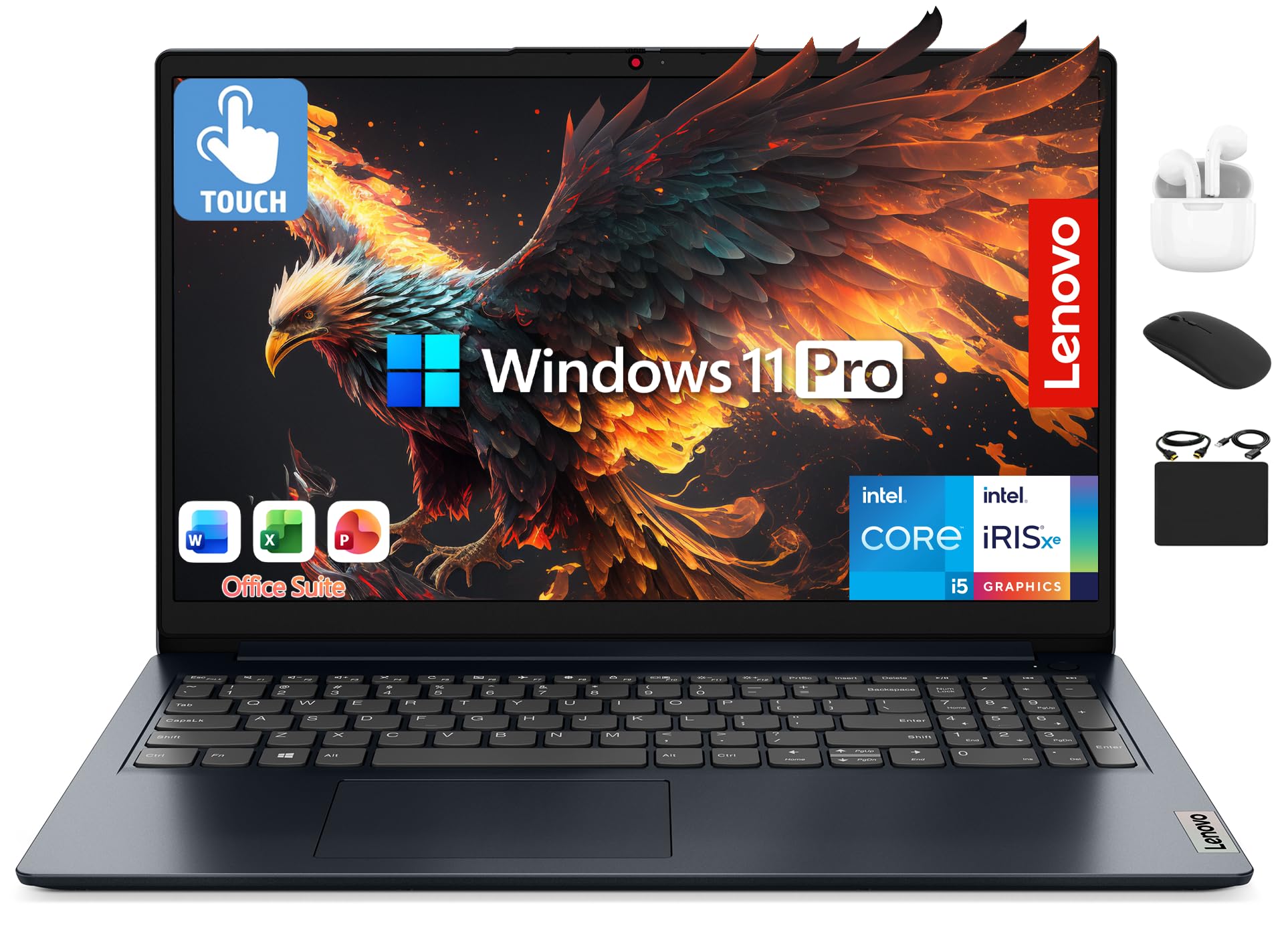
The Lenovo IdeaPad (i5 Touch) is a hybrid productivity and light gaming machine that leans heavily on the “touchscreen” experience and bundled accessories. It features a 15.6-inch FHD touch display, an Intel Core i5-1235U (10 cores, 12 threads, up to 4.40 GHz), 16GB of RAM, and a 512GB SSD plus a 500GB external drive. It ships with a full ecosystem of accessories: wireless earbuds, a wireless mouse, a mousepad, and a free lifetime Microsoft Office 2024 license.
For gaming, this is very much an entry-level machine. The integrated Intel UHD Graphics (or Intel Iris Xe depending on configuration) is not a dedicated GPU, so it will only handle very light games like Minecraft on low settings, indie titles, and browser-based games. The touchscreen is responsive and bright, making it excellent for creative work, media consumption, and note-taking. The 16GB RAM and large total storage (1TB+) are great for students or office workers who also want to game on the side.
The lack of a backlit keyboard is a notable omission for a laptop in this price range. The laptop also ships with Windows 11 Pro, which is a plus for business users. It is not a dedicated gaming laptop, so buyers must temper expectations. For a gamer who needs a do-everything laptop for school and only plays light/casual games, this bundle offers excellent value. For anyone wanting to run modern AAA games, this is not the right pick.
Why it’s great
- Touchscreen display with good resolution and brightness for creative work and media.
- Generous 16GB RAM and 1TB total storage (512GB SSD + 500GB external).
- Bundled accessories (wireless earbuds, mouse) and lifetime Office 2024 add significant value.
Good to know
- No dedicated GPU (Intel UHD/Xe graphics) severely limits gaming to light/indie titles only.
- Keyboard is not backlit, which is surprising for the price.
- Not a gaming laptop; only suitable for casual gaming, not modern AAA titles.
13. MALLRACE Gaming Laptop (Ryzen 7)

The MALLRACE Gaming Laptop is an aggressively priced machine that markets itself as a gaming laptop but is really a Ryzen 7-powered productivity workstation with integrated Radeon Graphics. The AMD Ryzen 7 7730U (8 cores / 16 threads, up to 4.5 GHz) is a powerful CPU for multitasking, productivity, and even light video editing. The 16GB of DDR4 RAM (expandable to 64GB) and 512GB NVMe SSD (with dual M.2 slots for up to 4TB) provide a strong foundation for office work and creative tasks.
For gaming, the integrated AMD Radeon Graphics is built on the RDNA 2 architecture, making it one of the more capable iGPUs. It can handle games like *League of Legends*, *Valorant*, *CS:GO*, and lighter indie titles at 1080p low-medium settings. However, it is not suitable for AAA gaming. The 15.6-inch FHD screen is clear for reading documents and watching videos. The 180° hinge and physical webcam privacy shutter are thoughtful additions for office environments.
The main issue is the branding — calling this a “Gaming Laptop” is misleading. It has no dedicated GPU, so it cannot run modern AAA games. The Radeon Graphics also lack the VRAM of discrete GPUs, meaning texture quality and resolution will be limited. The speakers are not loud enough for comfortable media consumption. This is a solid pick for a student or office worker who needs a fast, upgradable laptop with a Ryzen 7 processor, and occasionally plays light games during breaks. It is not for anyone looking to play the latest *Cyberpunk* or *Elden Ring*.
Why it’s great
- Ryzen 7 7730U provides excellent CPU performance for multitasking and productivity.
- High expandability with two M.2 slots and two RAM slots (up to 64GB).
- 180° hinge and physical webcam privacy shutter are great for office use.
Good to know
- Integrated Radeon Graphics cannot run modern AAA games; misleading “gaming” branding.
- Speakers are underpowered for comfortable movie or game audio.
- Integrated GPU lacks dedicated VRAM, limiting texture quality and resolution in gaming.
FAQ
Is 8GB of RAM enough for a basic gaming laptop in 2025?
What is the minimum GPU I should look for in a basic gaming laptop?
Can I upgrade the RAM and storage on a budget gaming laptop later?
Does a 144Hz display matter for a basic gaming laptop?
Final Thoughts: The Verdict
For most users, the best basic gaming laptop winner is the Acer Nitro V 15 ANV15-51-51H9 because it balances a genuine RTX 4050 with Thunderbolt 4, solid build quality, and an upgrade-friendly design at a mid-range price that doesn’t break the bank. If you want a razor-sharp 165Hz display and vapor chamber cooling for competitive play, grab the ASUS ROG Strix G16. And for absolute budget-conscious buyers who prioritize a 144Hz screen above all else, nothing beats the MSI Thin A15 (R5/RTX 2050).