
Our readers keep the lights on and my morning glass full of iced black tea. As an Amazon Associate, I earn from qualifying purchases.
Specs are compiled from manufacturer listings and verified buyer reviews and can change over time — please confirm the key details on the product page before buying.
Manual bed leveling—turning knobs and sliding paper under the nozzle—is the top frustration for new 3D printer owners. The printers on this list can help reduce that headache with sensors that map the build plate and adjust the nozzle height for you, automatically, on every print. You still get to learn slicing, supports, and filament settings, but the most tedious part is handled by the machine.
I’m Min — the founder and writer behind Gadgets Feed. This guide is built by comparing the manufacturers’ published specifications and the patterns across verified customer reviews, so you get each pick’s real strengths and trade-offs instead of marketing spin.
Auto-leveling sensors map the build plate and adjust nozzle height automatically, eliminating the guesswork from your first layer. This guide to the best 3d printer with auto leveling sorts out which model fits your budget, space, and project ambitions—if you want a fast FDM workhorse or a detail-obsessed resin machine.
Our Picks at a Glance


How To Choose The Best 3D Printer With Auto Leveling
Auto-leveling means the printer uses a sensor to measure the build plate and automatically adjusts the nozzle height, which can help achieve a good first layer. This is especially helpful for beginners because it can reduce a common cause of failed prints and frustration.
FDM or Resin: Which Technology?
FDM (Fused Deposition Modeling) printers melt plastic filament and lay it down layer by layer. They are great for functional parts, larger objects, and are generally easier to live with. Resin printers use a screen to cure liquid resin, producing incredibly detailed miniatures and models, but they require handling messy chemicals and proper ventilation.
Build Volume and Speed
Build volume is the maximum size object the printer can create, measured in millimeters. A larger volume like 350x350x350mm lets you print bigger parts or multiple smaller items at once. Print speed, measured in mm/s, tells you how fast the print head moves, with speeds like 500mm/s or 600mm/s now common on modern machines.
Quick Comparison
| Model | Best For | Build Volume | Max Speed | Weight | Amazon |
|---|---|---|---|---|---|
| Bambu Lab A1★ Best Overall | Beginners & families | Standard | 10,000 mm/s² accel | 22 lbs | Amazon |
| FLASHFORGE Adventurer 5MBest Value | First-time users | 220x220x220mm | 600 mm/s | 23.8 lbs | Amazon |
| FLASHFORGE AD5MTop Performer | High-speed printing | 220x220x220mm | 600 mm/s | 22 lbs | Amazon |
| Creality Ender-3 V3 KE | Tinkerers & budget | 220×220×250 mm | 500 mm/s | 21.7 lbs | Amazon |
| ELEGOO Mars 5 Ultra | Miniature detail | 6.04×3.06×6.49 in | 150 mm/h | 19.36 lbs | Amazon |
| ELEGOO Saturn 4 Ultra | Larger resin prints | 8.62×4.84×8.66 in | 150 mm/h | 40 lbs | Amazon |
| QIDI Q2 | Enthusiasts & pros | 270x270x256mm | 600 mm/s | 39.8 lbs | Amazon |
| Bambu Lab P1S Combo | Multi-color & enclosed | Standard | 500 mm/s | 47.5 lbs | Amazon |
| QIDI PLUS4 | Large, tough materials | 305x305x280mm | 600 mm/s | 59.4 lbs | Amazon |
| Creality K2 Plus Combo | Large multi-color jobs | 350*350*350mm | 600 mm/s | 27.5 lbs | Amazon |
| Sovol SV08 MAX | Massive builds | 500×500×500mm | 700 mm/s | 86.8 lbs | Amazon |
In‑Depth Reviews
1. Bambu Lab A1 3D Printer
Our pick — over 4.5★ from 550+ verified ratings; the strongest balance of quality and price.
The set-and-forget companion that runs quietly at ≤48 dB for daily, reliable printing.
The defining trait here isn’t just the auto-leveling — it’s the entire full-auto calibration suite that handles Z-offset, bed leveling, and more with zero input from you. The 1-Clip quick swap nozzle means you can change a nozzle in seconds without tools, and active motor noise canceling keeps the machine at ≤48 dB so it won’t disturb your work.
Owners who have run Prusa and Creality machines say the A1 “blows them out of competition,” praising its reliability for daily use over months, and the print quality earns the most praise of any single feature. The Bambu Handy app simplifies finding and sending models, and the machine works with an optional AMS lite for multi-color printing — though you need to buy the combo or the AMS lite separately to open up that.
It’s a 22-pound machine with a footprint that sits in a small home office without dominating the room. For beginners and kids, setup is easy enough that the reviews describe it as an ideal first printer, while experienced users appreciate the low maintenance and easy nozzle swaps.
Why owners rave
- Print quality is the most-praised aspect, with reliability close behind
- Quiet enough at ≤48 dB to run in a shared space
- Full-auto calibration means no manual leveling rituals
What to weigh first
- Multi-color needs a separate AMS lite purchase
- Durability gets mixed feedback across the review base
Reach for this if: you want a genuinely easy, reliable daily driver that a kid can run and a pro won’t outgrow.
Look elsewhere if: you plan to print advanced carbon-fiber or glass-fiber materials from day one — this is a PLA-to-PETG friendly machine.
2. FLASHFORGE Adventurer 5M 3D Printer
The fast-starter that goes from unboxing to a perfect first layer in about 10 minutes.
This one is built around speed and simplicity: full-auto one-click leveling calibrates the bed for a perfect first layer, and the Core XY motion system pushes top speed to 600mm/s with 20000 mm/s² acceleration. From unboxing to your first print is about 10 minutes, which makes it an easy recommendation for a first-time buyer.
The quick-detachable nozzle handles up to 280°C, and the dual-sided PEI coating plate gives you a flexible surface that pops prints off by bending. A filament run-out sensor pauses the job when the spool runs empty, and power-loss recovery lets you resume from where it stopped after an outage.
It’s a 23.8-pound machine with a 220x220x220mm build volume — noticeably more compact than the Bambu A1, which is helpful if your desk space is tight. Print quality is the top praised aspect, though the reviews do split on noise level, with some finding it acceptable and others too loud for a quiet room.
What stands out
- 10-minute unbox-to-print time
- Fast 600mm/s top speed with vibration compensation
- Flexible PEI steel plate for easy part removal
Fair caveats
- Noise level gets mixed reviews — some find it loud
- Small build volume at 220x220x220mm may limit large parts
Grab it if: you want a fast, beginner-friendly FDM machine with minimal setup friction at a sensible price.
Think twice if: your projects need a bigger build area or you plan to print in a silent bedroom environment.
3. FLASHFORGE AD5M 3D Printer
The maintenance-light marvel that swaps nozzles tool-free in 3 seconds for continuous printing.
This sibling of the Adventurer 5M shares the 220x220x220mm build volume and the 600mm/s top speed, but its a neat extra is the patent quick-release nozzle — a tool-free swap that takes as little as 3 seconds. You can change between 0.25, 0.4, 0.6, and 0.8mm nozzles to switch between high-precision and high-efficiency jobs.
The fully automatic one-click leveling measures the nozzle-to-build-plate distance and sets accurate offsets, so the first layer is flawless without any manual work. For connectivity, the Orca-flashforge slicer enables one-click batch file transmission and multi-printer network monitoring, plus the Flash Maker app lets you monitor prints remotely from anywhere.
Print quality leads the praise, and the reviews call it a great option for absolute beginners — the included PLA gets you a first successful print within about an hour of setup. It also resumes after power outages, saving the current layer and continuing when power returns, and the double-sided PEI steel plate handles PETG on the reverse.
The highlight: a 3-second tool-free nozzle swap is a genuine convenience no other pick in this range matches.
The honest trade-off: some buyers report the printer stopping after roughly 20 prints, and the monitor cable can be frustrating to connect — treat the first weeks as a test window.
Best fits: a beginner who values easy maintenance and wants the option to dial in different nozzle sizes for different jobs.
Not for: buyers who want a plug-and-play machine with zero chance of needing to troubleshoot connectivity quirks.
4. Creality Ender-3 V3 KE 3D Printer

The modder’s canvas that rewards tinkering with a huge community and endless upgrade options.
If you enjoy tweaking your setup, the Ender-3 V3 KE rewards you with speed: it prints at up to 500mm/s with 8000mm/s² acceleration. Its CR Touch Sensor (a probe that auto-detects multiple points across the platform) ensures a flawless initial layer—a real upgrade over the manual leveling of older Ender models.
The high-configuration Sprite Direct Extruder with a 60W ceramic heater and copper nozzle reaches 300°C, handling PLA, PETG, ABS, TPU (95A), and ASA filaments. Owners describe easy setup with prints in about an hour, and the huge community means mods and help are everywhere — one user turned the hobby into selling their own designs.
Bed stability and adhesion get mixed feedback, with some owners reporting adhesion issues and others none at all, and the auto bed leveling is an improvement some find doesn’t always work perfectly. It’s best treated as a printer for someone willing to learn and adjust, not a pure out-of-the-box appliance.
Why it endures
- Print quality leads the praise; great value as a large-format starter
- 300°C nozzle opens up ABS and TPU
- Massive modding community and aftermarket support
Before you buy
- Bed adhesion and auto-leveling get mixed reviews
- Loud fans at times, per multiple owners
- Built for tinkerers, not pure plug-and-play
Choose this if: you enjoy learning and upgrading, and you want a proven platform with a huge community behind it.
skip it if: you want zero calibration fuss straight from the start — this one rewards patience.
5. ELEGOO Mars 5 Ultra Resin 3D Printer
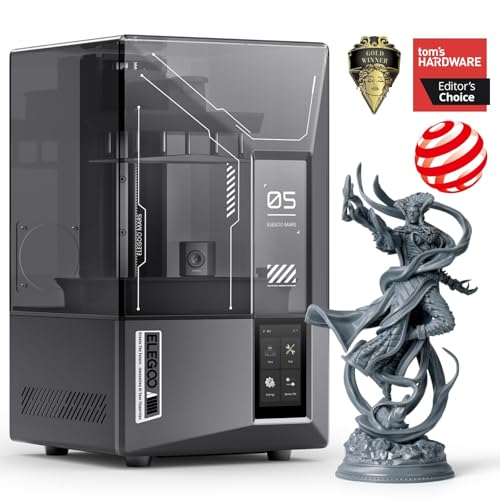
The miniature-maker that reproduces intricate detail down to 18μm with smart auto-leveling and minimal setup.
This is a resin printer, not FDM, which means it cures liquid resin with a 9K ultra-high-resolution 7-inch mono LCD screen. The 18μm XY resolution (the smallest detail it can reproduce) is what makes it a favorite for miniatures and jewelry molds — the detail far surpasses what FDM can achieve.
Smart automatic leveling and a self-check function mean you unbox, power on, and print without manual calibration. The tilt release technology (a mechanism that peels the model from the release film quickly) enables speeds up to 150mm/h, and the AI camera detects errors in real time, alerting you to empty build plates or model warps before they waste your resin.
Beginners specifically praise its wireless connectivity and suitability for first-timers, with owners calling it “perfect for miniatures.” However, print quality and auto-leveling get mixed feedback overall—some report high-quality prints while others experience failures, warping, and build plate adhesion problems. Resin printing also demands proper ventilation and careful cleanup that FDM owners never deal with.
What wins people over: the wireless printing and beginner-friendly setup, plus the dramatic detail jump over FDM machines.
The real caveat: resin printing is messier and smellier, and an occasional unit has build-plate adhesion or leveling trouble — know the cleanup ritual before you commit.
Reach for this if: your priority is fine detail for miniatures, models, or jewelry rather than large functional parts.
Look elsewhere if: you’re not ready for the mess, odor, and ventilation requirements of liquid resin.
6. ELEGOO Saturn 4 Ultra 12K Resin 3D Printer
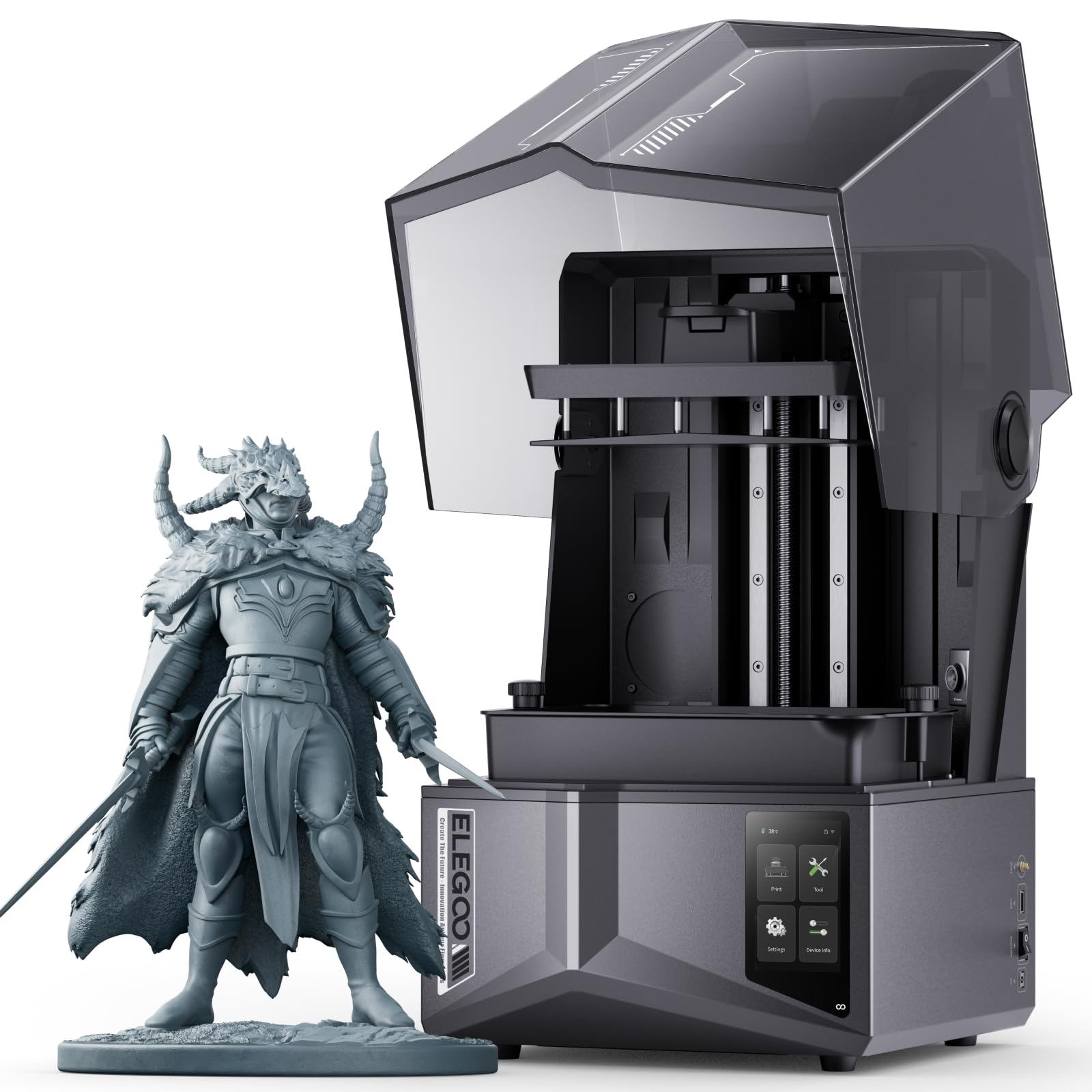
The larger resin canvas that delivers fine detail with one-touch leveling and a resin-shortage alarm.
This is the big sibling to the Mars 5 Ultra, with a 10-inch 12K monochrome LCD and an 8.62 × 4.84 × 8.66 inch print size — room for larger models or multiple miniatures at once. It uses the same tilt release technology for fast peeling, hitting a top speed of 150mm/h.
One-touch automatic leveling uses intelligent mechanical sensors so the platform is perfectly leveled every time, from the start. A mechanical sensor also supports foreign object detection to prevent LCD damage, plus a resin shortage alarm for safer, more reliable printing.
Owners praise the print quality for fine details and appreciate the perfect size balance, though build plate cleaning gets mixed feedback — easy for some, difficult for others. The reliability of the unit overall gets negative marks from a meaningful slice of owners, and one buyer found the auto-leveling “terrible and possibly self-damaged,” so test carefully within the return window. It’s a 40-pound machine that demands a sturdy table and patience with the resin workflow.
The big win: fine-detail print quality on a larger 10-inch 12K screen at 150mm/h speeds.
Stay honest: reliability is the recurring concern across the review base, and the auto-leveling works best when you verify your first few prints.
Best for: resin users who need a larger build area and want fine detail without moving to an industrial machine.
Not ideal for: anyone who wants a low-maintenance first resin experience—the Mars 5 Ultra is the gentler entry point.
7. QIDI Q2 3D Printer

The enclosed workhorse that tames advanced filaments like ABS and PPS-CF with a 65°C chamber.
What sets the QIDI Q2 apart is its 2nd-generation PTC heated chamber that reaches 65°C, which keeps large ABS prints from warping by maintaining consistent ambient temperature. The 370°C high-temp nozzle open up advanced materials like PPS-CF, making this a one-printer-does-all machine for engineers and serious hobbyists.
The Q2’s nozzle itself acts as the leveling sensor, which owners say delivers class-leading first-layer accuracy that doesn’t depend on the bed surface. The full-metal CoreXY structure (a frame layout that moves the print head on two belts) with precision linear rails hits 600mm/s top speed, and the 1.5GT synchronous belt reduces vibration artifacts for ultra-smooth surfaces.
Print quality is the most-praised aspect, and owners describe a 20-minute setup with outstanding warp-free ABS results. The triple filtration system (G3 pre-filter + H12 HEPA + activated carbon) makes indoor use reasonable. Reliability does get mixed feedback, and the AI spaghetti detection occasionally throws false positives — minor quirks for an otherwise capable machine.
Why it’s a workhorse
- 65°C heated chamber prevents warping on ABS
- 370°C nozzle handles advanced composites
- Print quality is the top praised aspect
What to know
- Reliability gets mixed feedback
- AI spaghetti detection has false positives
- Heavier at 39.8 lbs — needs a sturdy table
Reach for this if: you want one printer that moves from beginner PLA up to engineering-grade materials without upgrading.
Think twice if: you’re a pure beginner who won’t touch ABS or carbon fiber — the extra capability costs more than a simpler machine.
8. Bambu Lab P1S Combo 3D Printer + AMS

The enclosed multi-color machine that prints up to 16 shades with barely any layer lines.
This is the Combo package: the P1S printer plus the AMS (Automatic Material System) that gives you up to 16-color multi-material printing. It’s an enclosed CoreXY design that improves performance with advanced filaments like ABS and ASA, and it hits 500mm/s with 20000 mm/s² acceleration.
Auto bed leveling is built in, and owners describe a 15-minute unbox-to-operate experience with the first print under an hour. The Bambu Handy app handles setup and monitoring flawlessly, and the enclosed body keeps heat stable for better layer adhesion on materials that warp easily.
Print quality is described as remarkable, with owners noting prints come out with “barely any laylines.” Quality is the top praised aspect, followed closely by reliability. The sturdy build does have one recurring gripe — some owners mention the front handle breaking — and the proprietary ecosystem means you’re committing to Bambu’s filament and parts, which one reviewer called out as lock-in.
What impresses
- Up to 16-color printing with the included AMS
- Enclosed design improves ABS and ASA results
- Fast setup and reliable operation
What to weigh
- Some customers note the front handle breaking
- Proprietary ecosystem locks you into Bambu parts and filament
Choose this if: multi-color prints are your goal and you want a mostly plug-and-play enclosed machine with excellent support.
pass on it if: you prefer open-source freedom or want to avoid a closed ecosystem.
9. QIDI PLUS4 3D Printer

The large-format powerhouse that prints 12x12x11-inch parts and handles PPS-CF with a 400W chamber heater.
This is the big-format QIDI, with a 305x305x280mm build volume that lets you print multiple models at once or one large part. The second-generation active chamber heating system uses a 400W heater with air circulation and dual-layer insulation to keep temperature balanced and consistent, reducing warping on high-temp filaments.
The upgraded 80W high-temperature hotend reaches 370°C and supports PPS-CF, PPA-CF/GF, ABS, ASA, PC, PA, and PET. An independent dual motor-driven Z-axis with a 6mm thickened aluminum bed platform keeps the build surface flat and strong, and the 10mm diameter upgraded linear shafts and lead screws ensure precision.
Owners call it “a work horse I have run night and day with no problems” and praise the build quality and ability to handle multiple materials. The auto-leveling gets positive feedback, though some report bed leveling problems. It’s built for experienced users who don’t mind manual tuning — one reviewer explicitly recommended it only for tinkerers, not beginners.
The standout strength: a 305x305x280mm build volume plus a 370°C nozzle makes it a genuine multi-material workhorse.
The honest limitation: it needs manual tuning and suits experienced users more than beginners, and reliability gets mixed feedback across the review base.
Best fits: experienced makers who need a large build volume and want to print engineering materials like PPS-CF and PPA.
Not for: first-time buyers who want a pure plug-and-play experience without manual tuning.
10. Creality K2 Plus Combo 3D Printer

The huge multi-color machine that hooks up to four CFS units for up to 16 shades at 600mm/s.
This is Creality’s big-format answer to the Bambu P1S, with a 350x350x350mm build volume and the ability to connect up to four CFS (Creality Filament System) units for 16-color printing. The step-servo motor system delivers a staggering 30000mm/s² acceleration and a top speed of 600mm/s, with a 40mm³/s high-flow nozzle.
The ingenious anti-tilt auto leveling uses dual independently motorized Z-axes for automatic tilt reduction plus strain gauge-based leveling compensation, giving a pro-level first layer without manual intervention. Dual AI cameras watch for spaghetti failure, foreign objects, and idling, alerting you in real time.
Owners praise it as an excellent first printer that exceeds expectations, with solid prints and an easy app. The large build volume is a big draw. However, reliability and value get mixed feedback — some report it failing after three prints, and the 27.5-pound machine is heavy enough to need two people to move. One owner called setup “not for the faint of heart or a non-technical individual.”
Why it impresses
- Massive 350x350x350mm build volume
- 16-color printing with up to four CFS units
- Dual AI cameras for failure detection
What to weigh
- Reliability and value get mixed feedback
- Needs two people to move; heavy at 27.5 lbs
- Setup expects some mechanical experience
Choose this if: you want a large-volume multi-color machine and enjoy a bit of hands-on setup challenge.
Think twice if: you want a guaranteed smooth first weeks — test thoroughly within the return window.
11. Sovol SV08 MAX CoreXY 3D Printer
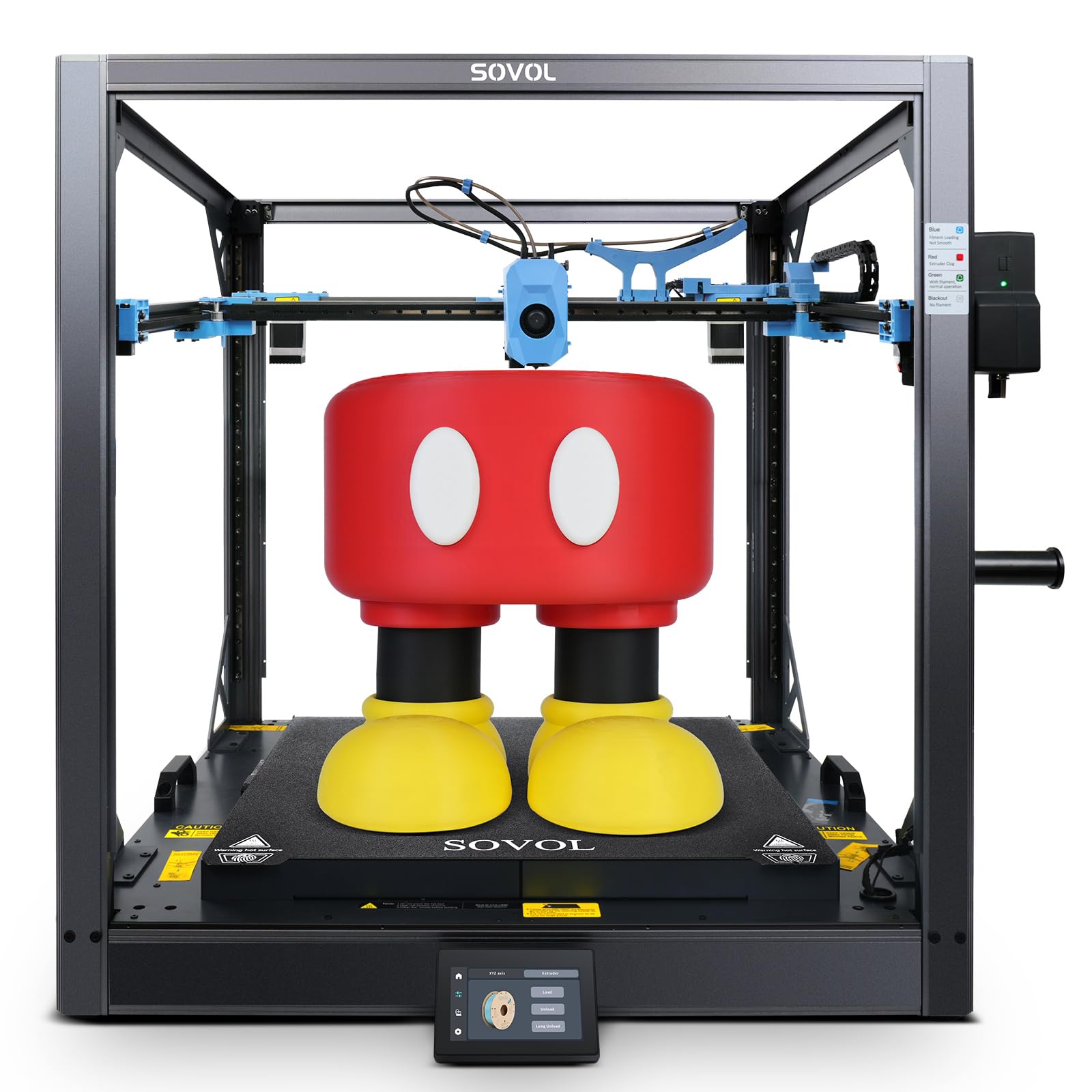
The giant 500mm³ open-source machine that prints furniture-scale parts at 700mm/s.
This is the biggest printer on this list, with a massive 500×500×500mm³ build volume that handles industrial parts, full-scale prototypes, and oversized props in one go. It’s a Voron 2.4 open-source design, so it runs vanilla Klipper and connects to apps like Mobileraker and Obico without any proprietary lock-in.
The eddy current sensor delivers high-speed, contactless bed leveling with exceptional accuracy, detecting even the smallest surface deviations before every print. Combined with pressure-sensing touch points for automatic bed calibration, you get a perfect first layer without any action on your part.
Top speed is a blistering 700mm/s with 40,000 mm/s² acceleration and a 50mm³/s high-flow nozzle, plus a 1280×720 HD camera for remote monitoring and timelapse. Print quality is the most-praised aspect by a wide margin. The catches: it’s extremely loud, the 1300W bed heats an entire room, and at 86.8 pounds it’s a two-person setup that needs serious floor space.
The big appeal: an open-source 500mm³ build volume that beats Prusa on price and Bambu on lock-in, with print quality as the top praised trait.
Know the trade-offs: extreme noise, huge power draw, and a startup power spike that can trip breakers — this is a shop machine, not a desk companion.
Best fits: makers printing furniture, props, and industrial parts who have a garage or workshop, not a bedroom.
Not for: beginners or anyone in a shared living space — the noise and power draw alone rule it out.
Understanding the Specs
Build Volume
This is the maximum size object a printer can create, in millimeters. A 220x220x220mm volume handles most functional parts and miniatures, while a 350x350x350mm or 500mm³ machine opens up furniture-scale and multi-part projects. Bigger volume also means you can print several smaller items in one batch, which saves time over many single prints.
Print Speed and Acceleration
Speed, in mm/s, tells you how fast the print head travels, and acceleration, in mm/s², tells you how quickly it reaches that speed. Machines like the FLASHFORGE Adventurer 5M and QIDI Q2 hit 600mm/s, while the Sovol SV08 MAX tops out at 700mm/s. Higher acceleration numbers like 40,000 mm/s² mean complex geometries finish faster with less time loss on direction changes.
FAQ
What does auto leveling actually do on a 3D printer?
Is auto leveling worth it for a first-time buyer?
What is the difference between FDM and resin printers for detail work?
How fast can a modern auto-leveling FDM printer actually print?
What build volume do I need for typical projects?
Can an auto-leveling printer handle advanced materials like carbon fiber?
What is the difference between the Bambu Lab A1 and the P1S Combo?
How long does it take to set up an auto-leveling printer?
Is a heated chamber necessary for good prints?
Is a heated chamber necessary for good prints?
What does the AI camera actually monitor during a print?
Can I print multi-color without an AMS or CFS unit?
Final Thoughts: The Verdict
For most buyers, the 3d printer with auto leveling winner is the Bambu Lab A1 because it nails the balance of ease, quiet operation, and reliable print quality that beginners and families need, backed by the strongest review base here. If you want faster speeds and a smaller footprint without spending more, grab the FLASHFORGE Adventurer 5M. And for multi-color printing in an enclosed package that handles ABS and ASA, the Bambu Lab P1S Combo is the one to reach for.
How We Picked
We do not accept paid placement. Every pick is matched to a real buyer and a real use-case; we do not hands-on test units.
Sources & Methodology
Specifications: manufacturer listings and product documentation. Review insights: verified customer reviews, as of August 2026. Pricing: not shown on this page (it changes often); check the current price via the retailer link.
As an Amazon Associate, Gadgets Feed earns from qualifying purchases. This does not affect which products we feature.