
Our readers keep the lights on and my morning glass full of iced black tea. As an Amazon Associate, I earn from qualifying purchases.
Specs are compiled from manufacturer listings and verified buyer reviews and can change over time — please confirm the key details on the product page before buying.
Running a small business means invoices, contracts, and shipping labels always need printing right now. The real question is which machine delivers sharp, fast pages without inflating your per-page costs. This guide cuts through spec sheets to find affordable printers that survive daily office use.
I’m Min — the founder and writer behind Gadgets Feed. This guide is built by comparing the manufacturers’ published specifications and the patterns across verified customer reviews, so you get each pick’s real strengths and trade-offs instead of marketing spin.
You want a printer that keeps your small business running without draining your budget, and the real cost is per page, not the sticker price. The affordable printer for small business options below balance upfront cost with long-term ink or toner expenses, so you can pick the one that fits your actual printing volume.
Our Picks at a Glance



How To Choose The Best Affordable Printer For Small Business
Your printing habits determine the right type. If you mostly print text documents, a monochrome laser is cheaper to run and faster than any inkjet. If clients need color marketing materials, you need to weigh ink costs carefully.
Match the machine to your monthly volume
Print speeds are measured in pages per minute (ppm). A 36 ppm laser handles a 30-page contract in under a minute, while a 15 ppm inkjet takes twice as long. High-volume offices should prioritize speed and large paper trays to avoid constant refills.
Understand the true cost per page
The purchase price is just the start. Toner cartridges last thousands of pages, so lasers are usually cheaper to run per page. Inkjet tanks (like EcoTank) refill with bottles for pennies per page. Always check cartridge yield and replacement costs before buying.
Quick Comparison
| Model | Best For | Print Speed | Duplex | Functions | Amazon |
|---|---|---|---|---|---|
| Brother HL-L2480DW★ Best Overall | Fast mono printing | 36 ppm | Automatic | Print, Scan, Copy | Amazon |
| Epson WF-3823Color Value Pick | Color all-in-one | 21 ppm B/W | Automatic | Print, Scan, Copy, Fax | Amazon |
| HP M234sdwCompact Team Pick | Small teams | 30 ppm B/W | Automatic | Print, Scan, Copy | Amazon |
| HP 3101sdw | Trusted reliability | 35 ppm B/W | Automatic | Print, Scan, Copy | Amazon |
| Canon LBP646Cdw | Color laser output | 26 ppm color | Automatic | Print Only | Amazon |
| Epson ET-2980 | Low ink costs | 15 ppm B/W | Automatic | Print, Scan, Copy | Amazon |
| Brother MFC-L2820DW | Fax + mono printing | 36 ppm B/W | Automatic | Print, Scan, Copy, Fax | Amazon |
| Xerox B310DNI | Blazing speed | 42 ppm B/W | Automatic | Print Only | Amazon |
| Canon GX2020 | High-volume color | 15 ppm B/W | Automatic | Print, Scan, Copy, Fax | Amazon |
In‑Depth Reviews
1. Brother HL-L2480DW
Our pick — 4.5★ from 600+ verified ratings; the strongest balance of quality and price.
The speed demon that turns a 30-page document into a quick two-sided task
This Brother is the crowd favorite for a reason: — it prints up to 36 pages per minute in sharp black and white, and its first page lands in 8.5 seconds. That pace makes it the fastest all-in-one here, outpacing the Epson WF-3823’s 21 ppm by a clear margin. For an office that churns out contracts and invoices, you are never waiting on the machine.
The 3-in-1 design packs a flatbed scanner and copier into a compact footprint, and the 2.7″ touchscreen makes cloud scanning to Google Drive or Dropbox genuinely easy. Setup is famously painless — buyers report getting it onto Wi-Fi and connected to phones, two PCs, and an iPad in about 30 minutes. The automatic duplex printing cuts paper waste without you lifting a finger.
What wins people over is the print quality and rock-solid construction. One owner called it a “great replacement for my 2280DW that lasted over 12 years!” — that kind of longevity is the real story here. The only consistent gripe is occasional wireless hiccups, with a few owners falling back on a USB or Ethernet cable for stability.
Why It Leads
- Blazing 36 ppm speed with 8.5-second first page
- Automatic duplex printing saves paper
- Touchscreen with cloud app support
- Proven longevity across generations
Watch Out For
- Wireless can drop for some owners
- Monochrome only — no color output
Reach for this if: you need fast, cheap, reliable black-and-white printing with scanning and copying built in.
Look elsewhere if: your business prints color marketing materials — this machine only does black and white.
2. Epson Workforce Pro WF-3823
A color all-in-one with fax that brings crisp pigment inks to a small office
The WF-3823 is the print, scan, copy, and fax hub for offices that need color without moving to laser. It runs at 21 ppm in black and 11 ppm in color, using Epson’s PrecisionCore Heat-Free Technology to place dots accurately. The DURABrite Ultra pigment inks dry instantly and hold up on plain paper.
Owners mention getting 100+ pages on the starter ink and praise the easy Wi-Fi setup and solid paper capacity at 250 sheets. The 35-page automatic document feeder (ADF) lets you walk away while a whole stack of pages gets scanned or copied. The 2.7″ color touchscreen and Epson Smart Panel app handle the daily workflow smoothly.
The honest trade-off is ink economics — Epson strongly recommends genuine cartridges, and those refills add up for heavy color users. One frustrated owner hit 200 pages before the ink ran out. But for light-to-moderate color printing with fax capability, it is a strong value play.
What Shines
- Full all-in-one with fax and 35-sheet ADF
- Fast first page out with PrecisionCore tech
- Instant-dry pigment inks
The Cost Side
- Proprietary ink can be expensive
- Mixed reliability reports from owners
Pick it for: a small office that needs color, scanning, copying, and fax from one compact machine.
Think twice if: you print heavy color volume — the ink costs will bite you over time.
3. HP LaserJet MFP M234sdw
The dual-band self-healing Wi-Fi makes this the most dependable connection in the lineup
Built for teams of 1-5 people, this HP LaserJet hits 30 ppm single-sided and up to 19 images per minute two-sided. Its dual-band Wi-Fi with self-reset automatically detects and fixes connectivity issues — a lifesaver in a busy office where dropped connections waste time. Customers note connecting three laptops, a desktop, an iPad, and three iPhones in under 20 minutes.
Print quality is the standout here, with owners praising crisp, smudge-free output even on a 300+ page job. The auto document feeder enables hands-free copying and scanning, and the HP Smart app handles print-from-phone tasks easily. The compact footprint (16.46″W x 12.13″D) fits tight desks, and the duplex printing cuts paper use automatically.
The recurring gripe is the control panel placed on the paper tray, which some find wobbly, and the scan button can be unresponsive at times. The included starter toner (~700 pages) gets you going, and HP Instant Ink eligibility is a nice option for predictable supply costs.
Standout Strengths
- Self-resetting dual-band Wi-Fi
- Excellent print quality on heavy jobs
- Compact size fits small desks
Minor Irritants
- Control panel on wobbly tray
- Starter toner is limited
Best suited for: a tight-knit small team that wants a compact, reliable mono laser with easy mobile printing.
Who should pass: offices needing a machine with a sturdy built-in control panel.
4. HP LaserJet Pro MFP 3101sdw

A step up in speed and reliability that handles 100+ page jobs without breaking a sweat
Rated 4.5 stars, this HP Pro is the machine for offices that push volume. It prints up to 35 ppm black, with a 7-second first page, and pairs a 250-sheet input tray with a 50-sheet auto document feeder for marathon scan-and-copy sessions. Reviewers point out using it for 100+ page jobs regularly, and it keeps up.
The starter toner is a high-yield unit (~1000 pages), which buyers appreciate — one owner got “clear, crisp prints at an economical price” without the bloatware that plagues some competitors. The HP Smart app handles scanning to phone and mobile fax cleanly. Firmware checks authenticity on toner, so you are tied to genuine HP cartridges for optimal performance.
The trust factor here is real — one owner liked it so much they bought a total of three, reporting all working flawlessly. The main complaint is delivery delays from the carrier rather than the printer itself, and a few note the auto-feeder can jam if you overload it past 25 sheets. Wi-Fi can drop on power surges, but a quick reset fixes it.
Built To Work
- Fast 35 ppm with 7-second first page
- 50-sheet ADF for high-volume scanning
- High-yield starter toner included
Keep In Mind
- Firmware blocks non-HP toner
- ADF jams if overfilled past 25 sheets
Grab it for: steady daily volume where reliability and a 35 ppm pace keep the workflow moving.
skip it if: you plan to use third-party toner — HP firmware will reject it.
5. Canon Color imageCLASS LBP646Cdw

The rare color laser that prints both colors in 26 ppm without demanding a huge desk footprint
If your business needs professional color documents but you already have a scanner, this Canon is a print-only machine that excels at its one job. It hits 26 ppm in both color and monochrome, with a first print around 10.3 seconds. Shoppers say zero jams and fast two-sided printing that saves both paper and time.
Color quality is the headline — owners call it clean, reliable output with vivid results from the Canon Genuine Toner 075 cartridges. The 5-line LCD screen keeps navigation simple, and mobile printing works through the Canon PRINT app, Apple AirPrint, or Mopria. The 250-sheet cassette plus a 1-sheet multipurpose tray handles specialty media like envelopes.
The catch is Mac setup, which a few owners found frustrating with sleep-related connection issues. It’s also a heavier machine, so plan your desk placement. But for dependable color laser output with a 1-year limited warranty, this delivers.
Color That Works
- True 26 ppm in both color and B/W
- Clean, vivid color output
- Zero-jam reliability reported
Knowing The Limits
- Print only — no scan or copy
- Mac setup can be finicky
Choose it for: offices that already have a scanner and just need a fast, high-quality color laser printer.
Pass on it if: you need all-in-one functions — this Canon does print only.
6. Epson EcoTank ET-2980

The cartridge-free design that puts up to three years of ink in the box from day one
This EcoTank flips the ink economics completely. Instead of cartridges, it uses supersized refillable tanks, and the ink included in the box prints up to 6,600 pages in black and 5,500 in color. Each replacement bottle set equals about 90 individual cartridges, so the cost per page drops dramatically for color-heavy offices.
Setup is a guided process via the instructions and app, and buyers highlight the easy ink-fill with EcoFit bottles that are hard to mess up. Print quality is good for home and small business use, and the automatic duplex printing keeps paper costs down too. The 24-bit color depth (measured in bits per pixel) supports smooth color gradients in everyday documents.
The mixed feedback lands on wireless connectivity — some buyers report the connection dropping from Wi-Fi. The small screen also gets negative mentions for being hard to read. But for sheer ink value, the ET-2980 is tough to beat if your office prints color regularly.
Ink Genius
- Up to 6,600 B/W pages from included ink
- Bottle refills equal ~90 cartridges each
- Auto duplex saves paper
Honest Trade-offs
- Wireless can drop for some owners
- Small, hard-to-read screen
Get this for: a color-printing office that wants to stop buying cartridges and start refilling bottles.
Look elsewhere if: you need fast printing — 15 ppm is on the slower side.
7. Brother MFC-L2820DW

The full office suite — print, scan, copy, and fax — wrapped in a compact laser body
This Brother adds fax capability to the already-strong mono laser formula, making it a true four-function hub. It matches the HL-L2480DW’s 36 ppm speed with an 8.5-second first page, and the 50-page auto document feeder lets you feed a whole stack for multi-page copying, scanning, or faxing without standing over it.
The 2.7″ touchscreen brings cloud app access to Google Drive, Dropbox, Evernote, and OneNote. Owners call setup a breeze — one reported the simplest installation ever via a Cat6 cable. The Brother Mobile Connect app adds remote printing and toner tracking. The scanner hits 23.6 pages per minute in black, so digitizing documents moves fast.
Reliability gets mixed notes, with some owners reporting daily Wi-Fi drops, though most find the wireless works well across Mac and Windows ecosystems. The toner economy is strong with the TN830 series, and genuine Brother toner is famously reasonably priced. If fax is a requirement, this is the pick.
Full Office Hub
- Print, scan, copy, and fax in one
- 50-page ADF for multi-page jobs
- Fast 36 ppm with 8.5s first page
Consider This
- Wi-Fi drops reported by some owners
- Monochrome only
Best for: offices that still send faxes and want Brother’s proven mono laser reliability with scanning.
Skip if: you don’t need fax and want to save desk space — the smaller HL-L2480DW does print, scan, and copy.
8. Xerox B310DNI
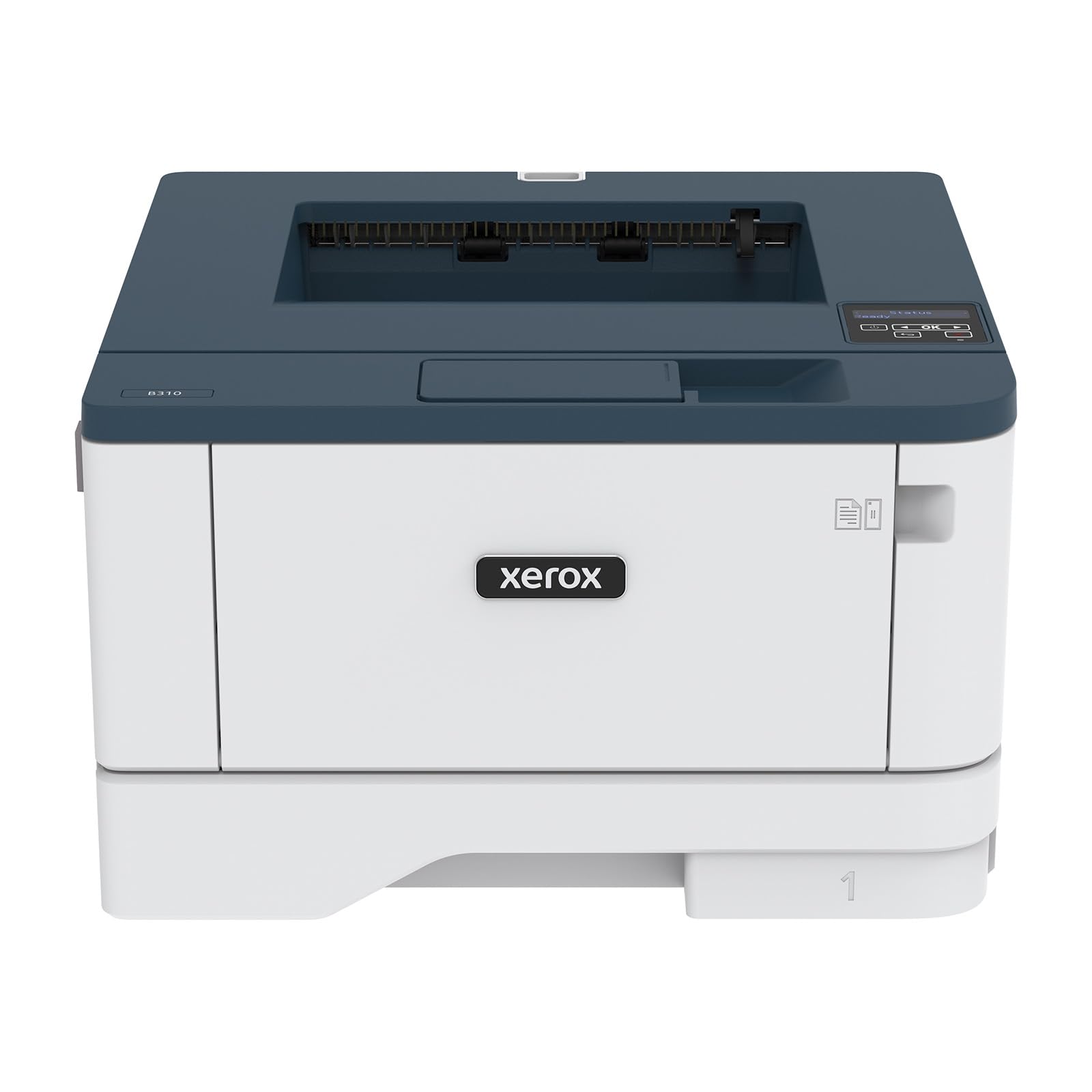
The 42 ppm blaze that outruns every other mono printer on this list
For raw speed, nothing here touches the Xerox B310DNI. It cranks out 42 A4 pages per minute in black and white, making it the fastest printer in this roundup by a healthy margin. That pace, plus automatic two-sided printing and a 250-sheet tray, means high-volume offices fly through daily jobs. Owners confirm it’s “blazing fast” with sharp, high-resolution output.
It’s a print-only machine, so bring your own scanner. The compact footprint fits tight spaces, and it handles envelopes and labels without complaint. Wireless setup draws some negative notes for being complex, but the Ethernet option is described as simple and reliable. Apple AirPrint, Mopria, and Chromebook support cover mobile printing needs.
Buyers love the Mac and Linux (CUPS) compatibility, calling it a breeze to set up and excellent in quality. The catch is cost — toner runs expensive and the starter cartridge only gets you so far. A couple of owners also mention the machine runs loud and the display is small. But for pure mono speed, it’s the benchmark.
Built For Speed
- Fastest at 42 ppm mono
- Auto duplex and 250-sheet tray
- Solid Mac and Linux support
Speed’s Price
- Expensive toner replacements
- Wireless setup can be complex
Choose it for: a print-heavy office where every minute saved at the printer matters more than scanning.
Leave it behind if: you need all-in-one functions or prefer plug-and-play wireless over Ethernet.
9. Canon MegaTank MAXIFY GX2020

A full fax-equipped tank that prints 3,000 pages before you need to buy more ink
The GX2020 is Canon’s answer to high-volume color printing without the cartridge drain. A single set of pigment-based ink bottles delivers up to 3,000 black and 3,000 color pages, and the refillable tank system makes the ongoing cost per page far lower than cartridge machines. It includes fax capability and a 35-sheet auto document feeder, making it a complete office hub.
Quality earns strong praise, with owners reporting crisp text and vibrant colors from the MAXIFY line. The 2.7″ color touchscreen keeps navigation intuitive, and the auto 2-sided printing saves paper. Setup is straightforward — one buyer called it an easy process under an hour, helped by online tutorial videos. The Canon PRINT app handles remote printing well.
The genuine ink bottles are reasonably priced, and the design uses non-proprietary nozzles, giving owners flexibility. The honest downside: it’s not a photo printer — a few owners mention blurry, dull images from it, so keep it for documents and office graphics. Envelope and cardstock printing can require careful settings. But for everyday office work, the value is strong.
Value Powerhouse
- 3,000 B/W and 3,000 color pages per ink set
- Fax, scan, copy, print in one
- Refillable tanks cut long-term cost
Know The Limits
- Not built for photo printing
- Envelope printing needs careful settings
Pick this for: a color-printing office that wants fax and the lowest possible ongoing ink cost.
pass on it if: your work involves photo-quality prints — this is a document machine.
Understanding the Specs
Pages Per Minute (ppm)
This is the print speed — how many pages the machine outputs in one minute. A 36 ppm laser finishes a 30-page document in under a minute, while a 15 ppm inkjet takes two minutes. Speed matters most if you print in bursts or regularly run multi-page reports.
Automatic Duplex Printing
Duplex means the printer flips pages automatically to print on both sides. This halves your paper usage per print job and cuts costs over time. Every printer on this list includes automatic duplex as a standard feature, saving you effort and money on paper.
FAQ
Is a laser printer or inkjet better for a small business?
How many pages per minute do I really need?
What does automatic duplex printing save me?
How do I estimate the real cost per page?
Should I worry about wireless printing reliability?
What is a starter toner cartridge and why is it smaller?
Do I need an automatic document feeder for scanning?
Can I print from my phone and tablet?
Final Thoughts: The Verdict
For most buyers, the affordable printer for small business winner is the Brother HL-L2480DW because it combines the fastest mono speed in its class (36 ppm) with proven longevity and a touchscreen that makes scanning easy. And for teams that rely on flawless wireless, the HP M234sdw with its self-healing dual-band Wi-Fi is the crowd favorite.
How We Picked
We do not accept paid placement. Every pick is matched to a real buyer and a real use-case; we do not hands-on test units.
Sources & Methodology
Specifications: manufacturer listings and product documentation. Review insights: verified customer reviews, as of August 2026. Pricing: not shown on this page (it changes often); check the current price via the retailer link.
As an Amazon Associate, Gadgets Feed earns from qualifying purchases. This does not affect which products we feature.