
Our readers keep the lights on and my morning glass full of iced black tea. As an Amazon Associate, I earn from qualifying purchases.
Specs are compiled from manufacturer listings and verified buyer reviews and can change over time — please confirm the key details on the product page before buying.
Finding a budget mouse that doesn’t force your hand into a claw grip is harder than it sounds. Most cheap mice are tiny, travel-sized afterthoughts that leave your palm hovering and your wrist aching after an hour of work. The real battle isn’t about wireless versus wired — it’s about finding a full-size shape that fits your hand properly while staying affordable.
I’m Min — the founder and writer behind Gadgets Feed. This guide is built by comparing the manufacturers’ published specifications and the patterns across verified customer reviews, so you get each pick’s real strengths and trade-offs instead of marketing spin.
You want a mouse that fits your whole hand, tracks smoothly, and won’t break the bank — without paying extra for a brand name. These picks deliver exactly that, and the budget normal sized mouse that fits, tracks, and lasts is the one that matches your grip and daily habits.
Our Picks at a Glance


How To Choose The Best Budget Normal Sized Mouse
The term “normal sized” is doing a lot of work here. Many budget-friendly mice are built compact to save on shipping and materials, which is great for travel but lousy for all-day comfort. Your goal is a mouse that lets your palm rest fully on the body rather than hovering above the desk.
Measure your hand against the length and width
A mouse that’s too short forces you to grip with your fingertips, which quickly leads to fatigue. Look for a body length around 4.4 to 4.9 inches and a width over 2.5 inches if you have medium to large hands. Compare that to compact models that hover around 3.97 inches long — a noticeable difference that translates to a cramped grip for many users.
Decide between wireless and wired
Wireless mice clear your desk and let you move the receiver anywhere, but they need batteries. Wired mice never need charging but chain you to your device. For a budget pick, a 2.4GHz wireless connection (a radio link that works up to about 30 feet) with a nano receiver (a tiny USB plug) is the balance — you get wireless freedom with plug-and-play simplicity, no Bluetooth pairing menus to fiddle with.
Check the button layout for your workflow
Standard mice offer three buttons: left, right, and a scroll wheel. Adding forward and back buttons lets you navigate web pages and file folders with a single click, saving you time during long research sessions. Some mice also include a DPI button to adjust cursor speed on the fly, which is handy when switching between detailed design work and broad desktop navigation.
Quick Comparison
| Model | Best For | Buttons | Dimensions (L x W) | Battery Life | Amazon |
|---|---|---|---|---|---|
| Logitech M510★ Best Overall | All-day productivity | 7 | 4.4″ x 2.5″ | 2 years | Amazon |
| Amazon Basics 2.4GHzBudget Champion | Simple entry-level use | 3 | 3.97″ x 2.28″ | Mixed | Amazon |
| Acer OMR339Large Hand Pick | Large hands & DPI control | 6 | 4.9″ x 2.7″ | Requires AA | Amazon |
| Logitech M185 | Small to medium hands | 3 | 1.54″ x 3.89″ | 12 months | Amazon |
| wegear WL300 | Quiet Bluetooth use | 6 | — | 24 months | Amazon |
| HP X3000 G3 | Travel-friendly ambidextrous | 3 | — | 15 months | Amazon |
| Censprin USB Wired | Silent wired work | 3 | 4.7″ x 3.07″ | — | Amazon |
| PHILIPS Dual Mode | Two-device connectivity | 6 | 3.5″ x 2″ | 18 months | Amazon |
| Kensington Pro Fit | Large hands with grip | 3 | — | — | Amazon |
In-Depth Reviews
1. Logitech M510 Full Size Ambidextrous 2.4 GHz Wireless Mouse
Our pick — over 4.5★ from 35,000+ verified ratings; the strongest balance of quality and price.
The Logitech M510’s seven programmable buttons and side-scrolling turn everyday browsing and spreadsheet work into a faster, one-hand workflow.
The defining spec here is the button count — 7 buttons is 2.3 times the three on the Amazon Basics mouse — and that gap changes how you work. Physical back and forward buttons on the thumb rest let you fly through web pages and folders, and you can reprogram them for app switching or full-screen views. Side-to-side scroll plus zoom means spreadsheets and photo libraries become one-hand affairs instead of scroll-wheel marathons. You get this control in a body sized at 4.4 inches long and 2.5 inches wide, so your palm rests fully supported by a contoured shape with soft rubber grips that work for either hand.
Battery life is where this mouse earns its keep for years at a time. Two years from a pair of included AA batteries is the headline number, backed by an on/off switch, smart sleep mode, and an indicator light so you’re never caught dead with a dead mouse. The Logitech Unifying receiver stays in your laptop’s USB port, meaning you can leave it plugged in while moving around and even pair compatible keyboards to the same dongle. The thing everyone raves about is reliability — the review pages sum it up: “Extremely durable—5 years heavy daily use still works; easy plug-and-play setup; batteries included and last years without turning off.”
The honest trade-off is durability parity over time. While most buyers report years of flawless service, a small number mention a unit failing after about 18 months of heavy use, so it’s not invincible. The scroll wheel can also develop a slight wobble or rattle on some units — an annoyance, not a functional failure. For the money, this remains the gold standard for a full-grip budget workhorse, and the only real reason to look elsewhere is if your hands run smaller than medium.
Why owners stick with it
- 7 total buttons with programmable back/forward and side-scroll for real speed gains
- 2-year battery life from included AAs with smart sleep mode
- Unifying receiver stays plugged in and pairs with other Logitech gear
The honest catches
- Occasional reports of failure after roughly 18 months of intense use
- Scroll wheel can wobble or rattle on certain units
- Best suited to medium or larger hands
Reach for this if: you spend hours daily in spreadsheets and browsers and want customizable thumb controls that genuinely accelerate your work.
Look elsewhere if: you have noticeably small hands or refuse to deal with any software — the M510 skips some functions without Logitech’s free SetPoint app.
2. Amazon Basics 2.4 GHz Wireless Optical Mouse
The Amazon Basics mouse delivers a reliable 2.4GHz connection and a simple three-button layout at a rock-bottom price.
This mouse is the most compact pick here at just 3.97 inches long and 2.28 inches wide — a 23% shorter body than the spacious Acer at 4.9 inches — so if your hands are large, you’ll feel the difference immediately. The 3-button layout keeps things simple: left, right, and a scroll wheel, with no extra thumb buttons to learn or accidentally press. The nano receiver stows inside the mouse when not in use, a thoughtful travel touch, though you’ll need to open the battery compartment to retrieve it on first setup.
The reliability story is where it gets interesting. Owners mention it’s quick to set up and very responsive for everyday tasks, and the affordable price means you can buy one for every PC without guilt. It’s ambidextrous, works on PC and Mac, and ships with batteries included. The catch is battery discipline: with heavy use, customers note needing to replace batteries every 2-3 weeks, and there’s no automatic shutdown — you have to flip the manual on/off switch yourself. If you leave it on overnight, you’ll be feeding it fresh AAs sooner than you’d like.
What wins people over is sheer functionality for the price — it just works, on most surfaces, with a strong 2.4GHz connection. This is the ideal first wireless mouse for a kid’s computer, a guest machine, or anyone who wants a spare that costs almost nothing. Just be honest with yourself about hand size: if you need a full palm rest, this compact body will leave you hovering.
Verdict in short: the best cheap-and-cheerful option for small to medium hands, with a simple 3-button setup and a receiver that hides inside. Battery life demands a nightly off switch habit.
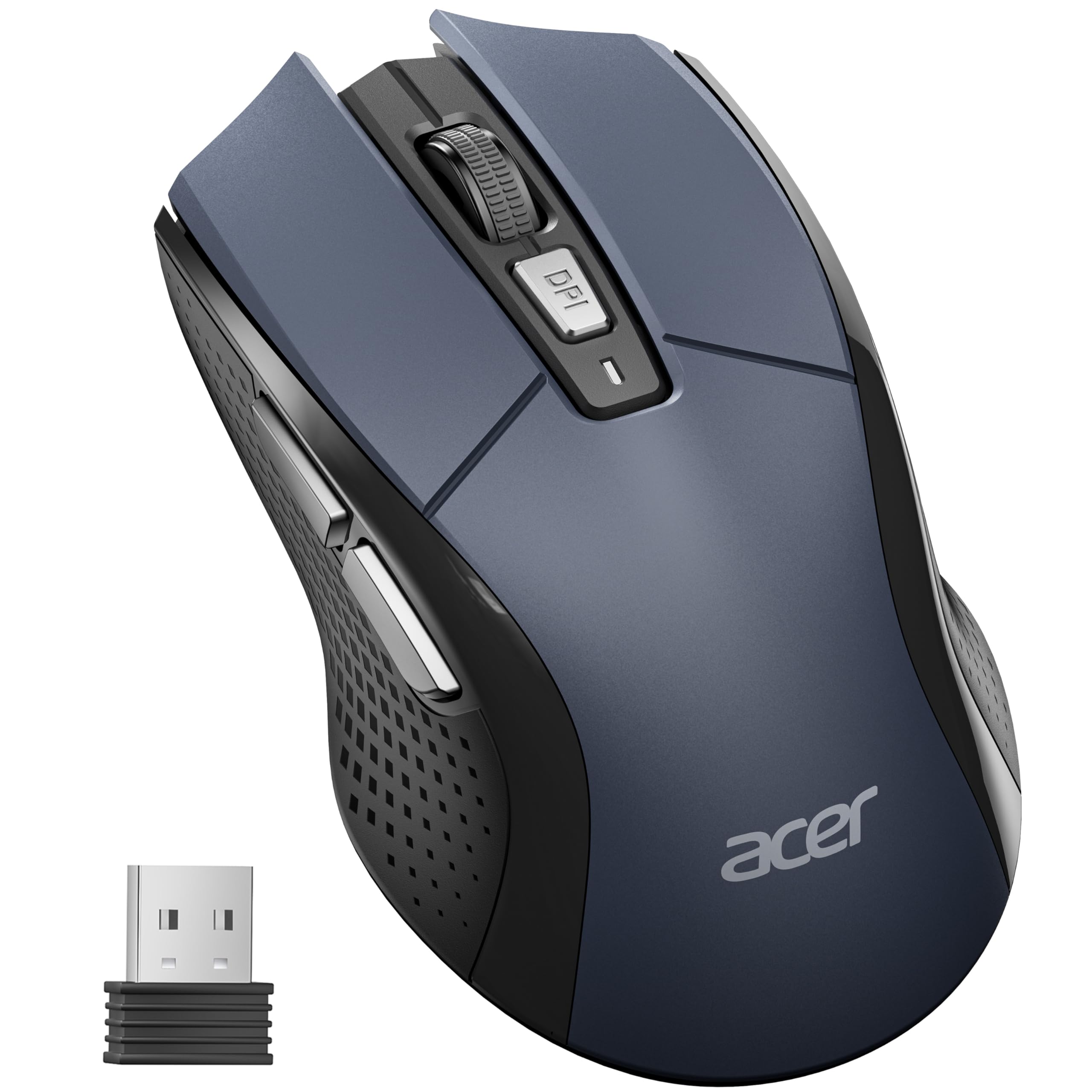
3. Acer Wireless Mouse for Laptop (OMR339)
The Acer OMR339’s 4.9-inch body is the largest in this lineup, giving large hands a full palm rest and a 4000 DPI sensor.
At 4.9 inches long and 2.7 inches wide, this Acer is the largest mouse in the lineup — a 23% longer frame than the Amazon Basics 3.97-inch body — and it’s explicitly designed for medium to large hands. The 6-button layout gives you forward and back navigation plus a dedicated DPI button that cycles through five sensitivity levels: 800, 1200, 2400, 3200, and up to 4000 DPI. That top figure doubles the precision of the HP X3000 G3’s 1600 DPI sensor, giving you serious cursor speed when you need to fling across a multi-monitor setup.
The clever part is the visible indicator light that flashes once to five times to show your current DPI setting, and it turns to a continuous red flash when the battery drops below 10%. Power saving is genuinely thoughtful: the mouse enters standby after 10 minutes of inactivity and wakes with just 2-3 clicks, and it’s rated for up to 10 million clicks of durability. The 2.4GHz connection reaches up to 33 feet of interference-free range, which matters if your receiver sits across a room.
Owners consistently describe it as comfortable and responsive, with the sensor idling nicely when not in use. One irregularity: a single owner reported occasional phantom inputs from a side button, but it appears to be a defective unit rather than a pattern. The bigger practical note is that it needs one AA battery you supply yourself — it’s not included — and there’s no Bluetooth, so it’s strictly USB-A receiver territory. If you have large hands and want DPI flexibility without paying premium prices, this is the one.
Best suited for: big-handed users who want DPI control. The 4000 DPI ceiling and 10-million-click rating make it feel more expensive than it is, though battery not included is a small setup friction.
4. Logitech M185 Compact Ambidextrous Wireless Mouse

The Logitech M185’s compact 3.89-inch body and 12-month battery make it a lightweight, travel-ready companion for small hands.
Where the M510 above goes big on buttons, the M185 keeps things lean at 3 buttons and a compact body built for small to medium hands. It’s the counterpoint to that 7-button productivity beast — if you found the M510 too button-heavy, this strips everything back to essentials with a contoured, ambidextrous shape that works in either hand. The wireless range reaches up to 33 feet, so you can keep clicking from across the room.
Battery life is a headline feature: up to 12 months from the included AA battery, thanks to a smart sleep mode that kicks in when the mouse sits idle. Plug in the tiny nano receiver and you’re working in seconds — no drivers, no pairing menus. The plastic body includes certified post-consumer recycled content, a sustainability touch you rarely see at this level. It also carries a 3-year limited hardware warranty from Logitech, which is a stronger safety net than most budget mice offer.
The recurring feedback is that it works flawlessly right from the start and feels great in the hand — as long as your hands are on the smaller side. Owners with larger hands consistently find it too small, so this is a fit-dependent pick rather than a universal one. For petite hands, tight workspaces, or a laptop bag that needs a lightweight companion, the M185 is a proven, reliable choice that just works.
Best if: your hands are small to medium or you want a low-maintenance travel mouse backed by a 3-year warranty. Think twice if you have large palms — it’ll feel cramped.
5. wegear WL300 Bluetooth Silent Mouse
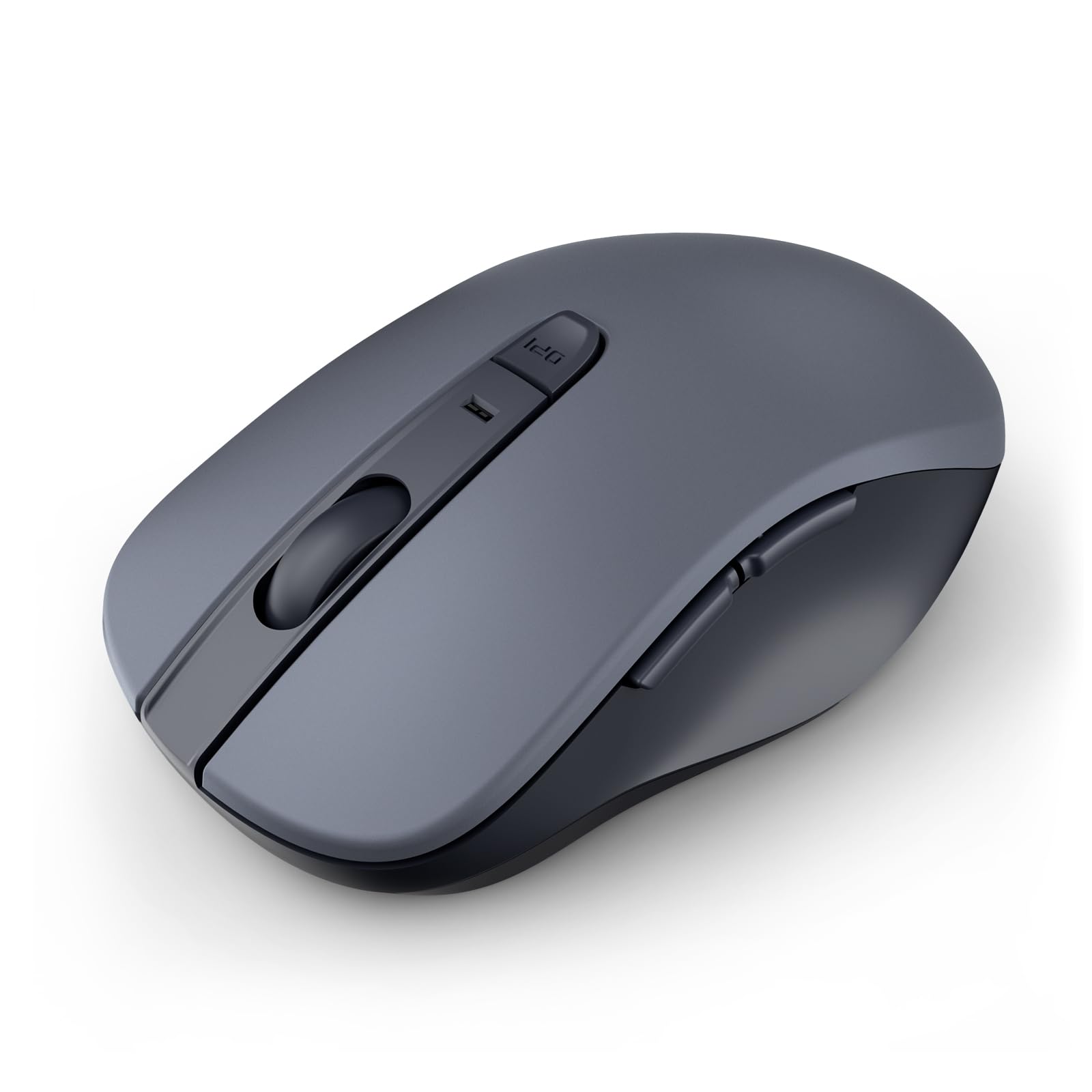
The wegear WL300’s dampened switches cut click noise dramatically, making it ideal for libraries and open offices.
If your old mouse sounds like cracking sunflower seeds with every click, The WL300’s silent clicks and Bluetooth 5.0 connectivity make it a quiet, cable-free upgrade for shared workspaces.. The whole point here is silence — the left, right, and scroll wheel buttons are all designed to click quietly, and owners repeatedly describe those clicks as “surprisingly satisfying.” It connects via Bluetooth 5.0 (the latest wireless standard) with Microsoft Swift Pair (a quick-pairing feature), so there’s no USB receiver to lose or swap between machines; it just pairs and stays paired to your laptop.
Battery life is a standout spec at up to 24 months from a single AA battery (not included), with sleep mode engaging after 30 seconds of inactivity to stretch that figure further. The 6-button layout adds forward and back navigation, plus a DPI button that cycles through 800, 1200, and 1600 DPI for adjusting cursor speed. Durability is spelled out numerically: the left and right buttons are engineered for up to 3 million clicks, and the scroll wheel for 300,000 cycles. The sculpted grip is designed for right-handed use and is full-size, a comfortable fit for extended work sessions.
The mixed feedback centers on battery — while the 24-month claim is promising, some owners note it’s not rechargeable, so you’re committed to AA replacements. Also, forward and back buttons aren’t recognized on Mac, so macOS users lose half the button value. But if you work in a shared office, a library, or late at night next to a sleeping partner, the silence alone justifies the pick. One owner loved it so much they bought five to replace aging Logitech mice across every PC and notebook.
Who it suits: anyone who needs quiet clicks in shared spaces and wants Bluetooth convenience without a dongle. The Mac limitation on side buttons and non-rechargeable battery are the two caveats to weigh.
6. HP X3000 G3 Wireless Mouse

The HP X3000 G3’s ambidextrous shape and textured side grips keep control steady on café tables and hotel desks.
A 1600 DPI optical sensor with LED multi-surface tracking means this mouse glides smoothly over wood, fabric, and other tricky surfaces — you won’t need a mousepad to keep working on a café table or hotel desk. The 2.4GHz USB-A connection holds a range of up to 30 feet, and the nano receiver stores inside the mouse body when you’re on the move, so nothing gets left behind in a laptop bag. With 3 buttons and an ambidextrous shape, it’s a straightforward, no-learning-curve tool for either hand.
Battery life is strong at up to 15 months from a single AA battery, which is a solid middle ground between the Amazon Basics’ short life and the wegear’s 24-month claim. Owners consistently praise the ergonomics — the contoured shape and side grips fit comfortably in the palm, and the tracking feels instant and responsive. It’s also genuinely travel-friendly, with a compact body that works well on a lap or a cramped train table.
The trade-offs are fit and battery-door friction. Owners with large hands report it runs a little small, so if you need your whole palm supported, the Acer is roomier. And the battery compartment requires a tool to open — it lacks the easy indentation you’ll find on other mice, which is a minor annoyance when swapping batteries. An occasional unit comes with a recessed, tiny on/off switch that’s fiddly to operate. If your hands are medium or smaller and you live out of a bag, this is a dependable pick.
Best for: travelers and medium-handed users who want a reliable, ambidextrous mouse with long battery life. Large hands will find the body a bit snug.
7. Censprin USB Wired Silent Mouse

The Censprin wired mouse delivers instant, zero-latency response with no batteries to replace or receivers to lose.
Sometimes the simplest solution is a cable. This Censprin mouse skips wireless entirely, which means no batteries to replace, no receivers to lose, and no connection drops — it’s a pure plug-and-play tool that works the moment you insert the USB. The body is generously sized at 4.7 inches long and a wide 3.07 inches across, with a wide tail and flanking finger rests designed to reduce pressure and relieve hand fatigue during long sessions. At 3.35 ounces, it’s substantial enough to feel solid without being heavy.
The defining feature is near-silent clicking. The 3D non-slip rubber wheel and quiet left and right buttons let you work in a library, an office, or at night without disturbing anyone. Owners repeatedly highlight how quiet and smooth it feels, and how the 3-button simplicity means there’s nothing to configure. It’s compatible with Windows 10, 8, 7, Vista, XP, and works with all major laptop brands — a plug-and-play experience with zero driver downloads.
The honest fit note: it’s a wide mouse, and some owners with smaller hands found it too big and had to return it. One also noted it moved a bit stiffly on a wooden surface, so a mousepad helps. The scroll wheel has a backlit, color-cycling glow that some will love and others will find unnecessary. If you want an unkillable, battery-free workhorse and have medium to large hands, this wired silent pick delivers.
Reach for this if: you hate battery management and want a quiet, wide-bodied mouse for office or home. Smaller hands should measure before buying — this one runs large.
8. PHILIPS Silent Click Dual Mode Mouse
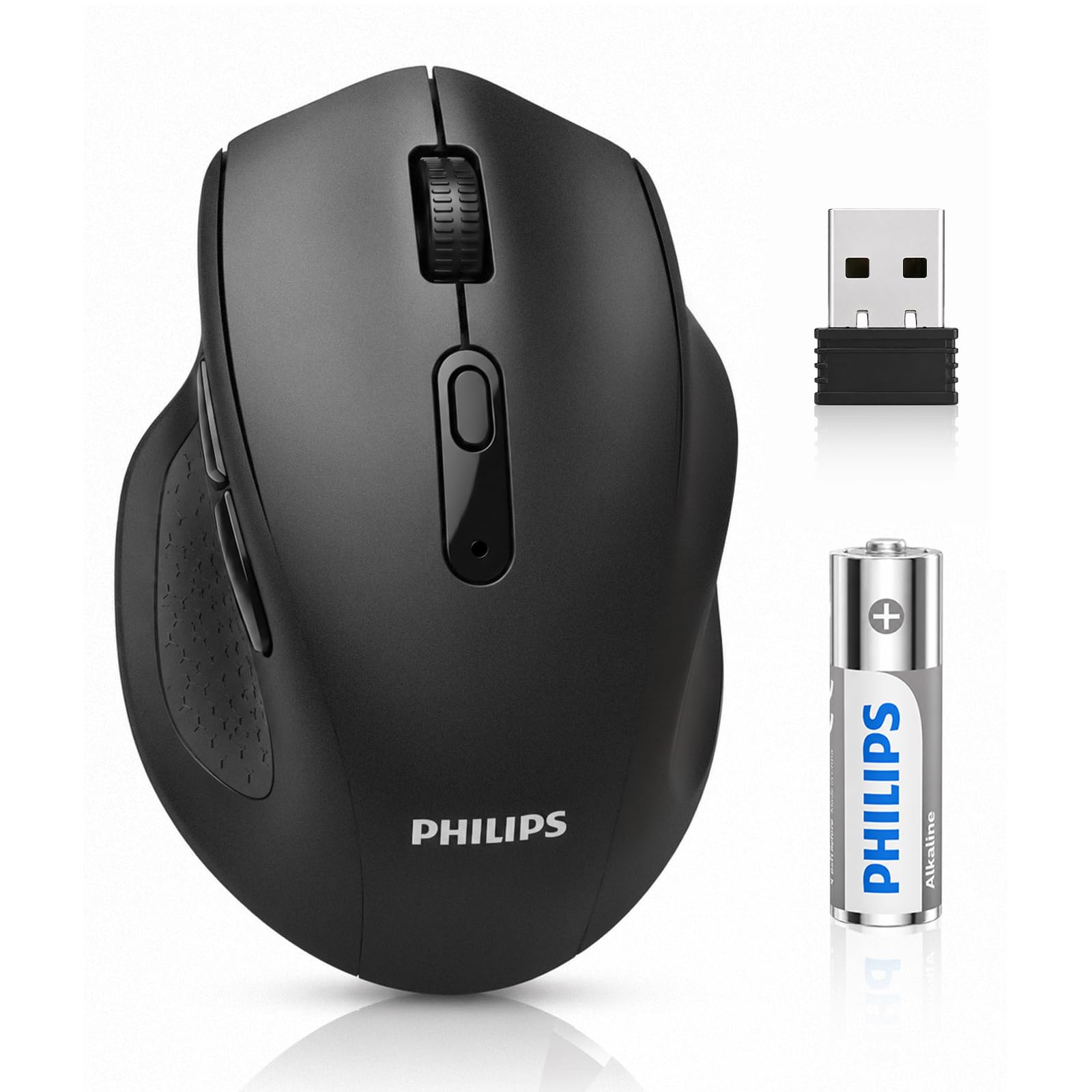
The two-device hybrid that switches between Bluetooth and a USB receiver in seconds.
The headline feature is dual connectivity: this Philips switches between a 2.4GHz USB receiver and a stable Bluetooth connection, so you can pair it with a work laptop and a personal desktop and toggle between them without re-pairing. It works with Windows PCs, MacBooks, Chromebooks, and tablets right from the start. The sculpted body features a supportive high-back arch and a textured thumb rest to keep your hand in a natural position — a specific design response to the wrist fatigue that flat, cheap mice cause.
Precision is a strong suit. The 5-level adjustable DPI button ranges from 800 up to 4000 DPI, letting you dial in cursor speed for multi-monitor setups or fine detail work. The Philips micro-switches are engineered to cut noise by 90% — a whisper-quiet 30dB — and are tested for over 5 million crisp clicks. A premium AA battery is included and rated for up to 12 months of power, with an ON/OFF switch and auto-sleep mode that extend the battery’s real-world life.
The ergonomics earn consistent praise, with owners noting it’s comfortable for all-day use without cramping. The main recurring gripe is side button placement — some owners find the thumb buttons sit too close and trigger accidental clicks, which a software fix can’t easily solve since it runs as a standard HID device. Auto-sleep also requires a click plus a 2-second reconnect on wake. If you juggle two devices and want silent, precise tracking, this dual-mode Philips is a versatile all-rounder.
Who it helps: multi-device users who want one mouse for a laptop and a tablet. The accidental side-button clicks and wake-delay are real quirks to test early.
9. Kensington Pro Fit Full-Size Wireless Mouse

The palm-filling veteran with a soft rubber grip that eases cramp-prone hands.
If your hands ache after a day of clicking, the Pro Fit’s ergonomic right-handed shape with a soft rubber grip is the specific remedy owners keep returning to — one report notes a single unit survived 7-plus years including heavy work-from-home use. The full-size body is tall and wide enough to let your palm rest completely, and the rubbery surface gives you a secure hold. It’s a 3-button design with forward and back buttons plus a pointer speed quick-select button that adjusts sensitivity on the fly.
The high-definition optical sensor runs up to 1200 DPI, which is modest next to the Acer’s 4000 DPI ceiling but perfectly adequate for everyday desktop and laptop work. Plug-and-play means no drivers required, and it’s compatible with Windows 8 systems. The 2.4GHz wireless dongle is larger than the nano receivers on other mice here, but owners note it delivers a strong signal and survives drops to the floor without issue. Battery life carries through years of use between changes, per long-term owner reports.
The recurring fit note is size — it’s a genuinely full-size mouse, which is great for large hands but too big for smaller ones, with some owners reporting thumb buttons sitting just out of comfortable reach. A few units have shown reliability quirks later in life, like a scroll wheel that wears out after years or an occasional random shutdown that needs a battery reinsertion. For cramp-prone larger hands wanting a soft-grip, no-software workhorse, this Kensington is a proven survivor.
Best for: large-handed users with wrist or palm fatigue who want maximum grip and zero driver hassle. Smaller hands and those needing a compact footprint should look to the M185.
Understanding the Specs
DPI and cursor speed
DPI (dots per inch) measures how far your cursor moves per inch of physical mouse movement. A higher DPI means the cursor flies across the screen with less hand travel. For a budget full-size mouse, 1200 DPI is fine for everyday browsing, while 1600 to 4000 DPI helps with large monitors and detailed precision work. An adjustable DPI button lets you switch sensitivity on the fly, which is handy when you alternate between spreadsheets and creative apps.
Button count and layout
The number of buttons fundamentally changes how you work. A 3-button mouse handles basic navigation, but adding forward and back buttons lets you jump between web pages and folders with one click. Higher button counts, like the 7 on the M510, add side-scrolling and zoom functions that speed up spreadsheet work. Side buttons only help if they sit naturally under your thumb — placement matters as much as quantity, so test before you commit if possible.
FAQ
What size mouse is considered normal or full size?
Are 2.4GHz wireless mice better than Bluetooth for a budget pick?
How long should a budget mouse battery last?
Can a silent mouse feel as good as a standard one?
Is a wired mouse more reliable than a wireless one on a budget?
What does an ambidextrous mouse mean for left-handed users?
Do all budget mice include batteries in the box?
How does the Logitech M510 compare to the Logitech M185?
What does a higher DPI setting actually do for me?
Final Thoughts: The Verdict
For the vast majority of buyers, the budget normal sized mouse winner is the Logitech M510 because it combines a true full-size grip, 7 customizable buttons, and a 2-year battery life into one dependable package. If your hands run large and you want the most spacious body with adjustable DPI, reach for the Acer OMR339. And for those who need whisper-quiet clicks in shared spaces, the wegear WL300 is the silent Bluetooth pick that keeps the peace while covering up to 24 months on a single battery.
How We Picked
We do not accept paid placement. Every pick is matched to a real buyer and a real use-case; we do not hands-on test units.
Sources & Methodology
Specifications: manufacturer listings and product documentation. Review insights: verified customer reviews, as of August 2026. Pricing: not shown on this page (it changes often); check the current price via the retailer link.
As an Amazon Associate, Gadgets Feed earns from qualifying purchases. This does not affect which products we feature.