
The moment you hit “Print” on an inkjet and hear that grinding, sputtering warm-up, you know you’re paying for a machine that dries out faster than it delivers. For anyone whose workflow revolves around crisp text, sharp reports, and documents that need to look professional without costing a fortune in cartridges, a monochrome laser is the only sane choice. It’s not about speed alone — it’s about the assurance that every page comes out clean, whether you print once a week or once an hour.
I’m Min — the co-founder and writer behind Gadgets Feed. I’ve spent thousands of hours studying the engineering trade-offs inside print engines, from paper-path geometry to firmware optimization, to understand why some lasers deliver 30,000 pages without a single jam while others struggle past the first toner swap. (And Homer 🐱 ratified each review by sitting on the output tray until the first page emerged).
You don’t need color to run a business, a classroom, or a home office that demands clean text. What you need is a machine built for that single job — reliably, quickly, and without subscription headaches. Below is the definitive guide to finding the best black and white laser printer for your specific volume, space, and connectivity needs.
How To Choose The Best Black And White Laser Printer
A monochrome laser printer is a long-term investment in document clarity. But not every model serves the same workflow. The decision hinges on print volume per month, the need for scanning and copying, network topology, and how much you are willing to spend per page over its lifetime.
Print Speed and First-Page-Out Time
Pages per minute (ppm) matters most when you regularly print multi-page reports. A 30 ppm engine finishes a 20-page document in under 40 seconds, while a 47 ppm model shaves that to 25 seconds. But the first-page-out time (FPOT) — often 6–9 seconds — is what you experience start to finish. Fast FPOT means a printer that wakes and delivers without a long warm-up ritual.
Connectivity: USB, Ethernet, or Dual-Band Wi-Fi
Wired USB connections are the most reliable, free from network interference, and ideal for a single dedicated computer. Ethernet adds multi-user shared access on a local network. Dual-band Wi-Fi (especially 5 GHz support) reduces interference in dense office environments, but wireless setup complexity varies wildly between brands — some require firmware updates before Wi-Fi functions properly. If you print from phones or tablets, AirPrint and Mopria support are non-negotiable.
Duty Cycle and Paper Handling
Duty cycle (pages per month) determines how much continuous printing the engine can sustain. A 250-sheet input tray is standard for home use; offices should look for 500+ sheet capacities or the ability to add a second tray. Automatic duplex printing should be standard — it halves paper use without slowing throughput. Models lacking a bypass slot restrict envelope and cardstock printing, a detail that frustrates small-business users.
Quick Comparison
On smaller screens, swipe sideways to see the full table.
| Model | Category | Best For | Key Spec | Amazon |
|---|---|---|---|---|
| Brother HL-L2480DW | All-in-One | Small office scanning | 36 ppm, 2.7″ touchscreen | Amazon |
| HP LaserJet Pro MFP 3101fdw | All-in-One | Team security | 35 ppm, HP Wolf Pro | Amazon |
| Xerox VersaLink B400/DN | Print Only | High-volume office | 47 ppm, 5″ color touch | Amazon |
| Xerox B230/DNI | Print Only | Mobile-first users | 36 ppm, AirPrint | Amazon |
| Lexmark MS431dw | Print Only | High-duty durability | 42 ppm, steel frame | Amazon |
| Canon imageCLASS MF284dw | All-in-One | Volume scanning | 35 ppm, 35-sheet ADF | Amazon |
| Canon imageCLASS LBP122dw | Print Only | Compact home setup | 30 ppm, Wi-Fi | Amazon |
| HP LaserJet M209d | Print Only | Wired simplicity | 30 ppm, auto duplex | Amazon |
| Brother MFC-L2690DW | All-in-One | Multi-function reliability | 26 ppm, scan/fax | Amazon |
In‑Depth Reviews
1. Brother HL-L2480DW

The Brother HL-L2480DW is the rare three-in-one that genuinely balances print, scan, and copy without feeling like a compromise. At 36 ppm with an 8.5-second first-page-out time, it keeps pace with small teams printing multi-page documents daily. The 2.7-inch color touchscreen lifts it above button-only competition, letting you configure cloud app connections — Google Drive, Dropbox, and OneNote — directly from the panel. Its 250-sheet tray plus a manual feed slot handles envelopes and card stock, so you are not stuck swapping media constantly.
Wireless connectivity spans dual-band 2.4 GHz and 5 GHz, which eliminates the channel congestion many single-band printers suffer in denser home offices. The flatbed scan glass and automatic duplex printing turn a two-person office into a paperless workflow without sacrificing print speed. Brother’s Refresh subscription can reduce genuine toner cost by up to 50 percent, but the printer works just as well with standard TN830 cartridges purchased per-job.
Users consistently report flawless wireless performance across Apple and Windows devices, and the touchscreen guides you through initial setup without needing a PC. The 36-ppm engine is quiet enough to run beside a desk without distraction, and the compact chassis fits shelves designed for inkjets. This is the machine to recommend when you need speed, scanning, and simplicity in one footprint.
Why it’s great
- Intuitive 2.7-inch touchscreen with cloud app access
- Reliable dual-band Wi-Fi with fast device pairing
- Versatile flatbed scanner combined with document feeder
Good to know
- Slightly noisier than some competitors under high-speed printing
- Subscription service offers savings but requires account management
2. HP LaserJet Pro MFP 3101fdw

The HP LaserJet Pro MFP 3101fdw targets small teams of up to seven users who need a self-contained document center. Its 35-ppm engine matches the Brother in raw speed, but the 50-sheet automatic document feeder and integrated fax make this the more complete multi-function unit for paper-heavy workflows. HP Wolf Pro Security adds firmware-level protection that small businesses handling sensitive documents should factor into their choice.
Connectivity spans intelligent Wi-Fi that automatically picks the best available band, plus Ethernet and Bluetooth for hardwired reliability. The Economode feature drew serious praise from a user who printed over 20,000 pages in nine months with zero jams — extending a single cartridge’s life to 10,000 pages. Setup is fast through the HP Smart app, though the printer uses cartridge authentication (firmware updates may block third-party toner), so future consumable costs are locked to genuine HP supplies.
Print quality remains sharp and consistent across the duty cycle, with no streaking or banding typical of lower-end lasers. The auto-duplex scanning and copying eliminate manual page flipping, which adds up to hours saved over a year. If you need a managed, secure fleet solution in one device and are comfortable with HP’s cartridge-verification approach, this is the strongest all-in-one on the list.
Why it’s great
- HP Wolf Pro Security includes endpoint protection for small teams
- 50-sheet ADF with duplex scanning streamlines document handling
- Economode doubles page yield for high-volume printing
Good to know
- Firmware updates block non-HP cartridges, raising long-term costs
- Build quality reports include premature failure in isolated units
3. Xerox VersaLink B400/DN

The Xerox VersaLink B400/DN delivers the highest sustained print speed in this lineup — 47 pages per minute — making it the clear choice for offices that churn through reams daily. The 5-inch color touchscreen brings smartphone-like navigation to print tasks, letting you swipe through job queues and settings without digging into submenus. A 550-sheet main tray plus a 150-sheet multi-purpose tray means fewer refill interruptions during marathon print runs.
This is a print-only machine, so you are not paying for a scanner or fax you may never use. The steel internal frame suggests a longer service life than the plastic chassis of many competitors, though some user reports note that the outer plastic shell feels thinner than expected. Wi-Fi requires a separate adapter (not included), so factor that into your connectivity planning if you need wireless; wired Ethernet and USB are built-in and deliver flawless throughput.
Users who ran nearly 3,500 pages in ten days over Ethernet reported zero jams and page-per-second output. The toner yields are generous with the standard 5,900-page cartridge, and aftermarket options are widely available because Xerox does not enforce the same chip-lock as HP. The trade-off is that the tablet-style touchscreen introduces a potential future failure point and the initial setup documentation is sparse — expect to spend time on first configuration.
Why it’s great
- Industry-leading 47 ppm speed with fast warm-up
- Large paper capacity (550+150 sheets) minimizes refills
- Accepts third-party toner without chip authentication
Good to know
- Wi-Fi requires separate adapter purchase
- Outer plastic build quality feels less robust than internal frame suggests
4. Xerox B230/DNI

The Xerox B230/DNI sits at a price point that undercuts most competitors while still delivering a 36-ppm engine and built-in dual-band Wi-Fi. It is a print-only model aimed at home offices and small teams that prioritize easy mobile connectivity — Apple AirPrint, Mopria, and Chromebook printing work without any driver installation. The automatic duplex printing is standard, so you are not losing the paper-saving feature that defines modern lasers.
Setup is genuinely fast for iOS and Android users: the printer appears on AirPrint-compatible networks within minutes. The user interface relies on a tiny LCD screen with an alphabetic scroll wheel, and several reviewers noted that entering a Wi-Fi password through this interface feels tedious. Once connected, however, connectivity is reliable and the printer rarely drops the network — unlike some units that require daily re-pairing.
The starter toner cartridge that ships with the unit is smaller than the standard replacement, so plan for an early cartridge swap if your volume is moderate. Replacement toners are expensive relative to the unit cost, shifting the total cost of ownership upward over two years. If you keep your needs simple — black text, fast output, wireless convenience — the B230 delivers solid performance without the bloat of an all-in-one you do not need.
Why it’s great
- Seamless AirPrint and Chromebook compatibility out of the box
- 36 ppm duplex printing matches higher-priced models
- Compact footprint with built-in dual-band Wi-Fi
Good to know
- Small LCD screen makes Wi-Fi password entry cumbersome
- Replacement toner cost is high compared to printer price
5. Lexmark MS431dw
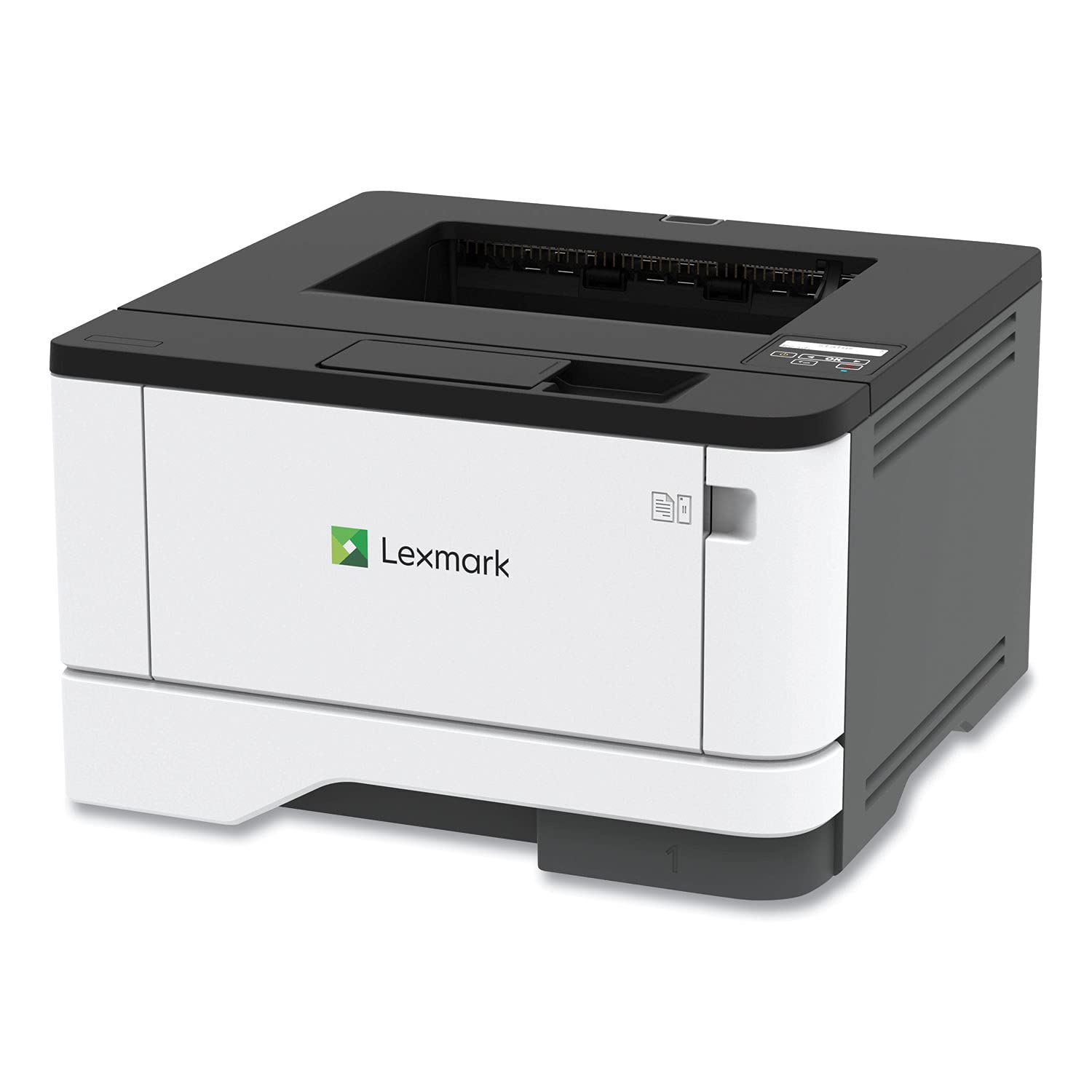
The Lexmark MS431dw is built around a steel internal frame that separates it from the all-plastic construction of most sub- lasers. At 42 ppm and an 800 to 8,000 page monthly duty cycle, it is engineered for environments where the printer needs to survive years of daily use — think shared offices or light production floors. The two-line LCD display is utilitarian but functional, giving you configurable system monitoring without the fragility of a full touchscreen.
Connectivity options include Wi-Fi, Ethernet, and USB, with a standard automatic duplexer that does not slow the engine. The recommended monthly volume of 800–8,000 pages means it can handle heavy bursts without overheating or jamming — a claim backed by user reports of trouble-free operation through tax season surges. Lexmark does not lock out third-party toner, which keeps per-page costs manageable even when you print at volume.
The trade-off is that the Lexmark is a print-only machine with no scanning or copying capability. Some users reported paper jam issues in isolated units, though the overall reliability rating from long-term buyers is strong. If you need a dedicated print engine that you can set up, connect via Ethernet, and forget about for thousands of pages, the MS431dw offers a balance of speed and mechanical longevity that few competitors match at this tier.
Why it’s great
- Steel frame construction for high-duty-cycle reliability
- No chip restrictions on aftermarket toner cartridges
- 42 ppm speed with stable Ethernet performance
Good to know
- Print-only model — no scan, copy, or fax functionality
- Two-line LCD display is basic and less intuitive than touchscreen alternatives
6. Canon imageCLASS MF284dw

The Canon imageCLASS MF284dw packs a 35-ppm engine, automatic duplex printing, a 250-sheet tray, and a 35-sheet automatic document feeder into a chassis that is notably quieter than equivalently spec’d Brother units. It is a four-function all-in-one (print, scan, copy, fax) with a clear LCD display that, while not a touchscreen, provides straightforward menu navigation. The first-print-out time of under 4.9 seconds ensures you are never waiting for the warm-up cycle when you need a quick page.
Wireless setup via the Canon PRINT app works reliably once the firmware is updated — several reviewers noted that the out-of-box Wi-Fi failed until they applied the latest update, a hiccup that is common across multiple brands in this category. The scanner runs single-sided at up to 15/21 ipm for black-and-white and color, which is respectable for an all-in-one at this price. The high-capacity toner option (Canon Genuine Toner 072 H) extends cartridge life significantly, reducing replacement frequency in moderate-volume offices.
The build quality is a mix of solid internal components and somewhat lightweight plastic on the paper cassette and outer panels. A small number of users received units not authorized for US sale, which voided Canon support — an Amazon inventory issue rather than a printer design flaw. For anyone needing a quiet, fast monochrome all-in-one with a dedicated ADF for multi-page scanning, the MF284dw delivers one of the best price-to-feature ratios at this speed tier.
Why it’s great
- Quiet operation at 35 ppm compared to similarly spec’d alternatives
- Fast first-print-out time under 5 seconds
- High-capacity toner option reduces per-page cost
Good to know
- Wi-Fi may require firmware update before it functions
- Some units shipped without US authorization, impacting warranty support
7. Canon imageCLASS LBP122dw

The Canon imageCLASS LBP122dw is the entry point into wireless monochrome laser printing, hitting 30 ppm with automatic duplex at a price that undercuts most of the field. It is a print-only unit, so you are not paying for scanning or copying hardware you may not use, and it supports mobile printing via the Canon PRINT app, Apple AirPrint, and Mopria. The compact chassis fits small desks and shelves designed for inkjets, making it a natural upgrade path for anyone moving away from slow color printers.
The user interface relies on a small LCD display with physical buttons — functional but dated. Typing a Wi-Fi password on the tiny screen is the most common complaint, though once connected, the printer maintains a stable wireless connection across iOS and Windows devices. Print quality is adequate for text documents but shows slightly less sharpness than the 2400 dpi-class engines from Brother and HP at higher resolutions. The paper tray holds 150 sheets, which is adequate for light personal printing but will annoy frequent users who need to refill often.
Genuine Canon toner (071 series) is priced competitively, but the included starter cartridge is a low-yield (700-page) unit, so budget for a standard or high-capacity replacement sooner than expected. The LBP122dw lacks Ethernet, so if your office requires wired networking, look elsewhere. For a budget-conscious buyer who prints primarily from a single device over Wi-Fi and wants the reliability of laser without the complexity of a full MFP, this Canon delivers exactly what the name implies: simple, fast, black-and-white printing.
Why it’s great
- Low entry price for a wireless duplex monochrome laser
- Compact footprint fits tight workspaces
- Stable Wi-Fi connectivity after initial password setup
Good to know
- Small LCD and button interface makes network configuration tedious
- 150-sheet tray capacity requires frequent refills for moderate volume
8. HP LaserJet M209d

The HP LaserJet M209d strips away every connectivity option except USB, delivering a wired-only monochrome laser that eliminates the network complexity that frustrates so many users. At 30 ppm with automatic duplex, it matches the speed of its wireless competitors while sidestepping Wi-Fi dropout, password entry frustration, and firmware update dependencies. The included USB cable means you plug it into your PC and you are running within five minutes.
The trade-off is significant: no Ethernet, no Wi-Fi, no mobile printing. If you need to share this printer across multiple devices, you must keep it connected to a single computer and share it through your operating system’s printer-sharing feature. The machine is compact at 8 by 14 inches, and the 150-sheet input tray is adequate for a single user printing a few dozen pages per week. Print quality is sharp and consistent, with fast warm-up that reviewers consistently praised as “instant.”
HP’s cartridge chip authentication means the printer will block non-HP cartridges, and periodic firmware updates maintain that lock. The starter toner included in the box is a standard-yield unit, not the low-yield starter some brands ship. The M209d is a niche choice, but for anyone who needs a dead-simple, no-app, no-network, print-only device — a dedicated workstation printer or a secondary unit for a specific computer — this is the most reliable configuration you can buy.
Why it’s great
- Zero network configuration — USB connection works immediately
- Fast 30 ppm duplex in a compact wired-only chassis
- Included USB cable and standard-yield starter toner
Good to know
- No Wi-Fi or Ethernet — only works with one directly connected computer
- HP firmware updates block third-party toner cartridges
9. Brother MFC-L2690DW

The Brother MFC-L2690DW is a full-featured monochrome all-in-one that includes print, scan, copy, and fax in a compact chassis that many users run for eight years without replacing. Its 26-ppm engine is slower than the 36-ppm HL-L2480DW, but the trade-off is a proven, mature platform that handles thick media — card stock, envelopes, and even 140-pound watercolor paper — without jamming. The 250-sheet adjustable paper tray accepts letter and legal sizes, and the manual feed slot adds flexibility for specialty jobs.
Wireless setup is straightforward via the Brother Mobile Connect app, and the printer supports AirPrint, Mopria, and Google Cloud Print for direct mobile output. The LCD display is monochrome and functional, lacking the color touchscreen of newer models but providing clear menu navigation for scan-to-email and fax forwarding. The TN-450 toner cartridges are widely available and relatively affordable, with high-capacity options that keep per-page costs low for moderate-volume users.
Some reviewers noted that the default configuration emphasizes fax setup, which can be confusing if you only need printing and scanning. A small number of units produced occasional blank pages — resolved by restarting the printer — suggesting a minor firmware quirk rather than a hardware defect. For anyone who needs scan-to-email, PC-free copying, and reliable fax in a printer that handles heavy media better than most competitors, the MFC-L2690DW remains a strong, proven choice.
Why it’s great
- Excellent media handling — thick card stock and envelopes feed reliably
- Proven long-term reliability with many units lasting 8+ years
- Full multi-function capability with scan, copy, and fax
Good to know
- 26 ppm engine is slower than similarly priced competitors
- Default fax-first setup can confuse users who only need print and scan
FAQ
How many pages should a black and white laser printer last before needing maintenance?
Can I use a monochrome laser printer for printing on envelopes and card stock?
Is it worth paying more for a printer with Ethernet when I have Wi-Fi?
Final Thoughts: The Verdict
For most users, the best black and white laser printer winner is the Brother HL-L2480DW because it combines a 36-ppm engine, a responsive 2.7-inch touchscreen, and a reliable flatbed scanner in a compact chassis that fits small teams and home offices equally well. If you need the fastest print speed for high-volume office work, grab the Xerox VersaLink B400/DN. And for a budget-friendly all-in-one that handles scanning and copying without compromising on print quality, nothing beats the Canon imageCLASS MF284dw.