
Our readers keep the lights on and my morning glass full of iced black tea. As an Amazon Associate, I earn from qualifying purchases.
Specs are compiled from manufacturer listings and verified buyer reviews and can change over time — please confirm the key details on the product page before buying.
Stuck with a single monitor because your PC’s motherboard only has one HDMI port? You don’t need a new computer to spread your work across two screens — you need a dedicated 2 HDMI video card. This guide sorts through the real options, from entry-level cards that simply add ports to serious gaming GPUs that also handle modern titles, so you can match the card to what you actually do daily.
I’m Min — the founder and writer behind Gadgets Feed. This guide is built by comparing the manufacturers’ published specifications and the patterns across verified customer reviews, so you get each pick’s real strengths and trade-offs instead of marketing spin.
Dual-monitor setups are a productivity upgrade, and choosing the right 2 hdmi video card is about matching port count, graphics memory, and your power supply to the work you do every day.
Our Picks at a Glance


How To Choose The Best 2 HDMI Video Card
Before you pick, understand that not all cards with two HDMI ports are created equal. A card that just outputs a desktop for spreadsheets is very different from one that renders a 4K game at high settings, and the price gap reflects that. Your job is to figure out which tier matches your daily reality.
Match the Card to Your Workload
If your day is stock charts, code editors, and video calls, you need a stable card that supports multiple screens without breaking a sweat. Gaming, video editing, or 3D modeling demands far more graphics memory and processing power — look at the card’s GPU chipset and its RAM. A card like the RX 9060 XT with 16GB GDDR6 is built for demanding 1440p gaming, while a GT 730 with 4GB is meant for office productivity.
Check Your Physical Space and Power
Two physical constraints often decide the winner before performance ever does. Measure your computer case: low-profile cards fit slim office towers, while full-height cards need standard mid-tower cases. Then check your power supply. Some cards are efficient and draw power straight from the motherboard slot, but high-performance models require a 300W or greater power supply and their own power cables. A card that doesn’t fit or can’t be powered is useless no matter how good it looks on paper.
Verify Port Count and Resolution Support
Not every card handles dual monitors the same way. While you’re looking for at least 2 native HDMI ports, also check the maximum supported resolution. Some budget cards top out at 2560×1440, while premium ones handle 7680×4320. If your monitors are 4K, you need a card that outputs 4K. The port count is only half the equation — the card also has to drive the pixels your screens demand.
Quick Comparison
| Model | Best For | Video Memory | GPU Clock Speed | Max Resolution | Amazon |
|---|---|---|---|---|---|
| XFX RX 9060 XT★ Best Overall | Gaming & heavy multitasking | 16 GB GDDR6 | 1900 MHz | 3840×2160 | Amazon |
| Sapphire RX 9070Premium Pick | High-end 1440p gaming | 16 GB GDDR6 | 2520 MHz | 7680×4320 | Amazon |
| Gigabyte RX 9070 XTTop Performer | 4K gaming performance | 16 GB GDDR6 | 3.06 GHz | 3840×2160 | Amazon |
| Gigabyte RX 7800 XT | Quiet 1440p gaming | 16 GB GDDR6 | — | 7680×4320 | Amazon |
| ASRock RX 7700 XT | Silent gaming & creation | 12 GB GDDR6 | — | 7680×4320 | Amazon |
| MSI RTX 3050 | Entry-level gaming | 6 GB GDDR6 | 1492 MHz | 7680×4320 | Amazon |
| Sapphire RX 580 | Budget gaming (renewed) | 8 GB GDDR5 | — | 3840×2160 | Amazon |
| Xynsviu RX 560 | 4-screen stock trading | 4 GB GDDR5 | 1070 MHz | 3840×2160 | Amazon |
| ASUS GT 730 | Silent HTPC & small cases | 2 GB GDDR5 | 927 MHz | 3840×2160 | Amazon |
| QTHREE GT 730 | Budget multi-monitor office | 4 GB DDR3 | 902 MHz | 2560×1440 | Amazon |
| SAPLOS GT 730 | Entry-level & small form factor | 4 GB GDDR3 | 902 MHz | 2560×1600 | Amazon |
In‑Depth Reviews
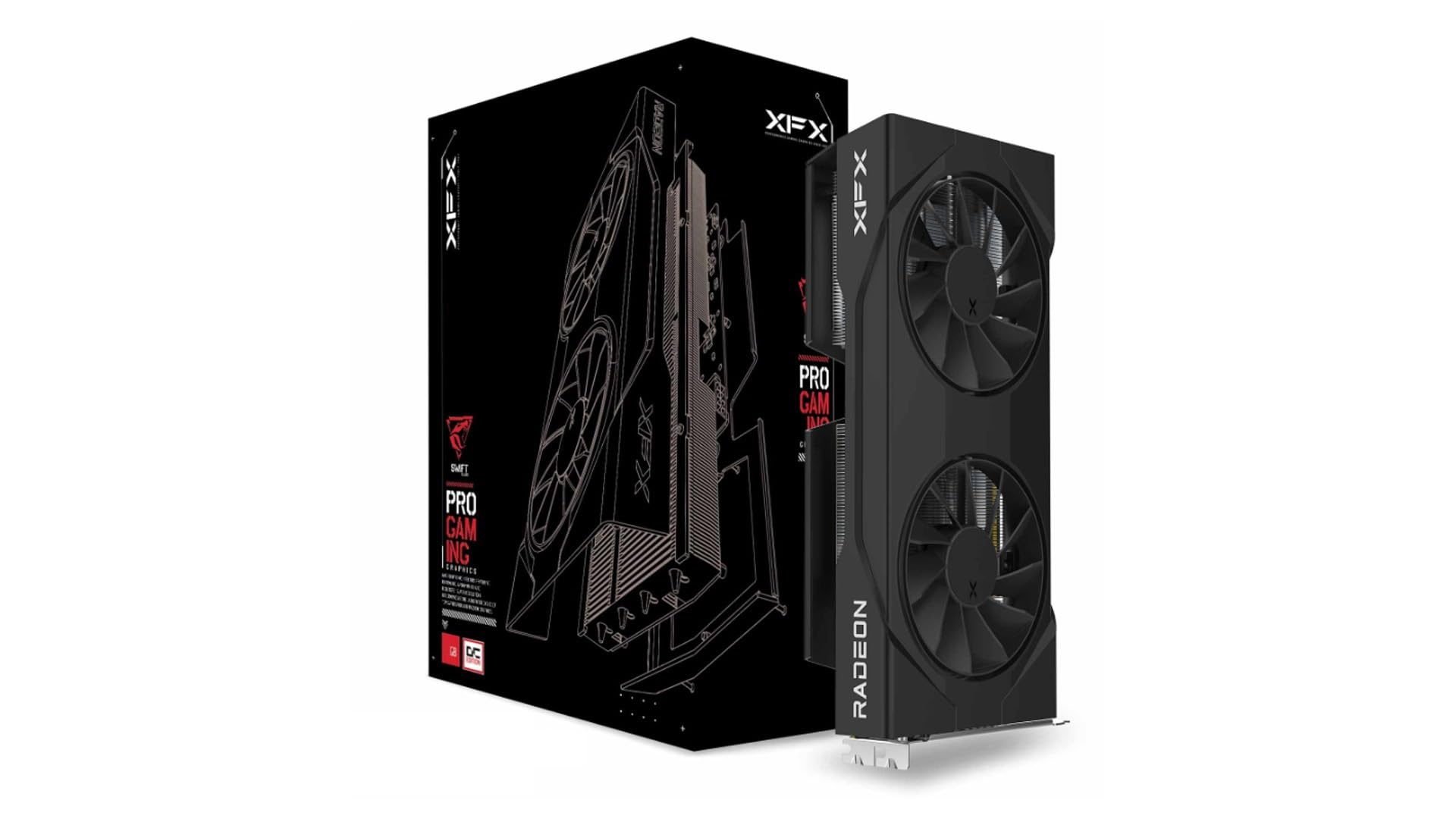
1. XFX Swift AMD Radeon RX 9060 XT
Our pick — over 4.5★ from 350+ verified ratings; the strongest balance of quality and price.
The gaming powerhouse that also gives you dual HDMI for a serious multiple-screen setup.
This is the card if your dual-monitor life includes playing modern AAA games at high settings. The XFX Swift ROCKS a 16GB GDDR6 memory pool and a boost clock that goes up to 3320 MHz, so it handles 1440p gaming easily and keeps 1080p ultra as a comfortable baseline. Buyers report it’s “two to three times better” than their old RX 6500 XT.
It’s not just fast; it’s also quiet. Owners consistently praise the cooling, noting it runs cool at about 90°F even under a heavy load. The install is straightforward, and it’s a stable performer right from the start, with buyers noting zero glitches. Its 10.63″ length means you need a mid-tower case with room to spare, not a compact SFF build.
Performance is the thing everyone raves about here — over 30 owners specifically call out how well it runs — and the price-to-performance ratio is the second most-praised trait. It delivers roughly double the performance of the RX 6500 XT it replaces. Its 16GB VRAM and high clock speed keep it future-proof for upcoming titles.
What wins people over
- Handles 1440p gaming with ease
- Runs cool and quiet, even under load
- Stable from the first install
What to keep in mind
- Long card needs a mid-tower case
- Premium price tier for dual HDMI output
Grab it for: a future-proof gaming rig where you also want multiple screens without compromising frame rates.
Look elsewhere if: you only need basic office display output and don’t want to pay for gaming horsepower you won’t use.
2. Sapphire Pulse AMD Radeon RX 9070
Silent, powerful, and stunningly effective at 1440p for the discerning gamer.
For a high-end dual-HDMI setup, this Sapphire Pulse RX 9070 is a masterclass in balance. It delivers 16GB of GDDR6 memory on a 2520 MHz clock frequency, and owners describe it as a “beast” that runs cool and quiet with no RGB lighting to distract. The dual HDMI and dual DisplayPort outputs give you flexible screen pairing options.
On the gaming front, it’s exceptional at 1440p, with buyers noting it performs “cool and amazing” even under pressure. Owners mention it should remain relevant for over five years of gaming. It’s a silent card that doesn’t compromise on aesthetics or performance, making it a favorite for those who value a clean build.
Compared to the RX 6700 XT it often replaces, the upgrade is about double the raw power, with an even bigger jump when ray tracing is on. The 16GB VRAM is a future-proofing advantage over cards stuck at 6GB or 8GB. It’s quiet, it’s fast, and it’s a top-tier choice for a serious gaming desktop.
Silent performer: This is for gamers who want top-tier 1440p or 4K performance without the fan noise.
The trade-off: It lacks dedicated AI accelerators, so if that’s your workflow, a different card is needed.
The verdict: The go-to card if you want a quiet, powerful, and beautiful GPU for high-resolution gaming.
Think twice if: you’re on a strict budget or need sturdy AI processing power for work tasks—this card focuses on gaming, not heavy compute.
3. Gigabyte Radeon RX 9070 XT Gaming OC
A 4K-ready behemoth with a massive 3.06 GHz core clock for unrivaled speed.
This Gigabyte card is for the enthusiast who demands peak performance. It’s built on the Radeon RX 9070 XT with 16GB of GDDR6 memory on a 256-bit interface, and its 3.06 GHz core frequency is among the fastest you’ll find. Customers note it plays 4K “well” and delivers “excellent frames and amazing image quality,” making it a spectacular choice for high-end gaming on multiple screens.
Gamers love the “bang for buck” it offers compared to similarly-priced Nvidia options, with one noting it allows for 1440p gaming on the highest settings in all AAA titles. The card’s WINDFORCE Cooling System keeps things stable, but a few buyers mention the fans can get noisy at high RPMs, so you might want to adjust the fan curve in software for a quieter experience.
The dual BIOS (a switch that lets you pick between Performance and Quiet modes) lets you choose your priority, and the reinforced structure adds durability. You get vivid, crisp imagery that makes games feel new—this is a premium card for a premium experience, though it costs more than the QTHREE GT 730.
Why it’s a beast
- Massive 3.06 GHz core frequency
- Handles 4K gaming with high frame rates
- Dual BIOS for Performance or Quiet modes
The minor gripe
- Fans can get audible at high RPM
- High power draw requires a sturdy PSU
Reach for it: if you’re building a top-tier gaming PC and want the fastest clock speeds for 4K or high-refresh 1440p gaming.
skip it if: fan noise at max load would bother you, or your case can’t handle a large, high-heat card.
4. Gigabyte Radeon RX 7800 XT Gaming OC

The quiet workhorse that crushes 1440p gaming with a massive 16GB video buffer.
This GIGABYTE card is the definition of a well-rounded performer. It comes with 16GB of GDDR6 memory on a 256-bit bus and a boost clock of 2565 MHz, ensuring it runs most modern games on high settings without stutters or freezing. Reviewers point out “excellent 1440p performance with smooth frame rates and great thermals,” making it a solid upgrade for any gaming setup.
The WINDFORCE cooling system is a highlight, featuring three 90mm blade fans and seven composite copper heat pipes. Owners consistently call it “quiet” and “cool,” and even use it for local LLM (large language model) workloads, noting a significant speed boost over competing cards. It’s not just a gaming card; it’s a capable all-rounder.
Performance is the aspect owners praise most, and the value for money follows closely behind. It’s an “all-around best graphics card for the money right now” according to one enthusiastic owner. With 2x HDMI 2.1 and 2x DisplayPort 2.1, your dual-screen setup is fully future-proofed for high refresh rates.
Quiet brilliance: Triple-fan cooling keeps it silent under pressure, so you can play rich games without fan noise drowning out the audio.
The fine print: It recommends a 700W power supply, so check your PSU before you buy.
Choose this: for excellent 1440p gaming performance wrapped in a quiet, well-cooled package.
Not for you if: your power supply is under 700W or you’re looking for the absolute fastest 4K card on the market.
5. ASRock RX 7700 XT Challenger

Silence is golden, and this card delivers it with fans that stop entirely at idle.
If a quiet room matters as much as a fast computer, the ASRock Challenger is a standout. Its 0dB silent cooling means the fans completely stop under light loads, giving you a silent workstation for office tasks and only spinning up during intense gaming. With 12GB of GDDR6 memory and a boost clock up to 2584 MHz, the performance is there when you need it.
Owners are impressed with the “clean blackout design” and the fact that the LED can be disabled if you prefer zero RGB. It runs games like GTAV at max settings and even handles VR titles like Assetto Corsa smoothly, all while staying cool. The dual fan design with striped ring fans and ultra-fit heatpipe technology keeps temperatures in check during extended sessions.
Graphics quality is the aspect that wins people over, and the value for money is close behind. However, reliability does get mixed feedback, so note that while many cards run perfectly, an occasional unit may have issues — a risk with any GPU. Its 0dB fans and 12GB VRAM suit quiet 1440p gaming rigs.
The silent appeal
- Fans stop completely at idle for silence
- Strong 12GB GDDR6 performance for 1440p
- Clean aesthetics with optional LED lighting
Keep in mind
- Mixed reliability feedback from some owners
- Only one HDMI port (needs DisplayPort for second monitor)
Ideal for: gamers and creators who want a powerful, quiet card and don’t mind using a DisplayPort cable for one monitor.
Look elsewhere: if you specifically need two native HDMI ports without adapters or a guarantee of perfect reliability.
6. MSI Gaming RTX 3050 Ventus 2X

The low-power modern card that brings ray tracing to budget builds and dual HDMI to your desk.
This MSI RTX 3050 is a fantastic entry-level gaming card precisely because it sips power. It draws just 70 watts, which means it often doesn’t even need a separate power connector, making it ideal for upgrading older OEM office PCs. It has 6GB of GDDR6 memory running at 14 Gbps, and its two HDMI 2.1a outputs are perfect for a dual-monitor gaming setup.
Performance is what owners praise most, with many noting it’s a solid step up from the GTX 1650 Super. It handles 1080p gaming well, achieving playable frame rates in titles like Cyberpunk 2077 when settings are adjusted. The dual-fan cooling keeps it quiet and stable, with one owner reporting under 62°C under full load and fans that are “very quiet.”
It’s a great fit for custom builds, and its low 70W power consumption is a huge plus for those with smaller power supplies. The value for money is exceptional at this tier. While it’s not a 4K powerhouse, it’s the perfect upgrade for someone wanting modern gaming features without rebuilding their whole PC.
Power sipper: Runs on just 70 watts, so it fits in most pre-built systems without a PSU upgrade.
Realistic ceiling: Great for 1080p, but don’t expect high settings at 4K on this card.
The verdict: The best value way to add modern gaming capability and dual HDMI output to an older or budget PC.
Think twice if: you need to game at 1440p or higher, or you demand maximum frame rates in AAA titles.
7. Sapphire Pulse RX 580 (Renewed)

A classic 1080p workhorse that offers serious value in the renewed market.
The RX 580 is a legendary card, and this renewed Sapphire Pulse version brings that legacy back at a budget-friendly price. It packs 8GB of GDDR5 memory on a 256-bit bus, which is still plenty for 1080p gaming at high settings. The dual HDMI outputs, alongside dual DisplayPort and a DVI-D, give you multiple options for connecting monitors.
However, the “renewed” status is the key caveat here. While some buyers receive a card that “looked and operated as new,” reliability is a genuine concern. Some shoppers say cards that work great from day one, but others experienced failures after a short period—one reviewer noted the card “stop working fine after 2 weeks.” Buyers risk receiving a defective unit despite the low price.
The performance itself is well-regarded for 1080p gaming, and its boost clock of 1366 MHz keeps it competitive. It’s a budget pick for 1080p gaming, but renewed units carry reliability risk. Just be prepared to test it thoroughly when it arrives.
The value play
- 8GB GDDR5 is strong for 1080p gaming
- Renewed price is very budget-friendly
- Multiple output options including dual HDMI
The gamble
- Renewed condition means reliability is not guaranteed
- Some owners received defective units
Reach for it: if you want maximum gaming performance for the least money and are comfortable with the risks of a renewed product.
Look elsewhere if: you need guaranteed reliability from the start — a new card like the RTX 3050 is safer.
8. Xynsviu RX 560 4GB
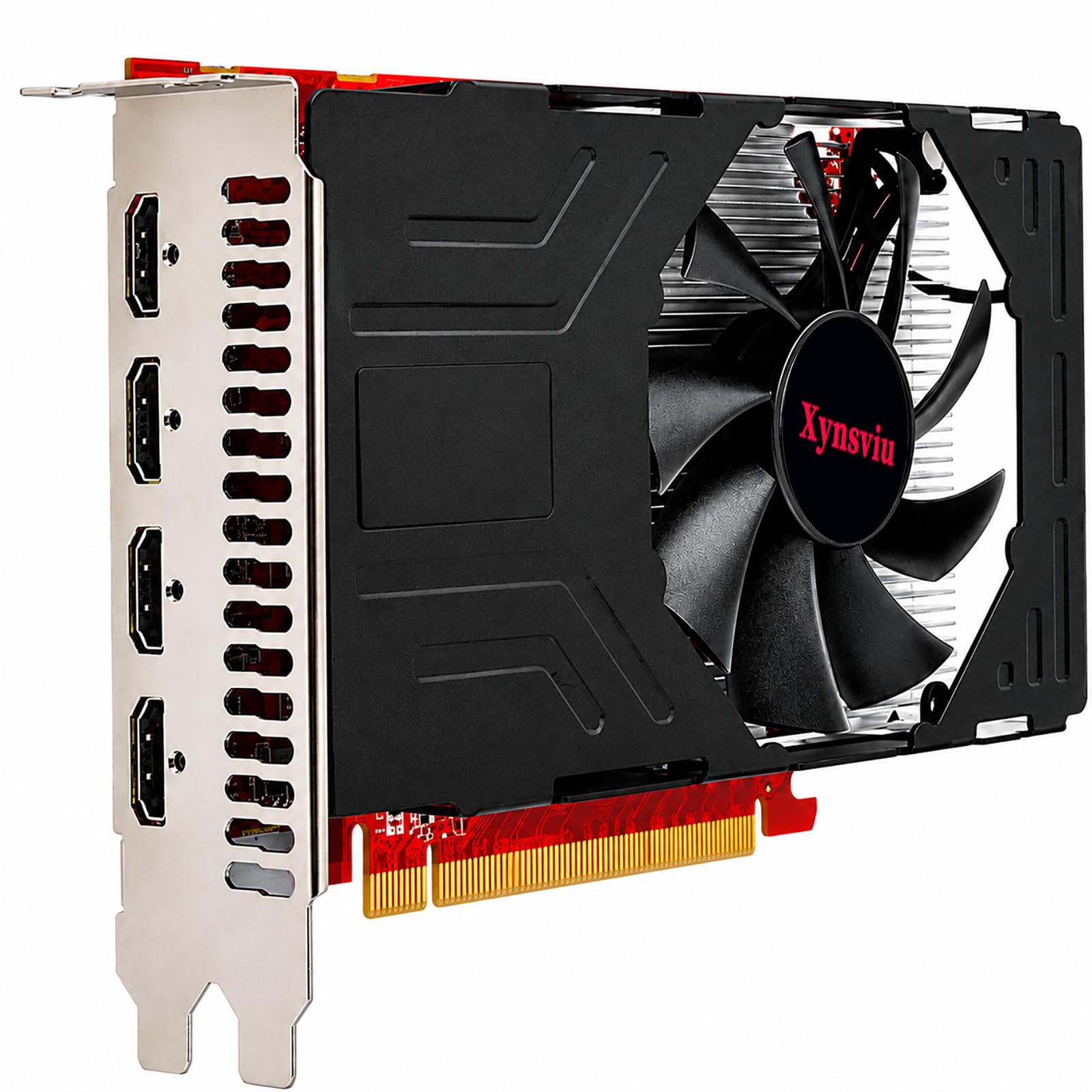
Four HDMI ports on a single card, purpose-built for multi-screen stock trading.
If your job requires watching multiple monitors at once, this RX 560 is built specifically for you. It’s one of the few cards with four native HDMI ports, allowing you to connect four displays simultaneously without any adapters. This makes it ideal for stock trading, where you might want charts on one screen, news on another, and your trading platform on a third.
Owners say it works “flawlessly” with multiple monitors, making day trading and video meetings “pleasurable.” It supports up to 3840×2160@60Hz, so you can drive 4K displays. However, the drivers are a critical step — some buyers report strange visuals or black screens until they update the drivers from AMD’s website. Once updated, the card runs smoothly.
The main concern is reliability, which receives mixed feedback. While many love its plug-and-play nature after a quick driver update, a few owners mention the card failing after a couple of months. Reliability is inconsistent, with some units failing within months.
Multi-screen specialist: Four HDMI ports make it the easiest way to run a 4-monitor trading desk.
The catch: Mixed reliability reports mean you should buy with a good return policy in mind.
Perfect for: office workers and traders who need to connect 3 or 4 screens at once without DisplayPort adapters.
Not for: gamers or anyone wanting a card that will last for years without a potential issue.
9. ASUS GeForce GT 730

Dead silent passive cooling and four HDMI ports in a single-slot card for HTPCs.
For a home theater PC or a silent office machine, this ASUS GT 730 is a brilliant fit. It has four HDMI ports and a single-slot, low-profile design with passive cooling — meaning there are no fans at all, so it runs completely silently. It’s the perfect card for a quiet multimedia center where you want to connect a TV and a monitor.
It works fantastically for multiple HDMI monitors and is easy to install, drawing around 10 watts for general usage. The one-slot design means it fits in small cases while leaving room for other expansion cards. Its 2GB of GDDR5 memory is more than enough for video playback and desktop productivity.
However, its 1920×1080 (manufacturer spec) maximum resolution is a limitation — although the spec sheet also lists 3840×2160 support. The bigger issue is drivers: being an older card, finding compatible drivers for newer operating systems like Linux can be a challenge. It’s a niche card that excels in its specific role of silent, multi-display output.
The quiet advantage
- Zero fan noise with passive cooling
- 4x HDMI ports on a compact single-slot card
- Very low power draw (~10 watts)
Drawbacks
- Older drivers can be tricky to find, especially for Linux
- Performance is strictly for office and media, not gaming
Pick this: for a silent home theater setup or a quiet office PC that needs multiple HDMI outputs for monitors and TVs.
Skip it: for gaming or if you’re using a niche operating system where driver support might be scarce.
10. QTHREE GeForce GT 730

The no-fuss, budget-friendly card that gets dual monitors running in minutes.
This QTHREE GT 730 is the definition of a practical office upgrade. Its main job is to provide basic display capabilities for office work and light multimedia, and it does exactly that well. Owners say it’s “easy to install and works great” for running dual HDMI monitors, which is the core promise of this list.
It’s a low-profile card that comes with a bracket, so it fits in compact ITX chassis and slim office towers. With 4GB of DDR3 memory, it handles multiple monitors and HD video playback with ease. It has 4 outputs (2x HDMI, VGA, and DisplayPort) so you can run up to 4 monitors, making it great for a productive desk setup.
Performance and installation are the most praised aspects, with value for money close behind it. However, the GT 730’s core clock of 902 MHz is modest, and reliability does receive mixed feedback — some units work for years, others may have issues. It’s an inexpensive way to add dual HDMI output, but managing driver downloads for Windows 11 sometimes takes a manual step.
The office ally
- Very budget-friendly price for dual HDMI
- Low-profile design fits small cases
- Supports up to 4 monitors simultaneously
Limitations
- Max resolution is 2560×1440, not 4K
- Mixed reliability feedback from long-term use
Choose this: for a simple, cheap way to add dual-HDMI monitor support to an office PC, especially a small form-factor one.
Look elsewhere: for gaming, 4K displays, or if you need guaranteed long-term reliability.
11. SAPLOS GT 730 4GB
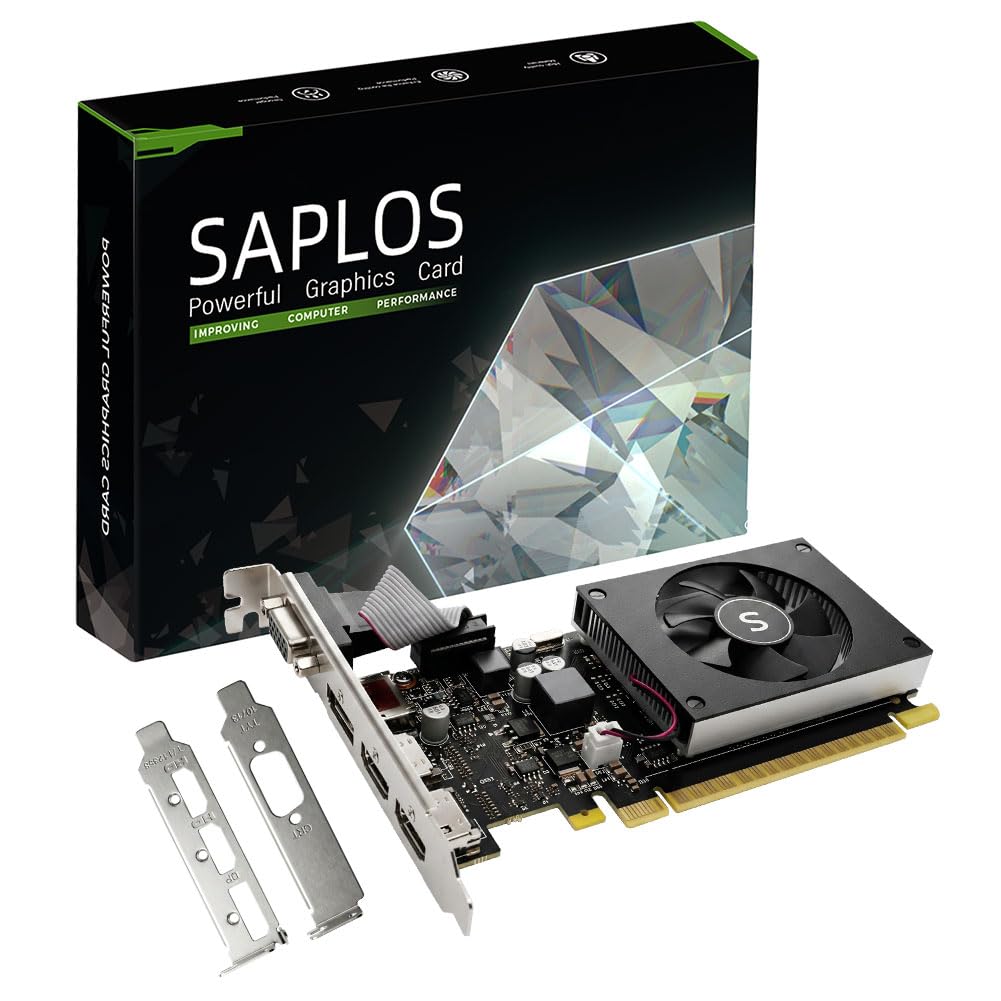
A solid low-profile option for reviving an older desktop with dual HDMI output.
This SAPLOS GT 730 is another entry-level champion for office and light desktop use. It’s a low-profile, single-slot card built on the Kepler architecture with 384 CUDA cores, making it a step up in efficiency from older Fermi-based cards. Its dual HDMI ports, along with a DisplayPort and removable VGA, let you run up to 4 displays.
Installation is a strong point for many, with owners calling it “easy to install” and praising the “zero configuration” needed on some Windows 11 systems. It’s an excellent economical option when your CPU doesn’t have integrated graphics. The small fan operates slowly and quietly, providing adequate heat dissipation for the low-power card.
However, its max resolution of 2560×1600 means it’s not a 4K card. Also, some users have noted that Windows 11 doesn’t always automatically update the Nvidia drivers, requiring a manual download from the Nvidia site to get both monitors working. It’s a cheap dual-HDMI solution for office tasks, not gaming or 4K.
Easy upgrader: A simple, low-cost way to add dual-HDMI support and 4K streaming (HDCP) to a legacy desktop.
Heads up: You may need to manually install Nvidia drivers to get full multi-monitor functionality on Windows 11.
Ideal for: a budget office PC or a small form-factor build where you need quiet, basic dual-screen output.
Think twice: if you have 4K monitors or plan to do any modern gaming — the GT 730 is strictly for productivity.
Understanding the Specs
Video Memory (VRAM)
This is the graphics card’s short-term memory for holding textures and frame data. For office work and video playback, 2GB to 4GB is plenty. For modern gaming at 1080p or 1440p, you’ll want 6GB to 8GB minimum, and 12GB to 16GB offers comfortable headroom for the latest games at high settings. More VRAM lets you run higher resolutions and more detailed textures without stuttering.
Clock Speed
Measured in MHz or GHz, this is how fast the GPU processes instructions. A higher clock speed generally means better performance, but it’s most telling when comparing cards of the same generation. A GT 730 at 902 MHz and an RX 9070 XT at 3.06 GHz are in completely different leagues — the clock speed gap (a 2.1x difference versus the RX 9060 XT) reflects that. This spec tells you the card’s raw processing power for tasks like gaming or rendering.
FAQ
Can I run two monitors with different resolutions on a 2 HDMI video card?
Does a 2 HDMI video card need its own power supply connection?
What is a low-profile video card and do I need one?
Can I mix an AMD card and an Nvidia card for multiple monitors?
Is 4GB of VRAM enough for a dual-monitor setup?
Will my brand new 2 HDMI video card work with Windows 11?
What is the difference between a gaming card and an office card?
Can a 2 HDMI video card improve my computer’s overall speed?
How do I know if a 2 HDMI video card will fit in my computer case?
Do I need a 2 HDMI video card or can I just use an adapter?
Final Thoughts: The Verdict
If you want one dependable pick, the 2 hdmi video card winner is the XFX RX 9060 XT because it combines massive 16GB GDDR6 memory with a high 1900 MHz clock speed, delivering both stunning 1440p gaming and sturdy dual-monitor productivity. If you want a quiet, premium option that excels at high-resolution gaming, grab the Sapphire RX 9070. And for a budget-friendly upgrade to add dual HDMI to an office PC, the QTHREE GT 730 is the one to reach for.
How We Picked
We do not accept paid placement. Every pick is matched to a real buyer and a real use-case; we do not hands-on test units.
Sources & Methodology
Specifications: manufacturer listings and product documentation. Review insights: verified customer reviews, as of August 2026. Pricing: not shown on this page (it changes often); check the current price via the retailer link.
As an Amazon Associate, Gadgets Feed earns from qualifying purchases. This does not affect which products we feature.