
Our readers keep the lights on and my morning glass full of iced black tea. As an Amazon Associate, I earn from qualifying purchases.
Specs are compiled from manufacturer listings and verified buyer reviews and can change over time — please confirm the key details on the product page before buying.
If you are shopping for a new gaming screen, the panel type matters more than any other spec. A 1440p OLED monitor delivers perfect black levels and response times that LCD screens cannot match, so motion stays crisp and colors look rich. The real question is which refresh rate, HDR performance, and burn-in protection features fit your setup and budget.
I’m Min — the founder and writer behind Gadgets Feed. This guide is built by comparing the manufacturers’ published specifications and the patterns across verified customer reviews, so you get each pick’s real strengths and trade-offs instead of marketing spin.
Whether you play fast esports titles or cinematic single-player games, this roundup of the best 1440p oled monitor options breaks down refresh rates, color coverage, and protective care features to match your priorities.
Our Picks at a Glance


How To Choose The Best 1440p OLED Monitor
Your choice here depends on what you play. If you are a competitive gamer, you will want a high refresh rate like 360Hz or 480Hz for smoother motion. If you prefer story-driven games, look for a screen with stronger HDR brightness and color accuracy. Every OLED panel in this list delivers the deep blacks and fast response that define the technology.
Refresh Rate and Response Time
The refresh rate, measured in hertz (Hz), tells you how many times the screen updates per second. A 240Hz display is a huge step up from a standard 60Hz screen, but the difference between 240Hz and 360Hz is less obvious to most people. Paired with an OLED’s near-instant 0.03ms response time, even a 240Hz panel feels dramatically smoother than an LCD with a slower response time.
QD-OLED vs WOLED Panel Technology
The two main OLED panel types you will see are QD-OLED and WOLED. QD-OLED uses quantum dots to produce wider color volume and usually delivers higher peak brightness, which makes HDR content look more striking. WOLED panels typically have a matte anti-glare coating and can offer better text clarity, which matters if you use the monitor for work as well as gaming.
Quick Comparison
| Model | Best For | Refresh Rate | Panel Type | Contrast Ratio | Amazon |
|---|---|---|---|---|---|
| MSI MAG 271QPX E2★ Best Overall | Value and build quality | 240Hz | QD-OLED | High | Amazon |
| AOC Q27G4ZDBest Value | Budget high-refresh gaming | 240Hz | QD-OLED | 1500000:1 | Amazon |
| MSI MAG 271QPXTop Performer | Speed and esports | 360Hz | QD-OLED | Alto | Amazon |
| ASUS ROG XG27AQDMGR | Glossy visuals and protection | 240Hz | WOLED | 1,500,000:1 | Amazon |
| Alienware AW2725DF | Premium all-rounder | 360Hz | QD-OLED | 1.5 million:1 | Amazon |
| LG 27GX790A-B | Ultra-high refresh rates | 480Hz | OLED | 1500000:1 | Amazon |
| Pixio PX277 OLED Max V2 | USB-C charging and KVM | 240Hz | WOLED | 1500000:1 | Amazon |
| LG 27GS95QE | Console and PC hybrid | 240Hz | OLED | 1.5M:1 | Amazon |
| Samsung Odyssey OLED G6 | Burn-in prevention tech | 360Hz | QD-OLED | 1,000,000:1 | Amazon |
| ASUS ROG Strix XG27ACDNG | HDR accuracy and anti-flicker | 360Hz | QD-OLED | 4000:1 | Amazon |
| Sony INZONE M10S | Esports tournament features | 480Hz | OLED | 1,500,000:1 | Amazon |
In‑Depth Reviews
1. MSI MAG 271QPX QD-OLED E2
Our pick — over 4.5★ from 200+ verified ratings; the strongest balance of quality and price.
The value-focused QD-OLED that nails the essentials without the premium price tag.
If you want a 1440p OLED that checks every important box without emptying your wallet, this MSI is the crowd favorite — 4.6 stars across 200+ owners. The 27-inch QD-OLED panel delivers the vibrant colors and 2560 x 1440 sharpness that make OLED gaming so compelling, and the 240Hz refresh rate keeps fast motion smooth. Buyers consistently praise the top-notch build quality, with that being the single most mentioned positive across the review data.
The 0.03ms response time eliminates ghosting and screen tearing, the core reason to switch to OLED. It also carries True Black HDR 400 certification, so dark scenes in games look deep and detailed. The glossy coating is “mirror-like” when off, as owners put it, but the picture quality more than makes up for it.
MSI includes OLED Care 2.0 with a custom heatsink and graphene film, so the monitor runs without a fan. That means silent operation and a lower risk of panel aging, which is key for longevity. The 3-year burn-in warranty adds confidence for a purchase this size.
OLED speed king
- Build quality is the standout, noted more than 37 times by owners
- 240Hz refresh with 0.03ms response for smooth, tear-free play
- Clear text rendering for a QD-OLED panel
menu quirks
- Not curved, and the stand is bulky — a VESA mount fixes that
- Glossy screen shows reflections until powered on
fastest pick: you want the best balance of price, build quality, and image quality in a 1440p OLED, especially for competitive gaming.
menu fiddlers: you need a curved panel or have a very shallow desk, since the stand takes up real estate.
2. AOC Q27G4ZD
The OLED that delivers flagship color and speed at a mid-range price.
This AOC is the pick for gamers upgrading from an older TN or IPS panel who want the biggest jump in picture quality for the smallest spend. It uses a 27-inch QD-OLED panel with a 2560 x 1440 resolution and covers 147.6 percent of the sRGB color space — the strongest color gamut figure in this entire lineup. That wide gamut is why buyers coming from TN panels describe the picture as “the best I’ve ever seen” alongside the fastest response times.
The 240Hz refresh rate and 0.03ms response time deliver tear-free motion in fast-paced shooters. Owners specifically note there is no color banding or input lag, which are the two biggest complaints about cheaper LCD panels. The 1,500,000:1 contrast ratio delivers the deep blacks that make OLED stand out in dark scenes.
The biggest trade-off is the glossy screen, which creates reflections in bright rooms — even with blinds closed, as some buyers report. It is fine at night and with good curtains. The stand also lacks height adjustments, so budget for a monitor arm if you need ergonomic flexibility.
budget OLED win: the 147.6% sRGB coverage beats the MSI’s 98% figure in the comparison data, giving this panel a real edge for color-critical games and media.
value choice: budget-conscious gamers who want OLED speed and color without paying flagship prices.
desk shakers: your room is bright during the day or you need height adjustment from the stock stand.
3. MSI MAG 271QPX QD-OLED
The 360Hz speedster that feels instant in every frame, built for serious competitive play.
This is the monitor to grab if you want the speed advantage of 360Hz without moving up to a 480Hz price tag. It runs the same 27-inch QD-OLED formula as the E2 above but bumps the refresh rate from 240Hz to 360Hz — a 50 percent jump in the comparison data. Owners describe the colors and deep blacks as phenomenal, and the near-infinite contrast makes dark games look stunning.
This MSI uses a 3rd-gen QD-OLED panel with a 0.03ms GtG response time and Delta E≤2 color accuracy, meaning colors are factory-calibrated to be highly accurate. The HDMI 2.1 port supports WQHD at 360Hz with full 48 Gbps bandwidth, which is a key spec if you have a newer graphics card or next-gen console. The bright 856.5 lm panel keeps dark scenes full of detail.
Build quality and color quality are the two most-praised aspects here, each mentioned over 50 times in the review data. The adjustable stand offers tilt and height, and MSI OLED Care 2.0 includes pixel shift and static image protection. The honest trade-off is that burn-in risk still exists, and some owners mention DSC slows down alt-tab switching.
Buyers sum up the 360Hz experience as game-changing, with one noting it was a worthwhile upgrade even at a discount price.
reliable pick: you play fast esports titles and want the motion clarity of 360Hz from a QD-OLED panel.
newer buyers: you need 480Hz and tournament-specific features, since this tops out lower.
4. ASUS ROG XG27AQDMGR
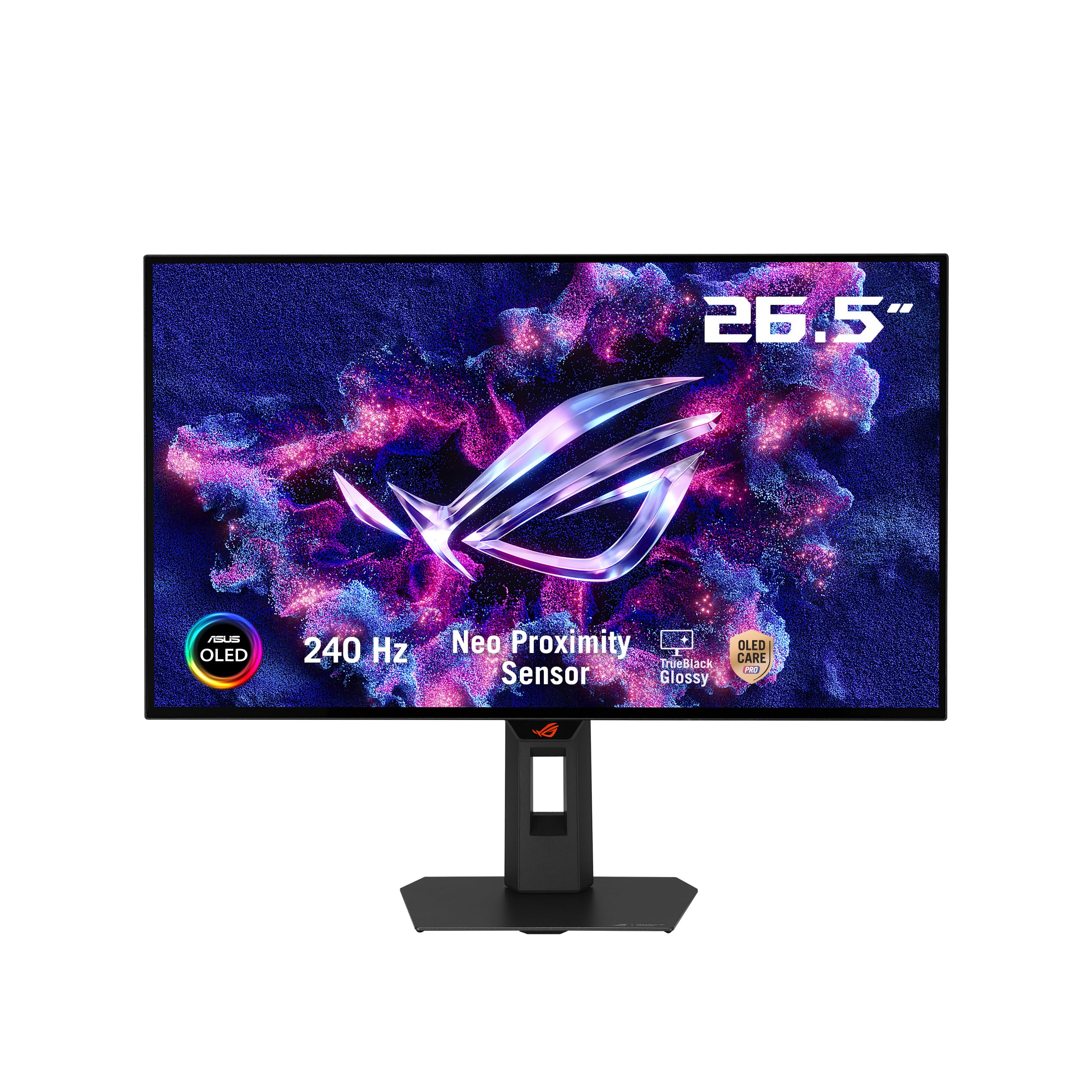
A glossy WOLED with the brightest panel in this roundup and next-level burn-in protection.
If you prefer the punchy contrast of a glossy screen and want the brightest panel here, this ASUS delivers. It is a 26.5-inch WOLED display with a 2560 x 1440 resolution, 240Hz refresh, and 0.03ms response time — but the headline spec is the 1300 candela-per-square-meter brightness, which is the highest in this entire list. That brightness is why owners call the colors “perfect” and the images “crisp, clean.”
The standout feature is OLED Care Pro, which pairs with a Neo Proximity Sensor. This sensor detects when you step away from the desk and switches the screen to black automatically, reducing burn-in risk without you lifting a finger. ASUS backs it with a 3-year warranty including burn-in coverage, and the 99% DCI-P3 gamut with true 10-bit color means HDR content looks properly rich.
At only 113 ratings it has fewer owner reviews than the alternatives above, but it holds a strong 4.6-star average. The display quality is the most-praised aspect, and buyers highlight how object edges stay perfectly sharp across games. The honest caveat is that owners mention a pixel refresh prompt every 8 hours, which is mildly annoying but easy to ignore.
brightest panel: at 1300 cd/m², this outshines the MSI’s 856.5 lm figure and the LG’s 275 cd rating, giving it a real HDR advantage over the competition.
brightness king: the best HDR brightness and automatic burn-in protection without needing to remember pixel cleaning.
budget minds: you prefer a matte screen or want a larger owner base of long-term reviews to reference.
5. Alienware AW2725DF

The fully adjustable 360Hz QD-OLED that owners call the best monitor they have ever bought.
This Alienware earns its premium spot by doing everything well. It is a 26.7-inch Quantum-Dot WQHD panel with a 2560 x 1440 resolution, a 360Hz refresh rate, and a 0.03ms response time — the same speed class as the MSI 360Hz but with a more complete ergonomic stand. The stand offers height, tilt, swivel, AND pivot adjustments, which is the most flexible setup in this entire roundup.
Color performance is where this panel shines: DCI-P3 99.3% coverage with Delta E<2 accuracy, backed by VESA DisplayHDR True Black 400. Owners describe the picture as “mind-blowing” at 360Hz, with deep blacks and vibrant QD-OLED colors. The infinite contrast ratio makes HDR games look stunning in both bright and dark scenes.
The review data shows the highest total volume of positive feedback here — quality is the top-praised aspect at over 80 mentions across the data. It also carries AMD FreeSync Premium Pro and VESA AdaptiveSync for tear-free visuals. The 3-year burn-in warranty with a 5-minute pixel refresh option gives solid long-term protection.
Buyers sum up the experience as a “must-buy for gamers,” though the premium price and purple tint coating on the screen are note before you commit.
text lovers: gamers who want premium build quality, full ergonomic adjustability, and 360Hz speed in one package.
hub seekers: raw refresh rate matters more to you than color coverage and adjustability.
6. LG 27GX790A-B

The 480Hz ultragear that makes even your mouse pointer look impossibly smooth.
Speed is the entire story here. The LG UltraGear runs a 27-inch QHD OLED panel at up to 480Hz with a 0.03ms response time — the highest refresh rate in this roundup alongside the Sony. Owners describe the 480Hz experience as making the mouse pointer “never been seen so smooth,” which tells you exactly what this monitor is built for.
The future-ready DisplayPort 2.1 connection delivers the bandwidth needed for flawless 480Hz gameplay. It also has two HDMI 2.1 ports and USB 3.0 connectivity, plus a 98.5% DCI-P3 color coverage. The 1.5M:1 contrast ratio and DisplayHDR True Black 400 mean dark scenes look cinematic, and the 275 cd brightness is paired with an anti-glare surface to cut reflections.
Beyond raw speed, this LG packs gaming features like Dynamic Action Sync to reduce input lag, Black Stabilizer to brighten dark scenes, and an FPS counter. The adjustable stand offers height, tilt, swivel, and pivot, and the RGB hexagonal backlighting adds a gamer aesthetic. The 2-year limited warranty covers the OLED panel itself.
Owners upgrading from a 240Hz screen note the jump to 480Hz is minimal in some games, so this is really for those coming from lower refresh rates.
esports ace: you want the fastest 1440p OLED available and have a GPU powerful enough to push 480 frames per second.
brightness fans: you are upgrading from 240Hz and expect a massive visual leap — the difference may feel small.
7. Pixio PX277 OLED Max V2
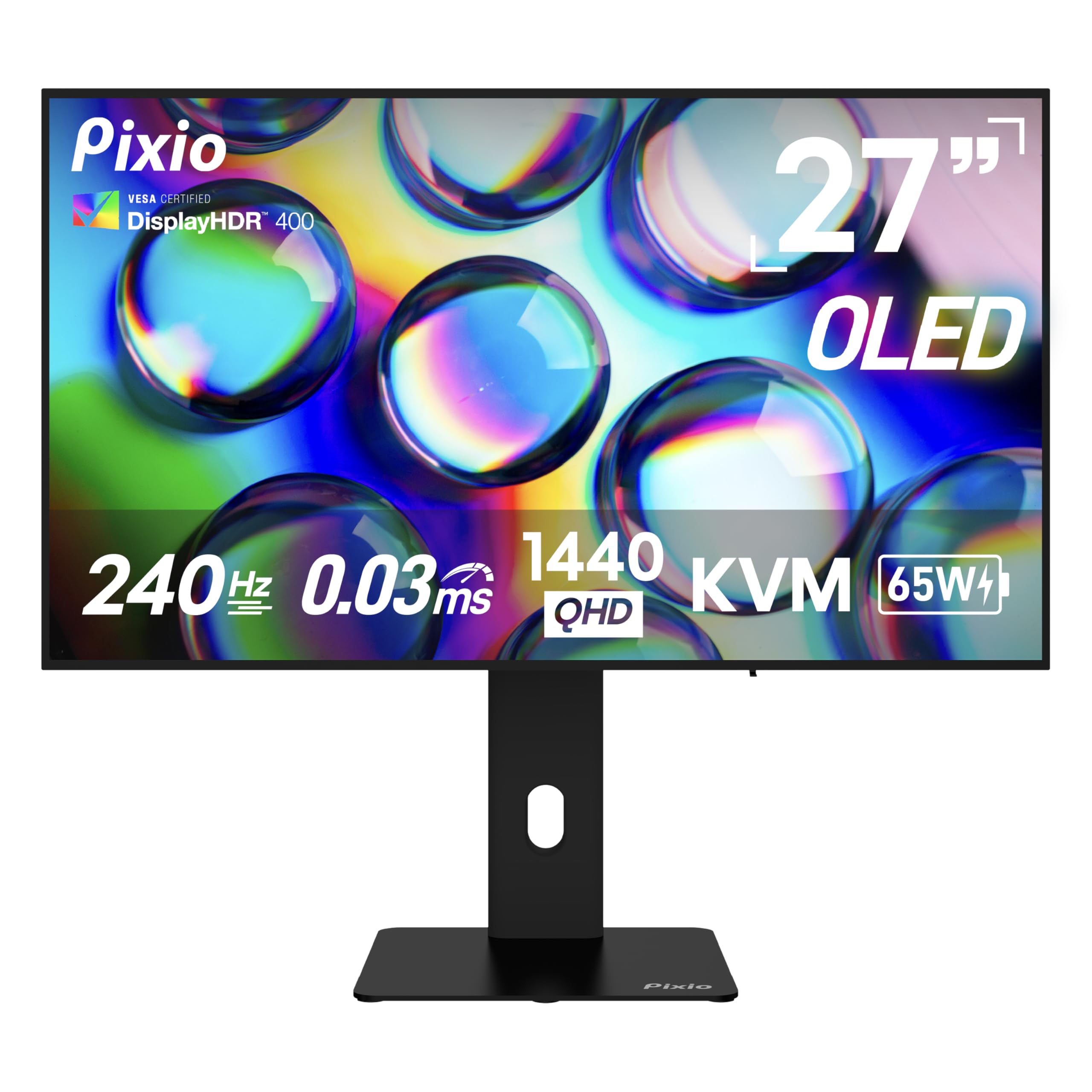
The productivity-minded OLED with USB-C charging and a built-in KVM switch for multi-device setups.
This Pixio is the pick for gamers who also work from home and juggle multiple devices. The 27-inch WOLED panel runs at 240Hz with a 0.03ms response time, but the defining features are the USB-C port delivering up to 65W of power and the built-in KVM switch. That KVM lets you control your PC and console with a single keyboard and mouse, which is a huge convenience for mixed setups.
The USB-C connection also provides 1440p at 240Hz for compatible laptops, making it a true one-cable docking monitor. It covers a 137.3% color gamut with a 1,500,000:1 contrast ratio and DisplayHDR True Black 400 certification. Owners consistently praise the quality and value, with quality being the top-mentioned positive in the data.
The fully adjustable stand offers height, tilt, swivel, and pivot adjustments, so you can dial in the perfect ergonomic position. It also has one DisplayPort 1.4 and two HDMI 2.1 connections, ensuring compatibility with PCs, laptops, and consoles. The 400 cd brightness is on the lower side, which is typical for WOLED panels.
One honest caveat from owners: the built-in speakers are weak, with one describing them as tinny. The picture quality is consistently described as top-notch, so this is a screen-first device.
budget OLED: you want USB-C charging, a KVM switch for multi-device control, and a flexible stand in one monitor.
HDR purists: you rely on monitor speakers, since the audio quality here is the weak point.
8. LG 27GS95QE

A proven 240Hz OLED with DTS sound and a remote control for console-and-PC households.
This LG UltraGear is excellent for gamers who split time between a PC and a console. It runs a 27-inch QHD OLED at 240Hz with a 0.03ms response time, certified by both AMD FreeSync Premium Pro and NVIDIA G-Sync Compatible. That dual certification means it plays nicely with both graphics card brands, and owners note it works well with consoles at 120Hz.
The image quality is described as sublime — vibrant colors, inky blacks, and a 1,500,000:1 contrast ratio that makes dark scenes look incredible. It covers up to 98.5% of DCI-P3, and the DisplayHDR True Black 400 certification ensures detailed dark scenes without the gray haze you get on LCDs. The included remote control lets you switch settings and power off the screen when you step away.
The anti-glare, low-reflection display is a plus for brighter rooms, and the virtually borderless design boost desk space. Owners upgrading from a 144Hz IPS panel describe the color depth as amazing, even for light photo and video editing work. The monitor includes HDMI 2.1 and DisplayPort 1.4 connections for full 240Hz support.
The honest trade-off is that some customers note reliability concerns after extended use, so the included warranty and a care routine matter here.
glare hater: gamers who want G-Sync and FreeSync support with a remote control for easy adjustments across PC and console.
refresh chasers: if reliability confidence is your top priority, the MSI E2 carries a longer burn-in warranty and a higher owner satisfaction score.
9. Samsung Odyssey OLED G6

The 360Hz Samsung with a pulsating heat pipe that fights burn-in at the hardware level.
Samsung tackles the biggest OLED fear — burn-in — with a genuinely innovative cooling system. The Odyssey G6 is the first monitor to use a Pulsating Heat Pipe, part of a Dynamic Cooling System that evaporates and condenses coolant to disperse heat 5x better than the older graphite sheet method. That hardware-level protection pairs with a Thermal Modulation System that predicts surface temperature and adjusts brightness automatically.
It is a 27-inch QD-OLED with a 2560 x 1440 resolution, 360Hz refresh, and 0.03ms response time. Owners describe the colors as vivid and the blacks as deep, with the anti-glare coating making it comfortable for long sessions. The 250 cd brightness is lower than the ASUS ROG option, but the 1,000,000:1 contrast ratio keeps dark scenes looking pure.
Beyond burn-in protection, Samsung adds smart features like Logo and Taskbar Detection, which dims static elements on screen automatically. The screen saver dims the display after 10 minutes of inactivity. The 3.9mm-thin design at its slimmest point keeps it looking sleek, and the included 3-year warranty covers the panel.
Reviewers point out flawless performance even after more than a year of use, with one calling it superior to an LG OLED TV they owned.
burn-in shield: the pulsating heat pipe is unique in this roundup, giving the G6 a real edge for those who leave static elements on screen.
safety first: you want the most advanced burn-in prevention technology alongside 360Hz speed and anti-glare comfort.
curve haters: a small number of shoppers say button durability issues, so check your unit early within the 3-year warranty period.
10. ASUS ROG Strix XG27ACDNG

The ROG Strix that combines anti-flicker technology with accurate HDR for a flawless competitive picture.
ASUS brings its own answer to OLED flicker with ROG-exclusive Anti-Flicker technology, which helps reduce flicker during refresh-rate fluctuations. That is a real quality-of-life win for games with variable frame rates. The 26.5-inch QD-OLED panel runs at 360Hz with a 0.03ms response time, and owners describe the experience as “silky smooth” with zero ghosting.
Color accuracy is a defining strength here: VESA DisplayHDR 400 True Black compliance, 99% DCI-P3 gamut, true 10-bit color, and Delta E < 2 difference. Owners consistently praise the vibrant colors and deep blacks, with monitor quality being the top-mentioned positive at over 50 mentions in the data. The custom heatsink and advanced airflow design keep the panel cool without a noisy fan.
The DisplayWidget Center software is a standout feature — it lets you adjust OLED Care functions and monitor settings using just a mouse, rather than fumbling with on-screen buttons. It also carries G-Sync Compatible and AMD FreeSync Premium Pro certification for smooth, tear-free play across both GPU brands. The 3-year warranty includes burn-in coverage.
One owner note: some older games may not display correctly, and the height adjustment is limited — check your setup before buying.
desk saver: you want ROG’s anti-flicker tech, mouse-controlled software, and accurate HDR for both gaming and creative work.
port hungry: you play many older or niche titles that may not support the panel’s modern display modes.
11. Sony INZONE M10S

The tournament-grade 480Hz Sony developed with Fnatic for esports players who need every advantage.
This is the monitor for players who take competitive gaming seriously. The Sony INZONE M10S runs a 27-inch QHD OLED at 480Hz with a 0.03ms response time, and it was developed with the Fnatic esports team. The defining feature is the 24.5-inch dual screen size mode plus dedicated FPS Pro and FPS Pro+ modes, which enhance contrast during fast-paced games — a tool designed specifically for tournament play.
The 4mm-thin base boost desk space, freeing room for aggressive mouse movements, and includes height, tilt, and ±180° swivel adjustments. It is G-Sync Compatible and supports VRR over HDMI 2.1, so screen tearing is a non-issue even when frame rates fluctuate. The 1,500,000:1 contrast ratio and 275 cd brightness keep colors looking rich.
Sony backs the M10S with a fan-less passive cooling system using a custom heatsink, plus OLED Care features like pixel refresh and static image detection. The 3-year Limited Warranty includes OLED burn-in coverage. Owners describe the 480Hz experience as “insanely smooth” and note the pixel density at 108 PPI keeps text sharp.
The review volume is smaller than other picks, which means fewer long-term data points. Some buyers report flicker issues when using G-Sync, so test your settings early.
pro gamer: esports competitors who want 480Hz speed, tournament features, and a low-profile stand that boost mouse space.
casual buyers: if you want a larger owner base and more long-term reliability data, the LG 480Hz has more reviews to reference.
Understanding the Specs
Refresh Rate and Response Time
The refresh rate tells you how many times the screen redraws per second, measured in hertz. A 240Hz screen feels dramatically smoother than a standard 60Hz display, while 360Hz and 480Hz panels push motion clarity even further for esports. Response time, measured in milliseconds, is how fast a pixel changes color — and at 0.03ms GtG, OLED panels are far faster than LCDs, eliminating ghosting and motion blur. Faster refresh rates matter most in fast-paced shooters where you track moving targets.
Burn-In Protection and OLED Care
Every OLED monitor includes some form of protection to prevent permanent image retention. OLED Care features like pixel shift, pixel cleaning, and static image detection work by moving the image slightly or running a refresh cycle. Hardware solutions like custom heatsinks and heat pipes keep the panel cool, since heat accelerates wear. Most manufacturers back these with a burn-in warranty lasting 2-3 years, which is why you should check warranty terms before buying.
FAQ
Is a 1440p OLED monitor worth it for gaming?
What is the difference between QD-OLED and WOLED?
How long does an OLED monitor last?
Will a 1440p OLED work with my PS5 or Xbox?
What refresh rate should I choose, 240Hz or 360Hz?
Does a glossy screen cause reflections?
What is the difference between G-Sync and FreeSync?
Is a 480Hz monitor worth the extra cost?
Can I use an OLED monitor for work and productivity?
What does VESA DisplayHDR True Black 400 mean?
Final Thoughts: The Verdict
Across the board, the 1440p oled monitor winner is the MSI MAG 271QPX QD-OLED E2 because it combines a 240Hz refresh rate, QD-OLED color quality, and top-rated build strength at a price that makes it the best starting point for most gamers. If you want maximum speed for esports, grab the LG 27GX790A-B with its 480Hz refresh rate. And for the best burn-in protection with advanced cooling, the Samsung Odyssey OLED G6 is the one to reach for with its pulsating heat pipe technology.
How We Picked
We do not accept paid placement. Every pick is matched to a real buyer and a real use-case; we do not hands-on test units.
Sources & Methodology
Specifications: manufacturer listings and product documentation. Review insights: verified customer reviews, as of August 2026. Pricing: not shown on this page (it changes often); check the current price via the retailer link.
As an Amazon Associate, Gadgets Feed earns from qualifying purchases. This does not affect which products we feature.