
Our readers keep the lights on and my morning glass full of iced black tea. As an Amazon Associate, I earn from qualifying purchases.
Specs are compiled from manufacturer listings and verified buyer reviews and can change over time — please confirm the key details on the product page before buying.
You have one HDMI video source—a satellite box, a streaming stick, or a security camera feed—and a building full of TVs already wired with coax. An ATSC modulator (a device that converts an HDMI signal into a broadcast channel) turns that single source into a channel every TV can find with a simple rescan. This is the piece that kills the box-under-every-TV problem in your RV, church, bar, or house. The trick is picking one whose channel lineup, output strength, and pass-through features match your coax network, and that is exactly what this guide sorts out.
I’m Min — the founder and writer behind Gadgets Feed. This guide is built by comparing the manufacturers’ published specifications and the patterns across verified customer reviews, so you get each pick’s real strengths and trade-offs instead of marketing spin.
You might need one channel or dozens, a broadcast-grade unit or a budget-friendly one. Here is how to choose the best atsc hdmi modulator for your setup and avoid the compatibility headaches owners hit most.
Our Picks at a Glance

How To Choose The Best ATSC HDMI Modulator
An ATSC HDMI modulator takes one HDMI video feed, compresses it, and broadcasts it over your existing coax cable as a standard digital TV channel. Pick the right one and every TV on the network finds your content with a channel scan; pick wrong and you are fighting weak signals or a box that only works for one type of TV.
Match Channel Count To Your Needs
Some modulators output only a single channel (one HDMI feed becomes one TV channel), while others can create up to 99 user-selectable digital channels. If you have one satellite receiver and a handful of TVs, a single-channel unit is plenty. If you run a bar, hotel, or office that wants to distribute several sources—or wants to keep channel numbers tidy—the multi-channel unit gives you far more flexibility.
Understand RF Output Level
The RF output level, measured in dBuV, is how strong the signal leaves the box. A modulator with adjustable output power (for example, tunable anywhere from 70 to 100 dBuV) lets you fine-tune the signal for your exact coax run, which matters on long cable lengths where signal fades. A fixed-output unit can struggle to reach distant TVs without an amplifier.
Look For A Coax Pass-Through
A built-in coaxial pass-through lets you combine your modulated channel with an over-the-air antenna signal using one cable, without needing an external combiner. This is a huge convenience if you want your custom channel and regular antenna TV on the same coax network. Without it, you will need to buy and wire a separate combiner yourself.
Consider The Source Device
Not every modulator plays nicely with every HDMI source. Some buyers report that a computer used as the HDMI source causes frustrating input lag on the modulated channel. Before you commit, think about what you are feeding the box—a satellite receiver, a security camera recorder, a DVD player—and check that the unit you want is known to handle it cleanly.
Quick Comparison
| Model | Best For | Channel Count | RF Output Level | Coax Pass-Through | Amazon |
|---|---|---|---|---|---|
| PVI MINIMOD 2★ Best Overall | RV & mobile setups | 1 | Adjustable gain | Yes | Amazon |
| SatLink ST-7000 | Easy IP setup | 1 | 70–100 dBuV | No | Amazon |
| Channel Master CM-1050 | Multi-channel buildings | 99 | Adjustable RF | Yes | Amazon |
| Thor Broadcast H-HDMI-RF-PETIT | Security camera feeds | 1 | — | No | Amazon |
In‑Depth Reviews
1. PVI MINIMOD 2
Our pick — over 4★ from 70+ verified ratings; the strongest balance of quality and price.
The RV-tested companion that rebalances its own signal every time you move campsites.
For anyone living the RV life, this is the modulator owners keep coming back to. The headline feature is the adjustable gain (the output strength you can tweak): when you park at a new campground, you can rebalance the output to match the new coax setup, which is a lifesaver when your feed has to share the cable with an over-the-air antenna. Owners mention it works reliably once you inject the coax at the front of the RV’s distribution system and switch to ATSC mode (the over-the-air digital TV standard) rather than the default cable setting.
It handles a full HD 1080p stereo input with Dolby audio (a surround-sound format), and the front color display lets you set the channel number and name without touching a computer. The built-in coax pass-through (a port that lets the signal continue to other devices) means you can combine the modulated channel with your antenna signal on one cable, so your TVs get both your custom feed and regular OTA (over-the-air) channels after a rescan. Compatibility is a recurring theme in the owner chatter—some setups need a 20dB attenuator (a small part that weakens the signal) to get the channel cleanly, and picture quality reviews are split between “major improvement” and “not as crisp as direct HDMI.”
What wins people over is pure functionality: owners in churches, RVs, and homes all find it straightforward to set up and depend on it daily. The crowd favorite holds a strong 4.4-star average from 70+ owners. The one honest trade-off is that Blu-ray sources can show compression artifacts over coax, but for satellite and DVD sources the output is near-direct quality.
Why RV Owners Rely On It
- Adjustable gain rebalances the signal at each new campsite
- Front color display for quick channel naming and setup
- Built-in pass-through combines with OTA antenna on one cable
- Handles 1080p input with Dolby audio
Room For Patience
- May need a 20dB attenuator to clean up the channel on some TVs
- Blu-ray sources show compression artifacts over coax
- Picture quality is a mixed bag vs direct HDMI
Your road-trip pick: if you live in an RV and want one box that rebalances itself as you move, this is the one owners trust most.
The catch: be ready to experiment with attenuation and injection point to get the cleanest channel on your particular TVs.
2. SatLink ST-7000

The IP-configured broadcast box that tunes its power from 70 to 100 dBuV to reach long coax runs.
If you want to configure a broadcast box from your laptop instead of a front-panel maze, the SatLink ST-7000 is built for you. Setup happens over the IP interface (the network connection you use to reach the box’s settings), and owners consistently describe it as a breeze. The headline knob is the adjustable output power: you can set it anywhere from 70 to 100 dBuV (the unit that measures signal strength at the coax output), and the balance most owners land on is 75 dBuV. That tunability is what lets this unit push a clean 1080p picture over long cable runs—though owners note that very long runs still want an amplifier in the path.
Picture quality is where this unit earns its keep. It delivers great 1080p HD video to multiple TVs through a splitter, and broadcasters praise the quality versus older analog modulators. There is no 5.1 surround pass-through (it is stereo only), and the program title and rating info from your source does not carry to the TVs. The functionality is honestly a mixed bag in the owner chatter—most get excellent results, but one unit died on the third use and left an owner stuck with a pricey paperweight past the return period.
Take the trade-offs in stride: the image quality makes it one of the best choices for broadcasting your own content, as long as you keep the source at 1080p. The reviews lean positive on build quality and setup, with the headline praise reserved for that clean HD picture.
The IP-first setup: configure everything from your browser, then dial the output power to 75 dBuV for the cleanest signal.
The durability question: the overwhelming majority love it, but a rare unit fails early—buy from a source with a solid return window.
3. Channel Master CM-1050

The 99-channel broadcast brain that lets a hotel or bar build a whole custom lineup over one coax network.
This is the big one for commercial spaces. The Channel Master CM-1050 stands apart with user-selectable digital channels from 2 to 99, which is a 99.0x gap compared to single-channel rivals—instead of one custom feed, a restaurant, bar, hotel, or office building can lay out a real channel lineup across its coax network. It also has a built-in coaxial pass-through, so you can combine your modulated channel with an over-the-air antenna signal without buying an external combiner, which is exactly what you want when TVs need both the house feed and OTA channels.
You can configure the RF channel number, virtual channel number, and RF output level right from the front panel display and menu buttons—no computer required. Prefer your laptop? The built-in Ethernet port lets you manage it over the local network. A broadcast engineer who reviewed it calls it an affordable ATSC modulator that covers all channels including low VHF, with adjustable RF output and programmable PSIP (the data that tells TVs what channel and program is showing). It handles Dolby AC3 audio and gives you lip-sync, GOP, and bitrate settings for fine-tuning.
The owners who have used other modulators put it plainly: “I have two other HD Modulators from other companies, but this Channel Master is the best.” The one clear limitation is that it is not for computer sources—an HDMI input from a PC causes severe mouse lag, so keep it fed from a satellite box, Blu-ray player, or streaming device. Audio has a mild low-frequency distortion that you can reduce by switching to MP1 Layer II audio encoding (a digital audio compression format).
The Building-Scale Advantage
- 99 user-selectable channels for a full custom lineup
- Built-in pass-through combines with OTA antenna, no extra combiner
- Front-panel or Ethernet-based configuration
- Covers all channels including low VHF with Dolby AC3
Who Should Feed It Carefully
- Computer HDMI input causes severe mouse lag—avoid PCs as the source
- Limited PSIP and non-adjustable audio
- Mild low-frequency distortion without tweaking MP1 encoding
Built for the building: reach for this if you run a bar, hotel, or office that needs multiple custom channels across a whole coax network.
Steer clear if: your video source is a computer—the input lag makes it unusable for PCs.
4. Thor Broadcast H-HDMI-RF-PETIT
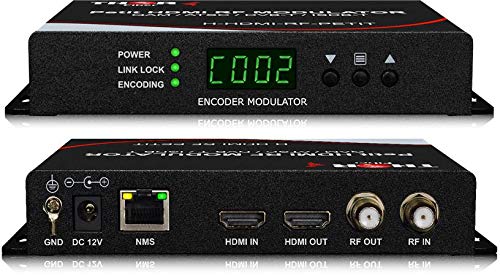
The 9.6-ounce featherweight that puts a security camera wall on every TV via one coax run.
If you are feeding an NVR (the recorder for your security cameras) and want the footage on every TV in the building, this Thor Broadcast unit is a proven workhorse. Owners consistently report it “just works”—one setup pushes a clean digital signal to roughly 50 TVs on old coax with an amplifier, with no rewiring needed. The unit integrates MPEG2 encoding with AC3 Dolby audio and a digital modulator all in one small box, and it supports 720p, 1080i, and 1080p sources, so it flexes across different camera and satellite feeds.
The controls live on the front panel for quick changes, and you can also connect it to any PC and manage it via Thor Broadcast’s proprietary GUI (the software interface used to control the unit’s settings). At 9.6 ounces and just over four inches long, it tucks into a rack or behind a TV with ease. Owners distributing DVD players and satellite receivers around a house praise the easy setup and reliable months of use, and the picture quality is described as near-HDMI quality with only minimal delay.
The honest watch-outs: the manual is sparse, the web interface IP is not clearly documented, and there is a slight ~1-second delay on the output. Some owners leave it running 24/7 and wonder about long-term heat, though no failures are reported. One owner calls it a cheaper alternative to a ZeeVee at roughly 35% of the cost, which makes it the value play for single-channel distribution.
The security-camera pick: feed it from your NVR and every TV on the coax network shows the camera wall in near-HD quality.
The documentation tax: plan for a sparse manual and a minor audio/video delay—the performance makes up for it.
Understanding the Specs
RF Output Level (dBuV)
This is how strong the TV signal leaves the modulator, measured in dBuV. A larger number means the signal can travel further down the coax without getting weak or snowy. Adjustable output (like 70 to 100 dBuV) lets you tune the strength to your exact cable length, so a unit with this dial is far more forgiving in a building with long coax runs than a fixed-output box.
Channel Count
Some modulators create just one channel from one HDMI feed, which is perfect for a single satellite box or camera feed. Others let you build multiple channels (up to 99), which suits a bar or hotel that wants to distribute several sources over the same coax network. More channels means more setup freedom but usually a higher price.
Coax Pass-Through
This is the feature that lets your modulated channel share the same coax cable as an over-the-air antenna signal, without a separate combiner. If you want your custom channel plus regular OTA channels on the same TVs, a built-in pass-through simplifies the wiring significantly.
ATSC vs QAM Output
ATSC is the digital TV standard used by over-the-air broadcasts in North America, and it is what most modern TVs tune natively. QAM (J.83B) is the standard used by cable providers. A modulator that outputs both gives you flexibility, but for most homes and businesses with standard TVs, ATSC is the mode you will actually use.
FAQ
What is an ATSC HDMI modulator used for?
Will an ATSC modulator work with my RV’s TVs?
How many channels can a modulator broadcast?
What does RF output level in dBuV mean for me?
Can I combine my modulator channel with an over-the-air antenna?
Is a modulator the same as an HDMI splitter?
Will my computer work as an HDMI source for a modulator?
Does a modulator pass through surround sound audio?
How do I set the channel number on a modulator?
Do I need an amplifier with a modulator?
Final Thoughts: The Verdict
For most people, the best atsc hdmi modulator is the PVI MINIMOD 2 because its adjustable gain and coax pass-through solve the real-world headaches of RV and home distribution in one box. If you want a single clean channel tuned from your laptop, grab the SatLink ST-7000. And for a bar, hotel, or office needing dozens of custom channels, the Channel Master CM-1050 is the one to reach for. If you are on a tighter budget and just need one reliable channel for a camera feed or a single satellite source, the Thor Broadcast delivers proven value at a lighter price point.
How We Picked
We do not accept paid placement. Every pick is matched to a real buyer and a real use-case; we do not hands-on test units.
Sources & Methodology
Specifications: manufacturer listings and product documentation. Review insights: verified customer reviews, as of August 2026. Pricing: not shown on this page (it changes often); check the current price via the retailer link.
As an Amazon Associate, Gadgets Feed earns from qualifying purchases. This does not affect which products we feature.