
Our readers keep the lights on and my morning glass full of iced black tea. As an Amazon Associate, I earn from qualifying purchases.
Specs are compiled from manufacturer listings and verified buyer reviews and can change over time — please confirm the key details on the product page before buying.
If you are shopping for an AI workstation, the real question is simple: which one can chew through massive local AI models without making you wait all day? This guide sorts through six serious machines so you can see which ones handle 200-billion-parameter models, which ones run all day on a single desk, and which ones are really just clever gaming rigs in disguise. You will learn what the core count and unified memory actually do for your workflows, and we will translate the specs into plain outcomes you can feel.
I’m Min — the founder and writer behind Gadgets Feed. This guide is built by comparing the manufacturers’ published specifications and the patterns across verified customer reviews, so you get each pick’s real strengths and trade-offs instead of marketing spin.
We’ve analyzed the best ai workstation pc options across the spectrum, from dedicated NVIDIA supercomputers to AMD-powered mini powerhouses built for local inference.
Our Picks at a Glance


How To Choose The Best AI Workstation PC
Buying an AI workstation is different from buying any other computer. Your main goal is running big language models locally, so the machine that plays games the best is not automatically the best one for you. You need to think about memory, the chip that powers the AI calculations, and how fast those calculations can actually stream out of the machine.
Why Unified Memory Matters for AI Workloads
A traditional PC gives its graphics card a fixed chunk of video memory, say 12GB, and that is the ceiling for any model you want to run. These AI workstations flip that idea on its head. They use a single pool of “unified memory” that both the brain and the graphics part can draw from, which means a 128GB system can load a 200-billion-parameter model that would need a warehouse full of conventional GPUs. When you see memory listed here, that is the ceiling for the biggest model you can run locally.
Reading Token Speeds Like a Pro
Token speed, measured in tokens per second, tells you how fast the machine can output text after you hit enter. A score of 50 tokens per second feels basically instant to a human reader, while anything under 10 starts to feel halting and labored. Good review data for these machines reports real-world numbers for popular models, and that is the single most useful number to compare when you are deciding between two similar towers.
Quick Comparison
| Model | Best For | Processor | Memory | Storage | Amazon |
|---|---|---|---|---|---|
| MSI Codex Z2★ Best Overall | Gaming plus light AI | AMD R7-8700F (8 cores) | 32GB DDR5 | 2TB NVMe SSD | Amazon |
| GMKtec EVO-X2Best Value | Price-to-performance local LLMs | Ryzen AI Max+ 395 (16 cores) | 64GB LPDDR5X | 2TB PCIe 4.0 SSD | Amazon |
| Ocean of Stars PC | AI-assisted creation and gaming | Ryzen 7 9700X (8 cores) | 32GB DDR5 | 1TB PCIe + 2TB SATA | Amazon |
| ASUS Ascent GX10 | Agentic AI development | NVIDIA GB10 (20 cores) | 128GB LPDDR5x | 1TB PCIe Gen4 NVMe | Amazon |
| NVIDIA DGX Spark | Enterprise-grade local research | ARM Cortex-X925 + A725 | 128GB Unified | 4TB NVMe M.2 | Amazon |
| MSI EdgeXpert | Large-model local fine-tuning | 10 Cortex-X925 + 10 A725 | 128GB LPDDR5 | 4TB Gen5 NVMe | Amazon |
In‑Depth Reviews
1. MSI Codex Z2 Gaming Desktop
Our pick — over 4★ from 200+ verified ratings; the strongest balance of quality and price.
A balanced desktop that handles AI tools and modern games at a reasonable price.
If you are entering AI development but still want a proper gaming machine, this MSI tower is the most relatable starting point on the list. It pairs the AMD Ryzen 7 8700F’s 8 cores with NVIDIA’s GeForce RTX 5070, a Blackwell-architecture card with 12GB of video memory, which is enough for running mid-size Stable Diffusion models and solid local LLM experiments. Buyers report “Great FPS performance at 160Hz, runs cool,” so you get a machine that stays quiet during work sessions and fast during play.
You can keep your AI model checkpoints and your game library on the same drive without juggling storage, thanks to the 2TB NVMe SSD. It comes with Windows 11 Home and an RGB keyboard and mouse, so you can unbox and start running a game or a local script right away. The main trade-off is the CPU: with 8 cores, it has a 2.0x core-count gap compared to the Ryzen AI Max+ 395 in the GMKtec, which you will notice during heavy multi-threaded data processing, not gaming.
Owner feedback highlights performance 59 times, dwarfing every other talking point, with setup and quiet operation trailing behind. The recurring caveat is a boot issue that around 50 reviewers mention as mixed, so treat the first power-on as a moment to check for updates. Some units have arrived with a single stick of RAM instead of the dual-channel pair that helps gaming and CPU-bound tasks, a quick fix but a real one to check.
What wins people over
- Exceptional gaming performance with the RTX 5070 12GB graphics card
- Runs cool and quiet, with solid airflow that keeps fans inaudible
- Includes premium RGB keyboard and mouse for instant setup
- 2TB NVMe SSD offers generous space for both games and AI models
Where it stumbles
- Boot issues receive mixed feedback, so initial setup may require patience
- Some units ship with a single RAM stick instead of two for better performance
- 8-core CPU lags behind 16-core rivals for heavy data processing
Reach for this if: you want one machine that handles serious gaming, VR, and entry-level AI workflows on a single 32GB DDR5 setup.
Look elsewhere if: local model size is your priority — the 12GB video memory caps you well below what unified-memory systems can run.
2. GMKtec AI Mini PC EVO-X2
A compact mini PC with a 16-core CPU and 64GB of fast memory for local AI.
This is the dark-horse champion for anyone who wants serious local LLM power without buying a full-size tower. The GMKtec EVO-X2 runs the AMD Ryzen AI Max+ 395, a 16-core chip that boosts to 5.1 GHz and doubles its thread count to 32 via AMD Simultaneous Multithreading. That is exactly double the core count of the MSI Codex Z2 above, a 2.0x gap that becomes obvious when you are preprocessing datasets or running parallel inference jobs.
The headline feature is 64GB of LPDDR5X memory running at a blistering 8000MT/s, which powers a massive integrated GPU with 40 AMD RDNA 3.5 compute units. Owners mention real-world results that sound like cloud performance: “Linux+Vulkan: Qwen3-30B 86 tok/s, GPT-oss-120B 50.5 tok/s,” meaning this tiny box streams text faster than most people can read it. It supports four screens including one at 8K via HDMI 2.1, and the dual USB4 ports hit 40Gbps transfer speeds.
For connectivity, you get Wi-Fi 7, Bluetooth 5.4, and a fast 2.5GbE LAN port, so you can move large files quickly. The honest trade-off: some owners note the memory split is fixed — 64GB goes to system use and the rest serves the GPU — and the software stack is still maturing, with one review calling it “effectively early-access hardware.”
Bang for the buck: this delivers the most AI compute per dollar on this list, beating machines that cost more but offer fewer cores.
Early-adopter tax: you are getting the newest AMD silicon, which means driver quirks and a fan that is audible under heavy load.
Ideal for: developers and students who want to run 30B-80B models locally and need four display outputs from a tiny desk footprint.
Not for: mission-critical production workloads where driver stability is non-negotiable — this is a dev machine, not a server.
3. Ocean of Stars AI Gaming PC
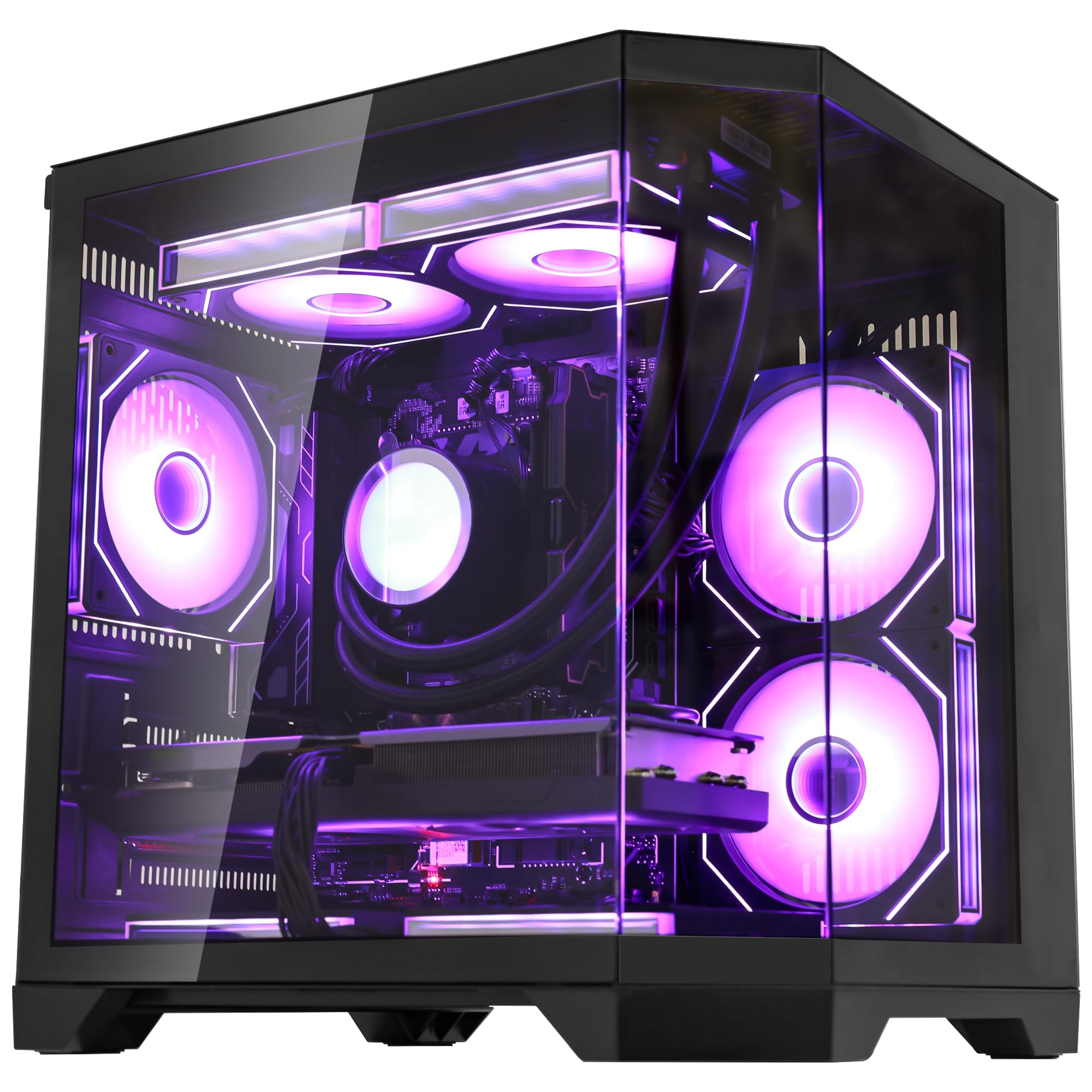
A creator-focused workstation with liquid cooling and 3TB of storage for AI models.
This build takes the RTX 5070’s 12GB of video memory and wraps it in a package aimed squarely at people who both create and game. The AMD Ryzen 7 9700X pushes up to 5.5GHz, which is a 10% speed advantage over the 5GHz ceiling on the MSI Codex Z2, giving you snappier single-thread performance for tasks like tokenizing text or cleaning datasets. The 32GB of DDR5 RAM keeps everything fluid when you run Chrome, a local LLM, and a video editor at the same time.
Storage is the real story here: a 1TB PCIe Gen4 SSD acts as your high-speed runway for the operating system and active models, while a 2TB SATA SSD becomes your personal “AI Model Repository,” enough for hundreds of LLMs, LoRAs, and Stable Diffusion checkpoints. The custom 240mm AIO liquid cooler keeps the CPU from throttling during long training runs or Unreal Engine 5 gaming sessions, and buyers praise the “gorgeous lighting” and clean panoramic black chassis.
This machine is the best-looking bridge between gaming and AI work, but it is not a dedicated inference box. The 12GB video memory is the same ceiling as the MSI Codex Z2, so you cannot run 100B+ parameter models that the unified-memory systems on this list handle with ease. Some owners noted the CPU cooler screen only displays the logo rather than GPU temperatures, a minor cosmetic quirk.
Creator-first design: the dual-drive setup and liquid cooling make this the smoothest machine here for mixed video-editing and AI-generation workflows.
Memory ceiling: if your goal is massive local language models, the 12GB video memory will frustrate you — this is a creator tool, not a research lab.
Choose this for: a gorgeous studio centerpiece that crushes 4K video renders and runs image-generation AI like Stable Diffusion flawlessly.
Skip if: your primary workload is fine-tuning or running large LLMs — you need unified memory, not a hybrid storage array.
4. ASUS Ascent GX10 AI Supercomputer

A stackable AI supercomputer with 128GB unified memory for agentic AI development.
This is where the list shifts from gaming-plus-AI to pure AI hardware. The ASUS Ascent GX10 is built on the NVIDIA GB10 Grace Blackwell Superchip, delivering 1 petaFLOP of AI performance from a device small enough to stack on your desk. With 128GB of LPDDR5x unified memory, it can fine-tune models up to 200 billion parameters locally, which is territory that used to require renting racks of cloud GPUs.
What separates this from the NVIDIA DGX Spark is the design philosophy: ASUS added a custom cooling board, a MIL-STD 810H-rated chassis, and stackable magnetic feet. Two units can be linked via NVIDIA ConnectX-7 networking to pool resources, which is why it is marketed for “agentic AI” via frameworks like OpenClaw and NemoClaw. Customers note running a 110GB VRAM mixture-of-experts model at 55-63 tokens per second and hosting multiple models simultaneously via Docker.
The catch is that this is not a plug-and-play consumer device. It arrives without an operating system, and reviewers point out that initial setup can require forum help and patience. Performance gets mixed feedback — some owners call it a hidden gem while others say it is “only for researchers” and slower than an RTX 3090 for fine-tuning. This is a developer tool, not a desktop replacement.
Built for: AI developers building secure, long-running agentic workflows who want private on-device inference with the option to grow by stacking a second unit.
Be warned: the lack of a pre-installed OS and mixed reliability feedback mean you should be comfortable troubleshooting before you buy.
5. NVIDIA DGX Spark

A desktop AI supercomputer with 1 petaFLOP performance and 128GB unified memory.
The DGX Spark delivers 1 petaFLOP of AI performance in a desktop form factor. The NVIDIA DGX Spark delivers up to 1 petaFLOP of FP4 AI performance through the GB10 Grace Blackwell chip, and its 128GB of unified memory lets you run models up to 200 billion parameters directly on your desktop. It is built to run headless — meaning no monitor required — and integrates smoothly with the full NVIDIA AI software stack so you can develop locally and deploy to the cloud unchanged.
Owners call this an “OpenClaw Monster,” reporting that it handles huge uncensored models via Ollama, generates images with ComfyUI, and produces speed that is “cloud-comparable or quicker.” The 4TB NVMe M.2 drive includes self-encryption for security, and the energy-efficient design means you can run enterprise-scale AI without the power bill of a server rack. The functionality and speed are the standout positives, while reliability gets mixed feedback.
The fine print is that mainstream PyTorch lacks support for the Blackwell GB10, so you will need NGC Docker containers or source compilation to open up GPU acceleration. Some owners found the first boot confusing, with no power light and silence that makes it unclear if the unit is even on. One unfortunate buyer faced thermal crashes that required a return, a caution about unit variance rather than a universal flaw.
Research-grade power: this is for people who work with models too big for a 12GB GPU and want the full NVIDIA software ecosystem.
Setup friction: the lack of an OS and the need for developer workarounds means this is not for beginners.
Ideal for: AI researchers, security analysts, and developers who want to inspect codebases and run ITAR-compliant local models without cloud latency.
Not for: gamers or casual users — there is no discrete GPU here, just raw AI compute power with ARM cores.
6. MSI EdgeXpert AI Mini Desktop
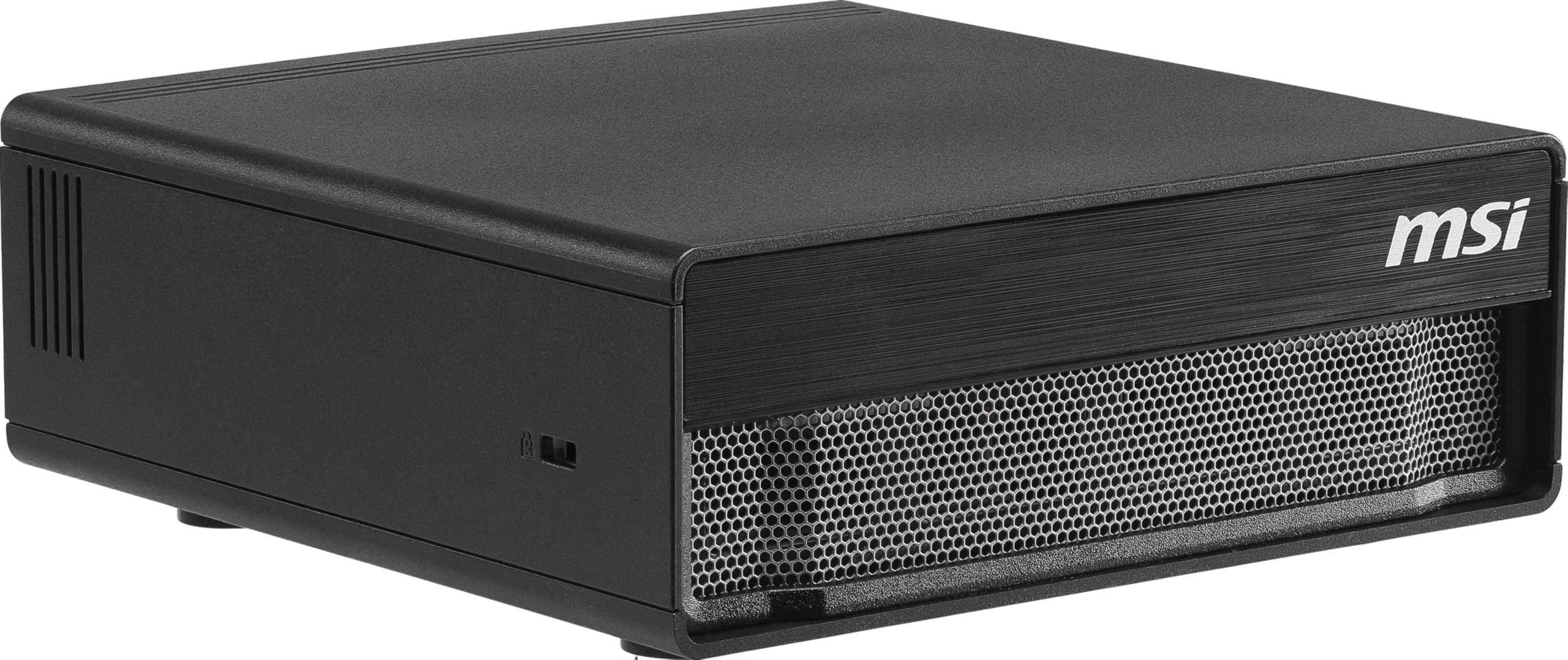
An inference-focused mini PC with a 20-core ARM CPU and 4TB Gen5 NVMe storage.
If the NVIDIA DGX Spark is the sports car, the MSI EdgeXpert is the tuned version with a bigger engine and faster wheels. It uses the same GB10 Grace Blackwell architecture but runs a 20-core ARM CPU — 10 high-performance Cortex-X925 cores plus 10 efficiency Cortex-A725 cores — and ships with a 3.8GHz max speed. The headline is storage: a 4TB PCIe Gen5 NVMe SSD hits up to 10,000 MB/s, making this the fastest drive on the entire list.
MSI tuned this for developers with NVIDIA DGX OS pre-installed, an Ubuntu-based Linux that is tune for machine learning and edge deployment. The 128GB of unified LPDDR5 memory (up to 273 GB/s bandwidth) supports models up to 200 billion parameters, and shoppers say impressive results: running a 119B Mistral mixture-of-experts model at 30-40 tokens per second, with prompt processing surpassing 1000 tokens per second. One buyer summed it up bluntly: “Amazing machine!”
The trade-off is that this is frontier hardware with immature software support. Owners note that vLLM and llama.cpp support is still developing, and running 70B models requires a cloud session to convert formats first. It runs quiet on single tasks but gets hot when you push LLM and image generation simultaneously, with one owner adding a 140mm fan to keep things under 80°C.
What makes it elite
- 4TB Gen5 NVMe SSD with 10,000 MB/s speeds for instant model loading
- Pre-installed NVIDIA DGX OS tuned for AI development from the start
- 20-core ARM design balances raw power with energy efficiency
- Runs 200B-parameter models locally with 128GB unified memory
What holds it back
- Software ecosystem is immature, requiring workarounds for some frameworks
- Gets hot when running LLMs and image generation simultaneously
- Premium pricing puts it in a league where every buyer must justify the cost
Pick this if: you want the most polished DGX Spark platform with Gen5 storage and a Linux OS that is ready for development on day one.
Think twice if: you need bleeding-edge framework support — this is for early adopters comfortable with troubleshooting GPU acceleration.
Understanding the Specs
Unified Memory and VRAM
Standard gaming PCs give the graphics card a fixed video memory pool, which caps the size of any AI model you can run. Unified memory systems like the DGX Spark and EdgeXpert use one shared pool that both the CPU and GPU access, so a 128GB machine can load models that would normally require multiple enterprise GPUs. When you see a big number next to “unified memory,” that is the ceiling for the largest local model you can run.
Token Speed and Throughput
Token speed, measured in tokens per second, tells you how fast the machine generates text after your prompt. A higher number feels more natural and responsive, while a low number feels like watching an old modem load. The best reviews report real speeds for specific models, like 86 tokens per second for a 30B model, which is the most useful metric for comparing AI workstations against each other.
FAQ
What is the difference between an AI workstation and a gaming PC?
Can I run a 200 billion parameter model on these workstations?
Does an AI workstation need Windows or Linux?
How many cores do I actually need for AI workloads?
Can I use an AI workstation for gaming?
What does token speed mean when running local AI models?
Is a mini PC powerful enough for serious AI development?
What is an NPU and why does it matter?
Final Thoughts: The Verdict
Across the board, the ai workstation pc winner is the MSI EdgeXpert because it is the only machine here that pairs a 20-core ARM CPU with 4TB of Gen5 storage and a pre-tuned Linux OS for AI development. If you want the best value in a compact form, grab the GMKtec EVO-X2, which delivers 16 cores and blazing 8000MT/s memory at a fraction of the cost. And for a machine that games as hard as it generates, the Ocean of Stars PC is the one to reach for with its liquid-cooled 5.5GHz CPU and 3TB of hybrid storage.
How We Picked
We do not accept paid placement. Every pick is matched to a real buyer and a real use-case; we do not hands-on test units.
Sources & Methodology
Specifications: manufacturer listings and product documentation. Review insights: verified customer reviews, as of August 2026. Pricing: not shown on this page (it changes often); check the current price via the retailer link.
As an Amazon Associate, Gadgets Feed earns from qualifying purchases. This does not affect which products we feature.