
Building a gaming PC for the price of a single AAA game title sounds impossible, yet the renewed desktop market has created a strange pocket of possibility. These aren’t rigs that run Cyberpunk at 4K — they’re systems built on legacy business hardware from HP and Dell that, with the right expectations, can handle older titles, indie games, and esports staples at playable frame rates.
I’m Min — the co-founder and writer behind Gadgets Feed. I’ve spent years analyzing the renewed enterprise desktop pipeline, tracking how surplus office hardware trickles down into the sub- gaming market and which specs actually matter when you’re working with an integrated graphics budget. (And Homer 🐱 sat on the VESA mount box and judged its structural integrity.)
The renewed office PC segment has quietly become the entry-level gamer’s best-kept secret, but separating a capable machine from an e-waste landmine requires knowing exactly which components to prioritize when hunting for a $100 gaming pc.
How To Choose The Best $100 Gaming PC
Shopping for a gaming rig at this price point means accepting that you’re buying a last-generation business machine and evaluating it purely on upgrade potential and CPU power. The case won’t be pretty, the power supply will be entry-level, and you’ll need to manage your expectations around what games will actually run well.
CPU Generation and Core Count
At this budget, the processor is the only component that can’t be easily swapped later. An Intel i5-4570 or i5-6500 with four physical cores gives you a fighting chance in older titles like CS:GO, League of Legends, and Minecraft. Avoid any system with a dual-core Pentium or Celeron — those chips choke on modern game logic even at minimum settings.
Storage Type Matters More Than Capacity
A 256GB solid-state drive makes a $100 machine feel snappy during boot and game loading, while a 500GB mechanical hard drive will leave you waiting 90 seconds for Windows to settle. Prioritize systems that already include an M.2 or SATA SSD, even if the capacity is smaller, because swapping an HDD for an SSD costs additional money you may not want to spend.
Form Factor and Upgrade Path
Small form factor desktops like the HP ProDesk and Dell OptiPlex Micro save desk space but severely limit your graphics card options. If you ever plan to add a dedicated GPU, look for a tower-style case with a standard PCIe x16 slot that can physically fit a low-profile graphics card. The SFF machines are great for emulation and light gaming on integrated graphics, but they hit a hard ceiling without an external GPU enclosure.
Quick Comparison
On smaller screens, swipe sideways to see the full table.
| Model | Category | Best For | Key Spec | Amazon |
|---|---|---|---|---|
| HP ProDesk 600 G1 SFF | Renewed Office | Budget entry gaming | Intel i5-4570 / 8GB RAM / 500GB HDD | Amazon |
| Dell Optiplex 3040 SFF | Renewed Office | SSD speed on a budget | Core i3-6100 / 8GB RAM / 256GB SSD | Amazon |
| Dell OptiPlex 3020 Micro | Ultra Compact | Space-saving emulation | i3-4150T / 8GB RAM / 120GB SSD | Amazon |
| HP ProDesk 600 G3 SFF | Bundle Deal | All-in-one starter kit | i5-6500 / 16GB RAM / 256GB SSD | Amazon |
| C3 Mini PC i3-5005U | Mini PC | Energy-efficient workstation | i3-5005U / 8GB RAM / 512GB SSD | Amazon |
| wo-we P6 Ryzen 5 3500U | Mini PC | Casual gaming on Ryzen | Ryzen 5 3500U / 8GB RAM / 256GB SSD | Amazon |
| OKAMUS Gaming PC i5 | Prebuilt Desktop | 1080p esports gaming | i5-4570 / 8GB RAM / 256GB M.2 | Amazon |
| GMKtec N95 Mini PC | Mini PC | Dual 4K office display | Intel N95 / 8GB RAM / 256GB SSD | Amazon |
| Getorli Mini PC Ryzen 5300U | Mini PC | Multi-monitor productivity | Ryzen 3 5300U / 16GB RAM / 512GB SSD | Amazon |
In‑Depth Reviews
1. HP ProDesk 600 G3 SFF with Monitor Bundle

The HP ProDesk 600 G3 SFF bundle is the smartest value proposition at this budget level because it pairs a legitimate quad-core i5-6500 with 16GB of DDR4 RAM — double the memory of most competitors — and ships with a 21.5-inch Full HD monitor, keyboard, and mouse. That 16GB capacity means you can leave multiple browser tabs, Discord, and a game running without hammering the page file on the 256GB SSD, which is a genuine advantage over the 8GB machines in this class.
The integrated Intel HD Graphics 530 handles older titles like Left 4 Dead 2, Team Fortress 2, and Minecraft at 1080p with reasonable frame rates, and the inclusion of Wi-Fi and Bluetooth means you don’t need to buy a separate adapter. The renewed unit arrives with Windows 11 Pro, and multiple verified buyers report it boots quickly and looks nearly new out of the box.
The small form factor chassis limits your GPU upgrade path to low-profile cards only, and a few users noted occasional Wi-Fi dropouts or a brief screen flicker on the bundled monitor. Still, getting a complete desktop setup with 16GB of RAM and a 256GB SSD at this price makes the G3 bundle the most well-rounded entry point for someone who needs everything in one box.
Why it’s great
- 16GB DDR4 RAM is double the typical budget offering
- Includes Full HD monitor, keyboard, and mouse
- i5-6500 quad-core handles esports titles well
Good to know
- SFF chassis limits dedicated GPU upgrades
- Some units report intermittent Wi-Fi connectivity
2. Getorli Mini PC Ryzen 5300U
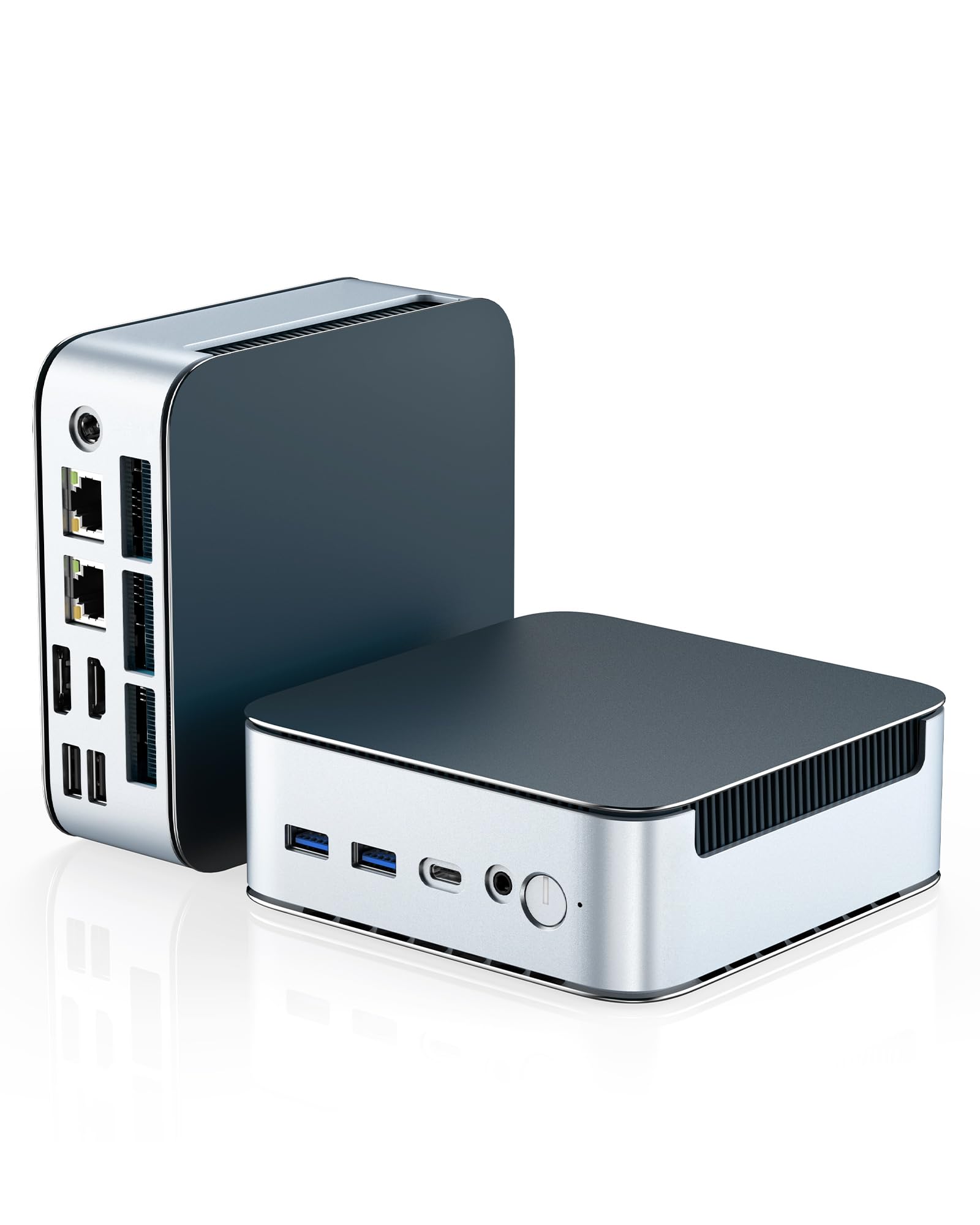
The Getorli Ryzen 5300U pushes well past the typical renewed-office-PC formula by packing a modern Zen 2 architecture with four cores and eight threads clocked up to 3.8GHz. The integrated Radeon graphics on this chip are significantly more capable than Intel HD 530 or 4600 — you can play Fortnite at playable settings and get reasonable performance in lighter modern titles, which the older i5 machines simply cannot do with their integrated graphics alone.
With 16GB of dual-channel DDR4 RAM and a 512GB PCIe NVMe SSD, this mini PC out-specs every other machine in the roundup for raw storage and memory bandwidth. The dual 2.5G LAN ports and Wi-Fi 6 support make it an exceptional home server candidate, while triple display output via HDMI and DisplayPort gives you a proper multi-monitor productivity setup that rivals far more expensive business desktops.
The compact chassis runs quietly under load thanks to an efficient fan and thermal design, though the AMD Radeon Graphics still rely on shared system memory rather than dedicated VRAM. A few users noted a Bluetooth connectivity quirk with certain peripherals, but the general consensus is that this unit delivers premium performance per dollar that outstrips any renewed HP or Dell in this budget band.
Why it’s great
- Ryzen 5300U Radeon graphics beats Intel integrated gaming
- 16GB / 512GB NVMe is the best storage pairing here
- Dual 2.5G LAN and Wi-Fi 6 for networking
Good to know
- Integrated graphics still falls short of budget dedicated GPUs
- Bluetooth peripheral pairing can be finicky
3. OKAMUS Gaming PC i5
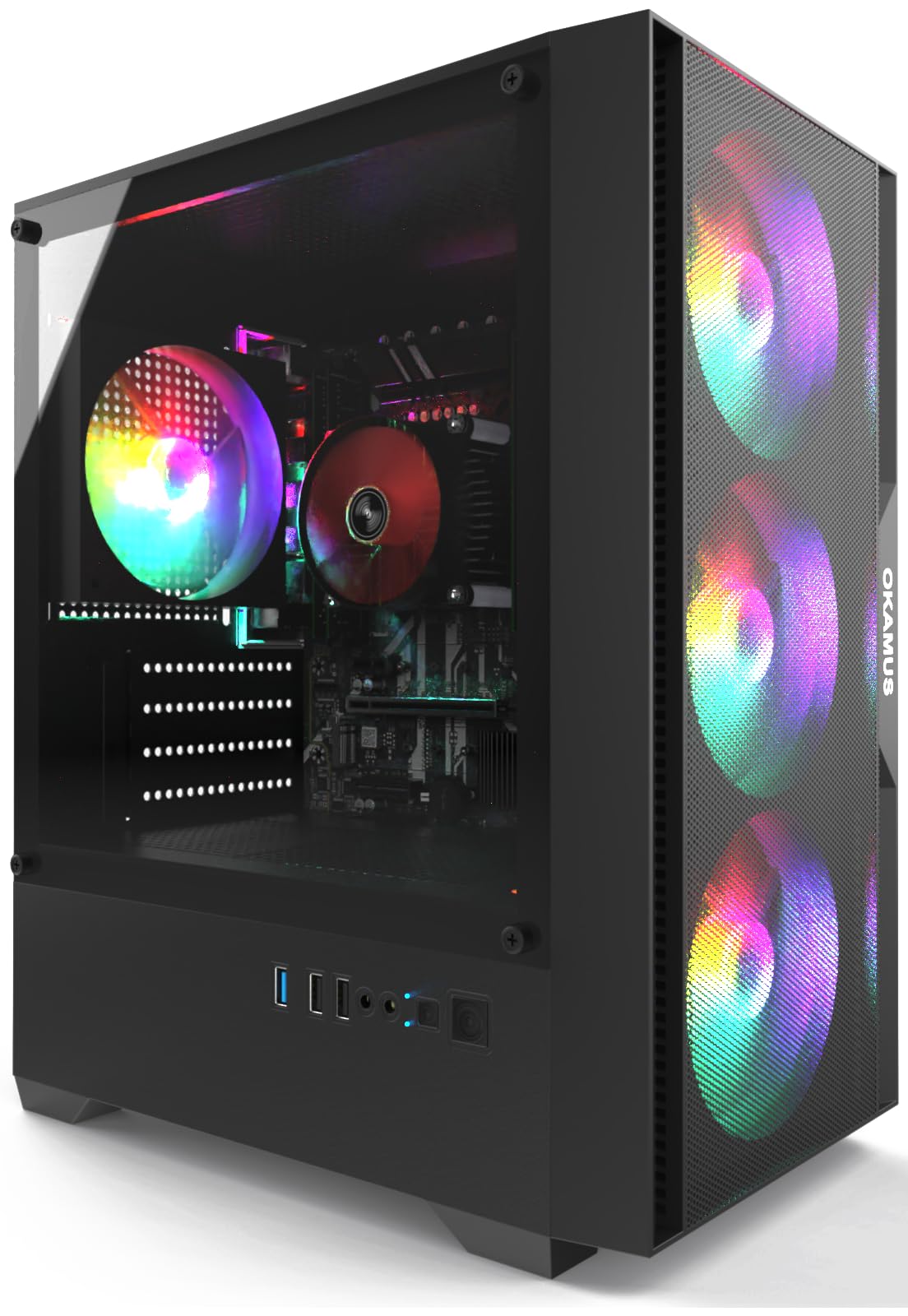
The OKAMUS prebuilt stands apart because it comes in a tower case with four RGB fans, a 400W power supply, and a digital temperature display — all features that signal genuine gaming intent rather than a repurposed office PC. The i5-4570 processor is older but reliable, and the 256GB M.2 SSD ensures fast game loading. The integrated Intel HD Graphics 4600 will push 1080p in older titles and esports games at medium settings, and the 400W PSU gives you headroom to install a low-power dedicated GPU later.
What makes this build interesting is the upgrade path: the standard PCIe x16 slot and full-height case accept most single-fan graphics cards up to around 150W TDP without requiring a PSU swap. Pairing this system with something like a GTX 1050 Ti or RX 6400 would turn it into a legitimate 1080p gaming machine. The included RGB controller and remote add a layer of customization that no renewed office PC can match.
Quality control is the biggest concern — several buyers reported units that stopped booting within 30 days due to a defective M.2 slot or motherboard issue. The KingSpec SSD has been flagged for a manufacturing defect where the drive doesn’t seat flat, and the return process has frustrated some customers. If you get a working unit, it’s a fantastic base, but the failure rate is higher than the established renewed hardware from HP and Dell.
Why it’s great
- Standard case and PSU accept most budget GPUs
- 256GB M.2 SSD for fast game loading
- RGB fans and temperature display included
Good to know
- Higher defect rate than established renewed hardware
- KingSpec SSD has known seating issues
4. wo-we P6 Mini Desktop Ryzen 5 3500U
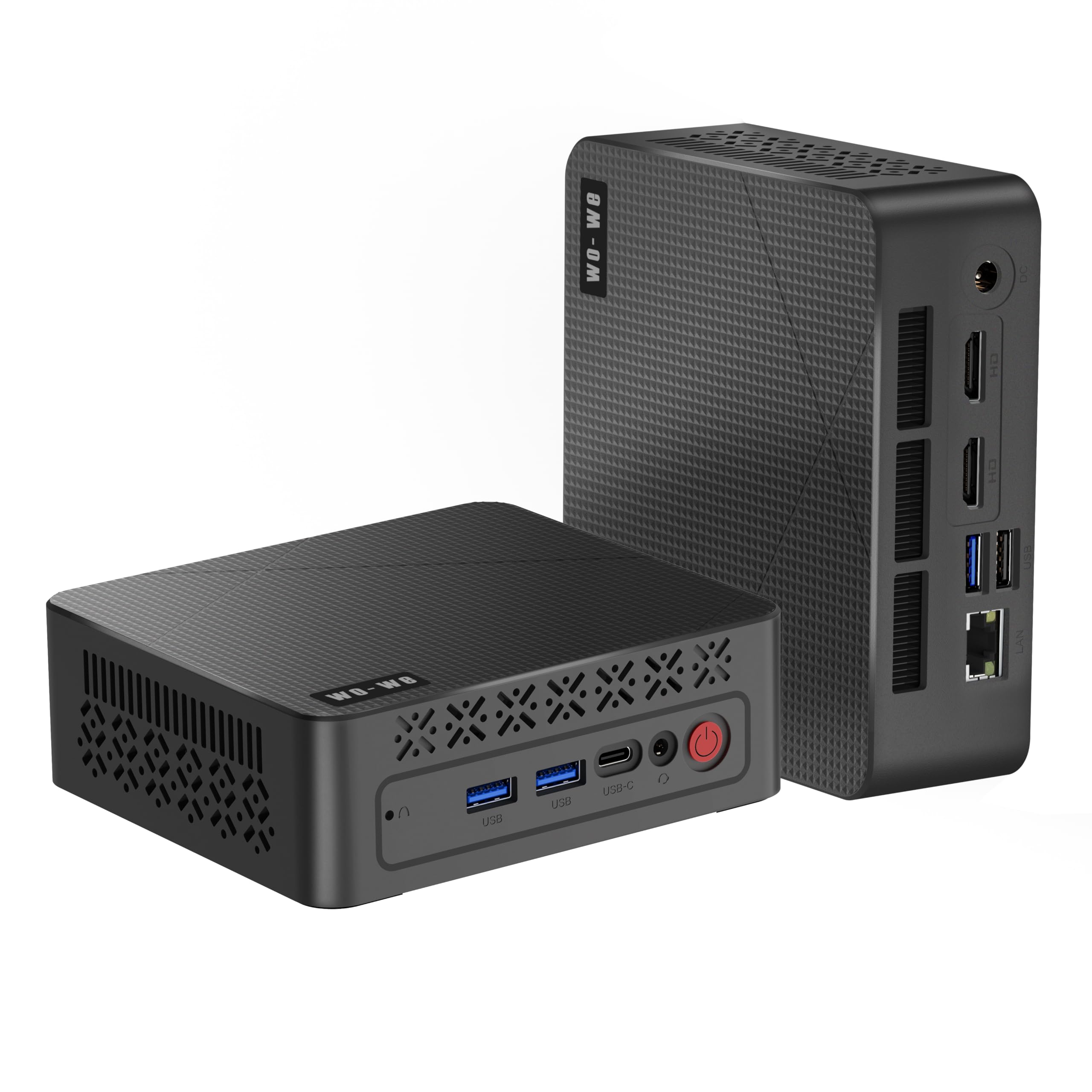
The wo-we P6 leverages the AMD Ryzen 5 3500U with integrated Radeon Vega 8 graphics, which delivers roughly twice the graphical performance of the Intel HD 4600 found in the HP and Dell machines. This translates to playable frame rates in Rocket League, CS:GO, and even some lighter modern indie titles at 720p. The 8GB of dual-channel DDR4 RAM running at 2400 MT/s helps the Vega iGPU perform closer to its potential than a single-stick configuration would allow.
The P6 supports triple-display output through dual HDMI 2.0 ports and one USB-C port, all capable of 4K@60Hz, making it an excellent choice for a home office setup that doubles as a casual gaming station. The built-in silent fan keeps noise levels low during extended use, and the compact metal chassis with subtle RGB lighting avoids the “bare office box” look entirely.
Some users reported that the unit runs best with Linux for productivity tasks, while Windows 11 handles the gaming side without driver drama. For the price, the Vega 8 graphics alone justify choosing this over any Intel HD-powered alternative.
Why it’s great
- Vega 8 graphics beats Intel integrated by a wide margin
- Triple 4K display support for productivity
- Quiet operation with efficient cooling
Good to know
- 8GB RAM limits multitasking during heavy gaming
- 256GB storage fills quickly with modern games
5. GMKtec N95 Mini PC G3S

The GMKtec G3S runs on the 12th-gen Intel N95 processor, a four-core chip that beats the older N100 and N5105 by a noticeable margin — roughly 36 percent improvement in synthetic benchmarks. The Intel UHD Graphics clocked at 1200MHz support dual 4K@60Hz output via HDMI 2.0, making this the best option for anyone who needs a high-resolution media center or multi-monitor office setup on a tight budget.
With 8GB of DDR4 RAM and a 256GB M.2 2242 SSD, the G3S boots quickly and handles everyday productivity tasks without hesitation. The unit supports AV1 decoding, which makes it a solid choice for streaming 4K video from services like YouTube and Netflix without stutter. The VESA mount included in the box lets you attach it behind a monitor for a completely cable-managed desk.
Gaming performance is strictly limited to light titles — think Stardew Valley, Slay the Spire, or older 2D games — because the N95’s UHD graphics lack the raw shader power for anything 3D at 1080p. One user reported that a front USB port arrived non-functional, and the packaging was minimal. For dedicated gaming, the Ryzen-based mini PCs in this roundup offer a much better experience for only a small increase in budget.
Why it’s great
- Dual 4K@60Hz HDMI output
- AV1 decoding for smooth streaming
- VESA mount included for hidden installation
Good to know
- Not suitable for 3D gaming above emulation level
- Some units have non-functional USB ports
6. HP ProDesk 600 G1 SFF

The HP ProDesk 600 G1 SFF is the archetypal $100 gaming PC — a surplus business desktop with an Intel i5-4570 quad-core running at 3.6GHz turbo, 8GB of RAM, and a 500GB mechanical hard drive. The i5-4570 remains a surprisingly capable chip for its age, handling older Source engine games, Minecraft (with OptiFine), and even League of Legends at 60fps on the integrated Intel HD Graphics 4600. The DVD drive is an oddity but works for legacy software.
The biggest bottleneck here is the 5400RPM hard drive. Game load times will feel sluggish compared to even a budget SSD, and Windows 11 may feel labored during startup. The good news is that the SFF chassis has an empty SATA port and space for a 2.5-inch drive, so a SSD swap transforms this machine’s responsiveness. The included USB keyboard and mouse are basic but functional for getting started.
The lack of an HDMI port is a genuine annoyance — you’ll need a DisplayPort-to-HDMI cable or a VGA cable (neither included) to connect a modern monitor. The short power cord also limits placement options. Customer reviews are split between buyers delighted with the value and a few who received defective units that died within weeks. Given the price, the i5 quad-core makes this the cheapest entry point into functional PC gaming.
Why it’s great
- Cheapest quad-core i5 entry into PC gaming
- SATA port available for cheap SSD upgrade
- Runs older Source and esports titles at 60fps
Good to know
- No HDMI port — requires adapter cable
- 500GB HDD is slow for game loading
7. Dell Optiplex 3040 SFF

The Dell Optiplex 3040 SFF runs a Core i3-6100 — a dual-core processor with Hyper-Threading — but compensates with a 256GB solid-state drive that makes the whole system feel far snappier than the HP G1’s hard drive configuration. The Intel HD Graphics 530 built into the Skylake chip is roughly on par with the HD 4600 in raw gaming performance, so older titles and 2D games run well, but the dual-core limitation shows in CPU-bound scenarios like physics-heavy Source mods or modern game menus.
This Dell includes both HDMI 1.4 and DisplayPort 1.2, solving the monitor compatibility issue that plagues the HP G1. The included Wi-Fi adapter works reliably — several buyers praised the plug-and-play setup and noted the unit looked nearly new. The 8GB of RAM is standard for this price band, but the SSD makes day-to-day use feel responsive enough for web browsing, office work, and light gaming.
The dual-core i3 is the loudest warning sign for any gaming ambitions beyond the lightest titles. Some units arrived with cosmetic damage or poorly refurbished components — one buyer found front USB ports taped over with electrical tape and a hard drive held in place by masking tape. If you’re willing to accept the dual-core limitation for the sake of SSD speed, this machine works, but the i5-based alternatives are better long-term investments.
Why it’s great
- 256GB SSD provides responsive boot and load times
- HDMI and DisplayPort for easy monitor connection
- Includes Wi-Fi adapter for out-of-box connectivity
Good to know
- Dual-core i3 limits modern gaming performance
- Refurbishment quality varies between units
8. C3 Mini PC Intel Core i3 5005U
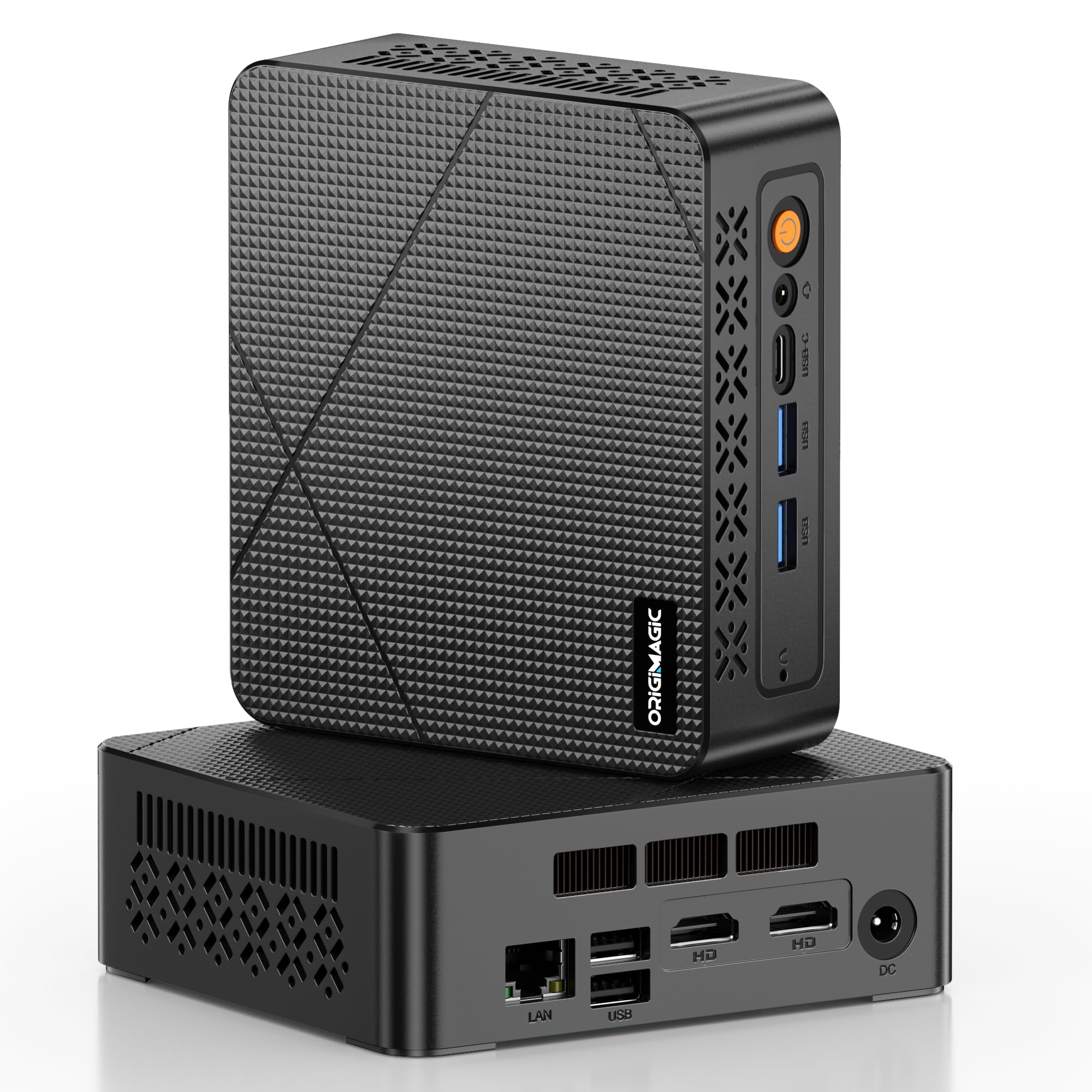
The C3 Mini PC runs on an Intel Core i3-5005U, a low-power 15W TDP Broadwell chip that trades raw gaming performance for energy efficiency and silent operation. This machine is designed for 24/7 use cases like digital signage, thin client terminals, or home media servers — not for fragging in competitive shooters. The 512GB SSD provides generous storage for a mini PC, and the 8GB of DDR3L RAM is adequate for light multitasking.
The port selection is surprisingly robust: dual HDMI outputs, USB 3.2 Gen1, USB-C, and Gigabit Ethernet give you flexible connectivity for a multi-monitor office setup. The compact chassis runs cool enough to tuck behind a monitor or mount under a desk without thermal concerns. The unit ships with Windows 10 and explicitly cannot upgrade to Windows 11, which may matter for software compatibility in the long term.
Gaming performance is extremely limited — the Intel HD Graphics 5500 in the 5005U struggles with anything beyond 2D titles and very old 3D games at 720p. One buyer reported a unit that overheated within 15 minutes and became a fire hazard, though most reviews describe stable operation for office tasks. This is a niche machine for buyers who prioritize low power draw and compact size over any gaming capability.
Why it’s great
- 15W TDP for energy-efficient 24/7 operation
- 512GB SSD offers generous storage
- Compact size with VESA mount compatibility
Good to know
- Not suitable for gaming beyond 2D titles
- Cannot upgrade to Windows 11
9. Dell OptiPlex 3020 Micro

The Dell OptiPlex 3020 Micro is the smallest machine in this roundup — a palm-sized unit that runs on a 35W TDP i3-4150T dual-core processor with 8GB of RAM and a 120GB SSD. The 120GB storage is tight even for Windows 10, leaving you with about 60GB for games after the operating system and essential applications. The integrated Intel HD Graphics 4400 can handle Batocera arcade emulation and very light 2D gaming, but 3D performance is minimal.
This micro form factor is genuinely impressive for space-constrained setups — it can be VESA-mounted behind a monitor and powered by a small external brick, creating a near-invisible computer. The dual DisplayPort outputs support dual 4K displays, making it a competent office or kiosk machine. The unit ships with Windows 10 Professional and cannot upgrade to Windows 11, which is a hard limitation for long-term software support.
Several buyers praised it for emulation and conference room duty, but the dual-core i3 and limited storage make it a poor gaming choice compared to the similarly-priced HP G1. One review noted a defective video port with no customer support response. This machine fills a very specific niche for Batocera retro gaming or as a secondary office terminal, but it ranks last among these options for general gaming use.
Why it’s great
- Ultra-compact size fits anywhere
- Dual DisplayPort for dual 4K output
- Great for Batocera arcade emulation
Good to know
- 120GB SSD leaves minimal room for games
- Cannot upgrade to Windows 11
FAQ
Can a $100 gaming PC run Fortnite?
Should I buy a renewed office PC or a cheap mini PC for gaming?
Will these systems run Windows 11?
What is the best first upgrade for a $100 gaming PC?
Final Thoughts: The Verdict
For most users, the $100 gaming pc winner is the HP ProDesk 600 G3 SFF bundle because it includes a monitor, 16GB of RAM, and a quad-core i5 in a single box — removing the biggest hidden cost of building a budget setup. If you want the best gaming performance from integrated graphics, grab the wo-we P6 Ryzen 5 for its Vega 8 graphics that handle newer games better than any Intel HD alternative. And for pure upgrade potential, nothing beats the OKAMUS tower with its standard PCIe slot and 400W power supply ready for a dedicated GPU.