
Our readers keep the lights on and my morning glass full of iced black tea. As an Amazon Associate, I earn from qualifying purchases.
Specs are compiled from manufacturer listings and verified buyer reviews and can change over time — please confirm the key details on the product page before buying.
Picking a cheap power supply can feel like a gamble—get the wattage wrong or choose a weak unit, and you might face random shutdowns mid-game or worse. The good news: you don’t need to spend a lot to protect a mid-range build. For most gamers, the balance is 550W to 650W with an 80 Plus Bronze or Gold rating (efficiency certifications that mean less wasted electricity).
I’m Min — the founder and writer behind Gadgets Feed. This guide is built by comparing the manufacturers’ published specifications and the patterns across verified customer reviews, so you get each pick’s real strengths and trade-offs instead of marketing spin.
These nine options show how much reliability you can actually get for your money when you focus on efficiency, protections, and the right wattage for your components. Here is my breakdown of the best affordable psu picks for a wide range of budgets and build types.
Our Picks at a Glance


How To Choose The Best Affordable PSU
An affordable power supply is the one part of a budget PC where you shouldn’t just grab the absolute cheapest box on the shelf. Your GPU, motherboard, and drives all depend on it for clean, steady power, so a few minutes of spec-checking now saves you from mysterious crashes later.
Wattage vs. Your Real Needs
The biggest mistake beginners make is buying way more wattage than they need. A mid-range gaming rig with a single graphics card runs happily on a 550W or 650W unit. Go higher only if you plan to add a second GPU or run heavy overclocking. The data here shows units from 500W up to 650W covering everything from basic office machines to RTX-class gaming builds.
Efficiency Rating
The 80 Plus sticker (Bronze, Silver, Gold) tells you how much of the AC power from your wall gets converted into usable DC power for your PC. Higher efficiency means less heat and a lower electricity bill over time. For an affordable build, 80 Plus Bronze is the standard, while Gold units like the Segotep and the 750W MSI reviews mention offer even better efficiency without a huge price jump.
Modular vs. Non-Modular Cables
This is purely about cable management. Non-modular units have all cables permanently attached, which is fine for budget builds but can clutter a small case. Semi-modular designs let you detach the cables you don’t need, making installation cleaner — a feature buyers praise on the MSI and Rosewill picks for exactly that reason.
Quick Comparison
| Model | Best For | Wattage | Efficiency | Cable Design | Amazon |
|---|---|---|---|---|---|
| MSI MAG A650BE★ Best Overall | Best Overall Value | 650W | 80+ Bronze | Semi-Modular | Amazon |
| Rosewill VSB650Next-Gen Ready | Next-Gen GPU Ready | 650W | 80+ Bronze | Semi-Modular | Amazon |
| Corsair CX550Reliable Swapper | Pre-Built Replacement | 550W | 80+ Bronze | Non-Modular | Amazon |
| ASRock PRO-650B | Modern Standard Support | 650W | 80+ Bronze | Non-Modular | Amazon |
| Segotep GN-650 | Efficiency on a Budget | 650W | 80+ Gold | Non-Modular | Amazon |
| ARESGAME AGV 650W | Reliable Budget Pick | 650W | 80+ Bronze | Non-Modular | Amazon |
| ARESGAME AGW550 | Compact Budget Builds | 550W | 80+ Bronze | Non-Modular | Amazon |
| Thermaltake Smart 500W | Entry-Level Systems | 500W | 80+ Standard | Non-Modular | Amazon |
| Apevia Spirit 600W | Ultra-Budget Value | 600W | Unrated | Non-Modular | Amazon |
In-Depth Reviews
1. MSI MAG A650BE
Our pick — over 4.5★ from 250+ verified ratings; the strongest balance of quality and price.
The 650W semi-modular that hides its cables and its fan noise.
For most builders, this is the affordable PSU to beat: a 650W unit with an 80 Plus Bronze rating (at least 85% efficiency under typical loads) and a semi-modular design, so you plug in only the cables you need—keeping a micro ATX case tidy. Owners running an RTX 5060 Ti on it report zero issues, calling it easy to install and “a nice power supply with a modular design to help with removing the excess cables.”
The 120mm low-noise fan earns constant praise for being effectively dead silent, even under a gaming load. It carries industrial-level protection with OVP, OCP, OPP, OTP, and SCP — the full safety suite that shuts the unit down before a power spike can damage your components. Power quality is what wins people over, with the 120mm cooling and the Active PFC design (a feature that smooths out power draw from the wall) both getting steady props.
What you give up? It has fewer total ratings than some budget competitors here, but it holds a higher score — the crowd favorite at 4.8 stars across 280+ owners. It is backed by a 5-year warranty and a 10A current rating, so MSI expects it to last well beyond a single build. For a low-to-mid-tier gaming rig, this is the one to reach for.
Why It Wins
- Semi-modular cables keep small cases clean and installs simple
- 120mm fan runs nearly silent under load
- Full OVP/OCP/OPP/OTP/SCP protection for confidence
- 5-year warranty shows long-term confidence
Trade-Offs
- Fewer verified reviews than some budget rivals
- Overkill for basic office builds that need less than 650W
Grab it for: a mid-range gaming PC where you want quiet operation and tidy cable routing without paying premium prices.
Think twice if: you run a simple office machine that would be fine on 300W — you are paying for wattage you won’t use.
2. Rosewill VSB650
The future-proofed 650W that feeds a flagship GPU directly.
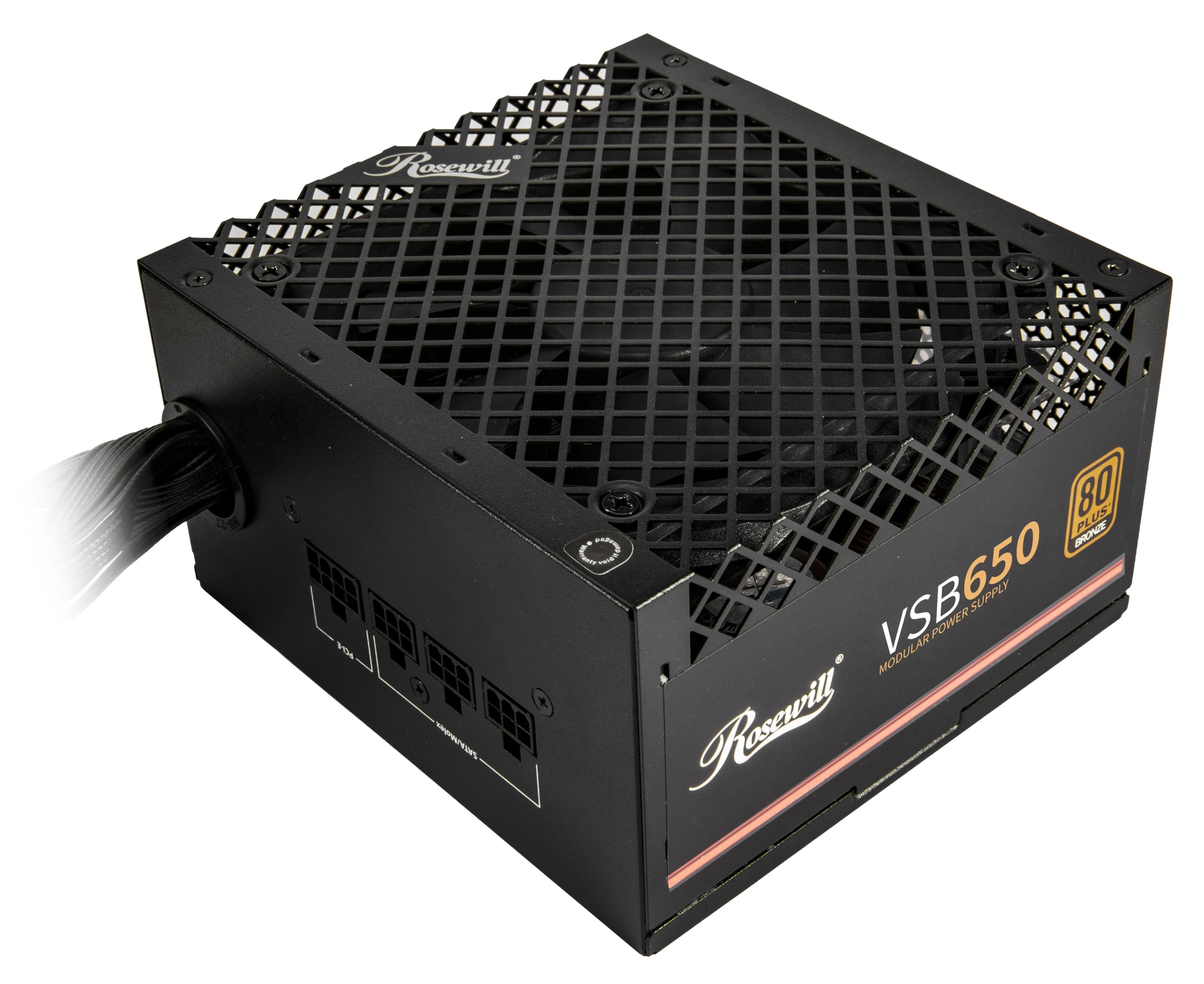
If you plan to run a modern high-end card later, this Rosewill has the feature that matters: a native PCIe 5.1 12V-2×6 connector (a new standard plug for graphics cards) that delivers 450W straight to new GPUs—which is why buyers report powering an RTX 5070 with a 12700K system without a hiccup. It is also Intel ATX 3.0 and 3.1 ready, meaning it handles the huge power spikes new GPUs demand—up to 235% power excursion and 300% GPU power excursion—without tripping protections.
The semi-modular design and a shorter chassis (140×150×86mm, called 35% smaller) make it a favorite for small-form-factor builds, and the 120mm ICB silent fan keeps operation quiet. Quality here is backed by a 105°C/221°F Japanese capacitor, which owners say handles the heat of 24/7 operation running storage pools and network cards with zero errors. The build quality is “semi-modular at this price point and at this quality is non-existent,” as buyers put it.
The recurring gripe is minor: one owner found the rocker switch sometimes needed a few flips to engage, and the cable management gets mixed feedback since the layout isn’t the most flexible. Still, with a 5-year warranty and a six-protection suite covering OCP, OPP, OTP, OVP, SCP, and UCP, this is the most future-ready unit in this lineup.
What stands out: the native 12V-2×6 cable means you don’t need a clunky adapter to run a next-gen GPU.
The honest catch: if you never plan to buy a modern flagship card, you are paying for ATX 3.1 features a simpler build won’t use.
Best fit: builders who want one PSU that can survive a GPU upgrade two or three years down the road.
Not for: tight budgets that can’t justify paying extra for PCIe 5.1 support today.
3. Corsair CX550
The dependable 550W fix for a dead or weak stock PSU.
This is the replacement unit people buy when a pre-built PC ships with a sketchy power supply—owners say it is “great for pre-built PCs,” and one ran a new MSI motherboard build with it continuously and satisfactorily. The 550W output is plenty for a single-GPU system, and the 80 Plus Bronze rating (up to 88% operational efficiency) means it runs cooler and wastes less electricity than the bare-bones units it often replaces.
Its defining spec is the thermally controlled 120mm fan: it stays slow and silent at low loads, only spinning up under heavy stress. The compact 125mm casing length is another practical win since it fits comfortably in almost all modern cases, including smaller ones. Reliability is the theme across buyer reports — units come through with no issues for months of daily use, and the full continuous power guarantee means the rated wattage holds under load rather than dipping.
This is a non-modular unit, so of the three Corsair picks here it offers the least flexible cable management. But for a straightforward build where you aren’t chasing a perfect interior shot, that trade-off gets you a trusted name at a fair price. If you simply want a boring, dependable 550W that works, this is it.
Why owners like it: it is a known-quantity replacement that slots into pre-built cases with zero fuss.
The limit: non-modular cables can bunch up in tiny cases, and 550W won’t feed a flagship GPU.
Reach for it if: you are replacing a failing unit in a pre-built or office PC and want a no-surprises part.
Look elsewhere if: you need headroom for a high-end graphics card or want modular cable routing.
4. ASRock PRO-650B
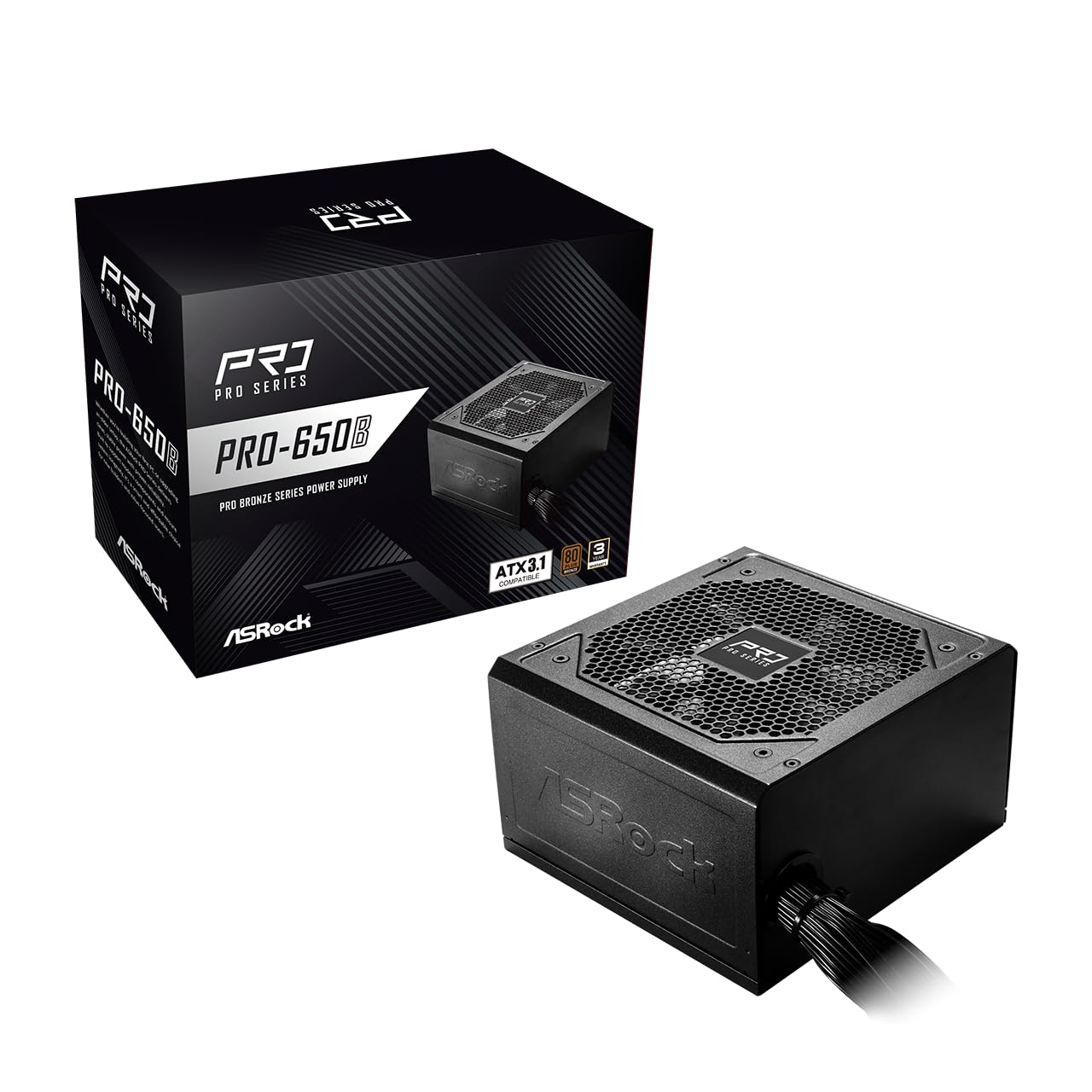
The 650W that handles modern CPU and GPU demands at a budget price.
ASRock brings a 650W unit that is ATX 3.1 compatible, meaning it can handle the 200% power excursion capability (sudden power spikes) that newer components can demand. That spec, plus a sturdy 54.1A on the +12V rail (the main power line for your CPU and GPU), is what owners mean when they call it “robusta” and note it delivers everything they needed functionally.
It comes with the full protection suite — OCP, OVP, UVP, OPP, OTP, and SCP — and is built with all-Taiwanese capacitors for durability. The 120mm balanced fan keeps noise low, and the flat cable design improves airflow inside the case. A 3-year warranty backs it up, which is a fair confidence window for the price tier.
The honest caveat is the compatibility note in the listing: it does not include a PCIe 5.1 connector, so it is suited for mid-range builds without flagship graphics cards. One owner also flagged the cable layout as a bit odd, with a single SATA and two molex on one line instead of extra SATA. For a standard gaming or workstation rig, though, it checks every important box without asking for a premium.
Standout trait: ATX 3.1 power excursion support at a non-premium price point.
Know before you buy: no PCIe 5.1 connector means high-end GPUs won’t plug in directly.
Choose it for: a modern mid-range build that wants ATX 3.1 safety without the markup.
skip it if: you are already shopping for a top-tier card that needs a 12V-2×6 plug.
5. Segotep GN-650

The 80 Plus Gold unit that delivers flagship efficiency for budget money.
Here’s the standout spec: an 80 Plus Gold certification — a tier usually reserved for pricier units — on a 650W budget-friendly PSU. That efficiency means less heat and lower electricity costs, and owners mention seeing it deliver around 87% efficiency in real use. The single 12V output delivers stable, high-amperage power when your system demands it, which is why it handles an RX 9060 with a Ryzen 5 5600 without complaint.
Cable management gets positive marks, with an abundance of internal peripheral connectors, though the non-modular design still means some extra wire to tuck away.
What’s the catch? Reliability is mixed in a small slice of reports—an occasional unit has failed from the start, so the 3-year warranty (not 5 like some rivals) is worth keeping in mind. But the efficiency-to-dollar ratio here is genuinely tough to top, and the overwhelming majority of owners say it simply works, quietly and reliably.
Why it earns its spot: 80 Plus Gold efficiency is the kind of feature you usually pay twice as much to get.
The trade-off: a short warranty and an occasional early failure mean it isn’t the most bulletproof pick.
Get it if: you run your PC long hours and want to save on power costs with a Gold-rated unit.
Pass if: you want maximum long-term warranty protection over raw efficiency.
6. ARESGAME AGV 650W

The 650W budget pick that keeps voltage steady for eGPU rigs.
If you want a reliable 650W on a strict budget, this ARESGAME delivers surprising polish. It is 80 Plus Bronze certified for energy efficiency, runs a silent and durable 120mm fan, and carries heavy protection including OVP, UVP, OPP, and SCP. One owner running it in an eGPU setup reports it holds voltage well with “no issues” and stays super quiet — exactly what you want from a PSU that lives on a desk.
The cables are all black (the brand specifically notes they avoided the old “ketchup and mustard” two-tone look), and buyers praise the long, flexible routing plus a handy tester included in the box. Reliability is the top-praised trait here, which matters more than flashy features at this price. The 5-year warranty and 24 connectors give it the feel of a pricier unit.
The downsides are the usual for non-modular budget units: cable management takes some effort, and a few customers note durability issues, with some units lasting around 3 months before failing. For the money, it is a solid choice for a mid-range build, but the mixed long-term reports mean it isn’t the one to bet your whole rig on if you can stretch a little further.
What You Get
- Steady voltage delivery praised by eGPU owners
- 5-year warranty and black sleeved cables
- 80 Plus Bronze efficiency with a quiet 120mm fan
Watch For
- Non-modular cables are harder to route neatly
- Some units reported failing within a few months
Great match for: budget gaming builds where every dollar counts and you want a warranty safety net.
Could be better for: anyone who wants proven long-term durability over a five-year horizon.
7. ARESGAME AGW550

The tiny 550W that packs premium looks into small cases.
This is the smaller sibling that fits where bigger units won’t. At just 5.9 x 5.5 x 3.3 inches, it is a full 1.9x more compact than the MSI A650BE’s 11.42 x 8.11 x 4.96-inch frame, making it a natural fit for cramped cases and office-tower conversions. The 550W output with an 80 Plus Bronze rating (85% efficiency or higher under typical loads) covers single-GPU gaming builds comfortably—one owner has run it for over two years with a 9060 XT and Ryzen 7 5700X with never an issue.
The 120mm ultra-quiet fan gets consistent praise for its cooling performance, and the all-black cables (again, no “ketchup and mustard” colors) give it a premium look that owners say “looks amazing” next to pricier hardware. Protection coverage includes OVP, UVP, OPP, and SCP, which covers the essentials.
The mixed notes are worth knowing: noise gets divided reviews (some say dead silent, one reported noise developing), and durability concerns exist since a small number of units have failed after about two months. If you need a compact, clean-looking 550W for a space-constrained build, this is a strong value — just know the long-term track record isn’t as proven as some pricier names.
Why it fits a niche: that tiny footprint opens up small-form-factor builds other 650W units can’t squeeze into.
The honest warning: a handful of owners hit early failures, so treat it as a budget bet, not a 10-year commitment.
Pick it for: a small case or a pre-built tower where physical space is the real constraint.
Reconsider if: you want maximum proven durability and don’t need the compact size.
8. Thermaltake Smart 500W

The 500W starter that handles overclocking tests on a budget.
This is the entry-level pick for a no-frills daily driver, and it earns its spot by being surprisingly capable for a 500W unit. One owner tested multiple PCIe cards and even overclocked a CPU off it, calling it a “good psu for the money” that they would buy again. That is strong proof that a modest 80 Plus Standard unit can still punch above its weight for basic systems.
It delivers exactly 500W — a full 30% less output than the 650W MSI above, so the math is simple: this is for light builds, not gaming rigs with hungry GPUs. The 120mm fan keeps it cool, and the ATX form factor means it drops into standard cases without drama. It runs at 100V to 240V input, so it adapts to different wall voltages.
The honest caveat: its efficiency rating is 80 Plus Standard (not Bronze), so it wastes a bit more power as heat, and one reviewer found it “se queda corta en potencia y calidad”—short on power and quality under demanding loads. For a basic office PC or a media center, that’s a fair trade; for anything heavier, you’d want more headroom.
The appeal: a recognizable brand and enough wattage to overclock a modest CPU on a strict budget.
The limit: 500W won’t comfortably run a modern mid-range gaming GPU, and efficiency is entry-level.
Right for: basic builds, HTPCs, and office machines where 500W is all you’ll ever need.
Wrong for: any system with a discrete gaming graphics card that wants more than the minimum.
9. Apevia Spirit 600W
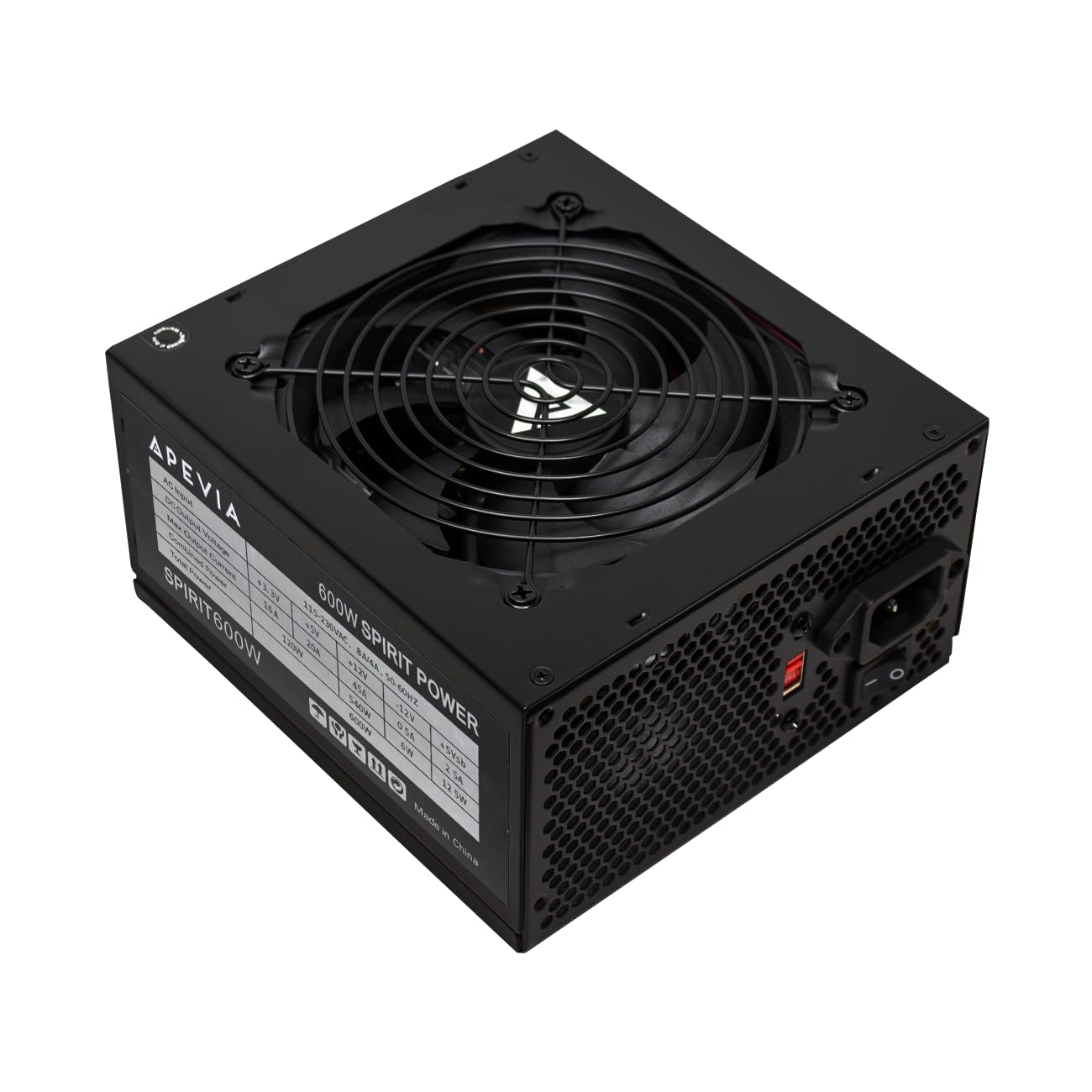
The 600W value king that slotted into an office tower for a GPU swap.
This is the cheapest way to get 600W of real power, and it has a specific superpower: it is a favorite for upgrading old pre-built office PCs. Owners have dropped it into an Acer TC885 and a Dell Optiplex 9010 to give those machines enough juice for a proper graphics card, and it fits perfectly with everything needed on board. The 120mm auto-thermal fan keeps noise down, often quieter than the case fans around it.
It supports a single 12V output at 45A (that’s the main rail that feeds your CPU and GPU), plus heavy-duty protections covering short-circuit, over-current, over-voltage, over-power, under-voltage, and over-temperature. The connectors are genuinely versatile: a 24-pin main, a 4+4 CPU that splits, two 6+2 PCIe GPU connectors, four SATA, and four Molex — enough for almost any mid-range build.
The catch is a real one: reliability gets the most mixed feedback of any aspect, and one owner’s unit died after first use (though support replaced it quickly). It has no 80 Plus rating at all, so efficiency is lower than the Bronze units here. Reviewers point out the cables can run a bit tight, and the CPU power lead was too short to route behind the motherboard tray in one large case. For a vintage build on a tiny budget, it’s a fantastic value; for a long-term daily driver, step up.
Big Wins
- Rock-bottom price for 600W of output
- Full protection suite despite the low cost
- Connectors split into 4+4 and 6+2 for broad compatibility
Real Limits
- No 80 Plus efficiency rating
- Reliability is the most-discussed mixed point, with some early failures
- Non-modular cables can be tight in some cases
Reach for it if: you’re reviving an old office PC with a new GPU and want maximum watt-per-dollar.
Be cautious if: you plan to run this 24/7 for years — the durability track record is the shakiest in this lineup.
Understanding the Specs
Wattage and the 12V Rail
Wattage is the total power budget your PSU can deliver, but the number that really matters for your CPU and GPU is the +12V rail amperage. This is the main power line for your most demanding components. A 650W unit with a strong single 12V rail (like the ASRock’s 54.1A or the Apevia’s 45A) feeds modern processors and graphics cards the steady high-amperage current they need under load.
80 Plus Efficiency Ratings
The 80 Plus sticker tells you how efficiently the PSU converts wall power into usable DC power. Bronze units (like the MSI, Rosewill, and Corsair) hit roughly 85% efficiency under typical loads, meaning less wasted heat. Gold units (like the Segotep) push closer to 87-90%, saving money on your electricity bill and running cooler — a worthwhile upgrade if you leave your PC on for long stretches.
Modular vs. Non-Modular Cables
Modular designs let you detach cables you don’t use, keeping your case tidy and airflow clean. Semi-modular units (like the MSI and Rosewill) remove the most common cables while keeping the essential motherboard and CPU wires attached. Non-modular units (like the Corsair, Apevia, and both ARESGAME picks) have everything attached upfront — simpler and cheaper, but you’ll have spare cables to tuck away in smaller cases.
Protection Circuits
Protection circuits are the safety net that shuts the PSU down before a power surge or short can damage your components. Look for the acronym soup: OVP (over-voltage), OCP (over-current), OPP (over-power), OTP (over-temperature), and SCP (short-circuit). All nine picks here carry at least a version of these, which is what separates a safe budget unit from a dangerous one.
FAQ
How do I know what wattage PSU I need for my PC?
Is 80 Plus Bronze good enough for a gaming PC?
What is the difference between modular and semi-modular PSUs?
Will a 650W PSU run an RTX 5060 or similar GPU?
What does ATX 3.1 compatibility mean for a power supply?
Can I use an affordable PSU in a pre-built office PC?
What is the 12V-2×6 connector on newer PSUs?
How long should a budget PSU last?
Are the cables included with these PSUs long enough for a full tower?
Final Thoughts: The Verdict
Across the board, the affordable psu winner is the MSI MAG A650BE because the crowd favorite — 4.8 stars across 280+ owners — pairs quiet operation, semi-modular cables, and full protection in one package. If you want a PSU that can handle a future flagship GPU, grab the Rosewill VSB650 with its native 12V-2×6 connector. And for a dependable replacement in a pre-built or office PC, the Corsair CX550 is the one to reach for.
How We Picked
We do not accept paid placement. Every pick is matched to a real buyer and a real use-case; we do not hands-on test units.
Sources & Methodology
Specifications: manufacturer listings and product documentation. Review insights: verified customer reviews, as of August 2026. Pricing: not shown on this page (it changes often); check the current price via the retailer link.
As an Amazon Associate, Gadgets Feed earns from qualifying purchases. This does not affect which products we feature.