
Our readers keep the lights on and my morning glass full of iced black tea. As an Amazon Associate, I earn from qualifying purchases.
Specs are compiled from manufacturer listings and verified buyer reviews and can change over time — please confirm the key details on the product page before buying.
If you are tired of your smart TV slowing down or your stick buffering mid-movie, the right streaming box fixes that. The real question is not just which one plays Netflix, but which one handles the apps, the picture quality, and the connection speed you actually need. This guide breaks down the top performers that plug into your TV’s HDMI port and run on Google’s Android TV system.
I’m Min — the founder and writer behind Gadgets Feed. This guide is built by comparing the manufacturers’ published specifications and the patterns across verified customer reviews, so you get each pick’s real strengths and trade-offs instead of marketing spin.
Upgrading your TV’s smarts starts with picking the right android box for television—one that fits your TV’s resolution, your internet speed, and the streaming apps you already pay for.
Our Picks at a Glance



How To Choose The Best Android Box For Television
Picking an Android TV box is about matching the hardware to your TV and your habits. A heavy streamer needs more RAM, while a casual viewer might be fine with the basics. Here is what actually changes your daily experience.
Google Certification is the app gatekeeper
A certified box runs the official Google TV or Android TV interface, which means it is licensed to play Netflix, Disney+, and Prime Video in full quality. Non-certified boxes often lack the licenses for these apps, so they may not appear in the store or may run in lower resolution.
RAM and storage set the speed limit
RAM handles how many apps you can have open without lag. Storage decides how many apps you can install before the box fills up. For smooth multitasking, 2GB of RAM is the usable floor, and 16GB to 32GB of storage gives you room to grow.
Picture and sound formats make the upgrade real
If your TV is 4K, you want a box that supports HDR10+ or Dolby Vision for brighter highlights and deeper blacks. If you have a soundbar, Dolby Atmos support means you get the spatial, overhead sound effects instead of plain stereo.
Quick Comparison
| Model | Best For | RAM | Storage | Connectivity | Amazon |
|---|---|---|---|---|---|
| NVIDIA Shield TV Pro★ Best Overall | Home theater power users | 3 GB | 16 GB | Gigabit Ethernet | Amazon |
| onn. Google TV 4KBudget Champion | Budget-friendly simplicity | — | 8 GB | HDMI | Amazon |
| KP1 (Android 11)Compact Pick | Google-certified streaming | 2 GB | 32 GB | Ethernet, Wi-Fi | Amazon |
| KICKPI KP1 (Android 14) | Latest Android version | 2 GB | 16 GB | Dual-band Wi-Fi | Amazon |
| Xiaomi TV Box S 3rd Gen | Wi-Fi 6 speed | 2 GB | 32 GB | Wi-Fi 6, HDMI 2.1 | Amazon |
| Xiaomi TV Stick 4K 2nd Gen | Portable travel streaming | — | 8 GB | Dual-band Wi-Fi 6 | Amazon |
| Formuler Z11 Pro | IPTV and live TV | 2 GB | 16 GB | Gigabit LAN | Amazon |
| Dune HD Pro Vision 4K | Local file playback | 4 GB | 64 GB | 1Gbit Ethernet, USB 3.0 | Amazon |
| Formuler Z12 Ultra | Flagship IPTV performance | 4 GB | 128 GB | Wi-Fi 6E, Gigabit LAN | Amazon |
In-Depth Reviews
1. NVIDIA Shield Android TV Pro
Our pick — over 4★ from 13,500+ verified ratings; the strongest balance of quality and price.
The enthusiast box that turns old HD into crisp 4K with next-gen AI.
The Tegra X1+ chip and 3GB RAM deliver the fastest, most responsive Android TV experience available. The Tegra X1+ chip powers a fast, responsive interface, and its AI upscaling enhances HD video in real-time to 4K, so older content looks noticeably sharper. With 3GB of RAM, it handles multitasking and heavy apps without slowing down—a full 50% more RAM than a typical 2GB box like the KP1.
Home theater fans get Dolby Vision HDR (a high-dynamic-range format that boosts contrast and color) and Dolby Atmos (object-based surround sound) in one box. Buyers report it plays Dolby Atmos music via Tidal on a 7.2.4 speaker setup, calling it “rich, better than stereo.” It also delivers sharper picture quality than Apple TV and Roku, but you may need to adjust settings manually for the best image.
The 2x USB 3.0 ports let you expand storage, plug in a keyboard, or add a game controller. Built-in Plex Media Server turns it into a central hub for your own media, and Gigabit Ethernet plus dual-band AC Wi-Fi keep connections stable. The backlit, motion-activated remote with a locator feature is the most advanced you will find, though some note the value is a sticking point for budget-minded buyers.
Why It Wins
- AI upscaling makes HD look like 4K
- 3GB RAM and 16GB storage handle heavy use
- Dolby Vision and Atmos for full theater sound
Consider This
- Premium price tag is the biggest hurdle
- Remote has a learning curve for some
Reach for this if: you want the fastest, most capable Android TV box with picture processing that outshines the rest.
Look elsewhere if: you just want a simple Netflix player and do not need USB ports or Plex.
2. onn. Google TV 4K Streaming Box
A no-frills Google TV box that just works while staying affordable.
If you want a clean, dependable entry into Google TV without spending much, this onn. box is the one. It runs the full Google TV interface with voice control, giving you access to all the standard apps. Owners mention “great results. Never a glitch. Very good price,” which is exactly the kind of reliability you want from a budget pick.
The 8GB storage is on the smaller side, so it suits viewers who stick to a handful of core apps like Netflix and YouTube. It is noticeably larger than the compact KP1 box, measuring 6.89″L x 3.78″W x 2.05″H compared to the KP1’s 3.78″L x 3.78″W x 0.91″H, making it a chunkier addition to your TV stand. At 340g, it is also heavier than the featherweight 122g Android 11.0 box.
For the price, the trade-off is simplicity. Its 8GB storage and basic chipset limit it to light streaming apps. It is a straightforward, reliable streamer for everyday viewing. Setup is plug-and-play via HDMI, and the interface is clean and easy to navigate.
The verdict: an ideal first Android TV box for casual viewers who want Google TV without the premium cost.
Just know: the smaller 8GB storage fills up fast if you install many apps.
3. Android 11.0 TV Box, KP1 Google Certified TV Box
A Google-certified box with big storage in a tiny, travel-friendly shell.
This KP1 box is Google-certified, so Netflix, Amazon Video, Disney+, and YouTube all play in 4K HDR (high dynamic range, for richer colors) without the compatibility headaches of generic boxes. It is also compact at 3.78″L x 3.78″W x 0.91″H and weighs just 122g, so you can hide it behind your TV or toss it in a bag for a hotel room. That is less than half the bulk of the onn. box.
Storage is a real highlight here—32GB of ROM is double what you get on the KICKPI Android 14 box. That space lets you install a large library of apps and games. A buyer in Canada confirms it “works in Canada, Netflix and all the other apps work well,” which speaks to its broad compatibility. The voice remote makes searching easy, and built-in Chromecast lets you cast from your phone.
The main caveat is performance. Some owners note it can feel a bit slow in certain apps, and it is not a good choice if you plan to run a VPN (a virtual private network that hides your online activity) for IPTV (internet-based TV)—one user reports that use case “doesn’t work well for that at all.” Think of it as a capable everyday streamer, not a power user’s tool.
Solid all-rounder: certified apps and 32GB of space make it a strong value for standard streaming.
But: if VPN and IPTV are your main use, look at a non-certified box instead.
4. KICKPI KP1 Android TV Box 14.0
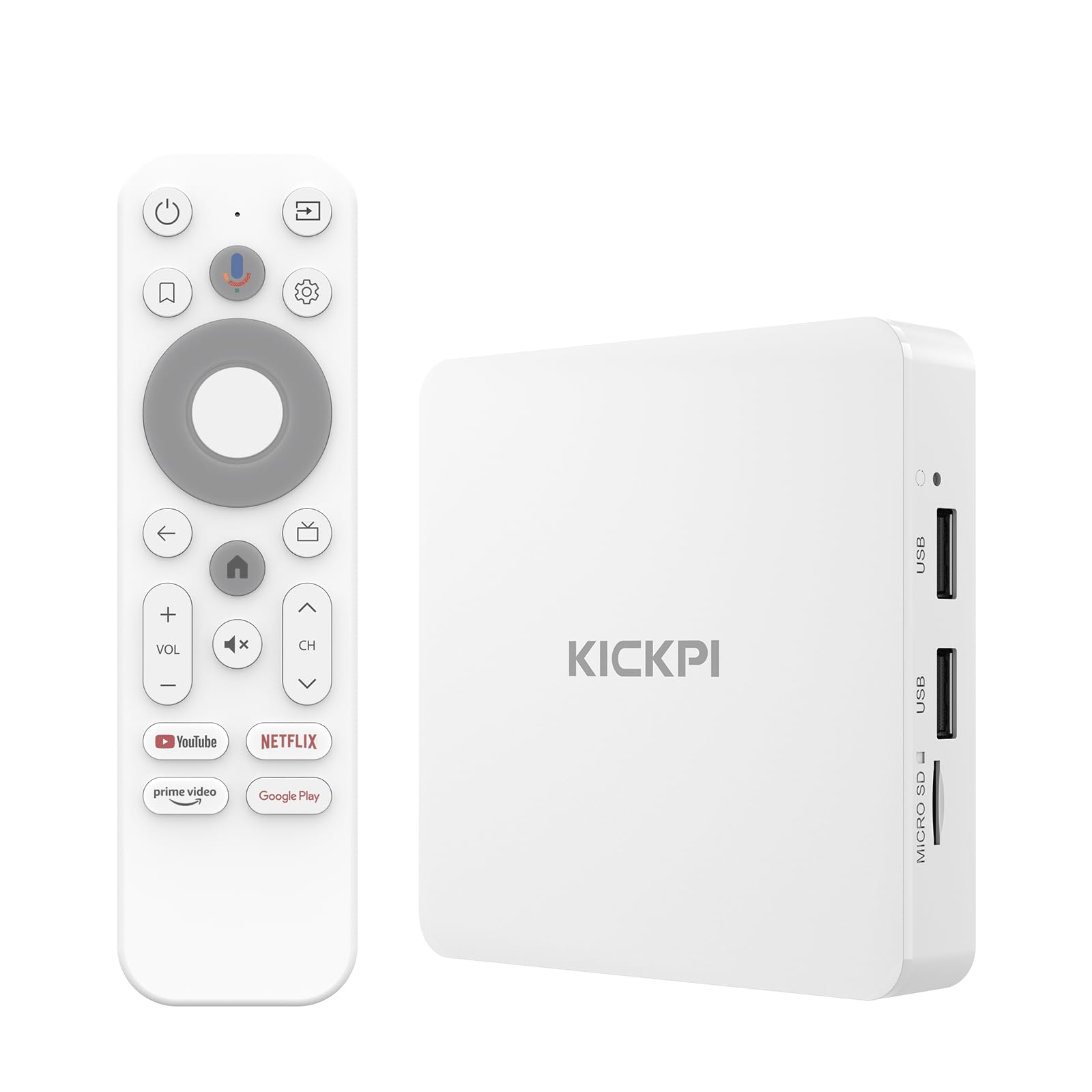
A certified box that updates itself to the freshest Android TV software.
It ships with Android 12 and updates over Wi-Fi to Android 14 for the latest features. It ships with Android 12 but quickly updates over Wi-Fi to Android 14, giving you the latest privacy protections and app compatibility. It is Google certified, so you get access to over 700,000 movies and shows across Netflix, Prime Video, Disney+, and more in 4K HDR.
The build is praised by owners, with one long-time user noting they have “purchased about 10 from them and all works well,” finally finding a box that performs as well as a Shield. It is a featherweight at 122g and compact at 3.78″L x 3.78″W x 0.91″H, identical in size to the Android 11 KP1. Connectivity includes dual-band Wi-Fi 5 and Bluetooth 5.0 for headphones and gamepads.
The honest trade-off is mixed performance. A few customers note rebooting issues or apps that misbehave, though these seem to be the exception rather than the rule. For most, it works as a solid mid-level box. The voice remote with Google Assistant makes hands-free searching easy, and built-in Chromecast handles phone casting.
Pick this if: you want the latest Android version with Google certification at a mid-range price.
Watch out for: occasional stability hiccups that some buyers have mentioned.
5. Xiaomi Google TV Box S 3rd Gen
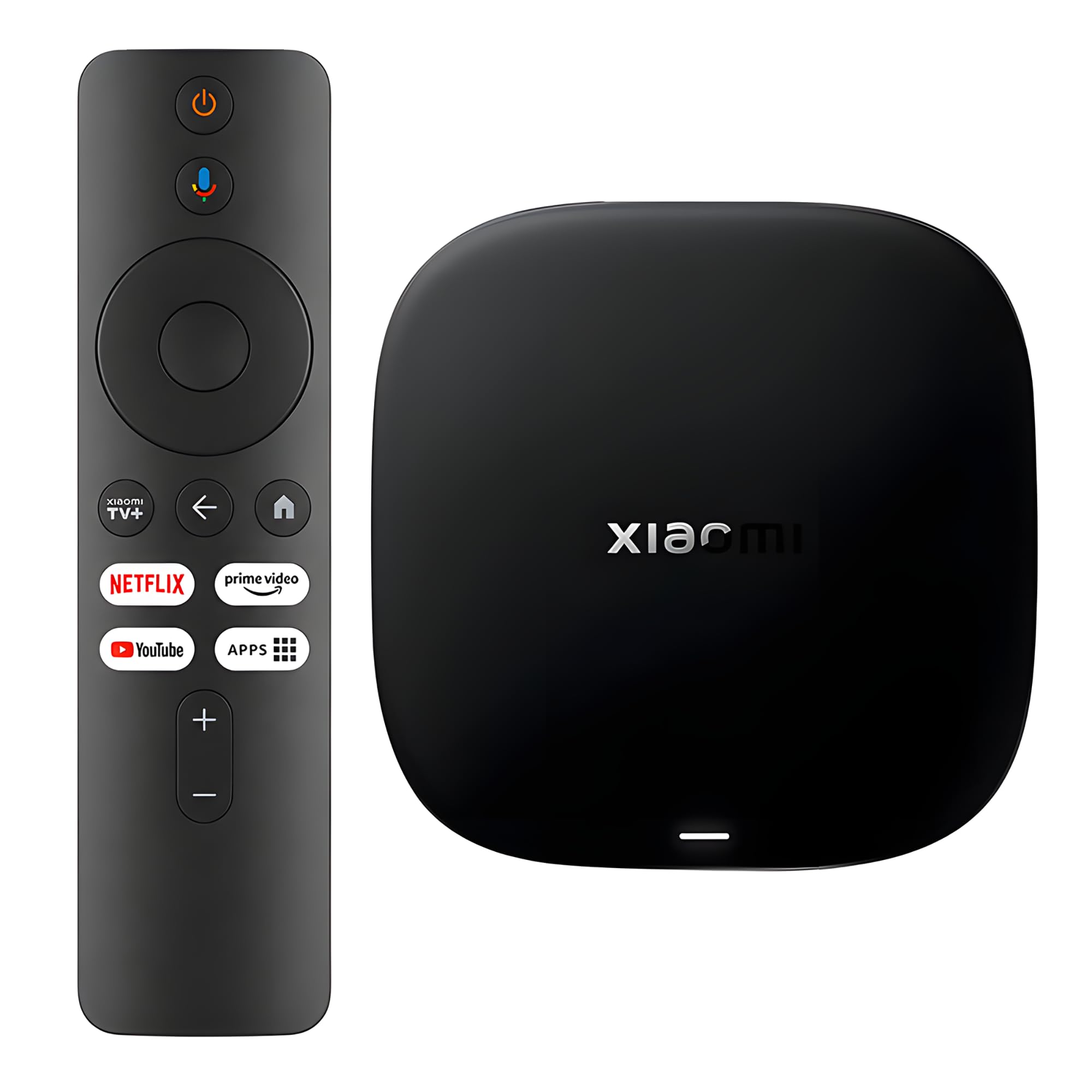
A speed-focused box that uses Wi-Fi 6 for instant, buffer-free playback.
This Xiaomi box is built for people with fast modern routers. It supports Wi-Fi 6, which uses OFDMA and MU-MIMO technologies to deliver greater bandwidth and significantly improved speeds—so online content starts playing instantly. Reviewers point out it “picks up your WiFi network from anywhere in the house, very good signal strength,” making it a great fit for larger homes.
Inside, a 64-bit 6nm platform (a tiny, power-efficient chip) with a quad-core A55 CPU running up to 2.5GHz keeps things smooth. The 2GB RAM and 32GB storage give you plenty of room for apps, and HDMI 2.1 (the latest connection standard) ensures your TV gets the full signal. It supports HDR10+ and Dolby Vision for cinematic picture, along with Dolby Atmos and DTS:X for rich sound. One owner notes it works great “with ability to add apps,” unlike some locked-down sticks.
The main gap is connectivity: there is no ethernet jack, so you rely on Wi-Fi. A buyer mentioned this as the only reason for a missing star. Reliability is praised, with one user calling it “excellent for older television sets,” though a rare few have reported sound issues after a few months. The 360° Bluetooth voice remote controls everything hands-free.
Best for: households with Wi-Fi 6 routers who want fast wireless streaming and app flexibility.
Not for: anyone who needs a wired ethernet connection for the most stable signal.
6. Xiaomi TV Stick 4K (2nd Gen)
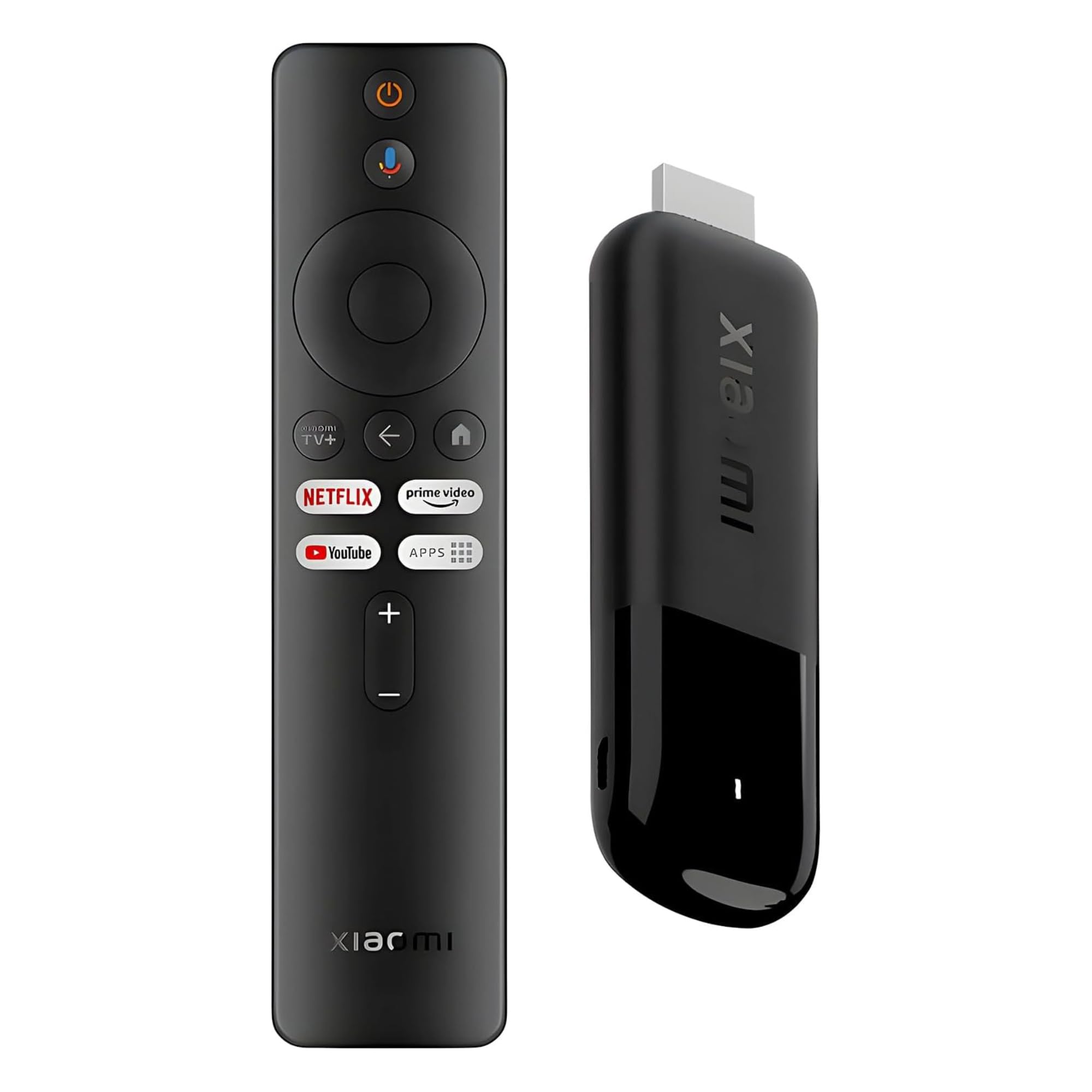
The ultra-slim stick that turns any HDMI port into a smart TV in seconds.
At 28 grams, it slips into a pocket and plugs into any hotel TV or projector. Weighing just 28 grams and measuring 4.2″L x 1.18″W x 0.55″H, it is smaller than the Xiaomi Box S and disappears behind your TV. You can plug it into a hotel TV or a projector to enjoy your streaming apps on the go. Owners are amazed at the performance, with one declaring “it’s a stick that runs better than the boxes and the upscaler is insane.”
Despite its size, it packs a 6nm platform with a 2.5GHz quad-core A55 CPU and dual-band Wi-Fi 6. It supports Dolby Vision, HDR10+, Dolby Atmos, and DTS:X for a full cinematic experience at home. One reviewer noted their “tv runs at 120 hz and I finally notice it with this stick,” highlighting its strong upscaling. It offers more than enough power for most viewers.
The catch is the same as other sticks: 8GB of storage is limited, and it uses a micro-USB port for power, which some owners wish was USB-C. It also runs on Wi-Fi, so there is no ethernet option. For a vacation companion or a simple TV upgrade, though, it is a fantastic choice.
Grab this if: portability is key and you want a tiny device that outperforms its size.
Be aware: storage is capped at 8GB and power uses a micro-USB port.
7. Formuler Z11 Pro 4K
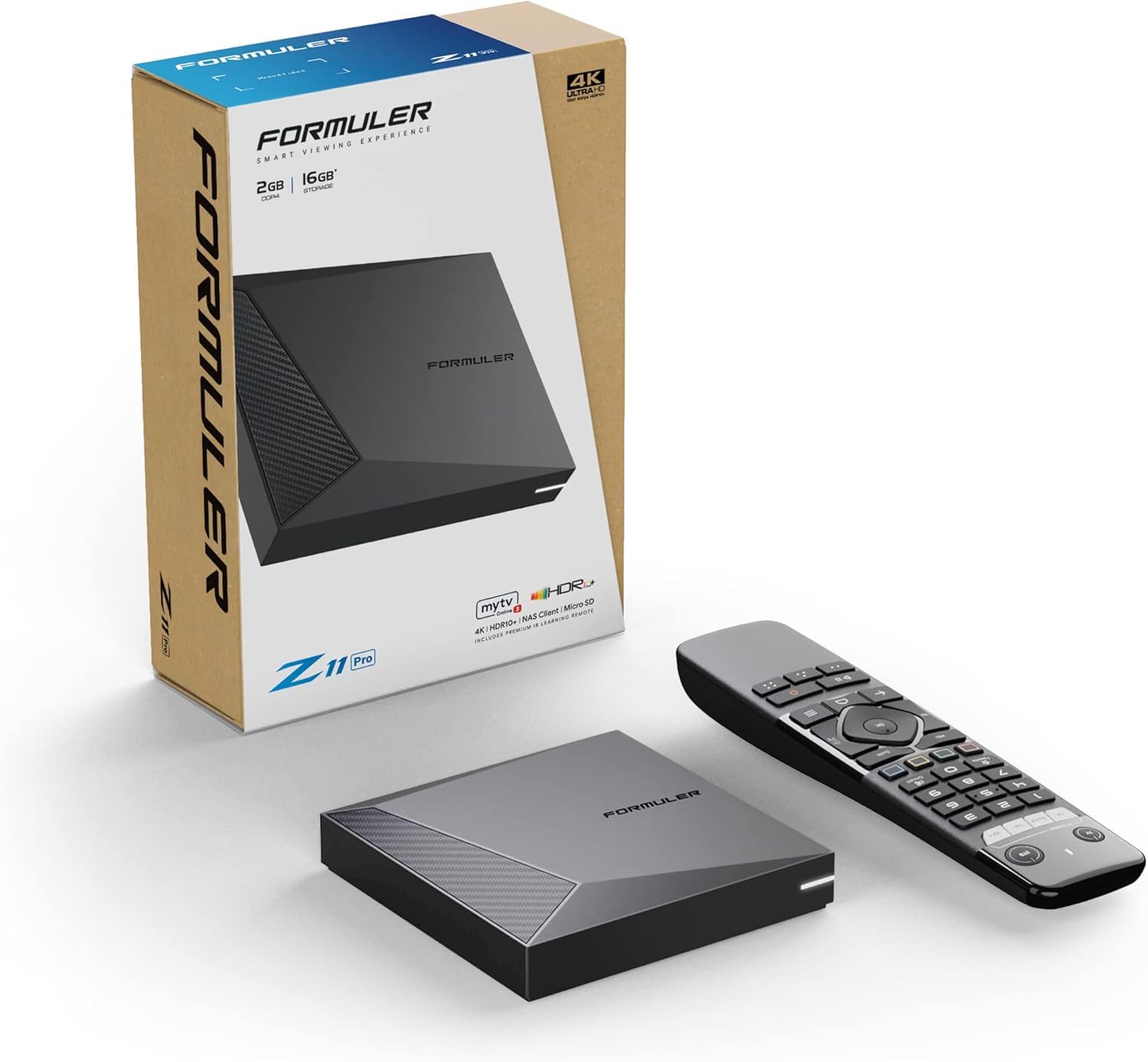
A streaming box that excels at live TV and international channels.
Formuler boxes have a cult following among IPTV users, and the Z11 Pro is a strong reason why. It runs Android 11 with 2GB RAM and 16GB storage, but its real strength is the MYTVOnline app, which handles live TV, recording, and channel management beautifully. Shoppers say getting “thousands of channels all over the world in any language” with a good internet connection.
The hardware is built for stability. It features Gigabit LAN (1000M) for wired connections, which is crucial for smooth live TV. It also has Dual Band 2×2 Dual Antenna 6th Generation AX wireless for those who prefer Wi-Fi. One owner loves that there is “no fan sound, fast processor, and great remote.” The IR1 remote included offers reliable control.
It is built specifically for IPTV users who need reliable live TV and channel organization. It is best for those who already use IPTV services or want to organize live channels from around the world. If you mainly stream Netflix and YouTube, simpler boxes do the job for less. But for the IPTV crowd, the Z11 Pro is a dependable workhorse.
The IPTV king: gigabit ethernet and MYTVOnline make it unbeatable for live TV.
But: if you don’t use IPTV, you are paying for features you will not use.
8. Dune HD Pro Vision 4K

A professional media player that plays any local file you throw at it.
If you have a large collection of downloaded movies and shows, this Dune HD box is a revelation. It uses the S905X4-J chip and is built for local file playback, supporting all HD audio formats and the AV1 video codec—which can improve video quality by up to 50% without increasing the bit rate. Owners say it “plays all the files and Dolby vision was also handled very well.”
Its 4GB RAM, 64GB storage, and metal heat-sink housing target serious media collectors. It has 4GB RAM and a huge 64GB of internal storage, plus support for 20 TB+ USB hard drives via its USB 3.0 port. The entire metal housing acts as a heat sink for silent, fanless cooling. Automatic frame rate switching ensures smooth playback for all content. One excited buyer said, “I have been waiting for a media player that beats my Nvidia Shield Pro for local files. This is it.”
The trade-off is that this is not a casual streaming box. Its interface is geared toward media enthusiasts who care about bit-perfect audio and video. The remote is functional but lacks some convenience features like easy scrolling. For anyone building a serious home theater library, this is the pick.
Media Powerhouse
- 4GB RAM and 64GB storage handle massive libraries
- Supports 20 TB+ USB hard drives
- Silent fanless cooling design
Not For Everyone
- Focused on local files, not app-heavy streaming
- Remote could be more intuitive
Choose this if: you are a media enthusiast with a large local library and demand top audio/video quality.
skip it if: you only stream from Netflix and do not need USB or high-end file support.
9. Formuler Z12 Ultra

A next-gen flagship with massive storage and the fastest Wi-Fi standard.
The Z12 Ultra is Formuler’s top-tier box, designed for users who want everything. It pairs 4GB DDR4 RAM with a massive 128GB of storage, so you can install apps and keep hours of recordings without running out of space. A buyer who has “used them all FireStick, Roku, ONN, Chrome cast” calls it “my everyday box and workes much faster that the others with much less buffering.”
It is the first in the lineup to bring Dolby Vision and Dolby Atmos together with HDR10+ support. The picture quality is superb on a capable TV, and the MyTVOnline3 app is praised as better than alternatives for IPTV. Connectivity is future-proof with Gigabit LAN and Wi-Fi 6E (AX) for fast, interference-free streaming. The sleek black and rose-gold design looks premium on any stand.
The main issues are its price and the remote. The Bluetooth backlit remote gets consistent criticism—one owner calls it “miserable” with hidden side buttons and reversed volume controls. Stability also gets mixed feedback, with some reporting crashes and random reboots. And it is currently region locked to North America. For devoted Formuler fans, this is the upgrade; for everyone else, it is a luxury.
For the enthusiast: class-leading storage and Dolby Vision make it a premium IPTV machine.
But: the remote frustrates many, and it is region-locked outside North America.
Understanding the Specs
RAM and Storage
RAM determines how smoothly you can switch between apps without reloading them. A box with 2GB of RAM is the minimum for a smooth Google TV experience, while 3GB or 4GB handles heavier multitasking and gaming. Storage is where your apps live—8GB fills up quickly, while 32GB or 128GB gives you room for a large app library and recordings.
Video and Audio Codecs
Look for support for HDR10+ or Dolby Vision to get the best picture on a 4K TV. Dolby Atmos and DTS:X provide rich, object-based surround sound for compatible soundbars and receivers. The AV1 codec (a video compression standard) is the newest, offering better compression—which means higher quality video at lower bit rates on platforms like YouTube.
FAQ
Will an Android TV box work with my current TV?
What is the difference between a certified and non-certified Android box?
How much RAM do I really need in a streaming box?
Is Wi-Fi 6 worth paying extra for on a TV box?
Can I use an Android TV box to watch live TV and IPTV?
What does Dolby Vision do for my picture quality?
Why would I need a box with USB ports?
Are these boxes easy to set up for a non-technical person?
Can I cast from my phone to any of these boxes?
Final Thoughts: The Verdict
For the majority of shoppers, the overall winner for the best android box for television is the NVIDIA Shield TV Pro because it combines the fastest performance, 3GB RAM, and AI upscaling that improves every stream. If you want the latest Android software on a budget, the KICKPI KP1 is the one to grab. And for IPTV enthusiasts with a large channel list, the Formuler Z11 Pro remains the dedicated choice.
How We Picked
We do not accept paid placement. Every pick is matched to a real buyer and a real use-case; we do not hands-on test units.
Sources & Methodology
Specifications: manufacturer listings and product documentation. Review insights: verified customer reviews, as of August 2026. Pricing: not shown on this page (it changes often); check the current price via the retailer link.
As an Amazon Associate, Gadgets Feed earns from qualifying purchases. This does not affect which products we feature.