
Our readers keep the lights on and my morning glass full of iced black tea. As an Amazon Associate, I earn from qualifying purchases.
Specs are compiled from manufacturer listings and verified buyer reviews and can change over time — please confirm the key details on the product page before buying.
Before you spend a cent, decide between a traditional joystick and a leverless all-button layout. Leverless controllers swap the physical stick for directional buttons, so your fingers move faster and your wrist stays fresher during long ranked sessions. This guide covers both styles, from budget picks to premium tournament-grade hardware, so you can match the right controller to your fighting game..
I’m Min — the founder and writer behind Gadgets Feed. This guide is built by comparing the manufacturers’ published specifications and the patterns across verified customer reviews, so you get each pick’s real strengths and trade-offs instead of marketing spin.
If you’re grinding ranked in Street Fighter 6 or just want that arcade feel at home, the right arcade controller for pc hinges on button layout, latency, and compatibility—so you know exactly what to look for before buying.
Our Picks at a Glance



How To Choose The Best Arcade Controller For PC
Before you buy, you need to decide between two fundamentally different designs. A traditional fight stick gives you a physical joystick and large buttons, which feels nostalgic and satisfying. A leverless controller replaces the joystick with four directional buttons, which many players find more precise for complex fighting game inputs.
Stick vs Leverless: Pick Your Play Style
If you grew up in arcades, a stick-based controller will feel instantly familiar. The tactile click of a Sanwa joystick and the satisfying slap of large buttons recreate that authentic experience. Leverless controllers shine for competitive play—the all-button layout allows for faster direction changes, making moves like wavedashing in Tekken or instant blocking in Street Fighter easier to execute consistently.
Latency and Switches: The Invisible Advantage
In fighting games, every millisecond counts, and the switches inside your controller decide how fast your inputs register. Mechanical switches give a satisfying tactile bump and actuate faster than standard membrane buttons. Some premium controllers now use optical switches, which register input the instant light passes through—no physical contact, so there’s zero debounce delay and the fastest possible response.
Quick Comparison
| Model | Best For | Style | Buttons | Connection | Amazon |
|---|---|---|---|---|---|
| MAYFLASH F300 Elite★ Best Overall | Multi-platform beginners | Stick | 9 | USB Wired | Amazon |
| MAYFLASH F700Wireless Premium | Wireless multi-platform | Stick | 10 | BT / 2.4G / USB | Amazon |
| Razer KitsuneElite Leverless | Premium leverless play | Leverless | — | USB-C | Amazon |
| Sehawei Haute42 G16 | Budget leverless entry | Leverless | 16 | USB-C | Amazon |
| JZW-Shop Haute42 P12 | Compact leverless value | Leverless | 12 | USB | Amazon |
| HORI Fighting Stick Mini | Travel and small hands | Stick | 8 | USB Wired | Amazon |
| Haute42 C16 | Customization and comfort | Leverless | 16 | USB-C | Amazon |
| 8Bitdo Retro Stick | Wireless casual play | Stick | 12 | BT / 2.4G / USB-C | Amazon |
| Qanba N3 Drone 2 | Officially licensed stick | Stick | — | USB Wired | Amazon |
In‑Depth Reviews
1. MAYFLASH Arcade Stick F300 Elite
Our pick — over 4.5★ from 800+ verified ratings; the strongest balance of quality and price.
The crowd-pleasing stick that runs on nearly everything, with pro-grade Sanwa parts right from the start.
The first thing you’ll notice is the weight—owners describe it as heavy enough to feel substantial without being a burden on your lap. That solid foundation is paired with genuine Sanwa buttons and joystick, the same components that power many tournament arcade cabinets, so you get that satisfying click and precise feel without spending premium prices. The 9-button layout includes a dedicated start button, and spacing between inputs earns consistent praise for comfort.
This stick wins on compatibility, working with Windows PC, macOS, Steam Deck, Switch, PS4, PS3, Xbox Series S/X, and more—on PC via both XINPUT and DINPUT standards (the two main PC input protocols). The catch: for PlayStation 5 and Xbox Series X, you’ll need MAYFLASH’s Magic-S adapter. Buyers report: “Great multi-platform stick (PS3-Switch); PS5/Series X needs Magic-S adapter.” It also runs on Android, so it’s a true all-in-one buy.
Modding enthusiasts will appreciate that the case pops open with a few screws, letting you swap the joystick and buttons to match your playstyle. This is a common thread in owner feedback, with many customizing theirs right away. The F300 Elite measures 11.81 x 8.86 x 2.2 inches, and while some note it feels slightly compact, the sturdy build and pre-installed Sanwa components make it an exceptional entry point.
What Wins People Over
- Genuine Sanwa buttons and joystick pre-installed
- Works across PC, Switch, PS4, Xbox, macOS, and Android
- Tool-free access to the interior for easy modding
- Solid, even weight that stays put during play
The Trade-Offs
- PS5 and Xbox Series X need a separate Magic-S adapter
- Turbo button may disqualify use in some tournaments
- Setup can be slightly tricky when switching consoles
Reach for this if: you want one stick that works on your PC, Switch, and console while staying affordable—the Sanwa parts alone justify the price.
Look elsewhere if: you’re on PS5 or Xbox Series X and don’t want to factor in an adapter purchase, or you demand a larger, heavier chassis.
2. MAYFLASH Arcade Stick F700
The wireless workhorse that ditches the cable without sacrificing a single frame of input.
MAYFLASH’s bigger sibling takes everything good about the F300 and adds the freedom of wireless play. You get three ways to connect—Bluetooth, 2.4G wireless via the included receiver, or a wired USB connection—and the 2.4G receiver tucks into a hidden compartment so you won’t lose it. The F700 runs on internal battery power, and owners mention the wireless connection feels completely lag-free during intense matches.
On PC, this stick works instantly via Xinput (the standard Windows input protocol), and it’s compatible with PS5 for fighting games like Street Fighter 6 and Tekken 8, plus PS4, PS3, Switch, macOS, iOS, iPadOS, Android, and even mini consoles like NEOGEO and SEGA Genesis Mini. Crucially, it does NOT support Xbox consoles, so Microsoft loyalists need the F700X variant instead. The 10-button layout includes turbo functions with adjustable speed settings.
Compatibility and quality are the standout themes in owner feedback, and the F700 pairs that versatility with a magnetic art panel for easy customization. It’s compatible with Sanwa Denshi buttons and joysticks, so serious modders can upgrade to their preferred components. At 3.3 kg it’ll weigh down your lap comfortably during long sessions, and the case opens up easily for internal upgrades.
The Wireless Advantage
- Bluetooth, 2.4G, and wired USB connections
- PS5 support for major fighting games, no adapter needed
- Magnetic art panel for quick cosmetic changes
- Works with Sanwa parts for easy modding
Keep In Mind
- Not compatible with Xbox Series S/X or Xbox One
- Slides on lap during heavy inputs; a non-slip pad helps
- Heavier than most sticks at 3.3 kg
Best for: players who want true multi-platform freedom with zero cables, especially if you play across PS5 and PC and dislike adapter compromises.
Not for: Xbox players, or anyone on a strict budget—the wireless flexibility commands a premium.
3. Razer Kitsune All-Button Arcade Controller
A razor-thin leverless built around optical switches for the fastest possible input registration.
The Kitsune is a statement piece. Its slim form factor measures just 0.76 inches thick, making it the most portable premium leverless on this list. The magic is inside: low-profile linear optical switches that actuate the instant light passes through, eliminating physical contact and debounce delay entirely. For fighting games, this means your button presses register as fast as your fingers can move—Players with 200+ hours in Street Fighter 6 confirm the crisp, responsive feel..
The quad movement button layout replaces the joystick entirely, so you get four dedicated directional buttons that let you execute complex motions with clean, precise inputs. Razer’s Chroma RGB lighting adds personality, and the removable aluminium top plate lets you swap in custom artwork using Razer Customs vinyl wraps or a downloadable template. A tournament lock switch and cable security clasp keep accidental inputs and disconnections from ruining a match.
Owners praise the ergonomics, noting there’s enough space to rest wrists and hands comfortably, plus a grippy textured surface on the bottom that keeps it steady on your lap. It’s compatible with PS5 and PC via USB-C, working natively as an Xinput device on Windows. The caveat is price—this is the most expensive pick here—and some players find the 30mm buttons require a longer reach than the 28mm layout on other leverless controllers.
Why It’s Elite
- Optical switches for near-zero input latency
- Incredibly thin and light at 1.7 pounds
- Removable aluminium top plate for custom art
- Grippy bottom stays put during intense play
Consider This First
- Premium price tag that’s hard to justify for casual players
- Not hot-swappable—changing switches requires work
- Matte finish attracts oil and dust over time
Perfect for: competitive players on PS5 or PC who want the thinnest, fastest leverless available and don’t mind paying for optical switch technology.
skip it if: you prefer a traditional joystick, want hot-swappable buttons, or play mostly on PC at a desk—the lap-oriented design shines on console.
4. Qanba N3 Drone 2 Wired Joystick
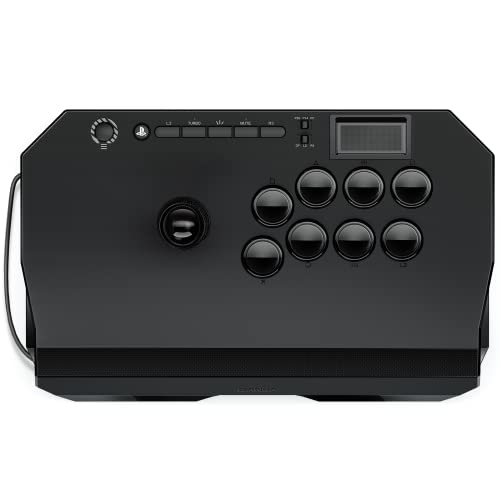
An officially licensed Sony stick that gives you premium Qanba components at a starter-friendly price.
The Drone 2 is the rare fighting stick that’s officially licensed by Sony, which means out-of-the-box plug-and-play reliability on PS5, PS4, and PC—no adapters, no workarounds. It ships with authentic Qanba 30mm B30 buttons and an OV7 OMRON switch joystick, and owners specifically call out the lever’s audible clicks as a rhythm aid for learning Tekken mechanics like the Mishima wavedash. That audio feedback helps build muscle memory.
Weighing in at 3.9 pounds, it’s light enough to carry easily but stable enough for most play sessions, though some users note it can slip on the lap during heavy inputs. The full control panel includes a touchpad and a 3.5mm microphone input with mute button control, making it a complete package for console voice chat. The 14 x 8.7 x 4.6-inch chassis offers plenty of surface area for comfortable hand placement.
Build quality is the most-discussed positive, with owners describing a premium feel that belies its mid-range positioning. The quick-release screw makes customization easy if you want to swap in different buttons or artwork. A recurring note is that the lever is noticeably loud, which is a plus for players who like audible feedback but a drawback if you play in a shared space. The non-detachable cable is another minor complaint from owners who value portability.
What You Get
- Officially licensed by Sony for guaranteed console compatibility
- Audible lever clicks help with fighting game timing
- Responsive 30mm B30 buttons with a satisfying feel
- Lightweight at 3.9 pounds for easy transport
Watch Out For
- Cable is non-detachable, which hurts portability
- Lever is loud during fast inputs
- Can slip on the lap; minimal padding underneath
Grab this if: you play on PS5 and PC and want an officially licensed stick with quality Qanba parts and no setup fuss.
Pass if: you need a detachable cable for travel or prefer a heavier chassis that never moves during intense matches.
5. 8Bitdo Retro Wireless Arcade Fight Stick

The nostalgic wireless stick that keeps the classic arcade feel alive for Switch and PC sessions
8Bitdo’s Retro Stick nails that authentic arcade cabinet feel, and owners describe it as just like playing at the arcades. It’s built for casual play with a sturdy chassis that feels solid on your lap or a tabletop. The standout feature is battery life: a massive 40 hours of play time on the 2.4G wireless connection, or 30 hours via Bluetooth, with a 4-hour charge time. The included 2.4G receiver has a smart hidden compartment in the stick itself.
Wireless flexibility is the core here, offering Bluetooth, 2.4G, and wired USB-C connections. The dynamic button layout even changes its visual markings when you switch between Switch and PC (X-Input) modes. Two dedicated macro buttons (P1/P2) let you program complex button combinations, and the 8BitDo Ultimate software handles button mapping, profile creation, and firmware updates. Its 12 buttons are laid out for comfortable arcade-style play.
Modding is a big part of the appeal—you can swap out 30mm and 24mm arcade buttons, and the universal joystick mounting plate supports virtually any stick ever made, including the Sanwa JLF. The 2.44 kg weight gives it a reassuring heft. The honest caveat is button quality; some owners describe the stock buttons as feeling less premium than dedicated competition sticks, which keeps this firmly in the “fun casual” rather than “tournament” category.
Why It’s Fun
- 40-hour battery life on 2.4G wireless
- Universal joystick mounting plate for easy modding
- Dynamic button layout adapts to Switch and PC modes
- Solid weight keeps it steady during play
The Reality Check
- Stock buttons feel cheaper than competition-grade sticks
- Not ideal for competitive play—built for casual sessions
- PC wireless is via 2.4G dongle or Bluetooth, not Xinput-native
Choose this for: laid-back couch play on Switch or PC where wireless freedom and that classic arcade feel matter more than tournament precision.
Skip it for: serious ranked grinding, where you’ll want better stock buttons and wired reliability.
6. Haute42 C16 Leverless Arcade Stick
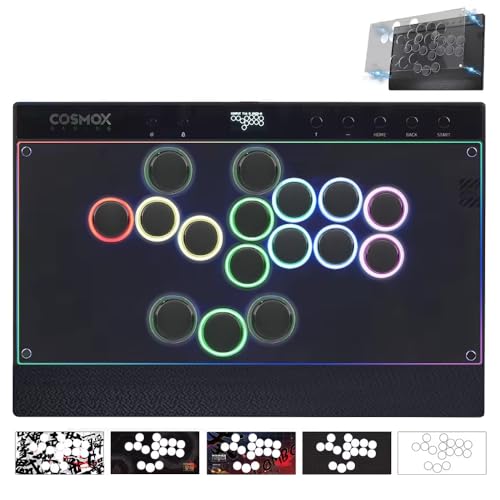
The magnetic-panel leverless that makes personalizing your controller as easy as pressing a button
The C16 kills the screwdriver requirement with an innovative magnetic detachable panel—just press the back button and the top pops off so you can swap in custom artwork. It comes with 6 art templates (including 2 blank ones) so you can start personalizing immediately. Beyond looks, it adds an ergonomic wrist rest and customizable RGB button rims for all-night comfort during long sessions.
This 16-button leverless controller includes a tournament-grade lock switch that disables extra buttons to prevent accidental presses during intense matches. It supports multiple SOCD resolution modes (Up Priority, Neutral, Last Input Priority), which is the compliance standard for major tournaments like EVO. Owners who have tried many leverless options single out the comfortable Kailh Wind Engine mechanical switches and the ideal spacing and layout as standouts.
Performance-wise, it’s built to compete. The bundle includes 2 spare Wind Engine switches, a 3M USB-C cable, and a switch puller for easy hot-swapping. It’s compatible with Windows 10+, Steam Deck, PS3, PS4, Switch, and various retro handheld platforms via Raspberry Pi. One caveat: PS5 play requires an external adapter like the Booter 5, which is a separate purchase. A small number of owners hit a faulty button from the start, though the responsive technical team handles replacements.
The Standout Features
- Magnetic panel for tool-free art customization
- Ergonomic wrist rest for comfortable long sessions
- Multiple SOCD modes compliant with major tournaments
- Comfortable Kailh Wind Engine switches praised by owners
Before You Buy
- PS5 and PS4 require a separate adapter purchase
- Occasional QA issue reported with individual buttons
- Instruction manual can be confusing for setup
Ideal for: players who want a comfortable, good-looking leverless they can customize without tools, especially if you value tournament-legal SOCD modes.
Not ideal if: you’re PlayStation-only and don’t want to buy an adapter, or you need a larger footprint for very big hands.
7. Sehawei Haute42 16-Key Leverless Arcade Stick (G16)

The featherweight leverless that delivers tournament-legal SOCD and switch hot-swap for a bargain price
The G16 packs an absurd amount of feature-per-dollar. It’s a leverless controller with 16 hot-swappable mechanical keys, 5 controller modes (X-input, Switch, PS3/D-input, PS4, and Keyboard), multiple SOCD cleaning modes (which resolve conflicting directional inputs), turbo functions, and an embedded web configuration tool. For the price, it’s genuinely tough to top—customers note it feels “superior to pricier 3D-printed hitboxes.” A tiny OLED screen displays your current settings and live inputs.
On PC, it’s plug-and-play, working instantly with Street Fighter 6 and Tekken 8 via X-input. The 40nm process node delivers an ultra-low 1ms delay with no frame leakage above 95%., and firmware updates are supported. At 0.58 kg, this transparent acrylic controller is incredibly portable, fitting easily into a backpack for local tournaments or travel. The RGB lighting adds a customizable glow.
Build quality and value are the most-praised aspects, with owners noting the solid construction and satisfying switches. The trade-off is size: the compact 3 x 4 x 5-inch footprint draws mixed feedback, with several owners saying it feels cramped for medium or large hands. This is a clear case of portability versus comfort, and you’ll know which camp you’re in after one long session. It’s compatible with Windows 10+, Steam Deck, PS3, PS4, Switch, and various single-board computers like Raspberry Pi and MiSTer.
Why It’s A Steal
- Hot-swappable mechanical switches—no soldering needed
- Tournament-legal SOCD cleaning modes included
- OLED screen shows settings and live inputs
- Featherlight at 0.58 kg for easy portability
The Catch
- Compact size feels cramped for medium or large hands
- Top-right option buttons are small and flimsy
- PS4/PS5 setup requires consulting the manual or website
Best value for: PC players who want to try leverless without spending big—the feature set here rivals controllers costing twice as much.
Think twice if: you have larger hands or plan marathon sessions, as the compact layout can cause cramping.
8. HORI Fighting Stick Mini for PS5, PS4, and PC

An officially licensed mini stick that slips into your backpack and works on PS5, PS4, and PC
HORI’s Fighting Stick Mini is built around one idea: portability. Its compact frame fits easily in a backpack alongside a laptop, making it the go-to for players who want an arcade experience on the go. It features a classic 8-button layout and an 8ft cable, so you have plenty of reach from your couch or desk. Being officially licensed by Sony means it works flawlessly with PS5 and PS4, plus PC for good measure.
For its size, it delivers solid mechanical quality, with HORI’s original joystick featuring a V-cut housing. Owners appreciate the responsive buttons and plug-and-play nature, calling it a great first fight stick. The 467g weight makes it incredibly light, but that’s a double-edged sword—the base is about the size of a hardcover book, and some players find the layout cramped. The light weight means it can slide around or tip during intense 2D fighting game inputs unless you’re on a stable surface.
The honest assessment is that this excels as a travel stick or a beginner’s first purchase. Others report it works better than their home stick for casual laptop gaming. The main limitations: no touchpad button on PS5 (you’ll need a regular controller for menus), and 2D fighting game purists may find it too light and small for serious play. If you have smaller hands, the compact ergonomics are actually a feature rather than a flaw.
Built For The Bag
- Compact form fits easily in a backpack with a laptop
- Officially licensed by Sony for PS5/PS4 reliability
- 8ft cable offers plenty of reach
- Responsive HORI V-cut joystick and buttons
Keep It Real
- Too light for intense 2D fighters; can tip on dashes
- No touchpad button for PS5 menus
- Cramped layout for players with larger hands
Pick this up for: travel gaming or a first-time stick, especially if you have smaller hands and want something that works everywhere without setup.
Give it a miss if: you’re a tournament player or have large hands—the compact size and light weight will frustrate you quickly.
9. JZW-Shop Haute42 Leverless Arcade Stick P12

A lightweight 12-button leverless that offers a genuine introduction to all-button fighting for less
If you’re curious about leverless but not ready to commit serious money, the P12 is a smart entry point. It uses precise 4-direction button layout with Kailh Low Profile Switches, driven by a Raspberry Pi RP2024 main control chip running GP2040-CE firmware. That combination delivers less than 1ms delay and supports firmware updates, so you get competitive-level responsiveness at a budget price. The ABS build with RGB lighting keeps the whole thing light at 0.38 kg.
Game feel is where this shines for new players. Owners describe the buttons as quiet, responsive, and great for both fighting games and rhythm games. A tournament lock switch lets you disable non-essential buttons to prevent accidental presses during competition. It offers 5 controller modes (X-input, Switch, PS3/D-input, PS4, Keyboard) and is compatible with Windows 10+, Steam Deck, PS3, PS4, Switch, and various retro gaming platforms. The web configurator lets you customize all the RGB lighting parameters.
There are two honest caveats. First, reliability gets mixed feedback from owners—it performs perfectly for some, but others report it randomly stops working. Second, console play on PS4/PS5 requires reading the manual for authentication setup. Owners note the compact size can feel cramped for larger hands, and the bundled USB-C cable feels a bit flimsy. Despite that, it’s an excellent value for trying out the leverless style, especially if you play on PC.
Why It’s A Good Start
- GP2040-CE firmware with less than 1ms delay
- Lightweight at 0.38 kg and highly portable
- Tournament lock switch prevents accidental inputs
- Great for rhythm games as well as fighters
What To Know
- Mixed reliability reports—some units have issues
- Small footprint is cramped for larger hands
- Bundled USB-C cable feels flimsy
Best for: PC players who want to test the leverless waters without much risk, or those who play multiple game genres including rhythm games.
Pass on this if: you have larger hands, want a more sturdy cable, or need rock-solid reliability for tournament play.
Understanding the Specs
Leverless vs Traditional Stick
A traditional fight stick uses a physical joystick, which feels nostalgic and satisfying but requires larger hand movements. A leverless controller replaces that stick with four directional buttons, allowing faster finger movements for complex inputs like dashes and wave dashing. Many competitive players prefer leverless for the speed advantage, while casual players often favor the classic stick feel.
Switch Types and Latency
Your buttons use either mechanical or optical switches. Mechanical switches use physical contact to register inputs, offering a satisfying tactile bump. Optical switches use light beams—the input registers the instant the beam breaks, with no physical contact, which means zero debounce delay and the fastest possible response. Low-profile switches also reduce the travel distance your finger needs, improving speed.
FAQ
What is the difference between a fight stick and a leverless controller?
Will a console fight stick work on PC?
What does SOCD cleaning mean in fighting games?
Hot-swappable switches are—what does that actually mean?
Do I need an adapter for my arcade controller on PS5?
Which is better for PC gaming: the F300 Elite or the F700?
Are the 8Bitdo Retro Stick’s buttons good enough for competitive play?
How long does an arcade controller last?
What is a tournament lock switch?
Final Thoughts: The Verdict
The well-rounded winner among our top Arcade Controller For PC picks is the MAYFLASH F300 Elite because it delivers pro-grade Sanwa parts and wide multi-platform support at a price that makes it the crowd favorite. If you want to try the leverless style on a budget, the Sehawei Haute42 G16 is the smart entry point. And for a wireless, premium experience across PC and PS5, the MAYFLASH F700 is the one to reach for.
How We Picked
We do not accept paid placement. Every pick is matched to a real buyer and a real use-case; we do not hands-on test units.
Sources & Methodology
Specifications: manufacturer listings and product documentation. Review insights: verified customer reviews, as of August 2026. Pricing: not shown on this page (it changes often); check the current price via the retailer link.
As an Amazon Associate, Gadgets Feed earns from qualifying purchases. This does not affect which products we feature.