
Food is no longer confined to the oven or stovetop. A new generation of desktop fabricators lets you extrude pureed ingredients into intricate shapes, turning chocolate into lattice domes and dough into custom-shaped pasta. These machines bridge culinary art and additive manufacturing, but choosing the right one means understanding the difference between an FDM printer that happens to push food-grade paste and a purpose-built edible extruder designed to handle everything from hummus to beetroot puree.
I’m Rikta — the co-founder and writer behind Gadgets Feed. I’ve spent hundreds of hours analyzing material flow rates, nozzle geometries, food-safe borosilicate syringe barrels, and the firmware logic that controls layer adhesion when your “ink” is a living bacterial culture or a temperature-sensitive ganache. (And Homer 🐱 sat guard on the pizza box while I read the spec sheets).
Whether you run a commercial kitchen, teach STEM at a high school, or simply want to plate desserts that draw gasps at dinner parties, you need a machine that can hold precise temperature bands, purge quickly between ingredients, and never leach heavy metals into your food. This guide dissects every significant option to help you find best 3d food printers for your specific kitchen or lab workflow.
How To Choose The Best 3D Food Printers
Buying a 3D food printer is unlike buying a conventional FDM machine. You are not selecting a plastic that softens at 210°C; you are choosing a system that must handle cold buttercream, warm chocolate, or semi-solid dough at precise extrusion pressures. The wrong choice leads to clogged nozzles, separated emulsions, or printed structures that collapse before you plate them.
Extrusion Mechanism: Syringe vs. Auger vs. Pneumatic
Syringe-based systems use a mechanical plunger to push paste out of a disposable or reusable barrel. These are simple to clean and work well for medium-viscosity ingredients such as hummus, cream cheese, or mashed potatoes. Auger-based extruders use a screw mechanism that can handle stiffer materials like cookie dough or marzipan, but they introduce more friction heat that can alter temperature-sensitive ingredients. Pneumatic systems deliver very consistent pressure for low-viscosity liquids such as ganache or fruit coulis, but they require an external compressor and are less common in consumer models.
Temperature Control: The Make-or-Break Feature
Chocolate printing demands a heated syringe and a cooled build plate to maintain tempering curves. Dough-based printing needs no bed heat, but the extruder must be refrigerated or actively cooled to keep butter from melting out of the pastry. Some premium machines offer dual-zone temperature management: a Peltier-cooled cartridge for the material and a heated bed that can be toggled between 15°C and 50°C. If you print both chocolate and savory pastes, prioritize a machine with independent temperature control for the barrel and the build plate.
Food-Safe Materials and Certification
The nozzle, syringe, and any wetted surface must be made from certified food-grade materials. Look for 304 stainless steel nozzles, borosilicate glass barrels, and platinum-cured silicone tubing. Avoid aluminum components that can react with acidic ingredients. The most rigorous certifications are FDA 21 CFR (United States) and EU Regulation 10/2011 (Europe). A machine that lacks clear material safety documentation should not be used with food — full stop.
Build Volume and Resolution
Most food printers have a smaller build volume than plastic printers because the printable materials are expensive and perishable. A typical footprint is 150 x 150 x 100 mm, which is sufficient for single-serve desserts or appetizers. Layer height for food printers typically ranges from 0.5 mm to 2.0 mm — coarser than plastic FDM because food paste cannot support microscopically thin layers. If you need finer detail for things like chocolate lace, look for a machine that can print at a 0.2 mm nozzle diameter and a layer height of 0.4 mm or less.
Software and Recipe Ecosystem
The best food printers ship with a slicer that understands rheology — the flow behavior of non-Newtonian fluids. Generic Cura profiles designed for PLA will not work. Look for software that lets you adjust extrusion multiplier on the fly, set different temperature zones for each layer, and purge the nozzle between material changes. Some vendors offer a recipe library where you can download pre-tuned profiles for chocolate, dough, and puree so you do not have to calibrate from scratch.
Quick Comparison
On smaller screens, swipe sideways to see the full table.
| Model | Category | Best For | Key Spec | Amazon |
|---|---|---|---|---|
| Original Prusa XL 5-Toolhead | Premium | Multi-material prototyping | 5 independent toolheads, 360 mm³ build volume, segmented heated bed | Amazon |
| Original Prusa CORE One | Premium | Reliable enclosed printing | 55°C active chamber heating, 250x220x270 mm build volume, steel exoskeleton | Amazon |
| Dremel DigiLab 3D45 | Premium | Education and classroom use | 280°C all-metal hotend, 5-inch touchscreen, HEPA + carbon filter | Amazon |
| ELEGOO Saturn 4 Ultra 16K | Premium | High-detail resin food molds | 16K monochrome LCD, 150 mm/h speed, 30°C heated resin tank | Amazon |
| QIDI Q2C | Mid-Range | Advanced materials with enclosure | 370°C bimetal hotend, 600 mm/s CoreXY, 270x270x256 mm build volume | Amazon |
| Creality K1C | Mid-Range | Carbon fiber and high-temp filaments | 600 mm/s speed, 300°C clog-free extruder, AI camera | Amazon |
| ELEGOO Centauri Carbon | Mid-Range | Ready-out-of-box high speed | 500 mm/s CoreXY, 320°C hardened nozzle, die-cast aluminum frame | Amazon |
| FLASHFORGE AD5X | Mid-Range | Multi-color entry-level | 600 mm/s CoreXY, 4-color IFS, 300°C direct-drive extruder | Amazon |
| Anycubic Kobra X Multicolor | Mid-Range | Family and education multicolor | 600 mm/s speed, 19-color expandable, 45 dB noise level | Amazon |
| Longer LK5 Pro 3 | Budget | Large-format cosplay and functional parts | 300x300x400 mm build volume, 180 mm/s speed, TMC2209 silent driver | Amazon |
| AOSEED X-Maker AI+ | Budget | Kids and beginner STEM | 400 mm/s speed, 8 PLA filaments included, AI Doodle model generator | Amazon |
In‑Depth Reviews
1. Original Prusa XL 5-Toolhead

The Prusa XL is the only machine on this list that can print five different materials or colors in a single job without manual tool changes. Each toolhead carries its own 300°C hotend and can be swapped between PLA, PETG, TPU, polycarbonate, and even flexible food-safe silicones if you equip the proper nozzle. The segmented heated bed uses intelligent zone control so you only heat the area under your model, which dramatically reduces warping on large prints and lowers energy consumption during long production runs.
Prusa’s open-source ecosystem means you are not locked into proprietary filament or software. The included Satin print sheet offers excellent adhesion across most food-grade plastics, and the integrated Prusa Connect platform lets you monitor print progress from any device. The frame is built around a rigid CoreXY gantry with linear rails on all axes, keeping layer lines consistent even at high accelerations during material transitions.
The XL is not a casual purchase — it requires floor space and a willingness to tune individual toolheads. But for a commercial kitchen developing custom packaging, a research lab prototyping edible scaffolds, or a production environment running batches of multi-material components, the XL’s tool-changing flexibility and large build volume justify every bit of its investment.
Why it’s great
- Five independent toolheads eliminate manual filament swaps and enable true multi-material prints
- Segmented heated bed heats only the active zone, saving power on large-format jobs
- Fully open-source firmware and slicer with no cloud login or forced updates
Good to know
- Requires half a day to unpack and assemble the extruder assemblies and LCD
- Heavy 75 lb footprint demands a dedicated, sturdy table
2. Original Prusa CORE One

The CORE One inherits Prusa’s reputation for reliability and wraps it in a fully enclosed, actively heated chamber that can hold 55°C. This is critical for printing food-safe materials like PETG and polypropylene, which warp badly in open-frame printers. The all-steel exoskeleton gives the gantry a stiffness that eliminates ghosting at high speeds, so you get smooth surfaces on parts that contact food directly.
Setup involves roughly 25 minutes of assembly — mostly securing the gantry and connecting the touchscreen. The bundled Prusament PLA spool gets you printing immediately, but the real value is the closed-loop temperature control that lets you print ASA, PC, or Nylon parts for food handling jigs and utensils. The 250 x 220 x 270 mm build volume fits most kitchen-scale fixtures without requiring a separate enclosure.
Print quality is exceptional straight out of the box, with automatic input shaping and pressure advance that compensate for resonance and ooze. The CORE One is not the fastest machine in its price range, but its reliability across hundreds of hours and the lifetime technical support make it the safest long-term investment for anyone who needs food-safe prints without constant tinkering.
Why it’s great
- Active chamber heating enables warpage-free prints with engineering-grade food-safe materials
- Steel exoskeleton provides vibration-dampening rigidity for artifact-free layer finishes
- One-click printing with Prusa Slicer profiles tuned for dozens of materials out of the box
Good to know
- First units had tight Z-axis screws that required a support ticket to resolve
- TPU prints slower than on open-frame machines due to chamber heat softening the filament path
3. Dremel DigiLab 3D45

The 3D45 has been a fixture in school labs and libraries for good reason: it is the most turnkey printer that still produces reliable food-safe prints. The fully enclosed body with a built-in carbon filter means you can print ABS or Nylon for food contact utensils without smelling up a classroom. The 5-inch color touchscreen walks you through bed leveling and first-layer calibration with intuitive icons, so students can start printing within minutes of unboxing.
Dremel’s proprietary slicing software handles PLA, PETG, ECO-ABS, and Nylon with pre-tuned profiles that remove the guesswork. The all-metal 0.4 mm nozzle reaches 280°C, which is sufficient for high-temperature food-safe filaments. Users report excellent bridging and overhang performance thanks to the dual part-cooling fans, and the glass build plate with a heated bed up to 100°C delivers strong first-layer adhesion for even the trickiest materials.
The trade-off is a modest 6.7 x 10 x 6 inch build volume and an expensive proprietary filament ecosystem if you use the RFID-enabled spools. Third-party filament works with some configuration tweaks, but the auto-pause-on-runout and RFID detection are designed to keep you inside the Dremel ecosystem. For educators who prioritize reliability over build size, the 3D45 remains a benchmark of hassle-free operation.
Why it’s great
- Integrated HEPA and carbon filter makes it safe for classrooms and enclosed office environments
- Guided touchscreen setup gets first-time users from unboxing to printing in under 15 minutes
- RFID system auto-detects filament type and loads the correct temperature profile
Good to know
- Build volume is small — 6.7 x 10 x 6 inches limits large food jigs or batch production
- Dremel-branded filament is expensive; third-party spools require manual profiles
4. ELEGOO Saturn 4 Ultra 16K

The Saturn 4 Ultra is not a food printer by design, but it occupies a critical niche in food-adjacent creation: making master molds, chocolate negatives, and silicone stamps with ultra-fine detail. Its 16K monochrome LCD delivers a pixel resolution of 19 x 19 microns, meaning you can emboss edible lace patterns, microscopic text, or intricate reliefs onto a silicone mold that then transfers into chocolate or fondant.
The intelligent tank heating system keeps the resin at a steady 30°C, which reduces viscosity and improves layer adhesion — a feature that matters when you are trying to capture sub-50-micron features across a 10-inch build plate. The tilt-release mechanism peels each layer from the FEP film without the traditional peel force that can warp thin mold walls. Included AI monitoring alerts you if the build plate is empty or a print is warping, saving expensive resin on failed runs.
Working with resin requires ventilation and gloves, and the prints themselves are not food-safe until you post-cure and seal them. But as a tool for producing high-resolution food-grade molds and stamping tools, the Saturn 4 Ultra outperforms any FDM printer at this price point. Users switching from older Mars or Photon printers report noticeably crisper edges and smoother curve faces on their first prints.
Why it’s great
- 16K 10-inch LCD delivers 19-micron pixel resolution for mold-making detail
- Heated resin vat at 30°C lowers viscosity for sharper layer definition
- Tilt-release peeling mechanism reduces stress on thin, delicate print features
Good to know
- Resin printing requires PPE, ventilation, and post-curing — not a kitchen appliance
- Some units needed a light sanding of the build plate and increased base exposure for reliable adhesion
5. QIDI Q2C
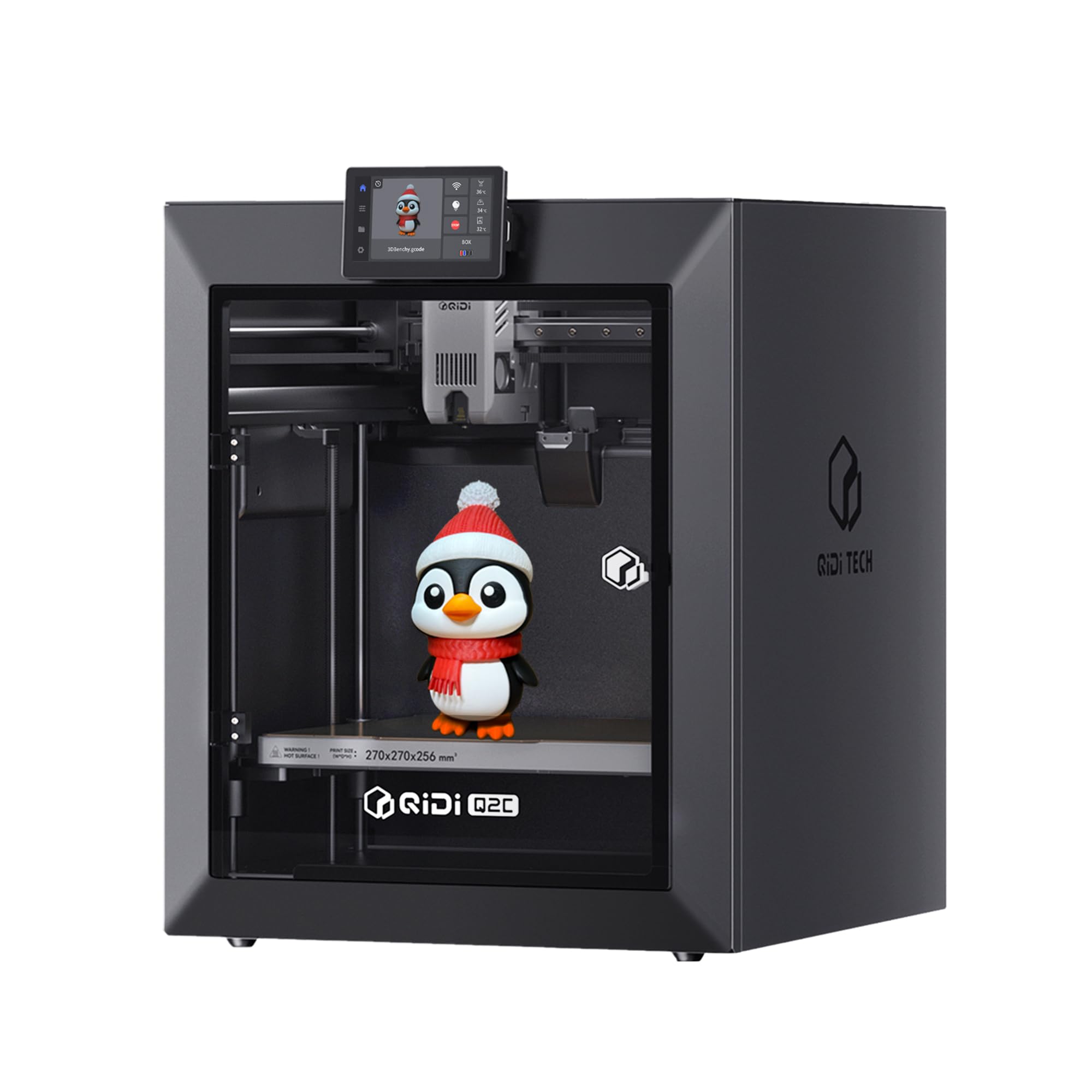
The QIDI Q2C is built for users who need to print high-performance food-safe materials like PPS-CF, PEKK, or glass-filled nylon, which demand nozzle temperatures above 350°C. The bimetal heatbreak prevents heat creep into the cold zone while the 1.5 GT belt drive dampens vibrations that would otherwise ruin the surface finish on semi-crystalline polymers. The enclosed CoreXY body with glass panels keeps ambient temperature stable, reducing layer separation on tall prints.
Setup is genuinely fast — about 15 minutes from box to first print, with auto-leveling handled by a nozzle-integrated sensor that does not require any homing switch calibration. The open-source firmware means you can dial in custom G-code for specialized food-grade profiles. QIDI BOX accessory adds up to 16-color multi-material capability with active drying for hygroscopic filaments like nylon, which would otherwise absorb moisture and extrude inconsistently.
Print quality is consistently excellent across the 270 x 270 x 256 mm build volume, with no Z-layer artifacts or ringing visible on test prints. The main caveat is that the Q2C does not include a chamber heater — the one in the Q2 model is absent here, so materials like PC-ABS that need a high ambient temp may still require an external enclosure heater. Still, for the price, the Q2C offers material capabilities normally found on printers costing twice as much.
Why it’s great
- 370°C bimetal hotend handles advanced food-safe composites like PPS-CF
- 15-minute unboxing-to-print with automatic nozzle-integrated bed leveling
- Open-source firmware allows custom G-code for specialized material profiles
Good to know
- No chamber heating — advanced materials need a warm ambient room or an aftermarket heater
- Camera is an optional accessory not included in the base package
6. Creality K1C

The K1C brings Creality’s high-speed CoreXY design into a fully enclosed package capable of hitting 600 mm/s with 20,000 mm/s² acceleration. The clog-free direct extruder uses a bolstered spring and ball plunger to grip filament tightly, combined with a titanium alloy heatbreak that blocks heat creep. This makes the K1C one of the most reliable printers for carbon-fiber-reinforced food-safe filaments, which are notoriously abrasive on standard brass nozzles.
Setup is genuinely plug-and-play: remove the packaging, power on, and follow the on-screen wizard for auto bed leveling and input shaping. The AI camera recognizes spaghetti failures and foreign object intrusion, pausing automatically to prevent wasted material. The 8.66 x 8.66 x 9.84 inch build volume is modest, but the upgraded cooling structure — with separate hotend, part-cooling, and auxiliary chamber fans — delivers stellar overhang performance even at high layer heights.
Long-term reliability data is still emerging, but early users report consistent results across hundreds of print hours with no clogging. The main frustration is the closed software stack — while the hardware is excellent, Creality’s slicer lacks some advanced features found in Orca or Prusa Slicer, and the proprietary nozzle ecosystem limits third-party options. For high-speed production of small food-contact parts, the K1C is hard to beat at its price tier.
Why it’s great
- 600 mm/s max speed with automatic input shaping and vibration compensation built in
- Clog-free direct extruder with spring-loaded grip handles carbon fiber filaments reliably
- Three-zone cooling system prevents stringing and warping during high-speed production runs
Good to know
- Proprietary slicer lacks advanced tuning features for expert users
- Some units required a full power-off reset when left idle mid-print for long periods
7. ELEGOO Centauri Carbon

ELEGOO enters the high-speed enclosed market with the Centauri Carbon, a fully assembled CoreXY machine that goes from box to benchy in under 30 minutes. The integrated die-cast aluminum frame provides the stiffness needed for clean prints at 500 mm/s, while the automatic vibration compensation keeps first layers smooth even on uneven tables. The 320°C brass-hardened steel nozzle is compatible with carbon fiber PETG and other abrasive food-safe materials without rapid wear.
The built-in chamber camera with dual LED lighting allows real-time monitoring and time-lapse capture, all controllable through the ELEGOO app. The dual-sided build plate features a PLA-specific surface on one side that delivers outstanding adhesion at lower bed temperatures, which is useful for prints with large footprints. The 256 x 256 x 256 mm build volume matches the popular Bambu Lab standard, making it easy to adapt community slicing profiles.
Reliability is the Centauri Carbon’s strongest argument. Multiple users report 300 to 400 hours of continuous PETG and PLA+ printing without recalibration. The main risk is that the first production run had cable routing issues that caused hotend errors after about a week — ELEGOO has since revised the design, and replacement units are performing well. For anyone who wants a set-and-forget high-speed printer with broad material support, the Centauri Carbon is an exceptional value.
Why it’s great
- Comes fully assembled and pre-calibrated — prints in under 30 minutes after opening the box
- Die-cast aluminum frame absorbs vibration for artifact-free layers at 500 mm/s
- Dual-sided build plate with PLA-specific surface offers easy release with no glue stick needed
Good to know
- Early units had a cable routing defect causing hotend errors; current stock has been revised
- Heavy 38.5 lb machine requires a sturdy desk — not easily moved between workstations
8. FLASHFORGE AD5X

The AD5X is FLASHFORGE’s answer to the multi-color printer market, combining a CoreXY 600 mm/s gantry with an Independent Filament System (IFS) that manages four colors simultaneously. The 4-in-1 extruder uses a dynamic purge mechanism that reduces filament waste during color changes by nearly 30% compared to an MMU-style setup. The 300°C direct-drive extruder with a hardened steel nozzle handles abrasive filaments without degrading over time.
Setup is fast: remove three shipping screws, attach the spool holder, and run the one-click auto-leveling routine. The dual-channel cooling fan and vibration compensation system produce clean layer lines at high speeds, and the touchscreen interface is responsive. Users switching from open-frame printers report a significant reduction in stringing thanks to the enclosed body, even without active chamber heating.
The software experience is the AD5X’s weak point. The bundled slicer works but feels dated, and the mobile app has limited functionality. Many users switch to Orca Slicer for better control, though the IFS color profiles do not transfer seamlessly. Once dialed in, the hardware is reliable for about 100 hours of continuous multi-color operation, but a few units have experienced filament jams at the 4-in-1 connector that require disassembly to clear.
Why it’s great
- Independent Filament System handles four colors with less purge waste than competitive multi-color setups
- One-click auto bed leveling and input shaping get you printing with minimal manual tuning
- Enclosed body reduces stringing and odor even without active chamber heating
Good to know
- Bundled slicer has a steep learning curve and limited preset profiles for specialty materials
- Filament jams at the 4-in-1 connector can require partial disassembly to clear
9. Anycubic Kobra X Multicolor

The Kobra X is the quietest printer on this list at 45 dB, making it a strong choice for home kitchens or classrooms where noise is a concern. It ships with four built-in color inputs and supports expansion to 19 colors by daisy-chaining multiple ACE 2 Pro units. The direct-drive extruder is paired with a hardened steel nozzle and vibration compensation, enabling consistent extrusion at 600 mm/s across a 220 x 220 x 220 mm build volume.
LeviQ 3.0 auto bed leveling uses 49-point calibration to guarantee first-layer flatness, and the system includes spaghetti detection and foreign object recognition via the integrated AI camera. The top-mount spool holder frees up desk space, and the machine’s open design makes it easy to clear jams or swap filaments mid-print. The Anycubic app provides remote monitoring, though users note the phone interface could be more polished.
Print quality is excellent for a machine at this price point — layers are smooth and color transitions are sharp with minimal bleed. The main drawback is quality control: a small number of units arrive with defective filament sensors or extruder issues that require an immediate return. For buyers who get a working unit, the Kobra X delivers multi-color capability and quiet operation that rivals printers costing significantly more.
Why it’s great
- Whisper-quiet 45 dB operation makes it suitable for shared home and classroom spaces
- Four built-in color inputs expandable to 19 colors for complex multi-material projects
- 49-point auto leveling and spaghetti detection reduce failed prints for newcomers
Good to know
- A small percentage of units ship with defective filament sensors or extruder components
- Phone app interface lacks some advanced control features found in desktop slicers
10. Longer LK5 Pro 3

The LK5 Pro 3 offers the largest footprint in the value tier at 300 x 300 x 400 mm, making it the obvious choice for printing large food-contact containers, cutting boards, or baking molds. The triangular frame and reinforced inclined rods minimize resonance artifacts, producing smooth layer lines even on 12-hour prints. The TMC2209 driver keeps stepper motor noise to a whisper — a real advantage in a home kitchen environment.
Longer ships the LK5 Pro 3 with an open-source 32-bit motherboard and firmware, giving advanced users full control over acceleration, jerk, and extrusion parameters. The silicon carbide lattice glass platform holds the bed temperature evenly at up to 90°C, ensuring strong adhesion for PETG and food-safe polypropylene. Dual Z-axis leadscrews prevent the gantry from sagging on tall prints, a problem common on single-Z machines in this price range.
The catch is manual bed leveling using spring-loaded knobs — it works, but it is less convenient than the auto-leveling found on more expensive printers. A few users report that the bed arrives slightly warped, though functional prints still succeed if you shim the low spots. For anyone who needs to print large-format food-related parts on a strict budget and is comfortable with a bit of manual tuning, the LK5 Pro 3 delivers the most cubic volume per dollar.
Why it’s great
- Massive 300x300x400 mm build volume accommodates large food molds and baking tools
- Silicon carbide glass platform provides even 90°C bed temperature for strong adhesion
- Open-source 32-bit motherboard allows full customization of print parameters
Good to know
- Manual bed leveling requires patience and occasional re-tuning between large prints
- Some units ship with a slightly warped bed that needs shimming for perfect first layers
11. AOSEED X-Maker AI+
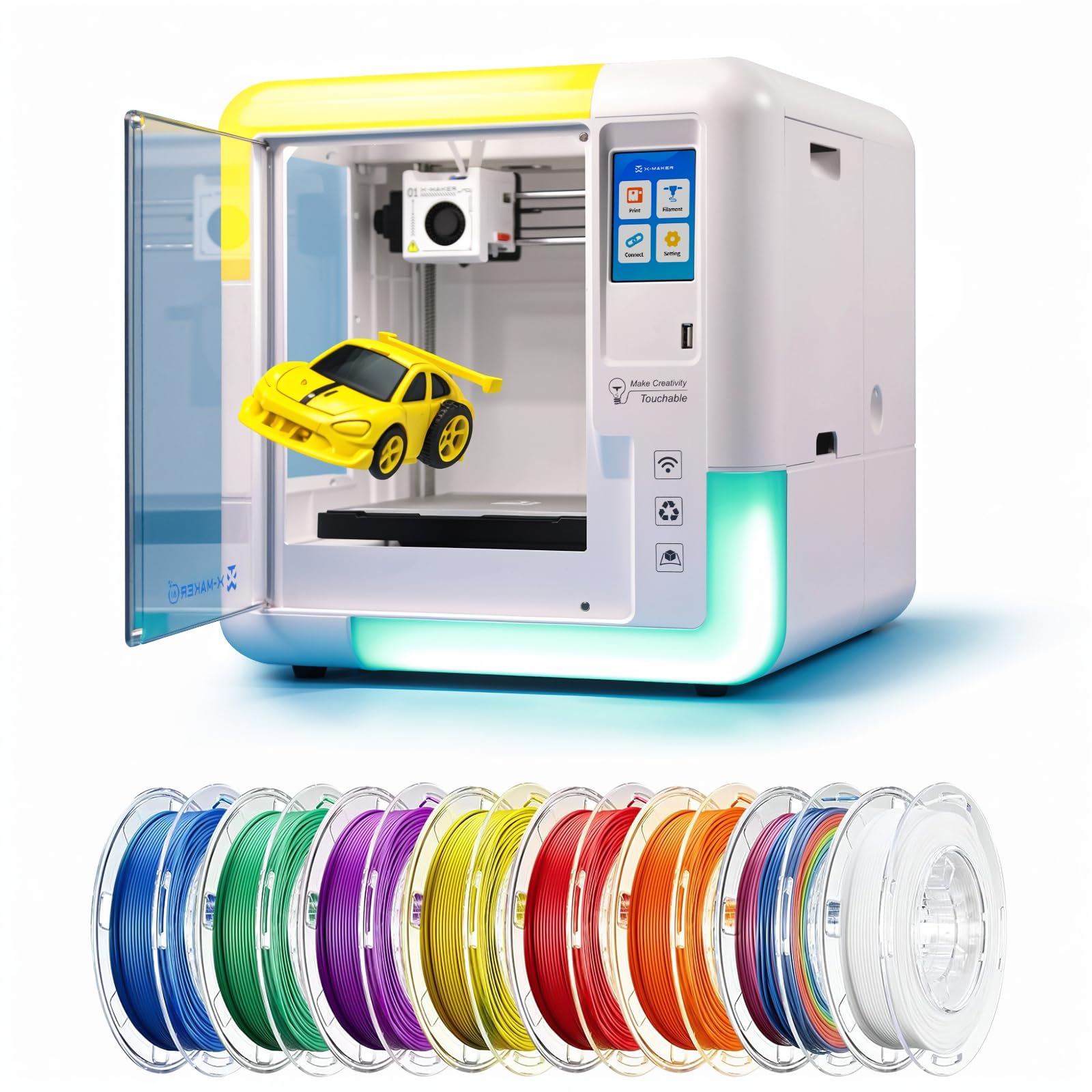
The X-Maker AI+ is designed explicitly for children and beginners, with an enclosed body that protects small hands from hot nozzles and moving parts. The AI Doodle feature generates 3D models from voice commands, text descriptions, or uploaded images, eliminating the need for CAD software. A library of over 1,500 pre-loaded toys and 17 mini design modules keeps kids engaged without requiring any slicing knowledge.
The printer uses a single-nozzle FDM setup with a 0.1-0.05 mm layer resolution and speeds up to 400 mm/s, which is fast enough to produce small toys in about 20 minutes — perfect for holding a child’s attention span. The included 8 rolls of TÜV-tested PLA are certified food-safe, and the magnetic build plate makes removal simple for small hands. Wireless printing via Wi-Fi, SD card, or USB works with the kid-friendly mobile app.
The trade-offs are significant for serious makers: the AI functions are basic and sometimes non-functional on complex models, the app crashes on prints larger than four inches, and the PC slicer is blocked by some antivirus software. The X-Maker is a toy maker, not a prototyping tool. But as a gateway into 3D printing for kids ages 9 to 16, its safety features and the sheer volume of included content make it a fantastic starting point.
Why it’s great
- Fully enclosed design with 8 TÜV-tested PLA rolls makes it safe for children ages 9 and up
- AI Doodle creates printable 3D models from voice, text, or photos — no CAD skills needed
- 1,500+ pre-loaded toy library with 17 design modules offers endless projects without downloading files
Good to know
- AI generation is unreliable on complex or multi-part models
- Filament sensor failed on some units within the first two weeks of use
FAQ
Can I use any 3D printer for food?
How do I clean a food 3D printer between ingredients?
What consistency should my food paste be for 3D printing?
Final Thoughts: The Verdict
For most users, the best 3d food printers winner is the Original Prusa CORE One because its actively heated chamber and steel-frame rigidity produce consistent food-safe prints across hundreds of hours with no tinkering required. If you need five-toolhead multi-material capability for complex edible prototypes or food packaging, grab the Original Prusa XL 5-Toolhead. And for budget-conscious beginners or classroom environments, nothing beats the AOSEED X-Maker AI+ for its safety-first enclosed design and AI-powered model generation.