
Our readers keep the lights on and my morning glass full of iced black tea. As an Amazon Associate, I earn from qualifying purchases.
Specs are compiled from manufacturer listings and verified buyer reviews and can change over time — please confirm the key details on the product page before buying.
You plug one video source into a splitter expecting two screens to light up, but a black screen and an error message can show up instead. The culprit is usually a spec called HDCP (a copy-protection handshake between your source and screen). If you feed a streaming stick, game console, or cable box into a 2 port hdmi splitter without HDCP 2.2 (the current 4K copy-protection standard), you get no picture at all. This guide explains which splitter works with your TV, monitor, or soundbar, and which one will leave you staring at a blank display.
I’m Min — the founder and writer behind Gadgets Feed. This guide is built by comparing the manufacturers’ published specifications and the patterns across verified customer reviews, so you get each pick’s real strengths and trade-offs instead of marketing spin.
You will learn what HDCP, EDID (the data your source reads to learn your screen’s capabilities), and downscaling actually mean for your living room, and which splitter handles mixed 4K and 1080p displays without glitching. The right 2 port hdmi splitter turns a frustrating dual-screen project into a true plug-and-play success.
Our Picks at a Glance


How To Choose The Best 2 Port HDMI Splitter
An HDMI splitter takes one signal from your source and sends it to two screens at the same time. It mirrors the exact same picture — it does not extend your desktop across two monitors. That single fact trips up more buyers than any spec, so know your goal before you shop.
HDCP: The Copy-Protection Gatekeeper
HDCP is the handshake between your source and your screen that prevents piracy. Streaming apps like Netflix, Hulu, and Amazon Prime Video require it. If your splitter does not pass HDCP 2.2 (the standard that allows 4K protected content through), protected content simply will not display. If you only watch your own files or play games, HDCP matters less — but for most living room setups, it is the difference between a working unit and a frustrating paperweight.
EDID and Mixed-Resolution Displays
EDID is how your source learns what your screen can handle. A basic splitter tells the source only what one screen supports, which causes blank screens when you connect a 4K TV and a 1080p monitor together. Splitters with EDID management (a setting that lets you force a specific resolution) or a downscaler read both screens and send each one a signal it can actually show. If your two displays have different resolutions, this feature is non-negotiable.
Quick Comparison
| Model | Best For | Max Resolution | HDCP Support | Downscaling | Amazon |
|---|---|---|---|---|---|
| avedio links 4K@60Hz Splitter★ Best Overall | Versatile 4K setups with soundbars | 4K@60Hz | 2.2 | Yes | Amazon |
| avedio links Mirror SplitterBudget Champ | Budget basic mirroring | 4K@30Hz | 1.4 | No | Amazon |
| Ouluoa EDID SplitterFine-Tuner | Fine-tuning tricky setups | 4K@60Hz | 2.2 | Yes | Amazon |
| Amazon Basics Splitter | Simple two-monitor mirroring | 4K@60Hz | Not listed | No | Amazon |
| OREI Downscaler Splitter | 4K TV plus 1080p TV | 4K@60Hz | 2.2 | Yes | Amazon |
| J-Tech MRO Splitter | Multi-resolution experts | 4K@60Hz | 2.3 | Yes | Amazon |
| J-Tech 18Gbps Splitter | Heavy-duty long cable runs | 4K@60Hz | 2.2 | Yes | Amazon |
| CORSAHD 4:4:4 Splitter | PS3 HDCP bypass recording | 4K@60Hz | 2.3 Bypass | Yes | Amazon |
In‑Depth Reviews
1. avedio links 4K@60Hz HDMI Splitter
Our pick — over 4★ from 500+ verified ratings; the strongest balance of quality and price.
The splitter that feeds a 4K TV and a soundbar in perfect sync
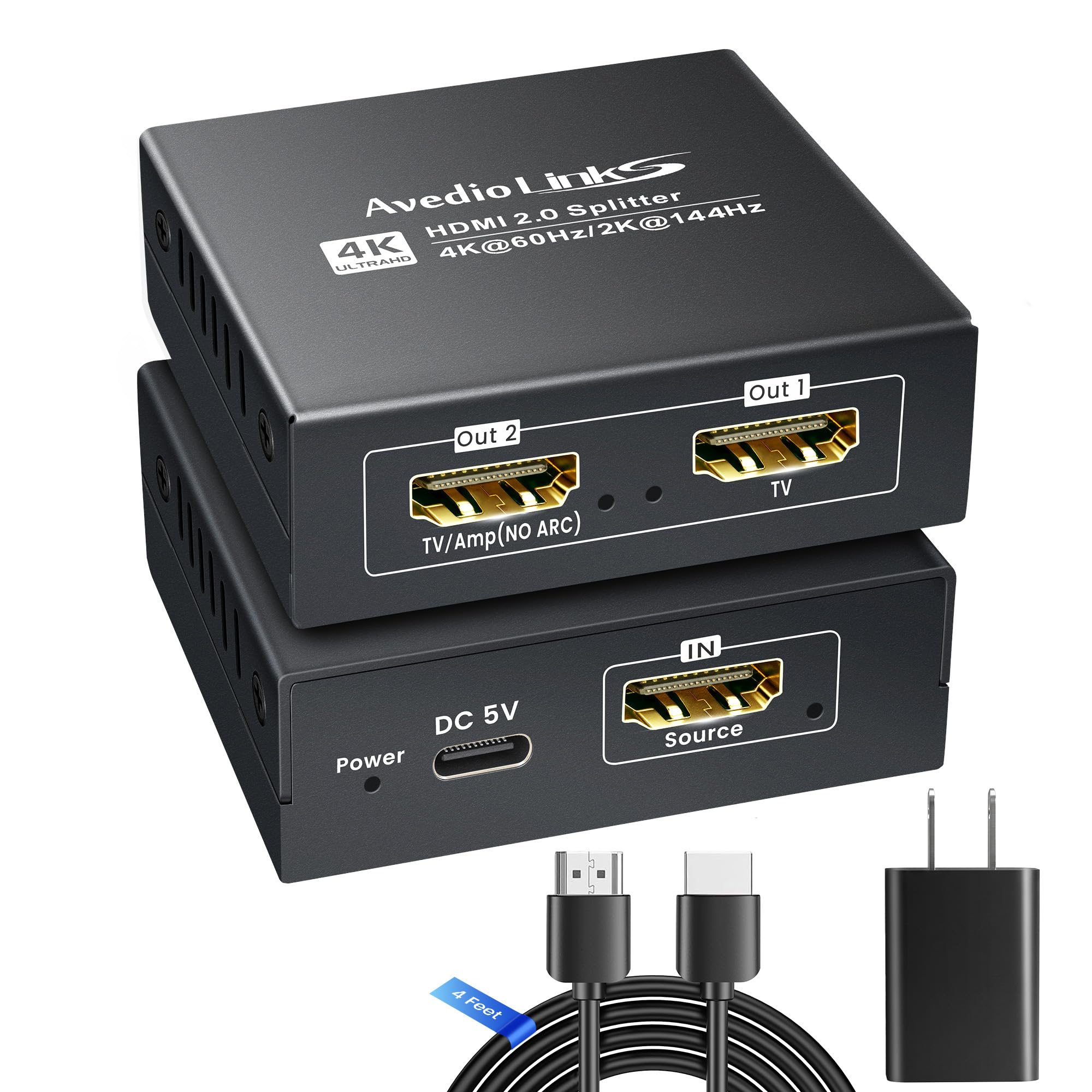
This pick stands out because it is built for the most common living room problem: getting full 4K HDR video on your TV while your soundbar handles the audio. Plug your TV into OUT 1 and your soundbar into OUT 2, and you get synchronized 4K HDR (high dynamic range, meaning richer colors and contrast), Dolby Vision video, and Dolby Atmos audio. It supports up to 4K@60Hz, 2K@75/120/144Hz, and even 1080P@120/240Hz for gaming.
The mixed-resolution handling is genuinely smart. Connect the lower-resolution display to HDMI OUT 2 with both screens at the same refresh rate (how many times the screen updates per second), and the splitter auto-downscales — no EDID switch needed. Buyers report that the 4 Ft HDMI 2.0 cable and the 5V 1A UL certified power adapter make it a true plug-and-play from the start.
One owner found it needed the DC cable connected as the manual mentions before it worked, and another noted the picture on one monitor scaled slightly. It is not phone-compatible and does not support ARC/eARC (audio return channels that let a TV send audio back to a soundbar through the same HDMI cable), so check that before you buy. For PS5, Roku, and home theater setups, this is the most complete package here.
Hands-free setup: The included power adapter and cable mean you do not need to hunt for extras — just plug, connect, and watch.
Who it is for: Anyone running a 4K TV with a separate soundbar or AV receiver who wants Dolby Vision and Atmos without extra gear.
Reach for this if: You want a single box that handles both video and audio splits for a modern home theater.
Look elsewhere if: You need ARC/eARC audio return or you plan to connect a mobile phone as your source.
2. avedio links HDMI Splitter Mirror Only
The budget pick that nails basic two-TV mirroring with zero fuss
If your only goal is showing the same picture on two TVs — no soundbar, no mixed resolutions — this is the splitter to beat. It duplicates one HDMI input to two displays simultaneously with no drivers and no lag, and it is backward compatible with everything from 1080p down to 480i (an older standard-definition format). The 4 Ft high-speed HDMI cable is included, so you can test it the moment it arrives.
The catch is the resolution ceiling: this unit tops out at 4K@30Hz, not the smoother 60Hz (meaning the screen updates 30 times per second instead of 60, which can look less fluid). It also uses HDCP 1.4 (an older copy-protection standard), so it is not compatible with HDCP 2.2 protected content. The 2.6 ft USB power cable is included, but the wall adapter is not — you must supply your own 5V 1A adapter. One reviewer noted the included USB wall outlet stopped working after a month, so budget for a quality adapter.
What wins people over is the sheer simplicity — instant mirroring, strong colors, and audio with no visible lag even when both outputs run. Buyers consistently praise its instant mirroring and lag-free audio on both outputs. If your screens are identical and your source is not a stick streaming 4K HDR, this is all you need.
What earns the praise
- Genuinely plug-and-play with no drivers
- Includes the HDMI cable you need to start
- Backward compatible down to 480i
Where it hits a wall
- 4K capped at 30Hz — not the smoother 60Hz
- No HDCP 2.2 means some streaming apps block it
- Power adapter not included
The verdict: The right call for identical 1080p TVs, a cable box, or a PC where you just want the same frame on two screens.
The trade-off: Skips it if you need 4K@60Hz or you stream 4K HDR from a stick — the HDCP 1.4 limit will bite.
3. Ouluoa 4K@60Hz EDID Splitter
The aluminum splitter with 8 EDID modes for stubborn signal issues
Most splitters just pass the signal and hope. This one gives you 8 signal setting modes via an EDID button (a physical control that lets you force a specific resolution the screens can handle), which is a lifesaver when your two displays disagree. If your input is 4K@60Hz but output terminal B shows no image, you press the button to mode 111 and the splitter sends 1080P/60Hz to match what that screen can handle. That kind of control is rare at this level.
The aluminum alloy housing is a real differentiator too — it dissipates heat better than plastic boxes, so long viewing sessions stay stable. It supports HDR10, 4K up to 4096×2160@60Hz, and audio passthrough for DTS:X, DTS-HD, Dolby TrueHD, and PCM 2.0 up to 192kHz sample rates (meaning high-quality surround and stereo formats pass through cleanly). One front-only note: it is not compatible with soundbars that only have ARC/eARC ports like Sonos ARC or Bose Soundbar 900 (those need an audio return channel this unit lacks).
Owners found the trial-and-error with settings a bit fiddly at first, but once they found the right mode it worked perfectly — one reported a year of clean video capture with no issues. The power cord is short, so plan your outlet placement. This is a splitter for the buyer who wants to solve signal headaches rather than hide from them.
Control freak’s friend: The EDID button lets you force a resolution instead of hoping the splitter guesses right.
Best fit: Complex multi-display setups, video capture rigs, and anyone pairing a 4K screen with an older 1080p one.
Reach for this if: You have tried a basic splitter and watched it fail on a mixed-resolution setup.
The single caveat: The short power cord and the learning curve on EDID modes are the two friction points to expect.
4. Amazon Basics HDMI Splitter

The featherweight 2.93 oz splitter that disappears behind your desk
At just 2.93 ounces, this is the lightest unit here — small enough to tuck behind a monitor arm or tape to the back of a TV stand. It mirrors one source to two displays at up to 4K@60Hz, and it works with PCs, laptops, DVD players, Xbox, Roku, and Chromecast. For a clean, minimal home office setup, the size alone makes it worth considering.
The build is functional and no-frills, matching Amazon Basics’ typical utilitarian design. One owner ran it through the harsh conditions at Burning Man without issue, and another confirmed no added lag when showing a computer on both a monitor and a nearby TV. The 3.3-foot USB-A to micro USB power cable is included, but you supply the power adapter.
Quality control is the weak spot, with a few units arriving dead on arrival. Test both outputs immediately, as defective units are rare but reported. If you get a good unit, it is a genuinely great value for simple dual-monitor mirroring; it just does not do mixed resolutions or downscaling.
The upside
- Featherweight 2.93 oz design is easy to mount anywhere
- No added lag for dual-monitor work
- Works with Xbox, Roku, Chromecast, and more
The downside
- Occasional defective unit straight from the start
- No EDID management for mixed resolutions
- USB power adapter not included
Pick it if: You want an unobtrusive splitter for two matching monitors and you are comfortable testing it immediately.
Think twice if: Your two displays have different resolutions — this one lacks the downscaling to handle that.
5. OREI 4K HDMI Splitter with Down Scaler
The splitter that sends 4K to one TV and 1080p to another, automatically
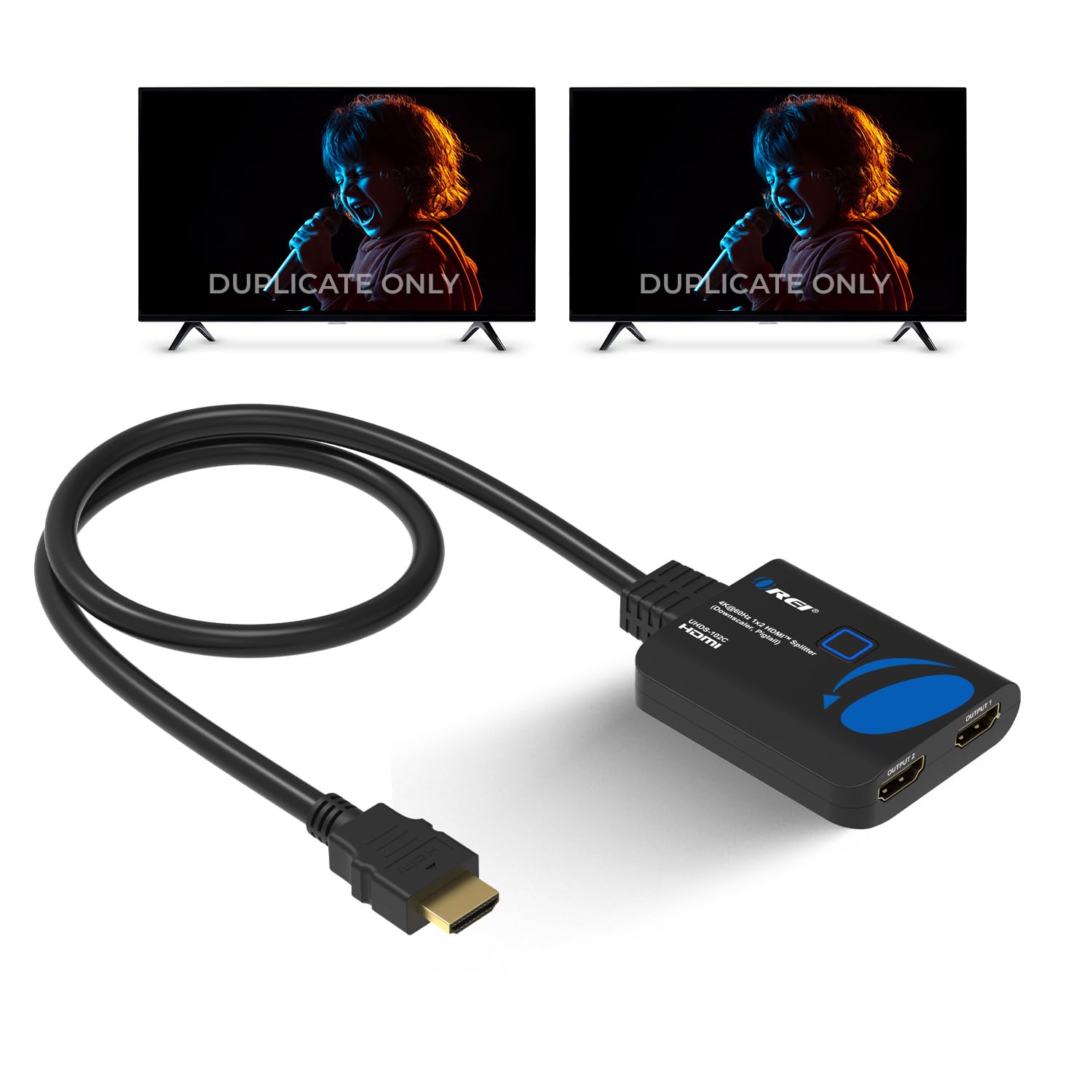
This is the pick for the classic mixed-TV setup: a 4K TV in the living room and an older 1080p TV in the bedroom. The auto downscaler reads both screens and outputs the full supported resolution to each — 4K to the 4K TV, 1080p to the 1080p TV — with no button pressing required. The auto downscale means you never touch a button once both TVs are connected.
It runs at 18 Gbps (the data speed needed for 4K@60Hz with full color) with HDCP 2.2, so it handles Roku 4, Amazon Fire TV, PS4, Xbox, and Apple TV without the copy-protection black screen. Owners have used it in continuous commercial settings — one ran a security camera feed to two LG OLED TVs with no resolution loss or flicker. It works best with high-quality cables up to 30 feet, which is generous for a room-to-room setup.
The one real complaint is the power situation: the box ships with a USB cable but no charger, so you need your own USB power brick. Compatibility gets mixed feedback, with some units working flawlessly and others struggling with specific source devices. If you need true dual-monitor extension, note this will not do it — it duplicates only. But for the 4K-plus-1080p household, this is a standout.
Set-and-forget hero: The auto downscale means zero fiddling when your screens have different resolutions.
Ideal buyer: Someone running a 4K TV and a 1080p TV from one cable box or streaming stick.
The pick: Choose this for the most common mixed-resolution home setup, where it shines without any configuration.
The catch: Budget for a USB power adapter and a quality cable, as neither is fully sorted from the start.
6. J-Tech Digital MRO Splitter

The Multi-Resolution Output splitter that speaks to every screen in its own language
Its Multi-Resolution Output (MRO) lets it send 4K to one screen and 1080p to another simultaneously. Most splitters force both screens to agree on one resolution; this one lets you mix a 4K TV with a 1080p receiver or an older projector without either dropping out. It supports 18Gbps bandwidth, 4K@60Hz 4:4:4 (full color sampling for sharpest text and graphics), HDR10, Dolby Vision, and HDCP 2.3 compliance — the highest copy-protection standard here.
The audio support is equally comprehensive: PCM, Dolby Digital, Dolby True HD, Dolby Atmos, DTS, DTS HD, DTS:X, and Dolby Digital+. Owners mention using it to send 4K HDR10 to a projector while keeping an older Pioneer receiver happy, saving hundreds on a new 4K receiver. Another found it finally solved a years-long puzzle of running 4K and 1080p screens simultaneously with PCM 5.1 surround.
The recurring gripe is reliability — several customers note the display intermittently flashing black, and one unit died after about two and a half months. It also only converts down to 1080p, not below, so pairing it with a 720p screen may not work. If you are willing to gamble on longevity for the best mixed-resolution feature set, this is the one. The brand backs it with a 1-year manufacturer warranty.
The capability
- MRO lets you mix 4K and 1080p displays natively
- HDCP 2.3 is the most future-proof here
- Full Dolby Atmos and DTS:X audio passthrough
The risk
- Reports of intermittent black-screen flashing
- Some units have failed within months
- Only downscales to 1080p, not below
Choose this if: You need the deepest feature set and are pairing a 4K display with an older 1080p receiver or projector.
Pause if: You want a set-and-forget device — the reliability reports suggest you may need the warranty.
7. J-Tech Digital 18Gbps Splitter
The splitter built for long cable runs and demanding multi-TV installs
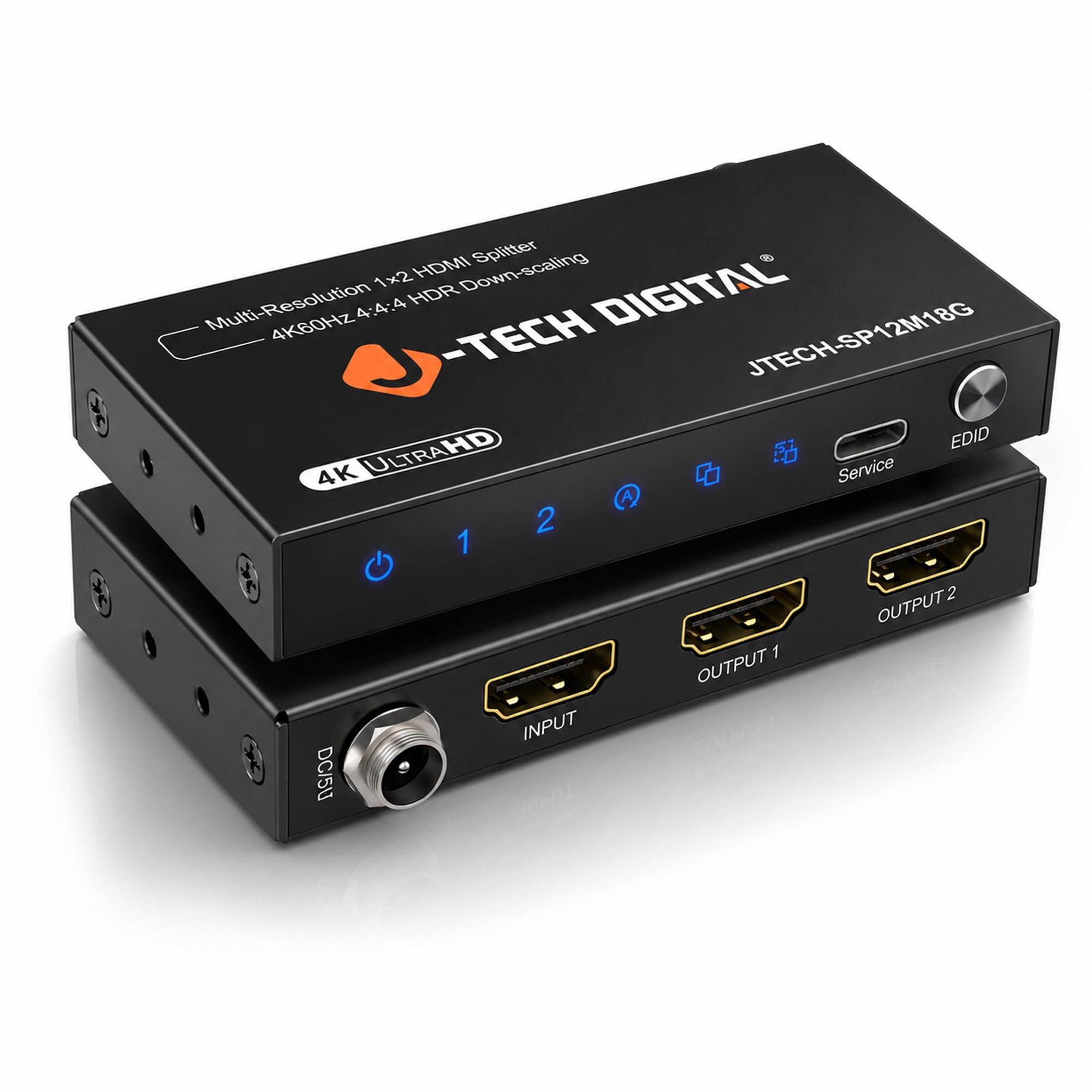
It handles long cable runs reliably, even feeding six TVs across 100-foot cables. A buyer ran 5 booster-ed 100-foot HDMI cables plus 50-foot and 25-foot runs through this unit to feed six TVs at a Legion Bingo night — and it worked great. The secure power input is a thoughtful touch that keeps the unit from losing power on a loose connection, a real concern in high-traffic setups.
It supports 4K@60Hz 4:4:4 with 18Gbps bandwidth, HDCP 2.2, and 4K-to-1080P downscaling so you can mix a 4K screen with a 1080p one. Three EDID settings — auto, copy, and downscale — give you control over how the splitter handles display negotiation. It does not downscale to 720P or pass HDR metadata when downscaling, so keep both of those limits in mind.
Owners consistently describe the metal housing as solid and professional-grade. The honest note is longevity: one church reported going through a unit every two years or so in continuous operation. That is a fair trade for a device running six TVs daily. It includes a one-year manufacturer replacement warranty and free lifetime technical support from Stafford, TX — a real safety net if something goes wrong.
Built for scale: The secure power input and stable signal make it the pick for multi-room or commercial installs.
The backup plan: Lifetime tech support and a one-year warranty give you a real safety net the cheaper picks lack.
Grab this if: You are running long cables or feeding multiple TVs from one source and need reliable signal delivery.
Know before you buy: It only downscales to 1080p, not 720P, and continuous heavy use may mean replacement every couple of years.
8. CORSAHD 4K@60Hz Splitter

The splitter that finally lets you record PS3 gameplay without the black screen
If you have ever tried to capture PS3 gameplay, you know the pain: HDCP is baked into the console’s hardware, so recording gives you a blank screen. This splitter is the workaround. Reviewers point out that connecting the console to OUT 1 and a capture card to the HDMI-IN lets you record cleanly — the HDCP bypass (a feature that lets the signal pass without enforcing the copy-protection handshake) does the heavy lifting. One owner who converts VHS tapes digitally called it a problem solved instantly.
Beyond the bypass, it is a full-featured 4K@60Hz 4:4:4 18Gbps splitter with EDID management, downscaling, HDR, Dolby Vision, and Dolby Atmos support. It works with PS5, Xbox, Nintendo Switch, Apple TV, Fire Stick, and Roku. The audio passthrough is solid, though a few users report garbled audio in specific setups — the fix is usually disabling Dolby 5.1 and selecting Linear PCM 2ch 96kHz.
The build quality is the weak spot: the on/off switch is poorly designed and hard to reach, and the unit feels cheap. One unit reportedly stopped powering on after a few uses. It also does not support ARC, eARC, CEC (a feature that lets one remote control multiple devices), VRR (variable refresh rate for smoother gaming), or 4K@120Hz, and it will not work with HDMI-to-DisplayPort cables. For its niche — HDCP bypass for recording — it is class-leading. For general use, it is good but not great.
The magic trick
- Reliable HDCP bypass for PS3 and other copy-protected sources
- Full 18Gbps bandwidth with Dolby Vision and Atmos
- Press UPDATE for 3 seconds to fix HDCP flicker issues
The reality check
- Cheaply built with a poorly designed on/off switch
- No ARC, eARC, CEC, VRR, or 4K@120Hz support
- Does not work with HDMI-to-DisplayPort cables
Reach for this if: You are a content creator or retro gamer who needs to capture PS3 footage without HDCP blocking the stream.
skip it if: You just want a general 4K splitter — the build quality and missing features make it a niche tool, not a daily driver.
Understanding the Specs
HDCP and Bandwidth
HDCP is the copy-protection handshake that streaming services require. HDCP 2.2 is the current standard for 4K content; HDCP 2.3 is the newest version. Bandwidth, measured in Gbps (gigabits per second, or the data speed of the connection), tells you how much data the splitter can move — 18Gbps handles 4K@60Hz with full color, while older 10.2Gbps units cap out at 4K@30Hz. If you stream Netflix in 4K, you need HDCP 2.2 and 18Gbps.
EDID and Downscaling
EDID is how your source learns what your screen can display. A basic splitter copies one screen’s info to the other, which breaks mixed-resolution setups. EDID management lets you force a specific mode, while downscaling sends 4K to a 4K screen and 1080p to a 1080p screen from the same source. If your two displays differ, look for downscaling or EDID controls.
FAQ
Will a 2 port HDMI splitter extend my desktop across two monitors?
Why does my streaming app show a black screen through a splitter?
Can I connect a soundbar to an HDMI splitter?
What is the difference between 4K@30Hz and 4K@60Hz?
Why do I need a power adapter for an HDMI splitter?
Will a splitter work if my two TVs have different resolutions?
What is HDCP bypass and is it legal?
How long can my HDMI cables be with a splitter?
Final Thoughts: The Verdict
The crowd favorite here is the avedio links 4K@60Hz Splitter because it handles the full modern home theater — 4K HDR video, Dolby Vision, and Dolby Atmos audio to a soundbar — with the included power adapter and cable. If you want no-fuss budget mirroring of two identical TVs, the avelio links Mirror Splitter is the value pick, but remember it caps at 4K@30Hz. And for the classic mixed setup with one 4K TV and one 1080p TV, the OREI Downscaler auto-corrects the signal with zero button pressing.
How We Picked
We do not accept paid placement. Every pick is matched to a real buyer and a real use-case; we do not hands-on test units.
Sources & Methodology
Specifications: manufacturer listings and product documentation. Review insights: verified customer reviews, as of August 2026. Pricing: not shown on this page (it changes often); check the current price via the retailer link.
As an Amazon Associate, Gadgets Feed earns from qualifying purchases. This does not affect which products we feature.