
Our readers keep the lights on and my morning glass full of iced black tea. As an Amazon Associate, I earn from qualifying purchases.
Specs are compiled from manufacturer listings and verified buyer reviews and can change over time — please confirm the key details on the product page before buying.
Finding the right 27-inch OLED at 1440p is really about one question: how fast do you need your games to feel? Whether you’re a casual explorer or a competitive esports player, the refresh rate—how many times the screen updates per second—is the first fork in the road. This guide breaks down the top models by their real strengths, so you can match the monitor to your games, your desk, and your budget.
I’m Min — the founder and writer behind Gadgets Feed. This guide is built by comparing the manufacturers’ published specifications and the patterns across verified customer reviews, so you get each pick’s real strengths and trade-offs instead of marketing spin.
You get perfect blacks and vivid color from every pick here, but the real choice is speed versus value. The 27 inch 1440p oled monitor market splits between high-refresh models for competitive play and cheaper options for everyday use. This guide helps you weigh those trade-offs with confidence.
Our Picks at a Glance


How To Choose The Best 27 Inch 1440P OLED Monitor
Choosing your first OLED monitor is a big step up from a standard LCD. The contrast is dramatically better, and motion looks cleaner. But the specs can be confusing, so it helps to know what actually matters for your setup.
Refresh Rate vs. Response Time
Refresh rate (measured in Hz) is how many times the image redraws each second. A 360Hz monitor looks noticeably smoother than a 240Hz one in fast games. Response time (measured in ms) is how fast a pixel changes color. At 0.03ms, these OLEDs are effectively instant, so you won’t see ghosting behind fast-moving objects.
Burn-in and Panel Protection
OLED panels can hold a permanent ghost of a static image if displayed for too long—that’s burn-in. Most of these monitors include a heatsink (a metal plate that spreads heat), pixel refresh cycles (automatic screen-cleaning routines), and automatic dimming of static elements like taskbars. A warranty that covers burn-in is a big plus for confidence.
Connectivity and Console Support
Check for HDMI 2.1 ports to get the full refresh rate from a PS5 or Xbox. DisplayPort is standard for PC, and some models add USB-C for laptops or KVM switching. You’ll also want to think about ergonomics—a stand with height adjustment is much better for your neck than a fixed one.
Quick Comparison
| Model | Best For | Refresh Rate | Response Time | Contrast Ratio | Amazon |
|---|---|---|---|---|---|
| ASUS ROG Strix XG27ACDNG★ Best Overall | High-speed gaming with pro features | 360Hz | 0.03ms | 4000:1 | Amazon |
| AOC Q27G4ZDBest Value | The budget value king | 240Hz | 0.03ms | 1500000:1 | Amazon |
| MSI MAG 271QPXSpeed Pick | Value with pro-level speed | 360Hz | 0.03ms | — | Amazon |
| MSI MPG 271QRX | Rich features and KVM | 360Hz | 0.03ms | 1,000,000:1 (min) | Amazon |
| Alienware AW2725DF | All-around performer | 360Hz | 0.03ms | Infinite | Amazon |
| INNOCN 2780M | Insane speed for esports | 500Hz | 0.03ms | 1500000:1 | Amazon |
| Samsung Odyssey G6 (G60SD) | Brilliant HDR and anti-glare | 360Hz | 0.03ms | 1,000,000:1 | Amazon |
| ASUS ROG PG27AQDP | The fastest on the market | 480Hz | 0.03ms | 1,000,000:1 | Amazon |
| Samsung Odyssey G6 (G61SD) | Sleek premium design | 240Hz | 0.03ms | 1,000,000:1 | Amazon |
| Sony INZONE M10S | Tournament-ready esports | 480Hz | 0.03ms | 1,500,000:1 | Amazon |
| GIGABYTE AORUS FO27Q2 | Connectivity and KVM | 240Hz | 0.03ms | 1500000:1 | Amazon |
In-Depth Reviews
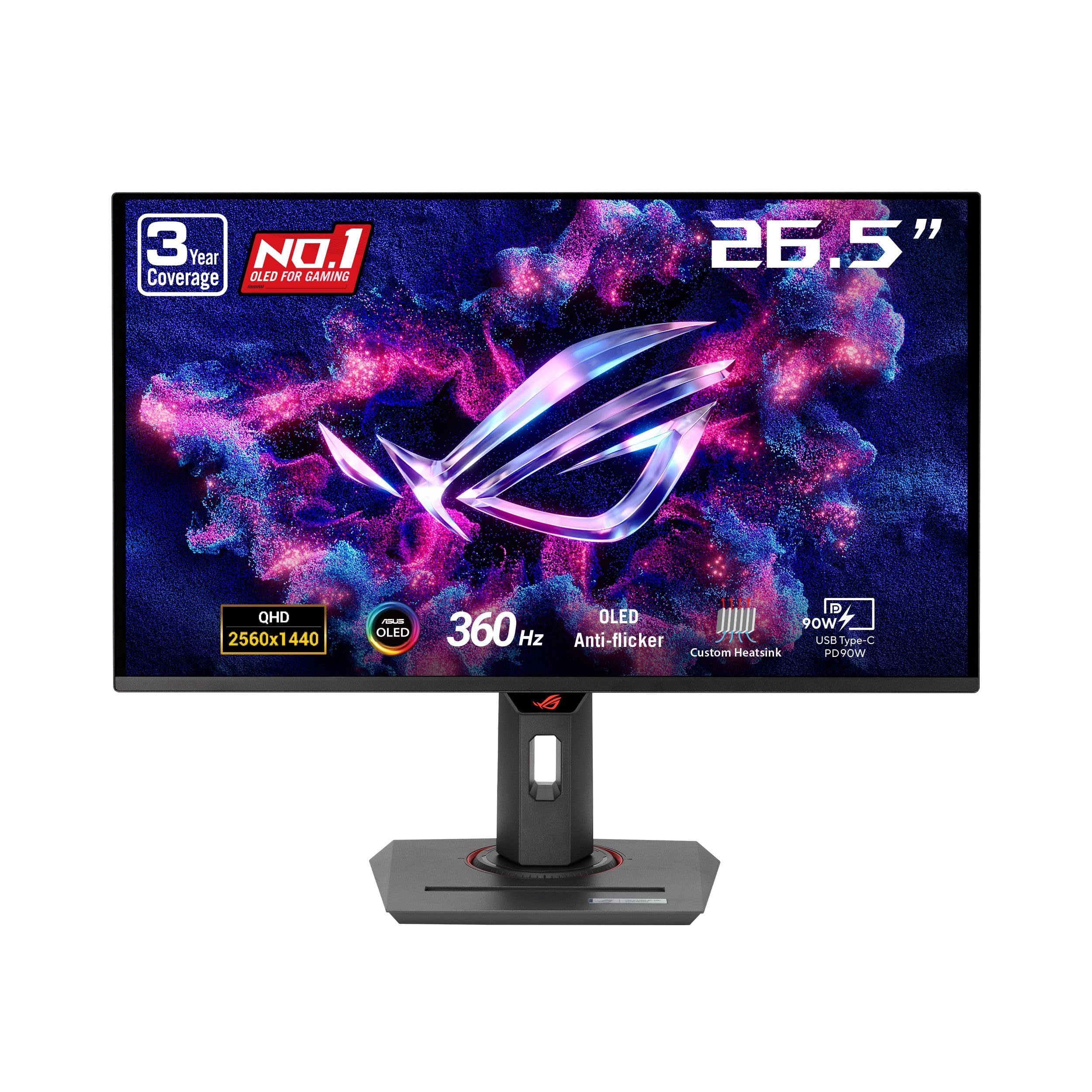
1. ASUS ROG Strix XG27ACDNG
Our pick — over 4★ from 350+ verified ratings; the strongest balance of quality and price.
The all-rounder that pairs pro-level smoothness with serious burn-in protection.
If you want one monitor that excels at both competitive shooters and beautiful single-player worlds, the ROG Strix is the one to beat. Its 360Hz refresh rate with a 0.03ms response time makes motion feel almost impossibly fluid, so you can track enemies without any blur. Buyers report the 1440p QD-OLED panel looks sharp and vibrant, earning it high praise for monitor build quality and picture quality.
This monitor is built to last, with a custom heatsink, advanced airflow design, and ASUS OLED Care+ functions to reduce burn-in risk. It also adjusts brightness automatically during refresh-rate changes, thanks to ROG-exclusive anti-flicker technology. The 3-year warranty includes burn-in coverage, offering real confidence for an OLED purchase.
Owners frequently mention the premium feel and crisp, vibrant colors. Since the screen has a faster 360Hz refresh than the AOC’s 240Hz, it is the better choice if you play fast, competitive titles. There are minor quirks like a pixel-cleaning popup, but the overall experience is overwhelmingly positive for both gaming and work.
OLED speed king
- Vibrant QD-OLED colors with deep blacks
- Excellent burn-in protection and 3-year warranty
- Smooth, tear-free gaming with G-SYNC Compatible support
pricey premium
- Limited height adjustment on the stand
- Some older games may have compatibility quirks
fastest pick: you want a premium 360Hz OLED that handles both competitive and story-driven games beautifully.
budget buyer: your desk setup demands a highly flexible stand, as the height range here is limited.
2. AOC Q27G4ZD
The budget champion that delivers OLED magic without the premium price tag.
This is the monitor that makes OLED accessible. At a budget-friendly price, the AOC Q27G4ZD delivers a 27-inch QHD 2560×1440 OLED panel with a 240Hz refresh rate and a 0.03ms response time. Owners mention that “240hz refresh rate for an OLED this price is about impossible to beat,” and the review scores back that up, with high marks for display quality and picture quality.
The color performance here is stunning. It covers 147.6% of sRGB and 110.2% of DCI-P3, delivering over 1.07 billion colors.. The self-luminous OLED panel means genuine blacks and extreme color accuracy, while the contrast ratio of 1500000:1 is dramatically higher than the 4000:1 found on the ASUS ROG Strix XG27ACDNG.
Some owners note that a glossy screen can cause reflections even with blinds closed, so you’ll want to manage your room’s lighting. The stand is basic and non-adjustable, so you may want a monitor arm. However, for the price, the image quality and speed are simply exceptional.
budget OLED star: The 1500000:1 contrast ratio delivers the inky blacks that OLED is famous for, at a value price point.
value choice: the best entry point into OLED gaming where price-to-performance is the priority.
port hunter: you play in a bright room without curtains, as the glossy screen can reflect light.
3. MSI MAG 271QPX
The value ticket to 360Hz speed with vivid QD-OLED colors.
MSI’s MAG 271QPX brings a 360Hz refresh rate to a more accessible price point than many rivals. Combined with a 0.03ms response time, this monitor makes competitive gaming feel incredibly smooth and responsive. The 3rd-gen QD-OLED panel delivers phenomenal color reproduction and deep blacks, making it a favorite for both competitive and story-driven games.
The colors meet a high standard with Delta E≤2, meaning what you see is incredibly close to the source. VESA DisplayHDR True Black 400 ensures HDR content looks rich, and dark scenes retain plenty of detail thanks to solid brightness. It also includes MSI’s OLED Care 2.0 to help reduce burn-in risk.
For consoles, the HDMI 2.1 port supports a full 48 Gbps bandwidth, giving you WQHD@360Hz if your console can handle it. While it offers a 360Hz refresh compared to the AOC’s 240Hz, both are excellent choices. Just be aware that burn-in is a consideration with any OLED, and some owners note VRR flicker during loading screens.
balanced performance: You get professional-level 360Hz speed and gorgeous QD-OLED color, at a price that undercuts many flagship rivals.
all-rounder: gamers who want the smoothness of 360Hz without paying a huge premium.
HDR purist: some users report VRR flicker on loading screens, a common trait of OLED panels.
4. MSI MPG 271QRX

A step up in features, adding KVM and gaming intelligence to that 360Hz speed.
The MPG 271QRX takes the core 360Hz / 0.03ms QD-OLED experience and layers on more pro features. A built-in KVM switch lets you control multiple devices—like a desktop and a laptop—with a single keyboard, mouse, and monitor. It also offers the Gaming Intelligence App to fine-tune viewing settings per game.
Owners are blown away by the “stunning visual experience,” noting vibrant colors, deep blacks, and infinite contrast. The 1,000,000:1 contrast ratio delivers excellent dark scene detail. With VESA DisplayHDR True Black 400, HDR content looks punchy, and MSI OLED Care 2.0 works to prevent image sticking.
The stand is fully adjustable for height and tilt, unlike the basic stand on the AOC, and the design is thin and sleek. Customers note that FreeSync Premium Pro can cause flickering for some, so you may need to experiment with settings. It’s a fantastic all-rounder for gamers who also work from a laptop.
high refresh elite: The KVM switch is a genuine plus for multi-device setups, and the adjustable stand is a step above budget models.
esports pro: users juggling a desktop and a work laptop who want one screen and one keyboard for both.
casual gamer: a few owners had to disable FreeSync to avoid periodic flickering.
5. Alienware AW2725DF

The 360Hz jack-of-all-trades that shines in both gaming and productivity.
Alienware’s 26.7-inch QD-OLED is a true all-rounder. It combines a 360Hz refresh rate and 0.03ms response time with superb color accuracy, covering 99.3% of DCI-P3 with a Delta E<2 accuracy. This makes it excellent for gaming, but also capable for creative work where color fidelity matters. Owners call it the “best monitor ever bought,” praising the deep blacks and vibrant colors.
The design includes full ergonomics—height, tilt, swivel, and pivot adjustments—so you can position it perfectly for long sessions. Its VESA DisplayHDR True Black 400 and infinite contrast ratio make HDR scenes pop. With AMD FreeSync Premium Pro, you get tear-free, stutter-free visuals that pair well with most graphics cards.
One common tip from owners is to run the 5-minute pixel refresh every few hours to keep the panel in top shape. The anti-glare coating is good, though some note a slight purple tint and that it can attract fingerprints. If you want a premium, flexible monitor for gaming and work, this is a top contender.
sleek design: The combination of 99.3% DCI-P3 coverage and a fully adjustable stand makes it a true all-rounder.
style pick: you need one monitor that does everything—gaming, movies, and color-accurate work—with a great stand.
desk stability: it demands a regular pixel refresh and its glossy coating can show fingerprints.
6. INNOCN 2780M

The 500Hz outlier that leaves even the fastest 360Hz panels chasing it.
If pure speed is your obsession, the INNOCN 2780M is the most extreme 27-inch 1440p OLED on this list. Its 500Hz refresh rate is rare, even among premium monitors, and it costs considerably less than you’d expect. This is a niche pick for players who compete at the highest level and can push 400+ frames per second in their games.
Beyond the speed, the QD-OLED panel delivers a 99% DCI-P3 color gamut and a 1500000:1 contrast ratio for lifelike visuals. It supports a wide 48Hz~500Hz variable refresh range, so it works smoothly across different frame rates. The stand offers height, tilt, and swivel adjustments, plus a 100mm x 100mm VESA mount.
The review pages sum it up: “Does the 500hz at 1440p. Hard to get better than this with today’s technology.” Reviewers point out you’ll need a high-end PC to actually hit those frame rates. It also has built-in speakers, which are surprisingly good for everyday shows. This is a specialist tool for the competitive elite.
affordable 4K: You get class-leading 500Hz speed and an amazing image for a price that undercuts the big brands.
budget 4K: esports purist with a top-tier graphics card who wants every last frame of smoothness.
contrast lover: casual players who won’t reach 400+ fps, where a 360Hz monitor is more than enough.
7. Samsung Odyssey OLED G6 (G60SD)

Samsung’s anti-glare OLED with cutting-edge cooling for bright, comfortable gaming.
The Samsung Odyssey G6 takes a different approach to the classic OLED problem of reflections. Its Glare Free technology significantly reduces glare from external light sources, so you can enjoy that perfect black and color experience even in a brighter room. The QD-OLED panel delivers “superior brightness and dynamic contrast,” making HDR content look spectacular.
At 360Hz with a 0.03ms response time, this monitor is incredibly responsive for competitive play. It also features a unique Dynamic Cooling System with a Pulsating Heat Pipe that dissipates heat 5x better than older graphite sheet methods, helping prevent burn-in. The Samsung OLED Safeguard+ suite adds logo and taskbar detection to auto-dim static images.
The design is sleek and modern, just 3.9mm at its thinnest point. While it doesn’t skimp on specs, some buyers have mixed feelings about build quality and value, so check your unit carefully.
compact G6: The Glare Free screen is a real advantage if your desk is near a window or bright light source.
space saver: you game in a room with ambient light and want vibrant HDR without reflections.
big display: some shoppers say mixed feelings on build quality for the premium price.
8. ASUS ROG PG27AQDP
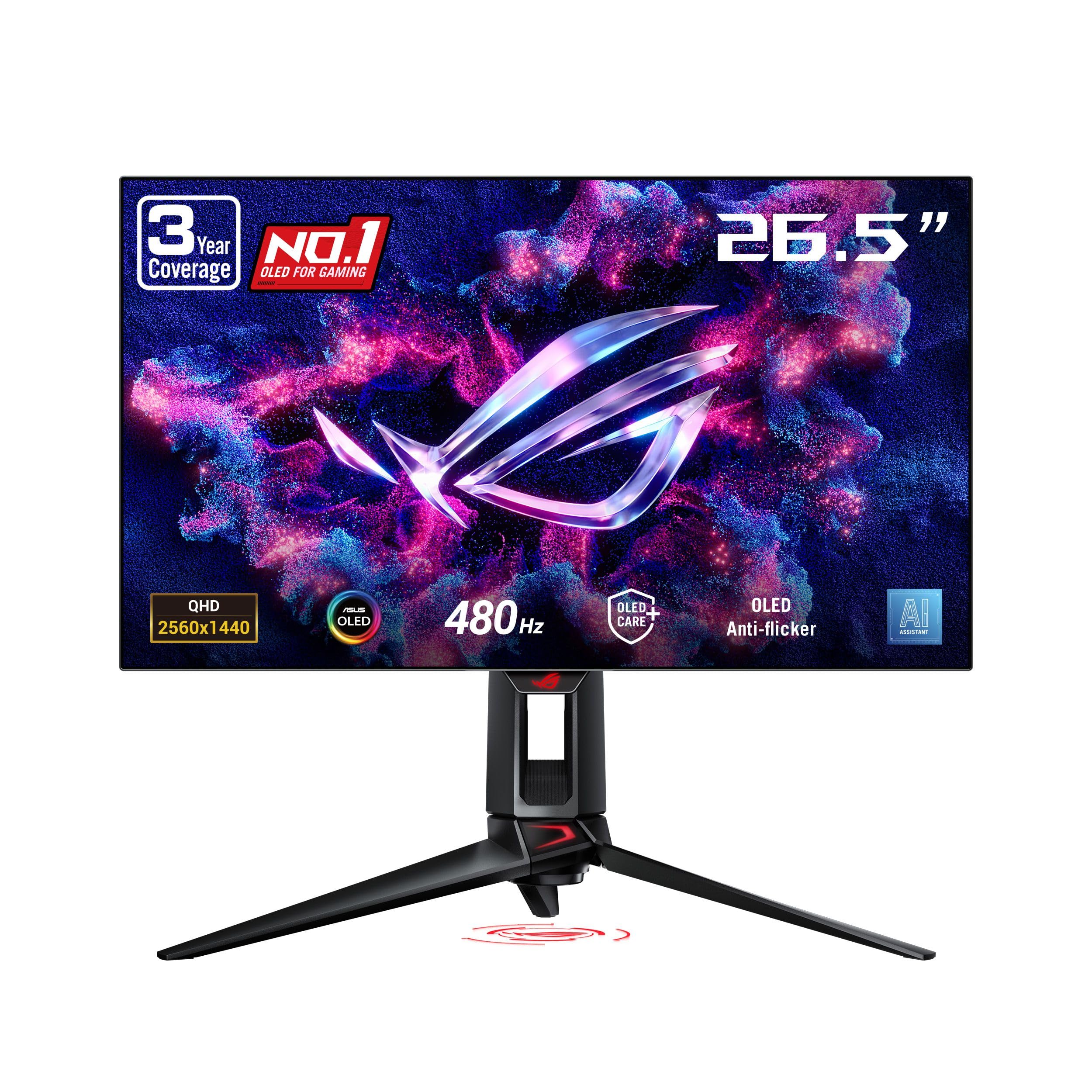
The world’s first 1440p 480Hz OLED, tuned for the absolute competitive edge.
ASUS pushed the envelope with the PG27AQDP, claiming the title of the world’s first 1440P 480Hz OLED gaming monitor. This WOLED panel delivers a 0.03ms response time with virtually no motion blur, making it a fascinating choice for esports professionals. Buyers report it matches the smoothness of high-end 540Hz TN panels in competitive games, but with infinitely better colors and blacks.
The color performance is elite, with 99% DCI-P3 coverage and a Delta E <2 rating for true-to-life colors. It features a custom heatsink for passive cooling and ASUS OLED Care+ to lower burn-in risk. The 3-year warranty covers burn-in, plus true 10-bit color depth and DisplayHDR400 True Black certification.
While the speed is class-leading, a few owners noted the matte coating can look a bit smeary, and some had firmware bugs on initial units. It’s also best viewed from about 2-3 feet away for the sharpest text. If you demand the absolute fastest refresh and can handle a few quirks, this is a top-tier pick.
480Hz monster
- Blazing 480Hz refresh for class-leading competitive smoothness
- Impressive text clarity and color accuracy
- Solid 3-year warranty with burn-in coverage
high price
- Matte coating may look slightly smeary to some
- Some early units had firmware-related bugs
speed demon: hardcore esports gamers who want the world’s fastest 1440p OLED and accept the premium.
frame rate cap: the matte finish and occasional firmware quirks mean it’s not for the faint of heart.
9. Samsung Odyssey OLED G6 (G61SD)

Samsung’s sleek metal design meets the reliable 240Hz balance for gaming.
The G61SD is the design-forward sibling in Samsung’s lineup, featuring a premium, modern metal finish that looks great on any desk. It offers a very smooth 240Hz refresh rate with a 0.03ms response time—plenty for most gamers, even if it doesn’t hit the 360Hz of its G60SD brother. The QD-OLED panel delivers “superior brightness and a wide color gamut” for vivid detail in every scene.
For smoothness, it supports both G-Sync compatibility and AMD FreeSync Premium Pro, so it works well with a wide range of graphics cards to reduce choppiness and tearing. Like the more expensive Samsung model, it includes the Dynamic Cooling System with a Pulsating Heat Pipe to prevent burn-in. Its Glare Free screen cuts reflections by 54% compared to standard anti-reflection film..
Owners describe it as the “end-game monitor,” praising the deep blacks and vibrant colors for gaming and even anime. The 3-year warranty covers the OLED panel, providing confidence. If you prefer a refined look over maximum refresh, this is a beautiful, high-performing choice.
G6 refresh: The premium metal design and excellent Glare Free coating set it apart from more plastic-y rivals.
latest model: style-conscious gamers who want a gorgeous monitor with proven 240Hz performance.
previous owner: it costs a premium for the design, and 240Hz is not the fastest available.
10. Sony INZONE M10S

A tournament-ready 480Hz monitor crafted with esports pros in mind.
Developed with the Fnatic esports team, the Sony INZONE M10S is built for one thing: winning tournaments. It packs a 480Hz refresh rate and a 0.03ms response time, and it offers a clever 24.5-inch mode swap. That lets you switch to a smaller simulated screen size for a more focused view during fast-paced FPS games, alongside dedicated FPS Pro and Pro+ modes for enhanced contrast.
The low-profile stand has a 4mm thin base, giving you maximum desk space for sweeping mouse movements. It includes height, tilt, and ±180° swivel adjustments, plus 100mm x 100mm VESA compatibility. A fan-less passive cooling system with a custom heatsink prevents burn-in and keeps the panel healthy over the long term.
Buyers rave that “the 480hz experience is truly special” and that everything feels instant. It supports NVIDIA G-SYNC to prevent tearing, even when frame rates fluctuate. While a few owners mention G-Sync flicker issues, the overall performance is stellar. This is a specialist tool for serious competitors.
esports tuned: The 24.5-inch mode and FPS Pro+ tweaks are genuinely useful for serious esports players.
pro player: competitive FPS players who want 480Hz speed and tournament-ready features.
general use: occasional G-Sync flicker, and the low-profile stand is minimal if you prefer a monitor arm.
11. GIGABYTE AORUS FO27Q2
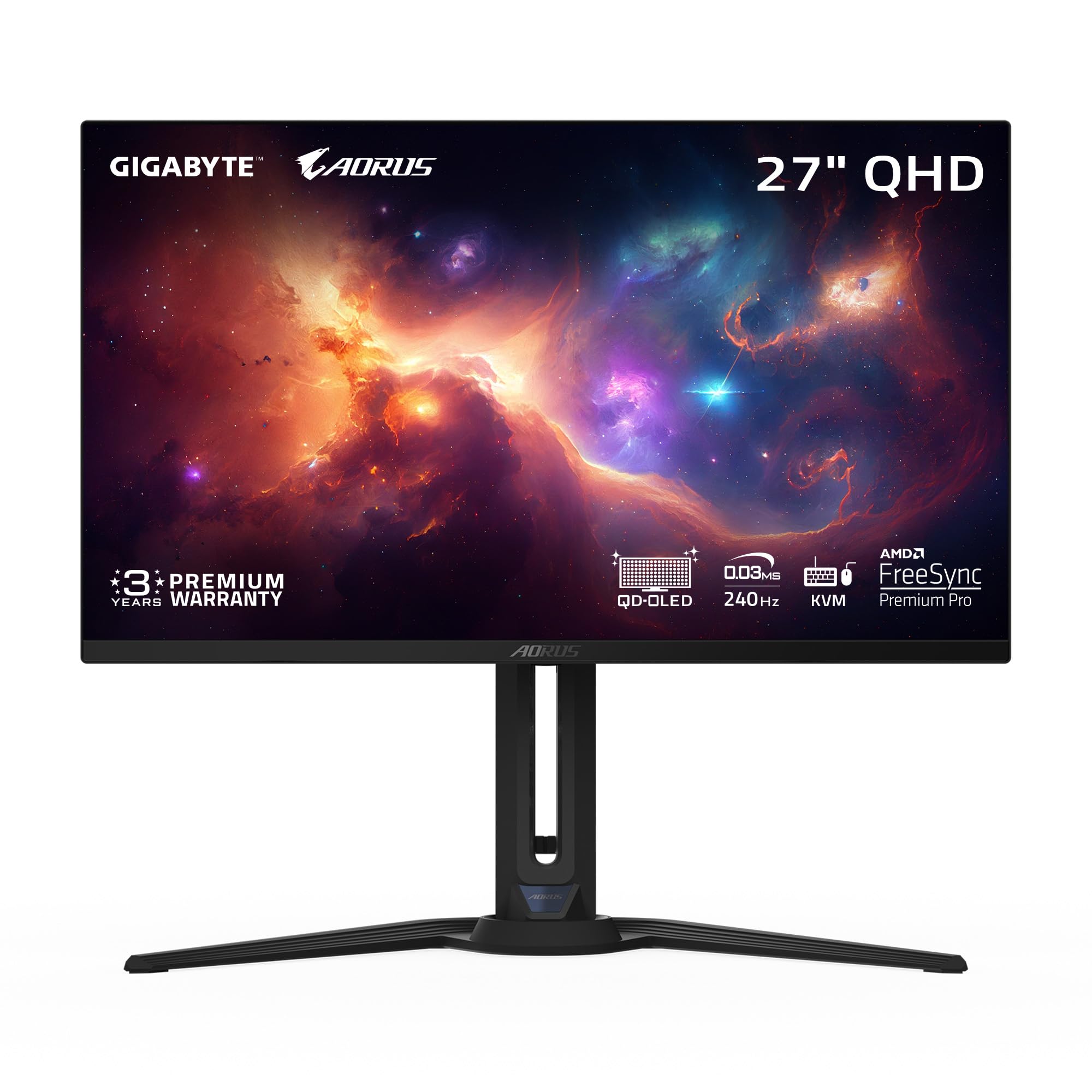
A connectivity king with Type-C KVM and superb build quality.
The GIGABYTE AORUS FO27Q2 is a fantastic choice if your desk has more than one device. Its Type-C KVM functionality lets you control a laptop and a desktop with a single keyboard and mouse, making it incredibly convenient. It’s built on a 3rd-gen QD-OLED panel, offering a 27-inch QHD 2560×1440 display with a 240Hz refresh and 0.03ms GTG response time.
The image quality is “pixel perfect,” with a 1500000:1 contrast ratio, 99% DCI-P3 color gamut, and 10-bit color depth for lifelike visuals. It supports VESA DisplayHDR True Black 400 and carries a VESA ClearMR 13000 certification, ensuring top-tier motion clarity for fast-moving content. For protection, GIGABYTE uses an AI-based algorithm in its OLED Care suite to minimize burn-in risk.
Owners praise the “superb build quality” and beautiful display, noting it’s bright enough even for a sunny room. The 3-year warranty includes burn-in coverage, which is reassuring. Some buyers had to disable Windows VRR to avoid flicker, but the connectivity options are the best in this list.
bright panel: The Type-C KVM and comprehensive connectivity make it the best choice for a multi-device setup.
bright room: users who switch between a work laptop and a gaming PC and want one clean setup.
desk space: the stand is huge, so most owners end up using a monitor arm anyway.
Understanding the Specs
QD-OLED vs. WOLED
These are the two main OLED panel types. QD-OLED uses a blue light source with quantum dots to create red and green, often resulting in more vibrant colors and better brightness. WOLED, used in the ASUS PG27AQDP, uses a white light source with color filters. Both look incredible, but QD-OLED tends to offer a wider color gamut.
Refresh Rate and Response Time
Refresh rate (Hz) tells you how many times the screen updates per second—360Hz is great for fast games, while 480Hz and 500Hz are for the absolute elite. Response time (ms) is how fast a pixel changes color; 0.03ms on these OLEDs is so fast that ghosting is essentially a non-issue.
Burn-in and Mitigation Features
Burn-in happens when a static image is left on screen for a long time, leaving a permanent ghost. These monitors fight it with custom heatsinks, pixel refresh cycles, and automatic dimming of static elements. A warranty that explicitly covers burn-in is a strong sign the manufacturer stands behind its panel.
HDR and Contrast Ratio
Contrast ratio is the difference between the brightest white and darkest black a screen can show. OLEDs have perfect blacks, so their contrast is effectively infinite. HDR builds on this with brighter highlights and richer colors, and VESA DisplayHDR True Black 400 is a common certification these monitors carry.
FAQ
What does 1440p resolution mean on a 27-inch monitor?
Is OLED burn-in still a big risk in 2025?
How many Hz do I need for competitive gaming?
What is the difference between G-SYNC and FreeSync?
Will these monitors work with a PS5 or Xbox?
What does a contrast ratio of 1500000:1 actually mean?
Do I need a powerful PC to drive a 360Hz or 480Hz monitor?
What is QD-OLED and how is it different from regular OLED?
Can I use these monitors for photo or video editing?
What is a KVM switch on a monitor?
Final Thoughts: The Verdict
For the majority of shoppers, the best 27 inch 1440p oled monitor is the ASUS ROG Strix XG27ACDNG because it combines a premium 360Hz panel with sturdy burn-in protection and a reassuring 3-year warranty. If you’re looking for the absolute best value and don’t need the highest refresh rate, grab the AOC Q27G4ZD for its unbeatable price-to-performance ratio. And for the competitive purist chasing every last millisecond of response time, the INNOCN 2780M is the one to reach for.
How We Picked
We do not accept paid placement. Every pick is matched to a real buyer and a real use-case; we do not hands-on test units.
Sources & Methodology
Specifications: manufacturer listings and product documentation. Review insights: verified customer reviews, as of August 2026. Pricing: not shown on this page (it changes often); check the current price via the retailer link.
As an Amazon Associate, Gadgets Feed earns from qualifying purchases. This does not affect which products we feature.