
Our readers keep the lights on and my morning glass full of iced black tea. As an Amazon Associate, I earn from qualifying purchases.
Specs are compiled from manufacturer listings and verified buyer reviews and can change over time — please confirm the key details on the product page before buying.
An all-in-one laser printer (a single machine that prints, scans, and copies) sidesteps most of that by using toner powder instead of liquid ink, which dries out and forces you to replace cartridges constantly. This guide focuses on the best AIO laser printers that pair fast output with honest running costs, so you can pick the one that fits your workload instead of guessing.
I’m Min — the founder and writer behind Gadgets Feed. This guide is built by comparing the manufacturers’ published specifications and the patterns across verified customer reviews, so you get each pick’s real strengths and trade-offs instead of marketing spin.
Whether you’re equipping a busy office or a corner desk, the right aio laser printer balances speed, running costs, and ease of setup with the features you’ll actually use every day.
Our Picks at a Glance
How To Choose The Right All-In-One Laser Printer
Laser printers (which fuse dry toner powder onto paper with heat) are built for volume in a way inkjets aren’t. Before you compare models, settle these three decisions: color or monochrome, how many people share it, and what your monthly page count really looks like.
Color vs. Monochrome
Black-and-white lasers are cheaper to buy and far cheaper to run because you only ever replace one black toner cartridge. Color lasers add cyan, magenta, and yellow cartridges, which raises both the upfront price and the per-page cost, but they make presentations, charts, and any document with brand colors look professional. If your output is mostly text and forms, a monochrome model is the smarter money.
Paper Handling and Auto-Duplex
An auto document feeder (a tray that pulls in a stack of pages for scanning or copying without you feeding them one by one) saves real time when you digitize multi-page contracts. Auto-duplex printing (the machine flips each page and prints the back side automatically) cuts your paper use roughly in half. Check the paper tray capacity too — a 250-sheet drawer means fewer refill trips than a 100-sheet tray on a busy week.
Running Costs: Toner Yield
The cartridge yield (the number of pages a single toner cartridge prints before it runs dry) is the number that decides your long-term budget. A high-yield cartridge that prints a few thousand extra pages usually costs less per page than the standard cartridge that ships in the box. Look up the replacement toner price for any model you’re considering before you buy the printer itself.
Quick Comparison
| Model | Best For | B&W Speed | Color | Initial Page | Amazon |
|---|---|---|---|---|---|
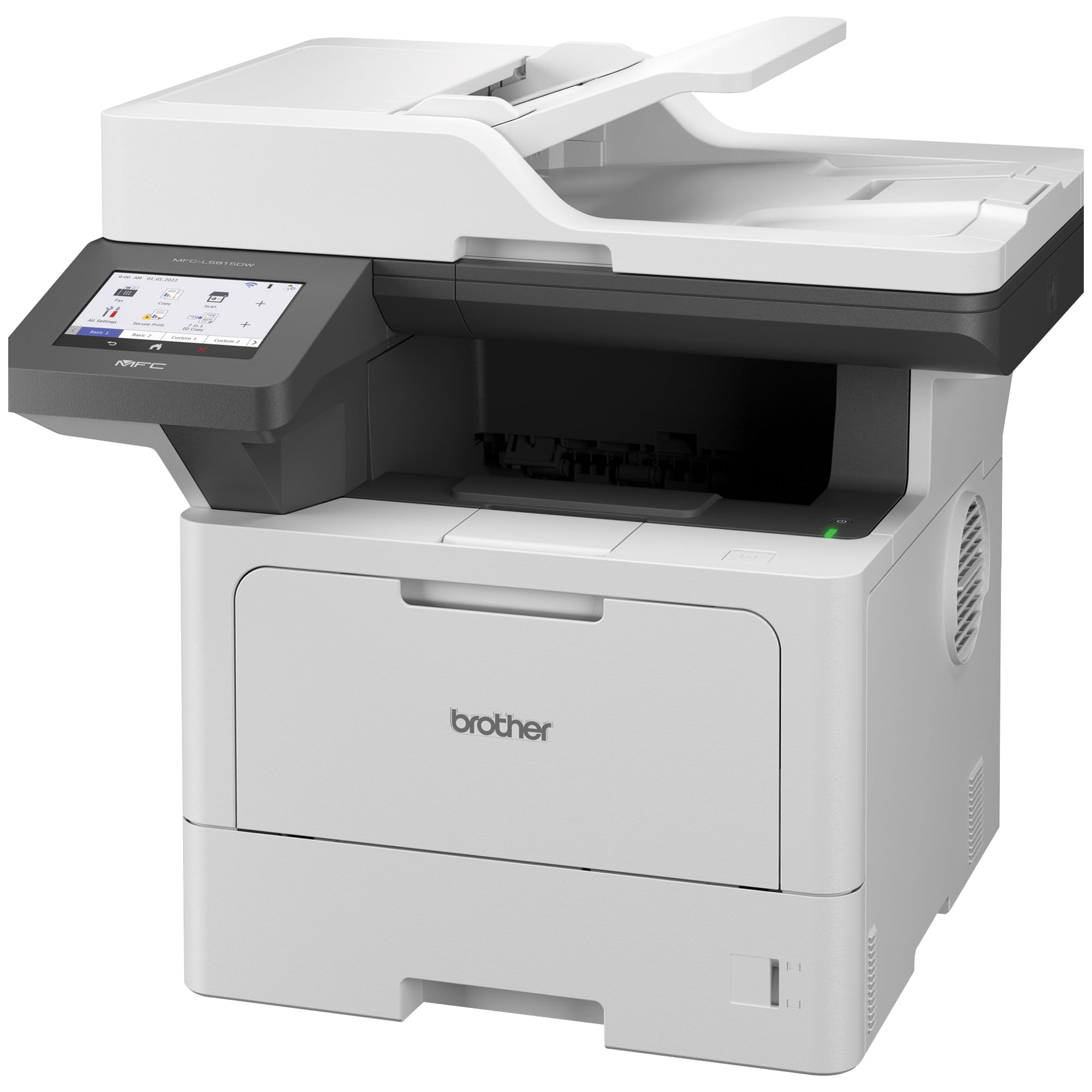
| Brother MFC-L5915DW★ Best Overall | High-volume offices | 50 ppm | — | 6.7 sec | Amazon |
| HP LaserJet Pro MFP 3105sdw | Small teams up to 7 users | 33 ppm | — | 4.6 sec | Amazon |
| Canon MF753Cdw II | Home offices wanting color | 35 ppm | 35 ppm | 7 sec | Amazon |
| HP Color LaserJet Pro MFP 4301fdw | Small teams needing fax | 35 ppm | 33 ppm | — | Amazon |
In‑Depth Reviews
1. Brother MFC-L5915DW
Our pick — over 4★ from 150+ verified ratings; the strongest balance of quality and price.
A 50 ppm monochrome workhorse built to handle 1,000-page days without jamming.
This Brother leads the list because it’s built for the busiest desks. It prints black-and-white documents at 50 pages per minute (the fastest of these four) and spits out the first page in just 6.7 seconds, so a long report is in your hands before the coffee cools. Buyers report it “handles heavy daily use (1000+ front/back prints) with labels/envelopes without failure” — that is a machine you stop thinking about.
Its auto document feeder holds 70 pages and scans two-sided documents in a single pass at up to 56ipm (images per minute), which means digitizing a stack of double-sided forms doesn’t require flipping anything. The auto 2-sided print function is standard, and the machine prints, copies, and scans. What wins people over is the print quality — owners consistently call it out as the standout trait, with speed a close second.
You will save money on every page you print, because this printer uses the Brother Genuine TN920UXXL ultra high-yield toner cartridge, which prints 18,000 pages, and even the included starter cartridge prints 3,000 pages. That keeps your per-page cost low over a full year of heavy use. Swapping paper sizes requires manually removing loaded paper and switching trays, so legal-size jobs need extra fiddling. At 48.5 pounds, it needs a sturdy, level table.
Built for Volume
- 50 ppm monochrome speed leads this entire list
- 6.7-second first page means almost no wait
- 18,000-page high-yield toner option keeps costs down
- Wired Gigabit Ethernet and dual-band wireless networking
Handle With Care
- Switching paper sizes requires manual tray changes
- Heavy unit needs a durable, level surface
- Scan-to-email setup demands some networking expertise
The bottom line: if your team prints thousands of pages a month and you want the lowest long-term cost per page, this is the one to buy.
Reach for this if: you need a fast, durable monochrome workhorse — think twice if you regularly switch between paper sizes mid-job.
2. HP LaserJet Pro MFP 3105sdw
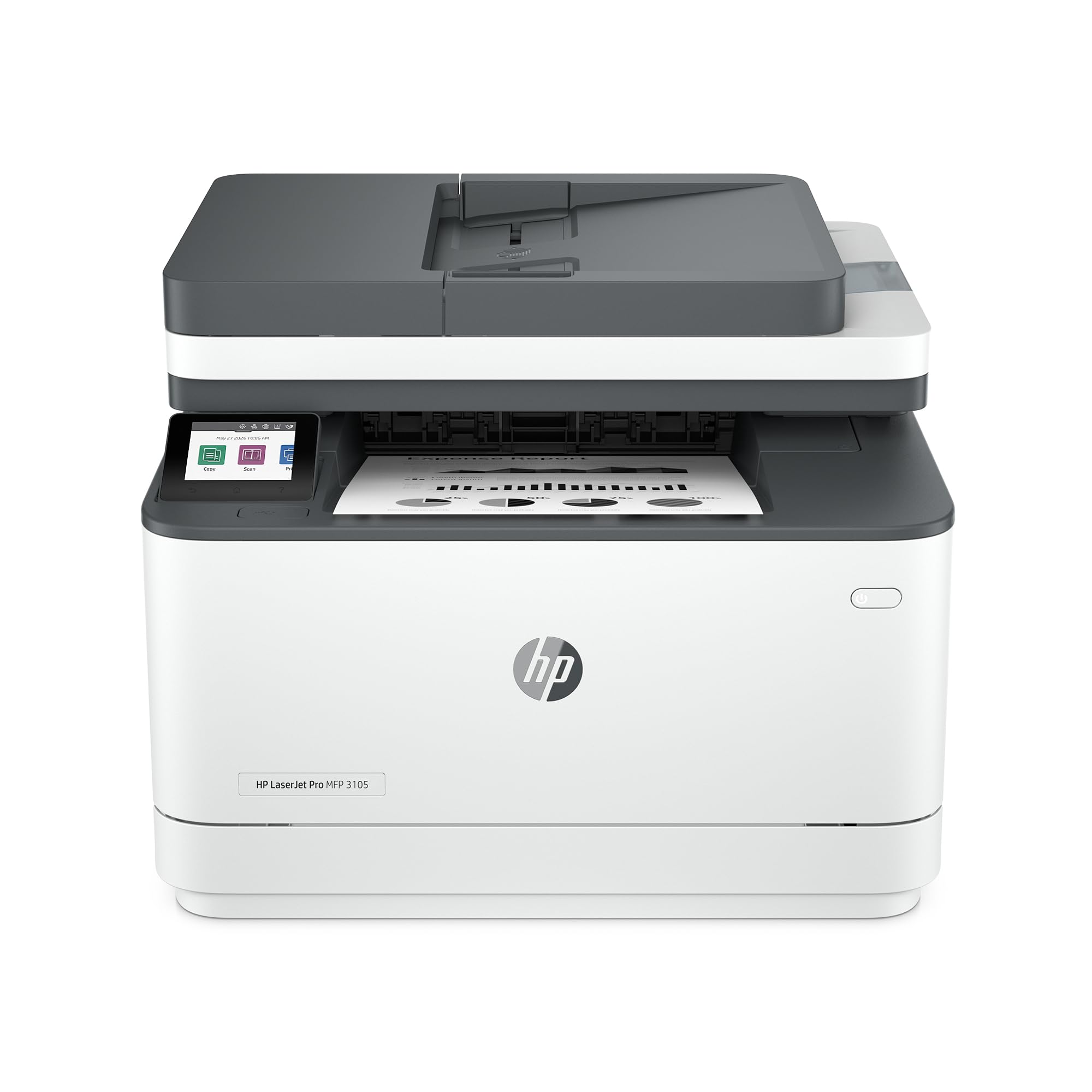
A 33 ppm monochrome all-in-one with a 4.6-second first page, held back only by finicky Wi-Fi setup.
For small teams of up to 7 people who need print, scan, and copy without paying for speed they won’t use, this HP is the value pick. It prints at 33 pages per minute, which trails the Brother’s 50 ppm up top, but it fires the first page out in just 4.6 seconds — noticeably quicker off the line than the Brother’s 6.7 seconds when you only need a single page. Owners mention a “fast setup (<10 min)” with wireless and mobile printing that runs jam-free.
The auto-duplex, legal-size tray, and HP Wolf Pro Security make it a smart buy at this price. It auto-prints on both sides (duplex printing), scans one-sided through its document feeder, and the tray extends for legal-size paper via a blue button — a detail buyers specifically praise. The security story is genuinely different here: HP Wolf Pro Security includes customizable settings to protect your data, and the HP AI features generate smart subject lines for scan-to-email and strip unwanted content from web-page prints.
Here’s the catch, and it’s worth knowing before you buy. The Wi-Fi setup process is the recurring gripe — on older Macs the wireless refused to connect until owners switched to a USB cable, and the Android app sometimes fails to find the printer at all. On the plus side, once it’s installed, customers note reliable connections and a generous paper tray that lasts about a month of normal use. The follow-up question most buyers have is toner: this printer only works with cartridges that use original HP chips and will block third-party toner, so you’re committed to HP cartridges for life.
Easy Day-to-Day
- 4.6-second first-page speed beats the top pick
- Auto 2-sided printing and one-sided document feeder
- HP Wolf Pro Security protects your print data
- Compact footprint at 15.7″D x 16.5″W x 12.3″H
Know Before You Buy
- Wi-Fi setup can be finicky, especially on older Macs
- Locks out third-party toner cartridges
- Black-and-white only — no color output
Smart money: this is the pick for a small team wanting fast, secure monochrome printing without the business-class price tag.
Look elsewhere if: you need color output, or you hate the idea of being locked into HP-brand toner forever.
3. Canon Color imageCLASS MF753Cdw II

A 35 ppm color all-in-one that prints crisp charts and runs 600-page jobs without jamming.
If your documents need color — charts, marketing one-pagers, anything with a brand identity — this Canon is the strongest all-around color pick here. It prints both black-and-white and color at 35 pages per minute, so color output doesn’t slow you down, and the first page lands in 7 seconds. It’s a true 4-in-1, printing, scanning, copying, and faxing, with an automatic document feeder and auto-duplex (two-sided) printing as standard.
Print quality is the most-praised trait here, with color quality right behind it. Review pages describe crisp text and vibrant colors, and the hardware has been run hard: one owner reports handling a single job of up to 600 pages without a jam, and another logged five months of use with zero paper jams and reliable Wi-Fi. The starter cartridges lasted more than 600 black-and-white pages and 900 color pages before needing attention, which is strong for included toners.
The caveat is split two ways. Setup is mixed — some owners found it easy, others describe the interface as clunky, and wireless connectivity gets mixed feedback, with some buyers struggling to connect. There’s also a slight learning curve if you’re new to lasers. And on the consumable side, the Canon 069 starter cartridges have a modest yield (1,100 for cyan, magenta, and yellow, 2,100 for black), so plan your replacement budget. The 3-year limited warranty plus mobile printing from your phone via the Canon app make it a solid long-term home-office buy.
Color That Impresses
- 35 ppm in both black-and-white and color
- True 4-in-1 with fax, copier, scanner, and printer
- 3-year limited warranty for confidence
- Auto document feeder and auto-duplex standard
Worth Knowing
- Setup and wireless connectivity earn mixed feedback
- Toner replacement costs add up for heavy color use
- Legal paper requires the bypass tray, cutting capacity
The takeaway: for a home office that wants professional color documents and fax capability, this Canon delivers the best all-around balance.
skip it if: you’re not comfortable troubleshooting a finicky first-time setup, or you print color only occasionally and could save with a monochrome model.
4. HP Color LaserJet Pro MFP 4301fdw

A refurbished 35 ppm color all-in-one with fax and strong graphics for small teams.
This refurbished HP is the option if your small team needs full color, fax capability, and a machine sized for up to 10 people. It prints black-and-white at 35 pages per minute and color at 33, so color jobs barely slow it down, and it handles print, scan, copy, and fax in one unit. Owners who got a good unit describe superb color graphics and a quality that matches a brand-new printer.
Print quality is the most-cited positive trait, with setup ease close behind. The scan-to-network-folder feature and the generous embedded web server options get specific praise from owners, and the HP app makes mobile printing easy. For security, it shares the same HP Wolf Pro Security found on the monochrome 3105sdw, and the intelligent Wi-Fi looks for the best connection to stay online.
The honest caveat here is the refurbished gamble. This is a renewed unit, and while many reviewers point out it arrived well-packed and looking like new, an occasional unit shows up damaged with missing parts or half-used toner — one owner’s experience was poor enough to sour them entirely. There’s also a placement quirk: the loading tray sits at the very bottom, so the printer can’t sit directly on carpet or you can’t open it. Given the strong core performance, this pick suits you if you’re comfortable with the small risk that comes with any refurbished purchase.
Color Team Player
- 35 ppm black-and-white and 33 ppm color
- Print, scan, copy, and fax in one machine
- HP Wolf Pro Security included for data protection
- 4 preinstalled starter toner cartridges in the box
Refurb Realities
- Renewed units vary; some arrive damaged or missing parts
- Bottom-loading tray needs a hard surface, not carpet
- Toner is overpriced, per owner feedback
Who it’s for: a small team that wants color, fax, and security in one machine and is willing to buy refurbished to get there.
The one limit: that refurbished lottery means checking your unit’s packing and toner levels the day it arrives.
Understanding the Specs
Pages Per Minute (ppm)
This is the speed rating for printing, and it tells you how many pages the machine can output in one minute. Real-world speed depends on the document’s complexity, but the gap matters: a 50 ppm printer tears through a 100-page report in about two minutes, while a 33 ppm model takes closer to three. For a busy office, that difference adds up fast.
Initial Page Print Time
This is the seconds between hitting “print” and the first page landing in the tray. It’s the number that defines the “first cup of coffee” wait. A machine with a 4.6-second first-page time feels instantly responsive for single-page jobs, while a 7-second model feels slightly more deliberate. For offices printing lots of small jobs, this spec matters more than raw ppm.
FAQ
What does an all-in-one laser printer actually do?
Is a color laser printer worth the extra cost?
How long does a laser toner cartridge last?
Does an AIO laser printer work with my phone or tablet?
How do I choose between Brother, HP, and Canon?
What is an auto document feeder and do I need one?
Can these printers handle legal-size paper?
What does a refurbished laser printer mean for quality?
Final Thoughts: The Verdict
For most people, the aio laser printer winner is the Brother MFC-L5915DW because its 50 ppm speed and 18,000-page high-yield toner make it the lowest long-term cost for any busy office. If you want a smaller, faster-starting monochrome machine for a team of up to 7, grab the HP LaserJet Pro MFP 3105sdw with its 4.6-second first page. And for professional color output backed by a 3-year warranty, the Canon MF753Cdw II is the one to reach for.
How We Picked
We do not accept paid placement. Every pick is matched to a real buyer and a real use-case; we do not hands-on test units.
Sources & Methodology
Specifications: manufacturer listings and product documentation. Review insights: verified customer reviews, as of August 2026. Pricing: not shown on this page (it changes often); check the current price via the retailer link.
As an Amazon Associate, Gadgets Feed earns from qualifying purchases. This does not affect which products we feature.