
Our readers keep the lights on and my morning glass full of iced black tea. As an Amazon Associate, I earn from qualifying purchases.
Specs are compiled from manufacturer listings and verified buyer reviews and can change over time — please confirm the key details on the product page before buying.
The jump to a 240Hz gaming monitor is about one thing: feeling the game respond to you the instant you move. This guide breaks down the best 240Hz gaming monitor options into clear choices based on panel type, resolution, and budget, so you can pick the one that actually fits your setup.
I’m Min — the founder and writer behind Gadgets Feed. This guide is built by comparing the manufacturers’ published specifications and the patterns across verified customer reviews, so you get each pick’s real strengths and trade-offs instead of marketing spin.
Before diving in, a quick note: the list below includes monitors running at 240Hz and beyond (we accept 360Hz screens as part of the family), so you can find the best 240Hz gaming monitor for your specific gaming style.
Our Picks at a Glance

How To Choose The Best 240Hz Gaming Monitor
The single biggest decision is your panel type. It dictates color, black levels, and response time. Understanding the trade-offs between different panel technologies is the first step to getting a display you’ll love.
IPS vs OLED vs VA: Which Panel Wins?
IPS panels (like the ones in the Pixio and ASUS TUF above) offer the best all-around color accuracy and viewing angles, making them ideal for both gaming and daily work. OLED panels (like the AOC and LG picks) deliver perfect blacks and stunning contrast, which makes games look dramatically more vibrant, but they typically cost more and require a bit of care to prevent burn-in.
Resolution: 1080p vs QHD (1440p)
At 27 inches, a QHD (2560×1440) resolution gives you a noticeably sharper image than 1080p, which matters if you want crisp text and fine details in games. However, pushing 240 frames per second at 1440p needs a very powerful graphics card, so if you’re on a budget GPU, a 1080p monitor like the Pixio PX279 is the easier, more reliable path to high frame rates.
Quick Comparison
| Model | Best For | Refresh Rate | Resolution | Panel Type | Amazon |
|---|---|---|---|---|---|
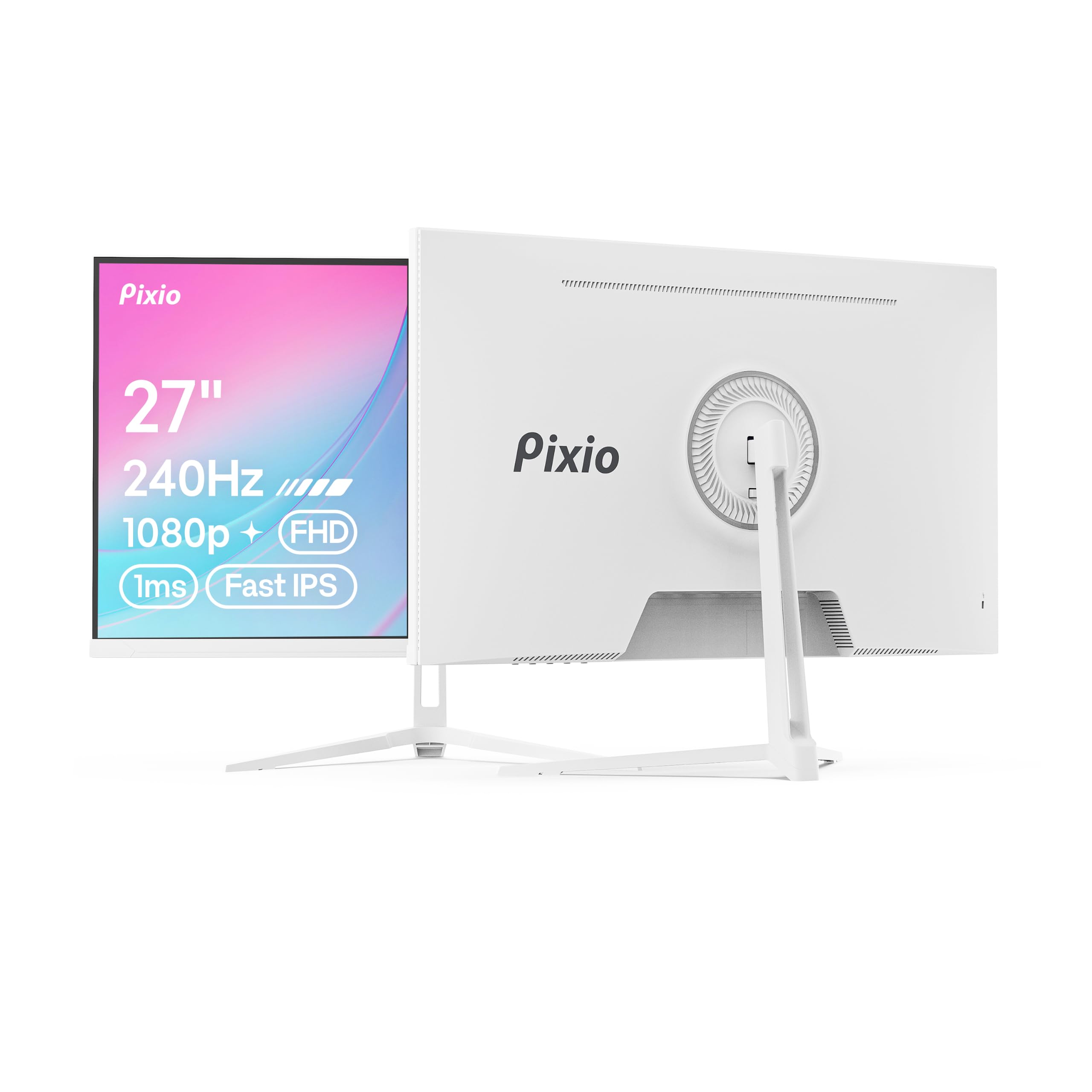
| Pixio PX279 Wave White★ Best Overall | Budget 1080p gaming | 240Hz | 1920 x 1080 | Fast IPS | Amazon |
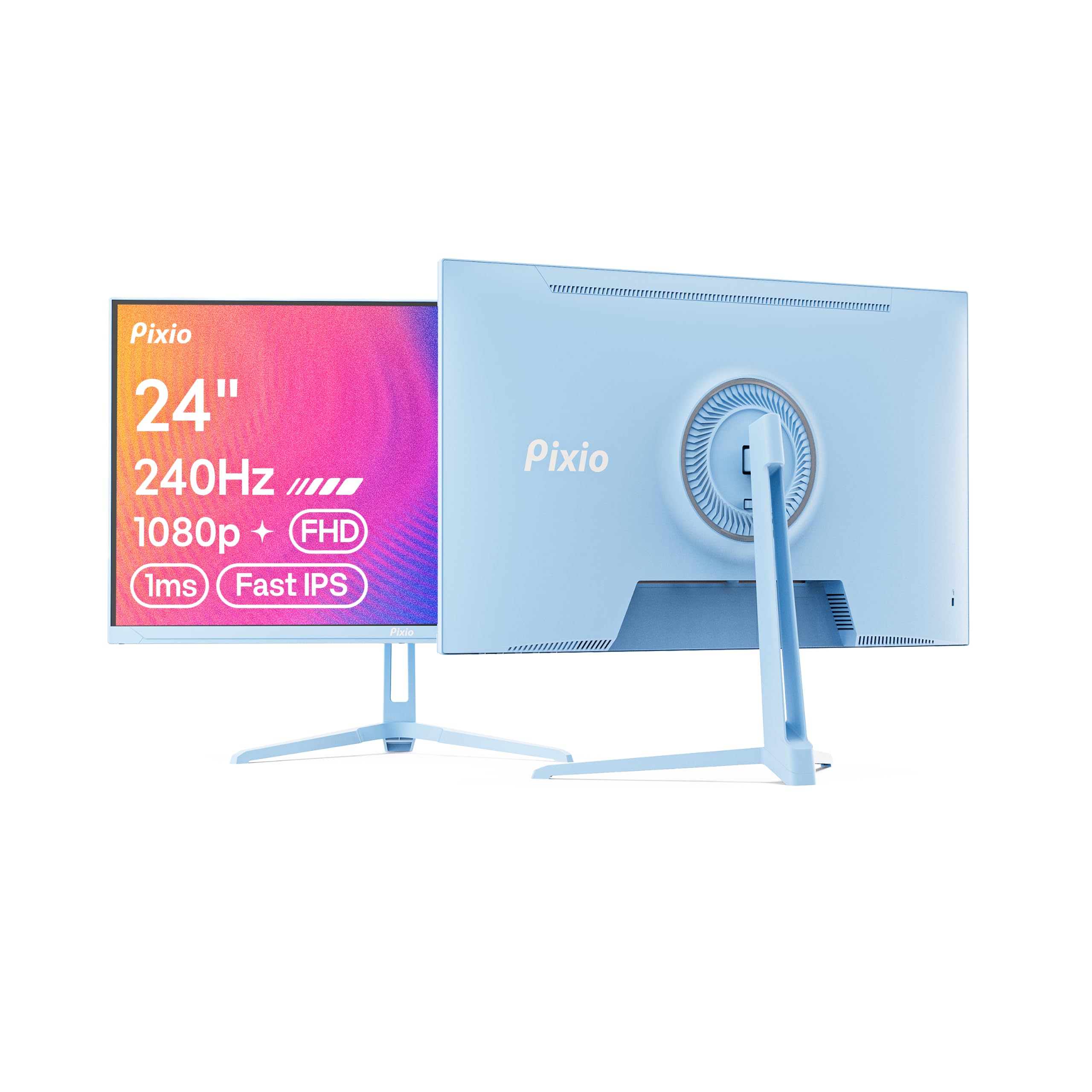
| Pixio PX249 Wave BlueEsports Pick | Compact 1080p esports | 240Hz | 1920 x 1080 | Fast IPS | Amazon |
| ASUS TUF Gaming VG27AQM5ATop Performer | High-refresh 1440p | 300Hz | 2560 x 1440 | Fast IPS | Amazon |
| LG 27GR83Q-B | Console and PC versatility | 240Hz | 2560 x 1440 | IPS | Amazon |
| AOC Q27GAZD | Entry into OLED | 240Hz | 2560 x 1440 | QD OLED | Amazon |
| AOC Agon Pro AG276QZD2 | Bright OLED gaming | 240Hz | 2560 x 1440 | OLED | Amazon |
| LG 27GX704A-B | Glossy OLED with console ports | 240Hz | 2560 x 1440 | OLED | Amazon |
| ASUS ROG XG27AQDMG | Premium OLED color accuracy | 240Hz | 2560 x 1440 | WOLED | Amazon |
| Samsung Odyssey G6 G61SH | Glare-free QD-OLED | 240Hz | 2560 x 1440 | QD-OLED | Amazon |
| MSI MAG 271QPX | Ultra-fast 360Hz response | 360Hz | 2560 x 1440 | QD-OLED | Amazon |
| Samsung Odyssey G9 G95C | rich ultrawide | 240Hz | 5120 x 1440 | VA | Amazon |
In‑Depth Reviews
1. Pixio PX279 Wave White
Our pick — over 4.5★ from 450+ verified ratings; the strongest balance of quality and price.
The budget 27-incher that proves 1080p can still feel buttery fast.
If you are hunting for a smooth 240Hz experience without spending premium money, this Pixio delivers exactly that. The 27-inch Fast IPS panel refreshes at 240Hz with a 1ms GTG response time, so fast-moving scenes stay clear and responsive, giving you a real edge in competitive shooters without the ghosting that plagues slower screens.
Its picture quality stands out at this price tier — a 350 cd brightness rating makes it noticeably brighter than the 24-inch Pixio PX249 below, which tops out at 300 cd. Buyers regularly call out the looks, with the color options being a genuine crowd-pleaser, and the built-in speakers plus tilt adjustment make it a practical choice for a first gaming setup or a secondary display for programming and console play.
Adaptive Sync (which matches the screen’s refresh to your graphics card’s output) eliminates screen tearing for smooth gameplay, and the matte anti-glare finish keeps reflections down. The main trade-off is the modest built-in speakers, and an occasional unit has arrived with a dead pixel, so check it promptly when it lands.
What Owners Love
- Bright 350 cd panel with vivid, crisp game visuals
- Multiple color options that match the marketing photos
- Easy setup with all necessary cables included and a wall-mount piece
The Trade-Offs
- Built-in speakers are weak; external ones recommended
- An occasional unit arrives with a dead pixel
Reach for this if: you want the most 240Hz gaming monitor for your dollar and prefer a brighter 1080p panel.
Look elsewhere if: you demand perfect pixel-perfect panels and plan to use the built-in speakers for primary audio.
2. Pixio PX249 Wave Blue
A compact 24-inch speedster that makes the most of your desktop space.
For the gamer who values a smaller footprint and wants every frame to count, this 24-inch Pixio is a responsive companion. You get the full 240Hz refresh rate with a 1ms response time, which means no frustrating ghosting or trailing in fast-paced titles, giving you the edge in competitive play without the desk-hogging size of larger screens.
Connectivity is a strong point here: it supports both HDMI 2.0 and DisplayPort 1.4, each capable of pushing 1920×1080 resolution at 240Hz, which assures maximum compatibility with PCs, laptops, and consoles. The IPS panel delivers vibrant colors and wide viewing angles, and the slim bezels keep the look modern, while the 112% sRGB coverage and 300 nits brightness (300 cd) deliver solid color for both gaming and everyday work.
The experience is largely positive, with owners highlighting the great value and sharp FHD clarity, though the sole DisplayPort cable in the box means you’ll need your own HDMI for a multi-monitor setup. The tilt-only stand lacks height adjustment, so a VESA arm is the fix if you want more ergonomic flexibility, and a few buyers report occasional QC quirks — one box arrived with a crushed end, so inspect the packaging on delivery day.
Speed demon: the 1ms Fast-IPS response makes it feel snappier than its price suggests, and it’s a great fit for competitive shooters and JRPGs alike.
The catch: budget-tier speakers and a basic tilt-only stand are the corners cut to hit this price.
Best for: casual gamers, students, and esports fans who want a smooth 240Hz experience on a smaller, budget-friendly screen.
Think twice if: you need height or rotation adjustment from the start, or you rely on built-in audio.
3. ASUS TUF Gaming VG27AQM5A
A QHD speedster that outruns the 240Hz crowd with a 300Hz refresh.
Serious competitive gamers will appreciate this ASUS TUF, which pushes beyond the 240Hz standard to a blazing 300Hz refresh rate — 300Hz versus the 240Hz on the Pixio PX279 Wave White above — while boosting resolution to QHD (2560×1440) compared with the Pixio’s 1920 x 1080. You get a sharper, faster image that feels almost unfair in fast-paced shooters.
Its 0.3ms (GTG) response time (min.) is remarkably fast, and the Extreme Low Motion Blur Sync (ELMB Sync) lets you run motion blur reduction and variable refresh rate together, eliminating ghosting and tearing for sharp visuals. The 1300:1 contrast ratio also beats the Pixio’s 1000:1, so scenes carry a bit more depth and punch, and the 95% DCI-P3 color gamut means rich, accurate colors for both gaming and creative work.
The build quality gets consistent praise, especially the durable stand that prevents desk shake, and the 3-year warranty covers dead pixels — useful confidence. Shadow Boost brightens dark areas without over-exposing bright spots, and a recurring note is that, for an IPS panel, the pixel response is genuinely impressive; the honest trade-off is that it’s not OLED-level contrast, and an occasional unit arrives with a dead pixel or a minor cracking noise, so check it early.
Speed and sharpness: it’s the rare combination of 300Hz refresh and 1440p resolution, making it ideal for competitive gaming that demands both.
Choose this if: your GPU can push high frame rates at 1440p and you want a versatile display for gaming and work.
skip it if: you’re on a budget GPU that struggles to hit 300 frames at 1440p — you’d be paying for speed you can’t use.
4. LG 27GR83Q-B Ultragear

The QHD workhorse that plays nice with both PC and console.
This LG Ultragear is built for gamers who don’t want to pick between smooth and sharp. The 27-inch QHD (2560×1440) IPS panel runs at 240Hz with a 1ms (GtG) response time, and its HDMI 2.1 and DisplayPort 1.4 connections both support the full 240Hz refresh rate, making it a strong option for next-gen consoles and high-end PCs alike.
It’s officially validated by NVIDIA as G-SYNC Compatible, which means smoother, tested frame pacing that reduces screen tearing, and it also supports AMD FreeSync Premium for those on Radeon hardware. Color is a highlight: it covers up to 95% (Typ.) of the DCI-P3 color gamut, and its VESA DisplayHDR 400 rating adds dynamic contrast, while the 400 cd brightness keeps things vivid.
The stand is a genuine plus — it adjusts for tilt, height, and pivot, which is rare at this price point, and owners consistently praise the sturdy feel and sharp, responsive image.
Dual-platform star: the G-SYNC and FreeSync Premium compatibility, plus HDMI 2.1, make it a one-monitor solution for PC and PS5 or Xbox owners.
Perfect for: gamers juggling a PC and a modern console who want one high-refresh QHD display for both.
Worth knowing: pixel quality is the most common complaint, so the first-week inspection matters.
5. AOC Q27GAZD

The most affordable way to get that OLED contrast magic on your desk.
This is the gateway into OLED gaming, and it delivers the dramatic difference you’ve heard about. The 27-inch QD OLED panel (Quantum Dot OLED, which uses quantum dots for richer color) runs at 240Hz with a 0.03ms (GtG) response time, so motion is practically instant and dark scenes show deep, true blacks that IPS screens simply can’t match.
Its HDR400 True Black certification means deeper blacks and brighter highlights, and the color coverage is stunning: 147.6% sRGB and 110.2% DCI-P3. The 1,500,000:1 contrast ratio is a massive leap over the 1000:1 you get on typical IPS panels, which is why scenes look so dimensional. It’s also G-Sync Compatible, so it works smoothly with NVIDIA GPUs to stop tearing.
The experience has won over most owners, who note the beautiful glossy finish, great HDR and peak brightness, and that there’s no visible text fringing or eye strain even after long sessions — impressive for an OLED. The stands and buttons are basic, and the brightness gets mixed feedback (some find it plenty, others want more), plus a slight buzz is audible on full-white images for some; it’s still widely considered a no-brainer over TN or IPS panels at this price.
OLED Wins
- Phenomenal color accuracy and deep, true blacks
- 240Hz with a super-low 0.03ms response
- Sharp 1440p resolution with no text fringing for most
What’s Basic
- Stand is basic and the 4-button control is clunky
- Brightness is good enough, not exceptional
Ideal for: anyone who wants the OLED look without the OLED price tag and owns an NVIDIA GPU.
Keep in mind: if you need a fully adjustable stand or the absolute peak brightness, this might leave you wanting more.
6. AOC Agon Pro AG276QZD2

A tournament-grade OLED that throws in serious brightness and built-in speakers.
The Agon Pro line is AOC’s top-tier gaming series, and this OLED model brings a notable brightness boost. With 1000 cd of peak brightness, this panel is significantly brighter than many OLED competitors, which usually sit in the 250-400 cd range, making it easier to see details in well-lit rooms and delivering stunning HDR highlights.
It’s more than just bright: the self-luminous OLED panel delivers genuine blacks and over 1.07 billion colors, and its color gamut covers 101% DCI-P3 and 136.7% sRGB. The 240Hz refresh rate and 0.03ms response time make it excellent for fast-paced esports titles, and it’s G-Sync compatible for tear-free gameplay, with the back lighting adding customizable flair to your setup.
Owners mention that the factory calibration is excellent, with vivid colors right from the start, and that it’s a joy for games like Valorant and Doom. The built-in speakers are serviceable, the stand is compact, and the glossy finish looks premium, though the stand can feel a bit wobbly when adjusting and some find the default picture slightly washed out until tweaked — a quick adjustment fixes it for most.
Brightness king: this is the OLED for bright rooms, with 1000 cd peak that outshines the more common 275 cd panels.
Choose this if: you want a bright, vivid OLED for gaming in a well-lit room and appreciate built-in speakers.
pass on it if: you need the most adjustable stand on the market, which is its weakest point.
7. LG 27GX704A-B Ultragear

A glossy OLED that makes colors pop and is made for next-gen consoles.
If you value that rich, vibrant look that glossy screens deliver, this LG Ultragear is a standout choice, offering a striking glossy finish with up to 240Hz refresh and a 0.03ms response time. It delivers a standard 275 nits of brightness and peaks at 1300 nits, so dark corners stay detailed and explosions stay dazzling, keeping action visible in any environment.
Its connectivity is a standout feature: dual HDMI 2.1, DP 1.4, plus USB 3.2 ports, which makes it an excellent pairing for next-gen consoles and high-end PCs. The panel covers up to 98.5% DCI-P3 color, and its VESA DisplayHDR True Black 400 certification with a 1.5M:1 contrast ratio delivers deep blacks and bright highlights, and it’s both G-SYNC Compatible and FreeSync Premium Pro certified.
It also carries three UL certifications for eye comfort, covering Anti-Glare, Flicker-Free, and Low Blue Light, which helps during long sessions, and its virtually borderless design looks sleek. Buyers consistently note the crisp text and low eye strain for daily work, while the OLED Care features help mitigate image retention; some note dark scenes can flicker, and it lacks smart features, but for pure gaming it’s top-tier.
Glossy glamour: the glossy finish makes colors look more saturated and vibrant than typical matte panels, and text stays crisp for work.
Perfect for: PS5 or Xbox owners wanting HDMI 2.1 with the deep blacks of OLED and the punch of a glossy screen.
Worth noting: a few owners see dark-scene flicker, so if you’re sensitive to that, check it early.
8. ASUS ROG XG27AQDMG

A third-gen WOLED that pairs gaming speed with serious color accuracy.
This ROG monitor is for gamers who also care about color fidelity. The 26.5-inch QHD (2560 x 1440) glossy WOLED panel (a White OLED, a specific type of OLED panel) runs at 240 Hz with a 0.03 ms response time, and its third-generation WOLED technology provides brighter full-white windows, clearer text, and improved motion clarity. It covers a full 99% DCI-P3 color space, making it excellent for both gaming and content creation.
Its G-SYNC Compatible support ensures smooth, tear-free gameplay, and the advanced cooling design — including a custom heatsink and ROG OLED Care functions — works to reduce the risk of burn-in, which is a key concern with OLED panels. The exclusive ROG OLED Anti-flicker technology helps reduce flicker during refresh-rate fluctuations, and a Uniform Brightness setting keeps luminance levels consistent.
The display quality is the headline: buyers rave about the vivid colors, deep blacks, and clear picture, and the glossy finish helps with perceived clarity. The 3-year warranty with burn-in coverage is a strong safety net, and the highly adjustable stand and versatile ports make setup flexible; the honest note is that no speakers are built in, and a few buyers mention variable refresh rate flicker that was resolved by swapping cables or disabling the feature.
Color and clarity: the 99% DCI-P3 coverage plus 240Hz makes it a rare dual-purpose pick for gaming and creative work.
Best for: the gamer who also does photo or video editing and wants OLED blacks with high color accuracy.
Remember: you’ll need external speakers or a headset, since there are none built in.
9. Samsung Odyssey OLED G6 G61SH

A glare-free QD-OLED that handles bright rooms with colors that pop.
Samsung’s Odyssey OLED G6 is engineered for gamers who play in bright spaces, thanks to its Glare Free Technology that keeps the screen clear of reflections from external light. This is a real differentiator, as many OLED panels have glossy finishes that struggle in sunlit rooms; this one stays readable, and its QD-OLED display delivers high brightness and a wide range of colors.
The 27-inch QHD (1440p) panel runs at 240Hz with a 0.03ms response time and supports AMD FreeSync Premium, which reduces choppiness, screen lag, and image tearing. It’s Pantone Validated, accurately reproducing 2100+ lifelike colors and 110+ skin tone shades, making it a solid pick for creators, and its HDR10 support provides brighter highlights and nuanced shadows.
OLED Safeguard technology helps prevent burn-in with a thermal modulation system, and the height-adjustable ergonomic stand pivots, tilts, and swivels for the perfect view. Colors are the strength here — owners call them terrific and the build sturdy — but the out-of-box settings need work: a common note is that until you calibrate HDR in Windows and tune the display, the image looks disappointing, so budget a few minutes for setup.
Bright-room ready: Glare Free is the feature that matters in a sunlit space, and this is the panel that delivers on it.
Reach for this if: you play in a bright room and want a QD-OLED that resists reflections and still looks vivid.
Plan for: spending time calibrating HDR and picture settings — factory defaults don’t show the panel at its best.
10. MSI MAG 271QPX

The 360Hz OLED for players who refuse to miss a single frame.
For the most demanding esports athletes, this MSI pushes refresh rate to a staggering 360Hz using a 3rd Gen QD-OLED panel, versus the standard 240Hz monitors and eliminating motion blur with its 0.03ms GtG response time. If you have the GPU to feed it, this is about as fluid as gaming gets.
Its QD Premium Color ensures the color meets the market standard with Delta E ≤ 2, which is a measure of color accuracy where lower is better, and the VESA DisplayHDR True Black 400 certification delivers deep blacks and bright highlights. Console Mode provides HDMI 2.1 with WQHD@360Hz and full 48 Gbps bandwidth, so it’s ready for the latest consoles too, and MSI OLED Care 2.0 reduces the risk of burn-in.
The 2560 x 1440 (QHD) resolution looks crisp, and buyers consistently praise the phenomenal color reproduction, deep blacks, and near-infinite contrast. The understated design and fast input response make it great for competitive and story gaming alike, and its 98% DCI-P3 color gamut keeps things vibrant; the known trade-offs are the burn-in risk (manageable with care and a 3-year burn-in warranty) and occasional VRR flicker, plus DSC can slow alt-tab transitions.
Frame-rate fiend: this is the monitor for players chasing every possible frame, with a response time fast enough to keep up.
Choose this if: you’re a competitive gamer with a high-end GPU that can actually hit 360 frames and you want OLED colors.
Think twice if: your GPU can’t push those frames — you’d be leaving speed on the table that a 240Hz panel could give you for less.
11. Samsung Odyssey G9 G95C

The 49-inch curved beast that wraps your entire field of view.
This is the monitor for those who want to be fully immersed, with a massive 49-inch 1000R curved screen that wraps deeply around your field of view. Its Dual QHD 5120×1440 resolution enables full peripheral vision that draws you into the game, and the 240Hz refresh rate with 1ms(GtG) response time delivers blur-free frames and minimized ghosting, so fast action stays crisp.
With 1000 nit peak brightness and a 1,000,000:1 contrast ratio, it offers enhanced color expression and depth, easily handling bright daytime scenes and dark, shadowy corners alike. The 32:9 aspect ratio effectively replaces a dual-monitor setup with a single smooth display, and AMD FreeSync Premium Pro projects fast-moving scenes smoothly and stutter-free.
It’s a productivity powerhouse too: Picture-by-Picture lets you view two sources simultaneously, and picture-in-picture resizes a second source to up to 25%, while Auto Source Switch+ auto-detects when devices turn on. The swivel, tilt, and height-adjustable Hexa stand offers flexibility, and the 92% DCI-P3 color gamut keeps colors vibrant; the recurring concern is reliability, with some owners reporting failures around the 9-month mark, so a warranty is worth considering.
Immersion Plus
- Massive 49-inch curved screen with excellent 1000 nit brightness
- Dual QHD resolution eliminates the bezel gap of dual monitors
- 240Hz refresh rate with a smooth 1ms response
What To Watch
- Reliability is the biggest concern — some units have failed around the 9-month mark
- The sheer width isn’t for everyone; it dominates a desk
Built for: sim racers, flight simmers, and productivity users who want the most rich single-screen experience available.
Be aware: this is a big investment in both money and desk space, and reliability reports suggest you should keep the warranty active.
Understanding the Specs
Refresh Rate (Hz)
This is how many times the screen redraws its image every second. A 60Hz monitor shows 60 frames per second, while a 240Hz monitor shows up to 240, which makes motion look significantly smoother and reduces the blur you see when you turn quickly in a game. It’s the defining spec of this category.
Response Time (ms)
This is how quickly a pixel can change color. A faster response time, measured in milliseconds (ms), means less ghosting or trailing behind fast-moving objects. For competitive gaming, a 1ms response time is common, but OLED panels can hit an incredible 0.03ms, which is practically instant.
FAQ
Is a 240Hz gaming monitor worth it for console gaming?
Can my PC run a 240Hz monitor at full speed?
What is the difference between G-Sync and FreeSync?
Is OLED worth the higher price for gaming?
Is 1080p or 1440p better for a 27-inch monitor?
What does response time like 1ms GTG or 0.03ms actually mean?
What is DisplayHDR and should I care?
How do I prevent OLED burn-in on a gaming monitor?
What is the ideal response time for a 240Hz monitor?
What is the ideal response for a 240Hz monitor?
Final Thoughts: The Verdict
If you want one dependable pick, the best 240hz gaming monitor winner is the ASUS TUF Gaming VG27AQM5A because it delivers a 300Hz refresh rate and sharp QHD resolution in one versatile package. If you want the deep, vivid colors of OLED without the premium price, grab the AOC Q27GAZD. And for a truly rich ultrawide experience that wraps around you, the Samsung Odyssey G9 G95C is the one to reach for.
How We Picked
We do not accept paid placement. Every pick is matched to a real buyer and a real use-case; we do not hands-on test units.
Sources & Methodology
Specifications: manufacturer listings and product documentation. Review insights: verified customer reviews, as of August 2026. Pricing: not shown on this page (it changes often); check the current price via the retailer link.
As an Amazon Associate, Gadgets Feed earns from qualifying purchases. This does not affect which products we feature.