
Sacrificing the dedicated arrow key cluster to save desk space is a compromise many 60% keyboard users eventually regret. You want the ultra-compact footprint that declutters your desk and frees up mouse space, but losing those four navigation keys breaks your muscle memory and slows down everyday workflows. What you actually need is a 60% board that refuses to compromise — a layout that fits a shoebox yet still gives you dedicated arrow keys without requiring awkward function-layer holds.
I’m Rikta — the co-founder and writer behind Gadgets Feed. I’ve spent countless hours comparing PCB layouts, switch travel distances, wireless latency figures, and gasket-mount acoustics across more than three dozen compact mechanical keyboards to find the models that truly deliver arrow keys in a 60% shell. (And Homer 🐱 supervised every unboxing from his warm spot on the RGB-lit boxes).
Whether you are a programmer navigating code one line at a time or a gamer dodging strafes without an extra hand, the right 60 percent layout keeps your muscle memory intact and your desk clean. This guide zeroes in on the very best 60 keyboard with arrow keys currently available, cutting through the spec sheet noise with the hard measurements that actually matter.
How To Choose The Best 60 Keyboard With Arrow Keys
Not all 60% keyboards are created equal when arrow keys are a requirement. Many compact boards hide arrows under a function layer, which kills the whole point of tactile navigation. You need a layout that physically places the arrow cluster — usually by shifting the right Shift key, reducing modifier widths, or pushing to a 65% edge — without bloating the footprint beyond the true 60% spirit. The following factors will help you zero in on the right board.
Layout Architecture: How the Arrows Fit
The defining engineering tradeoff in any 60 keyboard with arrow keys is how the manufacturer squeezes those four switches into the standard 61-key grid. The best designs shorten the right Shift key to a 1.75u cap, collapsing the bottom row and pushing arrows into the gap that traditionally holds the menu key and right Ctrl. Some boards extend to 65% (adding a column) while still marketing the “60% compact” ethos — know the difference. A genuine 60% arrow layout keeps the board at roughly 11.5 inches wide. Anything wider is technically a 65%.
Switch Type: Linear, Optical, or Hall Effect
Arrow keys for gaming demand fast, repeatable inputs with zero double-registration. Linear switches (red-type) give you a smooth, uninterrupted press that feels natural for rapid tapping. Optical switches use a light beam for near-instant actuation at 1.0mm, shaving milliseconds off every downstroke. Hall Effect magnetic switches go further, offering adjustable actuation points from 0.1mm to 4.0mm and Rapid Trigger that registers the moment you lift — ideal for strafing in FPS titles where arrow keys double as movement keys. For pure typing and editing, a pre-lubed linear switch with a creamy sound profile is the sweet spot.
Connectivity & Latency
Wired USB-C remains the gold standard for latency-sensitive arrow inputs — expect sub-1ms response with 1000Hz polling. High-end wired Hall Effect boards now push 8000Hz polling with 0.125ms latency, which is overkill but future-proof. For wireless, look for 2.4GHz dongle connectivity (not Bluetooth alone) if you need arrow-key precision in gaming. Bluetooth 5.0 works fine for typing and productivity, but introduces 8-12ms of perceivable delay that competitive users will notice when tapping arrows for precise cursor movement.
Build Materials & Keycaps
Arrow keys take a beating — especially the up and down keys in rhythm games and first-person shooters. Double-shot PBT keycaps resist shine and legend wear far better than standard ABS. An aluminum or alloy top frame adds rigidity, preventing PCB flex that can cause switch chatter on fast arrow presses. Gasket-mount construction dampens the bottoming-out sound, giving each arrow press a softer, thockier feel without harsh metallic ring. If you hot-swap frequently, look for a PCB that supports both 3-pin and 5-pin switches to future-proof your arrow key replacement options.
Quick Comparison
On smaller screens, swipe sideways to see the full table.
| Model | Category | Best For | Key Spec | Amazon |
|---|---|---|---|---|
| IQUNIX EV63 | Hall Effect | Competitive FPS & Esports | 0.01mm Rapid Trigger | Amazon |
| AULA Hero 68 HE | Hall Effect | Fast-paced Gaming | 8000Hz Polling Rate | Amazon |
| RK ROYAL KLUDGE M65 | Gasket Mount | Premium Wireless Typing | 240hr Battery (RGB off) | Amazon |
| Womier Q61 V2 | QMK/VIA | Programmable Workflows | 3000mAh Battery | Amazon |
| Razer Huntsman Mini | Optical Switch | Speed-First Typing & Play | 1.0mm Actuation | Amazon |
| HyperX Alloy Origins 60 | Aircraft Aluminum | Brutal Durability | 80M Keypress Life | Amazon |
| RK ROYAL KLUDGE RK61 | Tri-Mode | Budget Multi-Device | 3-Mode Connectivity | Amazon |
In‑Depth Reviews
1. IQUNIX EV63 Hall Effect Magnetic Gaming Keyboard
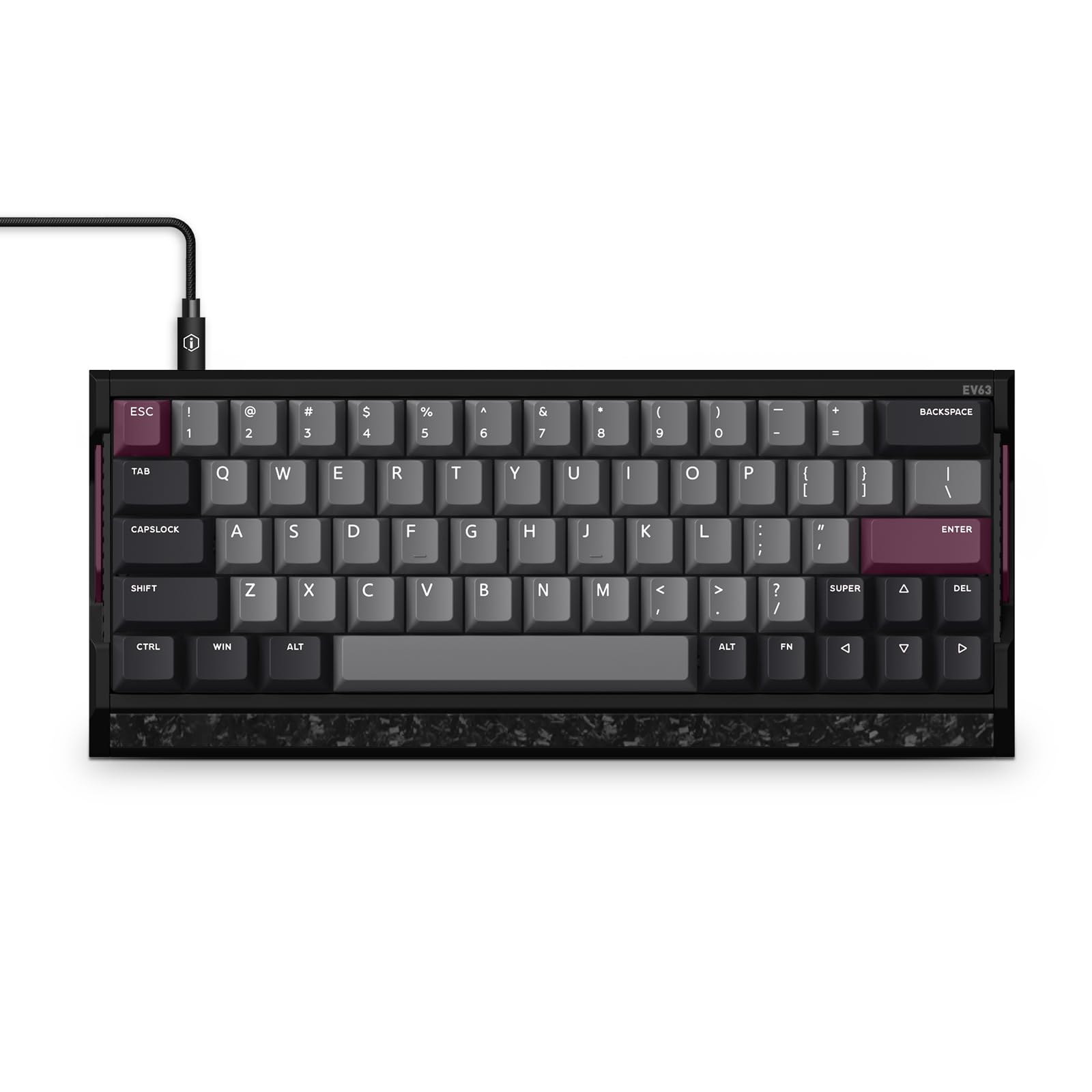
The IQUNIX EV63 sits at the premium end of the arrow-key 60% spectrum, and it earns that position through sheer engineering rigor. Its aircraft-grade CNC aluminum unibody with a forged carbon fiber front panel delivers a 2.7-pound heft that completely eliminates any deck flex — every arrow press feels solid and grounded. The third-gen Hall Effect magnetic switches, paired with the M.A.T. 2.0 algorithm, offer a 0.01mm Rapid Trigger with 8000Hz polling and 0.125ms latency, making this board a legitimate contender for esports-grade performance.
Dedicated arrow keys are integrated into a 64-key layout that keeps the board at 11.86 inches wide — true 60% dimensions. The translucent keycaps let the south-facing RGB shine through evenly, and the overall sound profile is thocky with a satisfying bottom-out that doesn’t ring. The web-based driver handles all remapping, including SOCD, RS, and DKS modes, which Valorant and CS:GO players will find immediately useful for counter-strafing and angle-peeking.
What elevates the EV63 beyond other Hall Effect boards is the self-calibrating algorithm that maintains consistency without constant tweaking. The 400% wider usable voltage range eliminates the missed-input ghosting that plagues cheaper magnetic switches. For anyone who demands the fastest possible arrow response in a compact chassis, this is the board.
Why it’s great
- CNC aluminum and forged carbon build is rock-solid and premium
- 0.01mm Rapid Trigger with 8000Hz polling for instant arrow response
- Self-calibrating M.A.T. 2.0 eliminates manual tweaking
Good to know
- Priced at the top end of the category
- Web driver not compatible with macOS
2. AULA Hero 68 HE Hall Effect Magnetic Switch Keyboard

The AULA Hero 68 HE brings Hall Effect magnetic switch technology to a mid-range price point without cutting crucial features. It delivers an 8000Hz polling rate with 0.125ms latency — figures that match boards costing three times as much. The adjustable actuation range of 0.1mm to 3.4mm (in 0.01mm increments) gives arrow-key users fine-grained control over how much travel they want before registration, which is a game-changer for rhythm games and precise cursor work.
The 68-key layout includes dedicated arrow keys without expanding the frame beyond a true 60% footprint. The side-printed PBT keycaps are a thoughtful design touch — every modifier is labeled on the side face, keeping the top surface clean while still being readable. The purple colorway and RGB lightbox on the front panel add personality, though the plastic enclosure doesn’t match the rigidity of aluminum alternatives. The web driver handles remapping, macros, and actuation customization without requiring an install, but it is Windows-only.
Where the Hero 68 HE truly shines is its Fast Trigger mode, which registers the instant a key starts moving upward, enabling rapid arrow spamming without fully releasing. This is a premium feature typically reserved for + boards, making the AULA an outstanding value for competitive users on a tighter budget. The included two spare magnetic switches are a nice insurance policy for high-use arrow keys.
Why it’s great
- Hall Effect switches with Rapid Trigger at a budget-friendly price
- 8000Hz polling and 0.125ms latency for competitive gaming
- Side-printed PBT keycaps resist wear and look clean
Good to know
- Driver software is Windows-only
- Plastic case doesn’t feel as premium as aluminum boards
3. RK ROYAL KLUDGE M65 Wireless Mechanical Keyboard with Volume Knob
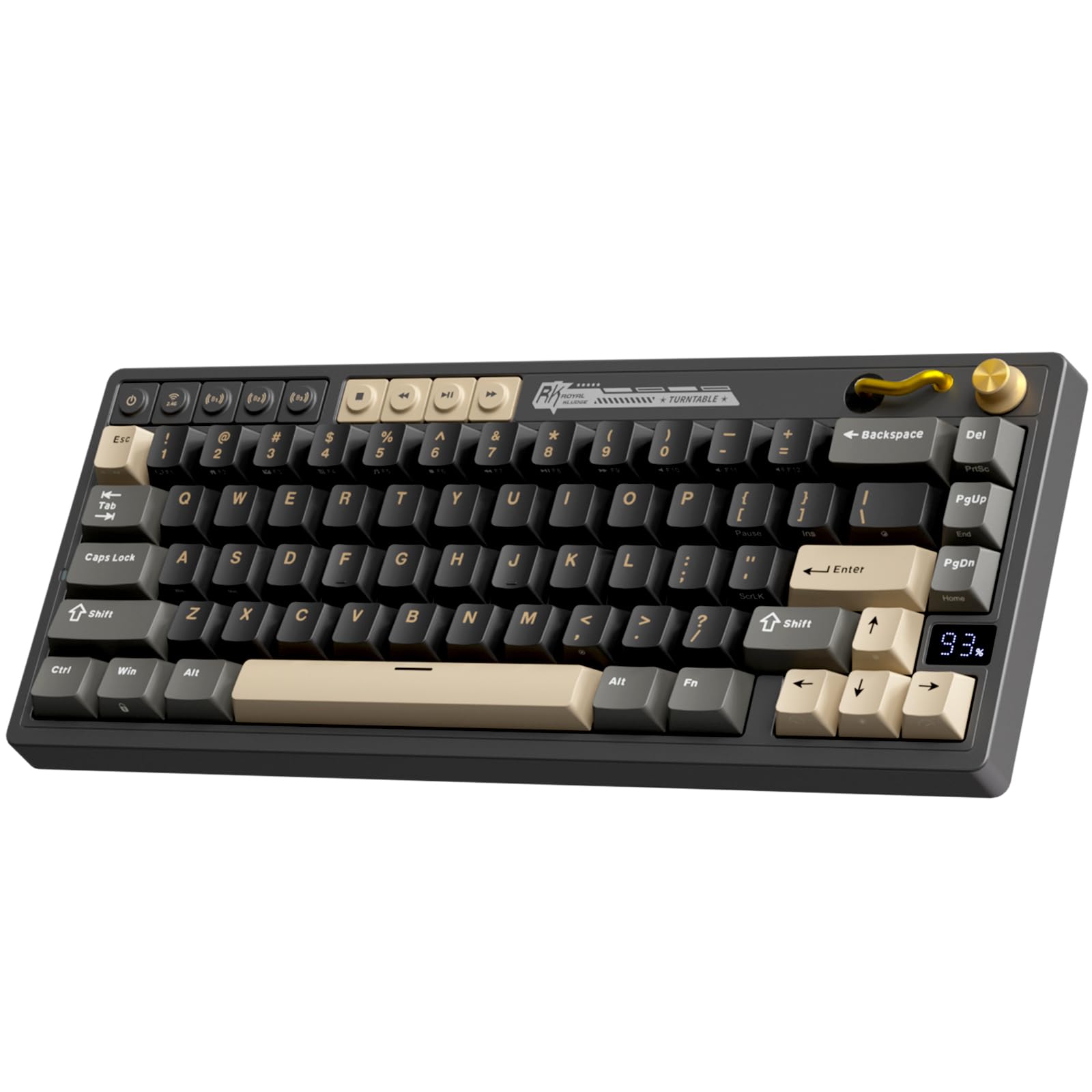
The RK ROYAL KLUDGE M65 is the rare wireless board that nails the arrow-key layout without requiring a wired tether. It uses a 66-key arrangement that squeezes dedicated arrows into the bottom-right corner while retaining a volume knob — a luxury you rarely find on 60% frames. The gasket-mount construction with sound-damping layers produces a quiet, crisp typing experience that makes arrow-key navigation feel smooth and un-rattly, even during rapid presses.
Tri-mode connectivity (2.4GHz, Bluetooth 5.0, USB-C) gives you flexibility across three paired devices, and the battery life is rated up to 240 hours with RGB disabled. A small LED display on the top edge shows remaining charge, so you are never surprised by a dead board mid-session. The hot-swappable PCB accepts both 3-pin and 5-pin switches, and the included pre-lubed Cream switches feel smooth out of the box — though some users report the factory lubrication wears off after a few weeks of heavy arrow-key gaming.
What makes the M65 particularly useful is the vintage turntable-inspired volume knob — it maps naturally to media volume and can be pressed to mute, eliminating the need to hunt for function layers during gameplay. The PBT double-shot keycaps resist shine well, though the plastic chassis lacks the weight of aluminum boards. For a wireless-first user who refuses to give up dedicated arrows, the M65 is the most complete package at its price level.
Why it’s great
- Dedicated arrow keys plus a physical volume knob in a 60% wireless frame
- Gasket-mount construction delivers quiet, thocky typing
- Up to 240 hours battery with RGB off
Good to know
- Plastic build may not satisfy users wanting a premium metal feel
- Pre-lubed switches may lose lubrication with heavy daily use
4. Womier Wireless Gaming Keyboard Q61 V2
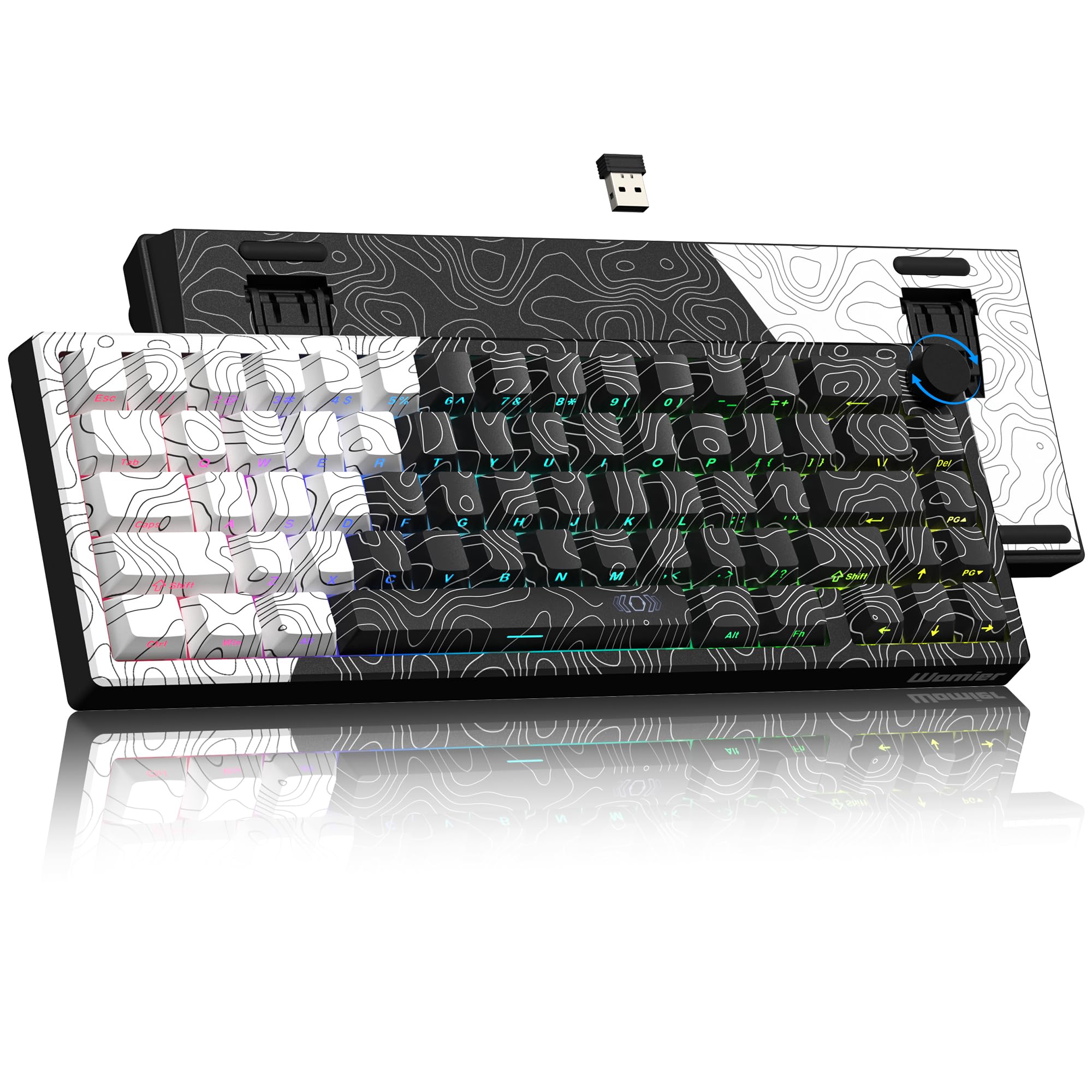
The Womier Q61 V2 stands out for its open-source DNA — it ships with QMK and VIA firmware, giving you complete control over every key assignment, macro, and lighting layer. The 63-key layout includes dedicated arrow keys by compacting the right modifiers, and the topographical design on the front and back panels is genuinely distinctive. The gasket-mount structure, combined with full POM linear switches, produces a creamy, marbly sound profile that keyboard enthusiasts rave about.
Tri-mode wireless (2.4GHz, Bluetooth 5.0, USB-C) with a 3000mAh battery keeps the Q61 V2 running for weeks under mixed use. The south-facing RGB LEDs shine through the MOA-profile dye-sublimation PBT keycaps beautifully, though the stock keycaps have a playful Comic Sans-adjacent font that may not appeal to everyone. At approximately 588 grams, it’s light enough for travel but dense enough to stay planted during aggressive arrow-key use.
The POM Rose Whisper switches are pre-lubed and feel smooth for the first few days, but reports indicate the lubrication degrades faster than with premium factory-lubed switches. Because the board is hot-swappable (3-pin and 5-pin compatible), replacing switches on the heavily-used arrow cluster is straightforward. The VIA remapping happens in wired mode but persists into wireless, so your custom arrow-layer shortcuts survive even when you unplug.
Why it’s great
- Full QMK/VIA programmability for custom arrow-key mapping
- 3000mAh battery provides exceptional wireless endurance
- Gasket-mount with POM switches delivers creamy, marbly sound
Good to know
- Stock keycap font style is quirky and may not suit everyone
- Factory lubrication on switches wears relatively quickly
5. Razer Huntsman Mini 60% Gaming Keyboard

The Razer Huntsman Mini is a 61-key board that achieves its dedicated arrow keys through a heavily condensed bottom row — the right Shift, Alt, Ctrl, and Fn keys are all shrunk to make room for a usable arrow cluster. While the layout is cramped compared to 65% competitors, the tradeoff pays off for those who insist on the smallest possible footprint. The linear optical switches actuate at just 1.0mm with a 15-30% shorter travel distance than standard mechanical switches, making each arrow press feel almost instant.
The aluminum top frame gives the Huntsman Mini a premium heft at 1.1 pounds, and the oil-resistant double-shot PBT keycaps resist the shine that ABS caps develop within months. Razer Chroma RGB remains the gold standard for ecosystem lighting — it syncs with hundreds of games and third-party devices. The included Snap Tap feature (via Synapse 4) prioritizes the most recent direction input between a pair of assigned keys, which is particularly useful for arrow-key-based movement in platformers and fighting games.
Where the Huntsman Mini falls short is its Micro USB connectivity — it is the only board in this roundup that doesn’t use USB-C, which feels dated in 2025. The optical switches are not hot-swappable either, so you are locked into Razer’s switch ecosystem. For pure speed and software integration though, the Huntsman Mini is a proven performer that thousands of competitive players rely on daily.
Why it’s great
- Optical switches actuate at 1.0mm for incredibly fast arrow presses
- Aluminum top frame with PBT keycaps feels durable and premium
- Razer Chroma RGB ecosystem syncs with hundreds of games
Good to know
- Uses Micro USB instead of USB-C
- Switches are not hot-swappable, limiting customization
6. HyperX Alloy Origins 60 Mechanical Gaming Keyboard

The HyperX Alloy Origins 60 uses a full aircraft-grade aluminum body that gives it a structural rigidity uncommon at its price point. The 60% layout does include arrow keys — they are accessed via a function layer by default with side-printed legends on the PBT keycaps showing secondary functions. While this is not a “true” physical arrow layout, the side printing makes the layer easy to learn, and the HyperX NGENUITY software allows you to remap the bottom-right cluster to act as permanent arrow keys if you prefer.
HyperX’s custom linear red switches are rated for 80 million keypresses — the highest durability rating in this comparison. The exposed LED design on the switches produces exceptionally bright, true-color RGB lighting that looks stunning with pudding-style keycap upgrades. Three adjustable keyboard angles (via two-step feet) let you find the perfect ergonomic tilt for comfort during long sessions of arrow-intensive editing or gaming.
Where the Alloy Origins 60 compromises is the stabilizers — users consistently report excessive lateral wobble and rattle on the larger keys, including the arrow cluster. A simple band-aid or electrical tape mod can mitigate the noise, but it is an extra step out of the box. The detachable USB-C cable is a nice portable touch, and the included extra Esc key and spacebar are a bonus for personalization. For users who prioritize brute durability and lighting over pre-built acoustic perfection, this is a strong contender.
Why it’s great
- Full aircraft-grade aluminum frame is incredibly rigid and durable
- HyperX switches rated for 80 million keypresses
- Exceptionally bright RGB lighting with exposed LEDs
Good to know
- Arrow keys are default function-layer; requires software remap for direct arrows
- Stabilizers have noticeable rattle and lateral play out of the box
7. RK ROYAL KLUDGE RK61 60% Mechanical Keyboard

The RK ROYAL KLUDGE RK61 is the entry-level gatekeeper to the world of 60% arrow-key boards. It uses a standard 61-key layout where the arrow keys are hidden under a function layer — a design choice that has frustrated many buyers who later upgrade to a physical-arrow board. That said, for the price, it delivers tri-mode connectivity (2.4GHz, Bluetooth, USB-C), hot-swappable red linear switches, and 18 RGB backlight modes. The included coiled USB cable with a metal aviator connector is a surprising aesthetic touch at this price level.
The 8-degree ergonomic angle and integrated wrist rest provide decent comfort for extended typing sessions, though the plastic case and ABS keycaps feel noticeably less premium than the PBT-equipped alternatives on this list. The hot-swappable PCB accepts 3-pin switches, so you can replace the arrow switches with a different feel — for example, swapping in heavier tactile switches for the arrow cluster to prevent accidental presses while leaving the rest linear.
Customer reports indicate Bluetooth latency can be an issue for fast-paced gaming, and the software is practically non-functional (no macros, no per-key RGB customization). For pure productivity on a tight budget where arrow keys are used sparingly and the function layer is acceptable, the RK61 gets the job done. But if dedicated arrows are a hard requirement, consider stretching the budget for the M65 or the Womier Q61 V2 instead.
Why it’s great
- Tri-mode wireless (2.4G, Bluetooth, USB-C) at an entry-level price
- Hot-swappable PCB allows switch customization
- Coiled USB cable with aviator connector adds visual flair
Good to know
- Arrow keys are function-layer only, not physically dedicated
- Bluetooth latency is noticeable for fast gaming
FAQ
Can I get true dedicated arrow keys on a 60% keyboard without going to a 65% layout?
Are Hall Effect magnetic switches worth the extra cost for arrow-key users?
Is Bluetooth 5.0 fast enough for arrow-key gaming?
How do I replace arrow switches on a hot-swappable 60% board?
Final Thoughts: The Verdict
For most users, the 60 keyboard with arrow keys winner is the RK ROYAL KLUDGE M65 because it delivers genuine physical arrow keys, a gasket-mount typing experience, tri-mode wireless, and a volume knob — all within a true 60% footprint. If you want the absolute fastest Hall Effect performance for competitive gaming, grab the IQUNIX EV63 with its 0.01mm Rapid Trigger and aluminum construction. And for deep programmability where arrow keys can be remapped to any function imaginable, nothing beats the Womier Q61 V2 with its full QMK/VIA support.