
Our readers keep the lights on and my morning glass full of iced black tea. As an Amazon Associate, I earn from qualifying purchases.
Specs are compiled from manufacturer listings and verified buyer reviews and can change over time — please confirm the key details on the product page before buying.
Most affordable desktop computers promise smooth multitasking, but the real battle is against hidden bottlenecks: a processor that was mid-range five years ago, or 8GB of memory that vanishes the moment you open a dozen browser tabs. This guide sorts through the towers, all-in-ones, and mini PCs that actually hold up for everyday work, streaming, and light gaming without making you wrestle with an upgrade kit on day one.
I’m Min — the founder and writer behind Gadgets Feed. This guide is built by comparing the manufacturers’ published specifications and the patterns across verified customer reviews, so you get each pick’s real strengths and trade-offs instead of marketing spin.
if you need a space-saving mini PC, a single-screen all-in-one, or a traditional tower, this breakdown of the best affordable desktop computer options will point you to the right fit for your desk and your workload.
Our Picks at a Glance


How To Choose The Best Affordable Desktop Computer
An affordable desktop is a multi-year purchase, so the goal is to avoid a machine that feels sluggish in eighteen months. Focus on three things: the amount of RAM, the type of storage, and the form factor that fits your space. The processor matters, but a balanced configuration beats a big CPU with skimpy memory every time.
RAM: The Real Speed Governor
Think of RAM as your computer’s short-term memory for open apps. A machine with 16GB of RAM will keep dozens of browser tabs, a video call, and a spreadsheet running without stuttering, while an 8GB machine will start slowing down as you pile on tasks. If your budget allows, 16GB is the safer bet for longevity; look for the RAM capacity in the specs before you even check the processor.
Storage Type: SSD vs. HDD
The type of storage dictates how fast your computer boots and how quickly apps open. An SSD (Solid State Drive) loads Windows in seconds and makes everything feel snappy, while an older HDD (Hard Disk Drive) uses spinning platters that feel sluggish. Prioritize an SSD for your main drive—a 512GB SSD is a solid baseline for documents and media, and you can always add an external drive for extra space later.
Form Factor: Tower, All-in-One, or Mini PC
Your desk space dictates the shape. A traditional tower offers the easiest upgrades and usually the best performance per dollar, but takes up floor or desk room. An all-in-one bundles the computer into the monitor, saving space and cutting cable clutter, at the cost of harder internal upgrades. A mini PC is the smallest option—often smaller than a hardcover book—and sips power, making it ideal for tidy desks and basic workloads, though you’ll need to supply your own monitor, keyboard, and mouse.
Quick Comparison
| Model | Best For | Processor | RAM | Storage | Amazon |
|---|---|---|---|---|---|
| Dell Slim | Productivity & multi-monitor | Core Ultra 5 (4.9 GHz) | — | 512GB SSD | Amazon |
| GEEKOM A5 Mini | Ultra-compact workhorse | Ryzen 7 7730U (4.5 GHz) | 16GB | 512GB SSD | Amazon |
| Lenovo IdeaCentre | Single-screen simplicity | Intel N100 (3.4 GHz) | 8GB | 512GB SSD | Amazon |
| ACEMAGIC K1 Mini | Multi-display multitasking | i5-12600H (4.5 GHz) | 16GB | 512GB SSD | Amazon |
| HP 21.5″ AIO | All-in-one with bonus dock | Intel N100 (3.4 GHz) | 8GB | 128GB SSD + dock | Amazon |
| HP 22″ AIO | Everyday home office | 13th Gen N100 (3.4 GHz) | 8GB | 128GB SSD | Amazon |
| suevery Gaming PC | Entry-level gaming & RGB | AMD Ryzen 5 (4.1 GHz) | 16GB | 512GB SSD | Amazon |
| Lenovo 24″ AIO | Business AIO with wireless | Intel N100 (3.4 GHz) | 16GB | 128GB SSD | Amazon |
| GEEKOM IT13 Mini | Heavy multitasking & 8K | i5-13600H | 16GB | 1TB SSD | Amazon |
| Acer Aspire Tower | Expandable business tower | Core i3-13100 (4.4 GHz) | 16GB | 1TB (512GB SSD + HDD) | Amazon |
| HP Pavilion Tower | Compact space-saving tower | Core i5-10400 (4.3 GHz) | 16GB | — | Amazon |
In‑Depth Reviews
1. Dell Slim Desktop
The compact tower that keeps pace with a modern multi-monitor office setup.
You get a genuinely future-proof processor here. The Intel Core Ultra 5-225 runs up to 4.9 GHz—44% faster than the Lenovo IdeaCentre’s 3.4 GHz N100—delivering snappier app launches and smoother spreadsheet scrolling. Its 20 MB of cache memory also dwarfs the 6 MB in that same Lenovo, so frequently used data is held closer to the cores for faster recall.
Connectivity is where this slim tower shines for desk workers. You can drive up to four FHD monitors using DisplayPort 1.4a with daisy chaining, or pair two 4K displays via the HDMI 2.1 port. The tool-less side panel pops off for quick upgrades, and the built-in lock slot and padlock loop keep the machine physically secure when you step away. One year of onsite service means a technician comes to you if hardware trouble can’t be fixed remotely.
Buyers report that this replaced an 11-year-old Dell running Windows 10 and handled spreadsheets, word processing, and internet tasks with adequate speed and memory. The consensus is that it’s easy to set up, compact on the desk, and notably quiet—one owner simply called it a “nice and quiet desktop that does everything I was expecting.” The functionality is praised most often, and the speed gets consistent positive callouts too.
One honest note: there’s no dedicated audio port, so owners route sound through the front headphone jack, which works fine for speakers. If you’re eyeing this as a media hub, the 16GB RAM version gets a strong recommendation from those running Plex servers.
What wins people over
- Runs up to four monitors for a true multi-screen setup
- Tool-less side panel makes upgrades genuinely easy
- 1-year onsite service if hardware fails
Worth knowing
- No dedicated audio port on the back
- Entry RAM config may feel tight for heavy multitaskers
The daily driver: this is the pick if you run a multi-monitor home office and want a machine that stays quiet and quick for years.
Look elsewhere if: you want a single-box monitor-and-PC combo, since this is a standalone tower that needs a display.
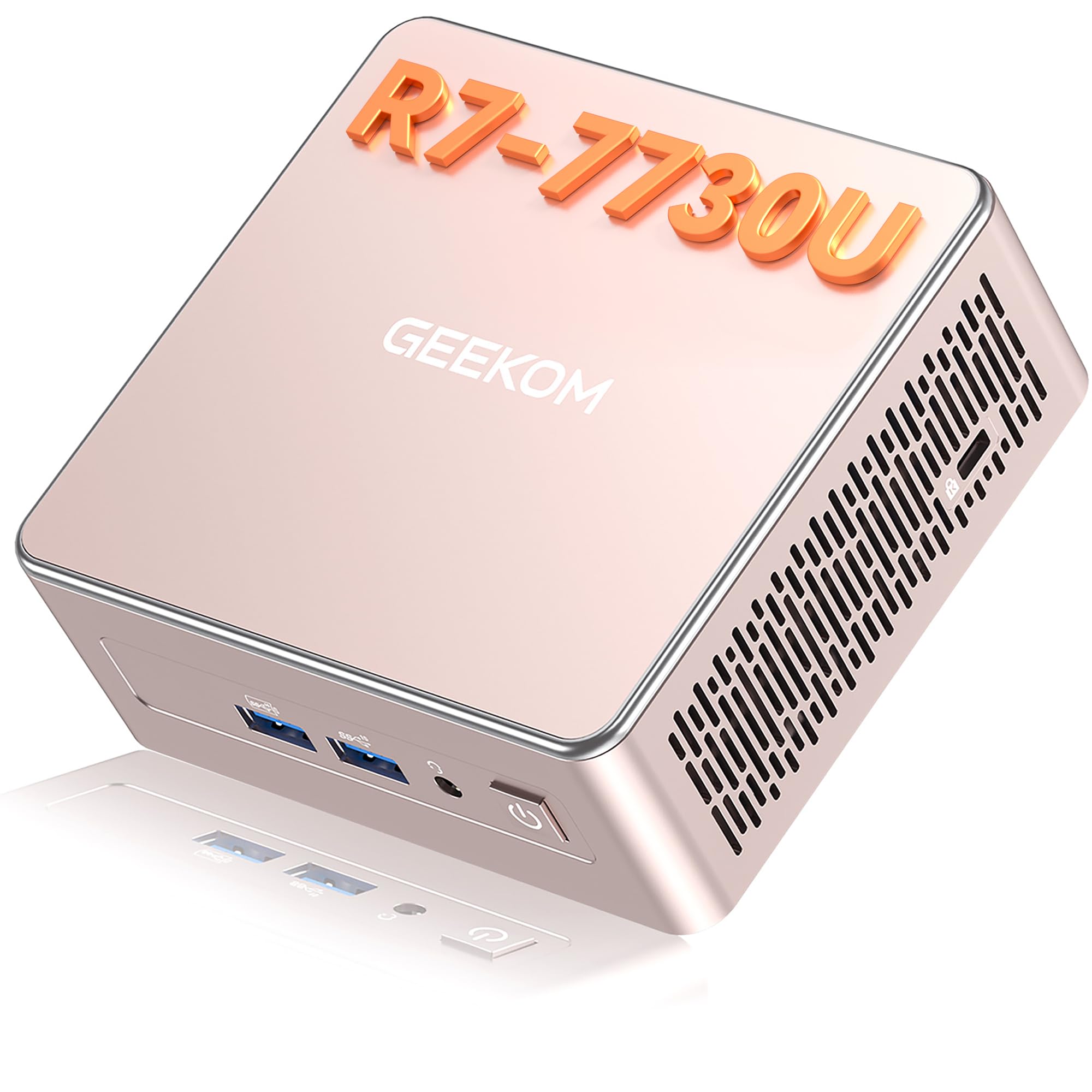
2. GEEKOM A5 Mini PC
A palm-sized powerhouse that drives four displays and sips just 15W of power.
This is the answer for anyone who wants serious computing without the tower taking over the desk. The AMD Ryzen 7 7730U packs 8 cores and 16 threads, boosting up to 4.5 GHz, with Radeon Vega 8 graphics handling office work, Photoshop, light video editing, and even retro or indie games. Owners describe it as fast, cool, and “quiet like a mouse,” with one calling it a “little beast” after loading Linux as a daily driver.
The flexibility is the real draw. You get 16GB DDR4 RAM and a 512GB PCIe NVMe SSD from the start, but dual-slot RAM allows upgrades up to 64GB, and the M.2 2242 slot plus a 2.5″ HDD bay expand storage up to 10TB total. It drives up to four displays through dual HDMI and dual USB-C ports, including 8K output via USB-C, and the 2.5GbE LAN port makes wired networking faster than most built-in laptop ports.
Energy efficiency is a standout—running at 15W, it uses 95.7% less power than a typical 350W desktop PC, which adds up on an electricity bill over a year of daily use. The IceBlast 3.0 cooling system with its metal frame and oversized fan holds temperatures steady at just 30dB, designed for 24/7 operation. GEEKOM backs it with an official 3-year limited warranty, plus FCC, UL, CE, and ENERGY STAR certifications.
Owners mention that the ~5-hour Windows 11 Pro update session initially felt long, but the payoff was a clean install with no bloatware. The Wi-Fi easily exceeded a home router’s range, and the port layout (2x HDMI, 2x USB-C, 4x USB-A) handled a three-monitor setup without a hitch. One owner did note Bluetooth devices occasionally needed a restart to reconnect, a minor quibble in an otherwise glowing experience.
Who it fits: the A5 is the pick for tidy desks, small offices, and anyone who wants quad-display power in a box smaller than a hardcover book.
The trade-off: it’s a mini PC, so you’ll need your own monitor, keyboard, and mouse—and Bluetooth pairing can be slightly finicky at times.
3. Lenovo IdeaCentre All-in-One
A space-saving single-screen desktop that delivers sharp visuals for home office work.
This all-in-one bundles the computer right into the 23.8-inch Full HD IPS display, so you get a tidy, cable-free desk setup with just one power cord. The anti-glare panel hits 250 nits brightness with 99% sRGB color coverage, which owners consistently praise—”the computer has a great picture and has a fast response” is a common refrain. There’s no tower to hide, making it ideal for reception counters, study areas, and small home offices.
Under the hood, the Intel N100 processor runs 4 cores up to 3.4 GHz with 6 MB of cache. That’s a 44% lower clock speed than the Dell Slim’s Core Ultra 5, and the 6 MB cache is a third of the Dell’s 20 MB, so this Lenovo is best for web browsing, documents, and everyday productivity rather than heavy multitasking. The 8GB DDR4-3200 memory supports smoother tab-switching, and the system supports up to 32GB total if you upgrade later. A 512GB PCIe SSD keeps boot times fast.
Video calls are covered with an HD camera, HD audio, dual 2W speakers, and a mono microphone, all built right into the screen. Connectivity includes Intel Wi-Fi 6 AX203, Bluetooth 5.2, Gigabit Ethernet, and a USB-C port running at 10Gbps. The slim design includes a firmware TPM 2.0 chip for business-level security and a Kensington Security Slot for physical locking.
The recurring trade-off owners flag is port access—specifically, there’s no SD card slot, so card users need a USB adapter. Some also find the USB port locations “very challenging to plug in stuff,” given their placement on the back. For the price, buyers consistently call it a great value that’s fast with good graphics for office, web, and media use.
What stands out
- Sharp 99% sRGB display with anti-glare coating
- All-in-one design saves serious desk space
- 512GB SSD offers double the storage of most N100 AIOs
The catch
- No SD card slot without an adapter
- USB ports are awkward to reach on the back
Reach for this if: you want one clean box that combines a crisp 24-inch screen with a capable PC for web and office work.
Think twice if: you regularly plug in multiple USB drives or SD cards, since the port placement and missing slot will frustrate you.
4. ACEMAGIC K1 Mini PC
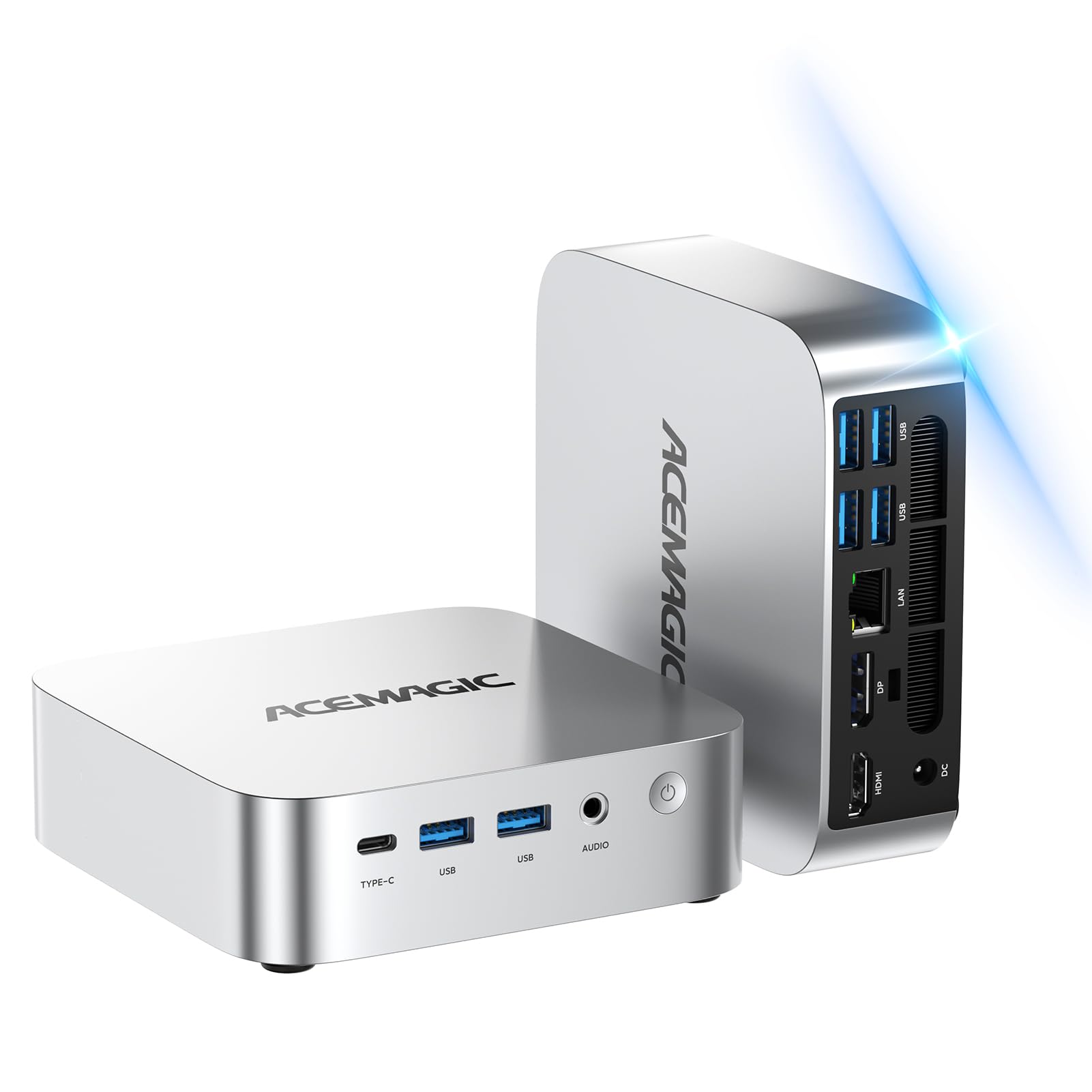
A 12-core mini PC that handles coding, local AI models, and triple 4K displays.
The ACEMAGIC K1 packs serious processing punch into a tiny silver chassis. Its Intel i5-12600H runs 12 cores and 16 threads, boosting up to 4.5 GHz with 18 MB of cache, so multitasking across heavy apps feels smooth with “no-delay switching.” Customers note it handles local AI models like DeepSeek R1 8B and Qwen3 4B smoothly, and runs esports and casual games fine on integrated graphics.
Storage and memory are generous and expandable. The 16GB DDR4 RAM is dual-channel and can be upgraded to 64GB, while the 512GB PCIe SSD pairs with an optional 2.5″ drive bay for up to 4TB total storage. Ports include triple 4K output via HDMI, DisplayPort, and Type-C, plus 1.0Gbps LAN for lag-free video calls, Wi-Fi 6, and Bluetooth 5.2.
It runs Windows 11 Pro from the start with a low-noise cooling system that keeps things “icy-cool under pressure,” according to the maker. The certifications (FCC, ROHS, CE) and a 12-month assurance with 7×24 support add confidence for a budget-minded buyer.
Owners who pushed it hardest were impressed: one called it “the best value” for local AI testing and coding, while another praised its fast boot and app loading, noting it performed “better than expected.” One long-term fan owns a fourth ACEMAGIC and still recommends it for multitasking, coding, and media. The integrated graphics are fine for casual games but not for serious AAA titles—know that boundary going in.
Power-to-price: this is the highest-core-count mini PC here, and the 12-core i5-12600H outmuscles every N100-based AIO on this list for raw throughput.
Who it’s not for: gamers chasing high frame rates on modern AAA titles should look for a dedicated GPU instead.
5. HP 21.5″ FHD All-in-One

A slick white all-in-one that bundles a docking hub for extra connectivity.
The HP 21.5″ AIO stands out on a desk with its clean white finish—reviewers point out it “looks slick” with the computer built right into the screen. The 1920 x 1080 LED panel uses an anti-glare VA display that expands vertical space for comfortable document and web browsing, with an adjustable stand that tilts from -6° to 21° to find your ideal angle.
What makes this bundle unusual is the included 8-in-1 docking hub. The total storage combines the internal drive with SD card expansion via the dock, so you get extra space for data management without opening the case. The spec sheet mentions up to 32GB DDR5 RAM and up to 640GB total storage for faster configurations, while this base model ships with 8GB and 384GB combined.
Ports are well covered: 1x USB-C 3.1, 2x USB-A 2.0, 2x USB-A 3.0, Ethernet, HDMI, and a headphone/microphone combo jack. Wi-Fi 6 and Bluetooth keep wireless connections modern, and the front-facing 720p camera with DTS-tuned speakers handles video calls. Windows 11 Home comes pre-installed with a keyboard and mouse included.
The standout quality earns most of the praise, with strong value-for-money and speed callouts behind it. Buyers found it “easy to assemble” and great for the price. The honest caveat is reliability—some shoppers say the screen turning black after extended use, though many others say it works perfectly, making this a fit-first choice for those who prioritize looks and price.
Why it stands out
- Unique white finish that looks great on a desk
- 8-in-1 docking hub adds ports and SD storage
- Adjustable stand tilts for comfortable viewing
Consider this
- Base config has just 8GB RAM
- Some buyers report screen issues after months
Best for: style-conscious buyers who want a clean, white all-in-one with bonus docking connectivity for a tidy desk.
skip it if: you plan to run heavy multitasking for years—the 8GB baseline will feel tight sooner than you’d like.
6. HP 22″ FHD All-in-One

A jet-black all-in-one with a privacy shutter that sets up in minutes.
This HP all-in-one is built for home offices where a clean, single-screen setup matters. The 21.5″ Full HD (1920 x 1080) LED IPS display has an anti-glare coating for comfortable viewing, and dual stereo speakers provide clear audio. A built-in HD webcam with a privacy shutter adds security for video conferencing—you can physically block the lens when you’re not on a call.
Under the hood, the latest 13th Gen Intel N100 runs 4 cores up to 3.4 GHz with 6 MB of cache and integrated Intel UHD Graphics. The 8GB DDR5 RAM handles smooth multitasking, while the 128GB SSD ensures fast boot-up and quick access to essential apps. Owners describe setup as remarkably quick—one measured just 5 minutes to configure—and another noted the display is large enough for senior users to see clearly.
Connectivity covers modern needs: 1x USB Type-C (5Gbps, data transfer), 2x USB Type-A at Hi-Speed, 1x USB Type-A at 5Gbps, a 3.5mm headphone/microphone combo, RJ-45 Ethernet, and HDMI-out. Wi-Fi 6 and Bluetooth 5.3 keep wireless devices paired smoothly, and the machine runs Windows 11 Pro (64-bit) with business-grade features like remote desktop support.
The performance is praised most, followed closely by value for money and reliability—owners call it “reliable and cost-effective” and note it works well for home office use. One reviewer noted a unit that quit after a day, but the replacement has worked flawlessly since, which points to occasional quality variance rather than a pattern. For everyday computing, email, and video calls, this is a dependable pick.
What owners love
- 5-minute setup from the start
- Privacy shutter on the webcam
- Windows 11 Pro with remote desktop support
Keep in mind
- 128GB SSD fills up quickly with media files
- 8GB RAM is baseline for light multitasking only
Reach for this if: you want a dependable, easy-to-set-up all-in-one for home office tasks like email, web, and video calls.
Look elsewhere if: you store lots of photos or videos locally—the 128GB drive will need external help fast.
7. suevery Prebuilt Gaming PC
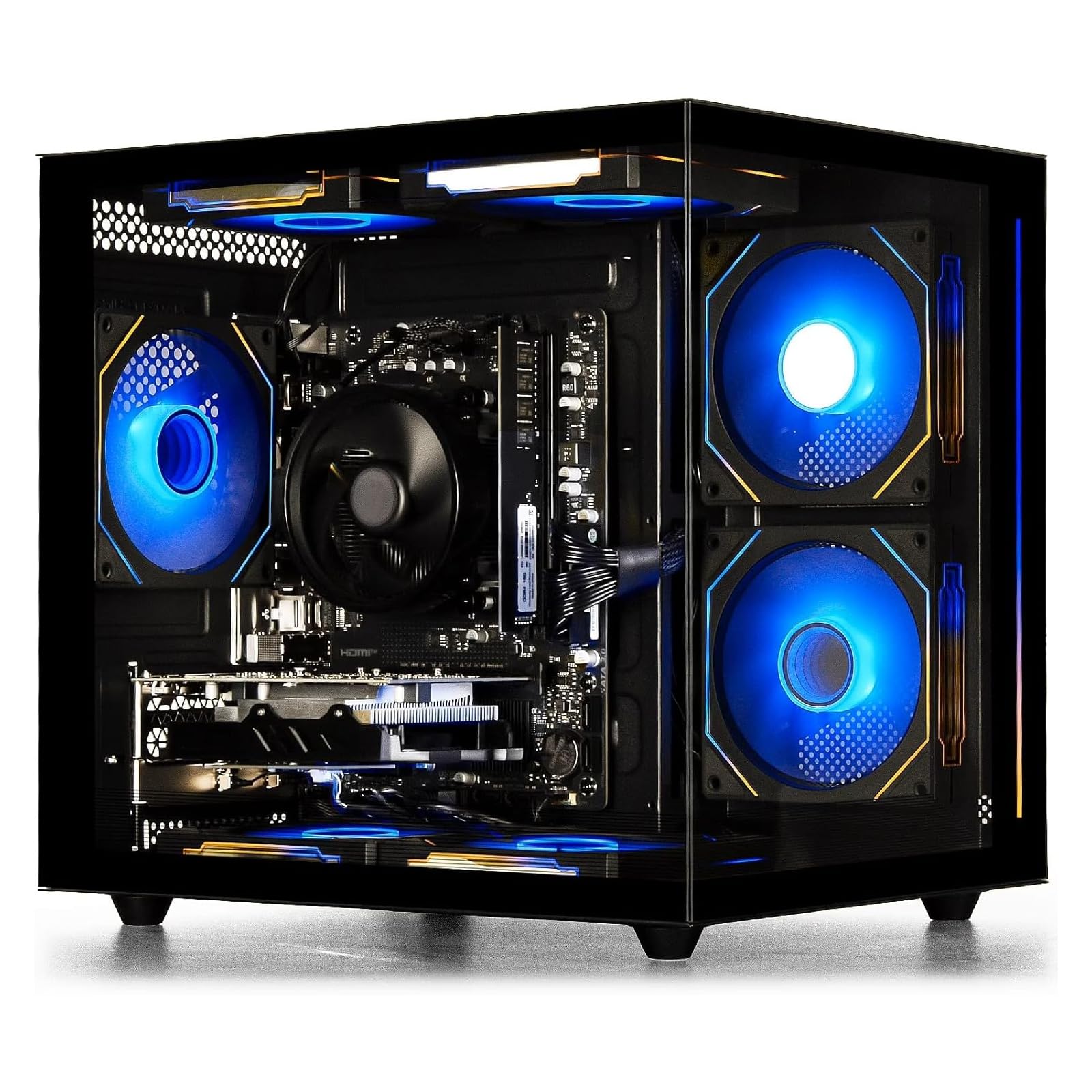
A transparent-side-panel tower with a dedicated GPU and playful RGB lighting.
This is the entry point for gamers who want a real graphics card without building a PC themselves. The AMD Ryzen 5 processor brings 6 cores and 6 threads, boosting from 3.6 GHz base to 4.1 GHz, paired with a dedicated AMD Radeon RX 560 4GB graphics card. Owners mention it runs Minecraft at 750 fps and handles Marvel Rivals, Planet Zoo, Fortnite, and Dead by Daylight flawlessly—it’s a starter PC that “exceeds expectations for beginners.”
The 16GB of DDR4 3200MHz memory supports smooth multitasking for gaming plus video or audio editing, and the 512GB M.2 NVMe SSD gives games and files fast load times. The customizable RGB lighting system is controlled via the power switch, with a 5-second press-and-hold to turn it off—a nice touch for a dark bedroom. It includes built-in Wi-Fi 6, 2 USB 3.0 ports, and 4 USB 2.0 ports.
The tower design features a transparent side panel showing off the internals and 6 fans that run with a low hum rather than a roar—owners note the cooling fans “aren’t too loud.” It’s described as large, sleek, and quiet, with no overheating issues even during extended sessions. The maker positions it for gaming, business, editing, design, and education.
The honest picture here is mixed on reliability. But a few received units with faulty components—one crashed 20 minutes after boot with a boot loop. That’s the nature of budget prebuilts: when they work, they’re fantastic value; occasionally a lemon slips through. Customers note the performance is strong, the appearance is a hit with kids and grandkids, and the graphics quality is solid for the price.
What makes it fun
- Dedicated RX 560 4GB GPU for real gaming
- Customizable RGB lighting via power switch
- 6 quiet cooling fans keep temps in check
What to watch
- Quality control varies—a few units arrive with faults
- Entry-level GPU, so skip demanding AAA titles
Best for: first-time gamers and parents buying for kids who want RGB flair and real graphics performance without building a rig.
Think twice if: you need rock-solid reliability for work-critical tasks—this is a gaming-first machine with occasional quality variance.
8. Lenovo 24″ All-in-One

A business all-in-one with 16GB RAM and wireless keyboard and mouse included.
This Lenovo skips the entry-level 8GB trap and ships with a full 16GB DDR4 RAM, which makes a real difference for multitasking across office apps, browser tabs, and video calls. The 23.8″ FHD (1920×1080) IPS anti-glare display hits 250 nits with 99% sRGB coverage, and buyers call it sturdy with great memory and display quality. It’s designed for school, university, business, studio, and workplace settings.
Under the hood, the Intel N100 runs 4 cores and 4 threads up to 3.40 GHz with 6 MB of cache—the same processor family as other AIOs here, but the doubled RAM gives it a smoother feel for real multitasking. The 128GB PCIe SSD provides fast bootup and reliable storage for files and documents. A wireless grey keyboard and wireless grey mouse come in the box, cutting cable clutter on your desk.
Connectivity is solid for business: Intel Wi-Fi 6 AX203 (802.11ax 2×2), Bluetooth 5.2, 2x USB-A at Hi-Speed, 2x USB-A at 10Gbps (USB 3.2 Gen 2), HDMI-out 1.4b, and Gigabit Ethernet via RJ-45. A 3.5mm headphone/microphone combo jack handles headsets. Windows 11 comes pre-installed.
Reviewers point out the machine “works great” with no issues after about a year, and the included 10-key keyboard is a nice bonus. One buyer uses it to run laser and 3D printer setups with an open up Office license, and noted the touchscreen is overly sensitive. The keyboard is the weak point—a few owners received units with incorrectly placed keys and had to buy a replacement separately, though the computer itself earned high marks across performance, value, and reliability.
Memory-first approach: the 16GB RAM here beats most N100 AIOs’ 8GB baseline, which is the smartest upgrade for office multitasking.
The catch: the included wireless keyboard has been hit-or-miss for some buyers, so budget for a replacement if you’re picky about key layouts.
9. GEEKOM IT13 Mini PC

A heavy-duty mini PC with USB4, 8K output, and a 3-year warranty.
The IT13 is GEEKOM’s answer for sustained, heavy workloads. Its 13th Gen Intel Core i5-13600H delivers balanced performance with energy efficiency, backed by a metal frame tested to withstand up to 440 lbs (200kg) of static pressure. This is engineered for computer labs, industrial control rooms, and enterprise workstations that run 24/7—not just a casual browsing box.
Connectivity is genuinely next-gen: tri-band Wi-Fi 6E (2.4/5/6GHz) for low-latency wireless, 2.5G Ethernet for blazing wired speeds, Bluetooth 5.2, and dual USB4 ports that support 8K output and eGPU connections. You can drive two 8K plus two 4K displays simultaneously—a setup that outclasses nearly every other mini PC in this price range. The 16GB RAM upgrades to 64GB, and the 1TB SSD expands to 4TB.
The ABS+PC composite shell with a precision-machined metal frame and baseplate, shock-absorbing feet, and multi-directional antenna make it durable for warehouses and retail settings. Tool-free upgrades mean you can swap storage without a screwdriver. GEEKOM backs it with a 3-year warranty and multi-certifications including FCC, UL, ENERGY STAR, CE, and RoHS.
Buyers are emphatic: “way more computing power than I need, but should serve me well for a long time” captures the consensus. Owners use it for photo editing (fast), running containers and strong workloads, and even Linux installations with responsive tech support. One buyer upgraded from an old Lenovo tower and called it well-made and great, while another praised the boot speed with no problems after nearly a year. It’s the pick for power users who want mini size without sacrificing performance.
What makes it a beast
- Dual USB4 with 8K output and eGPU support
- 1TB SSD stock—double the storage of most rivals
- 3-year warranty with 24/7 operation rating
Consider these
- Fan noise gets mixed reviews under sustained load
- Fewer USB-C ports than some might expect
Reach for this if: you run sustained workloads like containers, photo editing, or multi-display setups and want a tough, compact machine.
Look elsewhere if: you just need light web browsing—this is more power (and more cost) than basic tasks require.
10. Acer Aspire Business Desktop

A traditional business tower with 1TB of combined storage and easy expansion.
This Acer tower is the classic “do-everything” desktop that’s easily expandable. Its Intel Core i3-13100 uses a high-frequency 4-core design with 4.4GHz turbo boost, delivering “lightning-fast responsiveness” for office workloads, rich entertainment, and even competitive e-sports. It’s a real desktop CPU, not a low-power laptop chip, so sustained performance holds up better under load.
Storage is the headline feature here: 1TB total, split between a 512GB SSD for fast boot and app loads plus a 500GB HDD for bulk file storage. That combo gives you the speed of an SSD and the capacity of a hard drive without buying anything extra. The 16GB DDR5 RAM is the latest memory standard, and the spec sheet claims it outperforms the i5-12400T in class benchmarks.
Wireless connectivity is top-tier: Intel Wi-Fi 6E AX211 (Gig+) supports dual-stream Wi-Fi in the 2.4GHz, 5GHz, and 6GHz bands with UL MU-MIMO, plus Bluetooth 5.3 and gigabit Ethernet. The port selection covers front and rear needs: 1x USB 3.2 Type-C Gen 1 (5 Gbps), 2x USB 3.2 Gen 1, 4x USB 2.0, HDMI 1.4b, and HDMI 2.0 for dual-display setups.
Buyers call it “very fast” and “affordable for the RAM and SSD,” with one noting the extra hard drive arrives in a box you can use like a mobile HD. A 300-watt power supply handles the components with headroom. It’s a straightforward, no-nonsense tower that ships with keyboard and mouse, running Windows 11 Pro—ideal for anyone who wants maximum storage and upgrade room in a traditional form factor.
Storage king: the 1TB SSD+HDD combo is the most generous on this list, and with 16GB DDR5, it’s built to last.
Who it’s not for: anyone wanting a tiny footprint—this is a full-size tower that needs floor or desk space.
11. HP Pavilion Desktop Tower
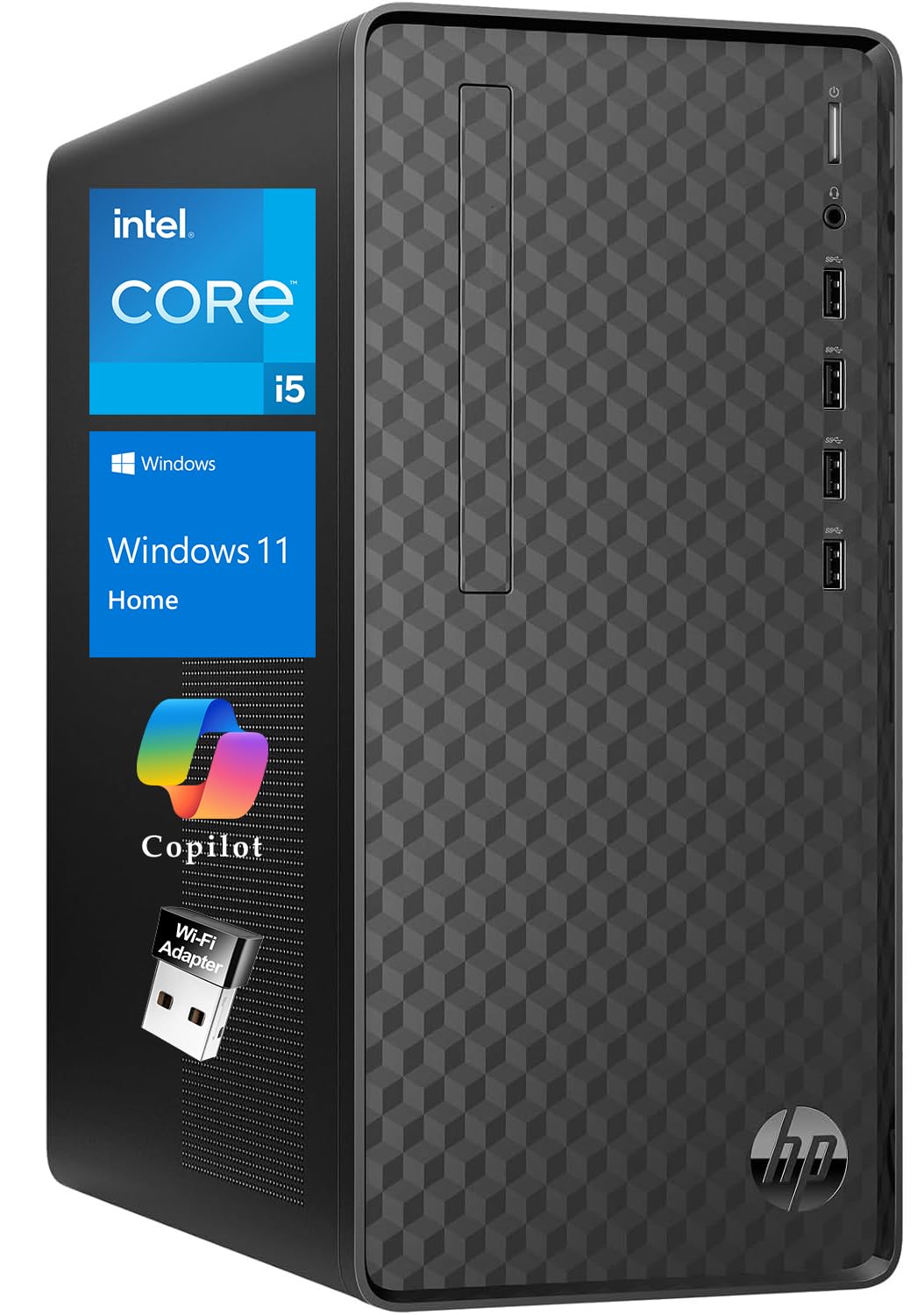
A space-saving tower that’s light enough to move and ready for multiple programs at once.
This HP Pavilion squeezes real desktop power into a compact frame measuring 13.2″ W × 11.9″ D × 6.1″ H, weighing just 9.26 lbs. That makes it genuinely portable—you can tuck it on a shelf, move it between rooms, or pack it for travel. The professional black case with a glowing V logo fits into any office or home environment without looking out of place.
The Intel Core i5-10400 runs 6 cores up to 4.3 GHz with 12 MB of cache, paired with 16GB RAM. A data scientist who runs a software development team bought it for work-from-home duties, noting it handles “all of the multiple programs I have open at any given time, as well as complex data queries.” The integrated Intel UHD Graphics keeps things quiet, and the integrated audio chip eliminates the need for external speakers.
This is a complete out-of-the-box set: an English keyboard and mouse are included, plus a wireless USB WiFi adapter for flexible connectivity and all necessary cables and a power supply. Windows 11 Home comes pre-installed and ready to use, so there’s nothing extra to buy before you start working. Owners use it for web browsing, document editing, video conferencing, and light photo/video editing.
Shoppers say it runs all their kids’ games and equipment “and then some,” with a 2010 HP owner finding it “functions better” than the old machine. The OMEN Gaming Hub makes it easy to monitor status and customize the V logo’s colors, which adds a bit of fun for beginners. It’s a solid starter PC that balances size, weight, and performance for home users and students rather than hardcore gamers.
Why it works
- Compact size saves desk space at just 9.26 lbs
- Core i5-10400 with 12MB cache handles heavy multitasking
- Keyboard, mouse, and Wi-Fi adapter included in box
The trade-off
- Integrated graphics mean no serious gaming performance
- Older 10th-gen CPU compared to newer options
Best for: students and home users who want a portable, complete tower that handles everyday tasks and light gaming without fuss.
Look elsewhere if: you need a dedicated graphics card for modern AAA games or video editing—this keeps to integrated visuals.
Understanding the Specs
Processor Cores and Clock Speed
The CPU is your computer’s brain. Cores handle separate tasks simultaneously—more cores mean better multitasking—while clock speed (measured in GHz) dictates how fast each core works. A 4-core N100 at 3.4 GHz is fine for web and office work, but a 12-core i5-12600H at 4.5 GHz crushes heavy multitasking and content creation. Don’t chase the highest number alone; match the CPU to your actual workload.
RAM: The Multitasking Buffer
RAM is short-term memory for open apps. The difference between 8GB and 16GB is stark: 8GB handles a few tabs and one document, while 16GB keeps dozens of tabs, a video call, and a spreadsheet running smoothly. For an affordable desktop you’ll keep for years, 16GB is the safer bet. Some models let you upgrade later, so check if the RAM is expandable before you buy.
SSD vs HDD Storage
Storage type determines boot and load speeds. An SSD (Solid State Drive) has no moving parts, booting Windows in seconds and launching apps instantly. An HDD (Hard Disk Drive) uses spinning platters and feels sluggish by comparison. A 512GB SSD is the balance for most users—enough for documents, photos, and a few games. Some desktops pair a fast SSD with a roomy HDD for the best of both worlds.
Integrated vs Dedicated Graphics
Integrated graphics share system RAM and handle everyday visuals, video playback, and light gaming. A dedicated GPU (Graphics Processing Unit) has its own memory and delivers real gaming performance. For an affordable desktop, integrated graphics from Intel UHD or AMD Radeon are fine for office work and streaming; if you game or edit video, look for a dedicated card like the RX 560 on the suevery tower.
FAQ
Is 8GB of RAM enough in an affordable desktop computer?
What’s the difference between a mini PC and an all-in-one desktop?
Can an affordable desktop computer handle multiple monitors?
Is a dedicated graphics card necessary for an affordable desktop?
How long will an affordable desktop computer last?
What is the Intel N100 processor good for?
Can I upgrade the RAM and storage later on these desktops?
Are these desktops quiet for a home office?
What’s the difference between Windows 11 Home and Pro on these desktops?
Is a tower or all-in-one better for a small workspace?
Final Thoughts: The Verdict
For most people, the affordable desktop computer winner is the Dell Slim Desktop because its 4.9 GHz Core Ultra 5 processor, quad-monitor support, and tool-less upgrades deliver genuine long-term value. If you want a space-saving machine that drives four displays and sips just 15W of power, grab the GEEKOM A5 Mini PC. And for a single-screen setup that’s ready from the start, the Lenovo IdeaCentre All-in-One is the one to reach for.
How We Picked
We do not accept paid placement. Every pick is matched to a real buyer and a real use-case; we do not hands-on test units.
Sources & Methodology
Specifications: manufacturer listings and product documentation. Review insights: verified customer reviews, as of August 2026. Pricing: not shown on this page (it changes often); check the current price via the retailer link.
As an Amazon Associate, Gadgets Feed earns from qualifying purchases. This does not affect which products we feature.