
Our readers keep the lights on and my morning glass full of iced black tea. As an Amazon Associate, I earn from qualifying purchases.
Specs are compiled from manufacturer listings and verified buyer reviews and can change over time — please confirm the key details on the product page before buying.
Running four computers means tripping over keyboards, mice, and monitors every day. A 4 Port HDMI KVM Switch lets you drive all of them with one keyboard and mouse, and most models here also share one or two displays. The best pick for most people is the ATLAHET dual-monitor model, because it runs two screens at up to 8K and keeps your window layouts exactly where you left them when you switch.
I’m Min — the founder and writer behind Gadgets Feed. This guide is built by comparing the manufacturers’ published specifications and the patterns across verified customer reviews, so you get each pick’s real strengths and trade-offs instead of marketing spin.
Every model is matched to a specific desk setup, from dual-monitor power users to budget buyers sharing one screen, so you can find the 4 port hdmi kvm switch that fits your workflow.
Our Picks at a Glance

How To Choose The Best 4 Port HDMI KVM Switch
Before you buy, decide if you need one monitor or two, and count the HDMI ports on your computers. A dual-monitor switch needs two HDMI outputs per computer, while a single-monitor model only needs one.
Resolution and Refresh Rate
Most switches top out at 4K@60Hz, which is smooth for office work and standard video. If you’re gaming or using a high-refresh monitor, look for a model that supports 120Hz or higher, or you will be stuck at a lower frame rate.
USB Ports and Power
USB 3.0 ports transfer files at up to 5Gbps and handle webcams and flash drives smoothly, while USB 2.0 is fine for just a keyboard and mouse. Many switches need an external power adapter, so check whether one is included or you’ll need to supply your own.
Switching Methods
Panel buttons and wired remotes are the most common, but some models add hotkey switching from the keyboard or even RS232 for automated setups. If you want to hide the switch under your desk, a wired remote is essential.
Quick Comparison
| Model | Best For | Max Resolution | USB Ports | Monitors | Amazon |
|---|---|---|---|---|---|
| ATLAHET Dual Monitor★ Best Overall | Dual-screen power users | 8K@60Hz / 4K@120Hz | 4x USB 3.0 | 2 | Amazon |
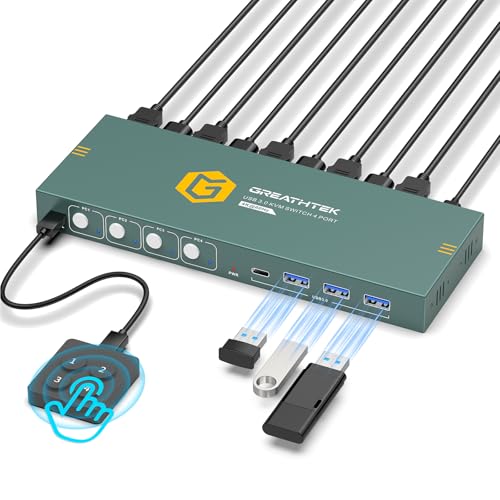
| GREATHTEK USB 3.0Budget Champ | Budget single-monitor setups | 4K@60Hz | 3x USB 3.0 + 1x USB-C | 1 | Amazon |
| Hearvo S7415HEasy Install | Easy setup on a budget | 4K@60Hz | 4x USB 3.0 | 1 | Amazon |
| PVBCTCSID USB 3.0 | Wireless peripherals | 4K@60Hz | 4x USB 3.0 | 1 | Amazon |
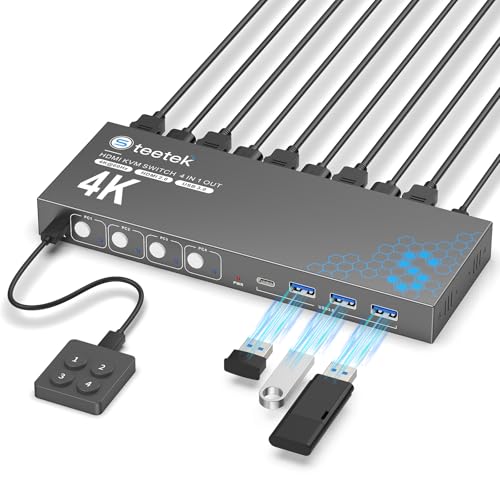
| Steetek USB 3.0 | Multi-PC desks | 4K@60Hz | 4x USB 3.0 | 1 | Amazon |
| CKLau 4 Port | Hotkey fans & consoles | 4K@60Hz 4:4:4 | USB 2.0 | 1 | Amazon |
| KCEVE DP + HDMI | High-refresh dual monitors | 8K@30Hz / 4K@144Hz | 4x USB 3.0 | 2 | Amazon |
| Camgeet Dual Monitor | Feature-packed dual screens | 4K@60Hz | 4x USB 3.0 | 2 | Amazon |
| MLEEDA Dual Monitor | Windows/Chrome OS dual screens | 4K@60Hz | 4x USB 3.0 | 2 | Amazon |
In‑Depth Reviews
1. ATLAHET 4 Port Dual Monitor HDMI KVM Switch
Our pick — over 4.5★ from 60+ verified ratings; the strongest balance of quality and price.
The dual-monitor workhorse that keeps every window exactly where you left it.
This is the pick for anyone who lives on two screens. It lets four computers share two monitors and four USB devices, and it tops out at 8K@60Hz or a smooth 4K@120Hz, so your footage stays fluid even on high-refresh displays. You press one button to switch, and the built-in EDID emulation (a chip that remembers your monitor’s settings) stops Windows from reshuffling your open windows every time you jump between PCs.
Owners praise the sharp 4K image with no flicker and the fast USB 3.2 file transfers, and the aluminum case feels solid on the desk. The catch is the wiring: this model needs each computer to have two HDMI ports and each monitor to have one, and you’ll have to buy the HDMI cables separately. It also ships without hotkey support, so you’re relying on the panel buttons or the included infrared remote.
One buyer warns to read the port requirements carefully before ordering, since older machines often lack the second HDMI output. That said, anyone with modern hardware and a 12V1A power supply (required, included) gets a genuinely premium dual-monitor experience.
Why it leads the pack
- Runs two monitors at up to 8K@60Hz for crisp, detailed work
- EDID emulation keeps window layouts intact when switching
- Solid aluminum body and reliable 4K@60Hz output with no flicker
Setup realities
- Needs two HDMI ports per computer and one per monitor
- HDMI cables sold separately — it’s a starter kit, not a full kit
- No hotkey switching, only panel buttons and infrared remote
Grab it for: dual-monitor setups on modern PCs that want max resolution and tidy windows.
Look elsewhere if: your computers only have a single HDMI output each.
2. GREATHTEK USB3.0 KVM Switch HDMI 4K@60Hz
The affordable single-monitor four-PC switch that keeps your desk tidy.
If you’re sharing one screen between four computers, this is the value pick that gets the job done. It outputs a sharp 3840×2160@60Hz picture with no lag, and the front buttons plus the included wired remote (clearly labeled 1/2/3/4) make switching nearly instant. Windows 10/11 and Linux users report a truly plug-and-play experience with no drivers.
What wins people over here is the sheer ease of use — owners describe a clean workspace where one button flips the monitor between PCs, and the metal build feels sturdy for the money. As buyers report: “Although it does require a single power source via USB, it is well worth consuming one USB outlet to be able to use multiple hard drives with a single monitor!” That USB-C port alongside the three USB 3.0 ports is a handy bonus for newer peripherals.
The honest trade-off is compatibility: wireless keyboards and mice don’t work reliably with this unit, and a few owners had USB devices drop their connection. One long-term owner reported the unit failing after a few months, so treat it as a solid budget tool rather than a forever device. For the price, it’s tough to top for a straight four-PC, one-monitor desk.
Best for: budget buyers with one monitor who want quick button and remote switching.
Reach for it if: you use wired keyboards and mice — wireless support is the weak spot here.
3. Hearvo USB 3.0 HDMI KVM Switch S7415H
A four-PC switch that’s genuinely quick to set up, with a compact build that hides under the desk.
This one is for the buyer who values a fast, painless install above all. Owners consistently say setup takes just a few minutes, and the one-press button switching is responsive with no lag. The package includes the cables you need to get started — one HDMI cable, four USB 3.0 cables, a wired remote, and four anti-slip rubber pads — so there’s no extra shopping trip.
It handles 4K@60Hz and is HDCP 2.2 compliant, meaning copy-protected streaming content plays without black-screen interruptions. The aluminum body keeps it light and strong, and the wired remote lets you tuck the switch out of sight while keeping control on your desk. Owners mention crisp image quality across both PC and Mac setups, and the 4 USB ports handle a keyboard, mouse, and webcam simultaneously.
The recurring complaint mirrors the budget tier: wireless mice and keyboards don’t work here, so plan around wired peripherals. A few owners also noticed there’s no audio passthrough, which matters if your monitor lacks speakers. But for a straightforward, reliable single-monitor four-PC switch, this is a very safe bet.
Best if: you want the fastest, least-fiddly setup with cables included.
Think twice if: you rely on wireless peripherals or need audio routed through the switch.
4. PVBCTCSID USB3.0 HDMI KVM Switch
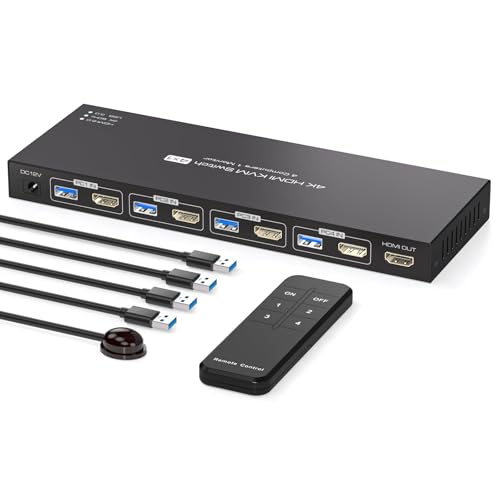
The slim four-PC switcher that handles wireless keyboards and mice without a fuss.
Unlike many budget switches that choke on wireless peripherals, this one is built to share wired or wireless keyboards and mice among four computers. It does 4K@60Hz with strong color saturation, and the four USB 3.0 ports transfer data at up to 5Gbps — owners say that’s roughly ten times faster than USB 2.0, so large file transfers feel quick.
You get two ways to switch: the white panel buttons for PCs 1 through 4, or an infrared remote that works even when the unit is hidden outside your workspace. The aluminum housing feels durable, and it’s plug-and-play with Windows, Vista, XP, Mac OS, Linux, and Unix, which makes it a flexible fit for mixed-system offices, conference rooms, and classrooms.
Reviewers describe it as “slim and compact” with zero complaints and excellent value, and the transfer speed gets consistent praise. The main caveat is that hotkey switching isn’t supported, so you’re tied to the buttons and remote. It’s a small limitation for a switch that otherwise nails the basics with reliable wireless support.
Grab it for: desks with wireless keyboards and mice that other switches reject.
skip it if: you specifically need hotkey switching from the keyboard.
5. Steetek USB 3.0 HDMI KVM Switch
The sturdy 4K switcher that shines in three- and four-PC office setups.
This switch makes sense when you’re juggling three or four machines — say an iMac, a laptop, and a Mac Mini — all sharing one keyboard, mouse, and monitor. Owners with exactly that kind of multi-PC desk call it excellent value, praising the metal build, bright LEDs, and the front USB ports that make plugging in a flash drive easy. The adaptive EDID keeps the picture stable across switches.
It’s drive-free for Windows, Linux, and Mac, and the package includes one HDMI cable plus four USB cables, so setup is genuinely ready to go. One reviewer noted it works with wireless peripherals and chose it specifically to avoid extra cords on a four-PC desk. HDCP 2.2 support means protected content plays without interruptions on your monitor.
The honest caveat is power: this unit is USB-powered from your computers, and owners found it needs a solid 5V 2A supply — anything weaker causes constant USB connect/disconnect loops. Another owner hit an incompatibility with an HP Victus laptop. If your machines can feed it proper power, it’s a dependable, compact workhorse for a busy desk.
Best for: three- to four-PC setups where you want one clean keyboard and mouse.
Check before buying: your PC’s USB power output — it needs a sturdy 5V 2A source to stay stable.
6. CKLau 4 Port KVM Switch HDMI with Audio

The four-way switcher with keyboard hotkeys, mouse-wheel tricks, and console support.
This is the most flexible switcher for people who hate reaching for buttons. It offers four switching methods: keyboard hotkeys (like NumLock + NumLock + 1 + Enter), a double-click of the mouse wheel, the panel buttons, or the wired remote. It even works with an Apple keyboard, and the hotkey combo is changeable to suit you. That flexibility is what long-term owners rave about.
Beyond switching, it handles a huge range of resolutions up to 4096×2160@60Hz and supports 2560×1440 at 144Hz or even 165Hz, which is rare at this level. It’s drive-free for Windows 10/7/2000/XP/Vista, Linux, Mac, Debian, Ubuntu, and Fedora, and it can switch by mouse or keyboard even without a USB signal — so an Apple TV or Android TV box works as an input. The included DC5V 2A adapter keeps power stable.
The recurring gripes are the USB 2.0 ports, which can fail with some USB 3.0 devices, and the audio plugs that some buyers found useless. It’s a feature-rich choice if you want hotkeys and console inputs, just not the fastest USB.
What makes it special
- Four switching methods including keyboard hotkeys and mouse-wheel clicks
- Runs 2560×1440 at up to 165Hz for smooth high-refresh work
- Switches non-USB devices like Apple TV and Android TV boxes
Know the limits
- USB 2.0 ports can drop select USB 3.0 devices
- Audio plugs described as useless by some owners
Reach for it if: hotkeys and mouse-wheel switching will speed up your daily flow.
Look elsewhere if: you need fast USB 3.0 file transfers through the switch.
7. KCEVE KVM Switch 2 Monitors 4 Computers HDMI + DisplayPort
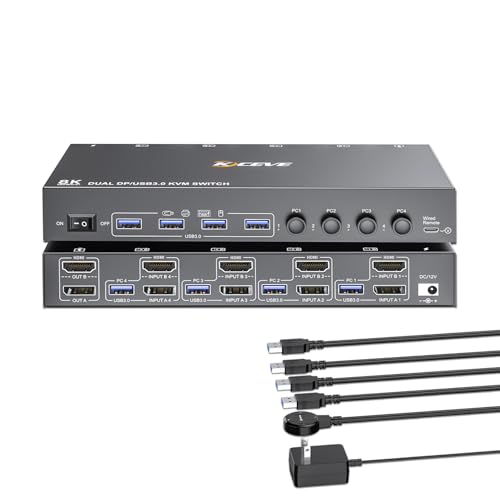
The dual-monitor switch for gamers and editors who need 144Hz on a 4K DisplayPort screen.
If your second monitor is a high-refresh gaming or editing display, this is the switch that won’t throttle it. It supports up to 4K@144Hz over DisplayPort and 8K@30Hz, with both copy and extend modes so you can mirror your main screen or drag windows across to the second output. One owner runs it flawlessly at 3860×1600 at 144Hz.
It mixes HDMI and DisplayPort inputs, which gives you flexibility if your PCs use different connector types. The wired control is upgraded with a bigger, more comfortable button, and it lets you hide the switch under the table for a clean desk. Four USB 3.0 ports share a mouse, keyboard, printers, and scanners, and it works with integrated or dedicated GPUs. Owners confirm it handles dual 2560×1440 monitors across Mac, Windows, and Linux boxes.
The catch is DisplayPort reliability: some buyers hit signal detection issues on certain GPUs, and an occasional DVI-to-DP adapter fails outright. There’s also a slight lag when switching, and no audio passthrough (owners use Bluetooth instead). For high-refresh dual-monitor setups on compatible hardware, it’s a strong performer; just verify your GPU plays nicely with DisplayPort KVMs first.
Best for: gamers and creators running a 144Hz DisplayPort monitor alongside a second screen.
Caution: DisplayPort detection can be finicky on some GPUs — test your hardware before committing.
8. Camgeet HDMI KVM Switch 2 Monitors 4 Computers
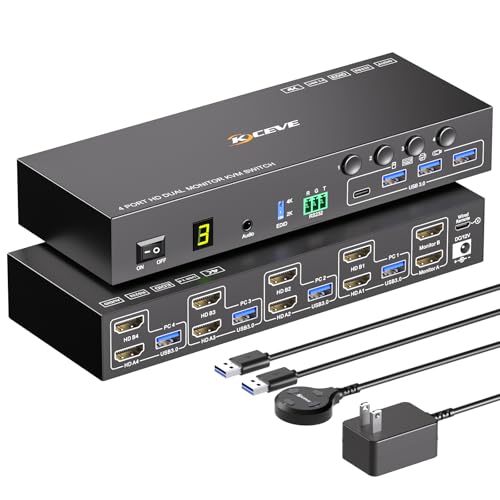
The fully-loaded dual-monitor switch with audio, RS232 automation, and EDID that remembers everything.
This is the most complete dual-monitor package here. It simulates the EDID of your displays, so the resolution and refresh rate are stored and your window positions never change when you switch between four PCs — a feature owners single out as a huge time-saver. It supports extended mode for two different screens or mirror mode for two identical ones.
Beyond the basics, it adds audio and RS232 control, meaning you can automate switching from a script or control system — one buyer uses it in a server-room setup. You get three switching modes: panel buttons, the 1.5m wired remote, and RS232 at 115200 baud. The unit runs at 4K@60Hz with 5Gbps USB 3.0 transfers, and it’s compatible with Windows, Mac OS, Linux, and Chrome OS. The 12V/2A power adapter is included and required.
The mixed notes: some Mac users need external EDID emulators, and buyers warn to match your HDMI cable versions — a 2.1 cable on one side and 2.0 on the other caused black screens until they matched. It’s a top-tier option if you want everything a dual-monitor KVM can offer.
The full package
- EDID simulation keeps window layouts perfectly intact
- Adds audio and RS232 for automation and server-room use
- Four USB 3.0 ports at 5Gbps for fast file sharing
Setup notes
- Newer MacOS hardware may need external EDID emulators
- HDMI cable versions must match or you’ll get black screens
Grab it for: office, home, and server-room dual-monitor setups that want audio and RS232 control.
Watch out for: Mac compatibility — test with your hardware before relying on it daily.
9. MLEEDA 4 Port HDMI KVM Switch 2 Monitors
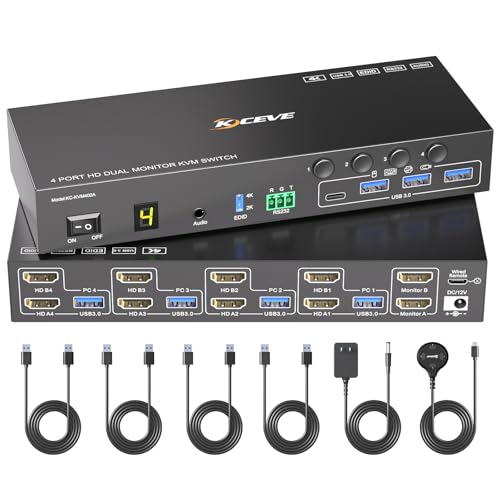
A dependable dual-monitor four-PC switch that shines on Windows and Chrome OS desks.
This is a near-twin of the Camgeet above, sharing the same dual-monitor design, EDID simulation, and RS232 support, but it stands out for its compatibility with Chrome OS alongside Windows, Mac OS, and Linux. Four computers share two external monitors and four USB peripherals, with expanded mode for different screens or mirror mode for identical ones. The EDID emulation keeps your windows in their original positions when you switch.
It delivers 4K@60Hz with 5Gbps USB 3.0 transfers, and you switch via panel buttons, the 1.5m wired remote, or RS232 at 115200 baud. The included 12V/2A power adapter is required, and the package comes with four USB 3.0 cables and a wired remote — note that HDMI cables aren’t included. One owner even got it working with a Samsung S21 smartphone, which speaks to its flexibility.
Reviewers found it easy to set up for switching between personal and work laptops, with a monitor, mouse, keyboard, and USB camera all switching smoothly. The frustrations are real but fixable: poor-quality included cables caused cut-outs until the seller replaced them, and one buyer hit random blank screens and flickering that made them call it “the worst monitor switch ever.” It’s a capable dual-screen switch if you have solid HDMI cables, but treat the bundled ones with skepticism.
Best for: Windows and Chrome OS users who want dual-monitor switching with RS232.
Plan for it: swap in your own quality HDMI cables — the included ones are the weak link.
Understanding the Specs
EDID Emulation
EDID is the data your monitor sends to your computer describing its resolution and refresh rate. A KVM with EDID emulation stores that data, so when you switch from one PC to another, the monitor is recognized instantly and your windows don’t rearrange. Without it, you’ll often find your icons scattered after every switch.
USB 3.0 vs USB 2.0
USB 3.0 ports transfer data at up to 5Gbps, which is fast enough for flash drives, external hard drives, and webcams without lag. USB 2.0 tops out around 480Mbps — perfectly fine for a keyboard and mouse, but sluggish for file transfers. If you plan to share storage drives, prioritize a USB 3.0 switch.
FAQ
Do I need a dual-monitor KVM switch or will a single-monitor one work?
Will a 4 port HDMI KVM switch work with wireless keyboards and mice?
What does EDID emulation do for me?
Do I need an external power supply for these switches?
Can I use a KVM switch with a PS4 or a TV box?
What is the difference between hotkey switching and a wired remote?
Why do my windows rearrange every time I switch computers?
Is 4K@60Hz enough for everyday office work?
Final Thoughts: The Verdict
For most buyers, the 4 port hdmi kvm switch winner is the ATLAHET Dual Monitor because it pairs 8K performance with EDID emulation that keeps your workspace organized. If you want the most feature-packed dual-monitor experience with audio and RS232, grab the Camgeet. And for a budget single-monitor setup that just works, the GREATHTEK is the one to reach for.
How We Picked
We do not accept paid placement. Every pick is matched to a real buyer and a real use-case; we do not hands-on test units.
Sources & Methodology
Specifications: manufacturer listings and product documentation. Review insights: verified customer reviews, as of August 2026. Pricing: not shown on this page (it changes often); check the current price via the retailer link.
As an Amazon Associate, Gadgets Feed earns from qualifying purchases. This does not affect which products we feature.